一、原生Java客户端
原生java客户端是hbase最主要,最高效的客户端。
涵盖了增删改查等API,还实现了创建,删除,修改表等DDL操作。
配置java连接hbase
Java连接HBase需要两个类:
HBaseConfigurationConnectionFactory
首先,配置一个hbase连接:
比如zookeeper的地址端口
hbase.zookeeper.quorum
hbase.zookeeper.property.clientPort
更通用的做法是编写hbase-site.xml文件,实现配置文件的加载:
hbase-site.xml示例:
<configuration>
<property>
<name>hbase.master</name>
<value>hdfs://host1:60000</value>
</property>
<property>
<name>hbase.zookeeper.quorum</name>
<value>host1,host2,host3</value>
</property>
<property>
<name>hbase.zookeeper.property.clientPort</name>
<value>2181</value>
</property>
</configuration>
随后我们加载配置文件,创建连接:
config.addResource(new Path(System.getenv("HBASE_CONF_DIR"), "hbase-site.xml"));
 Connection connection = ConnectionFactory.createConnection(config);
创建表
要创建表我们需要首先创建一个Admin对象
Admin admin = connection.getAdmin(); //使用连接对象获取Admin对象
TableName tableName = TableName.valueOf("test");//定义表名
HTableDescriptor htd = new HTableDescriptor(tableName);//定义表对象
HColumnDescriptor hcd = new HColumnDescriptor("data");//定义列族对象
htd.addFamily(hcd); //添加
admin.createTable(htd);//创建表
HBase2.X创建表
HBase2.X 的版本中创建表使用了新的 API
TableName tableName = TableName.valueOf("test");//定义表名
//TableDescriptor对象通过TableDescriptorBuilder构建;
TableDescriptorBuilder tableDescriptor = TableDescriptorBuilder.newBuilder(tableName);
ColumnFamilyDescriptor family = ColumnFamilyDescriptorBuilder.newBuilder(Bytes.toBytes("data")).build();//构建列族对象
tableDescriptor.setColumnFamily(family);//设置列族
admin.createTable(tableDescriptor.build());//创建表
添加数据
Table table = connection.getTable(tableName);//获取Table对象
try {
    byte[] row = Bytes.toBytes("row1"); //定义行
    Put put = new Put(row);             //创建Put对象
    byte[] columnFamily = Bytes.toBytes("data");    //列
    byte[] qualifier = Bytes.toBytes(String.valueOf(1)); //列族修饰词
    byte[] value = Bytes.toBytes("张三丰");    //值
    put.addColumn(columnFamily, qualifier, value);
    table.put(put);     //向表中添加数据
} finally {
    //使用完了要释放资源
    table.close();
}
获取指定行数据
//获取数据
Get get = new Get(Bytes.toBytes("row1"));   //定义get对象
Result result = table.get(get);         //通过table对象获取数据
System.out.println("Result: " + result);
//很多时候我们只需要获取“值” 这里表示获取 data:1 列族的值
byte[] valueBytes = result.getValue(Bytes.toBytes("data"), Bytes.toBytes("1")); //获取到的是字节数组
//将字节转成字符串
String valueStr = new String(valueBytes,"utf-8");
System.out.println("value:" + valueStr);
扫描表中的数据
Scan scan = new Scan();
ResultScanner scanner = table.getScanner(scan);
try {
    for (Result scannerResult: scanner) {
        System.out.println("Scan: " + scannerResult);
         byte[] row = scannerResult.getRow();
         System.out.println("rowName:" + new String(row,"utf-8"));
    }
} finally {
    scanner.close();
}
删除表
TableName tableName = TableName.valueOf("test");
admin.disableTable(tableName);  //禁用表
admin.deleteTable(tableName);   //删除表
Hbase Java API表DDL完整示例:
package com.example.hbase.admin;
import java.io.IOException;
import org.apache.hadoop.conf.Configuration;
import org.apache.hadoop.fs.Path;
import org.apache.hadoop.hbase.HBaseConfiguration;
import org.apache.hadoop.hbase.HColumnDescriptor;
import org.apache.hadoop.hbase.HConstants;
import org.apache.hadoop.hbase.HTableDescriptor;
import org.apache.hadoop.hbase.TableName;
import org.apache.hadoop.hbase.client.Admin;
import org.apache.hadoop.hbase.client.Connection;
import org.apache.hadoop.hbase.client.ConnectionFactory;
import org.apache.hadoop.hbase.io.compress.Compression.Algorithm;
public class Example {
  private static final String TABLE_NAME = "MY_TABLE_NAME_TOO";
  private static final String CF_DEFAULT = "DEFAULT_COLUMN_FAMILY";
  public static void createOrOverwrite(Admin admin, HTableDescriptor table) throws IOException {
    if (admin.tableExists(table.getTableName())) {
      admin.disableTable(table.getTableName());
      admin.deleteTable(table.getTableName());
    }
    admin.createTable(table);
  }
  public static void createSchemaTables(Configuration config) throws IOException {
    try (Connection connection = ConnectionFactory.createConnection(config);
         Admin admin = connection.getAdmin()) {
      HTableDescriptor table = new HTableDescriptor(TableName.valueOf(TABLE_NAME));
      table.addFamily(new HColumnDescriptor(CF_DEFAULT).setCompressionType(Algorithm.NONE));
      System.out.print("Creating table. ");
      createOrOverwrite(admin, table);
      System.out.println(" Done.");
    }
  }
  public static void modifySchema (Configuration config) throws IOException {
    try (Connection connection = ConnectionFactory.createConnection(config);
         Admin admin = connection.getAdmin()) {
      TableName tableName = TableName.valueOf(TABLE_NAME);
      if (!admin.tableExists(tableName)) {
        System.out.println("Table does not exist.");
        System.exit(-1);
      }
      HTableDescriptor table = admin.getTableDescriptor(tableName);
      // 更新表格
      HColumnDescriptor newColumn = new HColumnDescriptor("NEWCF");
      newColumn.setCompactionCompressionType(Algorithm.GZ);
      newColumn.setMaxVersions(HConstants.ALL_VERSIONS);
      admin.addColumn(tableName, newColumn);
      // 更新列族
      HColumnDescriptor existingColumn = new HColumnDescriptor(CF_DEFAULT);
      existingColumn.setCompactionCompressionType(Algorithm.GZ);
      existingColumn.setMaxVersions(HConstants.ALL_VERSIONS);
      table.modifyFamily(existingColumn);
      admin.modifyTable(tableName, table);
      // 禁用表格
      admin.disableTable(tableName);
      // 删除列族
      admin.deleteColumn(tableName, CF_DEFAULT.getBytes("UTF-8"));
      // 删除表格(需提前禁用)
      admin.deleteTable(tableName);
    }
  }
  public static void main(String... args) throws IOException {
    Configuration config = HBaseConfiguration.create();
    //添加必要配置文件(hbase-site.xml, core-site.xml)
    config.addResource(new Path(System.getenv("HBASE_CONF_DIR"), "hbase-site.xml"));
    config.addResource(new Path(System.getenv("HADOOP_CONF_DIR"), "core-site.xml"));
    createSchemaTables(config);
    modifySchema(config);
  }
}
二、使用Hbase Shell工具操作Hbase
在 HBase 安装目录 bin/ 目录下使用hbase shell命令连接正在运行的 HBase 实例。
$ ./bin/hbase shell
hbase(main):001:0>
预览 HBase Shell 的帮助文本
输入help并回车, 可以看到 HBase Shell 的基本信息和一些示例命令.
创建表
使用 create创建一个表 必须指定一个表名和列族名
hbase(main):001:0> create 'test', 'cf'
0 row(s) in 0.4170 seconds
=> Hbase::Table - test
表信息
使用 list 查看存在表
hbase(main):002:0> list 'test'
TABLE
test
1 row(s) in 0.0180 seconds
=> ["test"]
使用 describe 查看表细节及配置
hbase(main):003:0> describe 'test'
Table test is ENABLED
test
COLUMN FAMILIES DESCRIPTION
{NAME => 'cf', VERSIONS => '1', EVICT_BLOCKS_ON_CLOSE => 'false', NEW_VERSION_BEHAVIOR => 'false', KEEP_DELETED_CELLS => 'FALSE', CACHE_DATA_ON_WRITE =>
'false', DATA_BLOCK_ENCODING => 'NONE', TTL => 'FOREVER', MIN_VERSIONS => '0', REPLICATION_SCOPE => '0', BLOOMFILTER => 'ROW', CACHE_INDEX_ON_WRITE => 'f
alse', IN_MEMORY => 'false', CACHE_BLOOMS_ON_WRITE => 'false', PREFETCH_BLOCKS_ON_OPEN => 'false', COMPRESSION => 'NONE', BLOCKCACHE => 'true', BLOCKSIZE
 => '65536'}
1 row(s)
Took 0.9998 seconds
插入数据
使用 put 插入数据
hbase(main):003:0> put 'test', 'row1', 'cf:a', 'value1'
0 row(s) in 0.0850 seconds
hbase(main):004:0> put 'test', 'row2', 'cf:b', 'value2'
0 row(s) in 0.0110 seconds
hbase(main):005:0> put 'test', 'row3', 'cf:c', 'value3'
0 row(s) in 0.0100 seconds
扫描全部数据
从 HBase 获取数据的途径之一就是 scan 。使用 scan 命令扫描表数据。你可以对扫描做限制。
hbase(main):006:0> scan 'test'
ROW                                      COLUMN+CELL
 row1                                    column=cf:a, timestamp=1421762485768, value=value1
 row2                                    column=cf:b, timestamp=1421762491785, value=value2
 row3                                    column=cf:c, timestamp=1421762496210, value=value3
3 row(s) in 0.0230 seconds
获取一条数据
使用 get 命令一次获取一条数据
hbase(main):007:0> get 'test', 'row1'
COLUMN                                   CELL
 cf:a                                    timestamp=1421762485768, value=value1
1 row(s) in 0.0350 seconds
禁用表
使用 disable 命令禁用表
hbase(main):008:0> disable 'test'
0 row(s) in 1.1820 seconds
hbase(main):009:0> enable 'test'
0 row(s) in 0.1770 seconds
使用 enable 命令启用表
hbase(main):010:0> disable 'test'
0 row(s) in 1.1820 seconds
删除表
hbase(main):011:0> drop 'test'
0 row(s) in 0.1370 seconds
退出 HBase Shell
使用quit命令退出命令行并从集群断开连接。
三、使用Thrift客户端访问HBase
由于Hbase是用Java写的,因此它原生地提供了Java接口,对非Java程序人员,怎么办呢?幸好它提供了thrift接口服务器,因此也可以采用其他语言来编写Hbase的客户端,这里是常用的Hbase python接口的介绍。其他语言也类似。
1.启动thrift-server
要使用Hbase的thrift接口,必须将它的服务启动,启动Hbase的thrift-server进程如下:
cd /app/zpy/hbase/bin
./hbase-daemon.sh start thrift
执行jps命令检查:
34533 ThriftServer
thrift默认端口是9090,启动成功后可以查看端口是否起来。
2.安装thrift所需依赖
(1)安装依赖
yum install automake libtool flex bison pkgconfig gcc-c++ boost-devel libevent-devel zlib-devel python-devel ruby-devel openssl-devel
(2)安装boost
wget http://sourceforge.net/projects/boost/files/boost/1.53.0/boost_1_53_0.tar.gz
tar xvf boost_1_53_0.tar.gz
cd boost_1_53_0
./bootstrap.sh
./b2 install
3.安装thrift客户端
官网下载 thrift-0.11.0.tar.gz,解压并安装
wget http://mirrors.hust.edu.cn/apache/thrift/0.11.0/thrift-0.11.0.tar.gz
tar xzvf thrift-0.11.0.tar.gz
cd thrift-0.11.0
mkdir /app/zpy/thrift
./configure --prefix=/app/zpy/thrift
make
make install
make可能报错如下:
g++: error: /usr/lib64/libboost_unit_test_framework.a: No such file or directory
解决:
find / -name libboost_unit_test_framework.*
cp /usr/local/lib/libboost_unit_test_framework.a  /usr/lib64/
4.使用python3连接Hbase
安装所需包
pip install thrift
pip install hbase-thrift
python 脚本如下:
from thrift import Thrift
from thrift.transport import TSocket
from thrift.transport import TTransport
from thrift.protocol import TBinaryProtocol
from hbase import Hbase
from hbase.ttypes import *
transport = TSocket.TSocket('localhost', 9090)
protocol = TBinaryProtocol.TBinaryProtocol(transport)
client = Hbase.Client(protocol)
transport.open()
a = client.getTableNames()
print(a)
四、Rest客户端
1、启动REST服务
a.启动一个非守护进程模式的REST服务器(ctrl+c 终止)
bin/hbase rest start
b.启动守护进程模式的REST服务器
bin/hbase-daemon.sh start rest
默认启动的是8080端口(可以使用参数在启动时指定端口),可以被访问。curl http://:8080/
2、java调用示例:
import org.apache.hadoop.conf.Configuration;
import org.apache.hadoop.hbase.HBaseConfiguration;
import org.apache.hadoop.hbase.client.Get;
import org.apache.hadoop.hbase.client.Result;
import org.apache.hadoop.hbase.client.ResultScanner;
import org.apache.hadoop.hbase.client.Scan;
import org.apache.hadoop.hbase.rest.client.Client;
import org.apache.hadoop.hbase.rest.client.Cluster;
import org.apache.hadoop.hbase.rest.client.RemoteHTable;
import org.apache.hadoop.hbase.util.Bytes;
import util.HBaseHelper;
import java.io.IOException;
/**
 * Created by root on 15-1-9.
 */
public class RestExample {
    public static void main(String[] args) throws IOException {
       Configuration conf = HBaseConfiguration.create();
       HBaseHelper helper = HBaseHelper.getHelper(conf);
       helper.dropTable("testtable");
       helper.createTable("testtable", "colfam1");
       System.out.println("Adding rows to table...");
       helper.fillTable("testtable", 1, 10, 5, "colfam1");
       Cluster cluster=new Cluster();
       cluster.add("hadoop",8080);
       Client client=new Client(cluster);
       Get get = new Get(Bytes.toBytes("row-30"));
       get.addColumn(Bytes.toBytes("colfam1"), Bytes.toBytes("col-3"));
       Result result1 = table.get(get);
       System.out.println("Get result1: " + result1);
       Scan scan = new Scan();
       scan.setStartRow(Bytes.toBytes("row-10"));
       scan.setStopRow(Bytes.toBytes("row-15"));
       scan.addColumn(Bytes.toBytes("colfam1"), Bytes.toBytes("col-5"));
       ResultScanner scanner = table.getScanner(scan);
          for (Result result2 : scanner) {
         System.out.println("Scan row[" + Bytes.toString(result2.getRow()) +
                    "]: " + result2);
        }
    }
}
五、MapReduce操作Hbase
Apache MapReduce 是Hadoop提供的软件框架,用来进行大规模数据分析.
mapred and mapreduce
与 MapReduce 一样,在 HBase 中也有 2 种 mapreduce API 包.org.apache.hadoop.hbase.mapred and org.apache.hadoop.hbase.mapreduce.前者使用旧式风格的 API,后者采用新的模式.相比于前者,后者更加灵活。
HBase MapReduce 示例
HBase MapReduce 读示例
Configuration config = HBaseConfiguration.create();
Job job = new Job(config, "ExampleRead");
job.setJarByClass(MyReadJob.class);     // class that contains mapper
Scan scan = new Scan();
scan.setCaching(500);        // 1 is the default in Scan, which will be bad for MapReduce jobs
scan.setCacheBlocks(false);  // don't set to true for MR jobs
// set other scan attrs
...
TableMapReduceUtil.initTableMapperJob(
  tableName,        // input HBase table name
  scan,             // Scan instance to control CF and attribute selection
  MyMapper.class,   // mapper
  null,             // mapper output key
  null,             // mapper output value
  job);
job.setOutputFormatClass(NullOutputFormat.class);   // because we aren't emitting anything from mapper
boolean b = job.waitForCompletion(true);
if (!b) {
  throw new IOException("error with job!");
}
public static class MyMapper extends TableMapper<Text, Text> {
  public void map(ImmutableBytesWritable row, Result value, Context context) throws InterruptedException, IOException {
    // process data for the row from the Result instance.
   }
}
HBase MapReduce 读写示例
Configuration config = HBaseConfiguration.create();
Job job = new Job(config,"ExampleReadWrite");
job.setJarByClass(MyReadWriteJob.class);    // class that contains mapper
Scan scan = new Scan();
scan.setCaching(500);        // 1 is the default in Scan, which will be bad for MapReduce jobs
scan.setCacheBlocks(false);  // don't set to true for MR jobs
// set other scan attrs
TableMapReduceUtil.initTableMapperJob(
  sourceTable,      // input table
  scan,             // Scan instance to control CF and attribute selection
  MyMapper.class,   // mapper class
  null,             // mapper output key
  null,             // mapper output value
  job);
TableMapReduceUtil.initTableReducerJob(
  targetTable,      // output table
  null,             // reducer class
  job);
job.setNumReduceTasks(0);
boolean b = job.waitForCompletion(true);
if (!b) {
    throw new IOException("error with job!");
}
六、Hbase Web UI
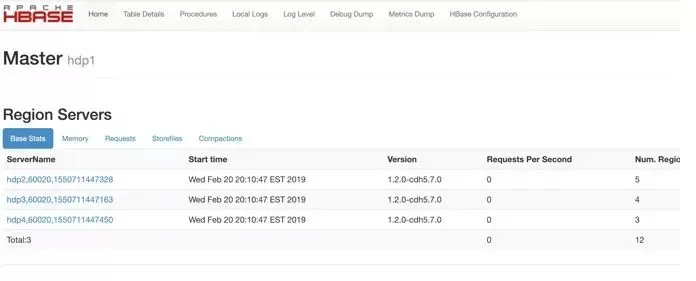
Hbase提供了一种Web方式的用户接口,用户可以通过Web界面查看Hbase集群的属性等状态信息,web页面分为:Master状态界面,和Zookeeper统计信息页面。
默认访问地址分别是:
ip:60010
ip::60030
ip:60010/zk.jsp
Master状态界面会看到Master状态的详情。
该页面大概分HBase集群信息,任务信息,表信息,RegionServer信息。每一部分又包含了一些具体的属性。
RegionServer状态界面会看到RegionServer状态的详情。
RegionServer的节点属性信息,任务信息和Region信息。
Zookeeper统计信息页面是非常简单的半结构化文本打印信息。