
概述
默认情况下, Spring-Kafka @KafkaListener 串行消费的。缺点显而易见生产者生产的数据过多时,消费端容易导致消息积压的问题。
当然了, 我们可以通过启动多个进程,实现 多进程的并发消费。 当然了也取决于你的TOPIC的 partition的数量。
试想一下, 在单进程的情况下,能否实现多线程的并发消费呢? Spring Kafka 为我们提供了这个功能,而且使用起来相当简单。 重点是把握原理,灵活运用。
@KafkaListener 的 concurrecy属性 可以指定并发消费的线程数 。
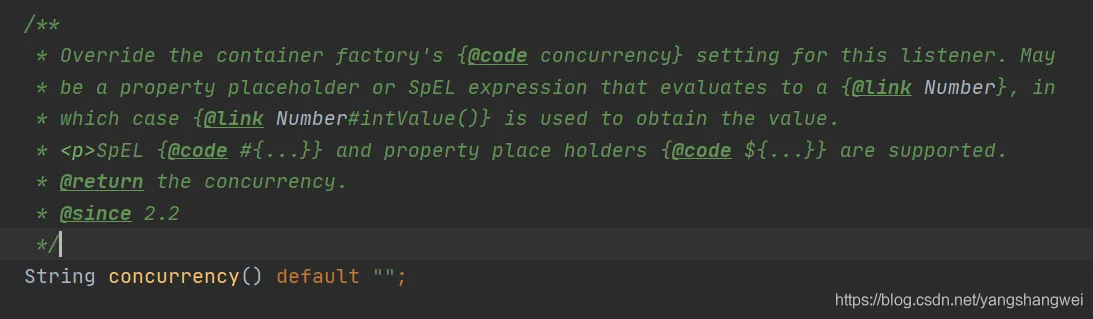
举个例子 : 如果设置 concurrency=2 时,Spring-Kafka 就会为该 @KafkaListener标注的方法消费的消息 创建 2个线程,进行并发消费。 当然了,这是有前置条件的。 不要超过 partitions 的大小
当concurrency < partition 的数量,会出现消费不均的情况,一个消费者的线程可能消费多个partition 的数据
当concurrency = partition 的数量,最佳状态,一个消费者的线程消费一个 partition 的数据
当concurrency > partition 的数量,会出现有的消费者的线程没有可消费的partition, 造成资源的浪费
演示过程

创建一个 Topic 为 “RRRR” ,并且设置其 Partition 分区数为 2
创建一个 ArtisanCosumerMock类,并在其消费方法上,添加 @KafkaListener(concurrency=2) 注解
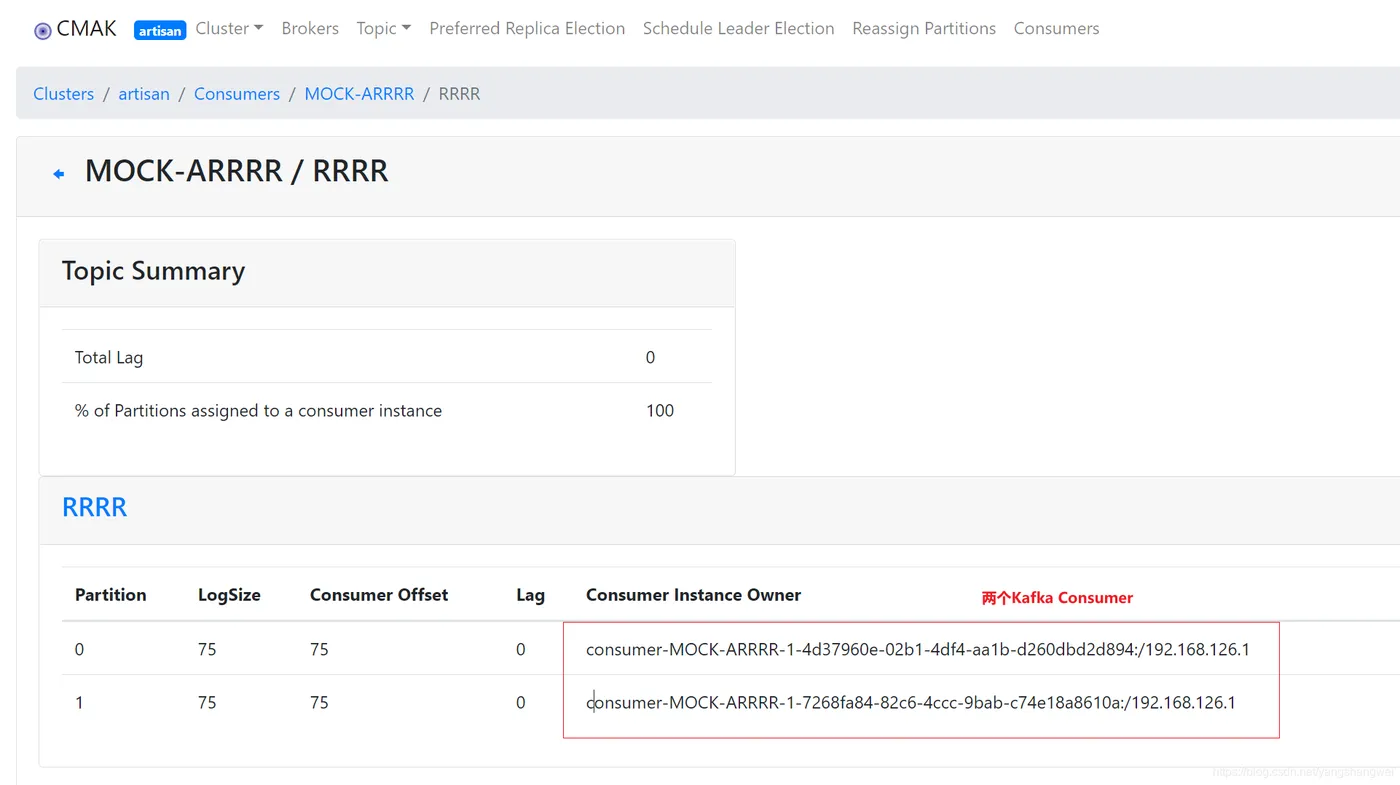
启动单元测试, Spring Kafka会根据@KafkaListener(concurrency=2) ,创建2个kafka consumer . ( 是两个Kafka Consumer ) . 然后,每个kafka Consumer 会被单独分配到一个线程中pull 消息, 消费消息
之后,Kafka Broker将Topic RRRR 分配给创建的 2个 Kafka Consumer 各 1个Partition (一共就2个partition,最佳情况,一人一个)
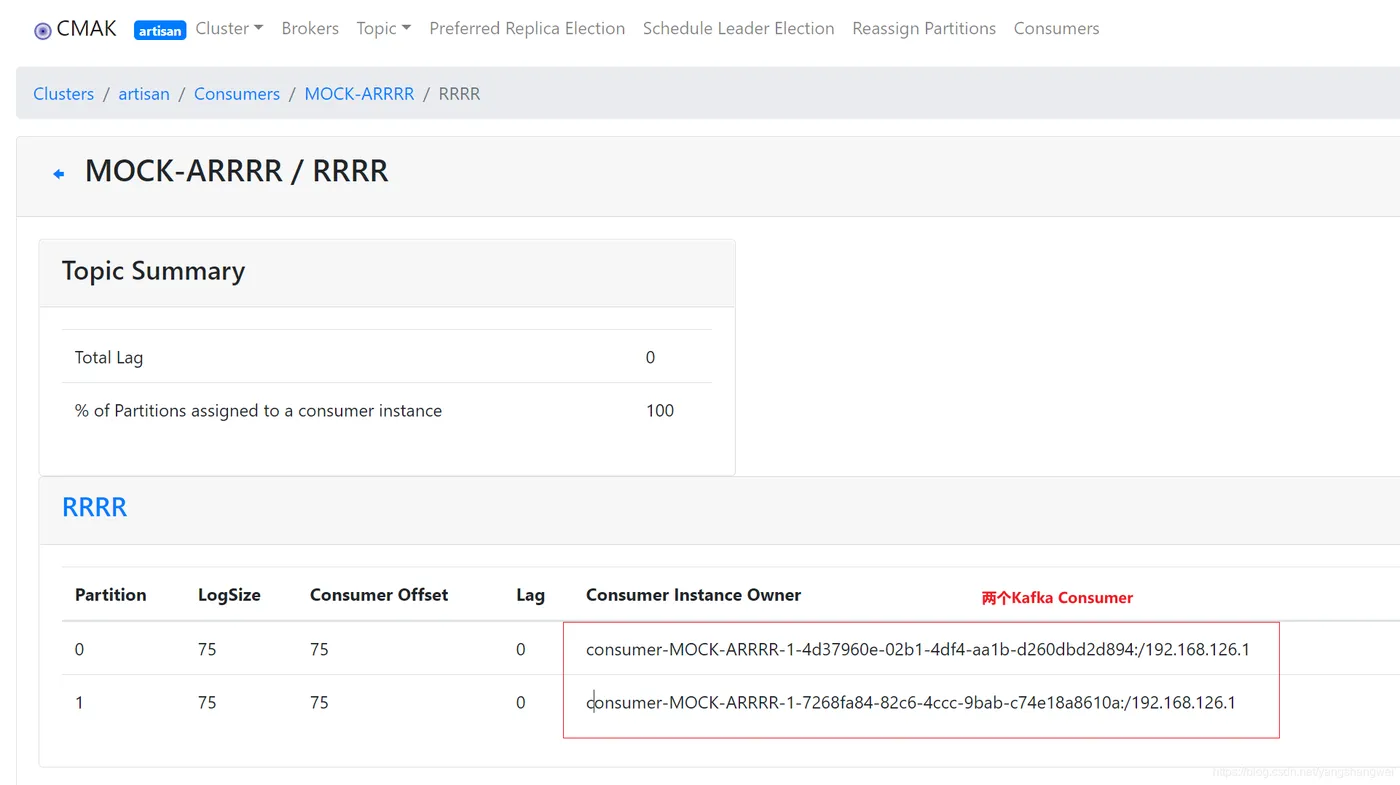
总结下: @KafkaListener(concurrency=2) 创建两个Kafka Consumer , 就在各自的线程中,拉取各自的Topic RRRR的 分区Partition 消息, 各自串行消费,从而实现单进程的多线程的并发消费。
题外话:
RocketMQ 的并发消费,只要创建一个 RocketMQ Consumer 对象,然后 Consumer 拉取完消息之后,丢到 Consumer 的线程池中执行消费,从而实现并发消费。
Spring-Kafka 提供的并发消费,需要创建多个 Kafka Consumer 对象,并且每个 Consumer 都单独分配一个线程,然后 Consumer 拉取完消息之后,在各自的线程中执行消费。
Code
POM依赖
  <dependencies>
    <dependency>
      <groupId>org.springframework.boot</groupId>
      <artifactId>spring-boot-starter-web</artifactId>
    </dependency>
    <!-- 引入 Spring-Kafka 依赖 -->
    <dependency>
      <groupId>org.springframework.kafka</groupId>
      <artifactId>spring-kafka</artifactId>
    </dependency>
    <dependency>
      <groupId>org.springframework.boot</groupId>
      <artifactId>spring-boot-starter-test</artifactId>
      <scope>test</scope>
    </dependency>
    <dependency>
      <groupId>junit</groupId>
      <artifactId>junit</artifactId>
      <scope>test</scope>
    </dependency>
  </dependencies>
配置文件
 spring:
  # Kafka 配置项,对应 KafkaProperties 配置类
  kafka:
    bootstrap-servers: 192.168.126.140:9092 # 指定 Kafka Broker 地址,可以设置多个,以逗号分隔
    # Kafka Producer 配置项
    producer:
      acks: 1 # 0-不应答。1-leader 应答。all-所有 leader 和 follower 应答。
      retries: 3 # 发送失败时,重试发送的次数
      key-serializer: org.apache.kafka.common.serialization.StringSerializer # 消息的 key 的序列化
      value-serializer: org.springframework.kafka.support.serializer.JsonSerializer # 消息的 value 的序列化
    # Kafka Consumer 配置项
    consumer:
      auto-offset-reset: earliest # 设置消费者分组最初的消费进度为 earliest
      key-deserializer: org.apache.kafka.common.serialization.StringDeserializer
      value-deserializer: org.springframework.kafka.support.serializer.JsonDeserializer
      properties:
        spring:
          json:
            trusted:
              packages: com.artisan.springkafka.domain
    # Kafka Consumer Listener 监听器配置
    listener:
      missing-topics-fatal: false # 消费监听接口监听的主题不存在时,默认会报错。所以通过设置为 false ,解决报错
logging:
  level:
    org:
      springframework:
        kafka: ERROR # spring-kafka
      apache:
        kafka: ERROR # kafka
生产者
 package com.artisan.springkafka.producer;
import com.artisan.springkafka.constants.TOPIC;
import com.artisan.springkafka.domain.MessageMock;
import org.springframework.beans.factory.annotation.Autowired;
import org.springframework.kafka.core.KafkaTemplate;
import org.springframework.kafka.support.SendResult;
import org.springframework.stereotype.Component;
import org.springframework.util.concurrent.ListenableFuture;
import java.util.Random;
import java.util.concurrent.ExecutionException;
/**
 * @author 小工匠
 * @version 1.0
 * @description: TODO
 * @date 2021/2/17 22:25
 * @mark: show me the code , change the world
 */
@Component
public class ArtisanProducerMock {
    @Autowired
    private KafkaTemplate<Object,Object> kafkaTemplate ;
    /**
     * 同步发送
     * @return
     * @throws ExecutionException
     * @throws InterruptedException
     */
    public SendResult sendMsgSync() throws ExecutionException, InterruptedException {
        // 模拟发送的消息
        Integer id = new Random().nextInt(100);
        MessageMock messageMock = new MessageMock(id,"artisanTestMessage-" + id);
        // 同步等待
        return  kafkaTemplate.send(TOPIC.TOPIC, messageMock).get();
    }
}
消费者
 package com.artisan.springkafka.consumer;
import com.artisan.springkafka.domain.MessageMock;
import com.artisan.springkafka.constants.TOPIC;
import org.slf4j.Logger;
import org.slf4j.LoggerFactory;
import org.springframework.kafka.annotation.KafkaListener;
import org.springframework.stereotype.Component;
/**
 * @author 小工匠
 * @version 1.0
 * @description: TODO
 * @date 2021/2/17 22:33
 * @mark: show me the code , change the world
 */
@Component
public class ArtisanCosumerMock {
    private Logger logger = LoggerFactory.getLogger(getClass());
    private static final String CONSUMER_GROUP_PREFIX = "MOCK-A" ;
    @KafkaListener(topics = TOPIC.TOPIC ,groupId = CONSUMER_GROUP_PREFIX + TOPIC.TOPIC,
        concurrency = "2")
    public void onMessage(MessageMock messageMock){
        logger.info("【接受到消息][线程ID:{} 消息内容:{}]", Thread.currentThread().getId(), messageMock);
    }
}
在 @KafkaListener 注解上,添加了 concurrency = "2" 属性,创建 2 个线程消费 Topic = “RRRR” 下的消息。
单元测试
    package com.artisan.springkafka.produceTest;
import com.artisan.springkafka.SpringkafkaApplication;
import com.artisan.springkafka.producer.ArtisanProducerMock;
import org.junit.Test;
import org.junit.runner.RunWith;
import org.slf4j.Logger;
import org.slf4j.LoggerFactory;
import org.springframework.beans.factory.annotation.Autowired;
import org.springframework.boot.test.context.SpringBootTest;
import org.springframework.kafka.support.SendResult;
import org.springframework.test.context.junit4.SpringRunner;
import org.springframework.util.concurrent.ListenableFuture;
import org.springframework.util.concurrent.ListenableFutureCallback;
import java.util.concurrent.CountDownLatch;
import java.util.concurrent.ExecutionException;
import java.util.concurrent.TimeUnit;
/**
 * @author 小工匠
 * * @version 1.0
 * @description: TODO
 * @date 2021/2/17 22:40
 * @mark: show me the code , change the world
 */
@RunWith(SpringRunner.class)
@SpringBootTest(classes = SpringkafkaApplication.class)
public class ProduceMockTest {
    private Logger logger = LoggerFactory.getLogger(getClass());
    @Autowired
    private ArtisanProducerMock artisanProducerMock;
    @Test
    public void testAsynSend() throws ExecutionException, InterruptedException {
        logger.info("开始发送");
        // 模拟发送多条消息
        for (int i = 0; i < 10; i++) {
            artisanProducerMock.sendMsgSync();
        }
        // 阻塞等待,保证消费
        new CountDownLatch(1).await();
    }
}
测试结果
2021-02-18 21:55:35.504  INFO 20456 --- [           main] c.a.s.produceTest.ProduceMockTest        : 开始发送
2021-02-18 21:55:35.852  INFO 20456 --- [ntainer#0-0-C-1] c.a.s.consumer.ArtisanCosumerMock        : 【接受到消息][线程ID:18 消息内容:MessageMock{id=23, name='artisanTestMessage-23'}]
2021-02-18 21:55:35.852  INFO 20456 --- [ntainer#0-1-C-1] c.a.s.consumer.ArtisanCosumerMock        : 【接受到消息][线程ID:20 消息内容:MessageMock{id=64, name='artisanTestMessage-64'}]
2021-02-18 21:55:35.859  INFO 20456 --- [ntainer#0-1-C-1] c.a.s.consumer.ArtisanCosumerMock        : 【接受到消息][线程ID:20 消息内容:MessageMock{id=53, name='artisanTestMessage-53'}]
2021-02-18 21:55:35.859  INFO 20456 --- [ntainer#0-0-C-1] c.a.s.consumer.ArtisanCosumerMock        : 【接受到消息][线程ID:18 消息内容:MessageMock{id=51, name='artisanTestMessage-51'}]
2021-02-18 21:55:35.859  INFO 20456 --- [ntainer#0-1-C-1] c.a.s.consumer.ArtisanCosumerMock        : 【接受到消息][线程ID:20 消息内容:MessageMock{id=67, name='artisanTestMessage-67'}]
2021-02-18 21:55:35.859  INFO 20456 --- [ntainer#0-0-C-1] c.a.s.consumer.ArtisanCosumerMock        : 【接受到消息][线程ID:18 消息内容:MessageMock{id=42, name='artisanTestMessage-42'}]
2021-02-18 21:55:35.859  INFO 20456 --- [ntainer#0-0-C-1] c.a.s.consumer.ArtisanCosumerMock        : 【接受到消息][线程ID:18 消息内容:MessageMock{id=12, name='artisanTestMessage-12'}]
2021-02-18 21:55:35.859  INFO 20456 --- [ntainer#0-1-C-1] c.a.s.consumer.ArtisanCosumerMock        : 【接受到消息][线程ID:20 消息内容:MessageMock{id=40, name='artisanTestMessage-40'}]
2021-02-18 21:55:35.859  INFO 20456 --- [ntainer#0-1-C-1] c.a.s.consumer.ArtisanCosumerMock        : 【接受到消息][线程ID:20 消息内容:MessageMock{id=37, name='artisanTestMessage-37'}]
2021-02-18 21:55:35.859  INFO 20456 --- [ntainer#0-0-C-1] c.a.s.consumer.ArtisanCosumerMock        : 【接受到消息][线程ID:18 消息内容:MessageMock{id=27, name='artisanTestMessage-27'}]
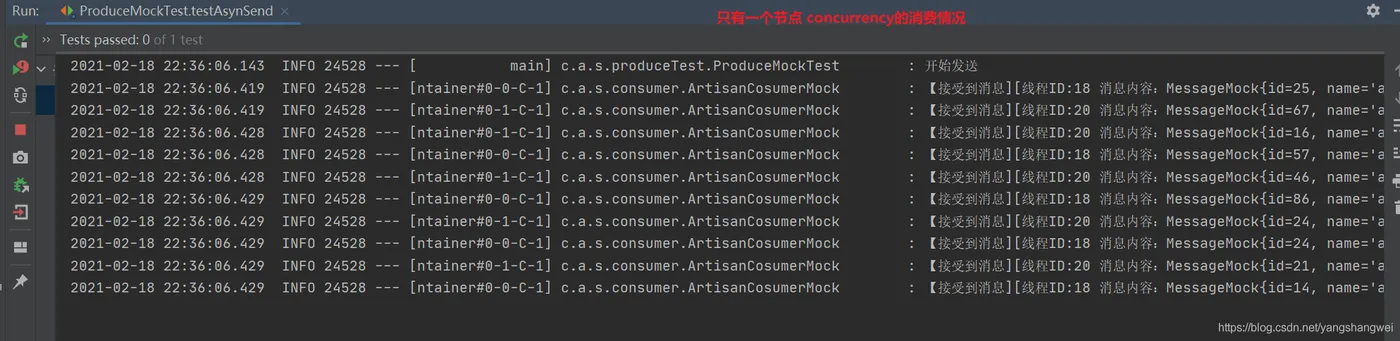
从日志结果来看 两个线程在消费 “TOPIC RRRR” 下的消息。
控制台也看下
紧接着

日志
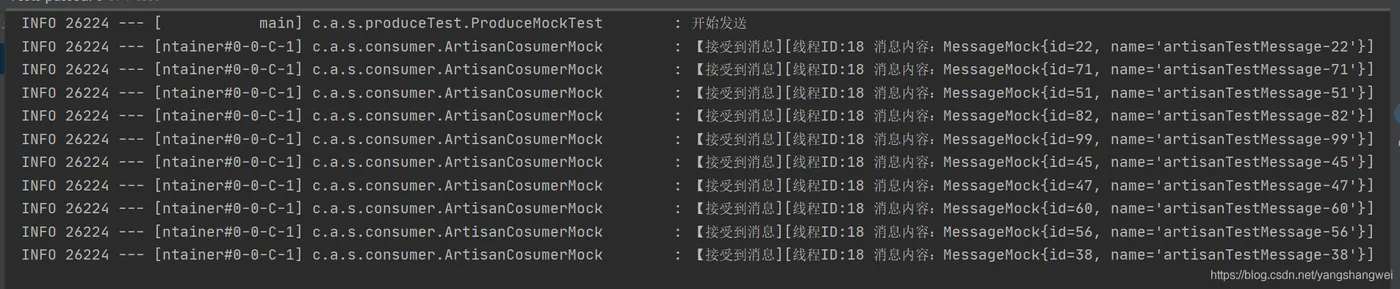
是不是一目了然 ,只有一个线程消费
方式二

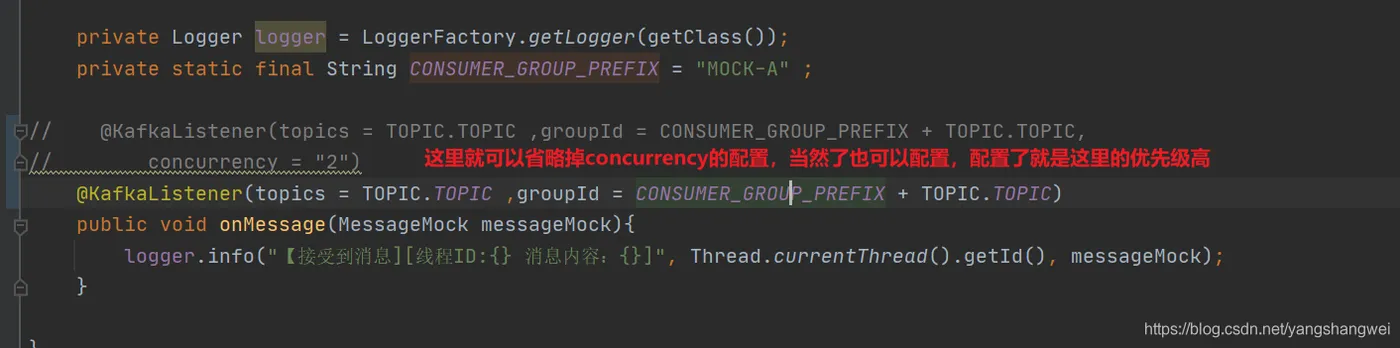
重新测试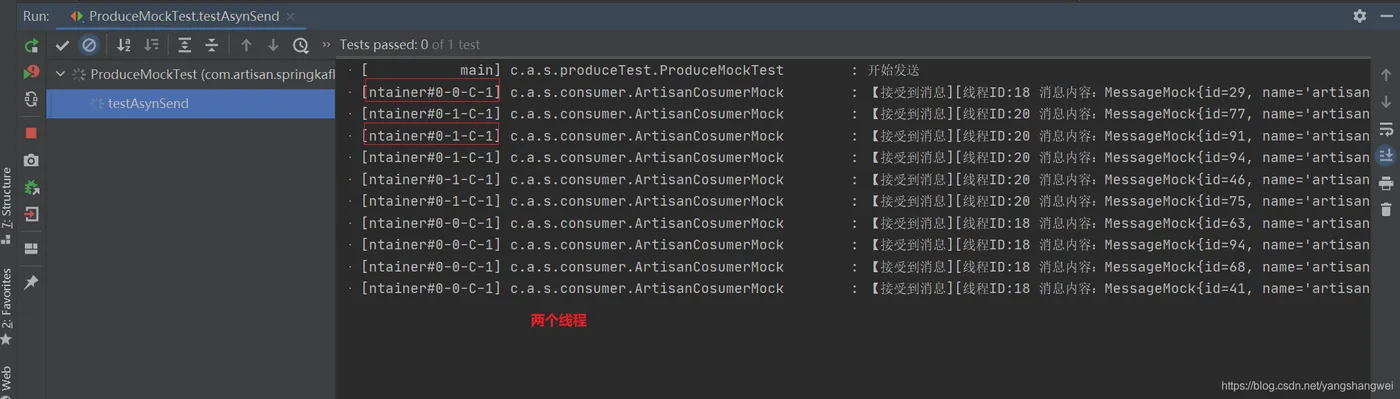
@KafkaListener 配置项
   /**
     * @KafkaListener(groupId = "testGroup", topicPartitions = {
     * @TopicPartition(topic = "topic1", partitions = {"0", "1"}),
     * @TopicPartition(topic = "topic2", partitions = "0",
     * partitionOffsets = @PartitionOffset(partition = "1", initialOffset = "100"))
     * },concurrency = "6")
     * //concurrency就是同组下的消费者个数,就是并发消费数,必须小于等于分区总数
     */
/**
 * 监听的 Topic 数组
 *
 * The topics for this listener.
 * The entries can be 'topic name', 'property-placeholder keys' or 'expressions'.
 * An expression must be resolved to the topic name.
 * This uses group management and Kafka will assign partitions to group members.
 * <p>
 * Mutually exclusive with {@link #topicPattern()} and {@link #topicPartitions()}.
 * @return the topic names or expressions (SpEL) to listen to.
 */
String[] topics() default {};
/**
 * 监听的 Topic 表达式
 *
 * The topic pattern for this listener. The entries can be 'topic pattern', a
 * 'property-placeholder key' or an 'expression'. The framework will create a
 * container that subscribes to all topics matching the specified pattern to get
 * dynamically assigned partitions. The pattern matching will be performed
 * periodically against topics existing at the time of check. An expression must
 * be resolved to the topic pattern (String or Pattern result types are supported).
 * This uses group management and Kafka will assign partitions to group members.
 * <p>
 * Mutually exclusive with {@link #topics()} and {@link #topicPartitions()}.
 * @return the topic pattern or expression (SpEL).
 * @see org.apache.kafka.clients.CommonClientConfigs#METADATA_MAX_AGE_CONFIG
 */
String topicPattern() default "";
/**
 * @TopicPartition 注解的数组。每个 @TopicPartition 注解,可配置监听的 Topic、队列、消费的开始位置
 *
 * The topicPartitions for this listener when using manual topic/partition
 * assignment.
 * <p>
 * Mutually exclusive with {@link #topicPattern()} and {@link #topics()}.
 * @return the topic names or expressions (SpEL) to listen to.
 */
TopicPartition[] topicPartitions() default {};
/**
 * 消费者分组
 * Override the {@code group.id} property for the consumer factory with this value
 * for this listener only.
 * <p>SpEL {@code #{...}} and property place holders {@code ${...}} are supported.
 * @return the group id.
 * @since 1.3
 */
String groupId() default "";
/**
 * 使用消费异常处理器 KafkaListenerErrorHandler 的 Bean 名字
 *
 * Set an {@link org.springframework.kafka.listener.KafkaListenerErrorHandler} bean
 * name to invoke if the listener method throws an exception.
 * @return the error handler.
 * @since 1.3
 */
String errorHandler() default "";
/**
 * 自定义消费者监听器的并发数,这个我们在 TODO 详细解析。
 *
 * Override the container factory's {@code concurrency} setting for this listener. May
 * be a property placeholder or SpEL expression that evaluates to a {@link Number}, in
 * which case {@link Number#intValue()} is used to obtain the value.
 * <p>SpEL {@code #{...}} and property place holders {@code ${...}} are supported.
 * @return the concurrency.
 * @since 2.2
 */
String concurrency() default "";
/**
 * 是否自动启动监听器。默认情况下,为 true 自动启动。
 *
 * Set to true or false, to override the default setting in the container factory. May
 * be a property placeholder or SpEL expression that evaluates to a {@link Boolean} or
 * a {@link String}, in which case the {@link Boolean#parseBoolean(String)} is used to
 * obtain the value.
 * <p>SpEL {@code #{...}} and property place holders {@code ${...}} are supported.
 * @return true to auto start, false to not auto start.
 * @since 2.2
 */
String autoStartup() default "";
/**
 * Kafka Consumer 拓展属性。
 *
 * Kafka consumer properties; they will supersede any properties with the same name
 * defined in the consumer factory (if the consumer factory supports property overrides).
 * <h3>Supported Syntax</h3>
 * <p>The supported syntax for key-value pairs is the same as the
 * syntax defined for entries in a Java
 * {@linkplain java.util.Properties#load(java.io.Reader) properties file}:
 * <ul>
 * <li>{@code key=value}</li>
 * <li>{@code key:value}</li>
 * <li>{@code key value}</li>
 * </ul>
 * {@code group.id} and {@code client.id} are ignored.
 * @return the properties.
 * @since 2.2.4
 * @see org.apache.kafka.clients.consumer.ConsumerConfig
 * @see #groupId()
 * @see #clientIdPrefix()
 */
String[] properties() default {};
/**
 * 唯一标识
 *
 * The unique identifier of the container managing for this endpoint.
 * <p>If none is specified an auto-generated one is provided.
 * <p>Note: When provided, this value will override the group id property
 * in the consumer factory configuration, unless {@link #idIsGroup()}
 * is set to false.
 * <p>SpEL {@code #{...}} and property place holders {@code ${...}} are supported.
 * @return the {@code id} for the container managing for this endpoint.
 * @see org.springframework.kafka.config.KafkaListenerEndpointRegistry#getListenerContainer(String)
 */
String id() default "";
/**
 * id 唯一标识的前缀
 *
 * When provided, overrides the client id property in the consumer factory
 * configuration. A suffix ('-n') is added for each container instance to ensure
 * uniqueness when concurrency is used.
 * <p>SpEL {@code #{...}} and property place holders {@code ${...}} are supported.
 * @return the client id prefix.
 * @since 2.1.1
 */
String clientIdPrefix() default "";
/**
 * 当 groupId 未设置时,是否使用 id 作为 groupId
 *
 * When {@link #groupId() groupId} is not provided, use the {@link #id() id} (if
 * provided) as the {@code group.id} property for the consumer. Set to false, to use
 * the {@code group.id} from the consumer factory.
 * @return false to disable.
 * @since 1.3
 */
boolean idIsGroup() default true;
/**
 * 使用的 KafkaListenerContainerFactory Bean 的名字。
 * 若未设置,则使用默认的 KafkaListenerContainerFactory Bean 。
 *
 * The bean name of the {@link org.springframework.kafka.config.KafkaListenerContainerFactory}
 * to use to create the message listener container responsible to serve this endpoint.
 * <p>If not specified, the default container factory is used, if any.
 * @return the container factory bean name.
 */
String containerFactory() default "";
/**
 * 所属 MessageListenerContainer Bean 的名字。
 *
 * If provided, the listener container for this listener will be added to a bean
 * with this value as its name, of type {@code Collection<MessageListenerContainer>}.
 * This allows, for example, iteration over the collection to start/stop a subset
 * of containers.
 * <p>SpEL {@code #{...}} and property place holders {@code ${...}} are supported.
 * @return the bean name for the group.
 */
String containerGroup() default "";
/**
 * 真实监听容器的 Bean 名字,需要在名字前加 "__" 。
 *
 * A pseudo bean name used in SpEL expressions within this annotation to reference
 * the current bean within which this listener is defined. This allows access to
 * properties and methods within the enclosing bean.
 * Default '__listener'.
 * <p>
 * Example: {@code topics = "#{__listener.topicList}"}.
 * @return the pseudo bean name.
 * @since 2.1.2
 */
String beanRef() default "__listener";
分布式下的concurrency
第一个单元测试,不要关闭,我们继续启动单元测试
继续启动, 会发现 当节点数量 = partition的数量的时候, 每个节点 其实还是一个线程去消费,达到最优。
源码地址
https://github.com/yangshangwei/boot2/tree/master/springkafkaConcurrencyConsume
