前言
效果图: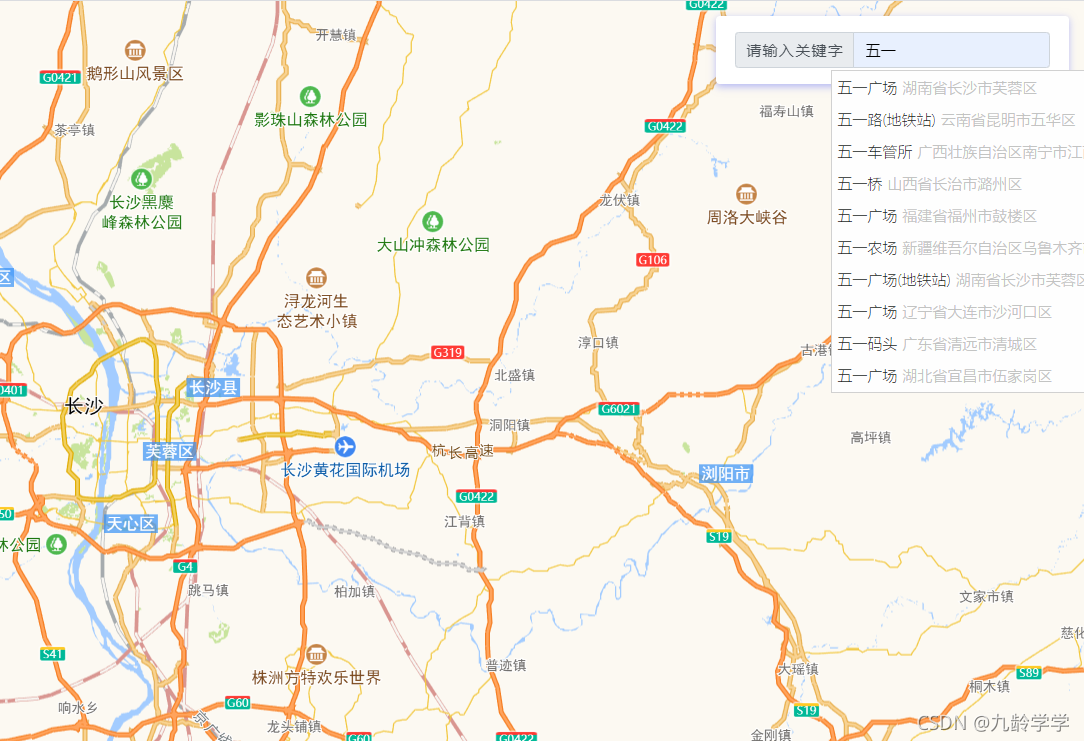
官网:高德地图官网,点击进入
我的配置:
打包用的是webpack,vite踩坑后打算再观望一阵
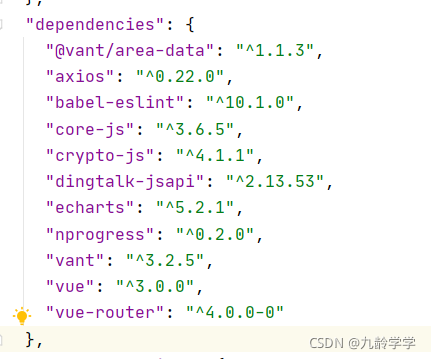
第一步:完善高德地图api的基本配置
- 先注册开发者账号,进入应用管理界面,应用管理界面就是咱右上角的那个头像,hover之后会有个弹窗,找到「应用管理」点击进入
- 找到右侧的「应用管理」菜单,点开后选择我的应用
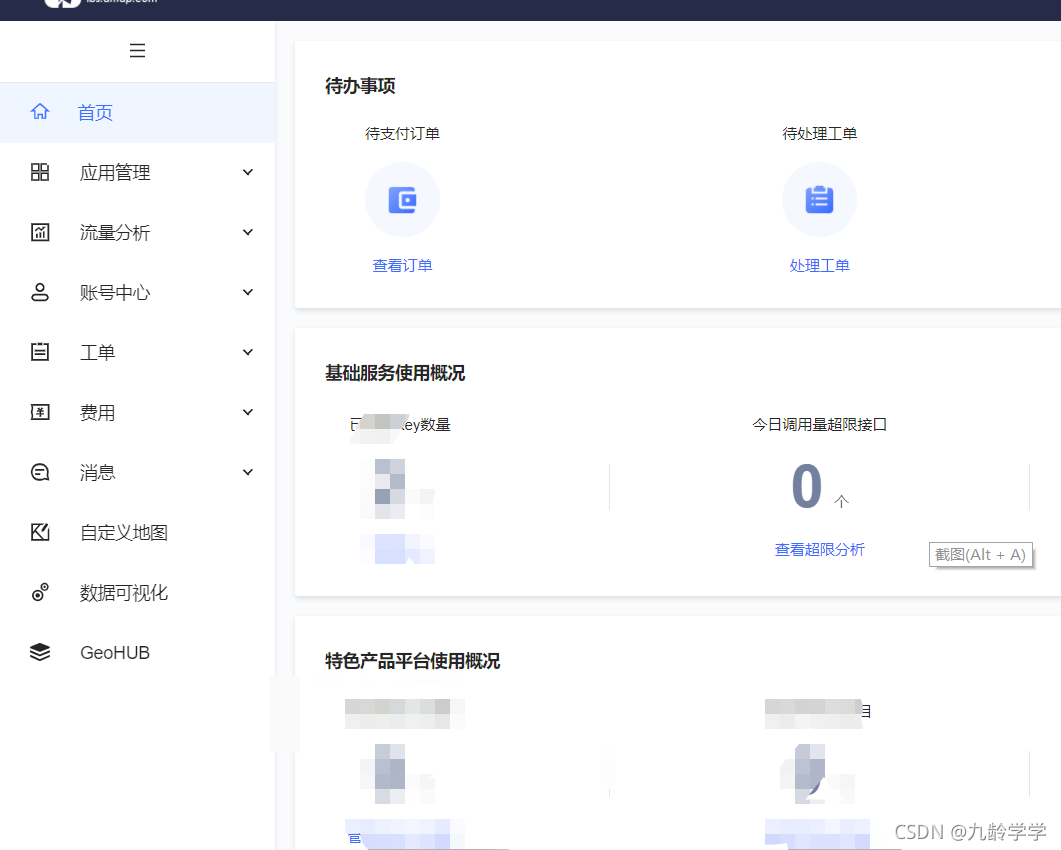
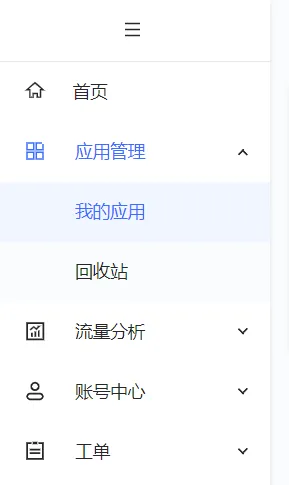
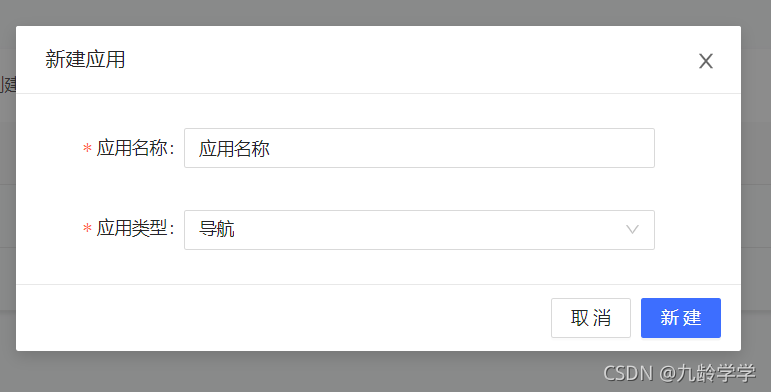
- 点击右上角创建新应用,应用类型看自己软件的定位
- 点击创建好应用的添加按钮

- 设置应用配置
ps:服务平台要选 web端(JS API) , 不要选web服务
域名不写表示所有域都可以访问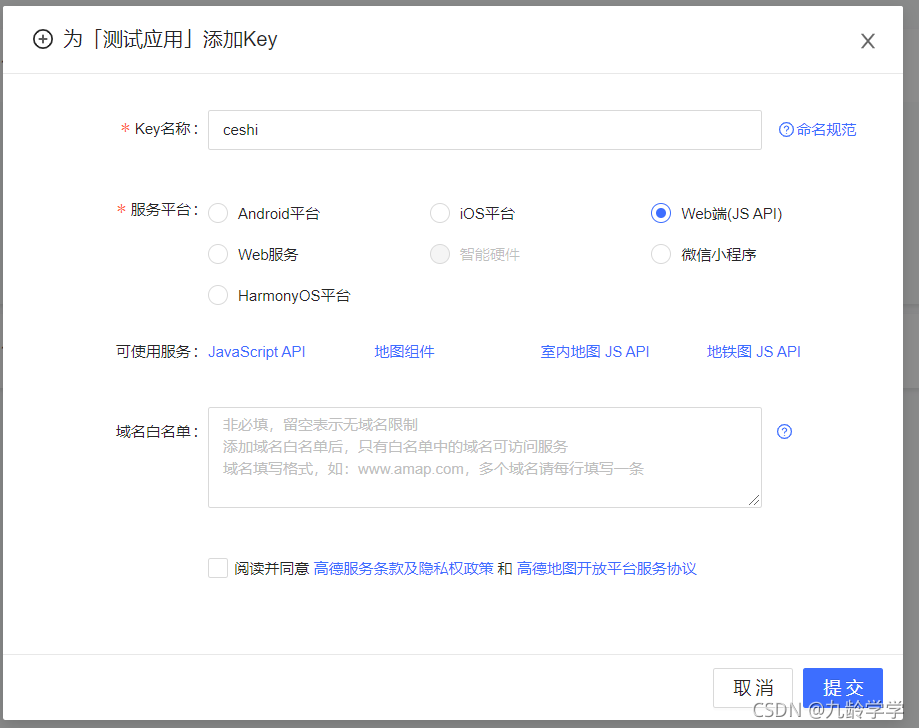
添加完成后,中间有个key,很长一段文字的,待会要用到
第二步:在vue3项目中使用高德地图api
- 复制刚刚创建好的key
- 在pulic/index.html 通过CDN引入高德地图api
ps:CDN在这里的意指通过链接加载的某些组件库,而不是通过npm,组件通过CDN加载可以启到一定程度的加速效果
<script type="text/javascript" src="http://webapi.amap.com/maps?v=1.4.4&key=粘贴刚刚复制好的key"></script>- 在项目根目录创建文件 vue.config.js ,注意配置文件最好别用ts,在js文件中粘贴以下代码
module.exports = {
    configureWebpack: {
        externals: {
            'AMap': 'AMap' // 表示CDN引入的高德地图
        }
    }
}- 新建vue文件,粘贴以下css代码和结构
ps:css代码是搜索框的样式,高德地图也有自带
<template>
  <div class="box">
    <div id="container" style="width:500px; height:300px"></div>
    <div class="info">
      <div class="input-item">
        <div class="input-item-prepend">
          <span class="input-item-text" style="width:8rem;">请输入关键字</span>
        </div>
        <input id='tipinput' type="text">
      </div>
    </div>
  </div>
</template>
<style scoped lang="scss">
@import "~@/styles/scss/_global.scss";
.info {
  padding: .5rem .7rem;
  margin-bottom: 1rem;
  border-radius: .25rem;
  position: fixed;
  top: 1rem;
  background-color: white;
  width: auto;
  min-width: 15rem;
  border-width: 0;
  right: 1rem;
  box-shadow: 0 2px 6px 0 rgba(240, 131, 0, .5);
  .input-item {
    position: relative;
    display: flex;
    flex-wrap: wrap;
    align-items: center;
    width: 100%;
    height: 2.2rem;
    border: 1px solid $themeTextColor;
    border-radius: .2rem;
    .input-item-prepend {
      margin-right: -1px;
    }
    .input-item-prepend {
      width: 35%;
      font-size: 13px;
      border-right: 1px solid $themeTextColor;
      height: 100%;
      display: flex;
      align-items: center;
      background: rgba(240, 131, 0, .1);
      span {
        text-align: center;
      }
    }
    input {
      width: 60%;
      background: #fff;
      padding: .2rem .6rem;
      margin-left: .3rem;
      border: none;
    }
  }
}
</style>- 在srcipt标签中引入AMap(高德地图)组件,并且在onMounted生命周期中使用,具体用意可以看代码中的注释
ps:不能在setup周期中使用,因为那时候DOM元素还未创建,找不到DOM元素
<script>
import AMap from 'AMap' // 引入高德地图
import { onMounted } from 'vue'
export default {
  name: 'Login',
  setup () {
    onMounted(() => {
      const map = new AMap.Map('container', { // 这里表示创建地图 第一个参数表示地图的div的id
        resizeEnable: true // 表示是否在加在所在区域的地图,如果定了别的区域,比如北京,就会默认加载北京
      })
      // 使用AMap插件 第一个是搜索框插件,第二个地址信息(经纬度名字之类)的插件
      AMap.plugin(['AMap.Autocomplete', 'AMap.PlaceSearch'], function() {
        const autoOptions = {
          // 使用联想输入的input的div的id
          input: 'tipinput'
        }
        const autocomplete = new AMap.Autocomplete(autoOptions)
        const placeSearch = new AMap.PlaceSearch({
          city: '北京', // 默认城市,一定要有,不然没有放大效果
          map: map // 地图,选中会有放大功能,绑定上面创建的地图即可
        })
        AMap.event.addListener(autocomplete, 'select', function(e) {
          console.log(e.poi.location) // 获取选中的的地址的经纬度
          placeSearch.search(e.poi.name)
        })
      })
    })
    return {
    }
  }
}
</script>
完结撒花,附上完整代码
<template>
  <div class="box">
    <div id="container" style="width:500px; height:300px"></div>
    <div class="info">
      <div class="input-item">
        <div class="input-item-prepend">
          <span class="input-item-text" style="width:8rem;">请输入关键字</span>
        </div>
        <input id='tipinput' type="text">
      </div>
    </div>
  </div>
</template>

<script>
import AMap from 'AMap' // 引入高德地图
import { onMounted } from 'vue'
export default {
  name: 'Login',
  setup () {
    onMounted(() => {
      const map = new AMap.Map('container', { // 这里表示创建地图 第一个参数表示地图的div的id
        resizeEnable: true // 表示是否在加在所在区域的地图,如果定了别的区域,比如北京,就会默认加载北京
      })
      // 使用AMap插件 第一个是搜索框插件,第二个地址信息(经纬度名字之类)的插件
      AMap.plugin(['AMap.Autocomplete', 'AMap.PlaceSearch'], function() {
        const autoOptions = {
          // 使用联想输入的input的div的id
          input: 'tipinput'
        }
        const autocomplete = new AMap.Autocomplete(autoOptions)
        const placeSearch = new AMap.PlaceSearch({
          city: '长沙',
          map: map
        })
        AMap.event.addListener(autocomplete, 'select', function(e) {
          console.log(e.poi.location) // 获取选中的的地址的经纬度
          placeSearch.search(e.poi.name)
        })
      })
    })
    return {
    }
  }
}
</script>

<style scoped lang="scss">
@import "~@/styles/scss/_global.scss";
.info {
  padding: .5rem .7rem;
  margin-bottom: 1rem;
  border-radius: .25rem;
  position: fixed;
  top: 1rem;
  background-color: white;
  width: auto;
  min-width: 15rem;
  border-width: 0;
  right: 1rem;
  box-shadow: 0 2px 6px 0 rgba(240, 131, 0, .5);
  .input-item {
    position: relative;
    display: flex;
    flex-wrap: wrap;
    align-items: center;
    width: 100%;
    height: 2.2rem;
    border: 1px solid $themeTextColor;
    border-radius: .2rem;
    .input-item-prepend {
      margin-right: -1px;
    }
    .input-item-prepend {
      width: 35%;
      font-size: 13px;
      border-right: 1px solid $themeTextColor;
      height: 100%;
      display: flex;
      align-items: center;
      background: rgba(240, 131, 0, .1);
      span {
        text-align: center;
      }
    }
    input {
      width: 60%;
      background: #fff;
      padding: .2rem .6rem;
      margin-left: .3rem;
      border: none;
    }
  }
}
</style>
转载请@,互相尊重谢谢!!