开发者学堂课程【PAL 平台学习路线:机器学习入门到应用:如何使用 EasyCompression 进行模型压缩训练】学习笔记,与课程紧密联系,让用户快速学习知识。
课程地址:https://developer.aliyun.com/learning/course/855/detail/14121
如何使用 EasyCompression 进行模型压缩训练
链路优化技术
1.PAI 深度学习开发全链路优化技术
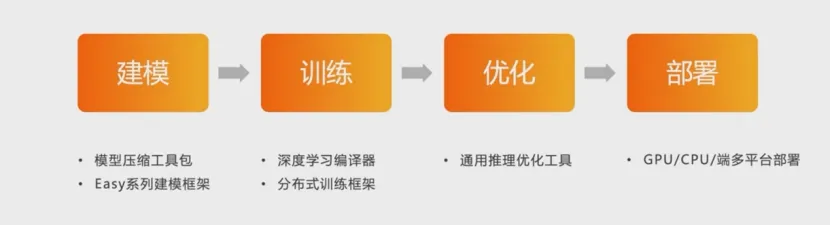
模型压缩工具包,一系列建模框架,深度学习编辑,分布式训练框架,通用推理优化工具,GPU,CPU 端多平台部署。
在建模阶段,使用模型压缩技术一线筑地,精简模型尺寸并加速推理计算,是深度学习开发链路中的重要优化手段。
阿里云派平台为深度学习开发供了从建模训练到优化部署的全链路优化技术,其中在建模阶段使用模型压缩技术能够显著的精简模型尺寸,并且加速地理计算,是深度学习开发链路中的重要优化手段。
2.EasyCompression 模型压缩工具
EasyCompression,是面向 TensorFlow 模型的压缩建模训练工具库,实现了量化、剪枝及结构化稀疏等压缩训练算法,并提供易用的接口。
fromeasycompressionimportCompressionHook,Pruner,PrunerConfigimport tensorflow as tf
define model architecture ..
pruner_config PrunerConfig(
compression_ratio 0.5,
step_interval=1000,
num_trials 10,
)
pruner Pruner(pruner_config)
compression_hook CompressionHook(pruner,save_dir 'pruning_output')
with tf.train.MonitoredSession(
session_creator=tf.train.ChiefSessioncreator(),
hooks=[compression_hook],
as sess:
sess.run(init_op)
while True:
try:
#sess.run(train_op)
except tf.errors.OutofRangeError:
Break
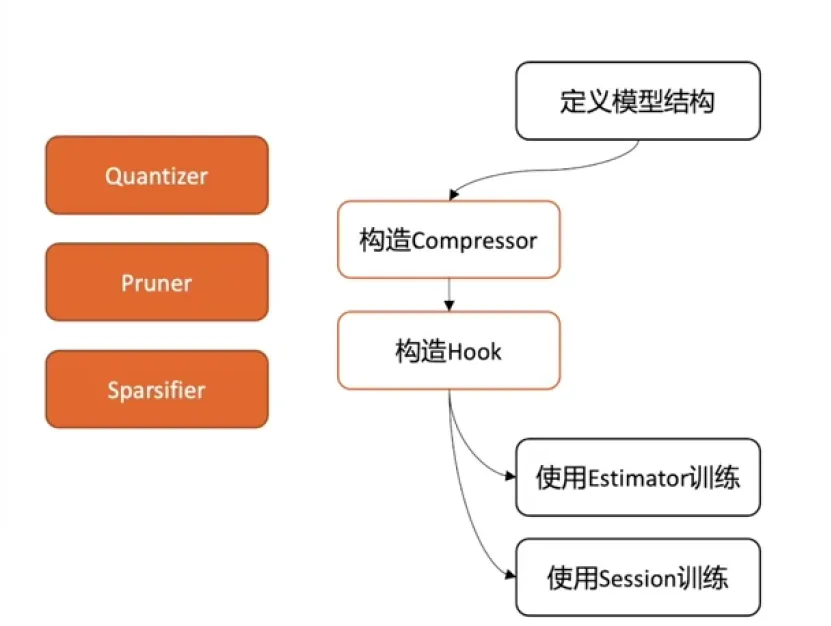
如上图所示,在常规的模型训练流程中,只需要在定义模型结构之后插入模型压缩训练相关的对象以及与训练控制相关的 hook 就可以非常容易的使用常规的 flow estimate 或者三的方式进行模型压缩训练,这段非常基础的代码示例展示了如何使用 compression 的基本概念,不需要指定压缩算法的配置,然后构造压缩算法对象,这里是以 Pro为示例。最后通过 compassion hook 的对象插入与压缩训练相关的流程控制。
3.模型压缩技术-通道剪枝
在深度学习中通常会使用结构和参数具有相当程度冗余的大规模神经网络模型以获得更好的预测准确率。对模型进行剪枝,可以在保持模型准确率的情况下,显著地压缩模型大小。PAI 模型压缩工具 EasyCompression 实现了通道剪枝(Filter Pruning)训练算法。
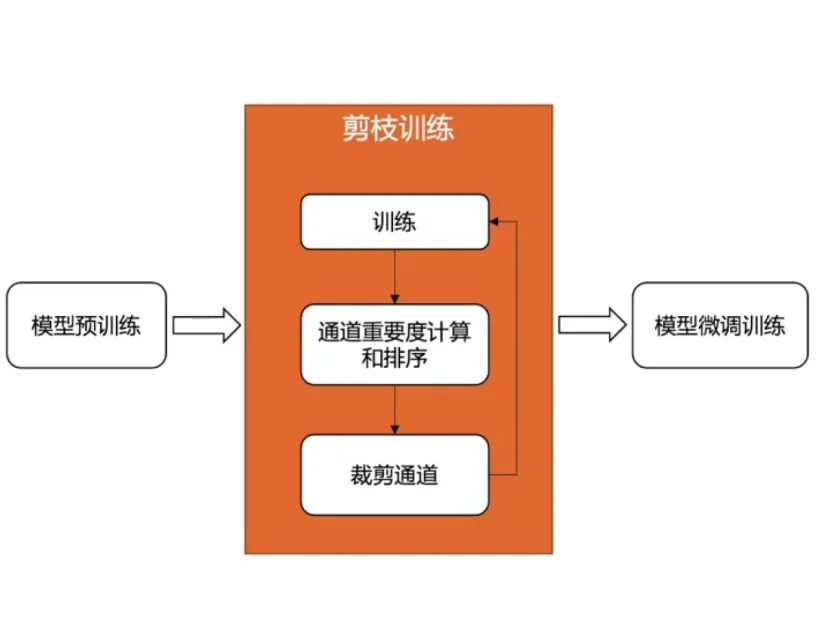
以剪枝为例,介绍如何使用 compression 进行压缩训练。展示了 it compression 实现的模型剪枝的基本原理,在训练中,我们将逐步对模型进行通道裁剪,在每一轮裁剪的过程中,我们将计算模型中不同通道的重要性并进行排序,按照重要性排序对相对不重要的通道进行裁剪。不断迭代进行上述训练,裁剪过程可以逐步的达到一个相对高的裁减比例。并且通过后续的模型微调训练,保持模型具备相当的准确率。
4.训练
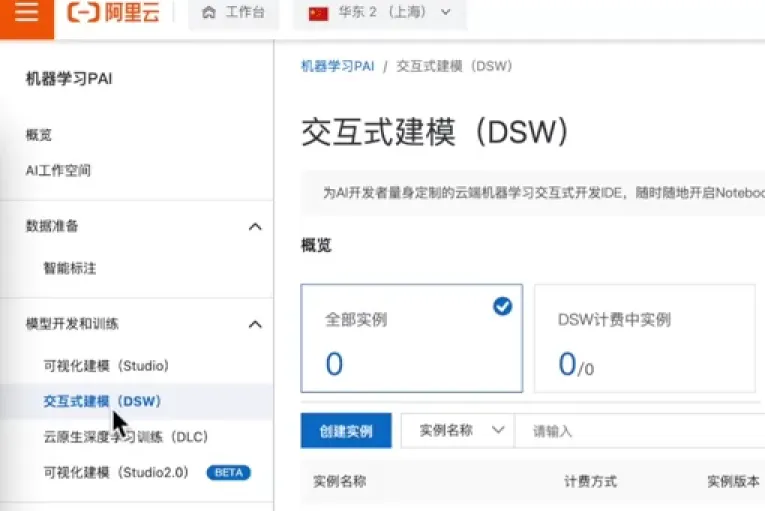
在阿里云 pai 的工作台页面左侧选项中选择交互式建模dw在dw页面中选择创建实例首先填入这个势力名称选择个人版确认地域及格用区,因为要进行模型的训练,所以要选择GPU实力,根据实际的需求选择合适的 GPU 型号 Is compression 支持 tensor flow 1.15版本的镜像,所以在镜像列表中选择相应的镜像版本,确认版本点击确认订单。
打开创建完成的 dw 示例
EasyCompression 剪枝训练示例:CIFAR-10 ResNet220
Ea3 yCompression 是 PA 推出的面向T0 nsorFlow 深度学习瓶架的模型压箱工具,支持剪枝、量化、结构化样值等模型压场方法。
现以基于 Estimator 实现的 CFAR-10数据集上的 ResNet120模型为例,结合代码具体说明如何使用EasyCompressioni 进行剪枝训练。
(1)准备数据集
可以借助 tensorflow-datasets 下载 CFAR-10然瓶集并生成 TFRecord,,即1 ensorflow_.da1 asets.load'cifar10~),本示例中已预先准备该致据文件可供直接下位.
!mkdir-p cifar1e_datasets
!wget -P cifar10_datasets https://pai-blade.oss-cn-zhangjiakou.aliyuncs.com/easycompression/demo/dsw_pruning_cifar10/cifar18-train.tfrecord-00008-of-00001
!wget-Pcifarle_datasetshttps://pai-blade.oss-cn-zhangjiakou.aliyuncs.com/easycompression/demo/dsw_pruning_cifar10/cifar10-test.tfrecord-00000-of-00001
定义数据集相关参数如下
TRAIN_TF_RECORED "cifar10_datasets/cifarl0-train.tfrecord-00000-of-00001"
TEST_TF_RECORED ="cifar10_datasets/cifar10-test.tfrecord-00000-of-00001"
NUM IMAGES ("train":50000,"validation":10000)
NUM CLASSES 10
HEIGHT 32
WIDTH 32
NUM_CHANNELS 3
我创建的副本模型训练的实验我们这里以在十数据集上对20模型进行剪枝训练为例,来介绍一个 compression的基本使用方法首先准备数据集谁发实数据可以直接从原始的数据及地址下载,已经将原始的数据集转换成了 tf的格式,直接下载格式的数据集对于20模型,采用 flow 官方提供的模型定义的方式,可以直接从上面下载相应的模型定义的Python 源文件。
(2)定义 ResNet20模型网络结构
本示例复用 tensorflow/models 项且中 ResNet 模型定义实现
:Iwgethttp://pai-blade.cn-hangzhou.oss.aliyun-inc.com/easycompression/demo/dsw_pruning_cifar1e/resnet_model.py
--2821-09-03 13:24:49--http://pai-blade.cn-hangzhou.oss.aliyun-inc.com/easycompression/demo/dsw_pruning_cifari8/resnetnodet.py
Resolving pai-blade.cn-hangzhou.oss.aliyun-inc.com...42.120.230.2
Connecting to pai-blade.cn-hangzhou.oss.aliyun-inc.com/42.120.230.21:80...connected.
HTTP request sent,awaiting response...200 0K
Length:22642 (22K)[text/x-python]
Saving to:'resnet_model.py'
resnet_model.py
100N========>】22,11K-.-KB/51n0.035
2021-09-03 13:24:49 (780 KB/s)-'resnet_model.py'saved [22642/22642]
import resnet_model
RESNET_20 resnet_model.Model(
resnet size=20,
bottleneckeFalse,
num_classeseNUM_CLASSES,
num filterse16.
kernelsize=3,
conv_stride=l,
first pool sizeNone,
first pool stridesNone
block_sizes=(3,3,3].
block_stridese[1,2,21,
resnet_version=1,
data formate"channels last"
通过 model 接口可以定义 ret 的模型结构 Pro 提供了多种接口来进行模型训练,我们这里以使用 Estimator接口为例来实现模型训练。
(3)基于 Estimator 接口实现模型训练
import tensorflow as tf
def input fn(is_training,batch_size,num_epochs=1):
"""Input function which provides batches for train or eval.""
GPU
tfrecords [TRAIN_TF_RECORED if is_training else TEST_TF_RECORED]
dataset tf.data.TFRecordDataset(tfrecords)100
datasetdataset.prefetch(buffer_size=batch_size)
if is training:
dataset dataset.shuffle(buffer_size=NUM_IMAGES["train"])
dataset dataset.repeat(num_epochs)
def preprocess(image,height,width,num_channels):
image tf.cast(image,tf.float32)
if is_training:
image tf.image.resize_image_with_crop_or_pad(image,height +8,width +8)
imagetf.image.random_crop(image,[height,width,num_channels])image tf.image.random_flip_left_right(image)
image tf.image.per_image_standardization(image)
returnimagedefparse_record(raw_record,height=HEIGHT,width=WIDTH,num_channels-NUM_CHANNELS):
features tf.parse_single_example(
raw record,
features=("id":tf.FixedLenFeature([],tstring),
"image":tf.FixedLenFeature([],tf.string),
"label":tf.FixedLenFeature([],tf.int64),
image tf.image.decode_png(features["image"],channelsmnum_channels)
image preprocess(image,height,width,num_channels)
label tf.cast(features["label"],tf.int32)
return ("image":image),label
dataset dataset.map(parse_record,num_parallel_callsabatch_size)
dataset dataset.batch(batch_size)
dataset dataset.prefetch(buffer_size=tf.contrib.data.AUTOTUNE)
return dataset
使用接口需要定义 input function,model function 等主要的训练定义函数。
(4)定义模型函数
此处需注是,当对剪枝后的极型进行微调训练导出时,搭建极型需采用如下方式
from easycompression.pruning.utils import GapFinetune
ft_helper=GapFinetune(model_dir)#model_dir 为对应剪枝训练完后得到的模型文件目录。需要在定义模型结构时,在模型结构的外层插入并且指定使用 Compression 提供的方法如这里所示代码 model function 的定义的其他部分与常规的定义基本一致。
with tf.variable_scope(...,custom_getter=ft_helper.get_variable):
#build model
finetune model save model
}:
def model_fn(features,labels,mode,params):
"""The model_fn argument for creating an Estimator."""
is_training mode =tf.estimator.ModeKeys.TRAIN
if "ft_helper"in params:
ft_helper params["ft_helper"]
with tf.variable_scope(name_or_scope="",custom_getter=ft_helper.get_variable):
logits RESNET_20(features ["image"],training=is_training)
else:
logits RESNET_20(features ["image"],training=is_training)
if mode ==tf.estimator.ModeKeys.TRAIN:
predictions tf.argmax(logits,axis=1)
accuracy tf.metrics.accuracy(labels=labels,predictions=predictions)
tf.identity(accuracy[1],name="train_accuracy")
Calculate loss,which includes softmax cross entropy and L2 regularization.
cross_entropy tf.losses.sparse_softmax_cross_entropy(
labels=labels,logits=logits
tf.identity(cross_entropy,name="cross_entropy")
#Add weight decay to the loss.
variables tf.trainable variables()
12_loss tf.add_n([tf.nn.12_loss(tf.cast(v,tf.float32))for v in variables])
12 loss params ["weight_decay"]12_loss
tf.identity(12_loss,name="12_loss")
Loss cross_entropy 12_loss
global_step tf.train.get_or_create_global_step()
learning_rate tf.train.piecewise_constant(
global_step,params["Ir_decay_steps"],params["Ir_vals"]
tf.identity(learning_rate,name="learning_rate")
GPU 10.0%
optimizer tf.train.MomentusOptimizer(
learning_rate=learning_rate,momentum=params ["momentun"]
minimize_op optimizer.minimize(loss,global_step)
update_ops tf.get_collection(tf.GraphKeys.UPDATE_OPS)
train_op tf.group(minimize_op,update_ops)
return tf.estimator.EstimatorSpec(
mode=tf.estimator.ModeKeys.TRAIN,loss=loss,train_op=train_op
if mode =tf.estimator.ModeKeys.EVAL:
loss tf.losses.sparse_softmax_cross_entropy(labels=labels,logits=logits)
predictions tf.argmax(logits,axis=1)
accuracy tf.metrics.accuracy(labelsslabels,predictions=predictions)
return tf.estimator.EstimatorSpec(
mode=tf.estimator.ModeKeys.EVAL,
10ss=l055,
eval_metric_ops={"accuracy":accuracy),
if mode =tf.estimator.ModeKeys.PREDICT:
predictions =
"classes":tf.argmax(logits,axis=1),
"probabilities":tf.nn.softmax(logits),
return tf.estimator.EstimatorSpec(
mode=tf.estimator.ModeKeys.PREDICT,
predictions=predictions,
export_outputs=("classify":tf.estimator.export.Predictoutput(predictions)),
(5)定义 Estimatori 训练相关函数
定义训练相关参数
def train_and_evaluate(estimator,train_hooks,eval_hooks):
Set up hook that outputs training logs.
tensors_to_log ["learning_rate","cross_entropy","12_loss","train_accuracy"]
logging_hook tf.train.LoggingTensorHook(tensors=tensors_to_log,every_n_iter=180)
train_hooks.append(logging_hook)
train_spec tf.estimator.Trainspec(
input_fn=lambda:input_fn(True,BATCH_SIZE,TRAIN_EPOCHS),hooks=train_hooks
eval_spec tf.estimator.EvalSpec(
input_fn=lambda:input_fn(False,BATCH_SIZE),throttle_secs=60,hooks=eval_hooks
tf.logging.info("Starting to train and evaluate.")
eval_results,=tf.estimator.train_and_evaluate(estimator,train_spec,eval_spec)
tf.logging.info("Evaluation results:()"format(evalresults))
在定义了 input function 和 function 之后,我们需要定义如何构造用于训练的对象这里显示的是通过一个的帮助函数来完成
Estimatori 对象的构造,构造完之后,可以根据 flow 官方提供的 etter 的使用接口进行模型训练和模型的测试,定义了一个用于训练和测试的辅助函数在完成上述对相关的对象的定义之后,可以开始进行模型训练和减脂训练通常的减脂训练包括对原始模型的训练,以及在原始预训练模型上进行剪枝训练,以及最后进行剪枝后的模型的训练三个训练环节,可以进行对原始模型的从头训练,直接使用预先训练好的 point 来表示我们的预训练模型。
5.剪枝训练
本示例中给出了典型剪枝场景中的究整程:·原始模型训练”、“对原始倾型的剪枝训练”、“对剪枝后模型的微调调练”、·模型导出”,
依次将各环节的楼型存健目录定义如下:
MODEL_DIR "models"
PRUNING_MODEL_DIR "models_pruning"
FINETUNE_MODEL_DIR "models_finetune"
EXPORT_DIR ="saved_model"
(1)原始模型训练
比如,可以通过执行如下代码完成 CFAR-10 ResNet20模型训练,准确率预计91%-92%
:tf.logging.set_verbosity(tf.logging.INFO)
train_estimator build_estimator(MODEL_DIR,params=())
train_and_evaluate(train_estimator,train_hooks=[],eval_hooks=[])
GPU 1 0.0%
或者,为节省时间,我们已预先准备训练收敛的原始模型 checkpoint,可直接下载跳过该训练环节
!wgethttp://pai-blade.cn-hangzhou.oss.aliyun-inc.com/easycompression/demo/dsw_pruning_cifar1e/cifar10_resnet20.tar.gzImkdir -p models 66 tar -xzf cifarle_resnet20.tar.gz -C models 66 rm-f cifar18_resnet28.tar.gz
(2)对原始模型的剪枝训练
在基于 Estimator 报口实现的模型悠中加入模型剪枝功能,只需引入 EasyCompression 提供的 CompressionHook即可,借助 pruner 类定义剪枝训练,通过 PrunerConfig 配置剪枝训练的详细参数(示例如下)。
import easycompression as ec
def pruner_hook(is_training):
pretrain_model tf.train.latest_checkpoint(MODEL_DIR)if is_training else None
pruner_config ec.PrunerConfig(
compression_ratio=0.5,
step_interval=2000,
num_trials=25,
prune_sort_rangeglobal",
prunable_op_types=["Conv2D"],
pretrain_model=pretrain_model,
return ec.CompressionHook(ec.Pruner(config=pruner_config))
pruning_estimator build_estimator(PRUNING_MODEL_DIR,parass=(})
train_hooks,eval_hooks [pruner_hook(True)],[pruner_hook(False)]
trainand_evaluate(pruning_estimator,train_hooks=train_hooks,eval_hooks=eval_hooks)
在完成了原始模型的训练之后,开始进行模型的剪枝训练行剪枝训练需要对进行配置,如这里所展示的,会定义,例如模型剪质的比例,每次进行点击的间隔步骤以及整体进行剪枝的次数以及相关的需要进行剪枝的 Estimator的类型,配置好的通过 compression compression hook 注入到的训练过程中去,如这里所演示的,我们会在的训练Estimator 中插入与 compression 相关的 hook,然后开始剪枝训练。
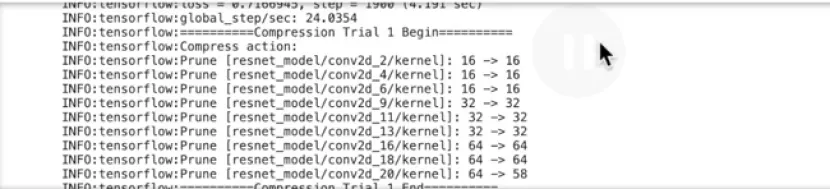
在剪枝训练的过程中没见得固定步骤 Compression 会对模型进行剪枝的操作如果训练 log 中所看到的,在进行剪枝操作时一部分卷积的通道数会被裁剪的更少,比如上图所示从64个通道裁剪到58个通道,在第一个剪枝操作中,只有少部分的卷积层被进行了裁剪,在进行剪枝训练的过程中,剪枝的比例会逐步递增直到最后达到预先设定的减值比例,随着剪枝训练的进行,可以看到转基层被裁剪的通道数越来越多直到最后一次进行,每一层的通道数基本上都被裁剪到了接近一半整体上也符合我们前面设置的50%的台阶.
完成了剪枝训练之后,可以对剪枝后的模型技术进行微调训练。
(3)对剪枝后模型的微调训练
对剪枝后的模型进行微调训练或导出时,搭建模型需采用既定方式完成。
from easycompression.pruning.utils import GapFinetune
pruning_model tf.train.latest_checkpoint(PRUNING_MODEL_DIR)
params {"ft_helper":GapFinetune(pruning_model)}
finetune_estimator build_estimator(FINETUNE_MODEL_DIR,params)
train_and_evaluate(finetune_estimator,train_hooks=[],eval_hooks=[])
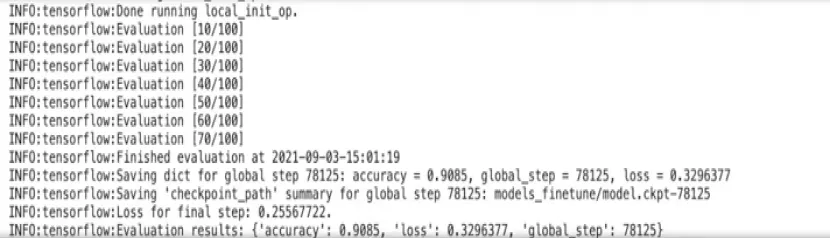
退训练有助于进一步提升模型在数据集上的准确率经过训练之后,模型的准确率达到了90%~91%,准确率也接近剪枝前的模型的准确率,所以可以通过剪枝训练,可以实现将模型剪枝50%之后仍然保持相当的准确率完成训练之后,可以将最终的模型进行导出保存成格式以便进行部署 。
(4).模型导出
input_shape [None,HEIGHT,WIDTH,NUM_CHANNELS]
receiver_fn tf.estimator.export.build_raw_serving_inputreceiver_fn(
{"image":tf.placeholder(tf.float32,input_shape,names"image"))
finetune_estimator.export_savedeodel(EXPORT_DIR,
receiver_fn,strip_default_attrs=True)
对比查看模型剪枝结果,输出各层卷积核个数,
:from collections import OrderedDict
def conv2d_kernels(model_dir):
tf.reset_default_graph()
meta_file ="().meta".format(tf.train.latest_checkpoint(model_dir))
tf.train.import_meta_graph(meta_file)
graph tf.get_default_graph()
kernels OrderedDict()
for op in graph.get_operations():
if op.type =="Conv2D":
kernels [op.namel op.outputs[0].shape.as_list()[-1]
return kernels
origin_kernels conv2d_kernels(MODEL DIR)
final_kernels conv2d_kernels(FINETUNE_MODEL_DIR)
for name in origin_kernels.keys():
print("(\t()\t{)".format(name,origin_kernels [name],final_kernels [name]))
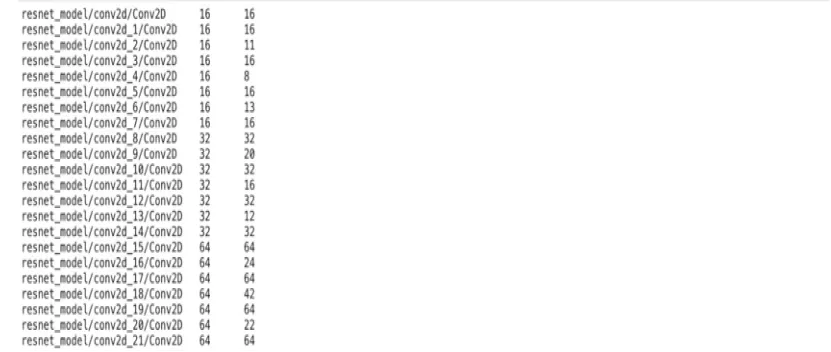
对于剪枝后模型可以查看每一层的通道数,通过对模型进行剪枝训练之后,能够实现对模型大幅度的压缩,并且保持模型具有相当的准确率。