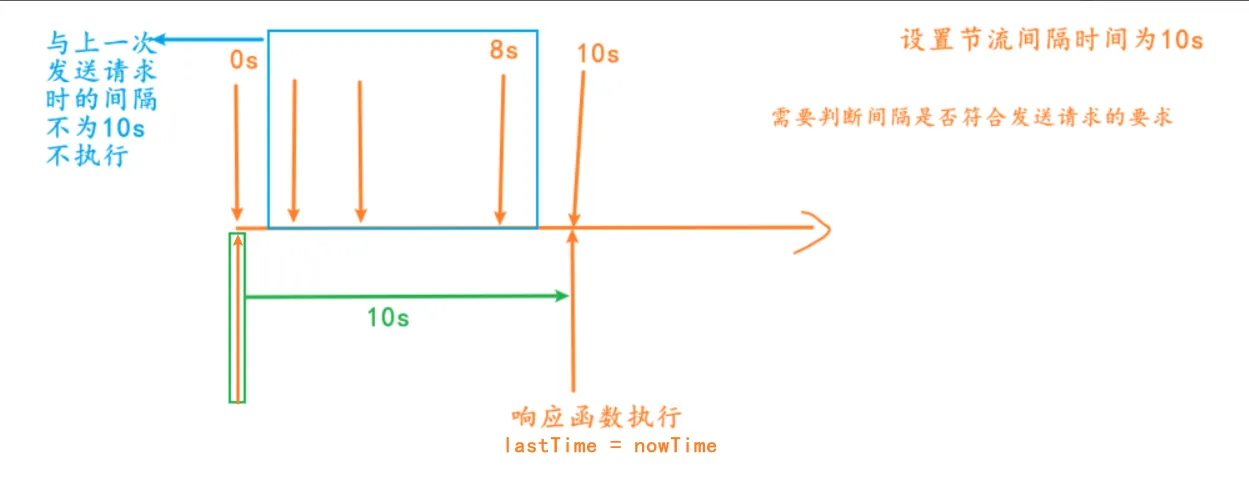
基本实现
console.log(`发送了第${++counter}次网络请求`)}
// 节流处理
inputEl.oninput = throttle(inputChange, 2000)
function throttle(fn, interval, options) {
// 1.记录上一次的开始时间
let lastTime = 0
// 2.事件触发时, 真正执行的函数
const _throttle = function() {
// 2.1.获取当前事件触发时的时间
const nowTime = new Date().getTime()
// 2.2.使用当前触发的时间和之前的时间间隔以及上一次开始的时间, 计算出还剩余多长时间需要去触发函数
const remainTime = interval - (nowTime - lastTime)
if (remainTime <= 0) {
  // 2.3.真正触发函数
  fn()
  // 2.4.保留上次触发的时间
  lastTime = nowTime
}功能优化——leading实现
:::info
有时候我们不想第一次输入的时候就发送请求,这时候我们最好做一个可选项供用户选择第一次的时候是否发送请求(leading: true/false)
:::
function throttle(fn, interval, options = { leading: true }) {
const { leading } = options
let lastTime = 0
const _throttle = function() {
const nowTime = new Date().getTime()
if (!lastTime && !leading) lastTime = nowTime
const remainTime = interval - (nowTime - lastTime)
if (remainTime <= 0) {
  fn()
  lastTime = nowTime
}功能优化——trailing 实现
:::info
用户在10s内输出了一些内容后停止输出,因为 “ 与上一次发送请求时的间隔不为10s“ 而没有发送请求
用户需求:想要在停止输出的10s后发送请求,即使最后一次输出没有达到与上一次发送请求的间隔为10s的要求
:::
function throttle(fn, interval, options = { leading: true, trailing: false }) {
const { leading, trailing } = options
let lastTime = 0
let timer = null
const _throttle = function() {
const nowTime = new Date().getTime()
if (!lastTime && !leading) lastTime = nowTime
const remainTime = interval - (nowTime - lastTime)
if (remainTime <= 0) {
  // 在最后一次达到要求的情况下是不需要加上定时器的,要取消掉
  if (timer) {
    clearTimeout(timer)
    timer = null
  }
  fn()
  lastTime = nowTime
  return  // return是为了防止被加上下面的定时器
}
if (trailing && !timer) {
  timer = setTimeout(() => {
    timer = null
    lastTime = !leading ? 0: new Date().getTime()
    fn()
  }, remainTime)
}功能优化——this、参数改进
:::info
与防抖中this、参数改进使用的方法是一样的,用apply进行绑定this、arg,用剩余函数...arg接收参数
:::
function throttle(fn, interval, options = { leading: true, trailing: false }) {
const { leading, trailing } = options
let lastTime = 0
let timer = null
// 用剩余函数...arg接收参数
const _throttle = function(...args) {
const nowTime = new Date().getTime()
if (!lastTime && !leading) lastTime = nowTime
const remainTime = interval - (nowTime - lastTime)
if (remainTime <= 0) {
  if (timer) {
    clearTimeout(timer)
    timer = null
  }
  //用apply进行绑定this、arg
  fn.apply(this, args)
  lastTime = nowTime
  return
}
if (trailing && !timer) {
  timer = setTimeout(() => {
    timer = null
    lastTime = !leading ? 0: new Date().getTime()
    fn.apply(this, args)
  }, remainTime)
}功能优化——取消功能
:::info
场景:用户在输入东西之后防抖函数发送请求之前按到退出键退出了界面或按了取消按钮,这时我们就不用再发送请求
:::
// 在原来的外部script代码中添加取消功能的代码
_throttle.cancel = function() {
if(timer) clearTimeout(timer)
timer = null
lastTime = 0功能优化——函数返回值
:::info
使用Promise来实现,resolve( ) 将结果进行回调出去
:::
function throttle(fn, interval, options = { leading: true, trailing: false }) {
const { leading, trailing, resultCallback } = options
let lastTime = 0
let timer = null
const _throttle = function(...args) {
return new Promise((resolve, reject) => {
  const nowTime = new Date().getTime()
  if (!lastTime && !leading) lastTime = nowTime
  const remainTime = interval - (nowTime - lastTime)
  if (remainTime <= 0) {
    if (timer) {
      clearTimeout(timer)
      timer = null
    }
    const result = fn.apply(this, args)
    if (resultCallback) resultCallback(result)
    resolve(result)
    lastTime = nowTime
    return
  }
  if (trailing && !timer) {
    timer = setTimeout(() => {
      timer = null
      lastTime = !leading ? 0: new Date().getTime()
      const result = fn.apply(this, args)
      if (resultCallback) resultCallback(result)
      resolve(result)
    }, remainTime)
  }
})
}
_throttle.cancel = function() {
if(timer) clearTimeout(timer)
timer = null
lastTime = 0
}
return _throttle
}