
0x01 Dockerfile文件的编写
1. 编写Dockerfile文件
为了方便,我复制了一份zk集群的文件,取名hbase_sny_all。
a. HBase集群安装步骤
参考文章:D005 复制粘贴玩大数据之安装与配置HBase集群
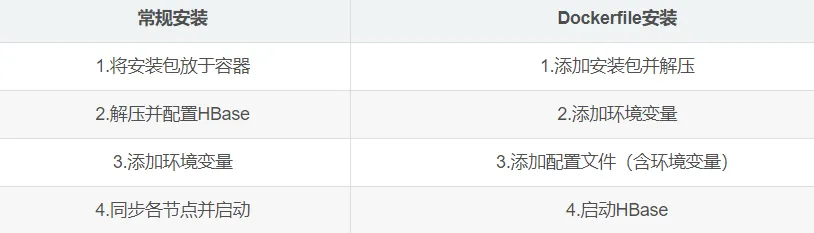
- 其实安装内容都是一样的,这里只是就根据我写的步骤整理了一下
2. 编写Dockerfile文件的关键点
与D004 复制粘贴玩大数据之Dockerfile安装Zookeeper集群的“0x01 3. a. Dockerfile参考文件”相比较,不同点体现在:
具体步骤:
a. 添加安装包并解压(ADD指令会自动解压)
#添加HBase
ADD ./hbase-1.2.6-bin.tar.gz /usr/local/
b. 添加环境变量(HBASE_HOME、PATH)
#HBase环境变量
ENV HBASE_HOME /usr/local/hbase-1.2.6
#PATH里面追加内容
$HBASE_HOME/bin:
c. 添加配置文件(注意给之前的语句加“&& \”,表示未结束)
&& \
mv /tmp/init_zk.sh ~/init_zk.sh && \
mv /tmp/hbase-env.sh $HBASE_HOME/conf/hbase-env.sh && \
mv /tmp/hbase-site.xml $HBASE_HOME/conf/hbase-site.xml  && \
mv /tmp/regionservers $HBASE_HOME/conf/regionservers
d. 添加修改权限语句
#修改init_zk.sh权限为700
RUN chmod 700 init_zk.sh
3. 完整的Dockerfile文件参考
a. 安装hadoop、spark、zookeeper、hbase
FROM ubuntu
MAINTAINER shaonaiyi shaonaiyi@163.com
ENV BUILD_ON 2019-02-13
RUN apt-get update -qqy
RUN apt-get -qqy install vim wget net-tools  iputils-ping  openssh-server
#添加JDK
ADD ./jdk-8u161-linux-x64.tar.gz /usr/local/
#添加hadoop
ADD ./hadoop-2.7.5.tar.gz  /usr/local/
#添加scala
ADD ./scala-2.11.8.tgz /usr/local/
#添加spark
ADD ./spark-2.2.0-bin-hadoop2.7.tgz /usr/local/
#添加zookeeper
ADD ./zookeeper-3.4.10.tar.gz /usr/local/
#添加HBase
ADD ./hbase-1.2.6-bin.tar.gz /usr/local/
ENV CHECKPOINT 2019-02-13
#增加JAVA_HOME环境变量
ENV JAVA_HOME /usr/local/jdk1.8.0_161
#hadoop环境变量
ENV HADOOP_HOME /usr/local/hadoop-2.7.5
#scala环境变量
ENV SCALA_HOME /usr/local/scala-2.11.8
#spark环境变量
ENV SPARK_HOME /usr/local/spark-2.2.0-bin-hadoop2.7
#zk环境变量
ENV ZK_HOME /usr/local/zookeeper-3.4.10
#HBase环境变量
ENV HBASE_HOME /usr/local/hbase-1.2.6
#将环境变量添加到系统变量中
ENV PATH $HBASE_HOME/bin:$ZK_HOME/bin:$SCALA_HOME/bin:$SPARK_HOME/bin:$HADOOP_HOME/bin:$JAVA_HOME/bin:$JAVA_HOME/lib/dt.jar:$JAVA_HOME/lib/tools.jar:$PATH
RUN ssh-keygen -t rsa -f ~/.ssh/id_rsa -P '' && \
    cat ~/.ssh/id_rsa.pub >> ~/.ssh/authorized_keys && \
    chmod 600 ~/.ssh/authorized_keys
#复制配置到/tmp目录
COPY config /tmp
#将配置移动到正确的位置
RUN mv /tmp/ssh_config    ~/.ssh/config && \
    mv /tmp/profile /etc/profile && \
    mv /tmp/masters $SPARK_HOME/conf/masters && \
    cp /tmp/slaves $SPARK_HOME/conf/ && \
    mv /tmp/spark-defaults.conf $SPARK_HOME/conf/spark-defaults.conf && \
    mv /tmp/spark-env.sh $SPARK_HOME/conf/spark-env.sh && \
    mv /tmp/hadoop-env.sh $HADOOP_HOME/etc/hadoop/hadoop-env.sh && \
    mv /tmp/hdfs-site.xml $HADOOP_HOME/etc/hadoop/hdfs-site.xml && \
    mv /tmp/core-site.xml $HADOOP_HOME/etc/hadoop/core-site.xml && \
    mv /tmp/yarn-site.xml $HADOOP_HOME/etc/hadoop/yarn-site.xml && \
    mv /tmp/mapred-site.xml $HADOOP_HOME/etc/hadoop/mapred-site.xml && \
    mv /tmp/master $HADOOP_HOME/etc/hadoop/master && \
    mv /tmp/slaves $HADOOP_HOME/etc/hadoop/slaves && \
    mv /tmp/start-hadoop.sh ~/start-hadoop.sh && \
    mv /tmp/init_zk.sh ~/init_zk.sh && \
    mkdir -p /usr/local/hadoop2.7/dfs/data && \
    mkdir -p /usr/local/hadoop2.7/dfs/name && \
    mkdir -p /usr/local/zookeeper-3.4.10/datadir && \
    mkdir -p /usr/local/zookeeper-3.4.10/log && \
    mv /tmp/zoo.cfg $ZK_HOME/conf/zoo.cfg && \
  mv /tmp/hbase-env.sh $HBASE_HOME/conf/hbase-env.sh && \
  mv /tmp/hbase-site.xml $HBASE_HOME/conf/hbase-site.xml  && \
  mv /tmp/regionservers $HBASE_HOME/conf/regionservers
RUN echo $JAVA_HOME
#设置工作目录
WORKDIR /root
#启动sshd服务
RUN /etc/init.d/ssh start
#修改start-hadoop.sh权限为700
RUN chmod 700 start-hadoop.sh
#修改init_zk.sh权限为700
RUN chmod 700 init_zk.sh
#修改root密码
RUN echo "root:shaonaiyi" | chpasswd
CMD ["/bin/bash"]
0x02 校验HBase集群前准备工作
1. 环境及资源准备
a. 安装Docker
请参考:D001.5 Docker入门(超级详细基础篇)的“0x01 Docker的安装”小节
b. 准备资源
安装ZK集群时的文件:D004 复制粘贴玩大数据之Dockerfile安装Zookeeper集群
c. 准备HBase安装包(hbase-1.2.6-bin.tar.gz),像其他安装包一样
d. 准备HBase的三份配置文件(放于config目录下)
cd /home/shaonaiyi/docker_bigdata/hbase_sny_all/config
配置文件一:vi hbase-env.sh
#
#/**
# * Licensed to the Apache Software Foundation (ASF) under one
# * or more contributor license agreements.  See the NOTICE file
# * distributed with this work for additional information
# * regarding copyright ownership.  The ASF licenses this file
# * to you under the Apache License, Version 2.0 (the
# * "License"); you may not use this file except in compliance
# * with the License.  You may obtain a copy of the License at
# *
# *     http://www.apache.org/licenses/LICENSE-2.0
# *
# * Unless required by applicable law or agreed to in writing, software
# * distributed under the License is distributed on an "AS IS" BASIS,
# * WITHOUT WARRANTIES OR CONDITIONS OF ANY KIND, either express or implied.
# * See the License for the specific language governing permissions and
# * limitations under the License.
# */
# Set environment variables here.
# This script sets variables multiple times over the course of starting an hbase process,
# so try to keep things idempotent unless you want to take an even deeper look
# into the startup scripts (bin/hbase, etc.)
# The java implementation to use.  Java 1.7+ required.
# export JAVA_HOME=/usr/java/jdk1.6.0/
export JAVA_HOME=/usr/local/jdk1.8.0_161/
export HBASE_CLASSPATH=/usr/local/hadoop-2.7.5/etc/hadoop
export HBASE_MANAGES_ZK=false
# Extra Java CLASSPATH elements.  Optional.
# export HBASE_CLASSPATH=
# The maximum amount of heap to use. Default is left to JVM default.
# export HBASE_HEAPSIZE=1G
# Uncomment below if you intend to use off heap cache. For example, to allocate 8G of
# offheap, set the value to "8G".
# export HBASE_OFFHEAPSIZE=1G
# Extra Java runtime options.
# Below are what we set by default.  May only work with SUN JVM.
# For more on why as well as other possible settings,
# see http://wiki.apache.org/hadoop/PerformanceTuning
export HBASE_OPTS="-XX:+UseConcMarkSweepGC"
# Configure PermSize. Only needed in JDK7. You can safely remove it for JDK8+
#export HBASE_MASTER_OPTS="$HBASE_MASTER_OPTS -XX:PermSize=128m -XX:MaxPermSize=128m"
#export HBASE_REGIONSERVER_OPTS="$HBASE_REGIONSERVER_OPTS -XX:PermSize=128m -XX:MaxPermSize=128m"
# Uncomment one of the below three options to enable java garbage collection logging for the server-side processes.
# This enables basic gc logging to the .out file.
# export SERVER_GC_OPTS="-verbose:gc -XX:+PrintGCDetails -XX:+PrintGCDateStamps"
# This enables basic gc logging to its own file.
# If FILE-PATH is not replaced, the log file(.gc) would still be generated in the HBASE_LOG_DIR .
# export SERVER_GC_OPTS="-verbose:gc -XX:+PrintGCDetails -XX:+PrintGCDateStamps -Xloggc:<FILE-PATH>"
# This enables basic GC logging to its own file with automatic log rolling. Only applies to jdk 1.6.0_34+ and 1.7.0_2+.
# If FILE-PATH is not replaced, the log file(.gc) would still be generated in the HBASE_LOG_DIR .
# export SERVER_GC_OPTS="-verbose:gc -XX:+PrintGCDetails -XX:+PrintGCDateStamps -Xloggc:<FILE-PATH> -XX:+UseGCLogFileRotation -XX:NumberOfGCLogFiles=1 -XX:GCLogFileSize=512M"
# Uncomment one of the below three options to enable java garbage collection logging for the client processes.
# This enables basic gc logging to the .out file.
# export CLIENT_GC_OPTS="-verbose:gc -XX:+PrintGCDetails -XX:+PrintGCDateStamps"
# This enables basic gc logging to its own file.
# If FILE-PATH is not replaced, the log file(.gc) would still be generated in the HBASE_LOG_DIR .
# export CLIENT_GC_OPTS="-verbose:gc -XX:+PrintGCDetails -XX:+PrintGCDateStamps -Xloggc:<FILE-PATH>"
# This enables basic GC logging to its own file with automatic log rolling. Only applies to jdk 1.6.0_34+ and 1.7.0_2+.
# If FILE-PATH is not replaced, the log file(.gc) would still be generated in the HBASE_LOG_DIR .
# export CLIENT_GC_OPTS="-verbose:gc -XX:+PrintGCDetails -XX:+PrintGCDateStamps -Xloggc:<FILE-PATH> -XX:+UseGCLogFileRotation -XX:NumberOfGCLogFiles=1 -XX:GCLogFileSize=512M"
# See the package documentation for org.apache.hadoop.hbase.io.hfile for other configurations
# needed setting up off-heap block caching.
# Uncomment and adjust to enable JMX exporting
# See jmxremote.password and jmxremote.access in $JRE_HOME/lib/management to configure remote password access.
# More details at: http://java.sun.com/javase/6/docs/technotes/guides/management/agent.html
# NOTE: HBase provides an alternative JMX implementation to fix the random ports issue, please see JMX
# section in HBase Reference Guide for instructions.
# export HBASE_JMX_BASE="-Dcom.sun.management.jmxremote.ssl=false -Dcom.sun.management.jmxremote.authenticate=false"
# export HBASE_MASTER_OPTS="$HBASE_MASTER_OPTS $HBASE_JMX_BASE -Dcom.sun.management.jmxremote.port=10101"
# export HBASE_REGIONSERVER_OPTS="$HBASE_REGIONSERVER_OPTS $HBASE_JMX_BASE -Dcom.sun.management.jmxremote.port=10102"
# export HBASE_THRIFT_OPTS="$HBASE_THRIFT_OPTS $HBASE_JMX_BASE -Dcom.sun.management.jmxremote.port=10103"
# export HBASE_ZOOKEEPER_OPTS="$HBASE_ZOOKEEPER_OPTS $HBASE_JMX_BASE -Dcom.sun.management.jmxremote.port=10104"
# export HBASE_REST_OPTS="$HBASE_REST_OPTS $HBASE_JMX_BASE -Dcom.sun.management.jmxremote.port=10105"
# File naming hosts on which HRegionServers will run.  $HBASE_HOME/conf/regionservers by default.
# export HBASE_REGIONSERVERS=${HBASE_HOME}/conf/regionservers
# Uncomment and adjust to keep all the Region Server pages mapped to be memory resident
#HBASE_REGIONSERVER_MLOCK=true
#HBASE_REGIONSERVER_UID="hbase"
# File naming hosts on which backup HMaster will run.  $HBASE_HOME/conf/backup-masters by default.
# export HBASE_BACKUP_MASTERS=${HBASE_HOME}/conf/backup-masters
# Extra ssh options.  Empty by default.
# export HBASE_SSH_OPTS="-o ConnectTimeout=1 -o SendEnv=HBASE_CONF_DIR"
# Where log files are stored.  $HBASE_HOME/logs by default.
# export HBASE_LOG_DIR=${HBASE_HOME}/logs
# Enable remote JDWP debugging of major HBase processes. Meant for Core Developers
# export HBASE_MASTER_OPTS="$HBASE_MASTER_OPTS -Xdebug -Xrunjdwp:transport=dt_socket,server=y,suspend=n,address=8070"
# export HBASE_REGIONSERVER_OPTS="$HBASE_REGIONSERVER_OPTS -Xdebug -Xrunjdwp:transport=dt_socket,server=y,suspend=n,address=8071"
# export HBASE_THRIFT_OPTS="$HBASE_THRIFT_OPTS -Xdebug -Xrunjdwp:transport=dt_socket,server=y,suspend=n,address=8072"
# export HBASE_ZOOKEEPER_OPTS="$HBASE_ZOOKEEPER_OPTS -Xdebug -Xrunjdwp:transport=dt_socket,server=y,suspend=n,address=8073"
# A string representing this instance of hbase. $USER by default.
# export HBASE_IDENT_STRING=$USER
# The scheduling priority for daemon processes.  See 'man nice'.
# export HBASE_NICENESS=10
# The directory where pid files are stored. /tmp by default.
# export HBASE_PID_DIR=/var/hadoop/pids
# Seconds to sleep between slave commands.  Unset by default.  This
# can be useful in large clusters, where, e.g., slave rsyncs can
# otherwise arrive faster than the master can service them.
# export HBASE_SLAVE_SLEEP=0.1
# Tell HBase whether it should manage it's own instance of Zookeeper or not.
# export HBASE_MANAGES_ZK=true
# The default log rolling policy is RFA, where the log file is rolled as per the size defined for the
# RFA appender. Please refer to the log4j.properties file to see more details on this appender.
# In case one needs to do log rolling on a date change, one should set the environment property
# HBASE_ROOT_LOGGER to "<DESIRED_LOG LEVEL>,DRFA".
# For example:
# HBASE_ROOT_LOGGER=INFO,DRFA
# The reason for changing default to RFA is to avoid the boundary case of filling out disk space as
# DRFA doesn't put any cap on the log size. Please refer to HBase-5655 for more context.
配置文件二:vi hbase-site.xml
<property>
  <name>hbase.rootdir</name>
  <value>hdfs://hadoop-master:9000/hbase</value>
</property>
<property>
  <name>hbase.cluster.distributed</name>
  <value>true</value>
</property>
<property>
  <name>hbase.zookeeper.quorum</name>
  <value>hadoop-master,hadoop-slave1,hadoop-slave2</value>
</property>
配置文件三:vi regionservers
hadoop-slave1
hadoop-slave2
PS:添加下面两行,配置环境变量:
vi profile
export HBASE_HOME=/usr/local/hbase-1.2.6
export PATH=$PATH:$HBASE_HOME/bin
初始化zookeeper的脚本(后面三句启动命令已从之前的start-hadoop.sh剪切到这里):
vi init_zk.sh
#!/bin/bash
ssh root@hadoop-master "echo '0' >> $ZK_HOME/datadir/myid"
ssh root@hadoop-slave1 "echo '1' >> $ZK_HOME/datadir/myid"
ssh root@hadoop-slave2 "echo '2' >> $ZK_HOME/datadir/myid"
#修改需要配置及启动zk命令的命令
ssh root@hadoop-master "source /etc/profile;/usr/local/zookeeper-3.4.10/bin/zkServer.sh start"
ssh root@hadoop-slave1 "source /etc/profile;/usr/local/zookeeper-3.4.10/bin/zkServer.sh start"
ssh root@hadoop-slave2 "source /etc/profile;/usr/local/zookeeper-3.4.10/bin/zkServer.sh start"
0x03 校验是否HBase安装成功
1. 修改生成容器脚本
a. 修改start_containers.sh文件(样本镜像名称成shaonaiyi/hbase、ip)
本人把里面的三个shaonaiyi/zk改为了shaonaiyi/hbase,ip最后一位加了1,如:
172.21.0.12改为了172.21.0.22等等~
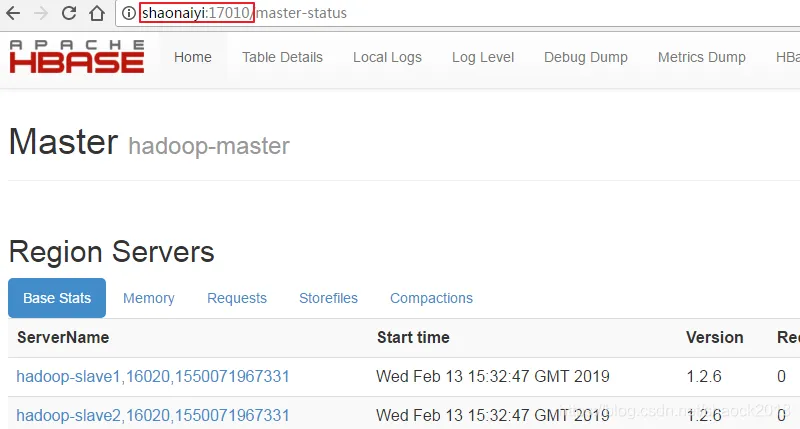
将hbase的16010端口暴露出去,加上:
\-p 17010:16010
ps:当然,你可以新建一个新的网络,换ip,这里偷懒,用了旧的网络,只换了ip
2. 生成镜像
a. 删除之前的spark集群容器(节省资源),如已删可省略此步
cd /home/shaonaiyi/docker_bigdata/zk_sny_all/config/
chmod 700 stop_containers.sh
./stop_containers.sh
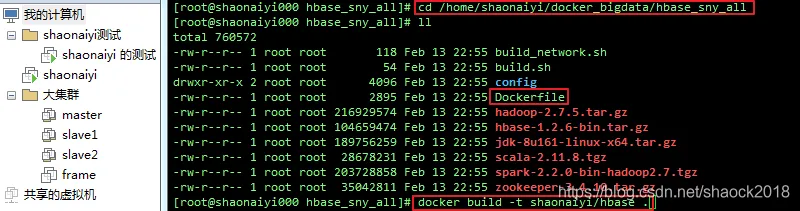
b. 生成装好hadoop、spark、zookeeper、hbase的镜像(如果之前shaonaiyi/spark未删除,则此次会快很多)
cd /home/shaonaiyi/docker_bigdata/hbase_sny_all
docker build -t shaonaiyi/hbase .
2. 生成容器
a. 生成容器(start_containers.sh如果没权限则给权限):
config/start_containers.sh
b. 进入master容器
sh ~/master.sh
3. 启动集群并查看进程
a. 启动集群,初始化zk配置:

./start-hadoop.sh
./init_zk.sh
之前出现了个问题(已修复):
在windows上写了脚本放到linux上执行报错

解决方法是:
vi init_zk.sh
用命令:set ff可以看到fileformat=dos
修改::set ff=unix,然后wq!保存退出即可。
重新执行:
./init_zk.sh
b. 启动HBase
start-hbase.sh
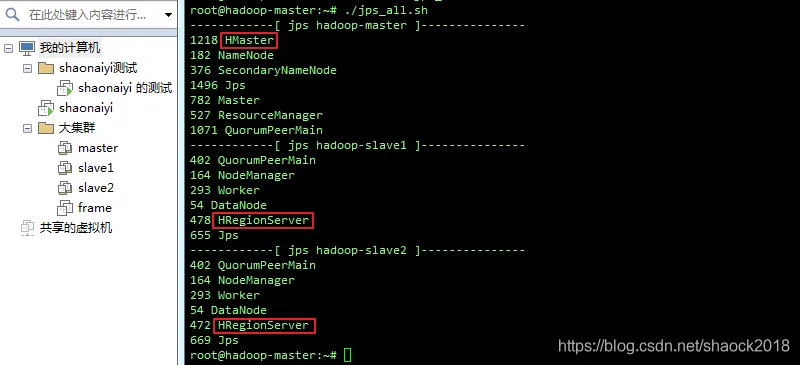
c. 执行查看进程
./jps_all.sh
请参考:D002 复制粘贴玩大数据之便捷配置的“0x03 1. jps_all.sh脚本”
d. 使用Web UI界面一样可以打开:
0xFF 总结
- 组件越来越多,与上一篇文章相比,又复杂了一些,于是又迭代了一下,其实很多东西并没有这么麻烦,离一键部署大数据集群不远了。
- Dockerfile常用指令,请参考文章:D004.1 Dockerfile例子详解及常用指令
