Mako 是用Python编写的模板引擎。从概念上讲,mako是一种嵌入式Python(即Python Server Page)语言,模版被编译成Python代码,使用python解释器执行。mako用于外网热门网站 reddit.com ,同时也是Pylons和Pyramid Web框架默认模板语言。学习mako,可以帮助我们加深对python编译和执行的理解。本文包括下面几个部分:
- 基础知识
- 抽象语法树 AST
- 动态编译 compile
- mako 项目结构
- Template API 介绍
- 模版解析
- 模版编译
- 模版渲染
- 小结
- 小技巧
基础知识
mako 模版引擎使用了一些编译原理相关的知识:语法解析,代码生成和编译执行等,了解这些基础知识才可以更好的读懂 mako 代码。
抽象语法树 AST
在计算机科学中,抽象语法树(Abstract Syntax Tree,AST),或简称语法树(Syntax tree),是源代码语法结构的一种抽象表示。它以树状的形式表现编程语言的语法结构,树上的每个节点都表示源代码中的一种结构。之所以说语法是“抽象”的,是因为这里的语法并不会表示出真实语法中出现的每个细节。
python标准库中 ast 模块可以帮助生成AST:
import ast
expr = """x,y =1,2\nprint(x+y)"""
ast_tree = ast.parse(expr)
print(type(ast_tree))
print(ast.dump(ast_tree))  # python 3.9 可以很好的格式化输出ast
生成的AST结构如下:
Module(
  body=[
    Assign(
      targets=[Tuple(elts=[Name(id='x', ctx=Store()), Name(id='y', ctx=Store())], ctx=Store())],
      value=Tuple(elts=[Constant(value=1, kind=None), Constant(value=2, kind=None)], ctx=Load()),
      type_comment=None),
    Expr(
      value=Call(func=Name(id='print', ctx=Load()), args=[BinOp(left=Name(id='x', ctx=Load()), op=Add(), right=Name(id='y', ctx=Load()))], keywords=[])
    )
  ],
  type_ignores=[]
)
使用参考链接中的可视化工具,这颗AST大概长这样:
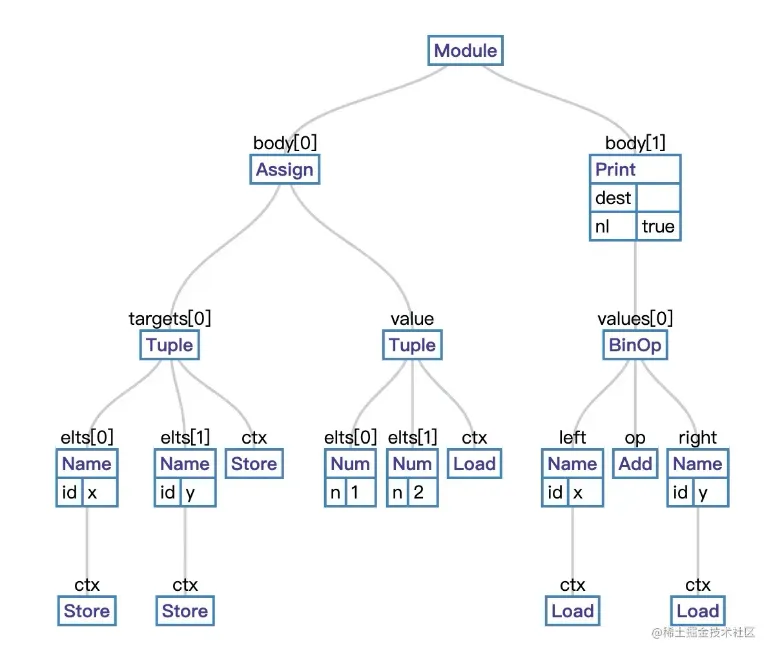
ast和python版本有关,图中内容是python2版本,所以和日志中的内容略有不同
动态编译 compile
python支持对文本进行动态编译执行,请看下面示例:
import types
source = """def add(x,y):\n    return x+y"""  # 函数定义的表达式
mod = types.ModuleType("test")  # 动态创建模块
print(mod, type(mod))
code = compile(source, "test", "exec")  # 编译表达式
print(code, type(code))
exec(code, mod.__dict__, mod.__dict__)  # 动态执行代码
result = mod.add(1, 2)  # 调用动态生成的add函数
print(result, type(result))
执行日志:
<module 'test'> <class 'module'>
<code object <module> at 0x7ff3b02649d0, file "test", line 1> <class 'code'>
3 <class 'int'>
结合日志可以知道, 动态编译执行主要是下面3步:
- 使用 types.ModuleType 创建模块
- 使用 compile 编译表达式链接到模块
- 使用 exec 执行编译后的byte-code
理解上面代码后,就可以知道模版引擎的工作就是将模版的代码解析转换成python文本,再动态的编译执行。
mako 项目结构
本文选择的mako源码版本是 1.1.0,不算ext扩展包,接近7000行代码,代码量比较大,相对也复杂一些,会有一点点挑战。源码目录如下:
| 文件 | 描述 |
| _ast_util.py | ast工具类 |
| ast.py | ast类 |
| cache.py | 缓存实现 |
| cmd.py | 命令行实现 |
| codegen.py | python代码生成 |
| compat.py | python2和python3的适配类 |
| exceptions.py | 异常 |
| filters.py | 过滤器 |
| lexer.py | 词法分析 |
| lookup.py | 模版文件查找 |
| parsetree.py | 解析代码节点 |
| pygen.py | python代码格式生成 |
| pyparser.py | 解析器 |
| runtime.py | 模版运行时 |
| template.py | 模版API |
| util.py | 工具类 |
| ext | 扩展包 |
Template API
按照惯例,从API示例作为入口进入项目:
mytemplate = Template("hello, ${name}!")  # 1. 创建模版对象
print(mytemplate._code)
result=mytemplate.render(name="shawn")  # 2. 渲染模版对象
print(result)
Template的构造函数不算复杂,摘剪示例相关代码如下:
class Template(object):
    lexer_cls = Lexer  # 词法分析类
    def __init__(
        self,
        text=None,  # 模版文本
        filename=None,
        uri=None,
        ...
    ):
    if uri:
        ...
    else:
        self.module_id = "memory:" + hex(id(self))
        self.uri = self.module_id
    if text is not None:
        (code, module) = _compile_text(self, text, filename)  # 编译模版文本
        self._code = code
        self._source = text
    self.module = module
    self.callable_ = self.module.render_body  # 注意 render_body 函数
模版文本编译主要过程是这样的:
def _compile(template, text, filename, generate_magic_comment):
    lexer = template.lexer_cls(
        text,
        filename,
        disable_unicode=template.disable_unicode,
        input_encoding=template.input_encoding,
        preprocessor=template.preprocessor,
    )
    node = lexer.parse()  # 词法解析出节点
    source = codegen.compile(
        node,
        template.uri,
        filename,
        ...
    )  # 生成python代码
    return source, lexer
def _compile_text(template, text, filename):
    identifier = template.module_id
    source, lexer = _compile(
        template,
        text,
        filename,
        generate_magic_comment=template.disable_unicode,
    )
    cid = identifier
    module = types.ModuleType(cid)
    code = compile(source, cid, "exec")  # 编译byte-code
    exec(code, module.__dict__, module.__dict__)  # 执行后,动态创建函数链接到module
    return (source, module)
- 使用词法解析器将模版解析成node
- 使用代码生成器将node转换成python的源码
- 使用compile将源码编译成byte-code
- 使用exec执行byte-code
模版解析
词法分析可以这样使用:
from mako.lexer import Lexer
lexer = Lexer("hello, ${name}!")
node = lexer.parse()
print(lexer.template)
日志显示模版解析后得到2个 Text 节点和1个 Expression 节点,每个节点包括节点类型,名称及在模版文件中的行列位置:
TemplateNode({}, [Text('hello, ', (1, 1)), Expression('name', [], (1, 8)), Text('!', (1, 15))])
Lexer构造函数:
class Lexer(object):
    def __init__(
        self,
        text,
        filename=None,
        disable_unicode=False,
        input_encoding=None,
        preprocessor=None,
    ):
        self.text = text  # 文本
        self.filename = filename
        self.template = parsetree.TemplateNode(self.filename) # 模版节点
        self.matched_lineno = 1
        self.matched_charpos = 0
        self.lineno = 1
        self.match_position = 0
        self.tag = []  # 节点
        self.control_line = []
        self.ternary_stack = []
        self.disable_unicode = disable_unicode
        self.encoding = input_encoding
        ...
对模版文本进行解析:
def parse(self):
    self.textlength = len(self.text)
    while True:  # 解析模版文件
        if self.match_position > self.textlength:
            break
        if self.match_end():
            break
        if self.match_expression():  # 匹配表达式
            continue
        if self.match_control_line(): # 匹配控制语句
            continue
        if self.match_comment(): # 匹配注释
            continue
        if self.match_tag_start(): # 标签起点
            continue
        if self.match_tag_end(): # 标签终点
            continue
        if self.match_python_block(): # 匹配代码块
            continue
        if self.match_text():  # 匹配文本
            continue
    return self.template
配合下面的模版文件更容易理解parse过程:
<%inherit file="base.html"/>
<%
    rows = [[v for v in range(0,10)] for row in range(0,10)]
%>
<table>
    % for row in rows:
        ${makerow(row)}  # expression
    % endfor
</table>
<%def name="makerow(row)">
    <tr>
    % for name in row:
        <td>${name}</td>
    % endfor
    </tr>
</%def>
第一个示例中得到2个Txt和1个expression,其中解析文本函数全文:
def match_text(self):
    match = self.match(
        r"""
            (.*?)         # anything, followed by:
            (
             (?<=\n)(?=[ \t]*(?=%|\#\#)) # an eval or line-based
                                         # comment preceded by a
                                         # consumed newline and whitespace
             |
             (?=\${)      # an expression
             |
             (?=</?[%&])  # a substitution or block or call start or end
                          # - don't consume
             |
             (\\\r?\n)    # an escaped newline  - throw away
             |
             \Z           # end of string
            )""",
        re.X | re.S,
    )
    if match:
        text = match.group(1)  # 只解析一个
        if text:
            self.append_node(parsetree.Text, text)  #  生成Text节点
        return True
    else:
        return False
match是通用的解析函数,主要是正则查找目标对象,并且进行游标移位操作:
def match(self, regexp, flags=None):
    mp = self.match_position
    match = reg.match(self.text, self.match_position) # 解析
    if match:
        (start, end) = match.span()
        if end == start:
            self.match_position = end + 1 # 移位
        else:
            self.match_position = end
        ...
    return match
解析表达式全文:
def match_expression(self):
    match = self.match(r"\${")
    if match:
        line, pos = self.matched_lineno, self.matched_charpos
        text, end = self.parse_until_text(True, r"\|", r"}")
        if end == "|":
            escapes, end = self.parse_until_text(True, r"}")
        else:
            escapes = ""
        text = text.replace("\r\n", "\n")
        self.append_node(
            parsetree.Expression,
            text,
            escapes.strip(),
            lineno=line,
            pos=pos,
        ) # 生成Expression节点
        return True
    else:
        return False
添加节点函数,比较复杂,主要逻辑是生成各种Node对象:
def append_node(self, nodecls, *args, **kwargs):
    kwargs.setdefault("source", self.text)
    kwargs.setdefault("lineno", self.matched_lineno)
    kwargs.setdefault("pos", self.matched_charpos)
    kwargs["filename"] = self.filename
    node = nodecls(*args, **kwargs)  # 生成节点对象
    if len(self.tag):  # tag是互相匹配的
        self.tag[-1].nodes.append(node)
    else:
        self.template.nodes.append(node)
    if self.control_line:  # 条件语句
        ...
    if isinstance(node, parsetree.Tag): # tag
        ...
    elif isinstance(node, parsetree.ControlLine):
        ...
Node节点根类:
class Node(object):
    def __init__(self, source, lineno, pos, filename):
        self.source = source  # 源码
        self.lineno = lineno  # 行
        self.pos = pos # 列
        self.filename = filename
    def get_children(self):
        return []
    def accept_visitor(self, visitor):
        def traverse(node):  # 递归节点
            for n in node.get_children():
                n.accept_visitor(visitor)
        method = getattr(visitor, "visit" + self.__class__.__name__, traverse)  # 动态函数
        method(self)
class TemplateNode(Node):
    def __init__(self, filename):
        super(TemplateNode, self).__init__("", 0, 0, filename)
        self.nodes = []  # 所有节点
    def get_children(self):
        return self.nodes
    ...
节点类型清单:
- ControlLine
- Text
- Code
- Comment
- Expression
- Tag
- IncludeTag
- NamespaceTag
- TextTag
- DefTag
- BlockTag
- CallTag
- CallNamespaceTag
- InheritTag
- PageTag
我们选择文本节点和表达式节点进行学习。文本节点非常简单,仅存储文本内容:
class Text(Node):
    def __init__(self, content, **kwargs):
        super(Text, self).__init__(**kwargs)
        self.content = content
    ...
表达式节点相对复杂一些:
class Expression(Node):
    def __init__(self, text, escapes, **kwargs):
        super(Expression, self).__init__(**kwargs)
        self.text = text  # 文本
        ...
        self.code = ast.PythonCode(text, **self.exception_kwargs)  # 代码片段
python代码片段:
class PythonCode(object):
    def __init__(self, code, **exception_kwargs):
        self.code = code
         # represents all identifiers which are assigned to at some point in
        # the code
        self.declared_identifiers = set()  # 重要的集合,没想好中文,请看英文
        # represents all identifiers which are referenced before their
        # assignment, if any
        self.undeclared_identifiers = set() # 同上
        if isinstance(code, compat.string_types):
            expr = pyparser.parse(code.lstrip(), "exec", **exception_kwargs)
        f = pyparser.FindIdentifiers(self, **exception_kwargs)
        f.visit(expr)  # 递归解析ast
每个代码片段都会解析成python的ast:
# pyparser
def parse(code, mode="exec", **exception_kwargs):
    return _ast_util.parse(code, "<unknown>", mode)
# _ast_util
def parse(expr, filename="<unknown>", mode="exec"):
    """Parse an expression into an AST node."""
    return compile(expr, filename, mode, PyCF_ONLY_AST)
再看一下示例2:
import ast
expr = """hello, """  # 文本节点
ast_tree = ast.parse(expr)
print(ast.dump(ast_tree))
# 输出
Module(body=[Expr(value=Tuple(elts=[Name(id='hello', ctx=Load())], ctx=Load()))], type_ignores=[])
识别标志:
# pyparser
class FindIdentifiers(_ast_util.NodeVisitor):
    def __init__(self, listener, **exception_kwargs):
        self.listener = listener  # PythonCode对象
    def visit_Name(self, node):
        if isinstance(node.ctx, _ast.Store): # 值
            self._add_declared(node.id)
        elif (
            node.id not in reserved
            and node.id not in self.listener.declared_identifiers
            and node.id not in self.local_ident_stack
        ):  # 变量
            self.listener.undeclared_identifiers.add(node.id)
class FindTuple(_ast_util.NodeVisitor):
    def __init__(self, listener, code_factory, **exception_kwargs):
        self.listener = listener
        self.exception_kwargs = exception_kwargs
        self.code_factory = code_factory
    def visit_Tuple(self, node):
        for n in node.elts:
            ...
            self.listener.args.append(ExpressionGenerator(n).value())  # 生成python代码
            ...
# _ast_util.py
class NodeVisitor(object):
    def get_visitor(self, node):
        method = "visit_" + node.__class__.__name__
        return getattr(self, method, None)  # 动态获取不同ast对象的方法
    def visit(self, node):
        """Visit a node."""
        f = self.get_visitor(node)
        if f is not None:
            return f(node)
        return self.generic_visit(node)  # 递归
    def generic_visit(self, node):
        """Called if no explicit visitor function exists for a node."""
        for field, value in iter_fields(node):
            if isinstance(value, list):
                for item in value:
                    if isinstance(item, AST):
                        self.visit(item)
            elif isinstance(value, AST):
                self.visit(value)
模版解析成node节点,每个node节点包含python标准的的ast对象。
模版编译
前面lexer处理模版文件得到node,node再被转换成python代码:
from mako import codegen
source = codegen.compile(node, "a", default_filters=[])
print(source)
日志如下:
1  from mako import runtime, filters, cache
 2  UNDEFINED = runtime.UNDEFINED
 3  STOP_RENDERING = runtime.STOP_RENDERING
 4  __M_dict_builtin = dict
 5  __M_locals_builtin = locals
 6  _magic_number = 10
 7  _modified_time = 1615385051.364234
 8  _enable_loop = True
 9  _template_filename = None
10  _template_uri = 'a'
11  _source_encoding = None
12  _exports = []
13
14
15  def render_body(context,**pageargs):
16      __M_caller = context.caller_stack._push_frame()
17      try:
18          __M_locals = __M_dict_builtin(pageargs=pageargs)
19          name = context.get('name', UNDEFINED)  # 从context中获取name属性值
20          __M_writer = context.writer()  # 重定向输出流
21          __M_writer('hello, ')  # 输出文本
22          __M_writer(name) # 输出变量
23          __M_writer('!')
24          return ''
25      finally:
26          context.caller_stack._pop_frame()
27
28
29  """
30  __M_BEGIN_METADATA
31  {"filename": null, "uri": "a", "source_encoding": null, "line_map": {"15": 0, "21": 1, "22": 1, "23": 1, "29": 23}}
32  __M_END_METADATA
33  """
source是一段python代码:
- 定义依赖 from mako import ...
- 定义常量 UNDEFINED 和 STOP_RENDERING
- 定义一些私有的变量 _template_filename 等
- 定义了一个关键的 render_body 函数,函数名称和我们在Template中看到
self.callable_ = self.module.render_body一致 - 定义了一段注释
模版的编译过程是这样的:
def compile(
    node,
    uri,
    ...
):
    buf = util.FastEncodingBuffer()  # 重定向的流
    printer = PythonPrinter(buf)  # printer
    _GenerateRenderMethod(  # 生成render函数
        printer,
        _CompileContext(  # 编译上下文
            uri,
            filename,
            ...
        ),
        node,
    )
    return buf.getvalue()  # 获取buffer的值:
buffer实现比较简单
class FastEncodingBuffer(object):
    def __init__(self, encoding=None, errors="strict", as_unicode=False):
        self.data = collections.deque()  # 使用双端队列模拟输出流
        self.delim = ""
        ...
        self.write = self.data.append
    def getvalue(self):
        ...
        return self.delim.join(self.data)
重点就是_GenerateRenderMethod函数
class _GenerateRenderMethod(object):
    """A template visitor object which generates the
       full module source for a template.
    """
    def __init__(self, printer, compiler, node):
        self.printer = printer
        self.compiler = compiler
        self.node = node
        ...
        # 生成render函数
        self.write_render_callable(
            pagetag or node, name, args, buffered, filtered, cached
        )
write_render_callable的实现:
def write_render_callable(
    self, node, name, args, buffered, filtered, cached
):
    self.printer.start_source(node.lineno)
    self.printer.writelines(
        "def %s(%s):" % (name, ",".join(args)),
        # push new frame, assign current frame to __M_caller
        "__M_caller = context.caller_stack._push_frame()",
        "try:",
    )
    ...
    self.write_variable_declares(self.identifiers, toplevel=True)
    for n in self.node.nodes:
        n.accept_visitor(self) # 遍历节点树
    self.write_def_finish(self.node, buffered, filtered, cached)
    self.printer.writeline(None)
    self.printer.write_blanks(2)
这里配合前面生成的python源码看,就容易理解
将node转换成python源码:
# parsetree
def accept_visitor(self, visitor):
    def traverse(node):
        for n in node.get_children():
            n.accept_visitor(visitor)
    method = getattr(visitor, "visit" + self.__class__.__name__, traverse)
    method(self)
# _ast_utl
class SourceGenerator(NodeVisitor):
    def visit_Name(self, node): # 写name
        self.write(node.id)
    def visit_FunctionDef(self, node): # 写函数
        self.newline(n=2)
        self.decorators(node)
        self.newline()
        self.write("def %s(" % node.name)
        self.signature(node.args)
        self.write("):")
        self.body(node.body)
    ...
模版渲染
使用这样的伪代码,就可以执行之前生成的 render—body 函数:
context = {"name":"shawn"}
self.callable_(context)
render正是做这样的工作,只是过程更复杂一些:
def render(self, *args, **data):
    return runtime._render(self, self.callable_, args, data)
def _render(template, callable_, args, data, as_unicode=False):
    buf = util.FastEncodingBuffer(
        as_unicode=as_unicode,
        encoding=template.output_encoding,
        errors=template.encoding_errors,
    )  # 重定向输出
    context = Context(buf, **data)  # 执行上下文
    _render_context(
        template,
        callable_,
        context,
        *args,
        **_kwargs_for_callable(callable_, data)
    )  # 执行渲染
    return context._pop_buffer().getvalue()  # 获取渲染结果
FastEncodingBuffer在前面代码生成的时候已经介绍,我们只需要了解runtime.Context类和_render_context方法。runtime.Context涉及的代码:
# runtime.py
class Context(object):
    def __init__(self, buffer, **data):
        self._buffer_stack = [buffer]
        self._data = data
        ....
     def __getitem__(self, key): # 代理data的值
        if key in self._data:
            return self._data[key]
        else:
            return compat_builtins.__dict__[key]
    def writer(self):
        return self._buffer_stack[-1].write # 获取输出流
    def _pop_buffer(self):
        return self._buffer_stack.pop()
_render_context的主要逻辑和我们推断的伪代码一样,就是执行callable_函数:
def _render_context(tmpl, callable_, context, *args, **kwargs):
    ...
    callable_(context, *args, **kwargs)
小结
mako 模版功能较多,我们只是学习了最简单的变量格式输出: "hello, ${name}!".format(name="shawn") 过程。更复杂的条件分支,函数,循环等都没有深入研究。通过这个简单的示例,我们已经知道mako模版的核心逻辑流程:
- 使用lexer对模版解析生成node节点
- 将node节点转换成python源码并编译执行得到渲染函数
- 调用渲染函数完成模版渲染
由于时间紧张,能力有限,mako更深入的解析并未完成,希望下次会深入更多细节实现。
小技巧
使用 StringIO 可以重定向print的输出:
import io
output = io.StringIO()
output.write('First line.\n')
print('Second line.', file=output)
# Retrieve file contents -- this will be
# 'First line.\nSecond line.\n'
contents = output.getvalue()
# Close object and discard memory buffer --
# .getvalue() will now raise an exception.
output.close()
使用 inspect 可以反射函数的参数信息:
import inspect
def inspect_getargspec(func):
    if inspect.ismethod(func):
        func = func.__func__
    if not inspect.isfunction(func):
        raise TypeError("{!r} is not a Python function".format(func))
    co = func.__code__
    if not inspect.iscode(co):
        raise TypeError("{!r} is not a code object".format(co))
    nargs = co.co_argcount
    names = co.co_varnames
    nkwargs = co.co_kwonlyargcount if py3k else 0
    args = list(names[:nargs])
    nargs += nkwargs
    varargs = None
    if co.co_flags & inspect.CO_VARARGS:
        varargs = co.co_varnames[nargs]
        nargs = nargs + 1
    varkw = None
    if co.co_flags & inspect.CO_VARKEYWORDS:
        varkw = co.co_varnames[nargs]
    return ArgSpec(args, varargs, varkw, func.__defaults__)
def _kwargs_for_include(callable_, data, **kwargs):
    argspec = compat.inspect_getargspec(callable_)  # 反射获取函数参数
    namedargs = argspec[0] + [v for v in argspec[1:3] if v is not None]
    for arg in namedargs:
        if arg != "context" and arg in data and arg not in kwargs:
            kwargs[arg] = data[arg]
    return kwargs
参考链接
- docs.python.org/zh-cn/3/lib…
- vpyast.appspot.com/
- zh.wikipedia.org/wiki/%E8%AF…
- www.makotemplates.org/