
迎接新的一波更新吧,这次是基于图灵机器人的一个api接口的测试。
这是api的接口:http://www.tuling123.com/openapi/api
我们试着通过浏览器直接访问看下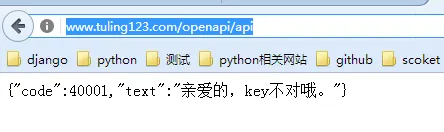
这是反馈的结果,那么我们来看下图灵机器人这边给的接口文档,http://www.tuling123.com/help/h_cent_webapi.jhtml?nav=doc这是文档中心,这里的编写很规范的,我们看到这个就很好知道我们想要用的接口,需要的东西,以及简单的接口说明,我们可以从这里很快的得到我们想要的信息。
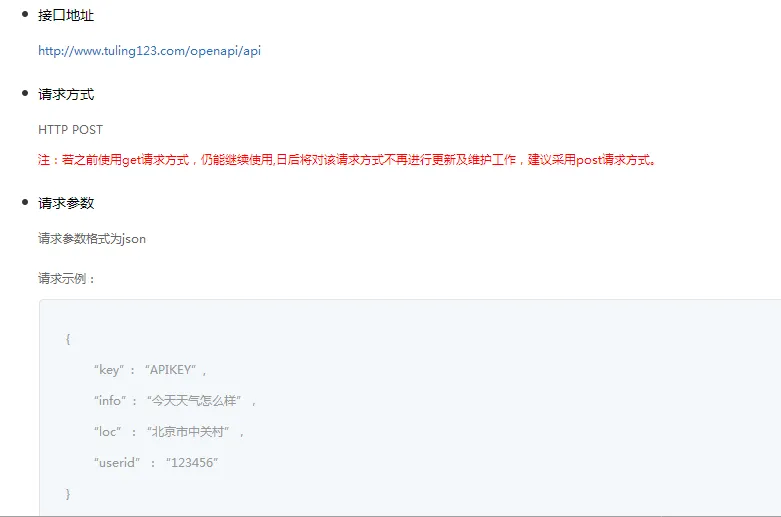
这里面详细的给我们描述了需要的接口地址,包括请求格式和请求参数,那么我们接下来,来分析下,
可见这个文档给我们了请求地址,请求参数格式,那么我们接下来需要想想我们的思路,
理清我们要测试的目的,测试的思路,怎么去来写这个测试用例,怎么组织我们想要的测试结果,尽量让我们的测试更加全面,这里呢,
我的想法呢就是主要有一下, 测试api的url 测试请求方式 请求的参数,返回结果。那么我们的断言写在哪里呢,我是把断言用返回结果code加断言,
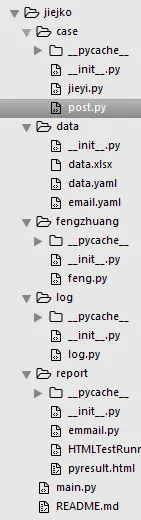
这是我整个目录
让返回结果来看看api返回值是否正确,那么我来写我的测试用例,在这里,我写的测试用例是基于yaml的文件写的,方便这里的读写,
post:
post1:
key: "aaaa"
coneent: 'sasa'
url: 'http://www.tuling123.com/openapi/api'
fangshi: 'POST'
code: "40001" #密码错误
post2:
key: "dfeb1cc8125943d29764a2f2f5c33739"
coneent: ''
url: 'http://www.tuling123.com/openapi/api'
fangshi: 'POST'
code: "40002" #未输入内容
post3:
key: "dfeb1cc8125943d29764a2f2f5c33739"
coneent: ''
fangshi: 'POST'
url: 'http://www.tuling123.com/openapi/api'
code: "40007" #格式异常
post4:
key: "dfeb1cc8125943d29764a2f2f5c33739"
coneent: 'sdsad'
fangshi: 'POST'
url: 'http://www.tuling123.com/openapi/api'
code: "40004" #次数用完
我的断言就是这些code,
那么我们写好测试用例了,下面就是来组织我们的脚本了。我喜欢吧一些我们经常用的封装起来,不管是框架也好,还是让我用起来方便吧,我一般都是简单的写几个函数,这样呢,在我接下来用的时候就特别方便了。我这里面呢使用的是第三方库,理由很简单,就是我们的第三方库提供给我们很多便利, 我使用的是requests来做的,我们大家可以看下,教程 。 这是一个中文的教程,大家可以来试试,这里因为我是文章,就不给大家讲解。大家可以看下详细的文档。接下来看下我封装的,其实就是简单的总结
# -*- coding: utf-8 -*-
# @Author  : leizi
import requests,json
class reques():
    def __init__(self):
        self.headers = {"User-Agent":"Mozilla/5.0 (Macintosh; Intel Mac OS X 10.10; rv:51.0) Gecko/20100101 Firefox/51.0"}
    def get(self, url):#get消息
        try:
            r = requests.get(url, headers=self.headers)
            r.encoding = 'UTF-8'
            json_response = json.loads(r.text)
            return json_response
        except Exception as e:
            print('get请求出错,出错原因:%s'%e)
            return {}
    def post(self, url, params):#post消息
        data = json.dumps(params)
        try:
            r =requests.post(url,params=params,headers=self.headers)
            json_response = json.loads(r.text)
            return json_response
        except Exception as e:
            print('post请求出错,原因:%s'%e)
    def delfile(self,url,params):#删除的请求
        try:
            del_word=requests.delete(url,params,headers=self.headers)
            json_response=json.loads(del_word.text)
            return json_response
        except Exception as e:
            return {}
            print('del请求出错,原因:%s'%e)
    def putfile(self,url,params):#put请求
        try:
            data=json.dumps(params)
            me=requests.put(url,data)
            json_response=json.loads(me.text)
            return json_response
        except Exception as e:
            print('put请求出错,原因:%s'%e)
            return json_response
其实没有怎么封装吧,但是呢 还是给我提供了便利。 我封装了几个请求方式,这样在接下来的使用中我可以直接使用了,我自己固定好的格式,给定的函数。
接下来就是来写我们的用例了。这里我利用了yaml和 unittest来组织用例。yaml使用方法以及剖析。http://www.cnblogs.com/c9com/archive/2013/01/05/2845539.html
unittest详细讲解:http://www.cnblogs.com/yufeihlf/p/5707929.html
# -*- coding: utf-8 -*-
# @Author  : leizi
from fengzhuang.feng import reques
import yaml,unittest
class Test_tuling(unittest.TestCase):
    def setUp(self):
        title=u'登陆测试'
        self.data_file = open(r"C:\\Users\\Administrator\\Desktop\\jiejko\\data\\data.yaml","r",encoding= "utf-8")
        self.data = yaml.load(self.data_file)
        self.post_data=self.data['post']
    def tearDown(self):
        pass
    def test_post1(self):
        try:
            self.url=self.post_data['post1']['url']
            self.key=self.post_data['post1']['key']
            self.coneent=self.post_data['post1']['coneent']
            self.fangshi=self.post_data['post1']['fangshi']
            self.code=int(self.post_data['post1']['code'])
            self.parem={'key':self.key,'info':self.coneent}
            if self.fangshi == 'POST':
                self.me=reques().post(url=self.url,params=self.parem)
                self.assertEqual(self.me['code'],self.code,msg='接口返回标识符有误')
            else:
                print('不支持%s方式请求'%self.fangshi)
        except Exception as e:
            print('用例1测试失败,原因:%s'%e)
    def test_post2(self):
        try:
            self.url=self.post_data['post2']['url']
            self.key=self.post_data['post2']['key']
            self.coneent=self.post_data['post2']['coneent']
            self.fangshi=self.post_data['post2']['fangshi']
            self.code=int(self.post_data['post2']['code'])
            self.parem={'key':self.key,'info':self.coneent}
            if self.fangshi == 'POST':
                self.me=reques().post(url=self.url,params=self.parem)
                self.assertEqual(self.me['code'],self.code,msg='接口返回标识符有误')
            else:
                print('不支持%s方式请求'%self.fangshi)
        except Exception as e:
            print('用例2测试失败,原因:%s'%e)
    def test_post3(self):
        try:
            self.url=self.post_data['post3']['url']
            self.key=self.post_data['post3']['key']
            self.coneent=self.post_data['post3']['coneent']
            self.fangshi=self.post_data['post3']['fangshi']
            self.code=int(self.post_data['post3']['code'])
            self.parem={'key':self.key,'info':self.coneent}
            if self.fangshi == 'POST':
                self.me=reques().post(url=self.url,params=self.parem)
                self.assertEqual(self.me['code'],self.code,msg='接口返回标识符有误')
            else:
                print('不支持%s方式请求'%self.fangshi)
        except Exception as e:
            print('用例3测试失败,原因:%s'%e)
    def test_post4(self):
        try:
            self.url=self.post_data['post4']['url']
            self.key=self.post_data['post4']['key']
            self.coneent=self.post_data['post4']['coneent']
            self.fangshi=self.post_data['post4']['fangshi']
            self.code=int(self.post_data['post4']['code'])
            self.parem={'key':self.key,'info':self.coneent}
            if self.fangshi == 'POST':
                self.me=reques().post(url=self.url,params=self.parem)
                self.assertEqual(self.me['code'],self.code,msg='接口返回标识符有误')
            else:
                print('不支持%s方式请求'%self.fangshi)
        except Exception as e:
            print('用例4测试失败,原因:%s'%e)
if __name__ == '__main__':
    project_path=''
    suite = unittest.TestSuite()
    suite.addTest(Test_tuling("test_post4"))
    suite.addTest(Test_tuling('test_post3'))
    suite.addTest(Test_tuling('test_post2'))
    suite.addTest(Test_tuling('test_post1s'))
    temp=str(time.time())
    filedir=project_path+"//report//"+temp
    os.makedirs(filedir)
    filename="//pyresult.html"
    filepath=filedir+filename
    fp=file(filepath,'wb')# 调用HTMLtestrunner来执行脚本并生成测试报告,html格式的
    runner=HTMLTestRunner.HTMLTestRunner(stream=fp,title='report',description='demo')
    runner.run(suite)
这是我写的用例。那么大家可以看出来,我的写法也是简单的。就是一些简单的使用。
这边的测试报告我使用的是HTMLrunner。
由于在后面在6的基础上进行了 优化,git clone代码后,使用下面命令
git checkout 5a9c6b041aa1b47e40df52d57727ae39f3e6319c
那么我们来看下最后的测试报告,
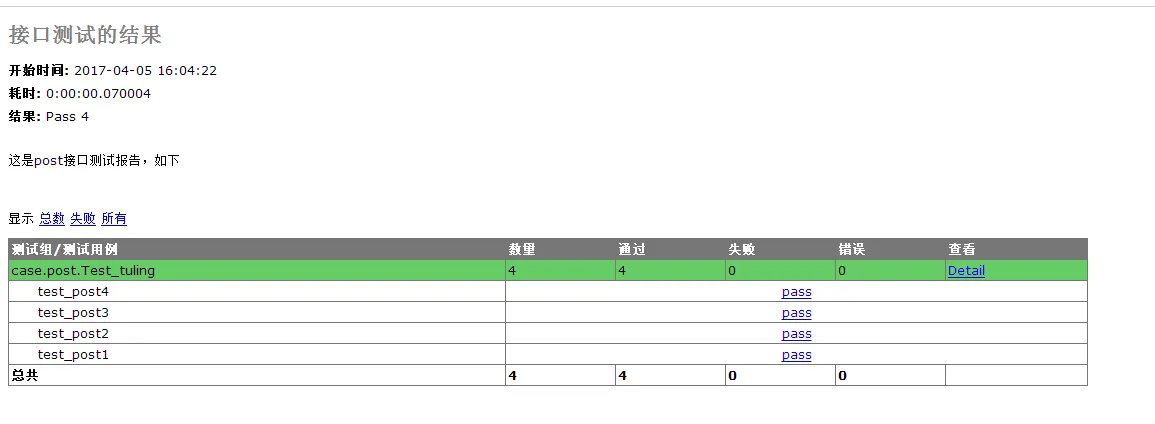
最后我还写了发送邮件的模块,其中加的log模块暂时还没有用在代码中。 后续的优化,这样,我就运行一下,然后最后给我发送测试报告,我不用盯着电脑了。
其实在这里,大家还可以加入多线程来跑脚本,这样比较快。
其实大家都是为了走的更远,做的更好。路在脚下,相信自己。
