
spring源码各版本下载地址:
https://github.com/spring-projects/spring-framework/tags
在工作中见得非常多的容器使用是:
|
1
2
3
4
5
6
7
8
9
10
11
12
13
14
15
16
17
18
19
20
21
22
23
24
|
<beans xmlns=
"http://www.springframework.org/schema/beans"
xmlns:xsi=
"http://www.w3.org/2001/XMLSchema-instance"
xmlns:util=
"http://www.springframework.org/schema/util"
xmlns:jee=
"http://www.springframework.org/schema/jee"
xmlns:aop=
"http://www.springframework.org/schema/aop"
xmlns:tx=
"http://www.springframework.org/schema/tx"
xmlns:context=
"http://www.springframework.org/schema/context"
xmlns:p=
"http://www.springframework.org/schema/p"
xmlns:cache=
"http://www.springframework.org/schema/cache"
xmlns:task=
"http://www.springframework.org/schema/task"
xsi:schemaLocation="
http:
//www.springframework.org/schema/task
http:
//www.springframework.org/schema/task/spring-task-4.1.xsd
http:
//www.springframework.org/schema/beans
http:
//www.springframework.org/schema/beans/spring-beans-4.1.xsd
http:
//www.springframework.org/schema/aop
http:
//www.springframework.org/schema/aop/spring-aop-4.1.xsd
http:
//www.springframework.org/schema/tx
http:
//www.springframework.org/schema/tx/spring-tx-4.1.xsd
http:
//www.springframework.org/schema/context
http:
//www.springframework.org/schema/context/spring-context-4.1.xsd
http:
//www.springframework.org/schema/util
http:
//www.springframework.org/schema/util/spring-util-4.1.xsd
http:
//www.springframework.org/schema/cache http://www.springframework.org/schema/cache/spring-cache-4.1.xsd">
<bean id=
"adapConsumer"
class
=
"com.ad.jms.AdapConsumer"
>
<property name=
"queueChannel"
ref=
"inputFromKafkaAdap"
></property>
</bean>
</beans>
|
|
1
2
|
final
ApplicationContext app =
new
ClassPathXmlApplicationContext(
"applicationContext.xml"
);
AdapConsumer adConsumer = app.getBean(
"adapConsumer"
, AdapConsumer.
class
);
|
其底层实现原理是怎样的?根据《Spring源码深度解析》以另外一个容器BeanFactory来解析源码实现。
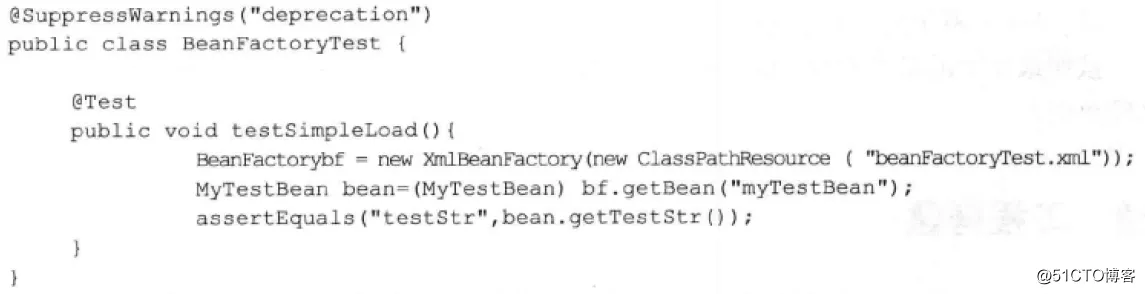
一、可以发现BeanFactory是通过XmlBeanFactory创建的,而XmlBeanFactory继承了DefaultListableBeanFactory,主要增加了XMLBeanDefinitionReader,接下来先认识一下这两个类。
1.1 DefaultListableBeanFactory
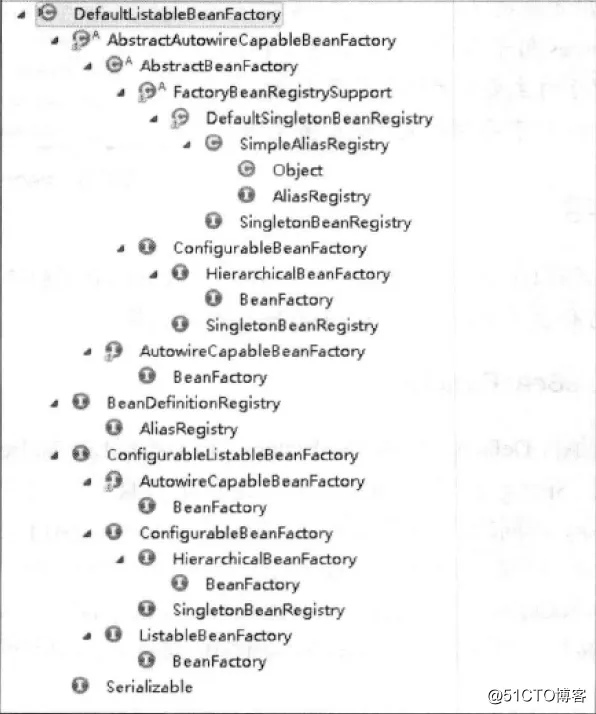
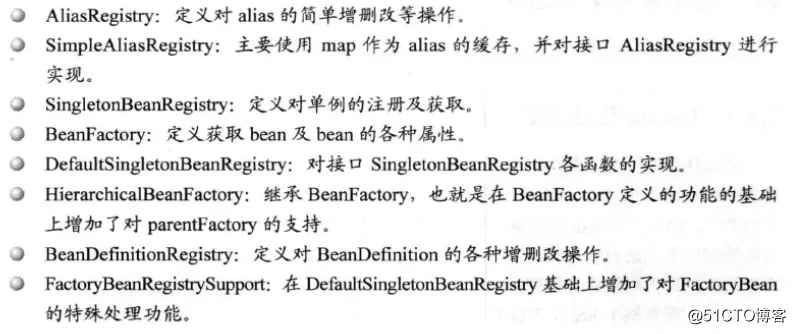
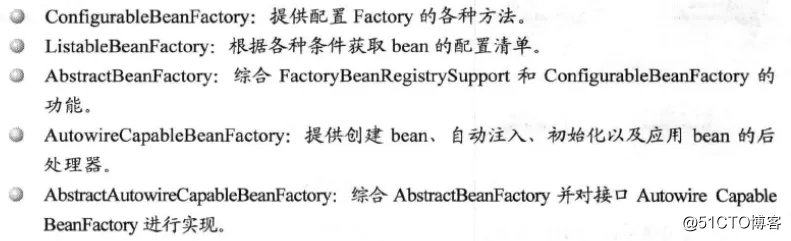
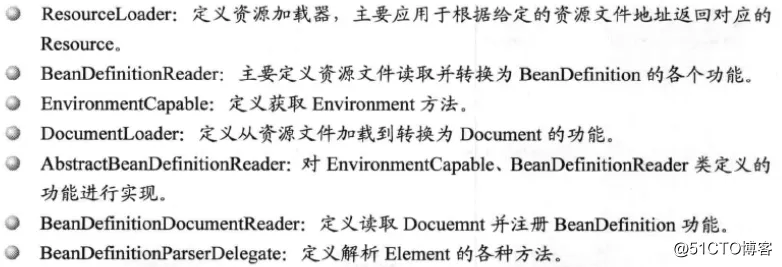
其中各个类的作用

1.2 XMLBeanDefinitionReader
完成了对配置文件进行封装后配置文件的读取工作。
二、我们根据BeanFactory bf = new XmlBeanFactory(new ClassPathResource("beanFactoryTest.xml"))来分析建立过程
2.1 new ClassPathResource("beanFactoryTest.xml")
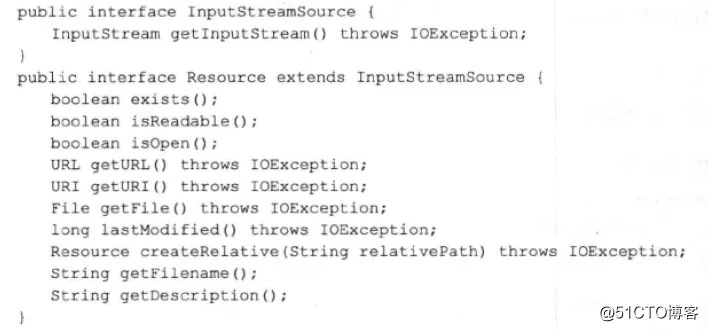
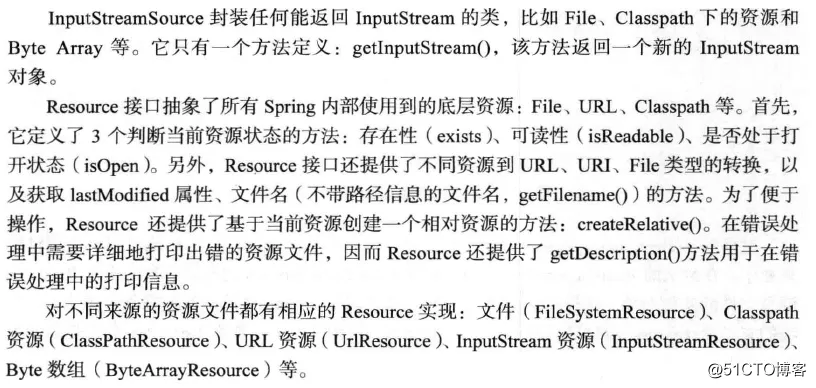
这是通过ClassPathResource构造函数来构造一个ReSource,然后交给XmlBeanFactory的构造函数。那么ClassPathResource怎么处理的?
ReSource底层实现:
2.2 new XmlBeanFactory(new ClassPathResource("beanFactoryTest.xml"))
|
1
2
3
4
5
6
7
8
9
10
11
12
13
14
15
|
public
class
XmlBeanFactory
extends
DefaultListableBeanFactory {
private
final
XmlBeanDefinitionReader reader =
new
XmlBeanDefinitionReader(
this
);
public
XmlBeanFactory(Resource resource)
throws
BeansException {
this
(resource,
null
);
}
public
XmlBeanFactory(Resource resource, BeanFactory parentBeanFactory)
throws
BeansException {
super
(parentBeanFactory);
this
.reader.loadBeanDefinitions(resource);
}
}
//最后一句代码主要完成下面三个功能
|


可以看到有XMLBeanDefinitionReader对象(完成了对配置文件进行封装后配置文件的读取工作),就是加载bean,在代码中一层一层往下看:
|
1
2
3
|
public
int
loadBeanDefinitions(Resource resource)
throws
BeanDefinitionStoreException {
return
loadBeanDefinitions(
new
EncodedResource(resource));
}
|
|
1
2
3
4
5
6
7
8
9
10
11
12
13
14
15
16
17
18
19
20
21
22
23
24
25
26
27
28
29
30
31
32
33
34
35
36
37
38
39
|
public
int
loadBeanDefinitions(EncodedResource encodedResource)
throws
BeanDefinitionStoreException {
Assert.notNull(encodedResource,
"EncodedResource must not be null"
);
if
(logger.isInfoEnabled()) {
logger.info(
"Loading XML bean definitions from "
+ encodedResource.getResource());
}
Set<EncodedResource> currentResources =
this
.resourcesCurrentlyBeingLoaded.get();
if
(currentResources ==
null
) {
currentResources =
new
HashSet<>(
4
);
this
.resourcesCurrentlyBeingLoaded.set(currentResources);
}
if
(!currentResources.add(encodedResource)) {
throw
new
BeanDefinitionStoreException(
"Detected cyclic loading of "
+ encodedResource +
" - check your import definitions!"
);
}
try
{
InputStream inputStream = encodedResource.getResource().getInputStream();
try
{
InputSource inputSource =
new
InputSource(inputStream);
if
(encodedResource.getEncoding() !=
null
) {
inputSource.setEncoding(encodedResource.getEncoding());
}
return
doLoadBeanDefinitions(inputSource, encodedResource.getResource());
}
finally
{
inputStream.close();
}
}
catch
(IOException ex) {
throw
new
BeanDefinitionStoreException(
"IOException parsing XML document from "
+ encodedResource.getResource(), ex);
}
finally
{
currentResources.remove(encodedResource);
if
(currentResources.isEmpty()) {
this
.resourcesCurrentlyBeingLoaded.remove();
}
}
}
|
上面这段代码真正进入了数据的准备阶段执行下面正式进入核心部分:
|
1
|
doLoadBeanDefinitions(inputSource, encodedResource.getResource())
|
doLoadBeanDefinitions之所以很核心,因为做了三件重要的事情:

|
1
2
3
4
5
6
7
8
9
10
11
12
13
14
15
16
17
18
19
20
21
22
23
24
25
26
27
28
29
30
31
32
33
34
35
36
37
38
39
40
|
protected
int
doLoadBeanDefinitions(InputSource inputSource, Resource resource)
throws
BeanDefinitionStoreException {
try
{
Document doc = doLoadDocument(inputSource, resource);
return
registerBeanDefinitions(doc, resource);
}
catch
(BeanDefinitionStoreException ex) {
throw
ex;
}
catch
(SAXParseException ex) {
throw
new
XmlBeanDefinitionStoreException(resource.getDescription(),
"Line "
+ ex.getLineNumber() +
" in XML document from "
+ resource +
" is invalid"
, ex);
}
catch
(SAXException ex) {
throw
new
XmlBeanDefinitionStoreException(resource.getDescription(),
"XML document from "
+ resource +
" is invalid"
, ex);
}
catch
(ParserConfigurationException ex) {
throw
new
BeanDefinitionStoreException(resource.getDescription(),
"Parser configuration exception parsing XML from "
+ resource, ex);
}
catch
(IOException ex) {
throw
new
BeanDefinitionStoreException(resource.getDescription(),
"IOException parsing XML document from "
+ resource, ex);
}
catch
(Throwable ex) {
throw
new
BeanDefinitionStoreException(resource.getDescription(),
"Unexpected exception parsing XML document from "
+ resource, ex);
}
}
protected
Document doLoadDocument(InputSource inputSource, Resource resource)
throws
Exception {
return
this
.documentLoader.loadDocument(inputSource, getEntityResolver(),
this
.errorHandler,
getValidationModeForResource(resource), isNamespaceAware());
}
public
int
registerBeanDefinitions(Document doc, Resource resource)
throws
BeanDefinitionStoreException {
BeanDefinitionDocumentReader documentReader = createBeanDefinitionDocumentReader();
int
countBefore = getRegistry().getBeanDefinitionCount();
documentReader.registerBeanDefinitions(doc, createReaderContext(resource));
return
getRegistry().getBeanDefinitionCount() - countBefore;
}
|
接下来将这三件事情逐个分析:
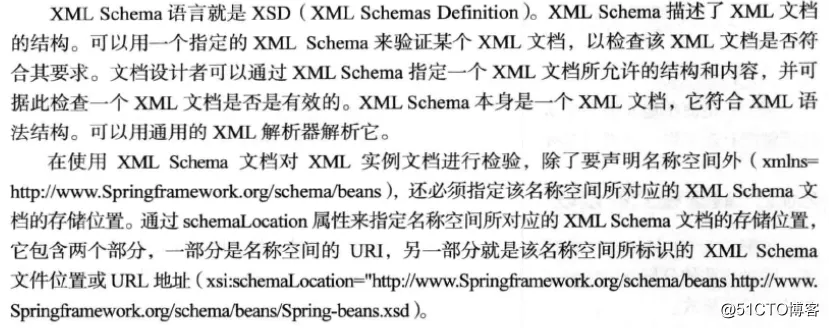
2.2.1 获取xml文件的验证模式
DTD和XSD的区别:

验证模式的读取:
|
1
2
3
4
5
6
7
8
9
10
11
12
13
14
|
protected
int
getValidationModeForResource(Resource resource) {
int
validationModeToUse = getValidationMode();
if
(validationModeToUse != VALIDATION_AUTO) {
return
validationModeToUse;
}
int
detectedMode = detectValidationMode(resource);
if
(detectedMode != VALIDATION_AUTO) {
return
detectedMode;
}
// Hmm, we didn't get a clear indication... Let's assume XSD,
// since apparently no DTD declaration has been found up until
// detection stopped (before finding the document's root tag).
return
VALIDATION_XSD;
}
|
2.2.2 读取document

|
1
2
3
4
|
protected
Document doLoadDocument(InputSource inputSource, Resource resource) throws Exception {
return
this
.documentLoader.loadDocument(inputSource, getEntityResolver(),
this
.errorHandler,
getValidationModeForResource(resource), isNamespaceAware());
}
|
|
1
2
3
4
5
6
7
8
9
10
11
12
13
14
15
|
package
org.springframework.beans.factory.xml;
import
org.w3c.dom.Document;
import
org.xml.sax.EntityResolver;
import
org.xml.sax.ErrorHandler;
import
org.xml.sax.InputSource;
public
interface
DocumentLoader {
Document loadDocument(
InputSource inputSource, EntityResolver entityResolver,
ErrorHandler errorHandler,
int
validationMode,
boolean
namespaceAware)
throws
Exception;
}
|
2.2.3 根据返回的document注册bean信息
|
1
2
3
4
5
6
7
8
9
10
11
12
13
14
15
16
17
18
19
20
21
22
23
24
25
26
27
28
29
30
|
protected
int
doLoadBeanDefinitions(InputSource inputSource, Resource resource)
throws
BeanDefinitionStoreException {
try
{
Document doc = doLoadDocument(inputSource, resource);
return
registerBeanDefinitions(doc, resource);
}
catch
(BeanDefinitionStoreException ex) {
throw
ex;
}
catch
(SAXParseException ex) {
throw
new
XmlBeanDefinitionStoreException(resource.getDescription(),
"Line "
+ ex.getLineNumber() +
" in XML document from "
+ resource +
" is invalid"
, ex);
}
catch
(SAXException ex) {
throw
new
XmlBeanDefinitionStoreException(resource.getDescription(),
"XML document from "
+ resource +
" is invalid"
, ex);
}
catch
(ParserConfigurationException ex) {
throw
new
BeanDefinitionStoreException(resource.getDescription(),
"Parser configuration exception parsing XML from "
+ resource, ex);
}
catch
(IOException ex) {
throw
new
BeanDefinitionStoreException(resource.getDescription(),
"IOException parsing XML document from "
+ resource, ex);
}
catch
(Throwable ex) {
throw
new
BeanDefinitionStoreException(resource.getDescription(),
"Unexpected exception parsing XML document from "
+ resource, ex);
}
}
|
registerBeanDefinitions方法:
|
1
2
3
4
5
6
|
public
int
registerBeanDefinitions(Document doc, Resource resource)
throws
BeanDefinitionStoreException {
BeanDefinitionDocumentReader documentReader = createBeanDefinitionDocumentReader();
int
countBefore = getRegistry().getBeanDefinitionCount();
documentReader.registerBeanDefinitions(doc, createReaderContext(resource));
return
getRegistry().getBeanDefinitionCount() - countBefore;
}
|
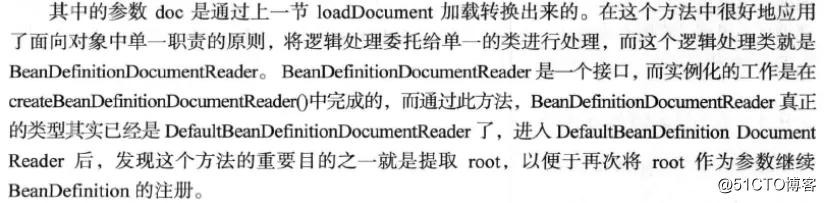


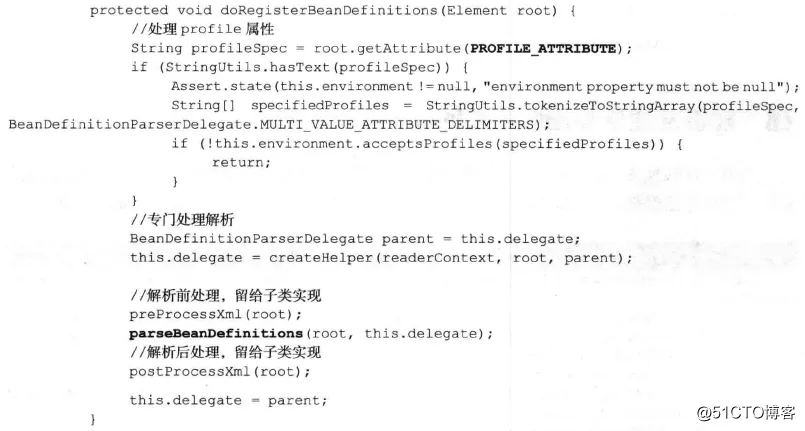

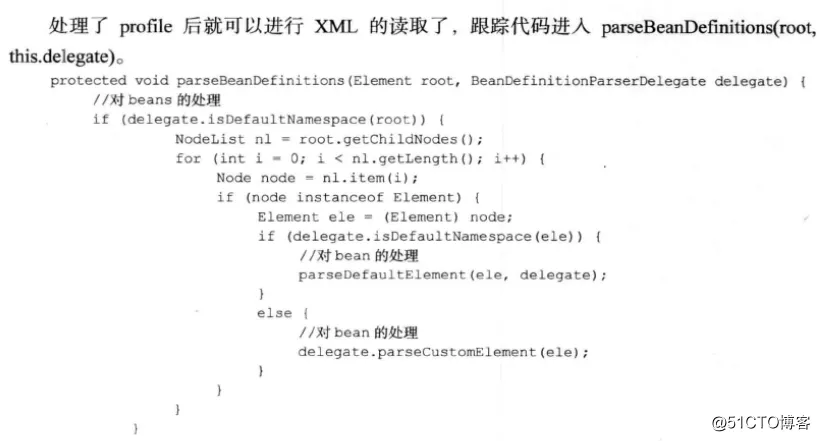
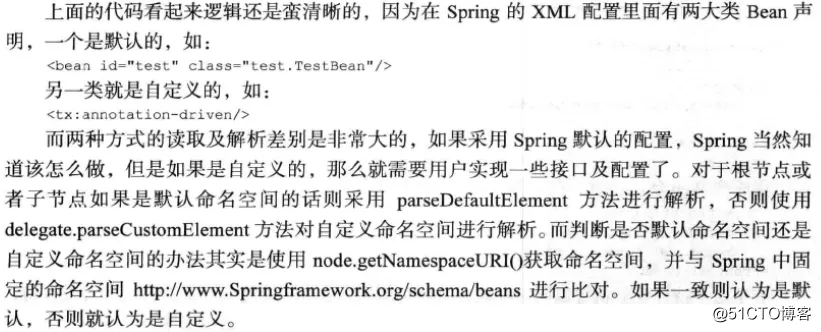
解析并注册BeanDefinition

本文转自 叫我北北 51CTO博客,原文链接:http://blog.51cto.com/qinbin/2059124
