首先,看下效果图:
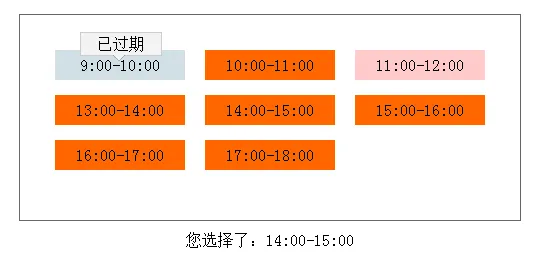
json字符串:
var mcode={"minfo":[{"time":"9:00-10:00","status":2},{"time":"10:00-11:00","status":1},{"time":"11:00-12:00","status":3},{"time":"13:00-14:00","status":1},{"time":"14:00-15:00","status":1},{"time":"15:00-16:00","status":1},{"time":"16:00-17:00","status":1},{"time":"17:00-18:00","status":1}]};
其中time代表时间段,status当职位1时代表可以使用,2时代表已过期,3时代表已选满。
通过循环遍历json字符串中的数据值。
for(var i in mcode.minfo){
       mcode.minfo[i].time + mcode.minfo[i].status;
}
当前时间段为已过期或以选满时,鼠标移动到其当前时间段上时提示相应信息,鼠标移开取消提示。
当前时间段为橘黄色代表可以选择。
$.each($("#test span"),function(k,v){
     if($(this).hasClass("unspan1")||$(this).hasClass("unspan2")){
          $(this).hover(function(){
               $(this).find("label").css({"display":"block"});
               $(this).find("em").css({"display":"block"});
          }, function(){
               $(this).find("label").css({"display":"none"});
               $(this).find("em").css({"display":"none"});
          });
     }
      else{
          $(this).click(function(){
            $("#result").empty().html("您选择了:"+$(this).text());
          });
      }
  });
拼接字符串,构建html结构。
for(var i in mcode.minfo){
    if(mcode.minfo[i].status===2){
        html+='<span class="unspan1 ';
    }
    else if(mcode.minfo[i].status===3){
         html+='<span class="unspan2 ';
    }
    else{
         html+='<span class=" ';
    }
    if((i+1)%3===0){
         html+='" >';
    }
    else{
         html+='mspan" >';
    }
    html+=mcode.minfo[i].time;
         if(mcode.minfo[i].status===2){
              html+='<label>已过期</label>';
         }
         else if(mcode.minfo[i].status===3){
              html+='<label>已选满</label>';
         }
         if(mcode.minfo[i].status!==1){
              html+='<em></em>';
         }
    html+="</span>";
 }
css样式:
#test{ width: 430px; padding: 35px; border: 1px solid #666666;overflow: hidden; margin: 100px auto 0px;}
#test span{display:block; background: #FF6600; width:130px; height: 30px; line-height: 30px; text-align: center; float:left;
           _display:inline; position:relative; margin-bottom: 15px; cursor: pointer;}
#test .mspan{margin-right: 20px;}
#test .unspan1{background: #D2E0E6; cursor:default}
#test .unspan2{background: #ffcaca; cursor: default;}
#test label{position: absolute; left:25px; top:-18px; width: 60px; line-height: 20px; background: #F3F3F3;
            padding:1px 10px; border:1px solid #CCCCCC;display: none;}
#test em{display: block;border-color: #F3F3F3 transparent transparent transparent;border-style: solid;border-width: 6px 6px 6px 6px;
                     padding: 0;width: 0;height: 0;
                     font-size: 0;line-height: 0;
                     position: absolute;left:58px; top:5px;display:none;
                     _border-top-color:  #F3F3F3;_border-bottom-color: #F3F3F3;
                     _filter: chroma( color = #F3F3F3);
            }
#result{ margin: 10px auto 0px; text-align: center}
实例:
<!DOCTYPE html> <html> <head> <title></title> <meta http-equiv="Content-Type" content="text/html; charset=UTF-8"> <script type="text/javascript" src="http://files.cnblogs.com/kuikui/jquery.js"></script> <style type="text/css"> *{margin:0px;padding: 0px;} #test{ width: 430px; padding: 35px; border: 1px solid #666666;overflow: hidden; margin: 100px auto 0px;} #test span{display:block; background: #FF6600; width:130px; height: 30px; line-height: 30px; text-align: center; float:left; _display:inline; position:relative; margin-bottom: 15px; cursor: pointer;} #test .mspan{margin-right: 20px;} #test .unspan1{background: #D2E0E6; cursor:default} #test .unspan2{background: #ffcaca; cursor: default;} #test label{position: absolute; left:25px; top:-18px; width: 60px; line-height: 20px; background: #F3F3F3; padding:1px 10px; border:1px solid #CCCCCC;display: none;} #test em{display: block;border-color: #F3F3F3 transparent transparent transparent;border-style: solid;border-width: 6px 6px 6px 6px; padding: 0;width: 0;height: 0; font-size: 0;line-height: 0; position: absolute;left:58px; top:5px;display:none; _border-top-color: #F3F3F3;_border-bottom-color: #F3F3F3; _filter: chroma( color = #F3F3F3); } #result{ margin: 10px auto 0px; text-align: center} </style> </head> <body> <div id="test"> </div> <div id="result"></div> <script type="text/javascript"> var mcode = { "minfo": [ { "time": "9:00-10:00", "status": 2 }, { "time": "10:00-11:00", "status": 1 }, { "time": "11:00-12:00", "status": 3 }, { "time": "13:00-14:00", "status": 1 }, { "time": "14:00-15:00", "status": 1 }, { "time": "15:00-16:00", "status": 1 }, { "time": "16:00-17:00", "status": 1 }, { "time": "17:00-18:00", "status": 1 } ] }; var html = ''; for(var i in mcode.minfo){ if(mcode.minfo[i].status===2){ html+='<span class="unspan1 '; } else if(mcode.minfo[i].status===3){ html+='<span class="unspan2 '; } else{ html+='<span class=" '; } if((i+1)%3===0){ html+='" >'; } else{ html+='mspan" >'; } html+=mcode.minfo[i].time; if(mcode.minfo[i].status===2){ html+='<label>已过期</label>'; } else if(mcode.minfo[i].status===3){ html+='<label>已选满</label>'; } if(mcode.minfo[i].status!==1){ html+='<em></em>'; } html+="</span>"; } $("#test").empty().html(html); $.each($("#test span"),function(k,v){ if($(this).hasClass("unspan1")||$(this).hasClass("unspan2")){ $(this).hover(function(){ $(this).find("label").css({"display":"block"}); $(this).find("em").css({"display":"block"}); }, function(){ $(this).find("label").css({"display":"none"}); $(this).find("em").css({"display":"none"}); }); } else{ $(this).click(function(){ $("#result").empty().html("您选择了:"+$(this).text()); }); } }); </script> </body> </html>