三、表单系统:构建健壮的数据录入
3.1 表单组件架构
HeroUI 的表单系统构建在 React Aria Components 之上,提供了一系列可组合的表单组件 :
Form - 表单容器,处理提交和验证
Input / TextField - 文本输入
TextArea - 多行文本
Select / ComboBox - 下拉选择
Checkbox / RadioGroup - 选项选择
NumberField - 数字输入(带增减按钮)
FieldError - 错误信息展示
Description - 辅助说明文字
3.2 Form 组件详解
基础用法
import { Form, Input, Button, FieldError } from "@heroui/react";

export default function SignupForm() {
  return (
    <Form
      action="/api/signup"  // 传统表单提交 URL
      method="post"
      validationBehavior="aria"  // ARIA 验证(实时错误,不阻止提交)
      className="space-y-4 max-w-md"
    >
      <Input
        isRequired
        label="邮箱"
        name="email"
        type="email"
        description="我们将发送验证邮件到此地址"
      />

      <Input
        isRequired
        label="密码"
        name="password"
        type="password"
        minLength={8}
        description="至少 8 个字符"
      />
      <FieldError name="password" />

      <Button type="submit" color="primary">
        注册
      </Button>
    </Form>
  );
}
两种验证模式的对比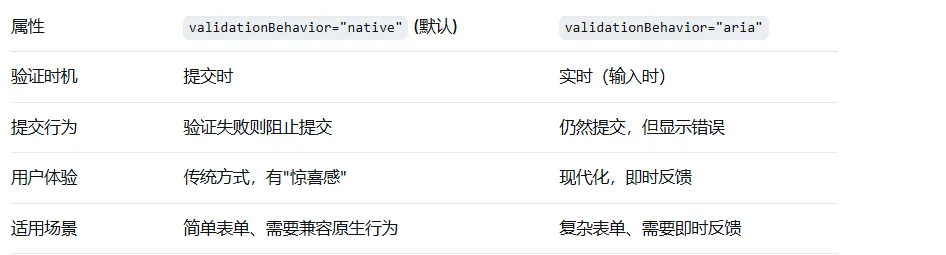
自定义验证函数
<Input
  label="用户名"
  name="username"
  validate={(value) => {
    if (value.length < 3) {
      return "用户名至少需要 3 个字符";
    }
    if (!/^[a-zA-Z0-9]+$/.test(value)) {
      return "只能包含字母和数字";
    }
    return null;  // 返回 null 表示验证通过
  }}
/>
服务器端验证错误
const [serverErrors, setServerErrors] = useState({});

const handleSubmit = async (e: FormEvent) => {
  e.preventDefault();
  const formData = new FormData(e.currentTarget);
  const res = await fetch("/api/register", { method: "POST", body: formData });

  if (!res.ok) {
    const errors = await res.json();
    setServerErrors(errors);  // { email: "邮箱已被注册", username: "用户名已存在" }
  }
};

return (
  <Form validationErrors={serverErrors} onSubmit={handleSubmit}>
    {/* 表单内容 */}
  </Form>
);
当用户修改对应字段时,validationErrors 中的错误会自动清除。
3.3 Input 组件的进阶功能
前缀与后缀
<Input
  label="金额"
  startContent={<span className="text-default-400">¥</span>}
  endContent={<span className="text-default-400">.00</span>}
/>
输入组(InputGroup)
从 v3.0.0-beta.2 开始,HeroUI 提供了 InputGroup 组件,用于将多个输入控件组合在一起 :
import { InputGroup, Input } from "@heroui/react";

<InputGroup>
  <Input placeholder="区号" className="w-24" />
  <Input placeholder="电话号码" />
</InputGroup>
TextArea
<Input
  as="textarea"
  label="个人简介"
  minRows={3}
  maxRows={6}
  description="简短介绍一下自己"
/>
3.4 Select 组件
基础用法
import { Select, SelectItem } from "@heroui/react";

const animals = [
  { key: "cat", label: "猫" },
  { key: "dog", label: "狗" },
  { key: "bird", label: "鸟" },
];

<Select label="选择宠物" items={animals}>
  {(animal) => <SelectItem key={animal.key}>{animal.label}</SelectItem>}
</Select>
Select 的 API 变化(v3.0.0-beta.2)
⚠️ 重要变更:Select.Content 子组件已重命名为 Select.Popover,以保持与其他组件(如 ComboBox、Dropdown)的一致性 。
// ❌ v3.0.0-beta.2 之前
<Select.Content>...</Select.Content>

// ✅ v3.0.0-beta.2 及以后
<Select.Popover>...</Select.Popover>
虚拟化滚动(大数据量优化)
<Select
  label="大数据量选项"
  items={largeDataset}  // 假设有 5000 条数据
  isVirtualized  // 开启虚拟化
  virtualizedItemSize={48}  // 每项高度 48px
/>
开启 isVirtualized 后,Select 内部使用 @tanstack/react-virtual,仅渲染可视区域内的选项,大幅提升性能。
3.5 NumberField 组件
从 v3.0.0-beta.2 引入 :
import { NumberField } from "@heroui/react";

<NumberField
  label="数量"
  defaultValue={1}
  minValue={1}
  maxValue={99}
  step={1}
  formatOptions={
  { style: "decimal" }}
/>
国际化支持:formatOptions 基于 Intl.NumberFormat,支持货币、百分比、小数位数等格式化。
来源:
https://bgnno.cn/