SpringAI整合了大多数大模型,而且对于大模型开发的三种技术架构都有比较好的封装和支持,开发起来非常方便。不同的模型能够接收的输入类型、输出类型不一定相同。SpringAI根据模型的输入和输出类型不同对模型进行了分类:
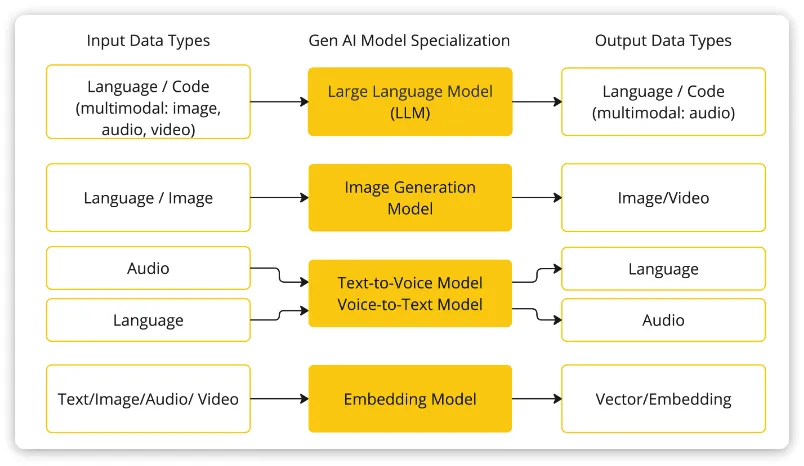
 编辑大模型应用开发大多数情况下使用的都是基于对话模型(Chat Model),也就是输出结果为自然语言或代码的模型。SpringAI支持的大模型中最完整的就是OpenAI和Ollama平台的大模型。
1.SpringAI入门实例
1.1 工程创建
创建SpringBoot项目并引入SpringAI基础依赖:
SpringAI完全适配了SpringBoot的自动装配功能,而且给不同的大模型提供了不同的starter,比如:
模型/平台 |
starter |
Anthropic |
<dependency> <groupId>org.springframework.ai</groupId> <artifactId>spring-ai-anthropic-spring-boot-starter</artifactId> </dependency>  |
Azure OpenAI |
<dependency> <groupId>org.springframework.ai</groupId> <artifactId>spring-ai-azure-openai-spring-boot-starter</artifactId> </dependency> |
DeepSeek |
<dependency> <groupId>org.springframework.ai</groupId> <artifactId>spring-ai-openai-spring-boot-starter</artifactId> </dependency> |
Hugging Face |
<dependency> <groupId>org.springframework.ai</groupId> <artifactId>spring-ai-huggingface-spring-boot-starter</artifactId> </dependency> |
Ollama |
<dependency> <groupId>org.springframework.ai</groupId> <artifactId>spring-ai-ollama-spring-boot-starter</artifactId> </dependency> |
OpenAI |
<dependency> <groupId>org.springframework.ai</groupId> <artifactId>spring-ai-openai-spring-boot-starter</artifactId> </dependency> |
我们可以根据自己选择的平台来选择引入不同的依赖。这里我们先以Ollama为例。
首先,在项目pom.xml中添加spring-ai的版本信息:
<spring-ai.version>1.0.0-M6</spring-ai.version>

然后,添加spring-ai的依赖管理项:
<dependencyManagement>
 <dependencies>
  <dependency>
    <groupId>org.springframework.ai</groupId>
    <artifactId>spring-ai-bom</artifactId>
    <version>${spring-ai.version}</version>
    <type>pom</type>
    <scope>import</scope>
  </dependency>
 </dependencies>
</dependencyManagement>

最后,引入spring-ai-ollama的依赖:
<dependency>
    <groupId>org.springframework.ai</groupId>
     <artifactId>spring-ai-ollama-spring-boot-starter</artifactId>
</dependency>

为了方便后续开发,我们再手动引入一个Lombok依赖:
<dependency>
    <groupId>org.projectlombok</groupId>
    <artifactId>lombok</artifactId>
    <version>1.18.22</version>
</dependency>

注意: 千万不要用start.spring.io提供的lombok,有bug!!
1.2 配置模型信息
在application.yml中配置模型参数
spring:
  application:
    name: ai-demo
  ai:
    ollama:
      base-url: http://localhost:11434 # ollama服务地址, 这就是默认值
      chat:
        model: deepseek-r1:7b # 模型名称
        options:
          temperature: 0.8 # 模型温度,影响模型生成结果的随机性,越小越稳定

1.3 封装ChatClient
import org.springframework.ai.chat.client.ChatClient;
import org.springframework.ai.chat.client.advisor.SimpleLoggerAdvisor;
import org.springframework.ai.ollama.OllamaChatModel;
import org.springframework.context.annotation.Bean;
import org.springframework.context.annotation.Configuration;
@Configuration
public class CommonConfiguration {
    // 注意参数中的model就是使用的模型,这里用了Ollama,也可以选择OpenAIChatModel
    @Bean
    public ChatClient chatClient(OllamaChatModel model) {
        return ChatClient.builder(model) // 创建ChatClient工厂
                .build(); // 构建ChatClient实例
    }
}

ChatClient.builder:会得到一个ChatClient.Builder工厂对象,利用它可以自由选择模型、添加各种自定义配置OllamaChatModel:如果你引入了ollama的starter,这里就可以自动注入OllamaChatModel对象。同理,OpenAI也是一样的用法。- Spring 会默认将方法名作为 Bean 的名称,默认生成名称为chatClient的Bean
1.4 同步调用
import lombok.RequiredArgsConstructor;
import org.springframework.ai.chat.client.ChatClient;
import org.springframework.web.bind.annotation.RequestMapping;
import org.springframework.web.bind.annotation.RequestParam;
import org.springframework.web.bind.annotation.RestController;
@RequiredArgsConstructor
@RestController
@RequestMapping("/ai")
public class ChatController {
    private final ChatClient chatClient;
    // 请求方式和路径不要改动,将来要与前端联调
    @RequestMapping("/chat")
    public String chat(@RequestParam(defaultValue = "讲个笑话") String prompt) {
        return chatClient
                .prompt(prompt) // 传入user提示词
                .call() // 同步请求,会等待AI全部输出完才返回结果
                .content(); //返回响应内容
    }
}

注意,基于call()方法的调用属于同步调用,需要所有响应结果全部返回后才能返回给前端。
1.5 流式调用
同步调用需要等待很长时间页面才能看到结果,用户体验不好。为了解决这个问题,我们可以改进调用方式为流式调用。在SpringAI中使用了WebFlux技术实现流式调用。
// 注意看返回值,是Flux<String>,也就是流式结果,另外需要设定响应类型和编码,不然前端会乱码
@RequestMapping(value = "/chat", produces = "text/html;charset=UTF-8")
public Flux<String> chat(@RequestParam(defaultValue = "讲个笑话") String prompt) {
    return chatClient
            .prompt(prompt)
            .stream() // 流式调用
            .content();
}

1.6 设置System
可以发现,当我们询问AI你是谁的时候,它回答自己是DeepSeek-R1,这是大模型底层的设定。如果我们希望AI按照新的设定工作,就需要给它设置System背景信息。
在SpringAI中,设置System信息非常方便,不需要在每次发送时封装到Message,而是创建ChatClient时指定即可。
我们修改配置类中的代码,给ChatClient设定默认的System信息:
@Bean
public ChatClient chatClient(OllamaChatModel model) {
    return ChatClient.builder(model) // 创建ChatClient工厂实例
            .defaultSystem("您是一个经验丰富的软件开发工程师,请以友好、乐于助人和愉快的方式解答学生的各种问题。")
            .defaultAdvisors(new SimpleLoggerAdvisor())
            .build(); // 构建ChatClient实例
}

1.7 日志功能
默认情况下,应用于AI的交互时不记录日志的,我们无法得知SpringAI组织的提示词到底长什么样,有没有问题。这样不方便我们调试。
1.7.1 Advisor
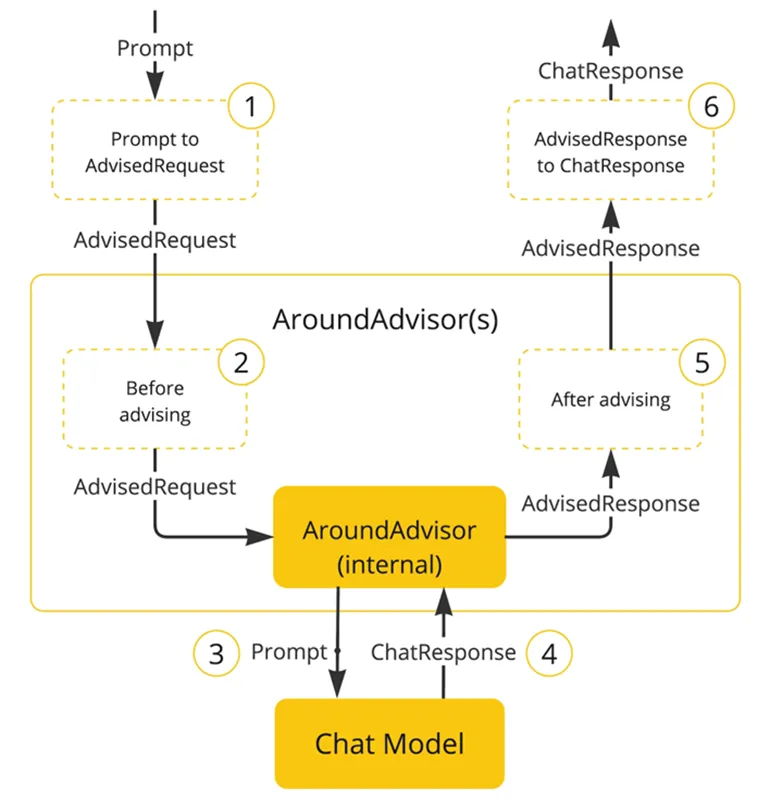
SpringAI基于AOP机制实现与大模型对话过程的增强、拦截、修改等功能。所有的增强通知都需要实现Advisor接口。
 编辑
编辑
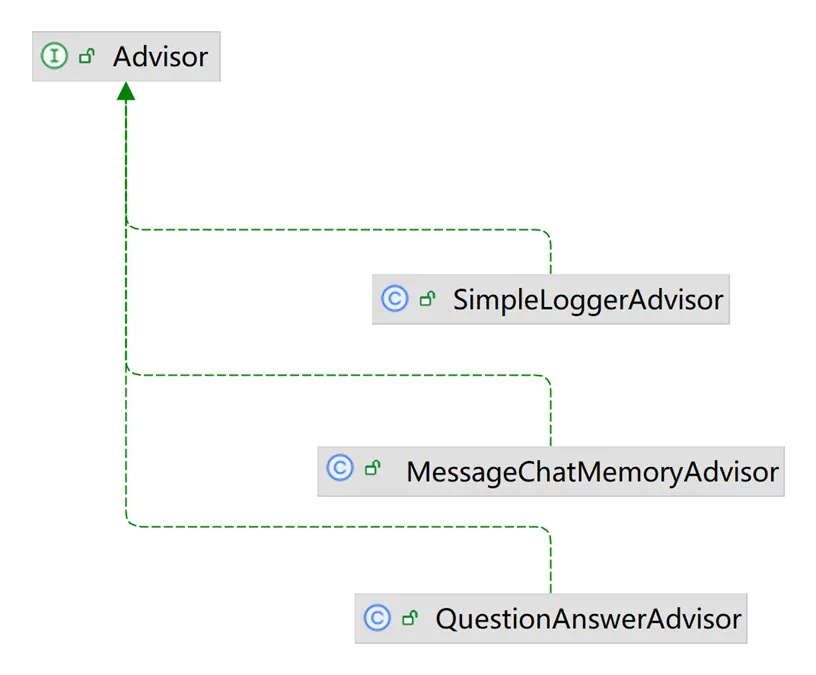
Spring提供了一些Advisor的默认实现,来实现一些基本的增强功能:
 编辑
编辑
- SimpleLoggerAdvisor:日志记录的Advisor
- MessageChatMemoryAdvisor:会话记忆的Advisor
- QuestionAnswerAdvisor:实现RAG的Advisor
1.7.2 添加日志Advisor
首先,我们需要修改配置文件,给ChatClient添加日志Advisor:
@Bean
public ChatClient chatClient(OllamaChatModel model) {
    return ChatClient.builder(model) // 创建ChatClient工厂实例
    .defaultSystem("你是一个热心、可爱的智能助手,你的名字叫小团团,请以小团团的身份和语气回答问题。")
            .defaultAdvisors(new SimpleLoggerAdvisor()) // 添加默认的Advisor,记录日志
            .build(); // 构建ChatClient实例
}

1.7.2 修改日志级别
接下来,我们在application.yml中添加日志配置,更新日志级别:
logging:
  level:
    org.springframework.ai: debug # AI对话的日志级别
    com.lgh.ai: debug # 本项目的日志级别

1.8 会话记忆
SpringAI自带了会话记忆功能,可以帮我们把历史会话保存下来,下一次请求AI时会自动拼接。
1.8.1 ChatMemory
话记忆功能同样是基于AOP实现,Spring提供了一个MessageChatMemoryAdvisor的通知,我们可以像之前添加日志通知一样添加到ChatClient即可。不过,要注意的是,MessageChatMemoryAdvisor需要指定一个ChatMemory实例,也就是会话历史保存的方式。
ChatMemory接口声明如下(此接口SpringAI自带):
public interface ChatMemory {
    // TODO: consider a non-blocking interface for streaming usages
    default void add(String conversationId, Message message) {
       this.add(conversationId, List.of(message));
    }
    // 添加会话信息到指定conversationId的会话历史中
    void add(String conversationId, List<Message> messages);
    // 根据conversationId查询历史会话
    List<Message> get(String conversationId, int lastN);
    // 清除指定conversationId的会话历史
    void clear(String conversationId);
}

所有的会话记忆都是与conversationId有关联的,也就是会话Id,将来不同会话id的记忆自然是分开管理的。
目前,在SpringAI中有两个ChatMemory的实现:
InMemoryChatMemory:会话历史保存在内存中CassandraChatMemory:会话保存在Cassandra数据库中(需要引入额外依赖,并且绑定了向量数据库,不够灵活)
基于内存的ChatMemory(SpringAI自带):
public class InMemoryChatMemory implements ChatMemory {
    Map<String, List<Message>> conversationHistory = new ConcurrentHashMap();
    public InMemoryChatMemory() {
    }
    public void add(String conversationId, List<Message> messages) {
        this.conversationHistory.putIfAbsent(conversationId, new ArrayList());
        ((List)this.conversationHistory.get(conversationId)).addAll(messages);
    }
    public List<Message> get(String conversationId, int lastN) {
        List<Message> all = (List)this.conversationHistory.get(conversationId);
        return all != null ? all.stream().skip((long)Math.max(0, all.size() - lastN)).toList() : List.of();
    }
    public void clear(String conversationId) {
        this.conversationHistory.remove(conversationId);
    }
}

基于Redis的ChatMemory实现:
import com.fasterxml.jackson.core.JsonProcessingException;
import com.fasterxml.jackson.databind.ObjectMapper;
import com.lgh.web.manager.springai.model.Msg;
import lombok.RequiredArgsConstructor;
import org.springframework.ai.chat.memory.ChatMemory;
import org.springframework.ai.chat.messages.Message;
import org.springframework.data.redis.core.StringRedisTemplate;
import org.springframework.stereotype.Component;
import java.util.List;
 /**
 * Redis ChatMemory实现类
 * @Author GuihaoLv
 */
@RequiredArgsConstructor
@Component
public class RedisChatMemory implements ChatMemory {
    private final StringRedisTemplate redisTemplate;
    private final ObjectMapper objectMapper;
    private final static String PREFIX = "chat:";
    @Override
    public void add(String conversationId, List<Message> messages) {
        if (messages == null || messages.isEmpty()) {
            return;
        }
        List<String> list = messages.stream().map(Msg::new).map(msg -> {
            try {
                return objectMapper.writeValueAsString(msg);
            } catch (JsonProcessingException e) {
                throw new RuntimeException(e);
            }
        }).toList();
        redisTemplate.opsForList().leftPushAll(PREFIX + conversationId, list);
    }
    @Override
    public List<Message> get(String conversationId, int lastN) {
        List<String> list = redisTemplate.opsForList().range(PREFIX +
                conversationId, 0, lastN);
        if (list == null || list.isEmpty()) {
            return List.of();
        }
        return list.stream().map(s -> {
            try {
                return objectMapper.readValue(s, Msg.class);
            } catch (JsonProcessingException e) {
                throw new RuntimeException(e);
            }
        }).map(Msg::toMessage).toList();
    }
    @Override
    public void clear(String conversationId) {
        redisTemplate.delete(PREFIX + conversationId);
    }
}

Msg消息类封装:
/**
 * 消息类
 * @Author GuihaoLv
 */
@NoArgsConstructor
@AllArgsConstructor
@Data
public class Msg {
    MessageType messageType; // 消息类型(枚举)
    String text;   // 消息文本内容
    Map<String, Object> metadata; // 消息元数据(附加信息)
    List<AssistantMessage.ToolCall> toolCalls;// 工具调用列表(仅助手消息可能有)
    public Msg(Message message) {
        this.messageType = message.getMessageType();
        this.text = message.getText();
        this.metadata = message.getMetadata();
        // 仅当原始消息是助手消息时,才复制toolCalls
        if(message instanceof AssistantMessage am) {
            this.toolCalls = am.getToolCalls();
        }
    }
    public Message toMessage() {
        return switch (messageType) {
            case SYSTEM -> new SystemMessage(text);
            case USER -> new UserMessage(text, List.of(), metadata);
            case ASSISTANT -> new AssistantMessage(text, metadata, toolCalls, List.of());
            default -> throw new IllegalArgumentException("Unsupported message type: " + messageType);
        };
    }
}

1.8.2 添加会话记忆Advisor
注册ChatMemory
@Bean
public ChatMemory chatMemory() {
    return new InMemoryChatMemory();
}

@Autowired
    private StringRedisTemplate stringRedisTemplate;
    @Bean
    public ObjectMapper objectMapper() {
        ObjectMapper objectMapper = new ObjectMapper();
        objectMapper.configure(com.fasterxml.jackson.databind.DeserializationFeature.FAIL_ON_UNKNOWN_PROPERTIES, false);
        // 添加Java 8日期时间模块支持
        objectMapper.registerModule(new JavaTimeModule());
        return objectMapper;
    }
    @Bean
    public ChatMemory chatMemory() {
       return new RedisChatMemory(stringRedisTemplate, objectMapper());
    }

添加MessageChatMemoryAdvisor到ChatClient:
@Bean
public ChatClient chatClient(OllamaChatModel model, ChatMemory chatMemory) {
    return ChatClient.builder(model) // 创建ChatClient工厂实例
            .defaultSystem("你的名字叫小黑。请以友好、乐于助人和愉快的方式解答学生的各种问题。")
            .defaultAdvisors(new SimpleLoggerAdvisor()) // 添加默认的Advisor,记录日志
            .defaultAdvisors(new MessageChatMemoryAdvisor(chatMemory))
            .build(); // 构建ChatClient实例
}

现在聊天会话已经有记忆功能了。
1.9 会话历史
会话历史与会话记忆是两个不同的事情:
会话记忆:是指让大模型记住每一轮对话的内容,不至于前一句刚问完,下一句就忘了。
会话历史:是指要记录总共有多少不同的对话
在ChatMemory中,会记录一个会话中的所有消息,记录方式是以conversationId为key,以List<Message>为value,根据这些历史消息,大模型就能继续回答问题,这就是所谓的会话记忆。
而会话历史,就是每一个会话的conversationId,将来根据conversationId再去查询List<Message>。
1.9.1 会话记忆管理
由于会话记忆是以conversationId来管理的,也就是会话id(以后简称为chatId)。将来要查询会话历史,其实就是查询历史中有哪些chatId。因此,为了实现查询会话历史记录,我们必须记录所有的chatId,我们需要定义一个管理会话历史的标准接口。
/**
 * 会话记录操作相关接口
 * @Author GuihaoLv
 */
public interface ChatHistoryRepository {
    /**
     * 保存会话记录
     * @param type 业务类型,如:chat、service、pdf
     * @param chatId 会话ID
     */
    void save(String type, String chatId);
    /**
     * 获取会话ID列表
     * @param type 业务类型,如:chat、service、pdf
     * @return 会话ID列表
     */
    List<String> getChatIds(String type);
}

基于内存的会话历史管理:
/**
 * 基于内存实现的会话管理
 * @Author GuihaoLv
 */
@Slf4j
//@Component
@RequiredArgsConstructor
public class InMemoryChatHistoryRepository implements ChatHistoryRepository {
    private Map<String, List<String>> chatHistory;
    private final ObjectMapper objectMapper;
    private final ChatMemory chatMemory;
    @Override
    public void save(String type, String chatId) {
        /*if (!chatHistory.containsKey(type)) {
            chatHistory.put(type, new ArrayList<>());
        }
        List<String> chatIds = chatHistory.get(type);*/
        List<String> chatIds = chatHistory.computeIfAbsent(type, k -> new ArrayList<>());
        if (chatIds.contains(chatId)) {
            return;
        }
        chatIds.add(chatId);
    }
    @Override
    public List<String> getChatIds(String type) {
        /*List<String> chatIds = chatHistory.get(type);
        return chatIds == null ? List.of() : chatIds;*/
        return chatHistory.getOrDefault(type, List.of());
    }
    @PostConstruct
    private void init() {
        // 1.初始化会话历史记录
        this.chatHistory = new HashMap<>();
        // 2.读取本地会话历史和会话记忆
        FileSystemResource historyResource = new FileSystemResource("chat-history.json");
        FileSystemResource memoryResource = new FileSystemResource("chat-memory.json");
        if (!historyResource.exists()) {
            return;
        }
        try {
            // 会话历史
            Map<String, List<String>> chatIds = this.objectMapper.readValue(historyResource.getInputStream(), new TypeReference<>() {
            });
            if (chatIds != null) {
                this.chatHistory = chatIds;
            }
            // 会话记忆
            Map<String, List<Msg>> memory = this.objectMapper.readValue(memoryResource.getInputStream(), new TypeReference<>() {
            });
            if (memory != null) {
                memory.forEach(this::convertMsgToMessage);
            }
        } catch (IOException ex) {
            throw new RuntimeException(ex);
        }
    }
    private void convertMsgToMessage(String chatId, List<Msg> messages) {
        this.chatMemory.add(chatId, messages.stream().map(Msg::toMessage).toList());
    }
    @PreDestroy
    private void persistent() {
        String history = toJsonString(this.chatHistory);
        String memory = getMemoryJsonString();
        FileSystemResource historyResource = new FileSystemResource("chat-history.json");
        FileSystemResource memoryResource = new FileSystemResource("chat-memory.json");
        try (
                PrintWriter historyWriter = new PrintWriter(historyResource.getOutputStream(), true, StandardCharsets.UTF_8);
                PrintWriter memoryWriter = new PrintWriter(memoryResource.getOutputStream(), true, StandardCharsets.UTF_8)
        ) {
            historyWriter.write(history);
            memoryWriter.write(memory);
        } catch (IOException ex) {
            log.error("IOException occurred while saving vector store file.", ex);
            throw new RuntimeException(ex);
        } catch (SecurityException ex) {
            log.error("SecurityException occurred while saving vector store file.", ex);
            throw new RuntimeException(ex);
        } catch (NullPointerException ex) {
            log.error("NullPointerException occurred while saving vector store file.", ex);
            throw new RuntimeException(ex);
        }
    }
    private String getMemoryJsonString() {
        Class<InMemoryChatMemory> clazz = InMemoryChatMemory.class;
        try {
            Field field = clazz.getDeclaredField("conversationHistory");
            field.setAccessible(true);
            Map<String, List<Message>> memory = (Map<String, List<Message>>) field.get(chatMemory);
            Map<String, List<Msg>> memoryToSave = new HashMap<>();
            memory.forEach((chatId, messages) -> memoryToSave.put(chatId, messages.stream().map(Msg::new).toList()));
            return toJsonString(memoryToSave);
        } catch (NoSuchFieldException | IllegalAccessException e) {
            throw new RuntimeException(e);
        }
    }
    private String toJsonString(Object object) {
        ObjectWriter objectWriter = this.objectMapper.writerWithDefaultPrettyPrinter();
        try {
            return objectWriter.writeValueAsString(object);
        } catch (JsonProcessingException e) {
            throw new RuntimeException("Error serializing documentMap to JSON.", e);
        }
    }
}

基于Redis实现会话历史管理:
/**
 * Redis ChatHistory 实现类
 * @Author GuihaoLv
 */
@RequiredArgsConstructor
@Component
public class RedisChatHistory implements ChatHistoryRepository{
    private final StringRedisTemplate redisTemplate;
    private final static String CHAT_HISTORY_KEY_PREFIX = "chat:history:";
    @Override
    public void save(String type, String chatId) {
        redisTemplate.opsForSet().add(CHAT_HISTORY_KEY_PREFIX + type, chatId);
    }
    @Override
    public List<String> getChatIds(String type) {
        Set<String> chatIds =
                redisTemplate.opsForSet().members(CHAT_HISTORY_KEY_PREFIX + type);
        if(chatIds == null || chatIds.isEmpty()) {
            return Collections.emptyList();
        }
        return chatIds.stream().sorted(String::compareTo).toList();
    }
}

1.9.2 保存会话id
接下来,修改ChatController中的chat方法,做到3点:
- 添加一个请求参数:chatId,每次前端请求AI时都需要传递chatId
- 每次处理请求时,将chatId存储到ChatRepository
- 每次发请求到AI大模型时,都传递自定义的chatId
@CrossOrigin("*")
@RequiredArgsConstructor
@RestController
@RequestMapping("/ai")
public class ChatController {
    private final ChatClient chatClient;
    private final ChatMemory chatMemory;
    private final ChatHistoryRepository chatHistoryRepository;
    @RequestMapping(value = "/chat", produces = "text/html;charset=UTF-8")
    public Flux<String> chat(@RequestParam(defaultValue = "讲个笑话") String prompt, String chatId) {

        chatHistoryRepository.addChatId(chatId);
        return chatClient
                .prompt(prompt)
                .advisors(a -> a.param(CHAT_MEMORY_CONVERSATION_ID_KEY, chatId))
                .stream()
                .content();
    }
}

这里传递chatId给Advisor的方式是通过AdvisorContext,也就是以key-value形式存入上下文:
chatClient.advisors(a -> a.param(CHAT_MEMORY_CONVERSATION_ID_KEY, chatId))

其中的CHAT_MEMORY_CONVERSATION_ID_KEY是AbstractChatMemoryAdvisor中定义的常量key,将来MessageChatMemoryAdvisor执行的过程中就可以拿到这个chatId了。
1.9.3 查询会话历史
我们定义一个新的Controller,专门实现会话历史的查询。包含两个接口:
- 根据业务类型查询会话历史列表(我们将来有3个不同业务,需要分别记录历史。大家的业务可能是按userId记录,根据UserId查询)
- 根据chatId查询指定会话的历史消息
其中,查询会话历史消息,也就是Message集合。但是由于Message并不符合页面的需要,我们需要自己定义一个VO.
/**
 * 消息查询结果类
 * @Author GuihaoLv
 */
@NoArgsConstructor
@Data
public class MessageVO {
    private String role;
    private String content;
    public MessageVO(Message message) {
        switch (message.getMessageType()) {
            case USER:
                role = "user";
                break;
            case ASSISTANT:
                role = "assistant";
                break;
            default:
                role = "";
                break;
        }
        this.content = message.getText();
    }
}

/**
 * AI会话历史记录
 * @author GuihaoLv
 */
@RestController
@RequestMapping("/web/aiHistory")
@Tag(name = "AI会话历史记录")
@Slf4j
public class ChatHistoryController {
    @Autowired
    private RedisChatHistory chatHistoryRepository;
    @Autowired
    private RedisChatMemory chatMemory;
    /**
     * 获取会话ID列表
     * @param type
     * @return
     * */
    @GetMapping("/{type}")
    @Operation(summary = "获取会话ID列表")
    public List<String> getChatIds(@PathVariable("type") String type) {
        return chatHistoryRepository.getChatIds(type);
    }
    /**
     * 获取会话记录
     * @param type
     * @param chatId
     * @return
     */
    @GetMapping("/{type}/{chatId}")
    @Operation(summary = "获取会话记录")
    public List<MessageVO> getChatHistory(@PathVariable("type") String type, @PathVariable("chatId") String chatId) {
        List<Message> messages = chatMemory.get(chatId, Integer.MAX_VALUE);
        if(messages == null) {
            return List.of();
        }
        return messages.stream().map(MessageVO::new).toList();
    }
}

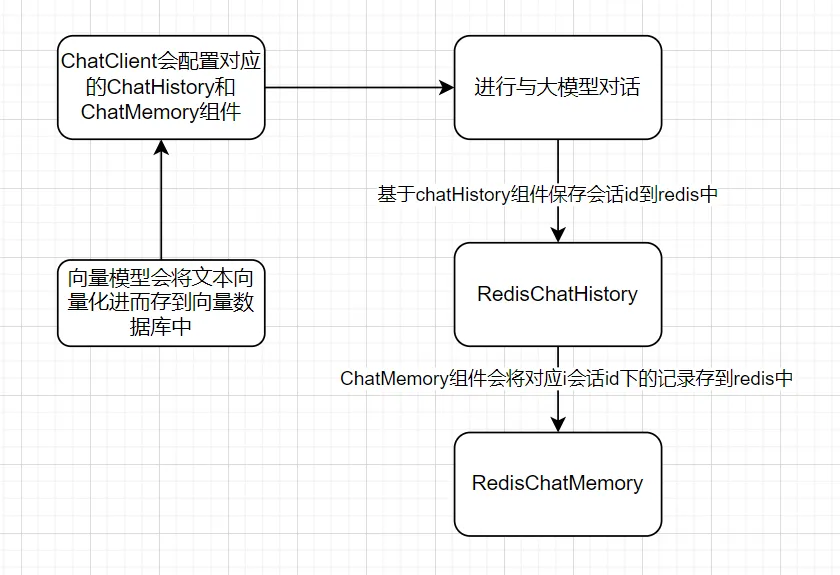
会话记忆整体逻辑设计:
 编辑
编辑
2 FunctionCalling
2.1 FunctionCalling介绍
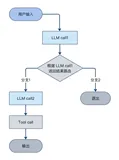
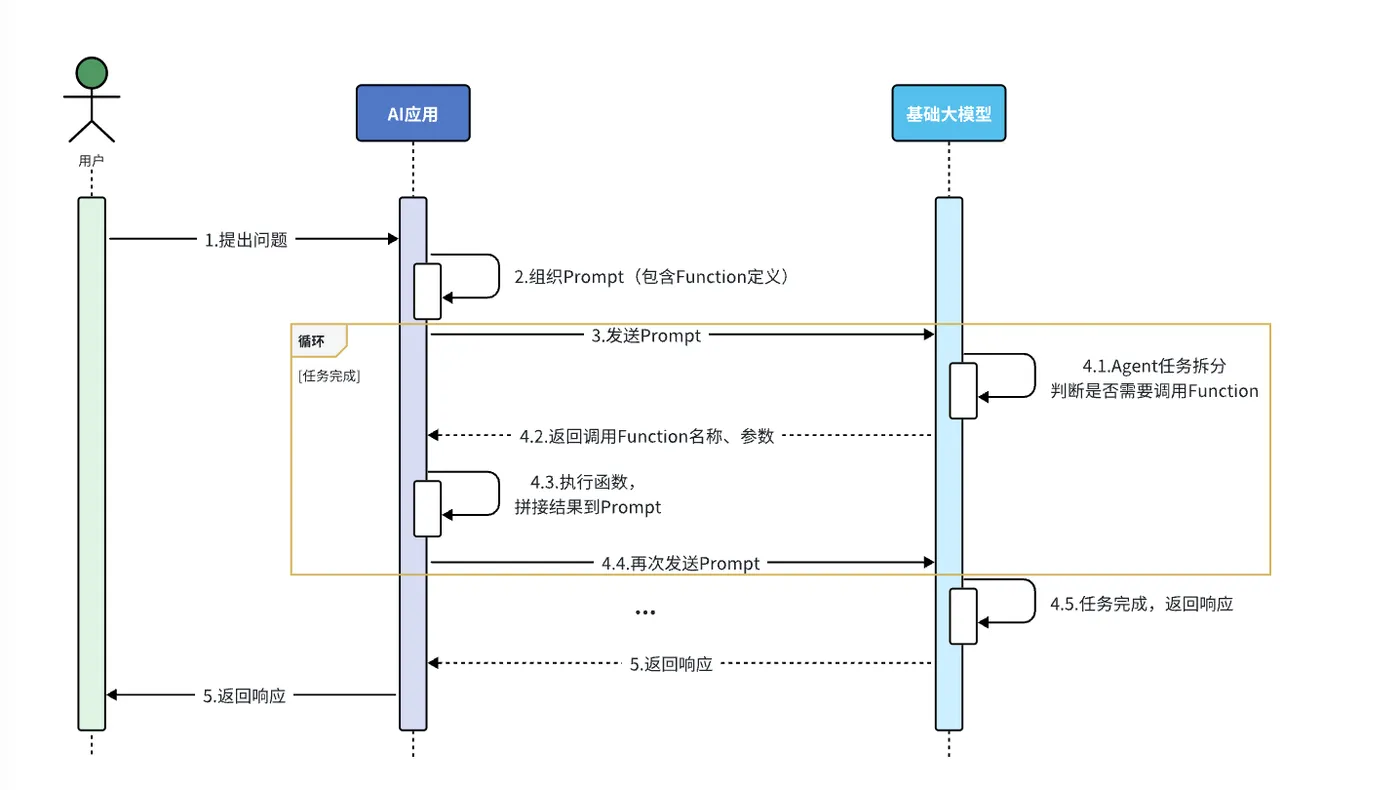
AI擅长的是非结构化数据的分析,如果需求中包含严格的逻辑校验或需要读写数据库等业务逻辑,我们可以赋予大模型执行业务规则的逻辑。我们可以把数据库操作等业务逻辑都定义成Function,或者也可以叫Tool,也就是工具。然后,我们可以在提示词中,告诉大模型,什么情况下需要调用什么工具,将来用户在与大模型交互的时候,大模型就可以在适当的时候调用工具了。
 编辑
编辑
流程解读:
- 提前把这些操作定义为Function(SpringAI中叫Tool),
- 然后将Function的名称、作用、需要的参数等信息都封装为Prompt提示词与用户的提问一起发送给大模型
- 大模型在与用户交互的过程中,根据用户交流的内容判断是否需要调用Function
- 如果需要则返回Function名称、参数等信息
- Java解析结果,判断要执行哪个函数,代码执行Function,把结果再次封装到Prompt中发送给AI
- AI继续与用户交互,直到完成任务
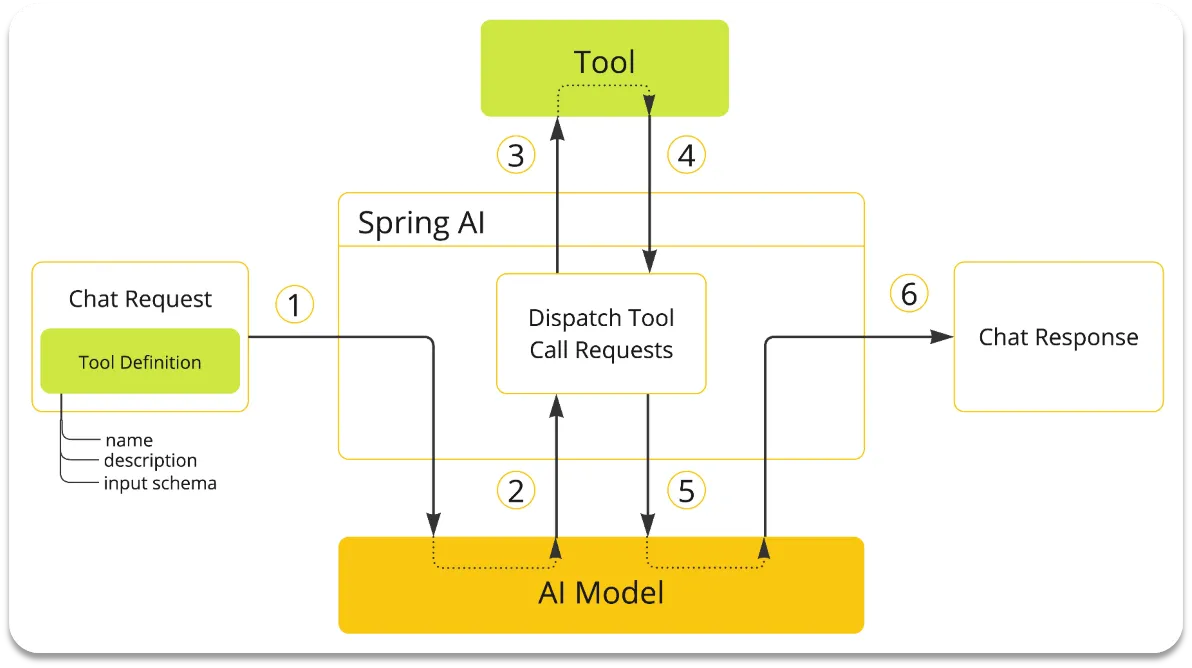
SpringAI提供了FunctionCalling的功能,由于解析大模型响应,找到函数名称、参数,调用函数等这些动作都是固定的,所以SpringAI再次利用AOP的能力,帮我们把中间调用函数的部分自动完成了。
 编辑
编辑
我们要做的事情就简化了:
- 编写基础提示词(不包括Tool的定义)
- 编写Tool(Function)
- 配置Advisor(SpringAI利用AOP帮我们拼接Tool定义到提示词,完成Tool调用动作)
2.2 FunctionCalling实战
实现一个大模型自动总结并保存当前会话知识点
2.2.1 业务封装
@Mapper
public interface AINoteMapper {
     /**
     * 插入一条记录
     * @param aINote
     * @return
     */
    @Insert("insert into tb_ai_note (user_id, chat_id, title, content) values (#{userId}, #{chatId}, #{title}, #{content})")
    Boolean insert(AINote aINote);
    /**
     * 删除一条记录
     * @param aiNoteId
     * @return
     */
    @Delete("delete from tb_ai_note where id = #{aiNoteId}")
    Boolean deleteById(Long aiNoteId);
    /**
     * 查询所有记录
     * @return
     */
    @Select("SELECT * FROM tb_ai_note")
    List<AINote> selectList();
    /**
     * 根据ID查询记录
     * @param aiNoteId
     * @return
     */
    @Select("SELECT * FROM tb_ai_note where id = #{aiNoteId}")
    AINote selectById(Long aiNoteId);

     /**
     * 添加AI词生文记录
     * @param generateText
     * @return
     */
    @Insert("insert into tb_generate_text (user_id, prompt_words, generated_text,translated_text) values (#{userId}, #{promptWords}, #{generatedText},#{translatedText})")
    Boolean addGT(GenerateText generateText);
    /**
     * 获取AI词生文记录
     * @param userId
     * @return
     */
    @Select("SELECT * FROM tb_generate_text where user_id = #{userId} order by create_time desc")
    List<GenerateText> getGTList(Long userId);
    /**
     * 删除AI词生文记录
     * @param generateTextId
     * @return
     */
    @Delete("delete from tb_generate_text where id = #{generateTextId}")
    Boolean deleteGT(Long generateTextId);
}

/**
* AI笔记表
* @Author GuihaoLv
*/
@Data
@AllArgsConstructor
@NoArgsConstructor
@Builder
public class AINote extends BaseEntity implements Serializable {
   private Long userId;//用户ID
   private String chatId;//会话ID
   private String title;//标题
   private String content;//内容
}

2.2.2 Function定义
/**
 * AI笔记工具类
 * @Author GuihaoLv
 */
@Component
public class AINoteTools {
    @Autowired
    private AINoteMapper aiNoteMapper;
    /**
     * 将会话中的知识点保存为AI笔记
     * @param chatId 会话ID(关联笔记所属会话)
     * @param title 笔记标题(总结知识点核心)
     * @param content 笔记内容(详细知识点)
     * @return 保存结果(true成功/false失败)
     */
    @Tool(description = "将会话中的知识点创建为AI笔记,需传入会话ID、标题和内容,自动关联当前用户")
    public Boolean createAINote(
            @ToolParam(required = false, description = "会话唯一标识,用于关联笔记和对应会话") String chatId,
            @ToolParam(required = true, description = "笔记标题,简洁概括知识点内容(不超过20字)") String title,
            @ToolParam(required = true, description = "笔记详细内容,记录会话中的知识点详情") String content) {
        // 构建笔记对象(自动填充当前用户ID)
        AINote aiNote = new AINote();
        aiNote.setUserId(UserUtil.getUserId());
        aiNote.setChatId(chatId);
        aiNote.setTitle(title);
        aiNote.setContent(content);
        // 保存到数据库
        return aiNoteMapper.insert(aiNote);
    }
}

这里的@ToolParam注解是SpringAI提供的用来解释Function参数的注解。其中的信息都会通过提示词的方式发送给AI模型。
2.2.3 System提示词
public static final String CHAT_ROLE ="""
        你是一个可以帮助用户记录会话笔记的助手。
        当用户发出以下指令时,必须调用createAINote工具:
        - "把刚才的内容记成笔记"
        - "记录这段知识点"
        - "保存当前对话内容"
        - 其他类似要求保存会话内容的表述

        调用工具时必须包含3个参数:
        1. chatId:当前会话的ID(从会话上下文获取)
        2. title:从会话内容中提炼的标题(不超过20字)
        3. content:需要记录的会话知识点详情(完整提取相关内容)

        调用成功后,回复用户"已为你保存笔记:[标题]";调用失败则提示"笔记保存失败,请重试"。
        """;

2.2.4 在ChatClient中配置tool
@Bean
    public ChatClient chatCommonClient(OpenAiChatModel model, ChatMemory chatMemory,VectorStore vectorStore,  AINoteTools aiNoteTools) {
        return ChatClient
                .builder(model)
                .defaultOptions(ChatOptions.builder()
                        .model("qwen-omni-turbo")
                        .build())
                .defaultSystem(AIChatConstant.CHAT_ROLE)
                .defaultAdvisors(
                        new SimpleLoggerAdvisor(),
                        new MessageChatMemoryAdvisor(chatMemory),
                        new QuestionAnswerAdvisor(
                                vectorStore,
                                SearchRequest.builder()
                                        .similarityThreshold(0.6)
                                        .topK(2)
                                        .build()
                        )
                )
                .defaultTools(List.of(aiNoteTools))
                .build();
    }

目前SpringAI的OpenAI客户端与阿里云百炼存在兼容性问题,所以FunctionCalling功能无法使用stream模式,为了兼容百炼云平台,我们需做调整
3 兼容百炼云平台
截止SpringAI的1.0.0-M6版本为止,SpringAI的OpenAiModel和阿里云百炼的部分接口存在兼容性问题,包括但不限于以下两个问题:
- FunctionCalling的stream模式,阿里云百炼返回的tool-arguments是不完整的,需要拼接,而OpenAI则是完整的,无需拼接。
- 音频识别中的数据格式,阿里云百炼的qwen-omni模型要求的参数格式为data:;base64,${media-data},而OpenAI是直接{media-data}
由于SpringAI的OpenAI模块是遵循OpenAI规范的,所以即便版本升级也不会去兼容阿里云,除非SpringAI单独为阿里云开发starter,所以目前解决方案有两个:
- 等待阿里云官方推出的spring-alibaba-ai升级到最新版本
- 自己重写OpenAiModel的实现逻辑。
接下来,我们就用重写OpenAiModel的方式,来解决上述两个问题。
首先,我们自己写一个遵循阿里巴巴百炼平台接口规范的ChatModel,其中大部分代码来自SpringAI的OpenAiChatModel,只需要重写接口协议不匹配的地方即可,重写部分会以黄色高亮显示。
新建一个AlibabaOpenAiChatModel类:
package com.itheima.ai.model; import io.micrometer.observation.Observation; import io.micrometer.observation.ObservationRegistry; import io.micrometer.observation.contextpropagation.ObservationThreadLocalAccessor; import org.slf4j.Logger; import org.slf4j.LoggerFactory; import org.springframework.ai.chat.messages.AssistantMessage; import org.springframework.ai.chat.messages.MessageType; import org.springframework.ai.chat.messages.ToolResponseMessage; import org.springframework.ai.chat.messages.UserMessage; import org.springframework.ai.chat.metadata.*; import org.springframework.ai.chat.model.*; import org.springframework.ai.chat.observation.ChatModelObservationContext; import org.springframework.ai.chat.observation.ChatModelObservationConvention; import org.springframework.ai.chat.observation.ChatModelObservationDocumentation; import org.springframework.ai.chat.observation.DefaultChatModelObservationConvention; import org.springframework.ai.chat.prompt.ChatOptions; import org.springframework.ai.chat.prompt.Prompt; import org.springframework.ai.model.Media; import org.springframework.ai.model.ModelOptionsUtils; import org.springframework.ai.model.function.FunctionCallback; import org.springframework.ai.model.function.FunctionCallbackResolver; import org.springframework.ai.model.function.FunctionCallingOptions; import org.springframework.ai.model.tool.LegacyToolCallingManager; import org.springframework.ai.model.tool.ToolCallingChatOptions; import org.springframework.ai.model.tool.ToolCallingManager; import org.springframework.ai.model.tool.ToolExecutionResult; import org.springframework.ai.openai.OpenAiChatOptions; import org.springframework.ai.openai.api.OpenAiApi; import org.springframework.ai.openai.api.common.OpenAiApiConstants; import org.springframework.ai.openai.metadata.support.OpenAiResponseHeaderExtractor; import org.springframework.ai.retry.RetryUtils; import org.springframework.ai.tool.definition.ToolDefinition; import org.springframework.core.io.ByteArrayResource; import org.springframework.core.io.Resource; import org.springframework.http.ResponseEntity; import org.springframework.lang.Nullable; import org.springframework.retry.support.RetryTemplate; import org.springframework.util.*; import reactor.core.publisher.Flux; import reactor.core.publisher.Mono; import java.util.*; import java.util.concurrent.ConcurrentHashMap; import java.util.stream.Collectors; public class AlibabaOpenAiChatModel extends AbstractToolCallSupport implements ChatModel { private static final Logger logger = LoggerFactory.getLogger(AlibabaOpenAiChatModel.class); private static final ChatModelObservationConvention DEFAULT_OBSERVATION_CONVENTION = new DefaultChatModelObservationConvention(); private static final ToolCallingManager DEFAULT_TOOL_CALLING_MANAGER = ToolCallingManager.builder().build(); /** * The default options used for the chat completion requests. */ private final OpenAiChatOptions defaultOptions; /** * The retry template used to retry the OpenAI API calls. */ private final RetryTemplate retryTemplate; /** * Low-level access to the OpenAI API. */ private final OpenAiApi openAiApi; /** * Observation registry used for instrumentation. */ private final ObservationRegistry observationRegistry; private final ToolCallingManager toolCallingManager; /** * Conventions to use for generating observations. */ private ChatModelObservationConvention observationConvention = DEFAULT_OBSERVATION_CONVENTION; /** * Creates an instance of the AlibabaOpenAiChatModel. * @param openAiApi The OpenAiApi instance to be used for interacting with the OpenAI * Chat API. * @throws IllegalArgumentException if openAiApi is null * @deprecated Use AlibabaOpenAiChatModel.Builder. */ @Deprecated public AlibabaOpenAiChatModel(OpenAiApi openAiApi) { this(openAiApi, OpenAiChatOptions.builder().model(OpenAiApi.DEFAULT_CHAT_MODEL).temperature(0.7).build()); } /** * Initializes an instance of the AlibabaOpenAiChatModel. * @param openAiApi The OpenAiApi instance to be used for interacting with the OpenAI * Chat API. * @param options The OpenAiChatOptions to configure the chat model. * @deprecated Use AlibabaOpenAiChatModel.Builder. */ @Deprecated public AlibabaOpenAiChatModel(OpenAiApi openAiApi, OpenAiChatOptions options) { this(openAiApi, options, null, RetryUtils.DEFAULT_RETRY_TEMPLATE); } /** * Initializes a new instance of the AlibabaOpenAiChatModel. * @param openAiApi The OpenAiApi instance to be used for interacting with the OpenAI * Chat API. * @param options The OpenAiChatOptions to configure the chat model. * @param functionCallbackResolver The function callback resolver. * @param retryTemplate The retry template. * @deprecated Use AlibabaOpenAiChatModel.Builder. */ @Deprecated public AlibabaOpenAiChatModel(OpenAiApi openAiApi, OpenAiChatOptions options, @Nullable FunctionCallbackResolver functionCallbackResolver, RetryTemplate retryTemplate) { this(openAiApi, options, functionCallbackResolver, List.of(), retryTemplate); } /** * Initializes a new instance of the AlibabaOpenAiChatModel. * @param openAiApi The OpenAiApi instance to be used for interacting with the OpenAI * Chat API. * @param options The OpenAiChatOptions to configure the chat model. * @param functionCallbackResolver The function callback resolver. * @param toolFunctionCallbacks The tool function callbacks. * @param retryTemplate The retry template. * @deprecated Use AlibabaOpenAiChatModel.Builder. */ @Deprecated public AlibabaOpenAiChatModel(OpenAiApi openAiApi, OpenAiChatOptions options, @Nullable FunctionCallbackResolver functionCallbackResolver, @Nullable List<FunctionCallback> toolFunctionCallbacks, RetryTemplate retryTemplate) { this(openAiApi, options, functionCallbackResolver, toolFunctionCallbacks, retryTemplate, ObservationRegistry.NOOP); } /** * Initializes a new instance of the AlibabaOpenAiChatModel. * @param openAiApi The OpenAiApi instance to be used for interacting with the OpenAI * Chat API. * @param options The OpenAiChatOptions to configure the chat model. * @param functionCallbackResolver The function callback resolver. * @param toolFunctionCallbacks The tool function callbacks. * @param retryTemplate The retry template. * @param observationRegistry The ObservationRegistry used for instrumentation. * @deprecated Use AlibabaOpenAiChatModel.Builder or AlibabaOpenAiChatModel(OpenAiApi, * OpenAiChatOptions, ToolCallingManager, RetryTemplate, ObservationRegistry). */ @Deprecated public AlibabaOpenAiChatModel(OpenAiApi openAiApi, OpenAiChatOptions options, @Nullable FunctionCallbackResolver functionCallbackResolver, @Nullable List<FunctionCallback> toolFunctionCallbacks, RetryTemplate retryTemplate, ObservationRegistry observationRegistry) { this(openAiApi, options, LegacyToolCallingManager.builder() .functionCallbackResolver(functionCallbackResolver) .functionCallbacks(toolFunctionCallbacks) .build(), retryTemplate, observationRegistry); logger.warn("This constructor is deprecated and will be removed in the next milestone. " + "Please use the AlibabaOpenAiChatModel.Builder or the new constructor accepting ToolCallingManager instead."); } public AlibabaOpenAiChatModel(OpenAiApi openAiApi, OpenAiChatOptions defaultOptions, ToolCallingManager toolCallingManager, RetryTemplate retryTemplate, ObservationRegistry observationRegistry) { // We do not pass the 'defaultOptions' to the AbstractToolSupport, // because it modifies them. We are using ToolCallingManager instead, // so we just pass empty options here. super(null, OpenAiChatOptions.builder().build(), List.of()); Assert.notNull(openAiApi, "openAiApi cannot be null"); Assert.notNull(defaultOptions, "defaultOptions cannot be null"); Assert.notNull(toolCallingManager, "toolCallingManager cannot be null"); Assert.notNull(retryTemplate, "retryTemplate cannot be null"); Assert.notNull(observationRegistry, "observationRegistry cannot be null"); this.openAiApi = openAiApi; this.defaultOptions = defaultOptions; this.toolCallingManager = toolCallingManager; this.retryTemplate = retryTemplate; this.observationRegistry = observationRegistry; } @Override public ChatResponse call(Prompt prompt) { // Before moving any further, build the final request Prompt, // merging runtime and default options. Prompt requestPrompt = buildRequestPrompt(prompt); return this.internalCall(requestPrompt, null); } public ChatResponse internalCall(Prompt prompt, ChatResponse previousChatResponse) { OpenAiApi.ChatCompletionRequest request = createRequest(prompt, false); ChatModelObservationContext observationContext = ChatModelObservationContext.builder() .prompt(prompt) .provider(OpenAiApiConstants.PROVIDER_NAME) .requestOptions(prompt.getOptions()) .build(); ChatResponse response = ChatModelObservationDocumentation.CHAT_MODEL_OPERATION .observation(this.observationConvention, DEFAULT_OBSERVATION_CONVENTION, () -> observationContext, this.observationRegistry) .observe(() -> { ResponseEntity<OpenAiApi.ChatCompletion> completionEntity = this.retryTemplate .execute(ctx -> this.openAiApi.chatCompletionEntity(request, getAdditionalHttpHeaders(prompt))); var chatCompletion = completionEntity.getBody(); if (chatCompletion == null) { logger.warn("No chat completion returned for prompt: {}", prompt); return new ChatResponse(List.of()); } List<OpenAiApi.ChatCompletion.Choice> choices = chatCompletion.choices(); if (choices == null) { logger.warn("No choices returned for prompt: {}", prompt); return new ChatResponse(List.of()); } List<Generation> generations = choices.stream().map(choice -> { // @formatter:off Map<String, Object> metadata = Map.of( "id", chatCompletion.id() != null ? chatCompletion.id() : "", "role", choice.message().role() != null ? choice.message().role().name() : "", "index", choice.index(), "finishReason", choice.finishReason() != null ? choice.finishReason().name() : "", "refusal", StringUtils.hasText(choice.message().refusal()) ? choice.message().refusal() : ""); // @formatter:on return buildGeneration(choice, metadata, request); }).toList(); RateLimit rateLimit = OpenAiResponseHeaderExtractor.extractAiResponseHeaders(completionEntity); // Current usage OpenAiApi.Usage usage = completionEntity.getBody().usage(); Usage currentChatResponseUsage = usage != null ? getDefaultUsage(usage) : new EmptyUsage(); Usage accumulatedUsage = UsageUtils.getCumulativeUsage(currentChatResponseUsage, previousChatResponse); ChatResponse chatResponse = new ChatResponse(generations, from(completionEntity.getBody(), rateLimit, accumulatedUsage)); observationContext.setResponse(chatResponse); return chatResponse; }); if (ToolCallingChatOptions.isInternalToolExecutionEnabled(prompt.getOptions()) && response != null && response.hasToolCalls()) { var toolExecutionResult = this.toolCallingManager.executeToolCalls(prompt, response); if (toolExecutionResult.returnDirect()) { // Return tool execution result directly to the client. return ChatResponse.builder() .from(response) .generations(ToolExecutionResult.buildGenerations(toolExecutionResult)) .build(); } else { // Send the tool execution result back to the model. return this.internalCall(new Prompt(toolExecutionResult.conversationHistory(), prompt.getOptions()), response); } } return response; } @Override public Flux<ChatResponse> stream(Prompt prompt) { // Before moving any further, build the final request Prompt, // merging runtime and default options. Prompt requestPrompt = buildRequestPrompt(prompt); return internalStream(requestPrompt, null); } public Flux<ChatResponse> internalStream(Prompt prompt, ChatResponse previousChatResponse) { return Flux.deferContextual(contextView -> { OpenAiApi.ChatCompletionRequest request = createRequest(prompt, true); if (request.outputModalities() != null) { if (request.outputModalities().stream().anyMatch(m -> m.equals("audio"))) { logger.warn("Audio output is not supported for streaming requests. Removing audio output."); throw new IllegalArgumentException("Audio output is not supported for streaming requests."); } } if (request.audioParameters() != null) { logger.warn("Audio parameters are not supported for streaming requests. Removing audio parameters."); throw new IllegalArgumentException("Audio parameters are not supported for streaming requests."); } Flux<OpenAiApi.ChatCompletionChunk> completionChunks = this.openAiApi.chatCompletionStream(request, getAdditionalHttpHeaders(prompt)); // For chunked responses, only the first chunk contains the choice role. // The rest of the chunks with same ID share the same role. ConcurrentHashMap<String, String> roleMap = new ConcurrentHashMap<>(); final ChatModelObservationContext observationContext = ChatModelObservationContext.builder() .prompt(prompt) .provider(OpenAiApiConstants.PROVIDER_NAME) .requestOptions(prompt.getOptions()) .build(); Observation observation = ChatModelObservationDocumentation.CHAT_MODEL_OPERATION.observation( this.observationConvention, DEFAULT_OBSERVATION_CONVENTION, () -> observationContext, this.observationRegistry); observation.parentObservation(contextView.getOrDefault(ObservationThreadLocalAccessor.KEY, null)).start(); // Convert the ChatCompletionChunk into a ChatCompletion to be able to reuse // the function call handling logic. Flux<ChatResponse> chatResponse = completionChunks.map(this::chunkToChatCompletion) .switchMap(chatCompletion -> Mono.just(chatCompletion).map(chatCompletion2 -> { try { @SuppressWarnings("null") String id = chatCompletion2.id(); List<Generation> generations = chatCompletion2.choices().stream().map(choice -> { // @formatter:off if (choice.message().role() != null) { roleMap.putIfAbsent(id, choice.message().role().name()); } Map<String, Object> metadata = Map.of( "id", chatCompletion2.id(), "role", roleMap.getOrDefault(id, ""), "index", choice.index(), "finishReason", choice.finishReason() != null ? choice.finishReason().name() : "", "refusal", StringUtils.hasText(choice.message().refusal()) ? choice.message().refusal() : ""); return buildGeneration(choice, metadata, request); }).toList(); // @formatter:on OpenAiApi.Usage usage = chatCompletion2.usage(); Usage currentChatResponseUsage = usage != null ? getDefaultUsage(usage) : new EmptyUsage(); Usage accumulatedUsage = UsageUtils.getCumulativeUsage(currentChatResponseUsage, previousChatResponse); return new ChatResponse(generations, from(chatCompletion2, null, accumulatedUsage)); } catch (Exception e) { logger.error("Error processing chat completion", e); return new ChatResponse(List.of()); } // When in stream mode and enabled to include the usage, the OpenAI // Chat completion response would have the usage set only in its // final response. Hence, the following overlapping buffer is // created to store both the current and the subsequent response // to accumulate the usage from the subsequent response. })) .buffer(2, 1) .map(bufferList -> { ChatResponse firstResponse = bufferList.get(0); if (request.streamOptions() != null && request.streamOptions().includeUsage()) { if (bufferList.size() == 2) { ChatResponse secondResponse = bufferList.get(1); if (secondResponse != null && secondResponse.getMetadata() != null) { // This is the usage from the final Chat response for a // given Chat request. Usage usage = secondResponse.getMetadata().getUsage(); if (!UsageUtils.isEmpty(usage)) { // Store the usage from the final response to the // penultimate response for accumulation. return new ChatResponse(firstResponse.getResults(), from(firstResponse.getMetadata(), usage)); } } } } return firstResponse; }); // @formatter:off Flux<ChatResponse> flux = chatResponse.flatMap(response -> { if (ToolCallingChatOptions.isInternalToolExecutionEnabled(prompt.getOptions()) && response.hasToolCalls()) { var toolExecutionResult = this.toolCallingManager.executeToolCalls(prompt, response); if (toolExecutionResult.returnDirect()) { // Return tool execution result directly to the client. return Flux.just(ChatResponse.builder().from(response) .generations(ToolExecutionResult.buildGenerations(toolExecutionResult)) .build()); } else { // Send the tool execution result back to the model. return this.internalStream(new Prompt(toolExecutionResult.conversationHistory(), prompt.getOptions()), response); } } else { return Flux.just(response); } }) .doOnError(observation::error) .doFinally(s -> observation.stop()) .contextWrite(ctx -> ctx.put(ObservationThreadLocalAccessor.KEY, observation)); // @formatter:on return new MessageAggregator().aggregate(flux, observationContext::setResponse); }); } private MultiValueMap<String, String> getAdditionalHttpHeaders(Prompt prompt) { Map<String, String> headers = new HashMap<>(this.defaultOptions.getHttpHeaders()); if (prompt.getOptions() != null && prompt.getOptions() instanceof OpenAiChatOptions chatOptions) { headers.putAll(chatOptions.getHttpHeaders()); } return CollectionUtils.toMultiValueMap( headers.entrySet().stream().collect(Collectors.toMap(Map.Entry::getKey, e -> List.of(e.getValue())))); } private Generation buildGeneration(OpenAiApi.ChatCompletion.Choice choice, Map<String, Object> metadata, OpenAiApi.ChatCompletionRequest request) { List<AssistantMessage.ToolCall> toolCalls = choice.message().toolCalls() == null ? List.of() : choice.message() .toolCalls() .stream() .map(toolCall -> new AssistantMessage.ToolCall(toolCall.id(), "function", toolCall.function().name(), toolCall.function().arguments())) .reduce((tc1, tc2) -> new AssistantMessage.ToolCall(tc1.id(), "function", tc1.name(), tc1.arguments() + tc2.arguments())) .stream() .toList(); String finishReason = (choice.finishReason() != null ? choice.finishReason().name() : ""); var generationMetadataBuilder = ChatGenerationMetadata.builder().finishReason(finishReason); List<Media> media = new ArrayList<>(); String textContent = choice.message().content(); var audioOutput = choice.message().audioOutput(); if (audioOutput != null) { String mimeType = String.format("audio/%s", request.audioParameters().format().name().toLowerCase()); byte[] audioData = Base64.getDecoder().decode(audioOutput.data()); Resource resource = new ByteArrayResource(audioData); Media.builder().mimeType(MimeTypeUtils.parseMimeType(mimeType)).data(resource).id(audioOutput.id()).build(); media.add(Media.builder() .mimeType(MimeTypeUtils.parseMimeType(mimeType)) .data(resource) .id(audioOutput.id()) .build()); if (!StringUtils.hasText(textContent)) { textContent = audioOutput.transcript(); } generationMetadataBuilder.metadata("audioId", audioOutput.id()); generationMetadataBuilder.metadata("audioExpiresAt", audioOutput.expiresAt()); } var assistantMessage = new AssistantMessage(textContent, metadata, toolCalls, media); return new Generation(assistantMessage, generationMetadataBuilder.build()); } private ChatResponseMetadata from(OpenAiApi.ChatCompletion result, RateLimit rateLimit, Usage usage) { Assert.notNull(result, "OpenAI ChatCompletionResult must not be null"); var builder = ChatResponseMetadata.builder() .id(result.id() != null ? result.id() : "") .usage(usage) .model(result.model() != null ? result.model() : "") .keyValue("created", result.created() != null ? result.created() : 0L) .keyValue("system-fingerprint", result.systemFingerprint() != null ? result.systemFingerprint() : ""); if (rateLimit != null) { builder.rateLimit(rateLimit); } return builder.build(); } private ChatResponseMetadata from(ChatResponseMetadata chatResponseMetadata, Usage usage) { Assert.notNull(chatResponseMetadata, "OpenAI ChatResponseMetadata must not be null"); var builder = ChatResponseMetadata.builder() .id(chatResponseMetadata.getId() != null ? chatResponseMetadata.getId() : "") .usage(usage) .model(chatResponseMetadata.getModel() != null ? chatResponseMetadata.getModel() : ""); if (chatResponseMetadata.getRateLimit() != null) { builder.rateLimit(chatResponseMetadata.getRateLimit()); } return builder.build(); } /** * Convert the ChatCompletionChunk into a ChatCompletion. The Usage is set to null. * @param chunk the ChatCompletionChunk to convert * @return the ChatCompletion */ private OpenAiApi.ChatCompletion chunkToChatCompletion(OpenAiApi.ChatCompletionChunk chunk) { List<OpenAiApi.ChatCompletion.Choice> choices = chunk.choices() .stream() .map(chunkChoice -> new OpenAiApi.ChatCompletion.Choice(chunkChoice.finishReason(), chunkChoice.index(), chunkChoice.delta(), chunkChoice.logprobs())) .toList(); return new OpenAiApi.ChatCompletion(chunk.id(), choices, chunk.created(), chunk.model(), chunk.serviceTier(), chunk.systemFingerprint(), "chat.completion", chunk.usage()); } private DefaultUsage getDefaultUsage(OpenAiApi.Usage usage) { return new DefaultUsage(usage.promptTokens(), usage.completionTokens(), usage.totalTokens(), usage); } Prompt buildRequestPrompt(Prompt prompt) { // Process runtime options OpenAiChatOptions runtimeOptions = null; if (prompt.getOptions() != null) { if (prompt.getOptions() instanceof ToolCallingChatOptions toolCallingChatOptions) { runtimeOptions = ModelOptionsUtils.copyToTarget(toolCallingChatOptions, ToolCallingChatOptions.class, OpenAiChatOptions.class); } else if (prompt.getOptions() instanceof FunctionCallingOptions functionCallingOptions) { runtimeOptions = ModelOptionsUtils.copyToTarget(functionCallingOptions, FunctionCallingOptions.class, OpenAiChatOptions.class); } else { runtimeOptions = ModelOptionsUtils.copyToTarget(prompt.getOptions(), ChatOptions.class, OpenAiChatOptions.class); } } // Define request options by merging runtime options and default options OpenAiChatOptions requestOptions = ModelOptionsUtils.merge(runtimeOptions, this.defaultOptions, OpenAiChatOptions.class); // Merge @JsonIgnore-annotated options explicitly since they are ignored by // Jackson, used by ModelOptionsUtils. if (runtimeOptions != null) { requestOptions.setHttpHeaders( mergeHttpHeaders(runtimeOptions.getHttpHeaders(), this.defaultOptions.getHttpHeaders())); requestOptions.setInternalToolExecutionEnabled( ModelOptionsUtils.mergeOption(runtimeOptions.isInternalToolExecutionEnabled(), this.defaultOptions.isInternalToolExecutionEnabled())); requestOptions.setToolNames(ToolCallingChatOptions.mergeToolNames(runtimeOptions.getToolNames(), this.defaultOptions.getToolNames())); requestOptions.setToolCallbacks(ToolCallingChatOptions.mergeToolCallbacks(runtimeOptions.getToolCallbacks(), this.defaultOptions.getToolCallbacks())); requestOptions.setToolContext(ToolCallingChatOptions.mergeToolContext(runtimeOptions.getToolContext(), this.defaultOptions.getToolContext())); } else { requestOptions.setHttpHeaders(this.defaultOptions.getHttpHeaders()); requestOptions.setInternalToolExecutionEnabled(this.defaultOptions.isInternalToolExecutionEnabled()); requestOptions.setToolNames(this.defaultOptions.getToolNames()); requestOptions.setToolCallbacks(this.defaultOptions.getToolCallbacks()); requestOptions.setToolContext(this.defaultOptions.getToolContext()); } ToolCallingChatOptions.validateToolCallbacks(requestOptions.getToolCallbacks()); return new Prompt(prompt.getInstructions(), requestOptions); } private Map<String, String> mergeHttpHeaders(Map<String, String> runtimeHttpHeaders, Map<String, String> defaultHttpHeaders) { var mergedHttpHeaders = new HashMap<>(defaultHttpHeaders); mergedHttpHeaders.putAll(runtimeHttpHeaders); return mergedHttpHeaders; } /** * Accessible for testing. */ OpenAiApi.ChatCompletionRequest createRequest(Prompt prompt, boolean stream) { List<OpenAiApi.ChatCompletionMessage> chatCompletionMessages = prompt.getInstructions().stream().map(message -> { if (message.getMessageType() == MessageType.USER || message.getMessageType() == MessageType.SYSTEM) { Object content = message.getText(); if (message instanceof UserMessage userMessage) { if (!CollectionUtils.isEmpty(userMessage.getMedia())) { List<OpenAiApi.ChatCompletionMessage.MediaContent> contentList = new ArrayList<>(List.of(new OpenAiApi.ChatCompletionMessage.MediaContent(message.getText()))); contentList.addAll(userMessage.getMedia().stream().map(this::mapToMediaContent).toList()); content = contentList; } } return List.of(new OpenAiApi.ChatCompletionMessage(content, OpenAiApi.ChatCompletionMessage.Role.valueOf(message.getMessageType().name()))); } else if (message.getMessageType() == MessageType.ASSISTANT) { var assistantMessage = (AssistantMessage) message; List<OpenAiApi.ChatCompletionMessage.ToolCall> toolCalls = null; if (!CollectionUtils.isEmpty(assistantMessage.getToolCalls())) { toolCalls = assistantMessage.getToolCalls().stream().map(toolCall -> { var function = new OpenAiApi.ChatCompletionMessage.ChatCompletionFunction(toolCall.name(), toolCall.arguments()); return new OpenAiApi.ChatCompletionMessage.ToolCall(toolCall.id(), toolCall.type(), function); }).toList(); } OpenAiApi.ChatCompletionMessage.AudioOutput audioOutput = null; if (!CollectionUtils.isEmpty(assistantMessage.getMedia())) { Assert.isTrue(assistantMessage.getMedia().size() == 1, "Only one media content is supported for assistant messages"); audioOutput = new OpenAiApi.ChatCompletionMessage.AudioOutput(assistantMessage.getMedia().get(0).getId(), null, null, null); } return List.of(new OpenAiApi.ChatCompletionMessage(assistantMessage.getText(), OpenAiApi.ChatCompletionMessage.Role.ASSISTANT, null, null, toolCalls, null, audioOutput)); } else if (message.getMessageType() == MessageType.TOOL) { ToolResponseMessage toolMessage = (ToolResponseMessage) message; toolMessage.getResponses() .forEach(response -> Assert.isTrue(response.id() != null, "ToolResponseMessage must have an id")); return toolMessage.getResponses() .stream() .map(tr -> new OpenAiApi.ChatCompletionMessage(tr.responseData(), OpenAiApi.ChatCompletionMessage.Role.TOOL, tr.name(), tr.id(), null, null, null)) .toList(); } else { throw new IllegalArgumentException("Unsupported message type: " + message.getMessageType()); } }).flatMap(List::stream).toList(); OpenAiApi.ChatCompletionRequest request = new OpenAiApi.ChatCompletionRequest(chatCompletionMessages, stream); OpenAiChatOptions requestOptions = (OpenAiChatOptions) prompt.getOptions(); request = ModelOptionsUtils.merge(requestOptions, request, OpenAiApi.ChatCompletionRequest.class); // Add the tool definitions to the request's tools parameter. List<ToolDefinition> toolDefinitions = this.toolCallingManager.resolveToolDefinitions(requestOptions); if (!CollectionUtils.isEmpty(toolDefinitions)) { request = ModelOptionsUtils.merge( OpenAiChatOptions.builder().tools(this.getFunctionTools(toolDefinitions)).build(), request, OpenAiApi.ChatCompletionRequest.class); } // Remove `streamOptions` from the request if it is not a streaming request if (request.streamOptions() != null && !stream) { logger.warn("Removing streamOptions from the request as it is not a streaming request!"); request = request.streamOptions(null); } return request; } private OpenAiApi.ChatCompletionMessage.MediaContent mapToMediaContent(Media media) { var mimeType = media.getMimeType(); if (MimeTypeUtils.parseMimeType("audio/mp3").equals(mimeType) || MimeTypeUtils.parseMimeType("audio/mpeg").equals(mimeType)) { return new OpenAiApi.ChatCompletionMessage.MediaContent( new OpenAiApi.ChatCompletionMessage.MediaContent.InputAudio(fromAudioData(media.getData()), OpenAiApi.ChatCompletionMessage.MediaContent.InputAudio.Format.MP3)); } if (MimeTypeUtils.parseMimeType("audio/wav").equals(mimeType)) { return new OpenAiApi.ChatCompletionMessage.MediaContent( new OpenAiApi.ChatCompletionMessage.MediaContent.InputAudio(fromAudioData(media.getData()), OpenAiApi.ChatCompletionMessage.MediaContent.InputAudio.Format.WAV)); } else { return new OpenAiApi.ChatCompletionMessage.MediaContent( new OpenAiApi.ChatCompletionMessage.MediaContent.ImageUrl(this.fromMediaData(media.getMimeType(), media.getData()))); } } private String fromAudioData(Object audioData) { if (audioData instanceof byte[] bytes) { return String.format("data:;base64,%s", Base64.getEncoder().encodeToString(bytes)); } throw new IllegalArgumentException("Unsupported audio data type: " + audioData.getClass().getSimpleName()); } private String fromMediaData(MimeType mimeType, Object mediaContentData) { if (mediaContentData instanceof byte[] bytes) { // Assume the bytes are an image. So, convert the bytes to a base64 encoded // following the prefix pattern. return String.format("data:%s;base64,%s", mimeType.toString(), Base64.getEncoder().encodeToString(bytes)); } else if (mediaContentData instanceof String text) { // Assume the text is a URLs or a base64 encoded image prefixed by the user. return text; } else { throw new IllegalArgumentException( "Unsupported media data type: " + mediaContentData.getClass().getSimpleName()); } } private List<OpenAiApi.FunctionTool> getFunctionTools(List<ToolDefinition> toolDefinitions) { return toolDefinitions.stream().map(toolDefinition -> { var function = new OpenAiApi.FunctionTool.Function(toolDefinition.description(), toolDefinition.name(), toolDefinition.inputSchema()); return new OpenAiApi.FunctionTool(function); }).toList(); } @Override public ChatOptions getDefaultOptions() { return OpenAiChatOptions.fromOptions(this.defaultOptions); } @Override public String toString() { return "AlibabaOpenAiChatModel [defaultOptions=" + this.defaultOptions + "]"; } /** * Use the provided convention for reporting observation data * @param observationConvention The provided convention */ public void setObservationConvention(ChatModelObservationConvention observationConvention) { Assert.notNull(observationConvention, "observationConvention cannot be null"); this.observationConvention = observationConvention; } public static AlibabaOpenAiChatModel.Builder builder() { return new AlibabaOpenAiChatModel.Builder(); } public static final class Builder { private OpenAiApi openAiApi; private OpenAiChatOptions defaultOptions = OpenAiChatOptions.builder() .model(OpenAiApi.DEFAULT_CHAT_MODEL) .temperature(0.7) .build(); private ToolCallingManager toolCallingManager; private FunctionCallbackResolver functionCallbackResolver; private List<FunctionCallback> toolFunctionCallbacks; private RetryTemplate retryTemplate = RetryUtils.DEFAULT_RETRY_TEMPLATE; private ObservationRegistry observationRegistry = ObservationRegistry.NOOP; private Builder() { } public AlibabaOpenAiChatModel.Builder openAiApi(OpenAiApi openAiApi) { this.openAiApi = openAiApi; return this; } public AlibabaOpenAiChatModel.Builder defaultOptions(OpenAiChatOptions defaultOptions) { this.defaultOptions = defaultOptions; return this; } public AlibabaOpenAiChatModel.Builder toolCallingManager(ToolCallingManager toolCallingManager) { this.toolCallingManager = toolCallingManager; return this; } @Deprecated public AlibabaOpenAiChatModel.Builder functionCallbackResolver(FunctionCallbackResolver functionCallbackResolver) { this.functionCallbackResolver = functionCallbackResolver; return this; } @Deprecated public AlibabaOpenAiChatModel.Builder toolFunctionCallbacks(List<FunctionCallback> toolFunctionCallbacks) { this.toolFunctionCallbacks = toolFunctionCallbacks; return this; } public AlibabaOpenAiChatModel.Builder retryTemplate(RetryTemplate retryTemplate) { this.retryTemplate = retryTemplate; return this; } public AlibabaOpenAiChatModel.Builder observationRegistry(ObservationRegistry observationRegistry) { this.observationRegistry = observationRegistry; return this; } public AlibabaOpenAiChatModel build() { if (toolCallingManager != null) { Assert.isNull(functionCallbackResolver, "functionCallbackResolver cannot be set when toolCallingManager is set"); Assert.isNull(toolFunctionCallbacks, "toolFunctionCallbacks cannot be set when toolCallingManager is set"); return new AlibabaOpenAiChatModel(openAiApi, defaultOptions, toolCallingManager, retryTemplate, observationRegistry); } if (functionCallbackResolver != null) { Assert.isNull(toolCallingManager, "toolCallingManager cannot be set when functionCallbackResolver is set"); List<FunctionCallback> toolCallbacks = this.toolFunctionCallbacks != null ? this.toolFunctionCallbacks : List.of(); return new AlibabaOpenAiChatModel(openAiApi, defaultOptions, functionCallbackResolver, toolCallbacks, retryTemplate, observationRegistry); } return new AlibabaOpenAiChatModel(openAiApi, defaultOptions, DEFAULT_TOOL_CALLING_MANAGER, retryTemplate, observationRegistry); } } }

接下来,我们要把AliababaOpenAiChatModel配置到Spring容器。
修改CommonConfiguration,添加配置:
@Bean
public AlibabaOpenAiChatModel alibabaOpenAiChatModel(OpenAiConnectionProperties commonProperties, OpenAiChatProperties chatProperties, ObjectProvider<RestClient.Builder> restClientBuilderProvider, ObjectProvider<WebClient.Builder> webClientBuilderProvider, ToolCallingManager toolCallingManager, RetryTemplate retryTemplate, ResponseErrorHandler responseErrorHandler, ObjectProvider<ObservationRegistry> observationRegistry, ObjectProvider<ChatModelObservationConvention> observationConvention) {
    String baseUrl = StringUtils.hasText(chatProperties.getBaseUrl()) ? chatProperties.getBaseUrl() : commonProperties.getBaseUrl();
    String apiKey = StringUtils.hasText(chatProperties.getApiKey()) ? chatProperties.getApiKey() : commonProperties.getApiKey();
    String projectId = StringUtils.hasText(chatProperties.getProjectId()) ? chatProperties.getProjectId() : commonProperties.getProjectId();
    String organizationId = StringUtils.hasText(chatProperties.getOrganizationId()) ? chatProperties.getOrganizationId() : commonProperties.getOrganizationId();
    Map<String, List<String>> connectionHeaders = new HashMap<>();
    if (StringUtils.hasText(projectId)) {
        connectionHeaders.put("OpenAI-Project", List.of(projectId));
    }
    if (StringUtils.hasText(organizationId)) {
        connectionHeaders.put("OpenAI-Organization", List.of(organizationId));
    }
    RestClient.Builder restClientBuilder = restClientBuilderProvider.getIfAvailable(RestClient::builder);
    WebClient.Builder webClientBuilder = webClientBuilderProvider.getIfAvailable(WebClient::builder);
    OpenAiApi openAiApi = OpenAiApi.builder().baseUrl(baseUrl).apiKey(new SimpleApiKey(apiKey)).headers(CollectionUtils.toMultiValueMap(connectionHeaders)).completionsPath(chatProperties.getCompletionsPath()).embeddingsPath("/v1/embeddings").restClientBuilder(restClientBuilder).webClientBuilder(webClientBuilder).responseErrorHandler(responseErrorHandler).build();
    AlibabaOpenAiChatModel chatModel = AlibabaOpenAiChatModel.builder().openAiApi(openAiApi).defaultOptions(chatProperties.getOptions()).toolCallingManager(toolCallingManager).retryTemplate(retryTemplate).observationRegistry((ObservationRegistry)observationRegistry.getIfUnique(() -> ObservationRegistry.NOOP)).build();
    Objects.requireNonNull(chatModel);
    observationConvention.ifAvailable(chatModel::setObservationConvention);
    return chatModel;
}

最后,让之前的ChatClient都使用自定义的AlibabaOpenAiChatModel.
修改CommonConfiguration中的ChatClient配置:
@Bean
public ChatClient chatClient(AlibabaOpenAiChatModel model, ChatMemory chatMemory) {
    return ChatClient.builder(model) // 创建ChatClient工厂实例
            .defaultOptions(ChatOptions.builder().model("qwen-omni-turbo").build())
            .defaultSystem("。请以友好、乐于助人和愉快的方式解答用户的各种问题。")
            .defaultAdvisors(new SimpleLoggerAdvisor()) // 添加默认的Advisor,记录日志
            .defaultAdvisors(new MessageChatMemoryAdvisor(chatMemory))
            .build(); // 构建ChatClient实例
}
@Bean
public ChatClient serviceChatClient(
        AlibabaOpenAiChatModel model,
        ChatMemory chatMemory,
        CourseTools courseTools) {
    return ChatClient.builder(model)
            .defaultSystem(CUSTOMER_SERVICE_SYSTEM)
            .defaultAdvisors(
                    new MessageChatMemoryAdvisor(chatMemory), // CHAT MEMORY
                    new SimpleLoggerAdvisor())
            .defaultTools(courseTools)
            .build();
}

4.RAG
由于训练大模型非常耗时,再加上训练语料本身比较滞后,所以大模型存在知识限制问题:
- 知识数据比较落后,往往是几个月之前的
- 不包含太过专业领域或者企业私有的数据
为了解决这些问题,我们就需要用到RAG了。
4.1 RAG原理
实现思路是给大模型外挂一个知识库,可以是专业领域知识,也可以是企业私有的数据。因为通常知识库数据量都是非常大的,而大模型的上下文是有大小限制的,早期的GPT上下文不能超过2000token,现在也不到200k token,因此知识库不能直接写在提示词中。所以,我们需要想办法从庞大的知识库中找到与用户问题相关的一小部分,组装成提示词,发送给大模型就可以了。
4.1.1 向量模型
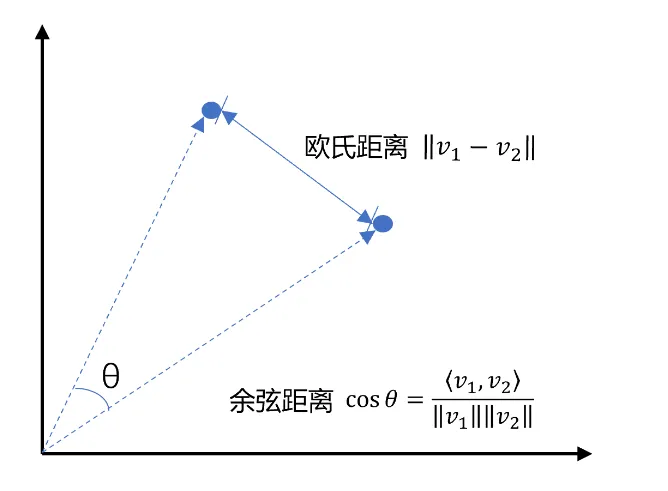
向量是空间中有方向和长度的量,空间可以是二维,也可以是多维。向量既然是在空间中,两个向量之间就一定能计算距离。我们以二维向量为例,向量之间的距离有两种计算方法:
 编辑
编辑
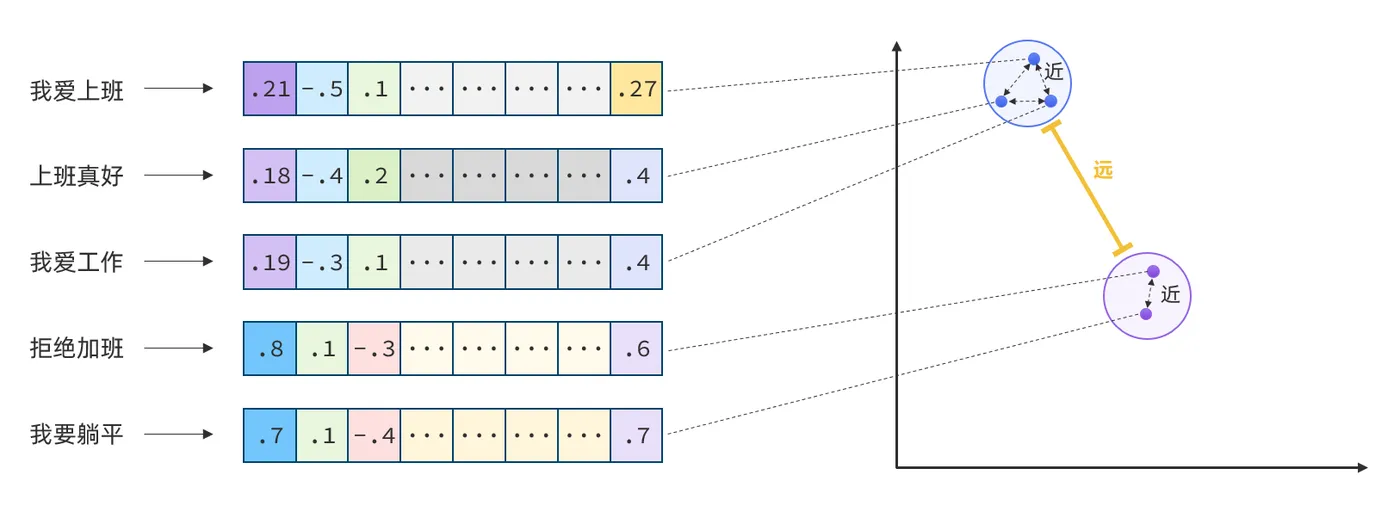
通常,两个向量之间欧式距离越近,我们认为两个向量的相似度越高。(余弦距离相反,越大相似度越高)所以,如果我们能把文本转为向量,就可以通过向量距离来判断文本的相似度了。现在,有不少的专门的向量模型,就可以实现将文本向量化。一个好的向量模型,就是要尽可能让文本含义相似的向量,在空间中距离更近:
 编辑
编辑
接下来,我们就准备一个向量模型,用于将文本向量化。
阿里云百炼平台就提供了这样的模型: 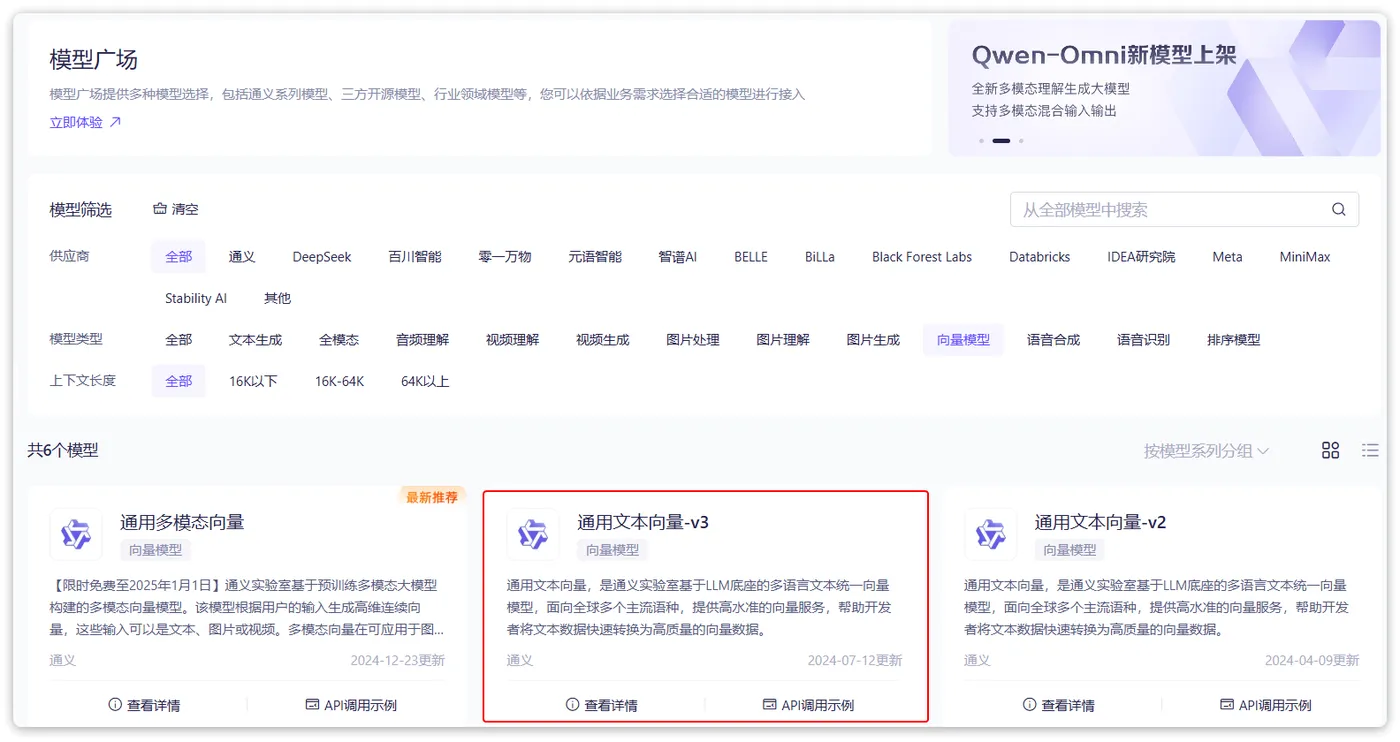
 编辑
编辑
这里我们选择通用文本向量-v3,这个模型兼容OpenAI,所以我们依然采用OpenAI的配置。
修改配置文件,添加向量模型:
server:
  ai:
    openai:
      base-url: ${spring.ai.openai.base-url}
      api-key: ${spring.ai.openai.api-key}
      chat:
        options:
          model: qwen-max-latest
      embedding:
        options:
          model: text-embedding-v3
          dimensions: 1024
    vectorstore:
      redis:
        initialize-schema: true
        index: 0
        prefix: "doc:" # 向量库key前缀

4.1.2 向量数据库
向量数据库的主要作用有两个:
- 存储向量数据
- 基于相似度检索数据
刚好符合我们的需求。
SpringAI支持很多向量数据库,并且都进行了封装,可以用统一的API去访问:
- Azure Vector Search - The Azure vector store.
- Apache Cassandra - The Apache Cassandra vector store.
- Chroma Vector Store - The Chroma vector store.
- Elasticsearch Vector Store - The Elasticsearch vector store.
- GemFire Vector Store - The GemFire vector store.
- MariaDB Vector Store - The MariaDB vector store.
- Milvus Vector Store - The Milvus vector store.
- MongoDB Atlas Vector Store - The MongoDB Atlas vector store.
- Neo4j Vector Store - The Neo4j vector store.
- OpenSearch Vector Store - The OpenSearch vector store.
- Oracle Vector Store - The Oracle Database vector store.
- PgVector Store - The PostgreSQL/PGVector vector store.
- Pinecone Vector Store - PineCone vector store.
- Qdrant Vector Store - Qdrant vector store.
- Redis Vector Store - The Redis vector store.
- SAP Hana Vector Store - The SAP HANA vector store.
- Typesense Vector Store - The Typesense vector store.
- Weaviate Vector Store - The Weaviate vector store.
- SimpleVectorStore - A simple implementation of persistent vector storage, good for educational purposes.
这些库都实现了统一的接口:VectorStore,因此操作方式一模一样,大家学会任意一个,其它就都不是问题。
不过,除了最后一个库以外,其它所有向量数据库都是需要安装部署的。每个企业用的向量库都不一样。
4.2 VectorStore
VectorStore接口:
public interface VectorStore extends DocumentWriter {
    default String getName() {
                return this.getClass().getSimpleName();
        }
    // 保存文档到向量库
    void add(List<Document> documents);
    // 根据文档id删除文档
    void delete(List<String> idList);
    void delete(Filter.Expression filterExpression);
    default void delete(String filterExpression) { ... };
    // 根据条件检索文档
    List<Document> similaritySearch(String query);
    // 根据条件检索文档
    List<Document> similaritySearch(SearchRequest request);
    default <T> Optional<T> getNativeClient() {
                return Optional.empty();
        }
}

VectorStore操作向量化的基本单位是Document,我们在使用时需要将自己的知识库分割转换为一个个的Document,然后写入VectorStore.
基于内存或Redis-Stack实现向量数据库:
@Bean
    public VectorStore vectorStore(OpenAiEmbeddingModel embeddingModel) {
        return SimpleVectorStore.builder(embeddingModel).build();
    }
    /**
     * 创建RedisStack向量数据库
     *
     * @param embeddingModel 嵌入模型
     * @param properties     redis-stack的配置信息
     * @return vectorStore 向量数据库
     */
    @Bean
    public VectorStore vectorStore(EmbeddingModel embeddingModel,
                                   RedisVectorStoreProperties properties,
                                   RedisConnectionDetails redisConnectionDetails) {
        JedisPooled jedisPooled = new JedisPooled(redisConnectionDetails.getStandalone().getHost(),
                redisConnectionDetails.getStandalone().getPort()
                , redisConnectionDetails.getUsername(),
                redisConnectionDetails.getPassword());
        return RedisVectorStore.builder(jedisPooled, embeddingModel)
                .indexName(properties.getIndex())
                .prefix(properties.getPrefix())
                .initializeSchema(properties.isInitializeSchema())
                .build();
    }

文件读取和转换:
知识库太大,是需要拆分成文档片段,然后再做向量化的。而且SpringAI中向量库接收的是Document类型的文档,也就是说,我们处理文
文档读取、拆分、转换的动作并不需要我们亲自完成。在SpringAI中提供了各种文档读取的工具,可以参考官网:https://docs.spring.io/spring-ai/reference/api/etl-pipeline.html#_pdf_paragraph
比如PDF文档读取和拆分,SpringAI提供了两种默认的拆分原则:
PagePdfDocumentReader:按页拆分,推荐使用ParagraphPdfDocumentReader:按pdf的目录拆分,不推荐,因为很多PDF不规范,没有章节标签
当然,大家也可以自己实现PDF的读取和拆分功能。
这里我们选择使用PagePdfDocumentReader。
首先,我们需要在pom.xml中引入依赖:
<dependency>
    <groupId>org.springframework.ai</groupId>
    <artifactId>spring-ai-pdf-document-reader</artifactId>
</dependency>

然后就可以利用工具把PDF文件读取并处理成Document了。
我们写一个单元测试(别忘了配置API_KEY):
@Test
public void testVectorStore(){
    Resource resource = new FileSystemResource("中二知识笔记.pdf");
    // 1.创建PDF的读取器
    PagePdfDocumentReader reader = new PagePdfDocumentReader(
            resource, // 文件源
            PdfDocumentReaderConfig.builder()
                    .withPageExtractedTextFormatter(ExtractedTextFormatter.defaults())
                    .withPagesPerDocument(1) // 每1页PDF作为一个Document
                    .build()
    );
    // 2.读取PDF文档,拆分为Document
    List<Document> documents = reader.read();
    // 3.写入向量库
    vectorStore.add(documents);
    // 4.搜索
    SearchRequest request = SearchRequest.builder()
            .query("论语中教育的目的是什么")
            .topK(1)
            .similarityThreshold(0.6)
            .filterExpression("file_name == '中二知识笔记.pdf'")
            .build();
    List<Document> docs = vectorStore.similaritySearch(request);
    if (docs == null) {
        System.out.println("没有搜索到任何内容");
        return;
    }
    for (Document doc : docs) {
        System.out.println(doc.getId());
        System.out.println(doc.getScore());
        System.out.println(doc.getText());
    }
}

4.3 RAG原理总结
OK,现在我们有了这些工具:
- PDFReader:读取文档并拆分为片段
- 向量大模型:将文本片段向量化
- 向量数据库:存储向量,检索向量
让我们梳理一下要解决的问题和解决思路:
- 要解决大模型的知识限制问题,需要外挂知识库
- 受到大模型上下文限制,知识库不能简单的直接拼接在提示词中
- 我们需要从庞大的知识库中找到与用户问题相关的一小部分,再组装成提示词
- 这些可以利用文档读取器、向量大模型、向量数据库来解决。
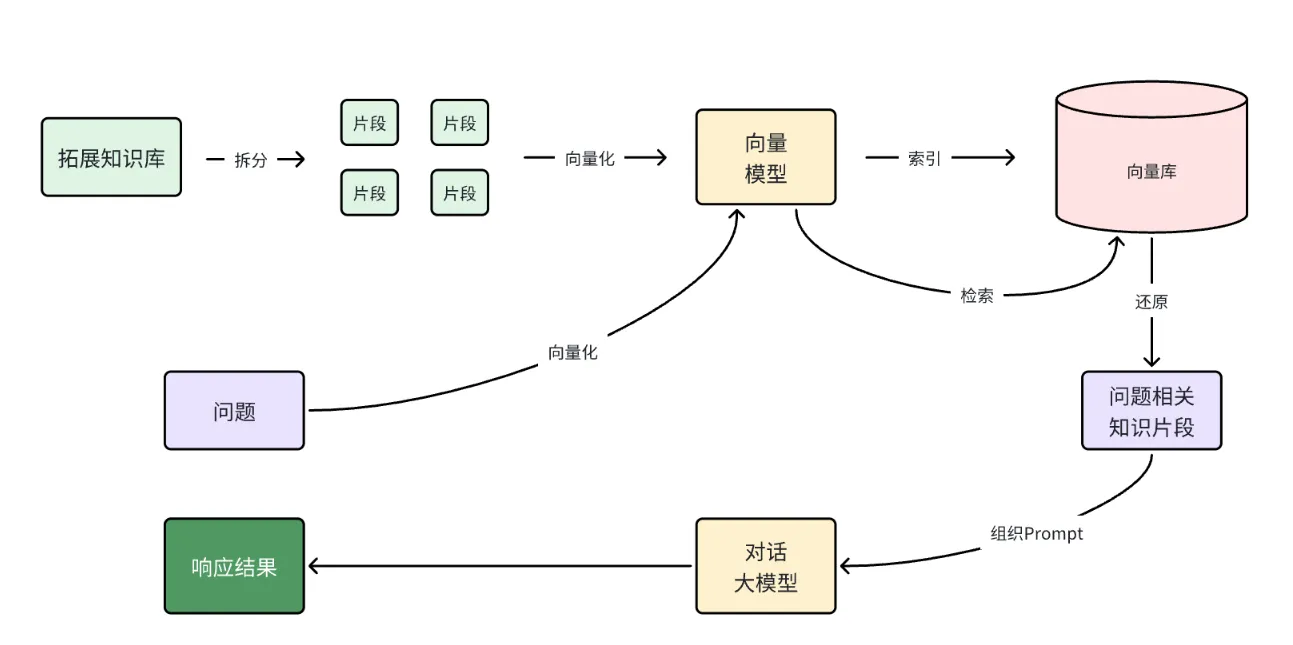
所以RAG要做的事情就是将知识库分割,然后利用向量模型做向量化,存入向量数据库,然后查询的时候去检索:
第一阶段(存储知识库):
- 将知识库内容切片,分为一个个片段
- 将每个片段利用向量模型向量化
- 将所有向量化后的片段写入向量数据库
第二阶段(检索知识库):
- 每当用户询问AI时,将用户问题向量化
- 拿着问题向量去向量数据库检索最相关的片段
第三阶段(对话大模型):
- 将检索到的片段、用户的问题一起拼接为提示词
- 发送提示词给大模型,得到响应
 编辑
编辑
4.4 AI文献阅读助手实例
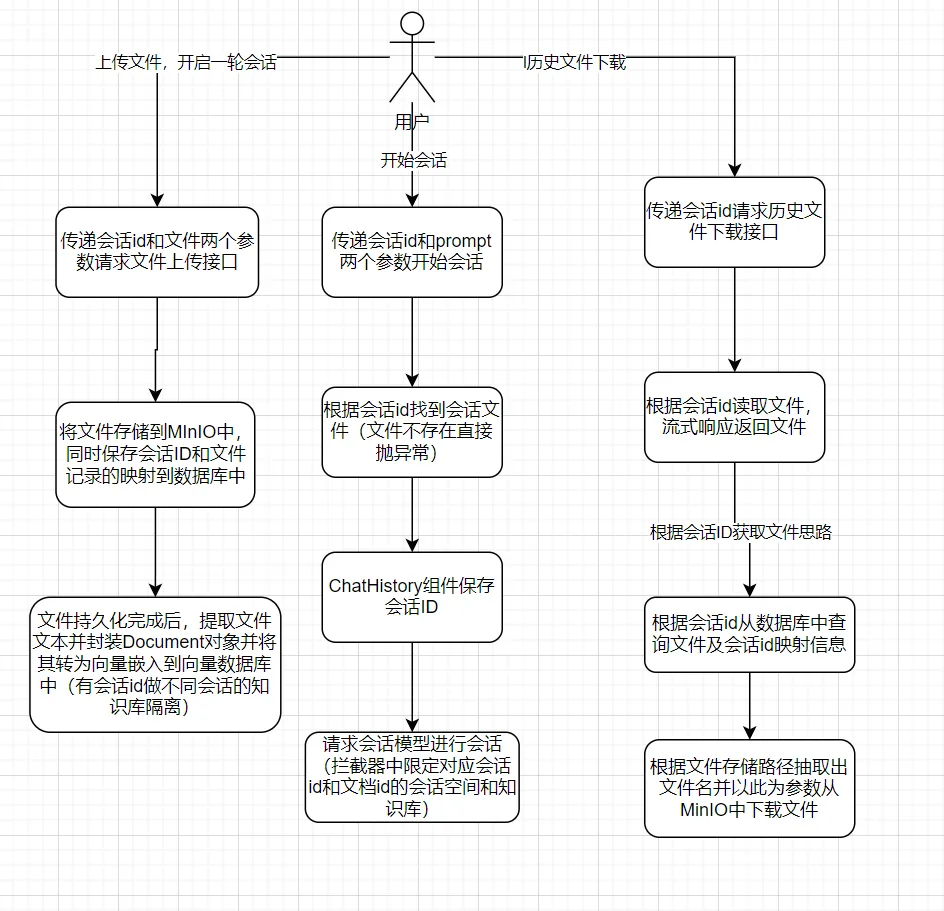
基于RAG实现一个AI文献阅读助手
整体架构:
 编辑
编辑
4.4.1 PDF文件管理
文件管理接口:
public interface FileRepository {
    /**
     * 保存文件,还要记录chatId与文件的映射关系
     * @param chatId 会话id
     * @param resource 文件
     * @return 上传成功,返回true; 否则返回false
     */
    boolean save(String chatId, Resource resource);
    /**
     * 根据chatId获取文件
     * @param chatId 会话id
     * @return 找到的文件
     */
    Resource getFile(String chatId);
}

@Slf4j
@Component
public class LocalPdfFileRepository implements FileRepository {
    @Autowired
    private CommonFileServiceImpl commonFileService;
    @Autowired
    private PdfFileMappingMapper fileMappingMapper;
    @Autowired
    private FileUtil fileUtil;
    @Autowired
    private VectorStore vectorStore;
    /**
     * 保存文件到MinIO并记录映射关系到MySQL
     */
    @Override
    public boolean save(String chatId, Resource resource) {
        try {
            // 转换Resource为MultipartFile
            MultipartFile file = convertResourceToMultipartFile(resource);
            if (file == null) {
                log.error("文件转换失败,chatId:{}", chatId);
                return false;
            }
            // 上传到MinIO
            String fileUrl = commonFileService.upload(file);
            // 保存新记录到数据库
            FileMapping mapping = FileMapping.builder()
                    .chatId(chatId)
                    .fileName(file.getOriginalFilename())
                    .filePath(fileUrl)
                    .contentType(file.getContentType())
                    .build();
            int rows = fileMappingMapper.insert(mapping);
            return rows > 0;
        } catch (Exception e) {
            log.error("保存文件映射失败,chatId:{}", chatId, e);
            return false;
        }
    }
    /**
     * 从MinIO获取文件
     */
    @Override
    public Resource getFile(String chatId) {
        try {
            // 查询数据库获取文件信息
            FileMapping mapping = fileMappingMapper.selectByChatId(chatId);
            if (mapping == null) {
                log.warn("文件映射不存在,chatId:{}", chatId);
                return null;
            }
            // 从MinIO下载文件
            String fileName=fileUtil.extractFileNameFromUrl(mapping.getFilePath());
            byte[] fileBytes = commonFileService.download(fileName);
            if (fileBytes == null || fileBytes.length == 0) {
                log.error("文件内容为空,filePath:{}", mapping.getFilePath());
                return null;
            }
            // 转换为Resource返回
            return new ByteArrayResource(fileBytes) {
                @Override
                public String getFilename() {
                    return mapping.getFileName();
                }
                @Override
                public long contentLength() {
                    return fileBytes.length;
                }
            };
        } catch (Exception e) {
            log.error("获取文件失败,chatId:{}", chatId, e);
            return null;
        }
    }
    /**
     * 转换Resource为MultipartFile(解决私有类和类型问题)
     */
    private MultipartFile convertResourceToMultipartFile(Resource resource) throws IOException {
        // 获取文件名
        String filename = Optional.ofNullable(resource.getFilename())
                .orElse("temp-" + UUID.randomUUID() + ".pdf");
        // 获取文件类型(解决Resource无getContentType()的问题)
        String contentType = null;
        if (resource.exists()) {
            // 尝试通过文件路径探测类型
            try {
                contentType = Files.probeContentType(resource.getFile().toPath());
            } catch (IOException e) {
                log.warn("通过文件路径获取类型失败,chatId:{}", e);
            }
            // 兜底:使用默认PDF类型
            if (contentType == null) {
                contentType = MediaType.APPLICATION_PDF_VALUE;
            }
        } else {
            contentType = MediaType.APPLICATION_OCTET_STREAM_VALUE;
        }
        // 读取文件内容为字节数组
        byte[] content = FileCopyUtils.copyToByteArray(resource.getInputStream());
        // 自定义MultipartFile实现(避免使用私有内部类)
        String finalContentType = contentType;
        return new MultipartFile() {
            @Override
            public String getName() {
                return "file"; // 参数名,可自定义
            }
            @Override
            public String getOriginalFilename() {
                return filename;
            }
            @Override
            public String getContentType() {
                return finalContentType;
            }
            @Override
            public boolean isEmpty() {
                return content.length == 0;
            }
            @Override
            public long getSize() {
                return content.length;
            }
            @Override
            public byte[] getBytes() throws IOException {
                return content;
            }
            @Override
            public InputStream getInputStream() throws IOException {
                return new ByteArrayInputStream(content);
            }
            @Override
            public void transferTo(File dest) throws IOException, IllegalStateException {
                FileCopyUtils.copy(content, dest);
            }
        };
    }
    /**
     * 初始化:加载向量存储
     */
    @PostConstruct
    private void init() {
        try {
            File vectorFile = new File("chat-pdf.json");
            if (vectorFile.exists() && vectorStore instanceof SimpleVectorStore) {
                ((SimpleVectorStore) vectorStore).load(vectorFile);
                log.info("向量存储已加载");
            }
        } catch (Exception e) {
            log.error("初始化向量存储失败", e);
        }
    }
    /**
     * 销毁前:保存向量存储
     */
    @PreDestroy
    private void persistent() {
        try {
            if (vectorStore instanceof SimpleVectorStore) {
                ((SimpleVectorStore) vectorStore).save(new File("chat-pdf.json"));
                log.info("向量存储已保存");
            }
        } catch (Exception e) {
            log.error("保存向量存储失败", e);
        }
    }
}

4.4.2 文献阅读助手
/**
      * 文件阅读助手
      * @param
      * @param
      * @return
      */
     @PostMapping(value = "/chat", produces = "text/html;charset=utf-8")
     @Operation(summary = "文件阅读助手")
     public Flux<String> chat(@RequestBody PDFDto pdfDto) {
         String prompt = pdfDto.getPrompt();
         String chatId = pdfDto.getChatId();
         // 1.找到会话文件
         Resource file = fileRepository.getFile(chatId);
         if (!file.exists()) {
             // 文件不存在,不回答
             throw new RuntimeException("会话文件不存在!");
         }
         // 2.保存会话id
         chatHistoryRepository.save("pdf", chatId);
         // 3.请求模型
         return pdfChatClient.prompt()
                 .user(prompt)
                 .advisors(a -> a.param(CHAT_MEMORY_CONVERSATION_ID_KEY, chatId))
                 .advisors(a -> a.param(FILTER_EXPRESSION, "file_name == '" + file.getFilename() + "'"))
                 .stream()
                 .content();
     }
     /**
      * 阅读助手文件上传
      */
     @PostMapping("/upload/{chatId}")
     @Operation(summary = "阅读助手文件上传")
     public Result uploadPdf(@PathVariable String chatId, @RequestParam("file") MultipartFile file) {
         try {
             // 1. 校验文件是否为PDF格式
             if (!Objects.equals(file.getContentType(), "application/pdf")) {
                 return Result.fail("只能上传PDF文件!");
             }
             // 2.保存文件
             boolean success = fileRepository.save(chatId, file.getResource());
             if (!success) {
                 return Result.fail("保存文件失败!");
             }
             // 3.写入向量库
             this.writeToVectorStore(file.getResource());
             return Result.success();
         } catch (Exception e) {
             log.error("Failed to upload PDF.", e);
             return Result.fail("上传文件失败!");
         }
     }
     /**
      * 阅读助手文件下载
      */
     @GetMapping("/file/{chatId}")
     @Operation(summary = "阅读助手文件下载")
     public ResponseEntity<Resource> download(@PathVariable("chatId") String chatId) throws IOException {
         // 1.读取文件
         Resource resource = fileRepository.getFile(chatId);
         if (!resource.exists()) {
             return ResponseEntity.notFound().build();
         }
         // 2.文件名编码,写入响应头
         String filename = URLEncoder.encode(Objects.requireNonNull(resource.getFilename()), StandardCharsets.UTF_8);
         // 3.返回文件
         return ResponseEntity.ok()
                 .contentType(MediaType.APPLICATION_OCTET_STREAM)
                 .header("Content-Disposition", "attachment; filename=\"" + filename + "\"")
                 .body(resource);
     }
//     private void writeToVectorStore(Resource resource) {
//         // 1.创建PDF的读取器
//         PagePdfDocumentReader reader = new PagePdfDocumentReader(
//                 resource, // 文件源
//                 PdfDocumentReaderConfig.builder()
//                         .withPageExtractedTextFormatter(ExtractedTextFormatter.defaults())
//                         .withPagesPerDocument(1) // 每1页PDF作为一个Document
//                         .build()
//         );
//         // 2.读取PDF文档,拆分为Document
//         List<Document> documents = reader.read();
//         // 3.写入向量库
//         vectorStore.add(documents);
//     }
        private void writeToVectorStore(Resource resource) {
            try {
                // 使用 Tika 解析 PDF 内容
                ContentHandler handler = new BodyContentHandler(-1); // 不限制内容长度
                Metadata metadata = new Metadata();
                ParseContext context = new ParseContext();
                PDFParser parser = new PDFParser();
                // 解析 PDF 并提取文本
                parser.parse(resource.getInputStream(), handler, metadata, context);
                String content = handler.toString();
                // 关键修复:将 Metadata 转换为 Map
                Map<String, Object> metadataMap = new HashMap<>();
                for (String name : metadata.names()) {
                    metadataMap.put(name, metadata.get(name));
                }
                // 补充文件名到元数据(可选)
                metadataMap.put("file_name", resource.getFilename());
                // 创建 Document 并写入向量库
                Document document = new Document(
                        resource.getFilename(), // 文档 ID
                        content, // 提取的文本内容
                        metadataMap // 转换后的元数据 Map
                );
                vectorStore.add(List.of(document));
            } catch (Exception e) {
                log.error("Failed to parse PDF with Tika", e);
                throw new RuntimeException("解析PDF失败", e);
            }
        }

ChatClient配置:
/**
     * AI文献阅读助手
     * @param model
     * @param chatMemory
     * @param vectorStore
     * @return
     */
    @Bean
    public ChatClient pdfChatClient(OpenAiChatModel model, ChatMemory chatMemory, VectorStore vectorStore) {
        return ChatClient
                .builder(model)
                .defaultSystem("请根据上下文回答问题,遇到上下文没有的问题,不要随意编造。")
                .defaultAdvisors(
                        new SimpleLoggerAdvisor(),
                        new MessageChatMemoryAdvisor(chatMemory),
                        new QuestionAnswerAdvisor(
                                vectorStore,
                                SearchRequest.builder()
                                        .similarityThreshold(0.6)
                                        .topK(2)
                                        .build()
                        )
                )
                .build();
    }

5.多模态
多模态是指不同类型的数据输入,如文本、图像、声音、视频等。目前为止,我们与大模型交互都是基于普通文本输入,这跟我们选择的大模型有关。deepseek、qwen-max等模型都是纯文本模型,在ollama和百炼平台,我们也能找到很多多模态模型。
以ollama为例,在搜索时点击vison,就能找到支持图像识别的模型: 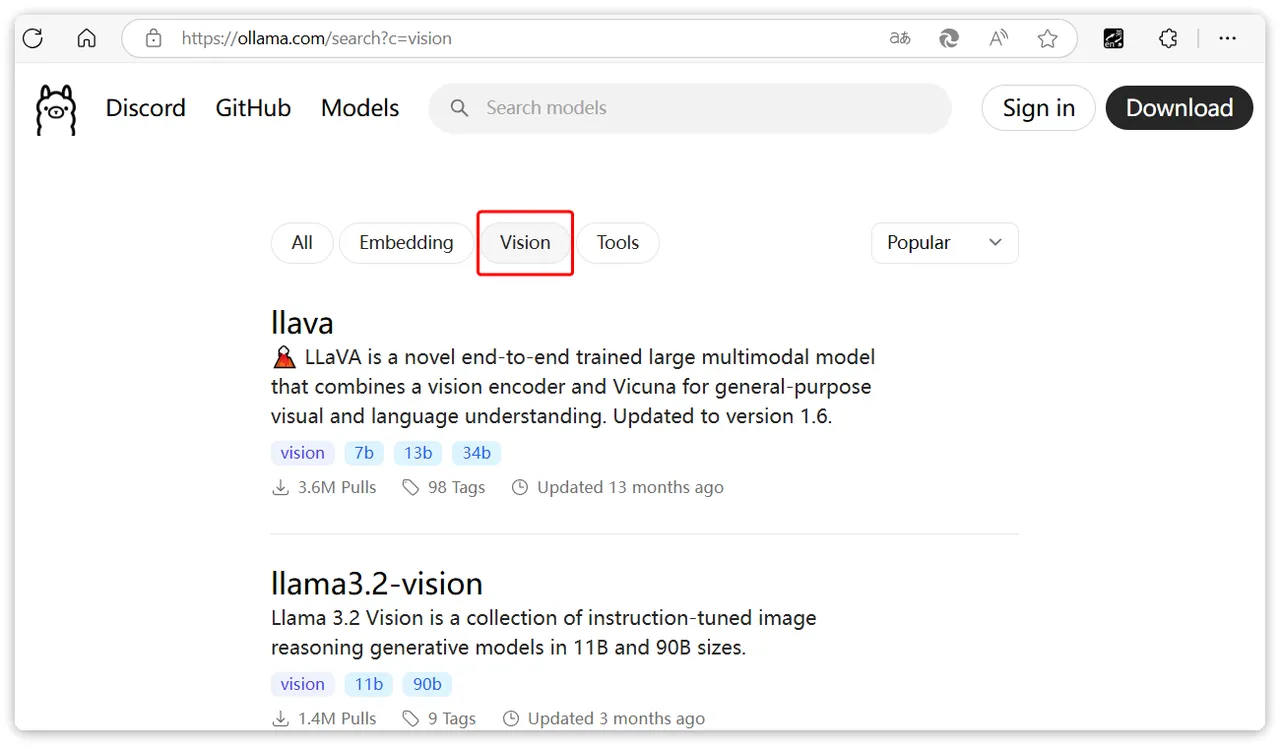
 编辑
编辑
在阿里云百炼平台也一样: 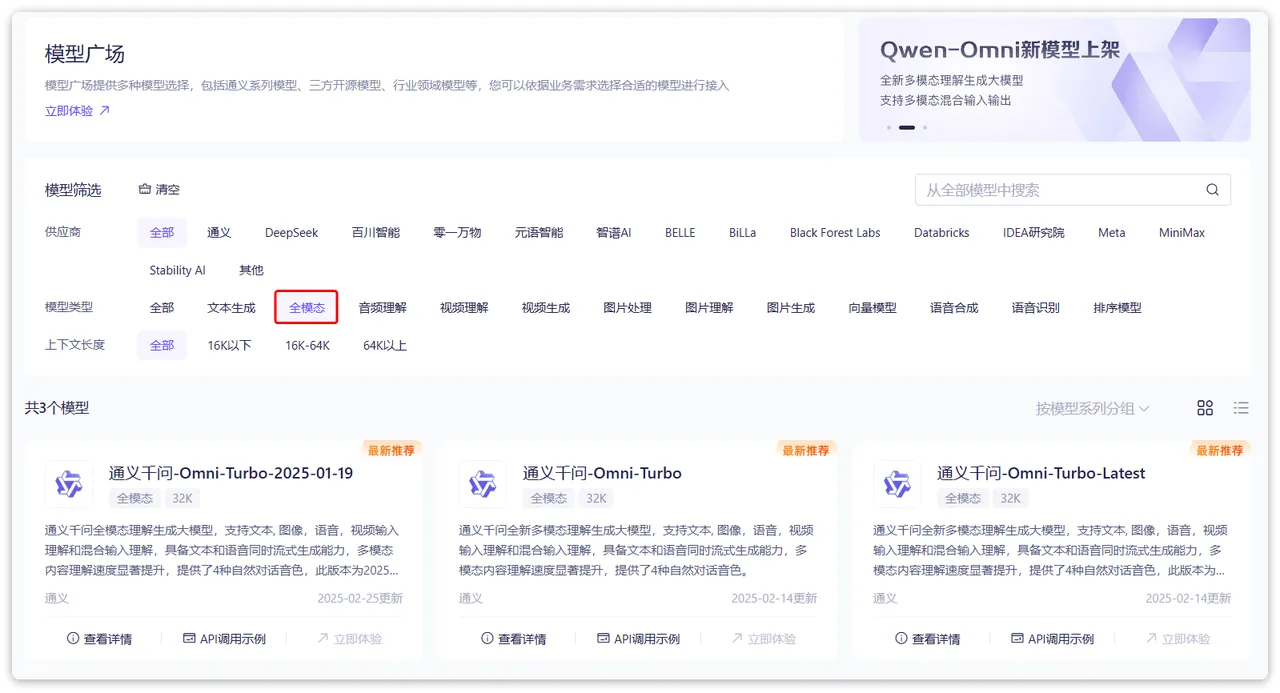
 编辑
编辑
阿里云的qwen-omni模型是支持文本、图像、音频、视频输入的全模态模型,还能支持语音合成功能,非常强大。
注意:
在SpringAI的当前版本(1.0.0-m6)中,qwen-omni与SpringAI中的OpenAI模块的兼容性有问题,目前仅支持文本和图片两种模态。音频会有数据格式错误问题,视频完全不支持。
目前的解决方案有两种:
- 一是使用spring-ai-alibaba来替代。
- 二是重写OpenAIModel的实现
多模态Agent实例:
/**
     * 智能体对话多模态助手
     * @param model
     * @param chatMemory
     * @param vectorStore
     * @return
     */
    @Bean
    public ChatClient chatCommonClient(AlibabaOpenAiChatModel model, ChatMemory chatMemory,VectorStore vectorStore,  AINoteTools aiNoteTools) {
        return ChatClient
                .builder(model)
                .defaultOptions(ChatOptions.builder()
                        .model("qwen-omni-turbo")
                        .build())
                .defaultSystem(AIChatConstant.CHAT_ROLE)
                .defaultAdvisors(
                        new SimpleLoggerAdvisor(),
                        new MessageChatMemoryAdvisor(chatMemory),
                        new QuestionAnswerAdvisor(
                                vectorStore,
                                SearchRequest.builder()
                                        .similarityThreshold(0.6)
                                        .topK(2)
                                        .build()
                        )
                )
                .defaultTools(List.of(aiNoteTools))
                .build();
    }

/**
     * 智能体对话
     * @param prompt
     * @param chatId
     * @param files
     * @return
     */
    @PostMapping(value = "/commonChat", produces = "text/html;charset=utf-8")
    @Operation(summary = "智能体对话")
    public Flux<String> chat(@RequestParam("prompt") String prompt, @RequestParam(required = false) String chatId,
                             @RequestParam(value = "files", required = false) List<MultipartFile> files) {
        // 1.保存会话,id
        chatHistoryRepository.save("chat", chatId);
        // 2.请求模型
        if (files == null || files.isEmpty()) {
            // 没有附件,纯文本聊天
            return textChat(prompt, chatId);
        } else {
            // 有附件,多模态聊天
            return multiModalChat(prompt, chatId, files);
        }
    }
    private Flux<String> multiModalChat(String prompt, String chatId, List<MultipartFile> files) {
        // 1.解析多媒体
        List<Media> medias = files.stream()
                .map(file -> new Media(
                                MimeType.valueOf(Objects.requireNonNull(file.getContentType())),
                                file.getResource()
                        )
                )
                .toList();
        // 2.请求模型
        return chatCommonClient.prompt()
                .user(p -> p.text(prompt).media(medias.toArray(Media[]::new)))
                .advisors(a -> a.param(CHAT_MEMORY_CONVERSATION_ID_KEY, chatId))
                .stream()
                .content();
    }
    private Flux<String> textChat(String prompt, String chatId) {
        return chatCommonClient.prompt()
                .user(prompt)
                .advisors(a -> a.param(CHAT_MEMORY_CONVERSATION_ID_KEY, chatId))
                .stream()
                .content();
    }