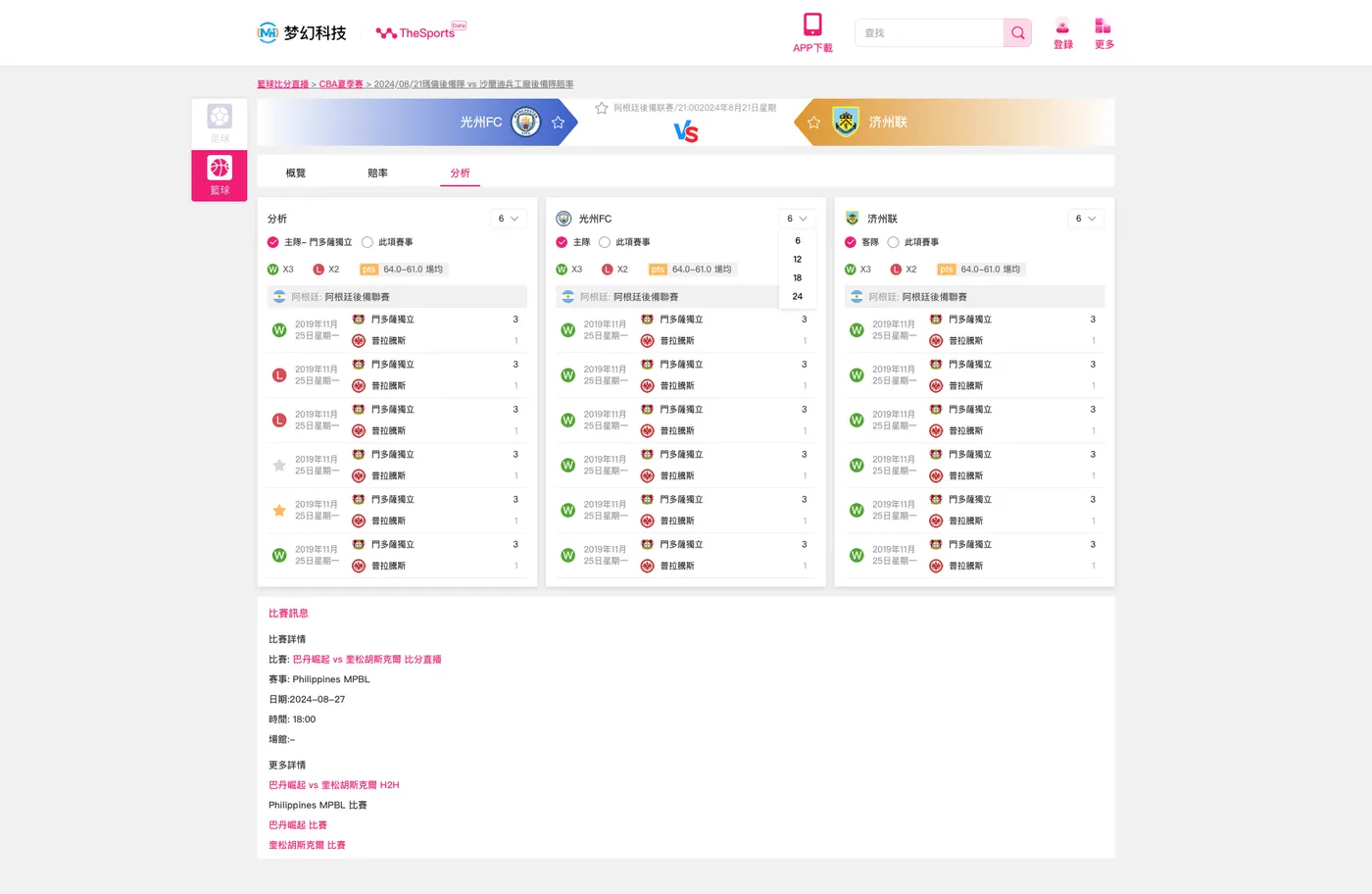
本文基于东莞梦幻网络科技“体育即时比分系统”的实际开发经验总结,仅供技术交流。该系统在实现过程中,主要解决了实时比分更新、赔率数据同步、赛事分析展示等关键问题,并采用了以下技术栈:
后端:PHP(ThinkPHP 框架)
安卓端:Java
iOS端:Objective-C
PC/H5 前端:Vue.js
其中,比分分析页面聚焦于展示比赛双方的近期战绩、比赛赔率、关键数据分析等信息,结合 WebSocket 实现实时数据推送,提高用户体验。
前端实现(Vue.js)
前端主要通过 Vue.js 进行开发,并调用后端 API 获取比赛数据。以下是 Vue 组件代码示例:
1. 比赛分析页面组件
<template>
  <div class="match-analysis">
    <div class="team-header">
      <div class="team" v-for="team in teams" :key="team.id">
        <img :src="team.logo" class="team-logo" />
        <span class="team-name">{
   {
    team.name }}</span>
      </div>
    </div>

    <div class="odds">
      <span v-for="odd in odds" :key="odd.id">{
   {
    odd.value }}</span>
    </div>

    <div class="history">
      <div v-for="(match, index) in matchHistory" :key="index" class="match-item">
        <span>{
   {
    match.date }}</span>
        <span>{
   {
    match.opponent }}</span>
        <span :class="{'win': match.result === 'W', 'lose': match.result === 'L'}">{
   {
    match.result }}</span>
      </div>
    </div>
  </div>
</template>

<script>
import axios from 'axios';

export default {

  data() {

    return {

      teams: [],
      odds: [],
      matchHistory: []
    };
  },
  methods: {

    async fetchMatchData() {

      try {

        const response = await axios.get('/api/match/details');
        this.teams = response.data.teams;
        this.odds = response.data.odds;
        this.matchHistory = response.data.history;
      } catch (error) {

        console.error('获取数据失败', error);
      }
    }
  },
  mounted() {

    this.fetchMatchData();
  }
};
</script>

<style scoped>
.match-analysis {

  padding: 20px;
  background-color: #fff;
}
.team-header {

  display: flex;
  justify-content: space-between;
}
.team-logo {

  width: 40px;
  height: 40px;
}
.history .match-item {

  display: flex;
  justify-content: space-between;
  padding: 10px;
}
.win {

  color: green;
}
.lose {

  color: red;
}
</style>
后端实现(ThinkPHP)
ThinkPHP 负责提供 API,前端通过 axios 调用后端接口获取比赛信息。
2. ThinkPHP 控制器示例
<?php
namespace app\api\controller;

use think\Controller;
use think\Db;

class Match extends Controller {

    public function details() {

        // 获取比赛基本信息
        $match_id = input('get.match_id');
        $match = Db::name('matches')->where('id', $match_id)->find();

        // 获取双方球队信息
        $teams = Db::name('teams')->where('id', 'in', [$match['team1_id'], $match['team2_id']])->select();

        // 获取赔率信息
        $odds = Db::name('odds')->where('match_id', $match_id)->select();

        // 获取比赛历史记录
        $history = Db::name('match_history')->where('match_id', $match_id)->order('date', 'desc')->limit(5)->select();

        return json([
            'teams' => $teams,
            'odds' => $odds,
            'history' => $history
        ]);
    }
}
移动端实现
3. Android 端(Java 示例代码)
public class MatchDetailActivity extends AppCompatActivity {

    private TextView team1Name, team2Name, oddsView;
    private RecyclerView historyRecycler;

    @Override
    protected void onCreate(Bundle savedInstanceState) {

        super.onCreate(savedInstanceState);
        setContentView(R.layout.activity_match_detail);

        team1Name = findViewById(R.id.team1_name);
        team2Name = findViewById(R.id.team2_name);
        oddsView = findViewById(R.id.odds);
        historyRecycler = findViewById(R.id.history_recycler);

        loadMatchData();
    }

    private void loadMatchData() {

        String url = "https://api.example.com/match/details?match_id=123";

        RequestQueue queue = Volley.newRequestQueue(this);
        JsonObjectRequest request = new JsonObjectRequest(Request.Method.GET, url, null,
            response -> {

                try {

                    team1Name.setText(response.getJSONObject("teams").getString("team1_name"));
                    team2Name.setText(response.getJSONObject("teams").getString("team2_name"));
                    oddsView.setText(response.getJSONArray("odds").toString());
                } catch (JSONException e) {

                    e.printStackTrace();
                }
            }, error -> {

                Log.e("API_ERROR", error.toString());
            }
        );

        queue.add(request);
    }
}
iOS 端实现(Objective-C 示例)
#import "MatchDetailViewController.h"

@interface MatchDetailViewController ()
@property (nonatomic, strong) UILabel *team1Label;
@property (nonatomic, strong) UILabel *team2Label;
@property (nonatomic, strong) UILabel *oddsLabel;
@end

@implementation MatchDetailViewController

- (void)viewDidLoad {

    [super viewDidLoad];

    self.team1Label = [[UILabel alloc] initWithFrame:CGRectMake(20, 100, 200, 30)];
    self.team2Label = [[UILabel alloc] initWithFrame:CGRectMake(20, 150, 200, 30)];
    self.oddsLabel = [[UILabel alloc] initWithFrame:CGRectMake(20, 200, 300, 30)];

    [self.view addSubview:self.team1Label];
    [self.view addSubview:self.team2Label];
    [self.view addSubview:self.oddsLabel];

    [self loadMatchData];
}

- (void)loadMatchData {

    NSURL *url = [NSURL URLWithString:@"https://api.example.com/match/details?match_id=123"];
    NSURLSessionDataTask *task = [[NSURLSession sharedSession] dataTaskWithURL:url completionHandler:^(NSData * _Nullable data, NSURLResponse * _Nullable response, NSError * _Nullable error) {

        if (error == nil) {

            NSDictionary *json = [NSJSONSerialization JSONObjectWithData:data options:kNilOptions error:nil];
            dispatch_async(dispatch_get_main_queue(), ^{

                self.team1Label.text = json[@"teams"][0][@"name"];
                self.team2Label.text = json[@"teams"][1][@"name"];
                self.oddsLabel.text = [NSString stringWithFormat:@"赔率: %@", json[@"odds"]];
            });
        }
    }];
    [task resume];
}

@end