一、Spring Boot 整合 MyBatis
MyBatis的自动配置
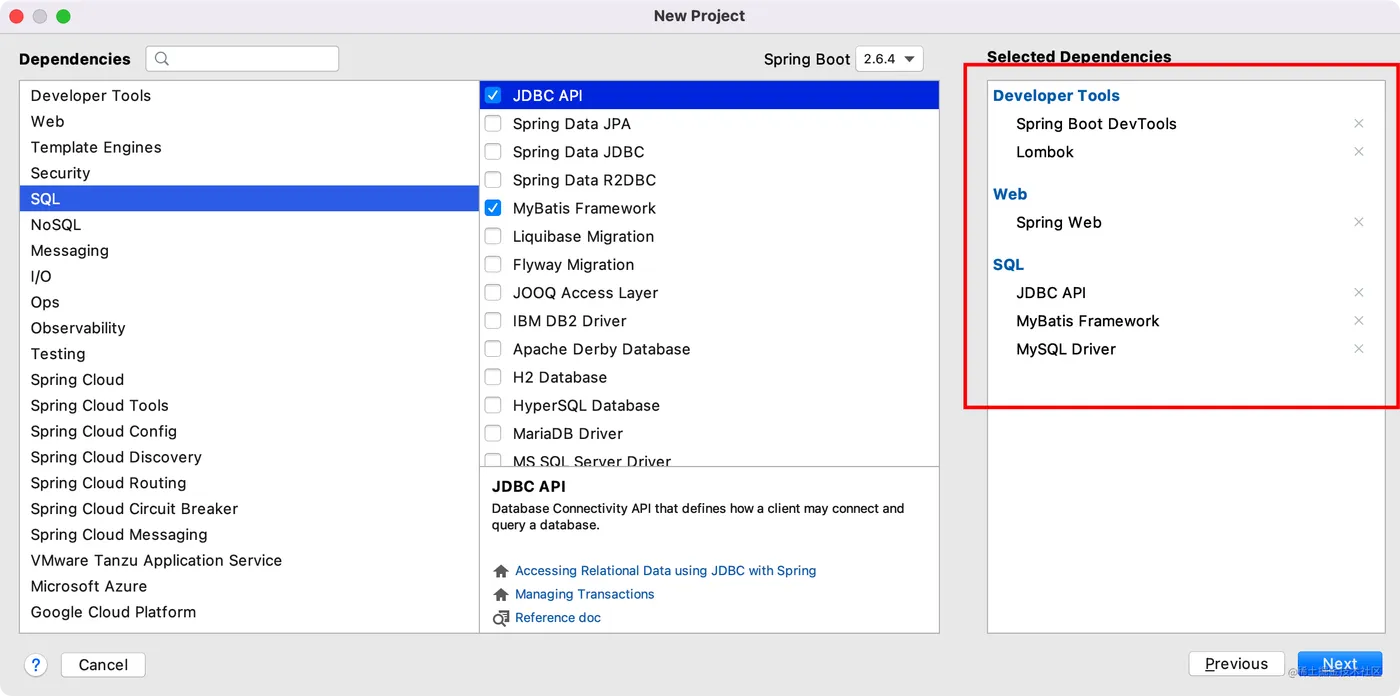
创建工程spring-boot-mybatis,创建项目时勾选MyBatis Framework会自动引入MyBatis的Starter
分析Mybatis的Staters启动器依赖
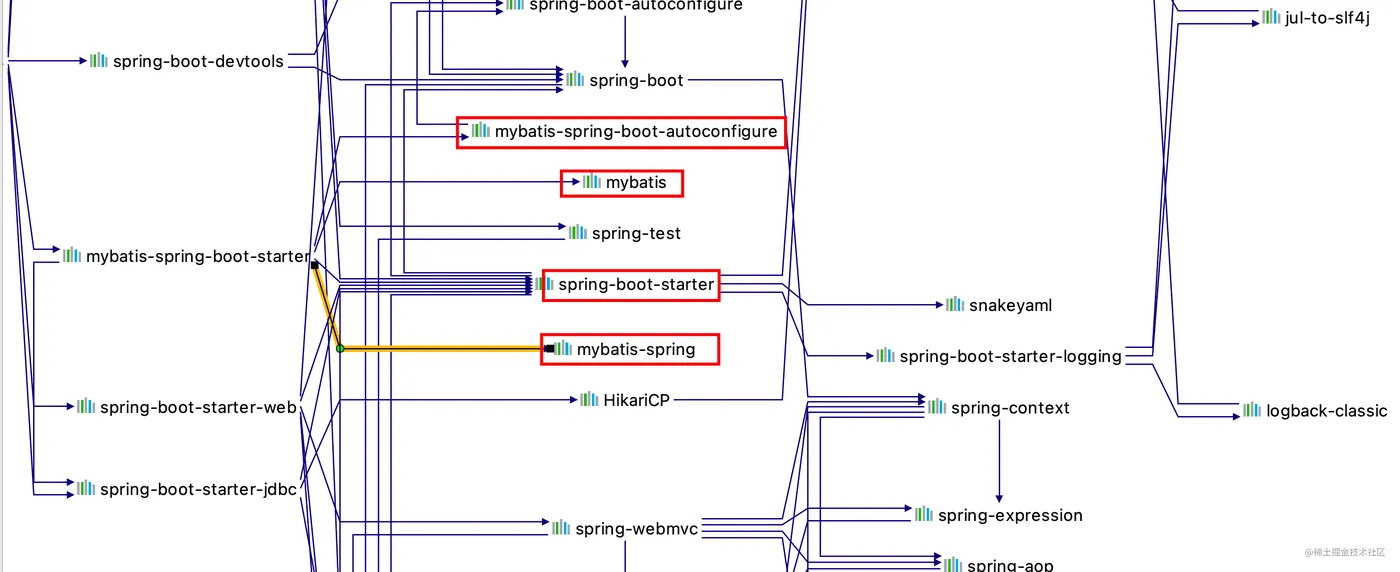
MyBatis的自动配置类和配置项类都在autoconfigure包下
MyBatis自动配置类依赖了SqlSessionFactory和SqlSessionFactoryBean以及DataSource类,并且启用了MyBatisProperties类中的属性作为配置项,并且在DataSourceAutoConfiguration自动配置类和MybatisLanguageDriverAutoConfiguration类生效后才会生效。
MyBatisProperties类源码中包含了mybatis的配置项
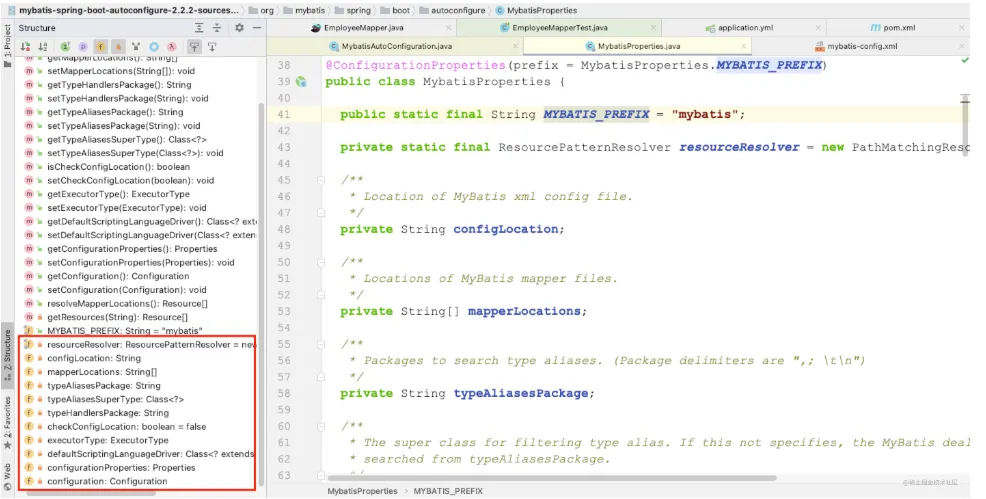
MyBatis的配置前缀都是以mybatis开头
配置Druid数据源
引入driud
<dependency>
    <groupId>com.alibaba</groupId>
    <artifactId>druid-spring-boot-starter</artifactId>
    <version>1.2.8</version>
</dependency>
复制代码
Druid数据源配置可以参考 Spring 全家桶之 Spring Boot 2.6.4(四)- Data Access(Part A JDBC)
初始化项目
在resources目录下放置employee.sql和department.sql文件
SET FOREIGN_KEY_CHECKS=0;
-- ----------------------------
-- Table structure for employee
-- ----------------------------
DROP TABLE IF EXISTS `employee`;
CREATE TABLE `employee` (
  `id` int(11) NOT NULL AUTO_INCREMENT,
  `lastName` varchar(255) DEFAULT NULL,
  `email` varchar(255) DEFAULT NULL,
  `gender` int(2) DEFAULT NULL,
  `d_id` int(11) DEFAULT NULL,
  PRIMARY KEY (`id`)
) ENGINE=InnoDB AUTO_INCREMENT=1 DEFAULT CHARSET=utf8;
复制代码
SET FOREIGN_KEY_CHECKS=0;
-- ----------------------------
-- Table structure for department
-- ----------------------------
DROP TABLE IF EXISTS `department`;
CREATE TABLE `department` (
  `id` int(11) NOT NULL AUTO_INCREMENT,
  `departmentName` varchar(255) DEFAULT NULL,
  PRIMARY KEY (`id`)
) ENGINE=InnoDB AUTO_INCREMENT=1 DEFAULT CHARSET=utf8;
复制代码
entity目录中创建两个实体类Employee和Department对应employee表和Department表
@Data
public class Employee {
    private Integer id;
    private String lastName;
    private String email;
    private Integer gender;
    private Integer dId;
}
复制代码
@Data
public class Department {
    private Integer id;
    private String departmentName;
}
复制代码
配置自定义数据源初始化类,初始化数据源
@Configuration
public class LilithDataSourceInitializer {
    @Value("classpath:employee.sql")
    private Resource employee;
    @Value("classpath:department.sql")
    private Resource department;
    @Bean
    public DataSourceInitializer dataSourceInitializer(final DataSource dataSource){
        final DataSourceInitializer initializer = new DataSourceInitializer();
        initializer.setDataSource(dataSource);
        initializer.setDatabasePopulator(databasePopulator());
        return initializer;
    }
    private DatabasePopulator databasePopulator(){
        final ResourceDatabasePopulator populator = new ResourceDatabasePopulator();
        populator.addScripts(employee,department);
        return populator;
    }
}
复制代码
启动应用,Spring Boot会自动在数据库表创建,再次启动之前如果不想初始化数据可以将@Configuration注解注释掉
二、MyBatis注解方式的使用
创建DepartmentMapper接口,使用注解标注增删改查的SQL语句
@Mapper
public interface DepartmentMapper {
    @Select("SELECT * FROM department WHERE id = #{id}")
    Department selectOneById(Integer id);
    @Delete("DELETE FROM department WHERE id = #{id}")
    void deleteOneById(Integer id);
    @Insert("INSERT INTO department (department_name) VALUES (#{departmentName})")
    void insert(Department department);
    @Update("UPDATE department SET department_name = #{departmentName} where id = #{departmentId}")
    void update(Department department);
}
复制代码
创建DepartmentMapperTest测试类,测试DepartmentMapper中的增删改查方法
@SpringBootTest
public class DepartmentMapperTest {
    @Resource
    private DepartmentMapper departmentMapper;
    @Test
    public void selectOneById() {
        Department department = departmentMapper.selectOneById(1);
        System.out.println(department);
    }
    @Test
    public void insert() {
        Department department = new Department();
        department.setDepartmentName("Avengers");
        departmentMapper.insert(department);
    }
}
复制代码
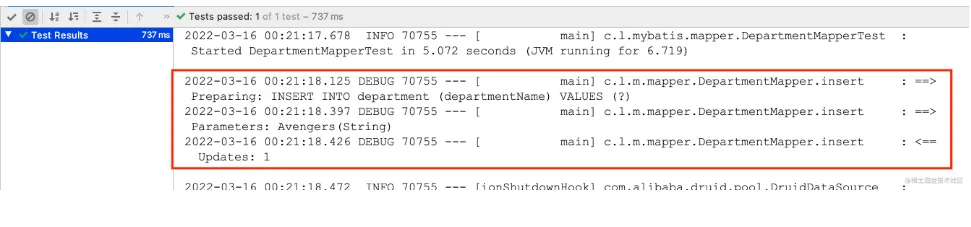
测试insert方法
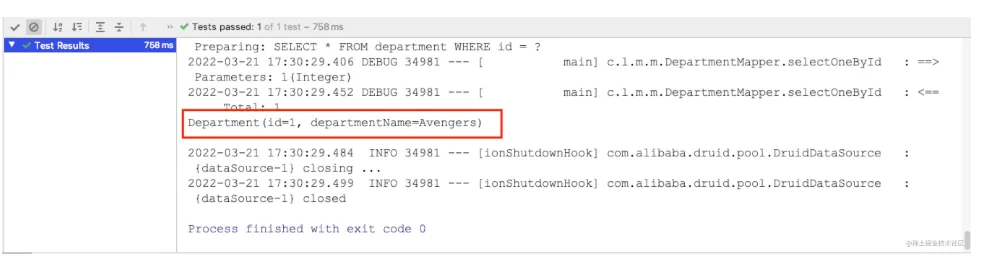
测试selectOneById方法
MyBatis 配置驼峰命名转换
修改Department表departmentName为下划线形式department_name;再次执行selectOneById方法
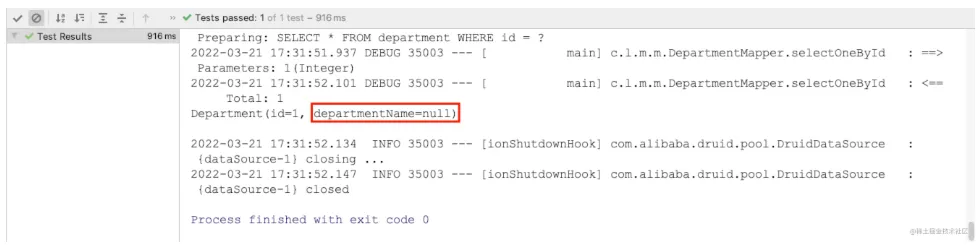
查询到DepartmentName属性为空,这时可以在yml配置文件中开启驼峰命名转换
mybatis:
  configuration:
    map-underscore-to-camel-case: true
复制代码
再次查询既可以查询到指定的是数据
配置类开启驼峰命名转换
也可以使用配置类来开启驼峰命名转换,MyBatisAutoConfuguration中包含了configurationCustomizers属性,这是一个List列表,包含了所有的自定义配置
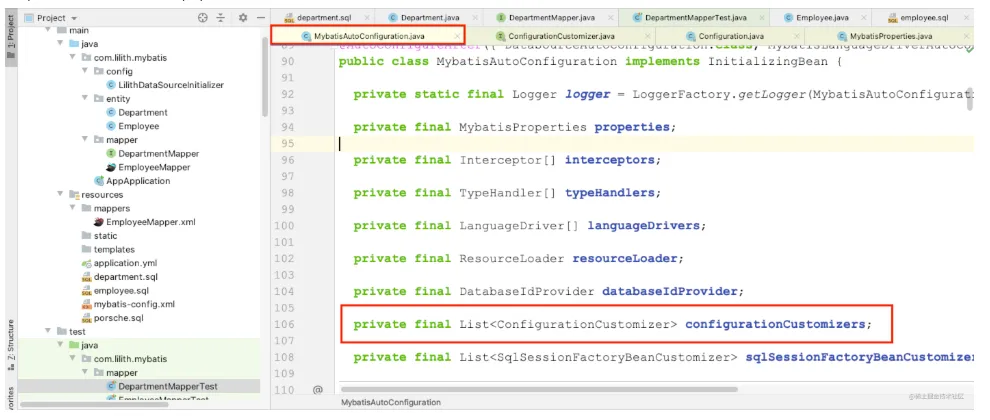
而ConfigurationCustomizer接口中有一个customize方法,该方法传入Configuration自定义配置
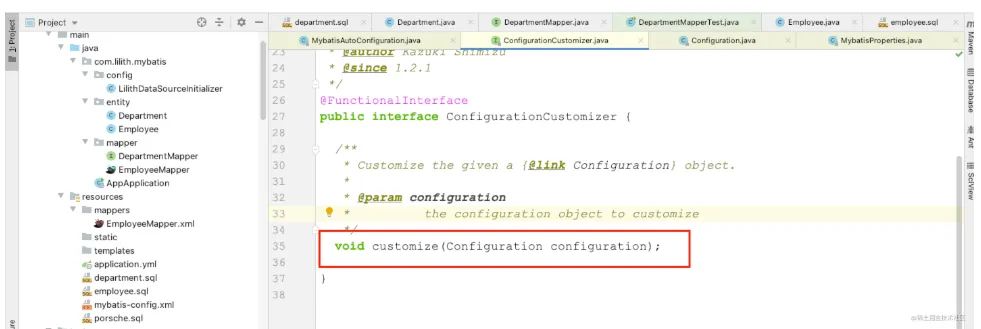
Configuration类中的属性就是可以自定义的配置
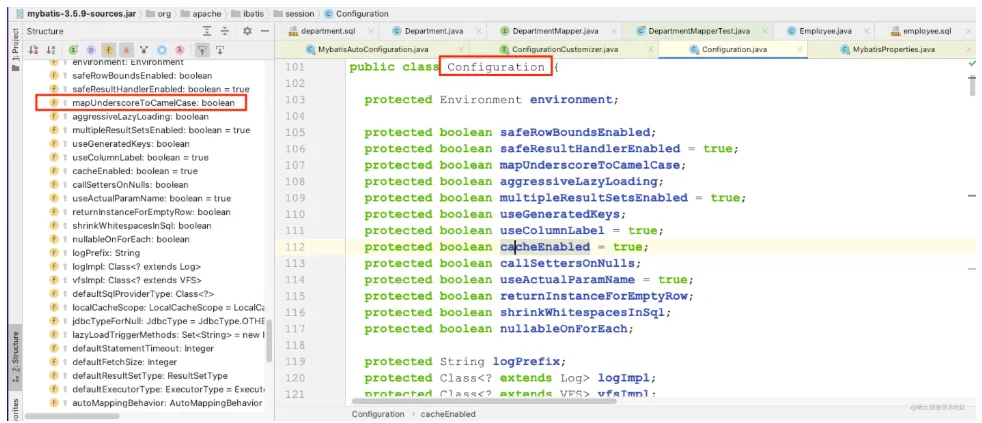
在config包下新建LilithMyBatisConfig配置类,新增一个configurationCustomizer方法,既往容器中注入ConfigurationCustomizer设置了属性的实现类
@Configuration
public class LilithMyBatisConfig {
    @Bean
    public ConfigurationCustomizer configurationCustomizer(){
        return configuration -> configuration.setMapUnderscoreToCamelCase(true);
    }
}
复制代码
这里使用lambda表达式实现了ConfigurationCustomizer接口中的customize方法
将yml文件中的驼峰命名转换注释,重新执行selectOneById方法
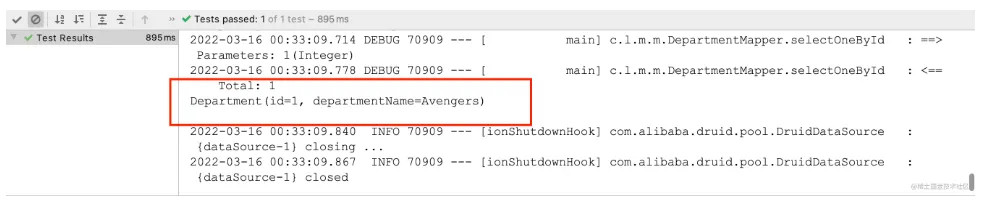
可以成功查询出数据。
@Mapper注解
@Mapper注解是自动配置的关键,标记当前类为容器的一个组件,缺少@Mapper注解将无法启动。
当Mapper接口非常多是,给每一个Mapper接口增加@Mapper注解非常麻烦,可以在主启动类上使用@MapperScan注解,扫描所有的Mapper接口
三、MyBatis配置文件方式的使用
创建Mapper接口EmployeeMapper,需要说明的是无论是注解还是配置文件方式使用MyBatis,@Mapper注解或者@MapperScan注解都是必不可少的。
@Mapper
public interface EmployeeMapper {
    void insert(Employee employee);
    Employee selectOneById(Integer id);
}
复制代码
在resources目录下创建mappers文件夹,新增EmployeeMapper.xml文件,增加Mapper接口中selectOneById方法和insert方法对应的SQL语句
<?xml version="1.0" encoding="UTF-8"?>
<!DOCTYPE mapper
        PUBLIC "-//mybatis.org//DTD Mapper 3.0//EN"
        "http://mybatis.org/dtd/mybatis-3-mapper.dtd">
<mapper namespace="com.lilith.mybatis.mapper.EmployeeMapper">
    <select id="selectOneById" resultType="com.lilith.mybatis.entity.Employee">
        select * from employee where id = #{id}
    </select>
    <insert id="insert" useGeneratedKeys="true" keyProperty="id" keyColumn="id">
        INSERT INTO employee (last_name, email, gender, d_id)
        VALUES (#{lastName}, #{email}, #{gender},#{dId})
    </insert>
</mapper>
复制代码
yml中增加mybatis配置
mybatis:
  # 全局配置文件的位置
  config-location: classpath:mybatis-config.xml
  mapper-locations: classpath:mappers/*.xml
  configuration:
    map-underscore-to-camel-case: true
复制代码
书写测试类
@SpringBootTest
public class EmployeeMapperTest {
    @Resource
    private EmployeeMapper employeeMapper;
    @Test
    public void insert() {
        Employee employee = new Employee();
        employee.setLastName("Thanos");
        employee.setEmail("thanos@gmail.com");
        employee.setGender(1);
        employee.setDId(1);
        employeeMapper.insert(employee);
    }
    @Test
    public void selectOneById() {
        Employee employee = employeeMapper.selectOneById(1);
        System.out.println(employee);
    }
}
复制代码
执行插入方法
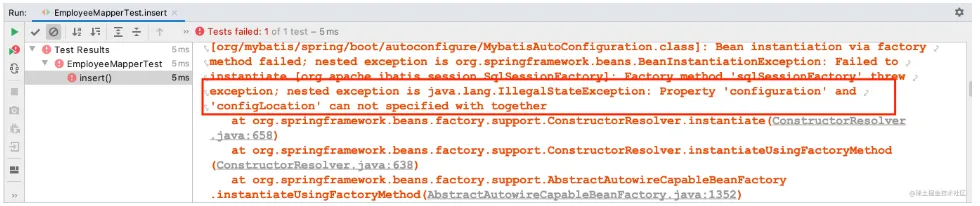
错误提示config-location和configuration不能同时写在yml文件中; 在resources目录下新建MyBatis全局配置文件,把configuration配置到mybatis-config.xml全局配置文件中
<?xml version="1.0" encoding="UTF-8"?>
<!DOCTYPE configuration
        PUBLIC "-//mybatis.org//DTD Config 3.0//EN"
        "http://mybatis.org/dtd/mybatis-3-config.dtd">
<configuration>
    <settings>
        <setting name="mapUnderscoreToCamelCase" value="true"/>
    </settings>
</configuration>
复制代码
再次执行测试
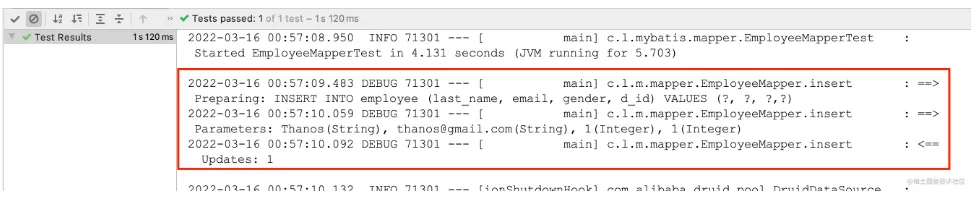
控制台显示有1行成功更新,数据被成功插入到输入句酷表中
执行selectOneById方法

成功查询出insert方法插入的数据