
一、背景
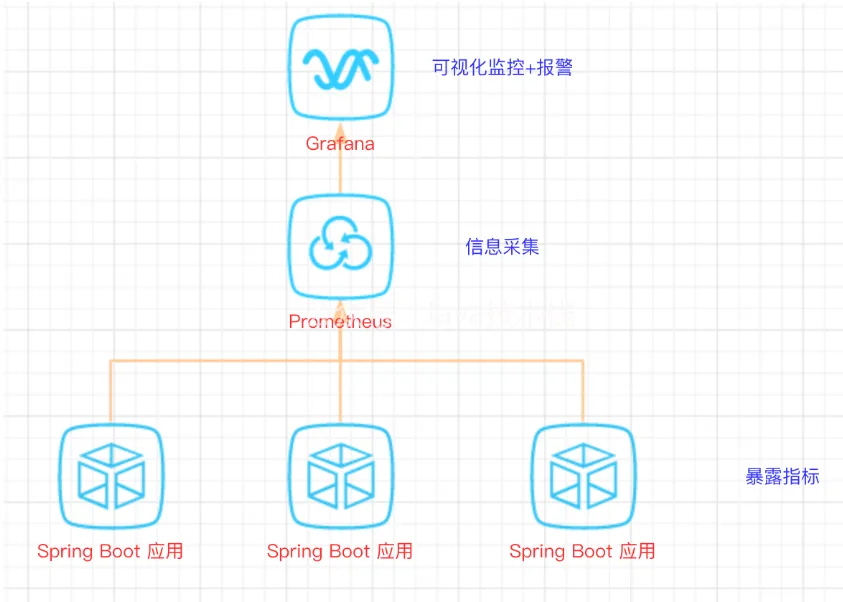
Spring Boot 的应用监控方案比较多,SpringBoot + Prometheus + Grafana 是目前比较常用的方案之一。
它们三者之间的关系大概如下图:
二、开发SpringBoot应用
首先,创建一个SpringBoot项目,pom文件如下:
<dependency>
    <groupId>org.springframework.boot</groupId>
    <artifactId>spring-boot-starter-actuator</artifactId>
</dependency>
<dependency>
    <groupId>org.springframework.boot</groupId>
    <artifactId>spring-boot-starter-web</artifactId>
</dependency>
<dependency>
    <groupId>org.projectlombok</groupId>
    <artifactId>lombok</artifactId>
    <optional>true</optional>
</dependency>
<!-- https://mvnrepository.com/artifact/io.prometheus/simpleclient_spring_boot -->
<dependency>
    <groupId>io.prometheus</groupId>
    <artifactId>simpleclient_spring_boot</artifactId>
    <version>0.8.1</version>
</dependency>
<dependency>
    <groupId>org.springframework.boot</groupId>
    <artifactId>spring-boot-starter-security</artifactId>
</dependency>
推荐一个 Spring Boot 基础教程及实战示例: https://github.com/javastacks/spring-boot-best-practice
注意: 这里的SpringBoot版本是1.5.7.RELEASE,之所以不用最新的2.X是因为最新的simpleclient_spring_boot只支持1.5.X,不确定2.X版本的能否支持。
MonitorDemoApplication启动类增加注解
package cn.sp;
import io.prometheus.client.spring.boot.EnablePrometheusEndpoint;
import io.prometheus.client.spring.boot.EnableSpringBootMetricsCollector;
import org.springframework.boot.SpringApplication;
import org.springframework.boot.autoconfigure.SpringBootApplication;
@EnablePrometheusEndpoint
@EnableSpringBootMetricsCollector
@SpringBootApplication
 public class MonitorDemoApplication {
     public static void main(String[] args) {
         SpringApplication.run(MonitorDemoApplication.class, args);
     }
 }
配置文件application.yml
server:
  port: 8848
spring:
  application:
    name: monitor-demo
security:
  user:
    name: admin
    password: 1234
  basic:
    enabled: true
    # 安全路径列表,逗号分隔,此处只针对/admin路径进行认证
    path: /admin
# actuator暴露接口的前缀
management:
  context-path: /admin
  # actuator暴露接口使用的端口,为了和api接口使用的端口进行分离
  port: 8888
  security:
    enabled: true
    roles: SUPERUSER
测试代码TestController
@RequestMapping("/heap/test")
@RestController
public class TestController {
    public static final Map<String, Object> map = new ConcurrentHashMap<>();
    @RequestMapping("")
    public String testHeapUsed() {
        for (int i = 0; i < 10000000; i++) {
            map.put(i + "", new Object());
        }
        return "ok";
    }
}
这里的逻辑就是在请求这个接口后,创建大量对象保存到map中增加堆内存使用量,方便后面测试邮件报警。
启动项目后,可以在IDEA中看到有很多Endpoints,如图:
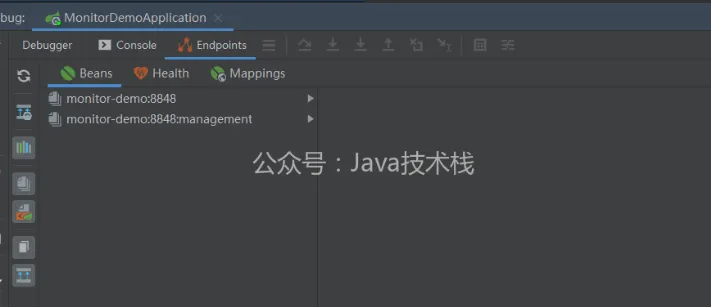
开始我的IDEA是不显示这个Endpoints,后来发现是我使用的idea版本太老了,还是2017.1的, 而这个需要 idea2017.2版本以上才能看到。 后来只好重新下载安装,弄了好久。。。。
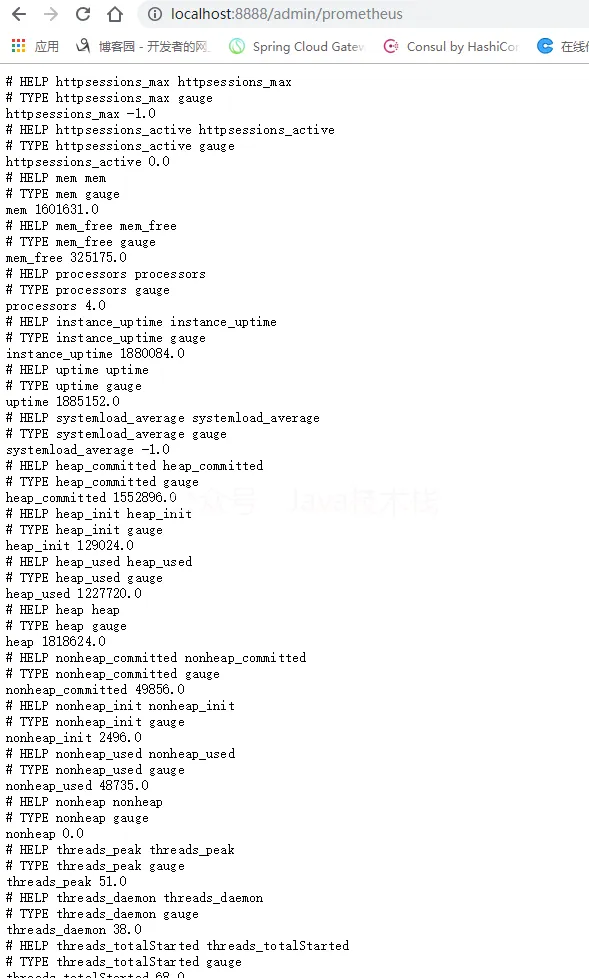
启动完毕,访问http://localhost:8888/admin/prometheus就可以看到服务暴露的那些监控指标了。
 注意:
注意:
由于开启了安全认证,所以访问这个URL的需要提示输入账号/密码,如果提示404请检查下你的请求地址是否正确,如果不设置management.context-path则默认地址是http://ip:port/prometheus
