

嚣张的面试开场
面试官:小伙子,python与时间有关的基础模块有哪些?
我: time datetime calendar
面试官:简单介绍下calendar日历模块
我: 我拒绝!
面试官:小子你很拽啊,那你想如何?
我:我想给大佬你做一个美观的网页版日历啊。
面试官:走两步,我瞧瞧...
我:好嘞!
Python Calender模块
python的日历模块Calender提供了多种日历展示模式:
| 参数 | 说明 | 示例 |
| calendar.calendar(year) | 输出某一年的日历 | calendar.calendar(2019) |
| monthcalendar(year, month) | 返回一个月中天数列表(不是当前月份的天数为0) | calendar.monthcalendar(2019, 6) |
| setfirstweekday(firstweekday) | 0是星期一,…,6为星期日 | calendar.setfirstweekday(firstweekday=6) |
| prmonth(theyear, themonth, w=0, l=0) | w每个单元格宽度,l每列换l行 | calendar.prmonth(2019, 6) |
| calendar.month_abbr[month] | 打印月份对应的英文简写 | calendar.month_abbr[6] |
| calendar.isleap(year) | 判断某一年是否为闰年 | calendar.isleap(2012) |
| calendar.weekday(year,month,day) | 判断某一天是周几0(周一一)到6(周日) | calendar.weekday(2019,12,25) |
| ... | ... | ... |
基本的就是上面这些了....
Bootstrap 表格
Flask使用Bootstrap模板,这个前几期已经说了,还不清楚的朋友,可以看看往期内容。
今天主要说下Bootstrap的table
| 类 | 说明 |
| .table | 少量的内补(padding)和水平方向的分隔线 |
| .table-striped | 给 <tbody> 之内的每一行增加斑马条纹样式 |
| .table-bordered | 为表格和其中的每个单元格增加边框 |
| .table-hover | 可以让 <tbody> 中的每一行对鼠标悬停状态作出响应 |
| .table-condensed | 可以让表格更加紧凑,单元格中的内补(padding)均会减半 |
| .active | 鼠标悬停在行或单元格上时所设置的颜色 |
| .success | 标识成功或积极的动作 |
| .info | 标识普通的提示信息或动作 |
| .warning | 标识警告或需要用户注意 |
| .danger | 标识危险或潜在的带来负面影响的动作 |
Flask日历
今天通过Flask,制作一个网页版日历,系统启动后,计算当天日期,并生成日历,高亮表示本月和今日。
首先,需要考虑日历的响应式布局,每行放四个月的数据,所以需要使用Bootstrap的栅格化<div class="col-lg-3">,保证在没有足够宽的情况下,自动转为单月的数据展示,避免重叠
其次,针对数据的排列,日历模块中calendar.monthcalendar(year, month)会返回一个原组,但如同下面的情况:
>>> import calendar
>>> calendar.setfirstweekday(firstweekday=6)
>>> calendar.monthcalendar(2019,5)
>>> [[0, 0, 0, 1, 2, 3, 4], [5, 6, 7, 8, 9, 10, 11],
     [12, 13, 14, 15, 16, 17, 18], [19, 20, 21, 22, 23, 24, 25],
     [26, 27, 28, 29, 30, 31, 0]]
>>> calendar.monthcalendar(2019,6)
>>> [[0, 0, 0, 0, 0, 0, 1], [2, 3, 4, 5, 6, 7, 8],
     [9, 10, 11, 12, 13, 14, 15], [16, 17, 18, 19, 20, 21, 22],
     [23, 24, 25, 26, 27, 28, 29], [30, 0, 0, 0, 0, 0, 0]]
>>> len(calendar.monthcalendar(2019,5))
>>> 5
>>> len(calendar.monthcalendar(2019,6))
>>> 6
有的月份刚好卡在1号周六,所以列表长为6....这样会导致绘图的时候日历表格高度差异,所以如果不满6个的月份,我们手动给他创建创建一个数据全为0的空列表:
def calc_calender(date):
    year = date.year
    yearInfo = dict()
    for month in range(1, 13):
        days = calendar.monthcalendar(year, month)
        if len(days) != 6:
            days.append([0 for _ in range(7)])
        month_addr = calendar.month_abbr[month]
        yearInfo[month_addr] = days
    return yearInfo
针对返回的数据,使用Jinjia2模板进行循环获取,要注意一点是,如果是日期是0的,代表站位符,需要进行替换。
但如果整行都是零,会导致Bootstrap的表单样式变更,故使用 进行占位操作。
最终HTML代码如下:
<!DOCTYPE html> <html lang="en"> <head> <meta charset="utf-8"> <meta http-equiv="X-UA-Compatible" content="IE=edge"> <meta name="viewport" content="width=device-width, initial-scale=1"> <title>Flask Calendar</title> <link rel="icon" href="{{ url_for('static',filename='favicon.ico') }}"> <link href="{{ url_for('static',filename='bootstrap.min.css') }}" rel="stylesheet"> </head> <body> <div class="container"> <h3 class="text-center">Welcome to Flask Calendar {{date.year}} <small><a href="https://www.jianshu.com/u/d23fd5012bed"> 清风Python</a></small></h3> {% set week_addr = ['Su', 'Mo', 'Tu', 'We', 'Th', 'Fr', 'Sa'] %} {% for month_addr,monthInfo in content.items()%} <div class="col-lg-3"> <h4 class="text-center">{{month_addr}}</h4> {% with _month=false %} {% if month_addr == this_month %} <table style='background-color:#a6e1ec' class="table table-bordered"> {% set _month = true %} {% else %} <table class="table table-bordered"> {% endif %} <tr> {% for addr in week_addr %} <th>{{addr}}</th> {% endfor %} </tr> {% for weeks in monthInfo %} <tr> {% for day in weeks %} {% if day == 0 %} <td> </td> {% elif _month== true and day == date.day %} <td style="background-color:hotpink;">{{ day }}</td> {% else %} <td>{{ day }}</td> {% endif %} {% endfor %} </tr> {% endfor %} {% endwith %} </table> </div> {% endfor %} </div> </body> <footer class="text-center "><strong><a href="https://www.jianshu.com/u/d23fd5012bed">Flask Calendar By:清风Python</a></strong></footer> </html>
JInjia2模板中,通过对with 和set的局部变量定义,判断月份与日期,最终达到高亮当月和当天的效果:
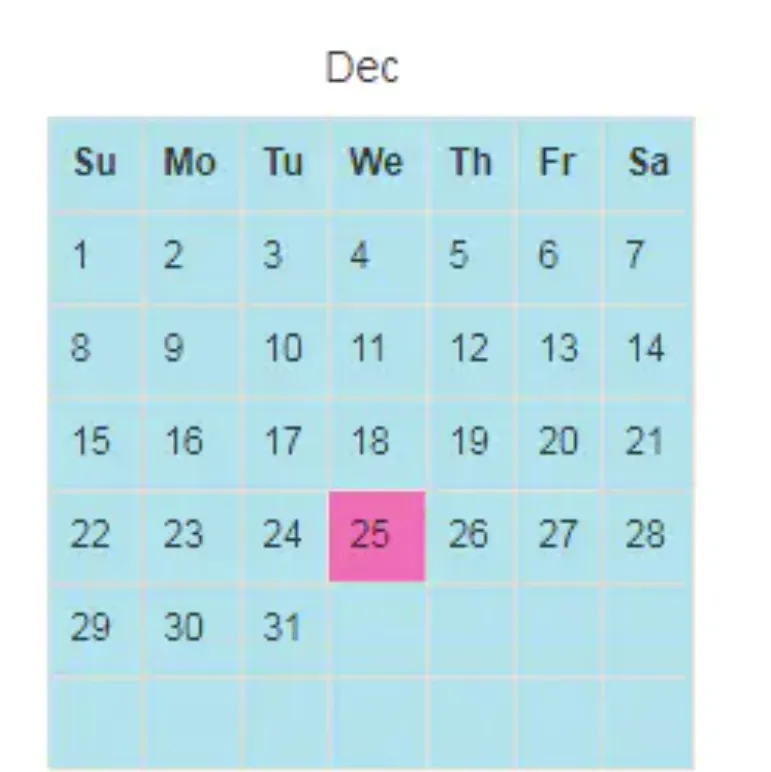
当天高亮效果
再来看看完整的效果展示:
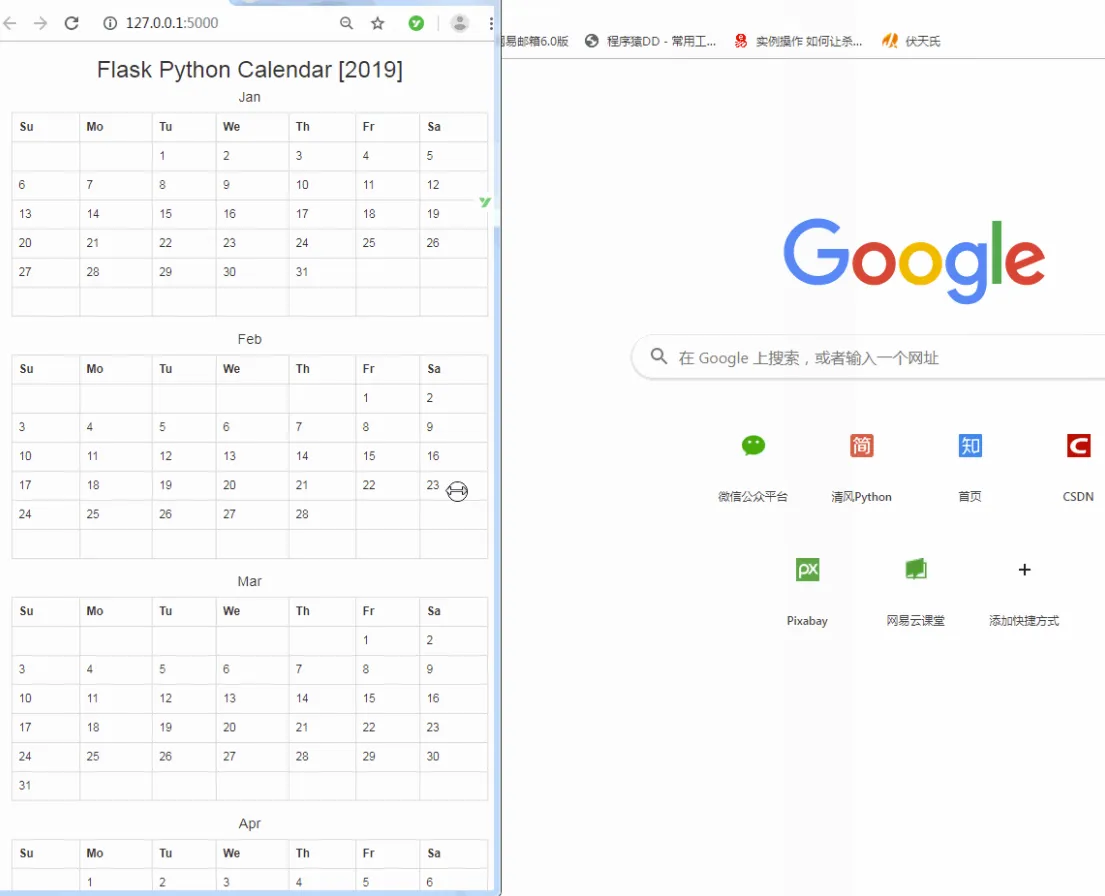
完整效果
完整代码:
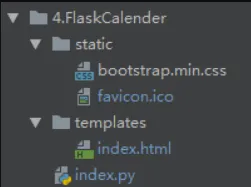
代码目录
# -*- coding: utf-8 -*-
# @Author   : 王翔
# @JianShu  : 清风Python
# @Date     : 2019/6/4 06:01
# @Software : PyCharm
# @version  :Python 3.6.8
# @File     : index.py
from flask import Flask, render_template, request, session, redirect, url_for
import calendar
from datetime import datetime
calendar.setfirstweekday(firstweekday=6)
app = Flask(__name__)
week = ['Su', 'Mo', 'Tu', 'We', 'Th', 'Fr', 'Sa']
def calc_calender(date):
    year = date.year
    yearInfo = dict()
    for month in range(1, 13):
        days = calendar.monthcalendar(year, month)
        if len(days) != 6:
            days.append([0 for _ in range(7)])
        month_addr = calendar.month_abbr[month]
        yearInfo[month_addr] = days
    return yearInfo
@app.route('/', methods=["GET", "POST"])
def index():
    if request.method == "GET":
        date = datetime.today()
        this_month = calendar.month_abbr[date.month]
        return render_template('index.html', this_month=this_month, date=date, content=calc_calender(date))
if __name__ == '__main__':
    app.run(debug=True)
