本文已收录在Github,关注我,紧跟本系列专栏文章,咱们下篇再续!
- 🚀 魔都架构师 | 全网30W技术追随者
- 🔧 大厂分布式系统/数据中台实战专家
- 🏆 主导交易系统百万级流量调优 & 车联网平台架构
- 🧠 AIGC应用开发先行者 | 区块链落地实践者
- 🌍 以技术驱动创新,我们的征途是改变世界!
- 👉 实战干货:编程严选网
0 前言
本文基于2.0.0-alpha2-SNAPSHOT最新版,分析Sentinel限流功能实现。
Sentinel会进行流量统计,执行流量控制规则:
- 统计数据的展示和规则的设置在 sentinel-dashboard 项目
- 不一定需要dashboard,可仅用sentinel-core,它会将统计信息写入指定日志文件,通过文件了解每个接口的流量。这时只是用到 Sentinel 流量监控功能。
dashboard默认不持久化数据
所有数据在内存,dashboard重启即所有数据丢失。按需定制dashboard,如至少提供持久化规则设置,QPS适合存放在时序数据库,若数据量不大,MySQL也可,注意定期清理不关心的历史数据。
Sentinel将不同Slot串联(责任链模式),将不同功能(限流、降级、系统保护)组合。
核心结构:
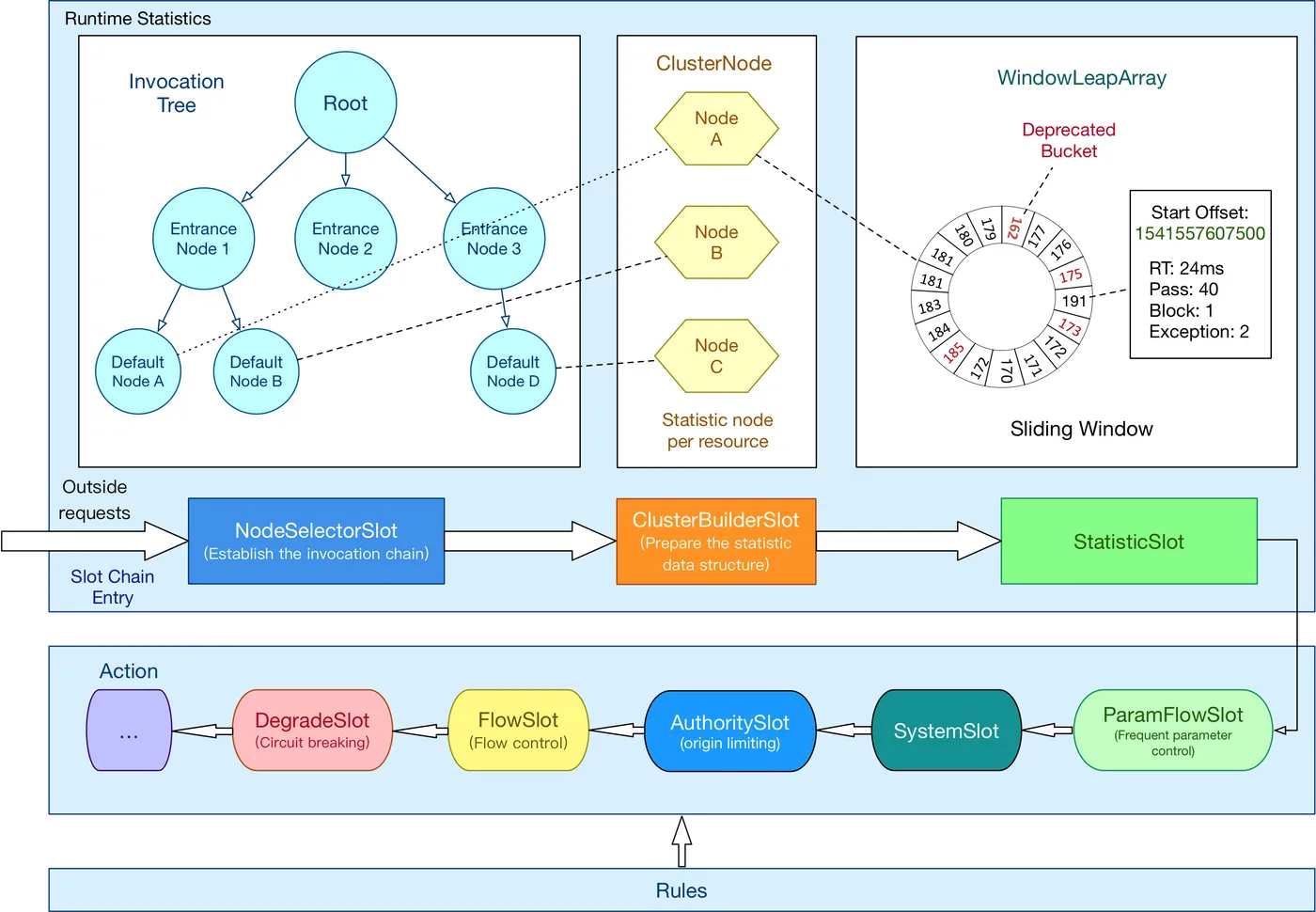
slot chain 可分为:
- 统计数据构建部分(statistic)
- 判断部分(rule checking)
1 Sentinel数据统计
Sentinel定位流控,有两维控制:
- 控制并发线程数
- 控制QPS
它们都针对某具体接口来设置,Sentinel的最小控制粒度是Resource。
要做控制,先做统计,须知当前接口QPS和并发,进而判断一个新请求能否通过。
2 StatisticNode
数据统计的代码:
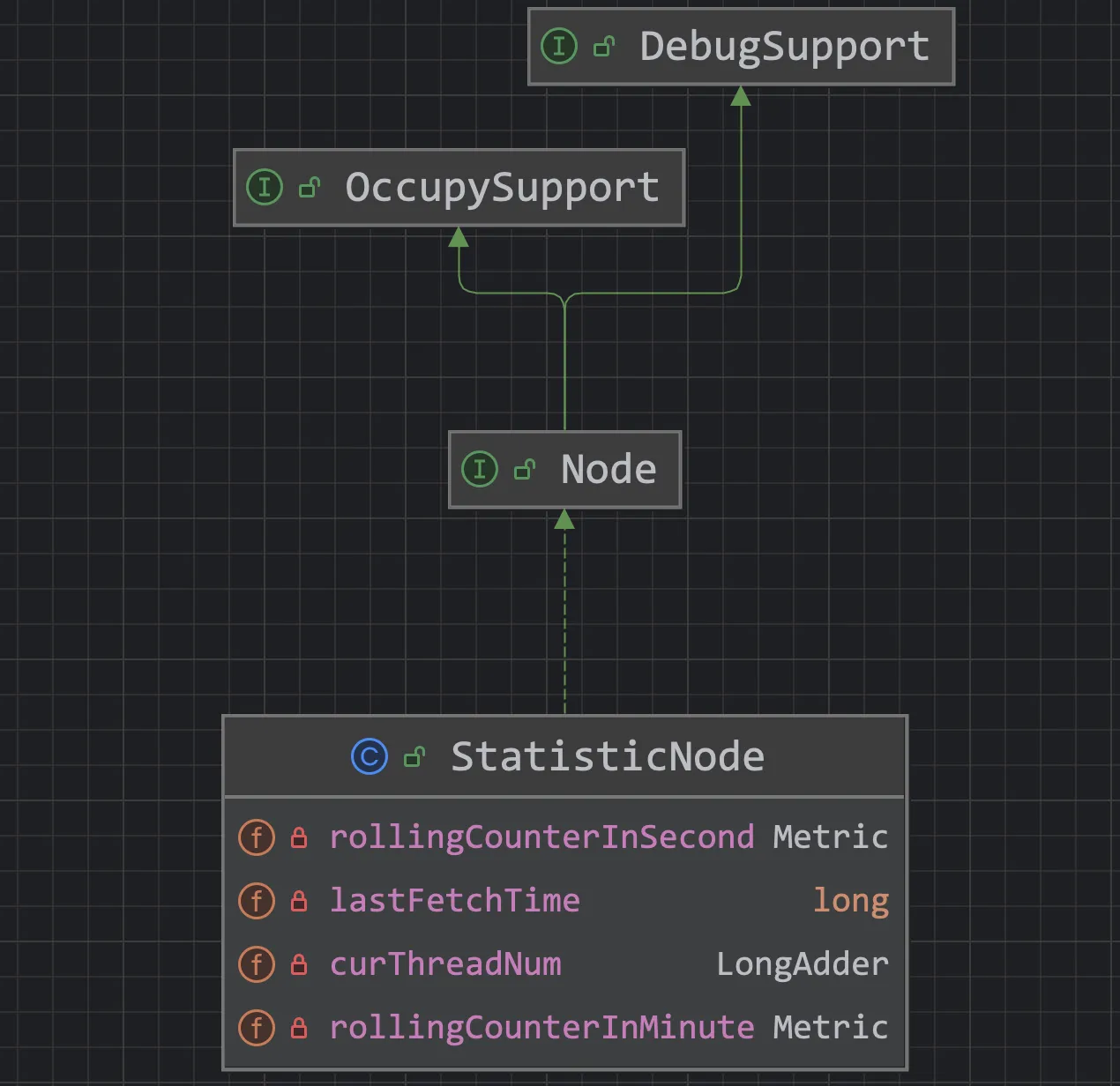
QPS数据用滑动窗口:
/**
 * 持有最近INTERVAL ms的统计数据
 * 将INTERVAL按给定的sampleCount分时间跨度
 */
private transient volatile Metric rollingCounterInSecond = new ArrayMetric(SampleCountProperty.SAMPLE_COUNT,
    IntervalProperty.INTERVAL);
/**
  * 持有最近60s的统计数据。故意将窗口长度设置为1000ms,即每s就是一个桶,就可获得每s的准确统计信息
  */
private transient Metric rollingCounterInMinute = new ArrayMetric(60, 60 * 1000, false);
线程数量的计数器,即统计并发量:
/**
 * 线程数量的计数器,即统计并发量
 */
private LongAdder curThreadNum = new LongAdder();
可见,Sentinel 统计 秒、分 两维,看其实现类
3 ArrayMetric
Sentinel的基本度量标准类,使用内部BucketLeapArray。
3.1 属性
维度统计用子类 BucketLeapArray 实现。
private final LeapArray<MetricBucket> data;
3.2 构造器
public ArrayMetric(int sampleCount, int intervalInMs) {
  this.data = new OccupiableBucketLeapArray(sampleCount, intervalInMs);
}
public ArrayMetric(int sampleCount, int intervalInMs, boolean enableOccupy) {
  if (enableOccupy) {
    this.data = new OccupiableBucketLeapArray(sampleCount, intervalInMs);
  } else {
    this.data = new BucketLeapArray(sampleCount, intervalInMs);
  }
}
/**
 * For unit test.
 */
public ArrayMetric(LeapArray<MetricBucket> array) {
  this.data = array;
}
3.3 字段
public abstract class LeapArray<T> {
    protected int windowLengthInMs;
    protected int sampleCount;
    protected int intervalInMs;
条件(谓词)更新锁,仅在不使用当前桶时使用。
/**
 * The conditional (predicate) update lock is used only when current bucket is deprecated.
 */
private final ReentrantLock updateLock = new ReentrantLock();
内部核心数组array,长度60,即有60个窗口,每个窗口长度为1s,1min走完一轮。然后下一轮开启“覆盖”操作。
protected final AtomicReferenceArray<WindowWrap<T>> array;
每个窗口是一个 WindowWrap 类实例。
3.4 添加数据
先判断目前走到啥窗口:
当前时间(s) % 60
再判断该窗口是否为【过期数据】,若是(窗口代表的时间距离当前已超过1min),需先重置这个窗口实例的数据。
3.5 统计数据
同理,如统计过去1min的QPS数据,就是将每个窗口的值相加,当中需判断窗口数据是否为过期数据,即判断窗口的 WindowWrap 实例是否是1min内的数据。
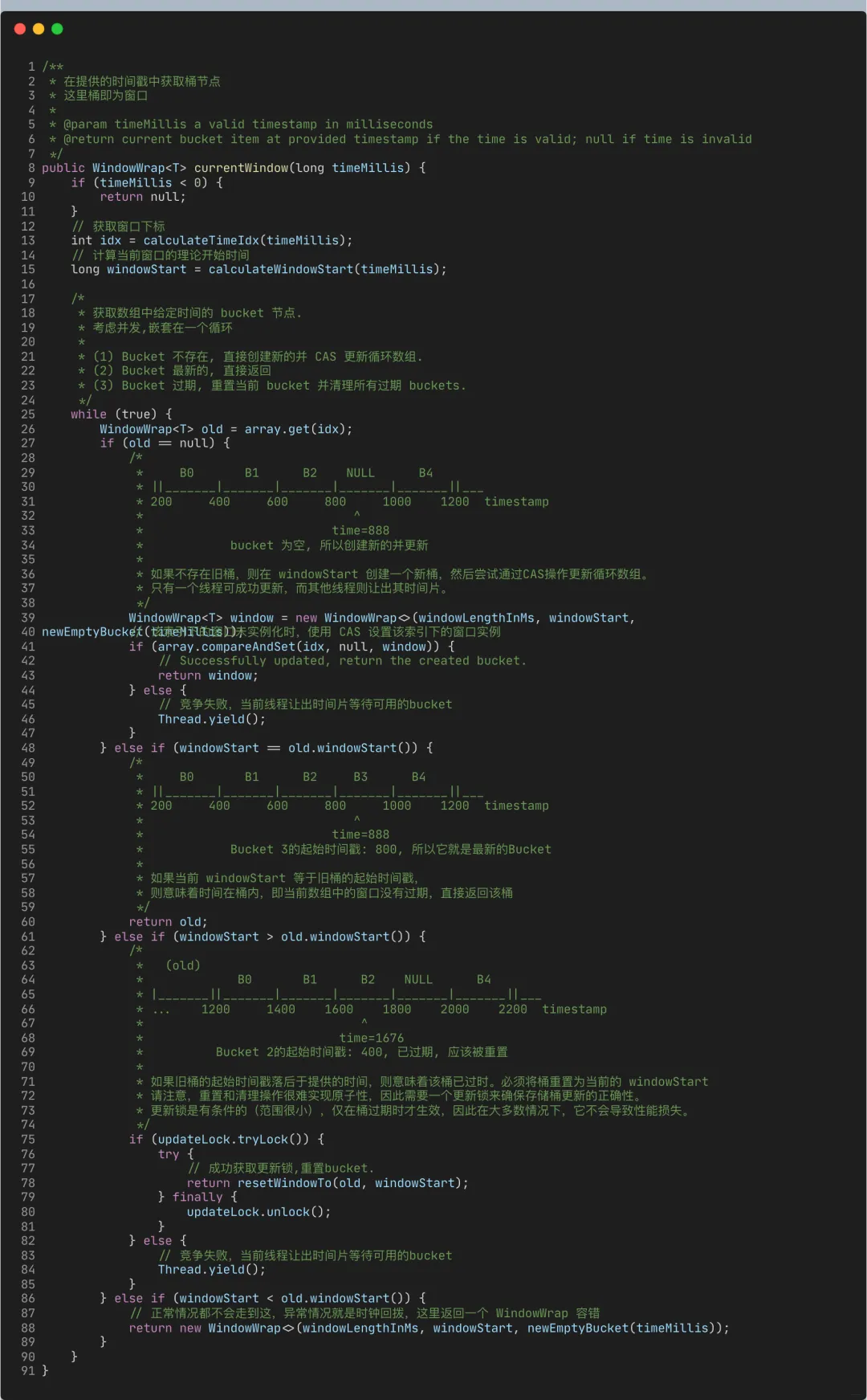
核心逻辑都封装在:currentWindow(long timeMillis) 和 values(long timeMillis)方法中。
添加数据时,先获取操作的目标窗口,即分维度数据统计。
4 currentWindow
处理初始化和过期重置:
5 values
获取数据,即返回“有效”窗口中的数据:
public List<T> values(long timeMillis) {
    if (timeMillis < 0) {
        return new ArrayList<T>();
    }
    int size = array.length();
    List<T> result = new ArrayList<T>(size);
    for (int i = 0; i < size; i++) {
        WindowWrap<T> windowWrap = array.get(i);
       // 过滤掉过期的数据
        if (windowWrap == null || isWindowDeprecated(timeMillis, windowWrap)) {
            continue;
        }
        result.add(windowWrap.value());
    }
    return result;
}
isWindowDeprecated
public boolean isWindowDeprecated(long time, WindowWrap<T> windowWrap) {
    // 判断当前窗口的数据是否是 60 秒内的
    return time - windowWrap.windowStart() > intervalInMs;
}
6 案例
public void getUserInfo(String application, long accountId) {
   // 红色部分的Context 代表一个调用链的入口,Context 实例设置在 ThreadLocal,所以它是跟着线程走的,如果要切换线程,需手动切换
    ContextUtil.enter("user-center", application);
    Entry entry = null;
    try {
        entry = SphU.entry("getUserInfo", EntryType.IN);

        // 获取昵称
        String nickName = this.getNickName(accountId);
        // 获取用户订单信息
        OrderInfoDTO orderInfo = this.getOrderInfo(accountId);

        // ...
        return result;
    } catch (BlockException ex) {
        throw new RuntimeException("系统忙");
    } finally {
        if (entry != null) {
            entry.exit();
        }
    }
}
嵌套改造:
public OrderInfoDTO getOrderInfo(long accountId) {
    Entry entry = null;
    try {
        entry = SphU.entry("getOrderInfo");
        // ... 查询订单信息
        return xxx;
    } catch (BlockException ex) {
        return null;
    } finally {
        if (entry != null) {
            entry.exit();
        }
    }
}
6.1 ContextUtil#enter
其参数:
context name
调用链的入口,以区分不同调用链路:
public final static String CONTEXT_DEFAULT_NAME = "sentinel_default_context";
origin
调用方标识,用于:
- 黑白名单的授权控制
- 统计诸如从应用 application-a 发起的对当前应用 interfaceXxx() 接口的调用,目前该数据会被统计,但dashboard不展示
6.2 BlockException
进入 BlockException 异常分支,代表该次请求被流量控制规则限制,一般会让代码进入熔断降级逻辑。
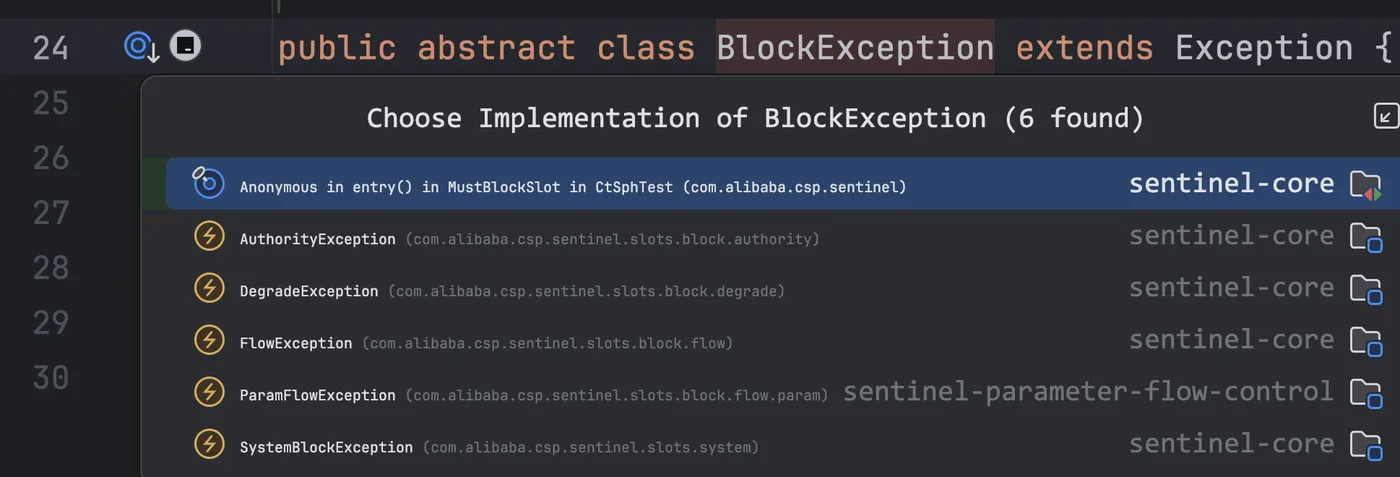
亦可 catch 具体子类处理。
6.3 SphU#entry
方法参数:
标识资源
通常就是我们的接口标识,对于数据统计、规则控制等,一般都在该粒度进行,根据这个字符串来唯一标识,会被包装成 ResourceWrapper 实例。
标识资源的类型
public enum EntryType {
    /**
     * Inbound traffic入口流量,比如我们的接口对外提供服务,那通常就是控制入口流量
     */
    IN,
    /**
     * Outbound traffic出口流量
     */
    OUT;
}
EntryType.OUT
public static Entry entry(String name) throws BlockException {
    return Env.sph.entry(name, EntryType.OUT, 1, OBJECTS0);
}
默认就是出口流量,如业务需调用订单服务,这种压力都在订单服务,那就指定它为出口流量。
流量类型在 SystemSlot 类用以实现自适应限流,根据系统健康状态判断是否限流,若是 OUT 类型,由于压力在外部系统,就无需执行该规则。
6.4 编码顺序
若在一个方法中写,要注意:
- 内层的 Entry 先 exit
- 才能做外层的 exit
- 否则会抛出异常
源码角度来看,是在 Context 实例中,保存了当前的 Entry 实例。
7 核心源码解析
7.1 ContextUtil
static 代码块
这里会添加一个默认的 EntranceNode 实例。
static {
    // Cache the entrance node for default context.
    initDefaultContext();
}
private static void initDefaultContext() {
    String defaultContextName = Constants.CONTEXT_DEFAULT_NAME;
    EntranceNode node = new EntranceNode(new StringResourceWrapper(defaultContextName, EntryType.IN), null);
    Constants.ROOT.addChild(node);
    contextNameNodeMap.put(defaultContextName, node);
}
enter
该行可选,一般不显示设置context。
ContextUtil.enter("user-center", "app-A");
若不显式调用该方法,进入默认context。
public static Context enter(String name, String origin) {
    if (Constants.CONTEXT_DEFAULT_NAME.equals(name)) {
        throw new ContextNameDefineException(
            "The " + Constants.CONTEXT_DEFAULT_NAME + " can't be permit to defined!");
    }
    return trueEnter(name, origin);
}
然后上面的这个方法会走进 ContextUtil#trueEnter,添加 “user-center” 的 EntranceNode 节点:
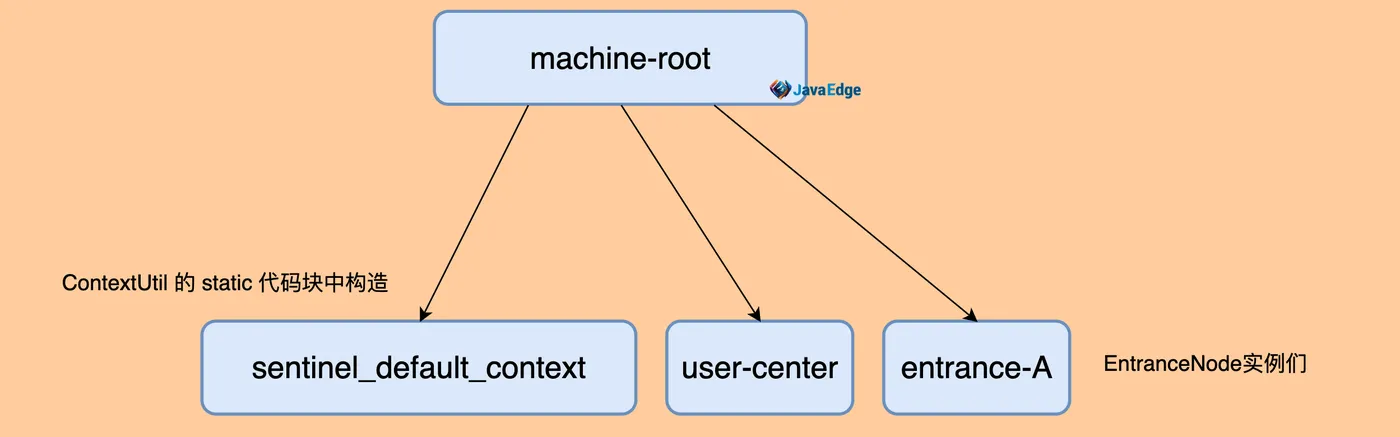
若不显式调用 ContextUtil#enter,那 root 就只有一个默认节点 sentinel_default_context。
context,线程执行的上下文,在 Sentinel 中对于一个新的 context name,Sentinel 会往树中添加一个 EntranceNode 实例。所以它的作用是为了区分调用链路,标识调用入口。在 sentinel-dashboard 中,我们可以很直观地看出调用链路:
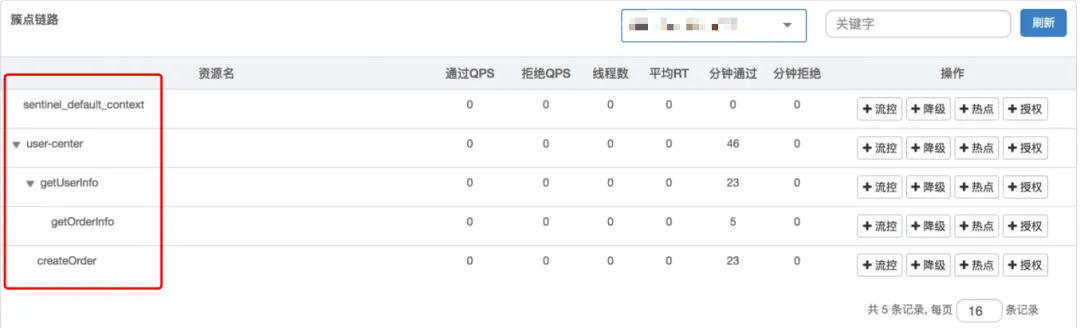
7.2 SphU
entry
CtSph#entryWithPriority
private Entry entryWithPriority(ResourceWrapper resourceWrapper, int count, boolean prioritized, Object... args) throws BlockException {
    // 从 ThreadLocal 获取 Context 实例
    Context context = ContextUtil.getContext();
    if (context instanceof NullContext) {
        // NullContext表示context数量超过阈值2000(ContextUtil#trueEnter)
        // 所以这里仅初始化节点,不会做任何规则校验(即不做新接口的统计、限流熔断)
        return new CtEntry(resourceWrapper, null, context);
    }
    // 不显式调ContextUtil.enter
    if(context == null) {
        // 则用默认context
        context = InternalContextUtil.internalEnter(Constants.CONTEXT_DEFAULT_NAME);
    }
    // 全局开关若是关闭,也不会有任何规则校验
    if (!Constants.ON) {
        return new CtEntry(resourceWrapper, null, context);
    }
    // 构建一个责任链,入参为资源的唯一标识resource
    ProcessorSlot<Object> chain = LookProcessChain(resourceWrapper);
    /*
     * 说明 resource(slot_chain) 超过 Constants.MAX_SLOT_CHAIN_SIZE(6000),
     * Sentinel 不再处理新请求的规则校验,主要为 Sentinel 性能
     */
    if (chain == null) {
        return new CtEntry(resourceWrapper, null, context);
    }
    // 执行该责任链。若抛 BlockException,说明链上某环拒绝该请求;
    // 把这异常往上层业务层抛, 业务层处理 BlockException 应该进入熔断降级逻辑
    try {
        Entry e = new CtEntry(resourceWrapper, chain, context);
        chain.entry(context, resourceWrapper, null, count, prioritized, args);
        e.exit(count, args);
        return e;
    } catch (BlockException el) {
        throw el;
    } catch (Throwable el) {
        // 除非Sentinel内部存在错误
        RecordLog.info("Sentinel unexpected exception", el);
        return e;
    }
}
lookProcessChain(resourceWrapper)
链中每一个节点是一个 Slot 实例,这个链通过 BlockException 异常来告知调用入口最终的执行情况。
Sentinel 提供了 SPI 端点,让我们可以自己定制 Builder,如添加一个 Slot 进去。
由于 SlotChainBuilder 接口设计,我们只能全局所有的 resource 使用相同的责任链配置。
@Spi(isDefault = true)
public class DefaultSlotChainBuilder implements SlotChainBuilder {
    @Override
    public ProcessorSlotChain build() {
        ProcessorSlotChain chain = new DefaultProcessorSlotChain();
     // Note: the instances of ProcessorSlot should be different, since they are not stateless
        List<ProcessorSlot> sortedSlotList = SpiLoader.of(ProcessorSlot.class).loadInstanceListSorted();
        for (ProcessorSlot slot : sortedSlotList) {
            if (!(slot instanceof AbstractLinkedProcessorSlot)) {
                RecordLog.warn("The ProcessorSlot(" + slot.getClass().getCanonicalName() + ") is not an instance of AbstractLinkedProcessorSlot, can't be added into ProcessorSlotChain");
                continue;
            }
            chain.addLast((AbstractLinkedProcessorSlot<?>) slot);
        }
        return chain;
    }
}
按默认的 DefaultSlotChainBuilder 生成的责任链继续源码。对相同的 resource,使用同一责任链实例,不同 resource,使用不同责任链实例。resource 实例根据 resource name 来判断,和线程无关。