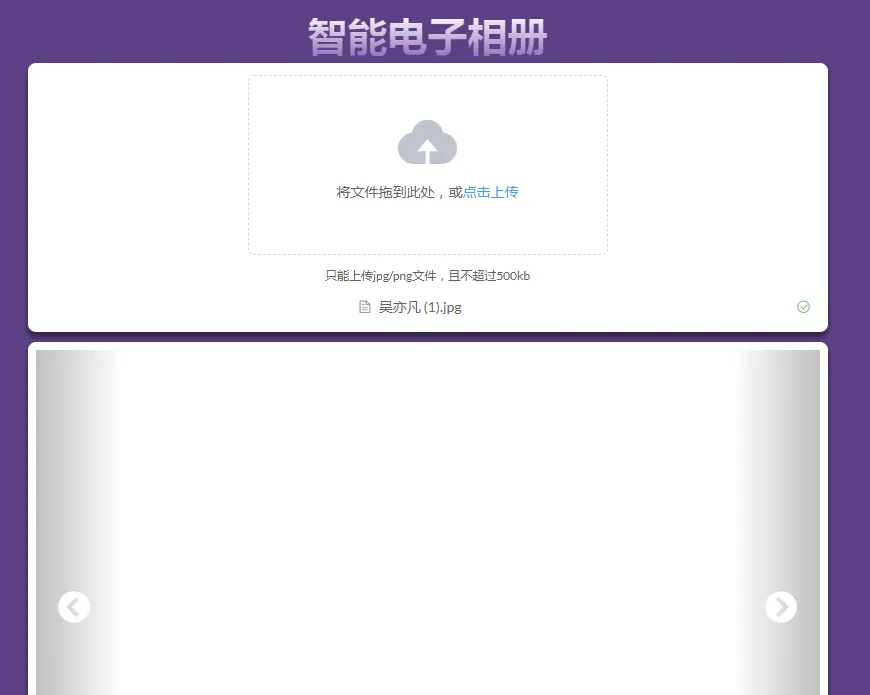
电子相册
目录结构

- common:是存放一些常量
- config:路径配置,数据配置
- controller:请求后台数据
- service :图片的保存和处理
- utils:MD5工具类
- resources:放置了些静态文件和日志文件
前提要求
要购买人脸识别服务,不然用不了
环境
pom的依赖
 <dependencies>
        <dependency>
            <groupId>org.springframework.boot</groupId>
            <artifactId>spring-boot-starter-web</artifactId>
        </dependency>

        <dependency>
            <groupId>org.springframework.boot</groupId>
            <artifactId>spring-boot-devtools</artifactId>
            <scope>runtime</scope>
            <optional>true</optional>
        </dependency>

        <dependency>
            <groupId>org.projectlombok</groupId>
            <artifactId>lombok</artifactId>
            <optional>true</optional>
        </dependency>

        <dependency>
            <groupId>com.alibaba</groupId>
            <artifactId>fastjson</artifactId>
            <version>1.2.67</version>
        </dependency>
        <!-- https://mvnrepository.com/artifact/commons-codec/commons-codec -->
        <dependency>
            <groupId>commons-codec</groupId>
            <artifactId>commons-codec</artifactId>
            <version>1.14</version>
        </dependency>
        <!-- https://mvnrepository.com/artifact/com.aliyun/aliyun-java-sdk-core -->
        <dependency>
            <groupId>com.aliyun</groupId>
            <artifactId>aliyun-java-sdk-core</artifactId>
            <version>4.4.9</version>
        </dependency>
        <!-- https://mvnrepository.com/artifact/com.aliyun/facebody -->
        <dependency>
            <groupId>com.aliyun</groupId>
            <artifactId>facebody</artifactId>
            <version>0.0.7</version>
        </dependency>

        <!-- https://mvnrepository.com/artifact/com.aliyun/imagerecog -->
        <dependency>
            <groupId>com.aliyun</groupId>
            <artifactId>imagerecog</artifactId>
            <version>0.0.5</version>
        </dependency>

        <dependency>
            <groupId>commons-io</groupId>
            <artifactId>commons-io</artifactId>
            <version>2.5</version>
        </dependency>

        <dependency>
            <groupId>org.springframework.boot</groupId>
            <artifactId>spring-boot-starter-test</artifactId>
            <scope>test</scope>
            <exclusions>
                <exclusion>
                    <groupId>org.junit.vintage</groupId>
                    <artifactId>junit-vintage-engine</artifactId>
                </exclusion>
            </exclusions>
        </dependency>
    </dependencies>
ExpressionEnum
public enum ExpressionEnum {
    neutral ("neutral","中性"),
    happiness("happiness","高兴"),
    surprise("surprise","惊讶"),
    sadness("sadness","伤心"),
    anger("anger","生气"),
    disgust("disgust","厌恶"),
    fear("害怕","害怕");

    String name;
    String nameEn;

    ExpressionEnum(String nameEn,String name){
        this.name = name;
        this.nameEn = nameEn;
    }

    public static String getNameByNameEn(String nameEn){
        for (ExpressionEnum expressionEnum : ExpressionEnum.values()){
            if (expressionEnum.nameEn.equals(nameEn)){
                return expressionEnum.name;
            }
        }
        return "";
    }
}
ResourseService
@Service
@Data
@Slf4j
public class ResourceService {

    private String scene;

    @Value("./data")
    private String storagePath;

    @Value("./img")
    private String imagePath;

    static final String fileName = "data.json";

    private LabelModel labelModel;

    @Autowired
    private VisionService visionService;

    @PostConstruct
    public void loadMetaData(){
        log.info("load");
        try {
            FileInputStream inputStream = new FileInputStream(storagePath + fileName);
            labelModel = JSONObject.parseObject(inputStream, LabelModel.class);
        } catch (IOException e) {
            log.error(e.toString());
            labelModel = new LabelModel();
        }
    }

    @PreDestroy
    public void saveMetaData(){
        log.info("save");
        try {
            System.out.println(JSON.toJSONString(labelModel));
            FileOutputStream outputStream = new FileOutputStream(storagePath + fileName);
            outputStream.write(JSON.toJSONBytes(labelModel));
            outputStream.close();
        } catch (IOException e) {
            log.error(e.toString());
        }
    }

    public List<String> getPhotosByCateAndLabel(String cate,String label){
        return getAccessPath(labelModel.getImgByCate(cate));
    }

    public List<String> getAccessPath(List<String> imgs){
        List<String> result = new ArrayList<>();
        imgs.stream().forEach(img -> {
            result.add(String.format("/img/%s",img));
        });
        return result;
    }

    public List<String> getPhotosByCate(String cate) {
        return getAccessPath(labelModel.getImgByCate(cate));
    }

    public List<String> getAllPhotos(){
        return getAccessPath(labelModel.getAllImg());
    }

    public Object getAllCates(){
        return labelModel.cateMap;
    }


    public void saveAndRecognizeImage(String fileName, InputStream inputStream){
        log.info("saveImage");
        try {
            //识别场景
            inputStream.reset();
            inputStream.mark(0);
            List<String> scenes = visionService.recognizeScene(inputStream);
            labelModel.addImg(LabelModel.SCENE,fileName,scenes);

            inputStream.reset();
            inputStream.mark(0);
            List<String> expressions = visionService.recognizeExpression(inputStream);
            labelModel.addImg(LabelModel.EXPRESSION,fileName,expressions);

            //重复利用InputStream需要reset,mark操作
            inputStream.reset();
            inputStream.mark(0);

            //保存文件
            System.out.println(imagePath+fileName);
            FileOutputStream outputStream = new FileOutputStream(imagePath + fileName);
            IOUtils.copy(inputStream,outputStream);

            outputStream.close();
        } catch (Exception e) {
            e.printStackTrace();
            log.error(e.toString());
        }
    }


    @Data
    static class LabelModel{
        static final String SCENE = "scene";
        static final String EXPRESSION = "expression";
        static final String STYLE = "style";

        //保存不同场景标签包含的图片
        private Map<String,Set<String>> sceneMap;
        //保存不同表情包含有的图片
        private Map<String,Set<String>> expressionMap;

        //保存不同风格包含的图片
        private Map<String,Set<String>> styleMap;
        private Map<String,Set<String>> cateMap;

        //图片包含的标签
        //key:图片地址
        //value:Set中value值为:{[style| expression|style]}_{label},例如:style_怀旧
        private Map<String,Set<String>> imgLables;

        public LabelModel(){
            this.imgLables = new HashMap<>();
            this.sceneMap = new HashMap<>();
            this.expressionMap = new HashMap<>();
            this.styleMap = new HashMap<>();
            this.cateMap = new HashMap<>();
        }

        //获取所有的图片
        public List<String> getAllImg(){
            List<String> result = new ArrayList<>();
            imgLables.forEach((k,v)->{
                result.add(k);
            });

            return result.stream().sorted(Comparator.reverseOrder()).collect(Collectors.toList());
        }

        //获取图片的种类
        public List<String> getImgByCate(String cate){
            Map<String,Set<String>> data = new HashMap<>();
            switch (cate){
                case SCENE:{
                    data = sceneMap;
                    break;
                }
                case EXPRESSION:{
                    data = expressionMap;
                    break;
                }
                case STYLE:{
                    data = styleMap;
                    break;
                }
            }

            Set<String> result = new HashSet<>();
            data.forEach((k,d)->{
                result.addAll(d);
            });

            return result.stream().sorted(Comparator.reverseOrder()).collect(Collectors.toList());
        }


        public List<String> getImgByCateAndLabel(String cate,String label){
            System.out.println(cate);
            System.out.println(label);

            String key = String.format("%s_%s",cate,label);

            Set<String> result = new HashSet<>();
            switch (cate){
                case SCENE:{
                    result = sceneMap.get(key);
                    break;
                }
                case EXPRESSION:{
                    result = expressionMap.get(key);
                    break;
                }
                case STYLE:{
                    result = styleMap.get(key);
                    break;
                }
            }
            return result.stream().sorted(Comparator.reverseOrder()).collect(Collectors.toList());
        }

        void addImg(String cate,String img,List<String> labels){
            for (String label : labels) {
                String item = String.format("%s_%s", cate, label);
                Set<String> imgSet = imgLables.getOrDefault(img, new HashSet<>());
                imgSet.add(item);
                imgLables.put(img, imgSet);
                switch (cate) {
                    case SCENE: {
                        Set<String> sceneSet = sceneMap.getOrDefault(item, new HashSet<>());
                        sceneSet.add(img);
                        sceneMap.put(item, sceneSet);
                        Set<String> cateSet = cateMap.getOrDefault(cate, new HashSet<>());
                        cateSet.add(label);
                        cateMap.put(cate, cateSet);
                        break;
                    }
                    case EXPRESSION: {
                        Set<String> expressionSet = expressionMap.getOrDefault(item, new HashSet<>());
                        expressionSet.add(img);
                        expressionMap.put(item, expressionSet);
                        Set<String> cateSet = cateMap.getOrDefault(cate, new HashSet<>());
                        cateSet.add(label);
                        cateMap.put(cate, cateSet);
                        break;
                    }
                    case STYLE: {
                        Set<String> styleSet = styleMap.getOrDefault(item, new HashSet<>());
                        styleSet.add(img);
                        styleMap.put(item, styleSet);
                        Set<String> cateSet = cateMap.getOrDefault(cate, new HashSet<>());
                        cateSet.add(label);
                        cateMap.put(cate, cateSet);
                        break;
                    }
                }
            }
        }


        void removeImg(String img) {
            Set<String> labels = imgLables.remove(img);
            labels.stream().forEach(label -> {
                String[] segs = label.split("_");
                String cate = segs[0];
                String labelKey = segs[1];
                switch (cate) {
                    case SCENE: {
                        sceneMap.get(labelKey).remove(img);
                        break;
                    }
                    case EXPRESSION: {
                        expressionMap.get(labelKey).remove(img);
                        break;
                    }
                    case STYLE: {
                        styleMap.get(labelKey).remove(img);
                        break;
                    }
                }
            });
        }
    }
}
VisionService
@Service
@Slf4j
public class VisionService {

    @Value("${aliyun.accessKeyId}")
    private String accessKey;

    @Value("${aliyun.accessKeySecret}")
    private String accessSecret;

    static String faceBodyEndpoint = "facebody";
    static String imageRecogEndpoint = "imagerecog";
    static String objectDetEndpoint = "objectdet";


    private Client getFaceBodyClient(String endpoint) throws Exception {
        Config config = new Config();
        config.accessKeyId = accessKey;
        config.accessKeySecret = accessSecret;
        config.type = "access_key";
        config.regionId = "cn-shanghai";
        config.endpointType = "internal";
        config.endpoint = String.format("%s.%s",endpoint,"cn-shanghai.aliyuncs.com");
        config.protocol = "http";
        return new Client(config);
    }

    private com.aliyun.imagerecog.Client getImageRecognClient(String endpoint) throws Exception {
        com.aliyun.imagerecog.models.Config config = new com.aliyun.imagerecog.models.Config();
        config.accessKeyId = accessKey;
        config.accessKeySecret = accessSecret;
        config.type = "access_key";
        config.regionId = "cn-shanghai";
        config.endpointType = "internal";
        config.endpoint = String.format("%s.%s",endpoint,"cn-shanghai.aliyuncs.com");
        config.protocol = "http";
        return new com.aliyun.imagerecog.Client(config);
    }

    public static InputStream getImageStream(String url) throws Exception{
        URLConnection conn = new URL(url).openConnection();
        conn.setConnectTimeout(10 * 1000);
        conn.setReadTimeout(10 * 1000);
        return conn.getInputStream();
    }

    public List<String> recognizeScene(InputStream inputStream) throws Exception {
        RecognizeSceneAdvanceRequest request = new RecognizeSceneAdvanceRequest();
        request.imageURLObject = inputStream;

        List<String> labels = new ArrayList<>();
        try {
            com.aliyun.imagerecog.Client client = getImageRecognClient(imageRecogEndpoint);
            RecognizeSceneResponse resp = client.recognizeSceneAdvance(request, new RuntimeObject());
            for (RecognizeSceneResponse.RecognizeSceneResponseDataTags tag: resp.data.tags) {
                labels.add(tag.value);
            }
        } catch (ClientException e) {
            log.error("ErrCode:{}, ErrMsg:{}, RequestId:{}", e.getErrCode(), e.getErrMsg(), e.getRequestId());
        }
        return labels;
    }

    public List<String> recognizeExpression(InputStream inputStream) throws Exception {
        RecognizeExpressionAdvanceRequest request = new RecognizeExpressionAdvanceRequest();
        request.imageURLObject = inputStream;

        List<String> labels = new ArrayList<>();
        try {
            Client client = getFaceBodyClient(faceBodyEndpoint);
            RecognizeExpressionResponse resp = client.recognizeExpressionAdvance(request, new RuntimeObject());
            for (RecognizeExpressionResponse.RecognizeExpressionResponseDataElements element : resp.data.elements) {
                labels.add(ExpressionEnum.getNameByNameEn(element.expression));
            }
        } catch (ClientException e) {
            log.error("ErrCode:{}, ErrMsg:{}, RequestId:{}", e.getErrCode(), e.getErrMsg(), e.getRequestId());
        }
        return labels;
    }


}
Controller
@RestController
@RequestMapping("/album/v1")
@Slf4j
public class AlbumController {

    @Autowired
    private VisionService visionService;

    @Autowired
    private ResourceService resourceService;


    @RequestMapping(value = "/list", method = RequestMethod.GET)
    public Object getList() throws Exception {
        return resourceService.getAllPhotos();
    }


    @RequestMapping(value = "/allCates", method = RequestMethod.GET)
    public Object getCates() throws Exception {
        return resourceService.getAllCates();
    }

    @RequestMapping(value = "/getPhotosByCateAndLabel", method = RequestMethod.GET)
    public Object getPhotosByCateAndLabel(@RequestParam(name="cate") String cate, @RequestParam(name="tag") String tag) throws Exception {
        return resourceService.getPhotosByCateAndLabel(cate, tag);
    }

    @RequestMapping(value = "/getPhotosByCate", method = RequestMethod.GET)
    public Object getPhotosByCate(@RequestParam(name="cate") String cate) throws Exception {
        return resourceService.getPhotosByCate(cate);
    }

    @PostMapping("/upload")
    public Object upload(@RequestParam("file") MultipartFile file) throws Exception {
        //计算上传文件的md5值,作为文件名
        byte[] bytes = file.getBytes();
        ByteArrayInputStream inputStream = new ByteArrayInputStream(bytes);
        String md5Str = Md5CaculateUtil.getMD5(inputStream);
        inputStream.reset();
        inputStream.mark(0);

        String fileName = file.getOriginalFilename();
        String fType = fileName.substring(fileName.lastIndexOf("."));
        fileName = String.format("%s%s", md5Str, fType);
        resourceService.saveAndRecognizeImage(fileName, inputStream);
        return fileName;
    }


}
前端是用vue来实现的界面