【.NET Core项目实战-统一认证平台】开篇及目录索引
上篇文章我们介绍了2种网关配置信息更新的方法和扩展Mysql存储,本篇我们将介绍如何使用Redis来实现网关的所有缓存功能,用到的文档及源码将会在GitHub上开源,每篇的源代码我将用分支的方式管理,本篇使用的分支为
course3。
附文档及源码下载地址:[https://github.com/jinyancao/CtrAuthPlatform/tree/course3]
一、缓存介绍及选型
网关的一个重要的功能就是缓存,可以对一些不常更新的数据进行缓存,减少后端服务开销,默认Ocelot实现的缓存为本地文件进行缓存,无法达到生产环境大型应用的需求,而且不支持分布式环境部署,所以我们需要一个满足大型应用和分布式环境部署的缓存方案。Redis应该是当前应用最广泛的缓存数据库,支持5种存储类型,满足不同应用的实现,且支持分布式部署等特性,所以缓存我们决定使用Redis作为缓存实现。
本文将介绍使用CSRedisCore来实现Redis相关操作,至于为什么选择CSRedisCore,可参考文章[.NET Core开发者的福音之玩转Redis的又一傻瓜式神器推荐],里面详细的介绍了各种Redis组件比较及高级应用,并列出了不同组件的压力测试对比,另外也附CSRedisCore作者交流QQ群:8578575,使用中有什么问题可以直接咨询作者本人。
二、缓存扩展实现
首先本地安装Redis和管理工具Redis Desktop Manager,本文不介绍安装过程,然后NuGet安装 CSRedisCore,现在开始我们重写IOcelotCache<T>的实现,新建InRedisCache.cs文件。
using Ctr.AhphOcelot.Configuration;
using Ocelot.Cache;
using System;
using System.Collections.Generic;
using System.Text;

namespace Ctr.AhphOcelot.Cache
{
    /// <summary>
    /// 金焰的世界
    /// 2018-11-14
    /// 使用Redis重写缓存
    /// </summary>
    /// <typeparam name="T"></typeparam>
    public class InRedisCache<T> : IOcelotCache<T>
    {
        private readonly AhphOcelotConfiguration _options;
        public InRedisCache(AhphOcelotConfiguration options)
        {
            _options = options;
            CSRedis.CSRedisClient csredis;
            if (options.RedisConnectionStrings.Count == 1)
            {
                //普通模式
                csredis = new CSRedis.CSRedisClient(options.RedisConnectionStrings[0]);
            }
            else
            {
                //集群模式
                //实现思路:根据key.GetHashCode() % 节点总数量,确定连向的节点
                //也可以自定义规则(第一个参数设置)
                csredis = new CSRedis.CSRedisClient(null, options.RedisConnectionStrings.ToArray());
            }
            //初始化 RedisHelper
            RedisHelper.Initialization(csredis);
        }

        /// <summary>
        /// 添加缓存信息
        /// </summary>
        /// <param name="key">缓存的key</param>
        /// <param name="value">缓存的实体</param>
        /// <param name="ttl">过期时间</param>
        /// <param name="region">缓存所属分类,可以指定分类缓存过期</param>
        public void Add(string key, T value, TimeSpan ttl, string region)
        {
            key = GetKey(region, key);
            if (ttl.TotalMilliseconds <= 0)
            {
                return;
            }
            RedisHelper.Set(key, value.ToJson(), (int)ttl.TotalSeconds);
        }


        public void AddAndDelete(string key, T value, TimeSpan ttl, string region)
        {
            Add(key, value, ttl, region);
        }

        /// <summary>
        /// 批量移除regin开头的所有缓存记录
        /// </summary>
        /// <param name="region">缓存分类</param>
        public void ClearRegion(string region)
        {
            //获取所有满足条件的key
            var data= RedisHelper.Keys(_options.RedisKeyPrefix + "-" + region + "-*");
            //批量删除
            RedisHelper.Del(data);
        }

        /// <summary>
        /// 获取执行的缓存信息
        /// </summary>
        /// <param name="key">缓存key</param>
        /// <param name="region">缓存分类</param>
        /// <returns></returns>
        public T Get(string key, string region)
        {
            key= GetKey(region, key);
            var result = RedisHelper.Get(key);
            if (!String.IsNullOrEmpty(result))
            {
                return result.ToObject<T>();
            }
            return default(T);
        }

        /// <summary>
        /// 获取格式化后的key
        /// </summary>
        /// <param name="region">分类标识</param>
        /// <param name="key">key</param>
        /// <returns></returns>
        private string GetKey(string region,string key)
        {
            return _options.RedisKeyPrefix + "-" + region + "-" + key;
        }
    }
}实现所有缓存相关接口,是不是很优雅呢?实现好缓存后,我们需要把我们现实的注入到网关里,在ServiceCollectionExtensions类中,修改注入方法。
/// <summary>
/// 添加默认的注入方式,所有需要传入的参数都是用默认值
/// </summary>
/// <param name="builder"></param>
/// <returns></returns>
public static IOcelotBuilder AddAhphOcelot(this IOcelotBuilder builder, Action<AhphOcelotConfiguration> option)
{
    builder.Services.Configure(option);
    //配置信息
    builder.Services.AddSingleton(
        resolver => resolver.GetRequiredService<IOptions<AhphOcelotConfiguration>>().Value);
    //配置文件仓储注入
    builder.Services.AddSingleton<IFileConfigurationRepository, SqlServerFileConfigurationRepository>();
    //注册后端服务
    builder.Services.AddHostedService<DbConfigurationPoller>();
    //使用Redis重写缓存
    builder.Services.AddSingleton<IOcelotCache<FileConfiguration>, InRedisCache<FileConfiguration>>();
            builder.Services.AddSingleton<IOcelotCache<CachedResponse>, InRedisCache<CachedResponse>>();
    return builder;
}奈斯,我们使用Redis实现缓存已经全部完成,现在开始我们在网关配置信息增加缓存来测试下,看缓存是否生效,并查看是否存储在Redis里。
为了验证缓存是否生效,修改测试服务api/values/{id}代码,增加服务器时间输出。
[HttpGet("{id}")]
public ActionResult<string> Get(int id)
{
    return id+"-"+DateTime.Now.ToString("yyyy-MM-dd HH:mm:ss");
}增加新的测试路由脚本,然后增加缓存策略,缓存60秒,缓存分类test_ahphocelot。
--插入路由测试信息
insert into AhphReRoute values(1,'/ctr/values/{id}','[ "GET" ]','','http','/api/Values/{id}','[{"Host": "localhost","Port": 9000 }]',
'','','{ "TtlSeconds": 60, "Region": "test_ahphocelot" }','','','','',0,1);
--插入网关关联表
insert into dbo.AhphConfigReRoutes values(1,2);现在我们测试访问网关地址http://localhost:7777/api/values/1,过几十秒后继续访问,结果如下。
可以看出来,缓存已经生效,1分钟内请求都不会路由到服务端,再查询下redis缓存数据,发现缓存信息已经存在,然后使用Redis Desktop Manager查看Redis缓存信息是否存在,奈斯,已经存在,说明已经达到我们预期目的。
三、解决网关集群配置信息变更问题
前面几篇已经介绍了网关的数据库存储,并介绍了网关的2种更新方式,但是如果网关集群部署时,采用接口更新方式,无法直接更新所有集群端配置数据,那如何实现集群配置信息一致呢?前面介绍了redis缓存,可以解决当前遇到的问题,我们需要重写内部配置文件提取仓储类,使用redis存储。
我们首先使用redis实现IInternalConfigurationRepository接口,每次请求配置信息时直接从redis存储,避免单机缓存出现数据无法更新的情况。RedisInternalConfigurationRepository代码如下。
using Ctr.AhphOcelot.Configuration;
using Ocelot.Configuration;
using Ocelot.Configuration.Repository;
using Ocelot.Responses;
using System;
using System.Collections.Generic;
using System.Text;

namespace Ctr.AhphOcelot.Cache
{
    /// <summary>
    /// 金焰的世界
    /// 2018-11-14
    /// 使用redis存储内部配置信息
    /// </summary>
    public class RedisInternalConfigurationRepository : IInternalConfigurationRepository
    {
        private readonly AhphOcelotConfiguration _options;
        private IInternalConfiguration _internalConfiguration;
        public RedisInternalConfigurationRepository(AhphOcelotConfiguration options)
        {
            _options = options;
            CSRedis.CSRedisClient csredis;
            if (options.RedisConnectionStrings.Count == 1)
            {
                //普通模式
                csredis = new CSRedis.CSRedisClient(options.RedisConnectionStrings[0]);
            }
            else
            {
                //集群模式
                //实现思路:根据key.GetHashCode() % 节点总数量,确定连向的节点
                //也可以自定义规则(第一个参数设置)
                csredis = new CSRedis.CSRedisClient(null, options.RedisConnectionStrings.ToArray());
            }
            //初始化 RedisHelper
            RedisHelper.Initialization(csredis);
        }

        /// <summary>
        /// 设置配置信息
        /// </summary>
        /// <param name="internalConfiguration">配置信息</param>
        /// <returns></returns>
        public Response AddOrReplace(IInternalConfiguration internalConfiguration)
        {
            var key = _options.RedisKeyPrefix + "-internalConfiguration";
            RedisHelper.Set(key, internalConfiguration.ToJson());
            return new OkResponse();
        }

        /// <summary>
        /// 从缓存中获取配置信息
        /// </summary>
        /// <returns></returns>
        public Response<IInternalConfiguration> Get()
        {
            var key = _options.RedisKeyPrefix + "-internalConfiguration";
            var result = RedisHelper.Get<InternalConfiguration>(key);
            if (result!=null)
            {
                return new OkResponse<IInternalConfiguration>(result);
            }
            return new OkResponse<IInternalConfiguration>(default(InternalConfiguration));
        }
    }
}
redis实现后,然后在ServiceCollectionExtensions里增加接口实现注入。
builder.Services.AddSingleton<IInternalConfigurationRepository, RedisInternalConfigurationRepository>();然后启动网关测试,可以发现网关配置信息已经使用redis缓存了,可以解决集群部署后无法同步更新问题。
四、如何清除缓存记录
实际项目使用过程中,可能会遇到需要立即清除缓存数据,那如何实现从网关清除缓存数据呢?在上篇中我们介绍了接口更新网关配置的说明,缓存的更新也是使用接口的方式进行删除,详细代码如下。
using Microsoft.AspNetCore.Authorization;
using Microsoft.AspNetCore.Mvc;

namespace Ocelot.Cache
{
    [Authorize]
    [Route("outputcache")]
    public class OutputCacheController : Controller
    {
        private readonly IOcelotCache<CachedResponse> _cache;

        public OutputCacheController(IOcelotCache<CachedResponse> cache)
        {
            _cache = cache;
        }

        [HttpDelete]
        [Route("{region}")]
        public IActionResult Delete(string region)
        {
            _cache.ClearRegion(region);
            return new NoContentResult();
        }
    }
}我们可以先拉去授权,获取授权方式请参考上一篇,然后使用HTTP DELETE方式,请求删除地址,比如删除前面的测试缓存接口,可以请求http://localhost:7777/CtrOcelot/outputcache/test_ahphocelot地址进行删除,可以使用PostMan进行测试,测试结果如下。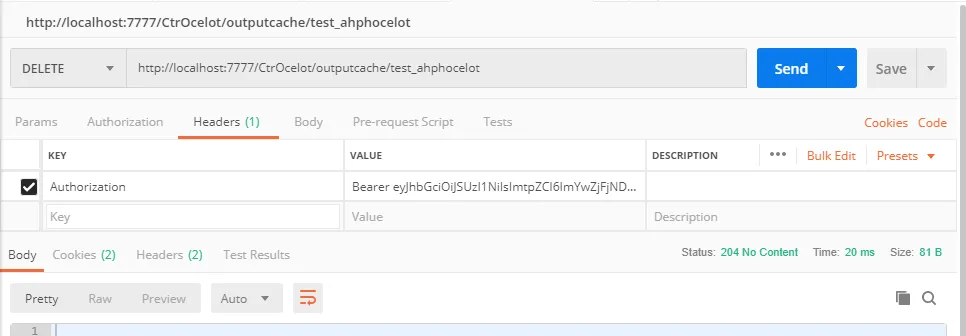
执行成功后可以删除指定的缓存记录,且立即生效,完美的解决了我们问题。
五、总结及预告
本篇我们介绍了使用redis缓存来重写网关的所有缓存模块,并把网关配置信息也存储到redis里,来解决集群部署的问题,如果想清理缓存数据,通过网关指定的授权接口即可完成,完全具备了网关的缓存的相关模块的需求。
下一篇开始我们开始介绍针对不同客户端设置不同的权限来实现自定义认证,敬请期待,后面的课程会越来越精彩,也希望大家多多支持。