首先写在最前面的一点,关于netty5的用户指南,可以参照这里
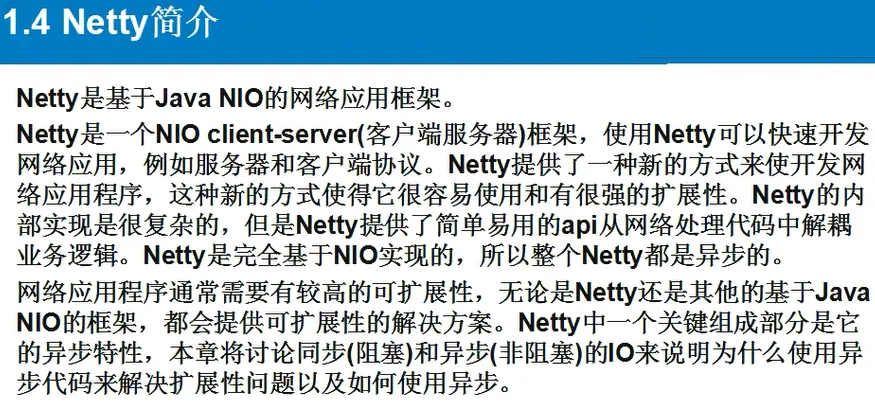
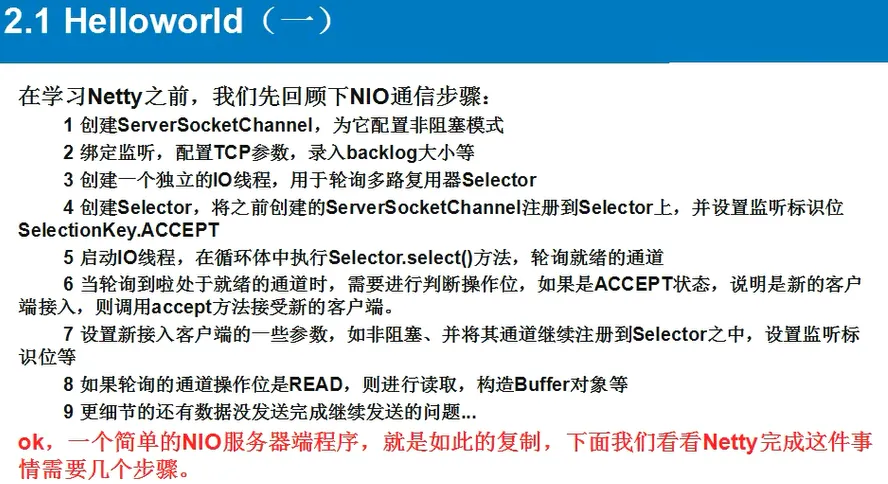
Netty的hello world
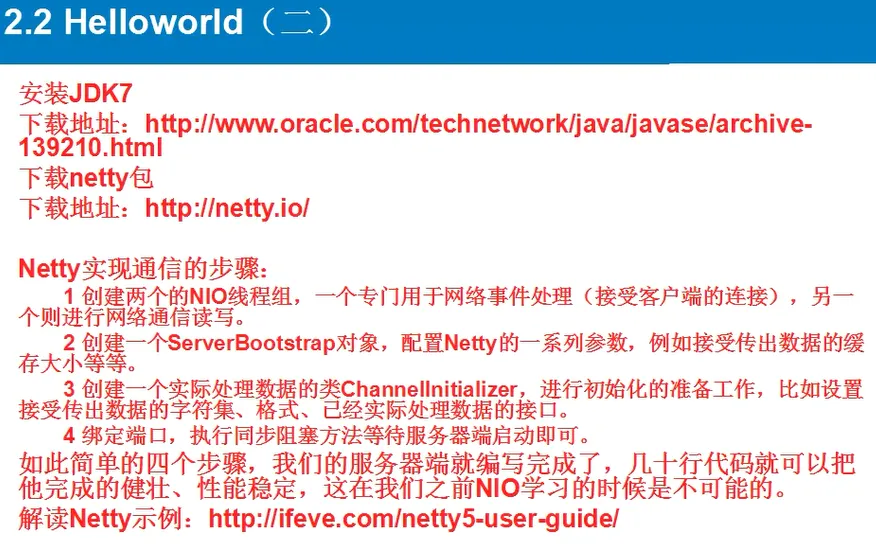
一个经典的hello world程序有四个类,分布是Client,ClientHandler,Server,ServerHandler,下面是它们的代码
Client.java
package bhz.netty.helloworld;

import io.netty.bootstrap.Bootstrap;
import io.netty.buffer.Unpooled;
import io.netty.channel.ChannelFuture;
import io.netty.channel.ChannelInitializer;
import io.netty.channel.EventLoopGroup;
import io.netty.channel.nio.NioEventLoopGroup;
import io.netty.channel.socket.SocketChannel;
import io.netty.channel.socket.nio.NioSocketChannel;

public class Client {

    public static void main(String[] args) throws Exception{

        EventLoopGroup group = new NioEventLoopGroup();
        Bootstrap b = new Bootstrap();
        b.group(group)
        .channel(NioSocketChannel.class)
        .handler(new ChannelInitializer<SocketChannel>() {
            @Override
            protected void initChannel(SocketChannel sc) throws Exception {
                sc.pipeline().addLast(new ClientHandler());
            }
        });

        ChannelFuture cf1 = b.connect("127.0.0.1", 8765).sync();
        //ChannelFuture cf2 = b.connect("127.0.0.1", 8764).sync();
        //发送消息
        Thread.sleep(1000);
        cf1.channel().writeAndFlush(Unpooled.copiedBuffer("777".getBytes()));
        cf1.channel().writeAndFlush(Unpooled.copiedBuffer("666".getBytes()));
        //cf2.channel().writeAndFlush(Unpooled.copiedBuffer("888".getBytes()));
        Thread.sleep(2000);
        cf1.channel().writeAndFlush(Unpooled.copiedBuffer("888".getBytes()));
        //cf2.channel().writeAndFlush(Unpooled.copiedBuffer("666".getBytes()));

        cf1.channel().closeFuture().sync();
        //cf2.channel().closeFuture().sync();
        group.shutdownGracefully();
    }
}
ClientHandler.java
package bhz.netty.helloworld;

import io.netty.buffer.ByteBuf;
import io.netty.buffer.Unpooled;
import io.netty.channel.ChannelHandlerAdapter;
import io.netty.channel.ChannelHandlerContext;
import io.netty.channel.ChannelPromise;
import io.netty.util.ReferenceCountUtil;

public class ClientHandler extends ChannelHandlerAdapter{


    @Override
    public void channelActive(ChannelHandlerContext ctx) throws Exception {
    }

    @Override
    public void channelRead(ChannelHandlerContext ctx, Object msg) throws Exception {
        try {
            ByteBuf buf = (ByteBuf) msg;

            byte[] req = new byte[buf.readableBytes()];
            buf.readBytes(req);

            String body = new String(req, "utf-8");
            System.out.println("Client :" + body );
            String response = "收到服务器端的返回信息:" + body;
        } finally {
            ReferenceCountUtil.release(msg);
        }
    }

    @Override
    public void channelReadComplete(ChannelHandlerContext ctx) throws Exception {

    }

    @Override
    public void exceptionCaught(ChannelHandlerContext ctx, Throwable cause)
            throws Exception {
        ctx.close();
    }

}
Server.java
package bhz.netty.helloworld;

import io.netty.bootstrap.ServerBootstrap;
import io.netty.channel.ChannelFuture;
import io.netty.channel.ChannelInitializer;
import io.netty.channel.ChannelOption;
import io.netty.channel.EventLoopGroup;
import io.netty.channel.nio.NioEventLoopGroup;
import io.netty.channel.socket.SocketChannel;
import io.netty.channel.socket.nio.NioServerSocketChannel;

public class Server {

    public static void main(String[] args) throws Exception {
        //1 创建线两个程组
        //一个是用于处理服务器端接收客户端连接的
        //一个是进行网络通信的(网络读写的)
        EventLoopGroup pGroup = new NioEventLoopGroup();
        EventLoopGroup cGroup = new NioEventLoopGroup();

        //2 创建辅助工具类,用于服务器通道的一系列配置
        ServerBootstrap b = new ServerBootstrap();
        b.group(pGroup, cGroup)     //绑定俩个线程组
        .channel(NioServerSocketChannel.class)      //指定NIO的模式
        .option(ChannelOption.SO_BACKLOG, 1024)     //设置tcp缓冲区
        .option(ChannelOption.SO_SNDBUF, 32*1024)   //设置发送缓冲大小
        .option(ChannelOption.SO_RCVBUF, 32*1024)   //这是接收缓冲大小
        .option(ChannelOption.SO_KEEPALIVE, true)   //保持连接
        .childHandler(new ChannelInitializer<SocketChannel>() {
            @Override
            protected void initChannel(SocketChannel sc) throws Exception {
                //3 在这里配置具体数据接收方法的处理
                sc.pipeline().addLast(new ServerHandler());
            }
        });

        //4 进行绑定
        ChannelFuture cf1 = b.bind(8765).sync();
        //ChannelFuture cf2 = b.bind(8764).sync();
        //5 等待关闭
        cf1.channel().closeFuture().sync();
        //cf2.channel().closeFuture().sync();
        pGroup.shutdownGracefully();
        cGroup.shutdownGracefully();
    }
}
ServerHandler.java
package bhz.netty.helloworld;

import io.netty.buffer.ByteBuf;
import io.netty.buffer.Unpooled;
import io.netty.channel.ChannelFutureListener;
import io.netty.channel.ChannelHandlerAdapter;
import io.netty.channel.ChannelHandlerContext;

public class ServerHandler extends ChannelHandlerAdapter {


    @Override
    public void channelActive(ChannelHandlerContext ctx) throws Exception {
        System.out.println("server channel active... ");
    }


    @Override
    public void channelRead(ChannelHandlerContext ctx, Object msg)
            throws Exception {
            ByteBuf buf = (ByteBuf) msg;
            byte[] req = new byte[buf.readableBytes()];
            buf.readBytes(req);
            String body = new String(req, "utf-8");
            System.out.println("Server :" + body );
            String response = "进行返回给客户端的响应:" + body ;
            ctx.writeAndFlush(Unpooled.copiedBuffer(response.getBytes()));
            //.addListener(ChannelFutureListener.CLOSE);
    }

    @Override
    public void channelReadComplete(ChannelHandlerContext ctx)
            throws Exception {
        System.out.println("读完了");
        ctx.flush();
    }

    @Override
    public void exceptionCaught(ChannelHandlerContext ctx, Throwable t)
            throws Exception {
        ctx.close();
    }
}
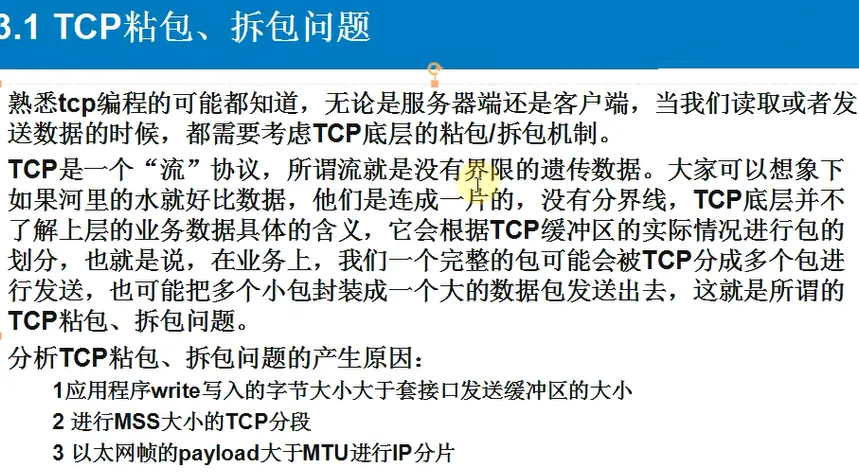
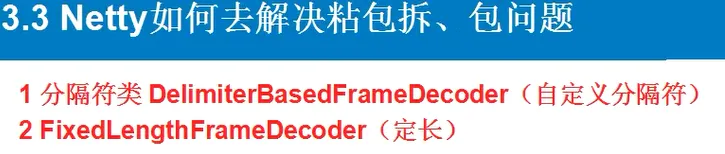
拆包粘包问题