作为一名热爱学习的Android开发工程si,刷微博的时候居然还想着技术呢,觉得自己也是够够了........哈哈哈

image.png
进入今天的正题,微博主页大家肯定是看过的,先看一下微博的效果。
(小提示:该Demo是采用kotlin语言编写的,需要配置Kotlin开发环境哦!)

wb.gif
微博的效果大家都看到了,先看看这标题栏悬停的效果。实现方式很多种,我的思路很简单:顶部有一个默认隐藏的标题栏在上面,然后通过计算ScrollView向上滑动的距离,动态控制头部标题导航栏的显示隐藏。
简单分析一下页面布局的结构:
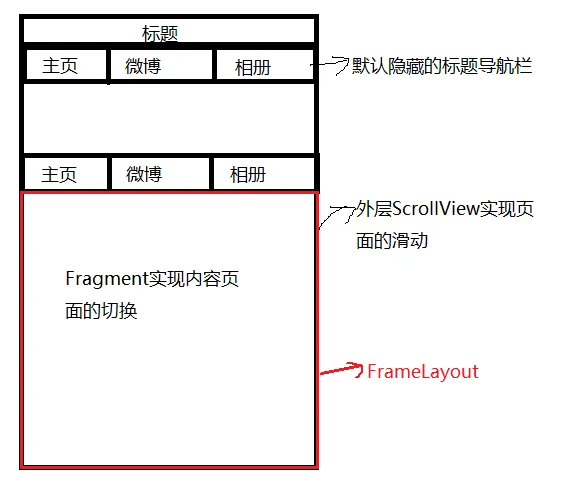
image.png
页面布局代码:
<?xml version="1.0" encoding="utf-8"?>
<RelativeLayout xmlns:android="http://schemas.android.com/apk/res/android"
    android:id="@+id/parent_view"
    android:layout_width="match_parent"
    android:layout_height="match_parent"
    android:background="#ffffff"
    android:orientation="vertical">

    <FrameLayout
        android:layout_width="match_parent"
        android:layout_height="match_parent">

        <ScrollView
            android:id="@+id/scrollView"
            android:layout_width="match_parent"
            android:layout_height="match_parent"
            android:fillViewport="true">

            <RelativeLayout
                android:layout_width="match_parent"
                android:layout_height="match_parent">

                <ImageView
                    android:id="@+id/iv_img"
                    android:layout_width="match_parent"
                    android:layout_height="200dp"
                    android:scaleType="fitXY"
                    android:src="@mipmap/bg_wb" />

                <include
                    android:id="@+id/ll_tab"
                    layout="@layout/layout_suspencial_title"
                    android:layout_width="match_parent"
                    android:layout_height="wrap_content"
                    android:layout_below="@+id/iv_img"></include>

                <FrameLayout
                    android:id="@+id/fl_container"
                    android:layout_width="match_parent"
                    android:layout_height="match_parent"
                    android:layout_below="@+id/ll_tab"></FrameLayout>
            </RelativeLayout>
        </ScrollView>

        <RelativeLayout
            android:layout_width="match_parent"
            android:layout_height="wrap_content"
            android:orientation="vertical">

            <TextView
                android:id="@+id/tv_title_text"
                android:layout_width="match_parent"
                android:layout_height="35dp"
                android:gravity="center"
                android:text="歌手李健"
                android:textColor="#ffffff"
                android:textSize="18sp" />

            <View
                android:id="@+id/title_divider"
                android:layout_width="match_parent"
                android:layout_height="1dp"
                android:layout_below="@+id/tv_title_text"
                android:background="#e6e6e6"
                android:visibility="gone"></View>
            <!--悬停导航标题栏-->
            <include
                android:id="@+id/ll_sus_tab"
                layout="@layout/layout_suspencial_title"
                android:layout_width="match_parent"
                android:layout_height="wrap_content"
                android:layout_below="@+id/title_divider"
                android:visibility="invisible"></include>
        </RelativeLayout>

    </FrameLayout>

</RelativeLayout>
设置标题栏导航栏悬停和标题栏渐变的核心代码:给ScrollView设置滑动的监听
        scrollView.setOnScrollViewListener(object : MyScrollView.OnScrollViewListener {
            override fun onScrollChanged(scrollX: Int, scrollY: Int, oldx: Int, oldY: Int) {
                //如果向上滑动的距离>=iv_img.height - tv_title_text.height,隐藏的标题导航栏设置显示
                var distanceScrollY = iv_img.height - tv_title_text.height
                if (scrollY >= distanceScrollY) {
                    ll_sus_tab.visibility = View.VISIBLE
//                    ll_tab.visibility = View.INVISIBLE
                    title_divider.visibility = View.VISIBLE
                } else {
                    ll_sus_tab.visibility = View.INVISIBLE
//                    ll_tab.visibility = View.VISIBLE
                    title_divider.visibility = View.GONE
                }
                //设置标题栏渐变
                if (scrollY <= 0) {
                    //初始位置:未滑动时,设置标题背景透明
                    tv_title_text.setBackgroundColor(Color.TRANSPARENT)
                    tv_title_text.setTextColor(Color.WHITE)
                } else if (scrollY > 0 && scrollY <= distanceScrollY) {
                    var scale: Float = (scrollY.toFloat()) / distanceScrollY
                    var alpha: Float = 255 * scale
                    tv_title_text.setBackgroundColor(Color.argb(alpha.toInt(), 255, 255, 255))
                    tv_title_text.setTextColor(Color.argb(alpha.toInt(), 0, 0, 0))
                } else {
                    tv_title_text.setBackgroundColor(Color.argb(255, 255, 255, 255))
                    tv_title_text.setTextColor(Color.argb(255, 0, 0, 0))
                }
//
            }
        })
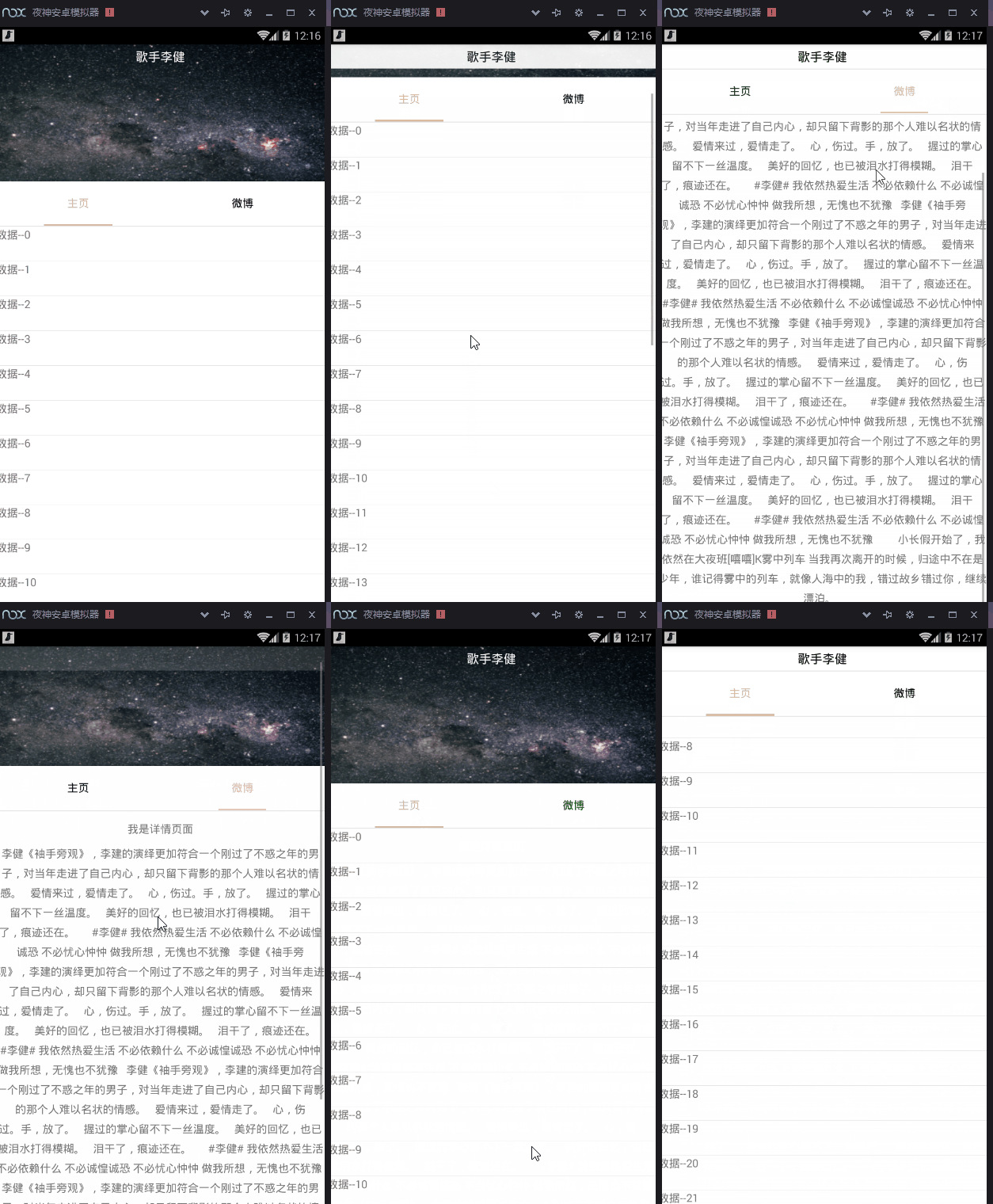
最后实现的效果:
re.gif
注意注意注意了:如果使用原生ScrollView,会报如下的警告,如果你是用API大于等于23(Android6.0)的手机测试,不会有什么问题,程序正常运行。但是要是低于这个版本的手机,就会导致奔溃,报 java.lang.NoClassDefFoundError:
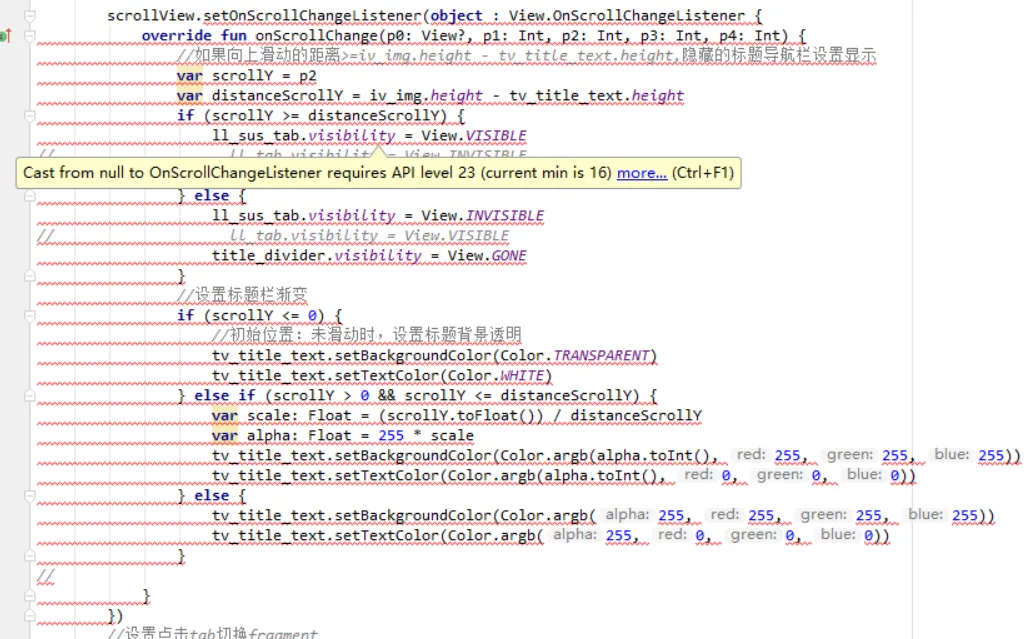
image.png
源码下载请戳: https://github.com/zj593743143/WeiboDetail_Demo