As your business progresses, database requirements will inevitably change and grow. Manually creating and maintaining database servers is no longer a viable approach for most business applications. Instead, enterprises nowadays need an on-demand database service to cope with the constantly changing business requirements.
Alibaba Cloud ApsaraDB for RDS is a ready-to-use service that handles routine database tasks, freeing you up from database administrative and management tasks. It is compatible with MySQL, SQL Server, and PostgreSQL databases, and is compatible with all Alibaba Cloud products.
In addition to its flexibility, Alibaba Cloud ApsaraDB for RDS supports convenient back up and restoration to ensure stable business operations. ApsaraDB for RDS provides a stable and efficient data backup mechanism, requiring as little as one second for a single operation.
In the next section, I will summarize how to use the restoration tools of ApsaraDB for RDS, in hopes of providing some guidance to those who run into similar issues. Specifically, we will be restoring data using Percona XtraBackup, which is a logical hot backup. Because this tutorial is based on my own practical experience, the actual implementation may vary depending on your device and operating environment.
System Configuration and Properties
Operating Environment
Terminal Operating System: OS X 10.10.4
Server Environment: CentOS 6.5
Local Database Environment: Server version: 5.6.21-log MySQL Community Server (GPL)
Production Database Environment: MySQL5.5
Tools Used
Terminal Tool: iTerm (Mac)
Data Compression and Extract Tool: rds_backup_extract (applicable to RDS only)
Database Restoration Tool: Percona XtraBackup 2.2 Release 2.2.12
Database Backup Procedure
1.Download the RDS official extract tool kit: rds_backup_extract.
An RDS backup file is a compressed package. It must be extracted first. Download the extract tool hererds_backup_extract (sh file). Currently, the tool kit only supports 64-bit Linux systems.
bash rds_backup_extract -f backup.tar.gz/back.xb.gz -C director
2.Install the backup restoration tool: Percona XtraBackup 2.2.
Download the official Percona-XtraBackup [Download address: https://www.percona.com/downloads/XtraBackup/]. The official website offers installers for various platforms. RDS backup uses Version 2.2.9, so we recommend you download Version 2.2.9 or a later version. For more information about the working principles of the tool, refer to the official documentation.
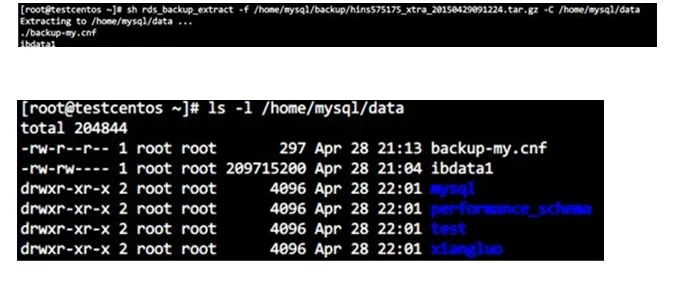
3.Extract backup files.
Extract the backup files by following the instructions in the help documentation:
bash rds_backup_extract -f /home/mysql/backup/hins575175_xtra_20150429091224.tar.gz -C /home/mysql/data
4.Restore data using the backup.
Install Percona-XtraBackup before extracting the backup file. Run the following command:
innobackupex --defaults-file=/home/mysql/data/backup-my.cnf --apply-log /home/mysql/data
This step will output the following. If it displays "completed OK", the operations was executed successfully.

5.Configure the environment.
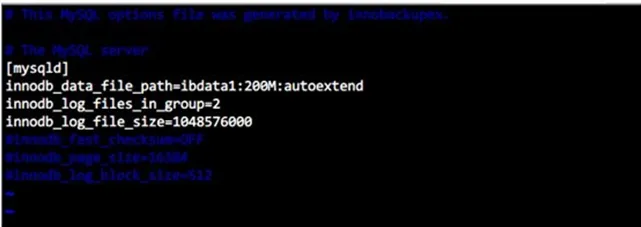
Due to version issues, comment out innodb_fast_checksum, innodb_page_size and innodb_log_block_size in backup-my.cnf in the extracted files, as shown in the figure below:
6.Modify the file owner.
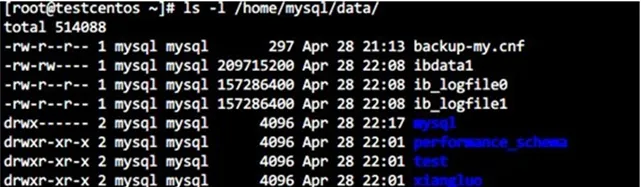
Modify the file owner and confirm that the file belongs to the mysql user.
chown -R mysql:mysql /home/mysql/data
7.Start the mysqld process and log on for verification.
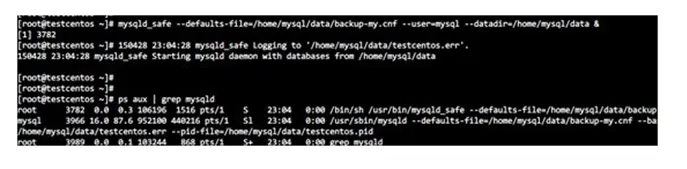
Start the mysqld process and verify that the startup is successful.
mysqld_safe --defaults-file=/home/mysql/data/backup-my.cnf --user=mysql --datadir=/home/mysql/data &
8.Login to MySQL.
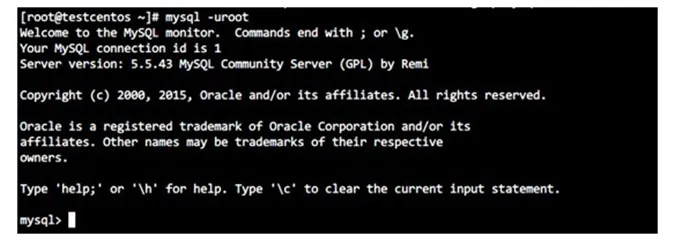
Note: After the restoration, the mysql.user table does not contain users created in the RDS. You need to create new users.
Prior to creating new users, execute the following SQL statements:
delete from mysql.db where user<>'root' and char_length(user)>0;
delete from mysql.tables_priv where user<>'root' and char_length(user)>0;
flush privileges;
Follow Up
That’s it! You have successfully restored your Alibaba Cloud ApsaraDB for RDS database. To learn more about backups on ApsaraDB for RDS, visit the official user guide.