软件下载: https://github.com/jumpserver/jumpserver
系统平台: centos 6.8
具体功能: www.jumpserver.org
1、关闭防火墙以及selinux
|
1
2
3
|
[root@test1 ~]
# service iptables stop
[root@test1 ~]
# getenforce
Disabled
|
2、检查基本环境如yum源,建议使用阿里,网络是否通畅此处网络必须能通
3、安装jump-server所要依赖的包 不要落下包
|
1
2
|
yum -y
install
git python-pip mysql-devel gcc automake autoconf python-devel vim sshpass readline-devel gcc-c++
yum -y
install
libtiff-devel libjpeg-devel libzip-devel freetype-devel lcms2-devel libwebp-devel tcl-devel tk-devel sshpass openldap-devel
|
4、上传软件包至/tmp目录下 版本jumpserver-jumpserver-master.zip
|
1
|
[root@test1 requirements]
# cd /tmp/jumpserver/jumpserver-dev/requirements
|
4.1: 安装依赖 pip install pipreqs
|
1
2
3
4
5
6
7
8
|
Requirement already satisfied: pipreqs
in
/usr/local/lib/python3
.5
/site-packages
Requirement already satisfied: docopt
in
/usr/local/lib/python3
.5
/site-packages
(from pipreqs)
Requirement already satisfied: yarg
in
/usr/local/lib/python3
.5
/site-packages
(from pipreqs)
Requirement already satisfied: requests
in
/usr/local/lib/python3
.5
/site-packages
(from yarg->pipreqs)
Requirement already satisfied: chardet<3.1.0,>=3.0.2
in
/usr/local/lib/python3
.5
/site-packages
(from requests->yarg->pipreqs)
Requirement already satisfied: idna<2.7,>=2.5
in
/usr/local/lib/python3
.5
/site-packages
(from requests->yarg->pipreqs)
Requirement already satisfied: certifi>=2017.4.17
in
/usr/local/lib/python3
.5
/site-packages
(from requests->yarg->pipreqs)
Requirement already satisfied: urllib3<1.23,>=1.21.1
in
/usr/local/lib/python3
.5
/site-packages
(from requests->yarg->pipreqs)
|
4.2:安装 pip install -r requirements.txt
|
1
|
Successfully installed Django-1.11.4 ForgeryPy-0.1 MarkupSafe-1.0 Pillow-4.2.1 PyYAML-3.12 amqp-2.2.1 ansible-2.3.2.0 asn1crypto-0.22.0 bcrypt-3.1.3 billiard-3.5.0.3 celery-4.1.0 cffi-1.10.0 coreapi-2.3.1 coreschema-0.0.4 cryptography-2.0.3 decorator-4.1.2 django-auth-ldap-1.2.15 django-bootstrap3-9.0.0 django-filter-1.0.4 django-formtools-2.0 django-redis-cache-1.7.1 django-rest-swagger-2.1.2 django-simple-captcha-0.5.5 djangorestframework-3.6.4 djangorestframework-bulk-0.2.1 ecdsa-0.13 enum-compat-0.0.2 eventlet-0.21.0 greenlet-0.4.12 gssapi-1.2.0 itsdangerous-0.24 itypes-1.1.0 jinja2-2.9.6 kombu-4.1.0 ldap3-2.3 olefile-0.44 openapi-codec-1.3.2 paramiko-2.2.1 passlib-1.7.1 pyasn1-0.3.2 pycparser-2.18 pycrypto-2.6.1 pyldap-2.4.37 pynacl-1.1.2 pytz-2017.2 redis-2.10.6 simplejson-3.11.1 six-1.10.0 sshpubkeys-2.2.0 uritemplate-3.0.0 vine-1.1.4
|
####### 5-8 为系统文档 vim docs/install.md
5、准备配置文件
|
1
2
3
4
5
6
7
8
9
10
11
12
13
|
$
cd
..
$
cp
config_example.py config.py
$ vim config.py
//
默认使用的是 DevelpmentConfig 所以应该去修改这部分 可以不用改这里是邮件
class DevelopmentConfig(Config):
EMAIL_HOST =
'smtp.exmail.qq.com'
EMAIL_PORT = 465
EMAIL_HOST_USER =
'ask@jumpserver.org'
EMAIL_HOST_PASSWORD =
'xxx'
EMAIL_USE_SSL = True
//
端口是 465 设置 True 否则 False
EMAIL_USE_TLS = False
//
端口是 587 设置为 True 否则 False
SITE_URL =
'http://localhost:8080'
//
发送邮件会使用这个地址
|
6、初始化数据库
|
1
2
3
|
$
cd
utils
$ sh make_migrations.sh
$ sh init_db.sh
|
7、安装redis server
$ yum -y install redis
$ service redis start
8、启动 建议用nohup直接启动 就不用前台启动了
$ cd ..
$ python run_server.py
```
访问 http://ip:8080
账号密码: admin admin
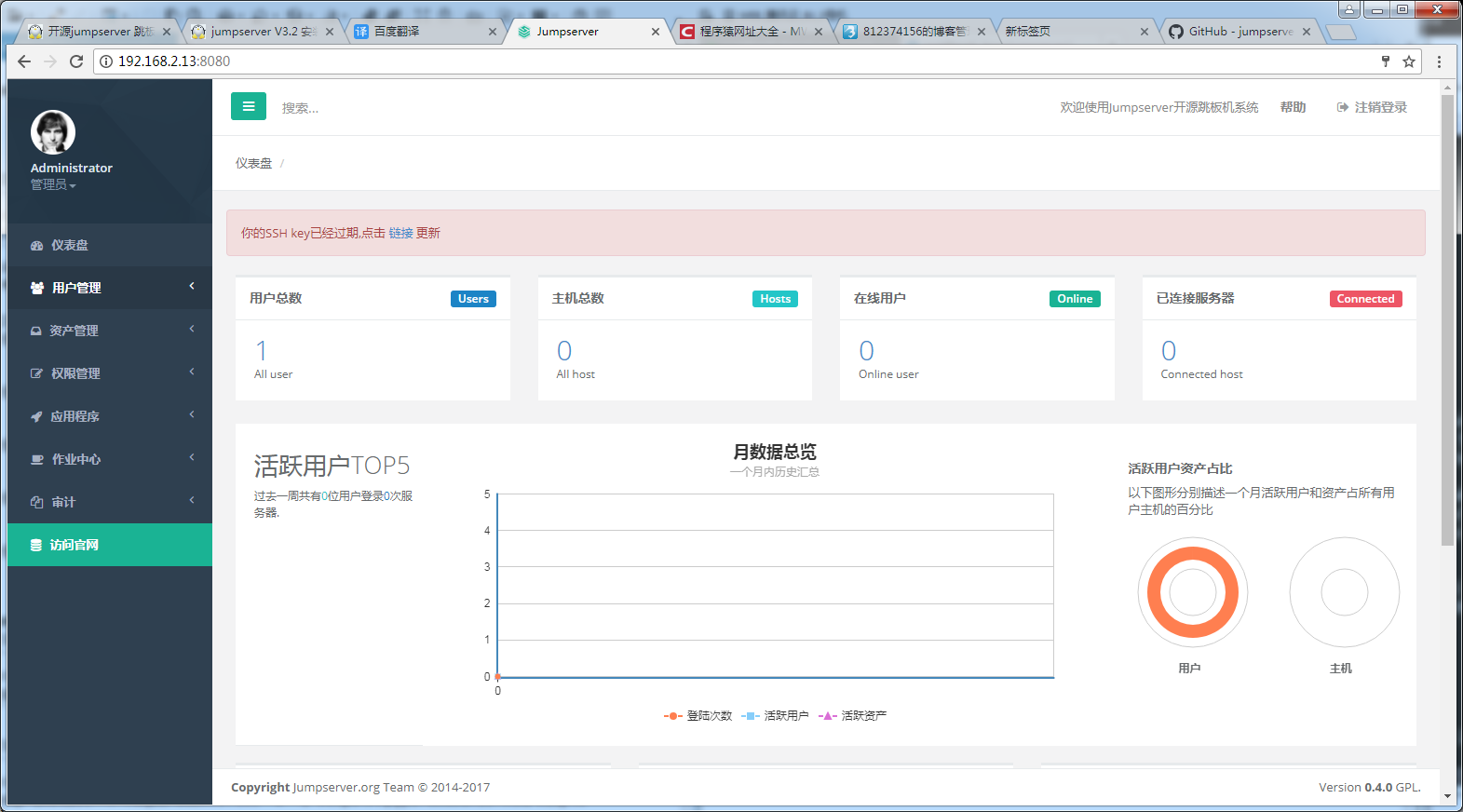
9、效果图,下面为碰到的错误以及解决方式
# FAQ
# 出现版本错误提示要9.0以上版本
|
1
2
3
4
5
6
|
[root@test1 jumpserver]
# pip install
/usr/lib/python2
.6
/site-packages/pip/_vendor/requests/packages/urllib3/util/ssl_
.py:90: InsecurePlatformWarning: A
true
SSLContext object is not available. This prevents urllib3 from configuring SSL appropriately and may cause certain SSL connections to fail. For
more
information, see https:
//urllib3
.readthedocs.org
/en/latest/security
.html
#insecureplatformwarning.
InsecurePlatformWarning
You are using pip version 7.1.0, however version 9.0.1 is available.
You should consider upgrading via the
'pip install --upgrade pip'
command
.
You must give at least one requirement to
install
(see
"pip help install"
)
|
解决方法:直接运行 pip install --upgrade pip
Collecting pip
Downloading pip-9.0.1-py2.py3-none-any.whl (1.3MB)
100% |████████████████████████████████| 1.3MB 126kB/s
Installing collected packages: pip
Found existing installation: pip 7.1.0
Uninstalling pip-7.1.0:
Successfully uninstalled pip-7.1.0
Successfully installed pip-9.0.1
# 运行命令 pip -V查看版本号
pip 9.0.1 from /usr/lib/python2.6/site-packages (python 2.6)
# 继续安装jumpserver提示python2.6版本不支持
[root@test1 jumpserver]# pip install
DEPRECATION: Python 2.6 is no longer supported by the Python core team, please upgrade your Python. A future version of pip will drop support for Python 2.6
You must give at least one requirement to install (see "pip help install")
# 解决方法,升级python 版本Python-3.5.4
|
1
2
3
4
5
6
7
8
9
|
[root@test1 tmp]
# tar xf Python-3.5.4.tgz
[root@test1 tmp]
# cd Python-3.5.4
[root@test1 Python-3.5.4]
# ./configure --enable-optimizations --enable-shared
[root@test1 Python-3.5.4]
# make install
[root@test1 Python-3.5.4]
# rm -rf /usr/bin/python
[root@test1 Python-3.5.4]
# ln -sv /usr/local/bin/python3.5 /usr/bin/python
"/usr/bin/python"
->
"/usr/local/bin/python3.5"
[root@test1 Python-3.5.4]
# python -V
python: error
while
loading shared libraries: libpython3.5m.so.1.0: cannot
open
shared object
file
: No such
file
or directory
|
解决方案:
[root@test1 Python-3.5.4]# ln -sv /usr/local/lib/libpython3.5m.so.1.0 /usr/lib64/
[root@test1 Python-3.5.4]# ldconfig
# 关掉窗口重新开一个 python -V
[root@test1 Python-3.5.4]# python -V
Python 3.5.4
# 安装MySQL-python 提示出错,因为yum是用python2.6写的,升级到了3.5它就报错了
yum list all MySQL-python
File "/usr/bin/yum", line 30
except KeyboardInterrupt, e:
^
SyntaxError: invalid syntax
# 解决办法:
vim /usr/bin/yum #修改yum安装工具包的python源为2.7版本、 并将python3.5链接为python
#!/usr/bin/python2.6
# 解决方案,使用了中文的数据,看起来就是一个字符集不兼容的错误;mysqld那边配置是默认使用了latin1 – default collation 。
|
1
2
3
4
5
6
7
8
9
10
11
12
13
14
15
16
|
# /etc/my.cnf中添加
character_set_server=utf8
# 然后重启mysql
mysql> show global variables like
'%char%'
;
+--------------------------+----------------------------------+
| Variable_name | Value |
+--------------------------+----------------------------------+
| character_set_client | utf8 |
| character_set_connection | utf8 |
| character_set_database | utf8 |
| character_set_filesystem | binary |
| character_set_results | utf8 |
| character_set_server | utf8 |
| character_set_system | utf8 |
| character_sets_dir |
/usr/local/mysql/share/charsets/
|
+--------------------------+----------------------------------+
|