1.Paramiko模块下的demo.py程序
前面利用Python中的Paramiko模块可以进行SSH的连接,以及用来传送文件(SFTP),但是无论是哪一种方式,连接都是短暂的,并非是长连的,即一次执行一个命令或上传与下载一个文件,显然效率是不如直接使用Linux shell下的ssh连接命令来进行连接。其实在将Paramiko的源码解压出来后,里面有一个demo的文件夹,里面有一个demo.py的程序,利用它,我们就可以进行长连接,即像ssh一样连接远程主机:
|
1
2
3
4
5
6
|
xpleaf@xpleaf-machine:/mnt/hgfs/Python/day6/sorftwares/demp_test/paramiko-
1.7
.
7.1
$ ls
demos LICENSE paramiko PKG-INFO setup.cfg setup.py tests
docs MANIFEST.
in
paramiko.egg-info README setup_helper.py test.py
xpleaf@xpleaf-machine:/mnt/hgfs/Python/day6/sorftwares/demp_test/paramiko-
1.7
.
7.1
$ cd demos/
xpleaf@xpleaf-machine:/mnt/hgfs/Python/day6/sorftwares/demp_test/paramiko-
1.7
.
7.1
/demos$ ls -l demo.py
-rwxrwxrwx
1
root root
5340
6
月
16
2010
demo.py
|
利用demo.py程序,我们可以进行ssh的长连接,比如这里有一台IP地址为192.168.1.124的远程主机需要进行连接,使用远程主机的账户名为xpleaf,如下:
|
1
2
3
4
5
6
7
8
9
10
11
|
xpleaf@xpleaf-machine:/mnt/hgfs/Python/day6/sorftwares/demp_test/paramiko-
1.7
.
7.1
/demos$ python demo.py
Hostname:
192.168
.
1.124
*** Host key OK.
Username [xpleaf]: xpleaf
Auth by (p)assword, (r)sa key, or (d)ss key? [p]
Password
for
xpleaf@
192.168
.
1.124
:
*** Here we go!
Last login: Fri Oct
9
17
:
19
:
42
2015
from
192.168
.
1.13
[xpleaf@moban ~]$ pwd
/home/xpleaf
|
这样我们就可以像ssh连接一样在远程主机上执行相关的命令了,下面,我们就是通过观察demo.py程序的源代码来对相关的程序模块作修改,然后实现简单的堡垒主机监控程序的开发。
2.通过修改与demo.py相关的模块来达到堡垒主机监控的功能
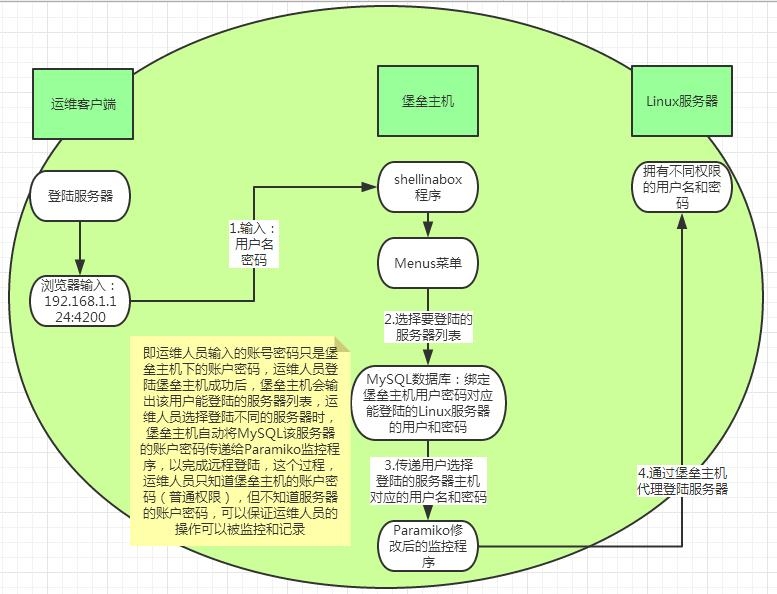
堡垒主机可以监控运维人员在服务器上做的命令操作,这里要做的,只是可以监控运维人员在Linux服务器上执行命令的操作,下面先给出这个监控程序的示意图:
运维人员登陆认证示意图:
运维人员命令监控记录示意图:
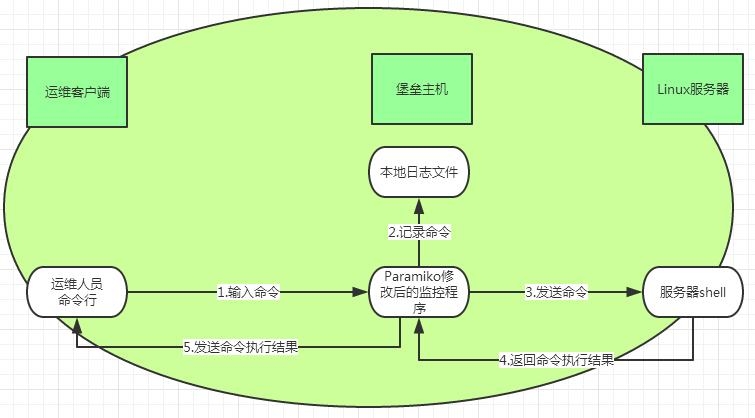
基于上面两个图示的说明,以及对Paramiko模块中demo.py程序代码的理解,可以对demo.py模块以及相关的模块程序源代码作相应的修改,至于这个引导的过程,因为是Alex老师引导过来的,根据Alex老师修改源代码的一些思想,然后自己再进一步修改其它部分的源代码,所以这整一个探索的过程如果要讲出来,篇幅比较大,这里就不提及了,下面直接给代码:
修改后的demo.py源代码:
|
1
2
3
4
5
6
7
8
9
10
11
12
13
14
15
16
17
18
19
20
21
22
23
24
25
26
27
28
29
30
31
32
33
34
35
36
37
38
39
40
41
42
43
44
45
46
47
48
49
50
51
52
53
54
55
56
57
58
59
60
61
62
63
64
65
66
67
68
69
70
71
72
73
74
75
76
77
78
79
80
81
82
83
84
85
86
87
88
89
90
91
92
93
94
95
96
97
98
99
100
101
102
103
104
105
106
107
108
109
110
111
112
113
114
115
116
117
118
119
120
121
122
123
124
125
126
127
128
129
130
131
132
133
134
135
136
137
138
139
140
141
142
143
144
145
146
147
148
149
150
151
152
153
154
155
156
157
158
159
160
161
162
163
164
|
#!/usr/bin/env python
import
base64
from binascii
import
hexlify
import
getpass
import
os
import
select
import
socket
import
sys
import
threading
import
time
import
trace
back
import
paramiko
import
interactive
def agent_auth(transport, username):
""
"
Attempt to authenticate to the given transport using any of the
private
keys available from an SSH agent.
""
"
agent = paramiko.Agent()
agent_keys = agent.get_keys()
if
len(agent_keys) ==
0
:
return
for
key
in
agent_keys:
print
'Trying ssh-agent key %s'
% hexlify(key.get_fingerprint()),
try
:
transport.auth_publickey(username, key)
print
'... success!'
return
except paramiko.SSHException:
print
'... nope.'
def manual_auth(username, hostname,pw):
''
'default_auth = '
p'
auth = raw_input(
'Auth by (p)assword, (r)sa key, or (d)ss key? [%s] '
% default_auth)
if
len(auth) ==
0
:
auth = default_auth
if
auth ==
'r'
:
default_path = os.path.join(os.environ[
'HOME'
],
'.ssh'
,
'id_rsa'
)
path = raw_input(
'RSA key [%s]: '
% default_path)
if
len(path) ==
0
:
path = default_path
try
:
key = paramiko.RSAKey.from_private_key_file(path)
except paramiko.PasswordRequiredException:
password = getpass.getpass(
'RSA key password: '
)
key = paramiko.RSAKey.from_private_key_file(path, password)
t.auth_publickey(username, key)
elif auth ==
'd'
:
default_path = os.path.join(os.environ[
'HOME'
],
'.ssh'
,
'id_dsa'
)
path = raw_input(
'DSS key [%s]: '
% default_path)
if
len(path) ==
0
:
path = default_path
try
:
key = paramiko.DSSKey.from_private_key_file(path)
except paramiko.PasswordRequiredException:
password = getpass.getpass(
'DSS key password: '
)
key = paramiko.DSSKey.from_private_key_file(path, password)
t.auth_publickey(username, key)
else
:
pw = getpass.getpass(
'Password for %s@%s: '
% (username, hostname))
t.auth_password(username, pw)
''
'
t.auth_password(username,pw)
# setup logging
paramiko.util.log_to_file(
'demo.log'
)
username =
''
if
len(sys.argv) >
1
:
hostname = sys.argv[
1
]
if
hostname.find(
'@'
) >=
0
:
username, hostname = hostname.split(
'@'
)
else
:
hostname = raw_input(
'Hostname: '
)
if
len(hostname) ==
0
:
print
'*** Hostname required.'
sys.exit(
1
)
port =
22
if
hostname.find(
':'
) >=
0
:
hostname, portstr = hostname.split(
':'
)
port =
int
(portstr)
# now connect
try
:
sock = socket.socket(socket.AF_INET, socket.SOCK_STREAM)
sock.connect((hostname, port))
except Exception, e:
print
'*** Connect failed: '
+ str(e)
trace
back.print_exc()
sys.exit(
1
)
try
:
t = paramiko.Transport(sock)
try
:
t.start_client()
except paramiko.SSHException:
print
'*** SSH negotiation failed.'
sys.exit(
1
)
try
:
keys = paramiko.util.load_host_keys(os.path.expanduser(
'~/.ssh/known_hosts'
))
except IOError:
try
:
keys = paramiko.util.load_host_keys(os.path.expanduser(
'~/ssh/known_hosts'
))
except IOError:
print
'*** Unable to open host keys file'
keys = {}
# check server's host key --
this
is
important.
key = t.get_remote_server_key()
if
not keys.has_key(hostname):
print
'*** WARNING: Unknown host key!'
elif not keys[hostname].has_key(key.get_name()):
print
'*** WARNING: Unknown host key!'
elif keys[hostname][key.get_name()] != key:
print
'*** WARNING: Host key has changed!!!'
sys.exit(
1
)
else
:
print
'*** Host key OK.'
#
get
username
''
'if username == '
':
default_username = getpass.getuser()
username = raw_input(
'Username [%s]: '
% default_username)
if
len(username) ==
0
:
username = default_username
''
'
#changed by xpleaf at
2015.10
.
9
username = sys.argv[
2
]
password = sys.argv[
3
]
sa_username = sys.argv[
4
]
agent_auth(t, username)
if
not t.is_authenticated():
manual_auth(username, hostname,password)
if
not t.is_authenticated():
print
'*** Authentication failed. :('
t.close()
sys.exit(
1
)
chan = t.open_session()
chan.get_pty()
chan.invoke_shell()
print
'*** Here we go!'
print
interactive.interactive_shell(chan,hostname,username,sa_username)
chan.close()
t.close()
except Exception, e:
print
'*** Caught exception: '
+ str(e.__class__) +
': '
+ str(e)
trace
back.print_exc()
try
:
t.close()
except:
pass
sys.exit(
1
)
|
修改后的interactive.py源代码:
|
1
2
3
4
5
6
7
8
9
10
11
12
13
14
15
16
17
18
19
20
21
22
23
24
25
26
27
28
29
30
31
32
33
34
35
36
37
38
39
40
41
42
43
44
45
46
47
48
49
50
51
52
53
54
55
56
57
58
59
60
61
62
63
64
65
66
67
68
69
70
71
72
73
74
75
76
77
78
79
80
81
82
83
84
85
86
87
88
89
90
91
92
|
import
socket
import
sys,time
# windows does not have termios...
try
:
import
termios
import
tty
has_termios = True
except ImportError:
has_termios = False
def interactive_shell(chan,hostname,username,sa_username):
if
has_termios:
posix_shell(chan,hostname,username,sa_username)
else
:
windows_shell(chan)
def posix_shell(chan,hostname,username,sa_username):
import
select
date = time.strftime(
'%Y_%m_%d'
) #Here
is
changed!
f = file(
'/tmp/%s_%s_record.log'
% (sa_username,date),
'a+'
) #Here
is
changed!
record = [] #Here
is
changed!
oldtty = termios.tcgetattr(sys.stdin)
try
:
tty.setraw(sys.stdin.fileno())
tty.setcbreak(sys.stdin.fileno())
chan.settimeout(
0.0
)
while
True:
date = time.strftime(
'%Y_%m_%d %H:%M:%S'
) #Here
is
changed!
r, w, e = select.select([chan, sys.stdin], [], [])
if
chan
in
r:
try
:
x = chan.recv(
1024
)
if
len(x) ==
0
:
print
'\r\n*** EOF\r\n'
,
break
sys.stdout.write(x)
sys.stdout.flush()
except socket.timeout:
pass
if
sys.stdin
in
r:
x = sys.stdin.read(
1
)
if
len(x) ==
0
:
break
#print x
record.append(x)
chan.send(x)
if
x ==
'\r'
: #Here
is
changed!Follow:
#print record
cmd =
''
.join(record).split(
'\r'
)[-
2
]
log =
"%s | %s | %s | %s\n"
% (hostname,date,sa_username,cmd)
f.write(log)
f.flush()
f.close() #Here
is
changed!Above:
finally
:
termios.tcsetattr(sys.stdin, termios.TCSADRAIN, oldtty)
# thanks to Mike Looijmans
for
this
code
def windows_shell(chan):
import
threading
sys.stdout.write(
"Line-buffered terminal emulation. Press F6 or ^Z to send EOF.\r\n\r\n"
)
def writeall(sock):
while
True:
data = sock.recv(
256
)
if
not data:
sys.stdout.write(
'\r\n*** EOF ***\r\n\r\n'
)
sys.stdout.flush()
break
sys.stdout.write(data)
sys.stdout.flush()
writer = threading.Thread(target=writeall, args=(chan,))
writer.start()
try
:
while
True:
d = sys.stdin.read(
1
)
if
not d:
break
chan.send(d)
except EOFError:
# user hit ^Z or F6
pass
|
存放在堡垒主机下的Menus程序,这里命名为run_demo.py:
|
1
2
3
4
5
6
7
8
9
10
11
12
13
14
15
16
17
18
19
20
21
22
23
24
25
26
27
28
29
30
31
32
33
34
35
36
37
38
39
40
41
|
#!/usr/bin/env python
import
os,MySQLdb
os.system(
'clear'
)
print
'='
*
35
print
''
'\
033
[
32
;1mWelcome to the Connecting System!\
033
[0m
Choose the Server to connect:
1
.DNS Server:
192.168
.
1.124
2
.DHCP Server:
192.168
.
1.134
''
'
print
'='
*
35
choice = raw_input(
'Your choice:'
)
if
choice ==
'1'
:
address =
'192.168.1.124'
elif choice ==
'2'
:
address =
'192.168.1.134'
sa_user =
'yonghaoye'
try
:
conn = MySQLdb.connect(host =
'localhost'
, user =
'root'
, \
passwd =
'123456'
, db =
'Server_list'
, port =
3306
)
cur = conn.cursor()
cur.execute(
"select * from users where sa = '%s'"
% sa_user)
qur_result = cur.fetchall()
for
record
in
qur_result:
if
record[
3
] == address:
hostname = record[
3
]
username = record[
4
]
password = record[
5
]
cur.close()
conn.close()
except MySQLdb.Error,e:
print
'Mysql Error Msg:'
,e
cmd =
'python /mnt/hgfs/Python/day6/sorftwares/paramiko-1.7.7.1/demos/demo.py %s %s %s %s'
% (hostname,username,password,sa_user)
os.system(cmd)
|
在堡垒主机上添加数据库:
|
1
2
3
4
5
6
7
8
9
10
11
12
13
14
15
16
17
18
19
20
21
22
23
24
25
26
27
28
29
30
31
32
33
34
35
36
37
38
39
40
41
42
43
44
45
46
47
48
49
50
51
|
添加了下面这样的数据库
mysql> show databases;
+--------------------+
| Database |
+--------------------+
| information_schema |
| Server_list |
| ftp_user |
| linkman |
| mysql |
| performance_schema |
| s6py |
+--------------------+
7
rows
in
set
(
0.01
sec)
mysql>
use
Server_list
Reading table information
for
completion of table and column names
You can turn off
this
feature to
get
a quicker startup
with
-A
Database changed
mysql> show tables;
+-----------------------+
| Tables_in_Server_list |
+-----------------------+
| users |
+-----------------------+
1
row
in
set
(
0.00
sec)
mysql> describe users;
+-----------------+------------------+------+-----+---------+----------------+
| Field | Type |
Null
| Key | Default | Extra |
+-----------------+------------------+------+-----+---------+----------------+
| id |
int
(
10
) unsigned | NO | PRI | NULL | auto_increment |
| sa | char(
20
) | NO | | NULL | |
| server_name | char(
20
) | NO | | NULL | |
| server_address | char(
20
) | NO | | NULL | |
| server_username | char(
20
) | NO | | NULL | |
| server_password | char(
20
) | NO | | NULL | |
+-----------------+------------------+------+-----+---------+----------------+
6
rows
in
set
(
0.00
sec)
mysql> selec * from users;
ERROR
1064
(
42000
): You have an error
in
your SQL syntax; check the manual that corresponds to your MySQL server version
for
the right syntax to
use
near
'selec * from users'
at line
1
mysql> select * from users;
+----+-----------+-------------+----------------+-----------------+-----------------+
| id | sa | server_name | server_address | server_username | server_password |
+----+-----------+-------------+----------------+-----------------+-----------------+
|
1
| yonghaoye | DNS Server |
192.168
.
1.124
| xpleaf |
123456
|
|
2
| yonghaoye | DHCP Server |
192.168
.
1.134
|
public
|
123456
|
+----+-----------+-------------+----------------+-----------------+-----------------+
2
rows
in
set
(
0.00
sec)
|
就不对数据库中的内容做解释说明了,其实看了前面的示意图,再看这里的代码就可以理解了。
3.监控程序演示
演示的网络环境如下:
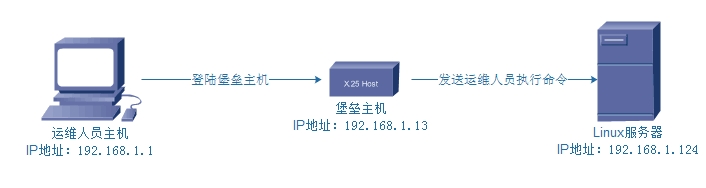
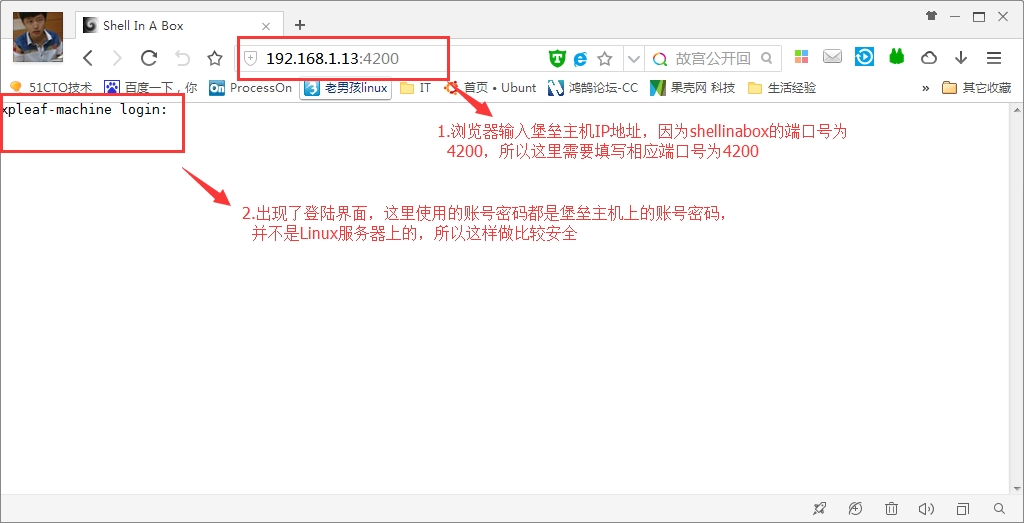
由于我在堡垒主机上安装了shellinabox程序,所以在运维人员主机上,可以直接在web界面输入堡垒主机的IP地址进行远程连接,来看下面操作:
(1)运维人员主机登陆堡垒主机
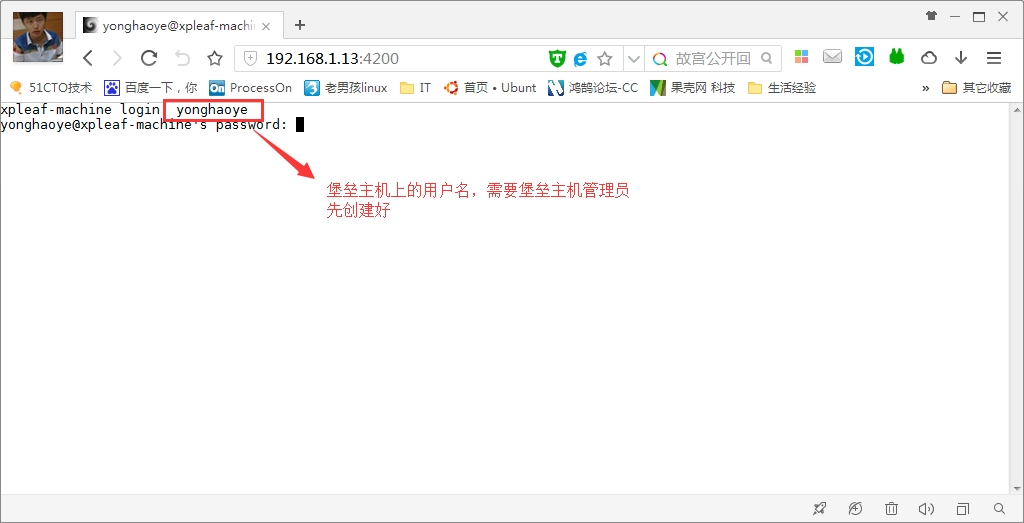
(2)输入堡垒主机账号密码
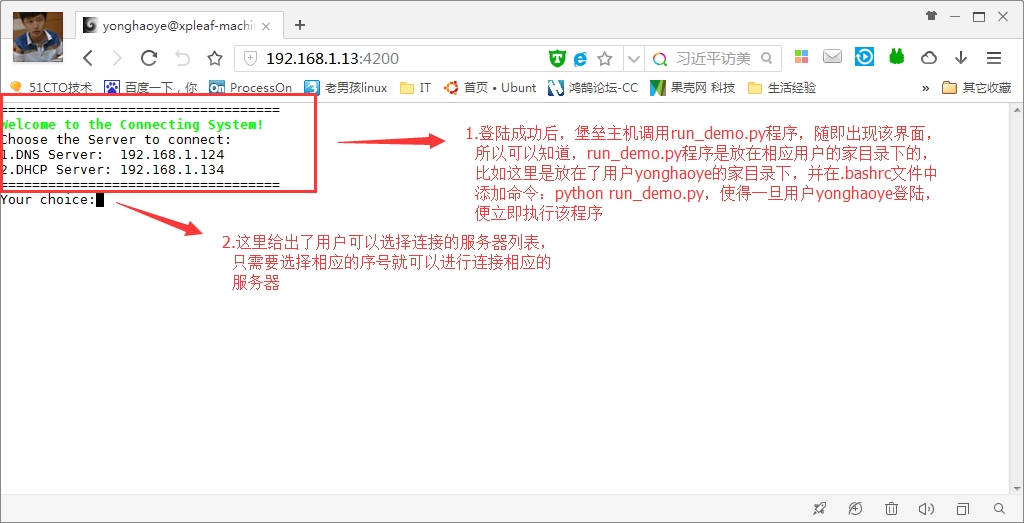
(3)登陆成功并进入服务器连接列表选择界面
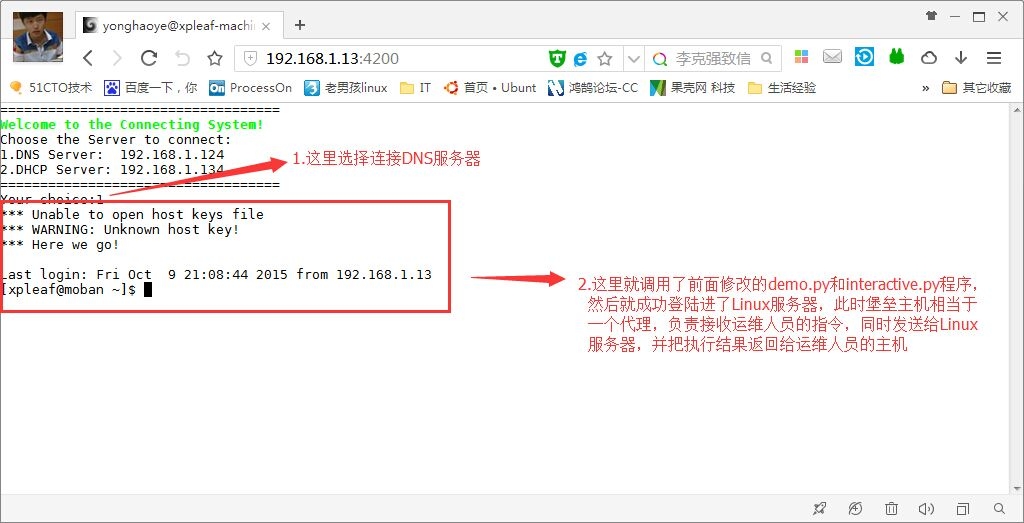
(4)选择连接相应服务器
(5)运维人员执行相关命令
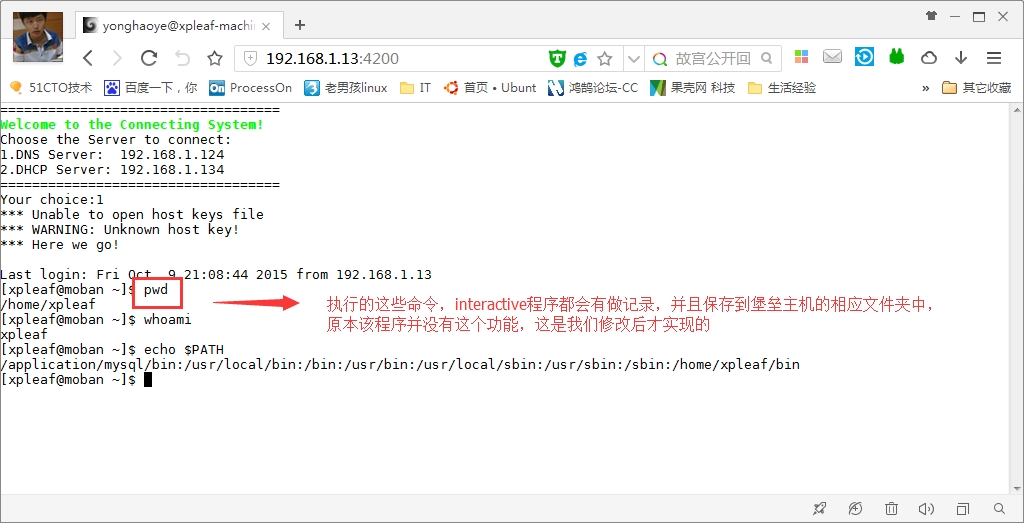
(6)在堡垒主机上查看运维人员的命令操作
|
1
2
3
4
|
xpleaf@xpleaf-machine:/tmp$ tail -f yonghaoye_2015_10_10_record.log
192.168
.
1.124
| 2015_10_10
00
:
36
:
44
| yonghaoye | pwd
192.168
.
1.124
| 2015_10_10
00
:
36
:
48
| yonghaoye | whoami
192.168
.
1.124
| 2015_10_10
00
:
37
:
13
| yonghaoye | echo $PATH
|
可以看到,在堡垒主机上生成了一个相对应用户的命令记录日志文件,这里可以查看用户执行的每一个命令,需要注意的是,这里记录了用户名“yonghaoye”,是堡垒主机上的用户,并不是Linux服务器上面的,该用户是分配给运维人员的,因此,也再一次看到,运维人员并不知道Linux服务器的账户和密码,这样就比较安全了。
3.不足与优化思路
通过上面的操作,这样的一个程序确实是可以记录运维人员在Linux服务器上做的操作,但是不足的是:
(1)程序还存在非常多的细节问题和Bug
(2)界面操作不够人性化
但不管怎么说,这个小程序只是作为学习过程中的一个练习程序而已,但思路基本上是没有问题的,根据上面的两个缺点,往后可以进一步修改源代码以保证程序运行的稳定性,同时对于界面问题,往后应该是要做成Web界面的,而不是借助shellinabox程序,这就需要调用Python中的Django模块来做Web方面的开发,当然还有其它技术。
刚过国庆放假期间,看到Alex老师开发了一个开源的堡垒机监控程序,大家可以去看看,而我这里所的这个小程序,作为入门来学习,其实也是非常不错的。
Alex老师开发的开源软件:http://3060674.blog.51cto.com/3050674/1700814
真的,那就非常了不得了,目前自己也在努力学习过程中,坚持下来就一定可以学到很多!Python不会让我们失望的!
4.对于堡垒主机监控程序的进一步开发计划
由于现在知道的真的是太少,往后会不断学习,希望以后也能以这里这个小程序的思路自己开发一个开源的堡垒主机监控系统,虽然目前已经有开源的了,但作为自己来练手我想也是非常不错的。
本文转自 xpleaf 51CTO博客,原文链接:http://blog.51cto.com/xpleaf/1701382,如需转载请自行联系原作者