本讲是通过DbCommand拦截器来实现读写分离的最后一讲,对之前几篇文章做了一个优化,无论是程序可读性还是实用性上都有一个提升,在配置信息这块,去除了字符串方式的拼接,取而代之的是section数组,这样在修改配置时更加清晰了;而实用性上,彻底改变了读和写不能共用一个仓储对象的缺点,并且在一个事务里可以读写并存,并为了数据的一致性,使事务里的curd操作指向主库,这一点很重要!
前几篇文章的目录
EF架构~通过EF6的DbCommand拦截器来实现数据库读写分离~再续~添加对各只读服务器的心跳检测 (2015-01-09 17:52)
EF架构~通过EF6的DbCommand拦截器来实现数据库读写分离~续~添加事务机制 (2015-01-08 14:08)
EF架构~通过EF6的DbCommand拦截器来实现数据库读写分离 (2015-01-07 17:31)
功能架构图如下
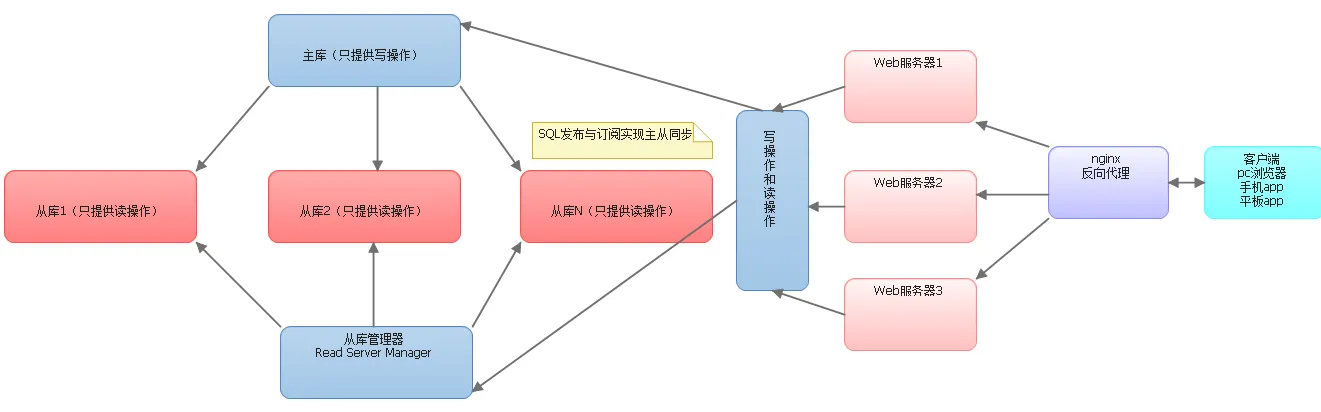
下面我们来分块看一下这次的修改
一 配置文件的修改

  <configSections>
      <section name="DistributedReadWriteSection" type="Project.DistributedReadWriteForEF.DistributedReadWriteSectionHandler, Project.DistributedReadWriteForEF"/>
  </configSections>
  <DistributedReadWriteSection>
    <add key="readDb1" Ip="192.168.2.71" Port="1433" DbName="background_read1" UserId="sa" Password="zzl123" />
    <add key="readDb2" Ip="192.168.2.71" Port="1433" DbName="TestWrite_Read_Zzl" UserId="sa" Password="zzl123" />
    <add key="readDb3" Ip="192.168.2.29" Port="1433" DbName="TestWrite_Read_Zzl" UserId="sa" Password="1" />
  </DistributedReadWriteSection>
  <appSettings>
    <!-- 只读服务器的sql连接串配置模版-->
    <add key ="readDbConnection" value="data source={0};initial catalog={1};persist security info=True;user id={2};password={3};multipleactiveresultsets=True;application name=EntityFramework"/>
    <add key ="writeDbConnection" value="data source=.;initial catalog=background;persist security info=True;user id=sa;password=zzl123;multipleactiveresultsets=True;application name=EntityFramework"/>
  </appSettings>
  /// <summary>
    /// redis配置信息加载
    /// </summary>
    internal class DistributedReadWriteManager
    {
        /// <summary>
        /// 配置信息实体
        /// </summary>
        public static IList<DistributedReadWriteSection> Instance
        {
            get
            {
                return GetSection();
            }
        }

        private static IList<DistributedReadWriteSection> GetSection()
        {
            var dic = ConfigurationManager.GetSection("DistributedReadWriteSection") as Dictionary<string, DistributedReadWriteSection>;
            return dic.Values.ToList();
        }
    }
    /// <summary>
    /// DistributedReadWriteForEFSection块,在web.config中提供DistributedReadWriteForEFSection块定义
    /// </summary>
    internal class DistributedReadWriteSection : ConfigurationSection
    {

        /// <summary>
        /// 主机地址
        /// </summary>
        [ConfigurationProperty("Ip", DefaultValue = "127.0.0.1")]
        public string Ip
        {
            get { return (string)this["Ip"]; }
            set { this["Ip"] = value; }
        }
        /// <summary>
        /// 端口号
        /// </summary>
        [ConfigurationProperty("Port", DefaultValue = "1433")]
        public int Port
        {
            get { return (int)this["Port"]; }
            set { this["Port"] = value; }
        }

        /// <summary>
        /// 数据库名称
        /// </summary>
        [ConfigurationProperty("DbName", DefaultValue = "Test")]
        public string DbName
        {
            get { return (string)this["DbName"]; }
            set { this["DbName"] = value; }
        }

        /// <summary>
        /// 数据库账号
        /// </summary>
        [ConfigurationProperty("UserId", DefaultValue = "sa")]
        public string UserId
        {
            get { return (string)this["UserId"]; }
            set { this["UserId"] = value; }
        }

        /// <summary>
        /// 数据库账号
        /// </summary>
        [ConfigurationProperty("Password", DefaultValue = "sa")]
        public string Password
        {
            get { return (string)this["Password"]; }
            set { this["Password"] = value; }
        }
    }
    internal class DistributedReadWriteSectionHandler : IConfigurationSectionHandler
    {
        #region IConfigurationSectionHandler 成员

        public object Create(object parent, object configContext, System.Xml.XmlNode section)
        {
            Dictionary<string, DistributedReadWriteSection> names = new Dictionary<string, DistributedReadWriteSection>();

            string _key = string.Empty;
            string _ip = string.Empty;
            string _dbName = string.Empty;
            string _userId = string.Empty;
            string _password = string.Empty;
            int _port = 1433;

            foreach (XmlNode childNode in section.ChildNodes)
            {
                if (childNode.Attributes["key"] != null)
                {
                    _key = childNode.Attributes["key"].Value;

                    if (childNode.Attributes["Ip"] != null)
                    {
                        _ip = childNode.Attributes["Ip"].Value;
                    }
                    if (childNode.Attributes["Port"] != null)
                    {
                        _port = Convert.ToInt32(childNode.Attributes["Port"].Value);
                    }
                    if (childNode.Attributes["DbName"] != null)
                    {
                        _dbName = childNode.Attributes["DbName"].Value;
                    }
                    if (childNode.Attributes["UserId"] != null)
                    {
                        _userId = childNode.Attributes["UserId"].Value;
                    }
                    if (childNode.Attributes["Password"] != null)
                    {
                        _password = childNode.Attributes["Password"].Value;
                    }
                    names.Add(_key, new DistributedReadWriteSection { Ip = _ip, Port = _port, DbName = _dbName, UserId = _userId, Password = _password });
                }
            }
            return names;
        }

        #endregion
    }
二 仓储大叔事务块修改
   public static void UsingNoMsdtc(IUnitOfWork db, bool isOutest, Action action)
        {
            var objectContext = ((System.Data.Entity.Infrastructure.IObjectContextAdapter)db).ObjectContext;
            try
            {

                objectContext.Connection.Close();
                //强制将所有curd操作维持到主库
                Project.DistributedReadWriteForEF.CommandInterceptor.IsTransactionScope = true;
                //重新设置链接串
                if (System.Configuration.ConfigurationManager.AppSettings["writeDbConnection"] != null)
                    objectContext.TransactionHandler.DbContext.Database.Connection.ConnectionString = System.Configuration.ConfigurationManager.AppSettings["writeDbConnection"];

                objectContext.Connection.Open();

                using (TransactionScope trans = new TransactionScope())
                {
                    action();
                    trans.Complete();
                    Project.DistributedReadWriteForEF.CommandInterceptor.IsTransactionScope = false;//事务结束将走读写分离
                }
            }
            finally
            {
                if (isOutest)//如果是最外层事务,再将连接关闭!内部事务与外部事务需要共用一个Connection的连接
                    objectContext.Connection.Close(); //只能关闭,不能dispose,因为dispose之后,上下文就无法得到链接串了
            }
        }
三 DbCommand拦截器的修改
    /// <summary>
    /// SQL命令拦截器
    /// 主要实现EF的读写分离
    /// </summary>
    public class CommandInterceptor : DbCommandInterceptor
    {
        static CommandInterceptor()
        {
            readConnList = DistributedReadWriteManager.Instance;

            sysTimer.Enabled = true;
            sysTimer.Elapsed += sysTimer_Elapsed;
            sysTimer.Start();
        }
        /// <summary>
        /// 是否在一个事务中,如果是select,insert,update,delete都走主库
        /// ThreadStatic标识它只在当前线程有效
        /// </summary>
        [ThreadStatic]
        public static bool IsTransactionScope = false;
        /// <summary>
        /// 锁住它
        /// </summary>
        private static object lockObj = new object();
        /// <summary>
        /// 定期找没有在线的数据库服务器
        /// </summary>
        private static Timer sysTimer = new Timer(5000);
        /// <summary>
        /// 读库,从库集群,写库不用设置走默认的EF框架
        /// </summary>
        private static IList<DistributedReadWriteSection> readConnList;

        #region Private Methods
        private static void sysTimer_Elapsed(object sender, ElapsedEventArgs e)
        {
            if (readConnList != null && readConnList.Any())
            {
                foreach (var item in readConnList)
                {
                    //心跳测试,将死掉的服务器IP从列表中移除
                    var client = new TcpClient();
                    try
                    {
                        client.Connect(new IPEndPoint(IPAddress.Parse(item.Ip), item.Port));
                    }
                    catch (SocketException)
                    {
                        //异常,没有连接上
                        readConnList.Remove(item);
                    }
                    if (!client.Connected)
                    {
                        readConnList.Remove(item);
                    }
                }
            }
        }

        /// <summary>
        /// 处理读库字符串
        /// </summary>
        /// <returns></returns>
        private string GetReadConn()
        {
            if (readConnList != null && readConnList.Any())
            {
                var resultConn = readConnList[Convert.ToInt32(Math.Floor((double)new Random().Next(0, readConnList.Count)))];
                return string.Format(System.Configuration.ConfigurationManager.AppSettings["readDbConnection"]
                    , resultConn.Ip
                    , resultConn.DbName
                    , resultConn.UserId
                    , resultConn.Password);
            }
            return string.Empty;
        }
        /// <summary>
        /// 只读库的选择,加工command对象
        /// 说明:事务中,所有语句都走主库,事务外select走读库,insert,update,delete走主库
        /// 希望:一个WEB请求中,读与写的仓储使用一个,不需要在程序中去重新定义
        /// </summary>
        /// <param name="command"></param>
        private void ReadDbSelect(DbCommand command)
        {
            if (!string.IsNullOrWhiteSpace(GetReadConn()))//如果配置了读写分离,就去实现
            {
                command.Connection.Close();
                if (!command.CommandText.StartsWith("insert", StringComparison.InvariantCultureIgnoreCase) && !IsTransactionScope)
                    command.Connection.ConnectionString = GetReadConn();
                command.Connection.Open();
            }
        }
        #endregion

        #region Override Methods
        /// <summary>
        /// Linq to Entity生成的update,delete
        /// </summary>
        /// <param name="command"></param>
        /// <param name="interceptionContext"></param>
        public override void NonQueryExecuting(DbCommand command, DbCommandInterceptionContext<int> interceptionContext)
        {
            base.NonQueryExecuting(command, interceptionContext);//update,delete等写操作直接走主库
        }
        /// <summary>
        /// 执行sql语句,并返回第一行第一列,没有找到返回null,如果数据库中值为null,则返回 DBNull.Value
        /// </summary>
        /// <param name="command"></param>
        /// <param name="interceptionContext"></param>
        public override void ScalarExecuting(DbCommand command, DbCommandInterceptionContext<object> interceptionContext)
        {
            ReadDbSelect(command);
            base.ScalarExecuting(command, interceptionContext);
        }
        /// <summary>
        /// Linq to Entity生成的select,insert
        /// 发送到sqlserver之前触发
        /// warning:在select语句中DbCommand.Transaction为null,而ef会为每个insert添加一个DbCommand.Transaction进行包裹
        /// </summary>
        /// <param name="command"></param>
        /// <param name="interceptionContext"></param>
        public override void ReaderExecuting(DbCommand command, DbCommandInterceptionContext<DbDataReader> interceptionContext)
        {
            ReadDbSelect(command);
            base.ReaderExecuted(command, interceptionContext);
        }
        /// <summary>
        /// 发送到sqlserver之后触发
        /// </summary>
        /// <param name="command"></param>
        /// <param name="interceptionContext"></param>
        public override void ReaderExecuted(DbCommand command, DbCommandInterceptionContext<DbDataReader> interceptionContext)
        {
            base.ReaderExecuted(command, interceptionContext);
        }

        #endregion
    }
好了,到这里,通过拦截器来实现数据库读写分离的方案就彻底完成了,这个版本应该算是个终级了吧,呵呵!感谢您的阅读!
本文转自博客园张占岭(仓储大叔)的博客,原文链接:EF架构~通过EF6的DbCommand拦截器来实现数据库读写分离~终结~配置的优化和事务里读写的统一,如需转载请自行联系原博主。