FlatUIKit
FlatUIKit is a collection of iOS components styled with the "Flat UI" aesthetic that we created while buildingGrouper for iPhone. Its design inspiration comes from Flat UI and Kyle Miller. Styling is implemented via categories on/drop-in replacements for existing UIKit components, so integrating it into your project is very straightforward.
FlatUIKit 是一个具有 iOS 扁平化风格美学的组件,我在 Grouper 应用中使用了。设计灵感来自于 Flat UI 和 Kyle Miller。这个组件是通过类目的方式、或者继承自父类的方式来实现的,所以,将他融入到你的工程非常容易。
Installation(安装)
FlatUIKit can be installed via Cocoapods. Simply add
pod 'FlatUIKit'
to your Podfile. If you don't use Cocoapods you're welcome to use git submodules, or simply download it and include it in your project manually.
Note that FlatUIKit requires the CoreText framework as well as iOS > 5.0. The flat stepper component requires iOS > 6.0.
你可以使用 Cocoapods 来安装。你也可以手动下载源码来添加到你的工程当中。
注意,FlatUIKit 需要 CoreText 框架,iOS > 5.0,这个扁平的 stepper 组件需要 iOS > 6.0。
The Components(组件)
Buttons(按钮)
FUIButton is a drop-in subclass of UIButton that exposes the additional properties buttonColor, shadowColor, cornerRadius, and shadowHeight. Note that if you set any of these, you have to set all of them.
FUIButton 继承自父类 UIButton,它添加了一些额外的属性 buttonColor, shadowColor, cornerRadius, 和 shadowHeight,注意,如果你设置了其中的一个,你就必须设置所有剩下的属性。
myButton.buttonColor = [UIColor turquoiseColor];
myButton.shadowColor = [UIColor greenSeaColor];
myButton.shadowHeight = 3.0f;
myButton.cornerRadius = 6.0f;
myButton.titleLabel.font = [UIFont boldFlatFontOfSize:16];
[myButton setTitleColor:[UIColor cloudsColor] forState:UIControlStateNormal];
[myButton setTitleColor:[UIColor cloudsColor] forState:UIControlStateHighlighted];

SegmentedControls(段控制器)
FUISegmentedControl is a drop-in subclass of UISegmentedControl that exposes the additional properties selectedColor, deselectedColor, selectedFont, deselectedFont, selectedFontColor, deselectedFontColor, dividerColor and cornerRadius. Note that if you set any of these, it is recommended that you set all of them.
FUISegmentedControl 继承至父类 UISegmentedControl,它添加了一些额外的属性 selectedColor, deselectedColor, selectedFont, deselectedFont, selectedFontColor, deselectedFontColor, dividerColor 和 cornerRadius,注意,设置了其中一个,其他剩下的属性都需要设置。
mySegmentedControl.selectedFont = [UIFont boldFlatFontOfSize:16];
mySegmentedControl.selectedFontColor = [UIColor cloudsColor];
mySegmentedControl.deselectedFont = [UIFont flatFontOfSize:16];
mySegmentedControl.deselectedFontColor = [UIColor cloudsColor];
mySegmentedControl.selectedColor = [UIColor amethystColor];
mySegmentedControl.deselectedColor = [UIColor silverColor];
mySegmentedControl.dividerColor = [UIColor midnightBlueColor];
mySegmentedControl.cornerRadius = 5.0;
Switches(选择器)
FUISwitch is not a subclass of UISwitch (UISwitch is too inflexible to subclass), but rather a reimplementation that exposes all of the methods of UISwitch. In addition, it also provides access to its underlying on/off UILabels and other subviews.
FUISwitch 不是继承至 UISwitch(UISwitch 太恶心) ,只是重新实现了它,另外,它提供了开关的 UILabel 。
mySwitch.onColor = [UIColor turquoiseColor];
mySwitch.offColor = [UIColor cloudsColor];
mySwitch.onBackgroundColor = [UIColor midnightBlueColor];
mySwitch.offBackgroundColor = [UIColor silverColor];
mySwitch.offLabel.font = [UIFont boldFlatFontOfSize:14];
mySwitch.onLabel.font = [UIFont boldFlatFontOfSize:14];

Alert Views(警告View)
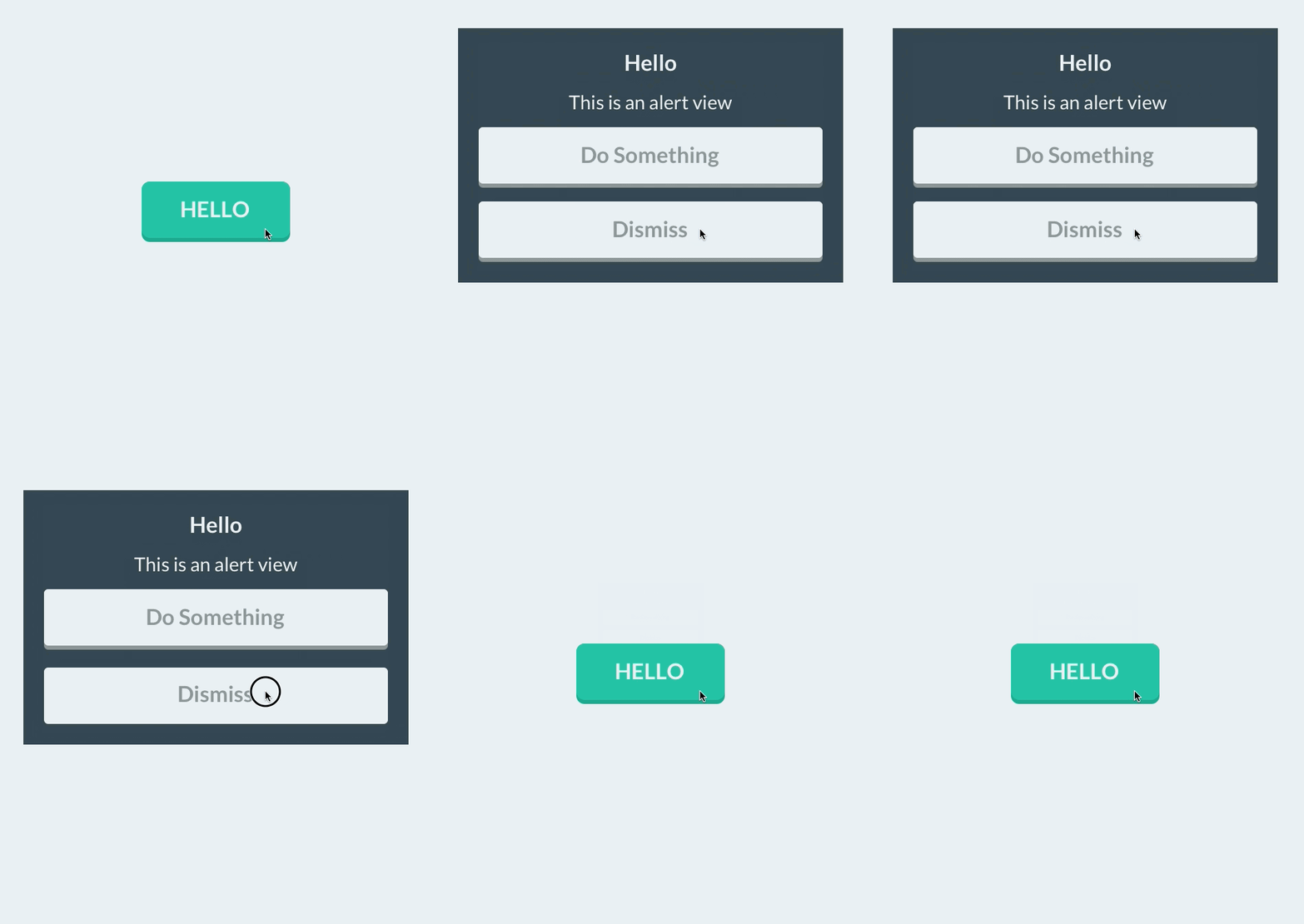
Similar to FUISwitch, FUIAlertView is a reimplemenation of UIAlertView that exposes all of UIAlertView's methods (and delegate methods, with the FUIAlertViewDelegate protocol), but with far greater flexibility in UI customization. All of its child UILabels, UIViews, and FUIButtons can be customized at will.
与 FUISwitch ,FUIAlertView 重新实现了 UIAlertView(以及提供代理方法),更具柔韧性。所有它的子 UILabel ,UIView 以及 FUIbutton 都可以定制。
FUIAlertView *alertView = [[FUIAlertView alloc] initWithTitle:@"Hello"
                                                      message:@"This is an alert view"
                                                     delegate:nil cancelButtonTitle:@"Dismiss"
                                            otherButtonTitles:@"Do Something", nil];
alertView.titleLabel.textColor = [UIColor cloudsColor];
alertView.titleLabel.font = [UIFont boldFlatFontOfSize:16];
alertView.messageLabel.textColor = [UIColor cloudsColor];
alertView.messageLabel.font = [UIFont flatFontOfSize:14];
alertView.backgroundOverlay.backgroundColor = [[UIColor cloudsColor] colorWithAlphaComponent:0.8];
alertView.alertContainer.backgroundColor = [UIColor midnightBlueColor];
alertView.defaultButtonColor = [UIColor cloudsColor];
alertView.defaultButtonShadowColor = [UIColor asbestosColor];
alertView.defaultButtonFont = [UIFont boldFlatFontOfSize:16];
alertView.defaultButtonTitleColor = [UIColor asbestosColor];
[alertView show];
Sliders/Steppers/Progress Views
To provide flat UISliders, UIProgressViews and UISteppers, we simply provide categories on UISlider/ProgressView/UIStepper to automatically configure their appearance with appropriate colors/corner radii. This makes for zero-friction integration with your existing project:
为了提供扁平风格的 UISlider ,UIProgressView 以及 UIStepper。我仅仅提供了相关类目文件来自动的配置这些控件的样式,诸如颜色,圆角值等。把这些添加到你的项目中,零污染。
[mySlider configureFlatSliderWithTrackColor:[UIColor silverColor]
                              progressColor:[UIColor alizarinColor]
                                 thumbColor:[UIColor pomegranateColor]];

[myProgressView configureFlatProgressViewWithTrackColor:[UIColor silverColor]
                              progressColor:[UIColor alizarinColor]];

[myStepper configureFlatStepperWithColor:[UIColor wisteriaColor]
                        highlightedColor:[UIColor wisteriaColor]
                           disabledColor:[UIColor amethystColor]
                               iconColor:[UIColor cloudsColor]];

Bar Button Items
To customize bar button items for your entire application (including back buttons), UIBarButtonItem+FlatUI provides a class method which leverages the UIBarButtonItem appearance proxy to do this in one step:
为了在你整个应用中全局定制 bar item,UIBarButtonItem+FlatUI 提供了一个类方法,用来促使 UIBarButtonItem 的样式改变,你只需要做一步设置即可。
[UIBarButtonItem configureFlatButtonsWithColor:[UIColor peterRiverColor]
                              highlightedColor:[UIColor belizeHoleColor]
                                  cornerRadius:3];

However, this might cause rendering issues with controllers that are pushed from actionsheets, sharesheets or links in webviews. To prevent this behavior, scope the customized bar buttom items to your controllers:
然而,这回引起渲染问题,当你的控制器从 actionsheet ,sharesheet 否则 webview 中 push 出来的。为了防止这个,你可以进行如下的设置。
[UIBarButtonItem configureFlatButtonsWithColor:[UIColor peterRiverColor]
                              highlightedColor:[UIColor belizeHoleColor]
                                  cornerRadius:3
                               whenContainedIn:[YourViewController class]];
Navigation Bars
As above, we provide a category on UINavigationBar to configure it flatly with a single color:
像上面那样,我提供了一个 UINavigationBar 类目文件来配置,仅仅是设置颜色。
[self.navigationController.navigationBar configureFlatNavigationBarWithColor:[UIColor midnightBlueColor]];
TableView Cells
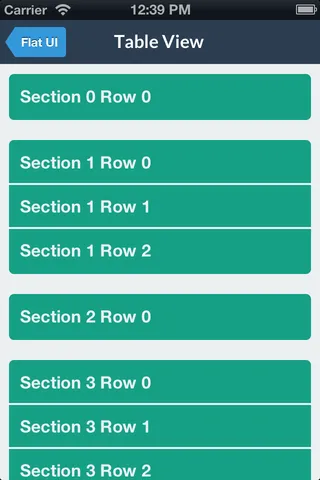
You can modify the backgroundColor and selectedBackgroundColor of a UITableViewCell without losing the rounded corners. The cell will copy the UITableView's separator color. The separator height is exposed as separatorHeight and the radius as cornerRadius.
你可以修改 UITableViewCell 的背景颜色,以及选中时的背景颜色,当然,你也可以设置圆角。这个 cell 会复制 UITableView 的分割条颜色。分割条的高度被扩展了支持圆角以及内圆角。
cell = [UITableViewCell configureFlatCellWithColor:[UIColor greenSeaColor]
                                     selectedColor:[UIColor cloudsColor]
                                             style:UITableViewCellStyleDefault
                                   reuseIdentifier:CellIdentifier];
cell.cornerRadius = 5.0f; // optional
cell.separatorHeight = 2.0f; // optional
Popover
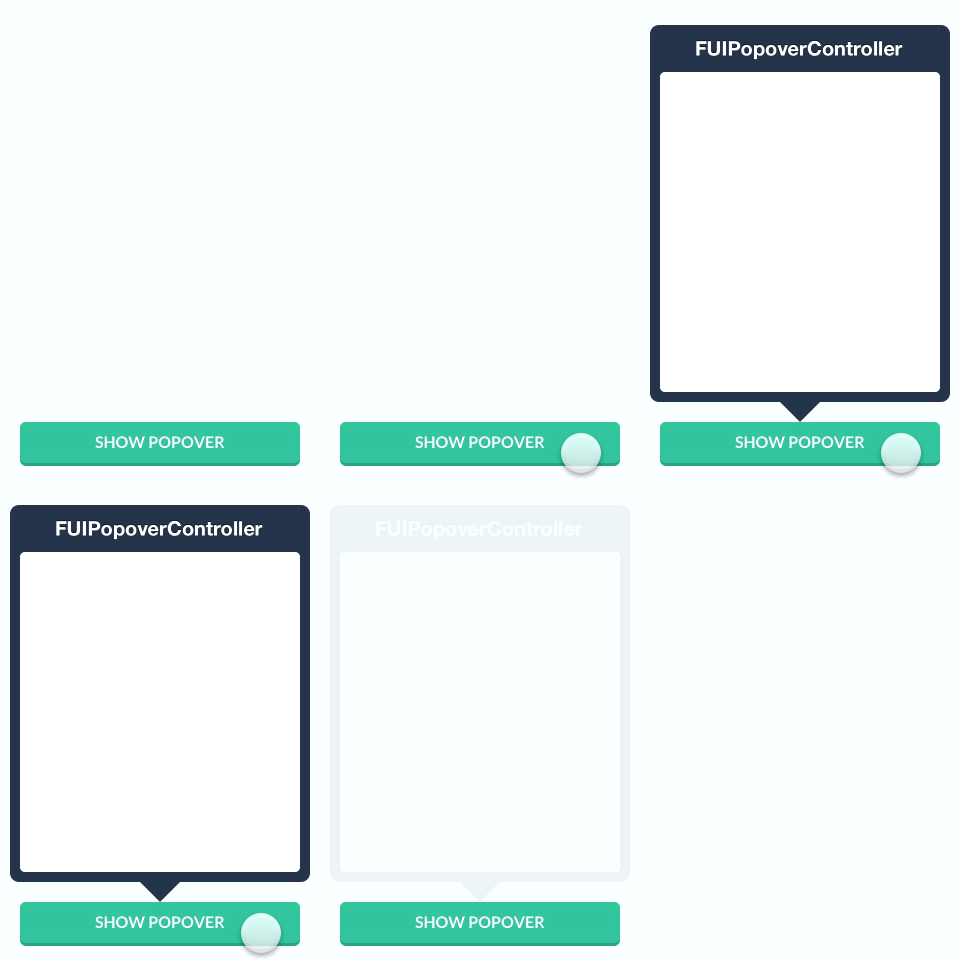
Like some other flat components, we simply provide a category to automatically configure a popover appearance for iPad by only having to set a background color.
像其他的扁平组件一样,我提供了一个类目来自动配置一个 popover 的样式用于 iPad ,仅仅设置一下背景色即可。
popover = [[UIPopoverController alloc] initWithContentViewController:nc];
[popover configureFlatPopoverWithBackgroundColor: [UIColor midnightBlueColor] cornerRadius:3];
popover.delegate = self;
[popover presentPopoverFromRect:button.frame inView:self.view permittedArrowDirections:UIPopoverArrowDirectionAny
Colors
For convenience, FlatUIKit includes the colors defined at Flat UI Colors. You can see examples of these colors in the code/components above. Using them is as simple as:
为了便利,FlatUIKit 包括了已经定义好的颜色。你可以看 demo ,用下面的方式来使用。
#import <FlatUIKit/UIColor+FlatUI.h>
UIColor *myColor = [UIColor turquoiseColor];
Fonts
FlatUIKit comes bundled with Lato, a clean, beautiful open font. More info on Lato can be found here. It is included in FlatUIKit automatically; you can use it as follows:
FlatUIKit 使用了 Lato 字体,整洁而美观。你可以在这里看到更多的信息。FlatUIKit 自动包含了 FlatUIKit。你可以这么用:
#import "UIFont+FlatUI.h"
UIFont *myFont = [UIFont flatFontOfSize:16];