问题描述
在 Logic App 中调用 Key Vault 的 Key 进行加密/解密操作时,可能遇到的权限报错问题:
"body": {
    "status": 403,
    "message": "Operation failed because client does not have permission to perform the operation on the key vault. Please check your permissions in the key vault access policies https://docs.microsoft.com/en-us/azure/key-vault/general/assign-access-policy-portal.\r\nclientRequestId: xxxxxxxxxx",
    "error": {
        "message": "Operation failed because client does not have permission to perform the operation on the key vault. Please check your permissions in the key vault access policies https://docs.microsoft.com/en-us/azure/key-vault/general/assign-access-policy-portal."
    },
    "source": "keyvault-xxx.azconn-xxx-xxx.p.chinacloudsites.cn"
}
错误截图:
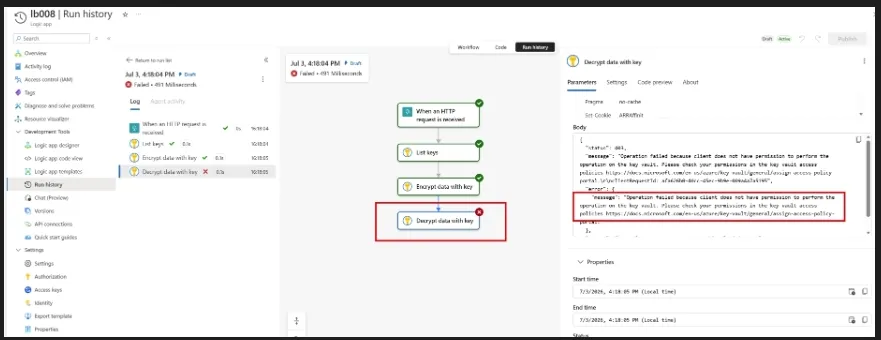
令人困惑的是,在 Key Vault 的 Access policy 中,已经为 Logic App 的标识(Identity)赋予了 Key 操作的全部权限,为什么仍然会出现权限不足的报错呢?
问题解答
根据错误提示中的链接(https://docs.microsoft.com/en-us/azure/key-vault/general/assign-access-policy-portal),排查方向通常是检查访问标识(Logic App 中使用的 SP 或 Identity)是否具备加密、解密等权限。
反复确认:相关权限确实已经在 Access policy 中授予。既然如此,为什么还会继续报权限错误呢?
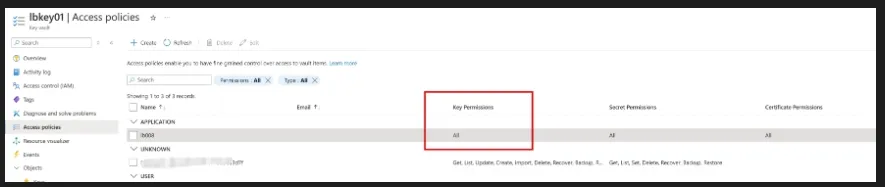
问题的关键,其实藏在更靠里的一层:Key 本身的权限设置。
在单独查看某一个具体 Key 的配置时,会发现它还可以单独设置 Permitted operations(允许的操作),包括 Encrypt、Decrypt、Sign、Verify、Wrap Key、Unwrap Key 等。
也就是说,即使 Key Vault 的 Access policy 已经为 Logic App 的标识授予了权限,如果具体 Key 本身没有勾选相应的允许操作,调用时仍然会持续报权限不足。这一点很容易被忽略,也正是这个问题最令人困惑的地方。
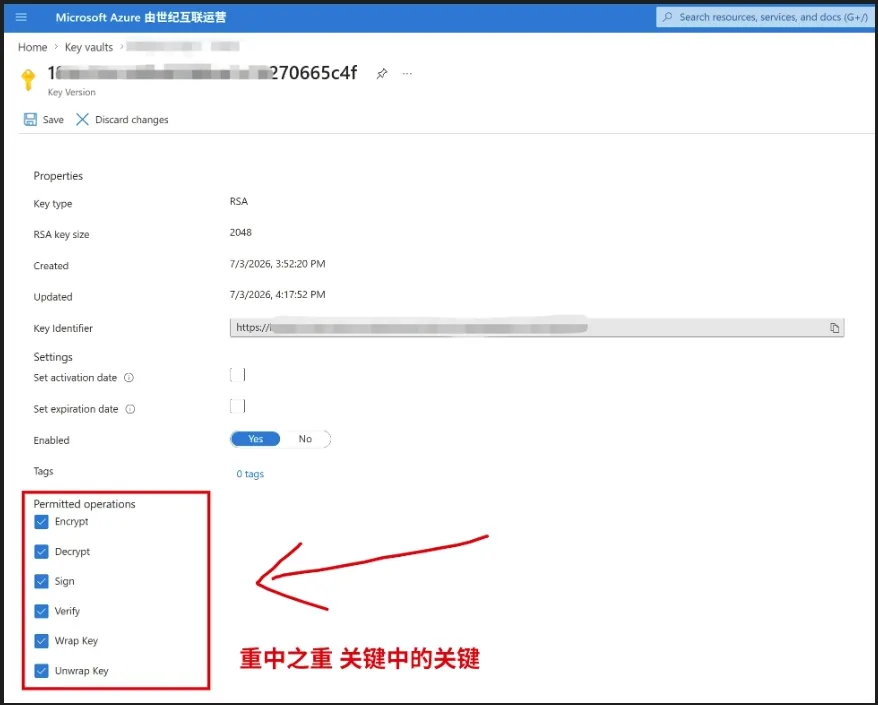
当为这个 Key 勾选 Decrypt 后,再次运行 Logic App,问题得到解决。
附录一:证书生成的 Key 无法加密/解密
Key Vault 中的 Certificates 会默认生成一个 Key,但这个 Key 在门户中不可见。不过,在 Logic App 的 Actions 中可以看到它。如果在加密/解密任务中选择了这个 Key,同样会遇到权限报错。
原因是:这个由证书生成的 Key 没有启用加密/解密功能,而且用户无法修改它的 Permitted operations。
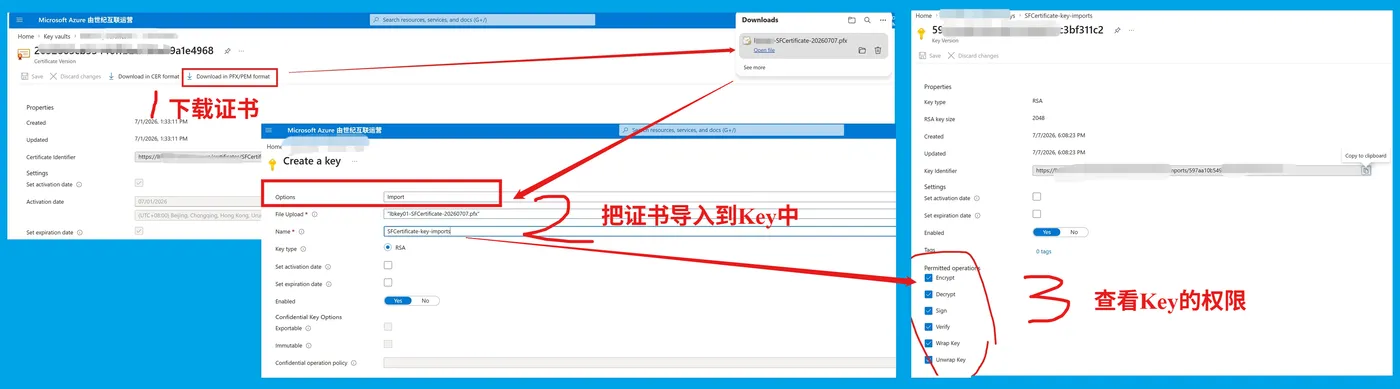
如果一定要使用证书生成的 Key,可以先下载证书的 pfx/pem 文件,再通过 Key 的方式重新上传证书文件,创建一个新的 Key。这样创建出来的 Key 就可以配置加密/解密权限了。
参考资料
Azure Key Vault Docs:https://docs.azure.cn/zh-cn/key-vault/keys/about-keys