
背景
自 ChatGPT 发布以来,大语言模型(Large Language Model,LLM)迅速从“辅助组件”升级为智能系统的核心引擎。系统架构的关注点正从“功能堆叠”转向“智能编排”:LLM 不再只是为应用提供回答,而是作为决策中枢,负责理解目标、拆解任务并驱动工具完成闭环执行。围绕这一能力,正在涌现一类新型智能系统——AI Agent(智能体),标志着人工智能从单纯的“工具增强”加速迈向“具备自主决策与行动能力的智能代理”,并开始在越来越多的真实业务场景中落地生根。
为了加速企业级 Agent 应用的落地,阿里云百炼与容器服务联合发布 AgentScope on 容器服务最佳实践方案,为智能体应用提供更稳定安全、更大规模弹性、更普惠易用的运行底座。
AgentScope 介绍
AgentScope 是阿里云百炼推出的多智能体(Multi‑Agent)应用框架与运行时,面向开发者和企业客户,帮助在大模型之上快速构建、编排和部署具备工具调用能力的智能代理应用。它提供多 Agent 协同、工具集成、对话状态管理、观测与调试等能力,并支持在云原生环境中以容器化方式运行。
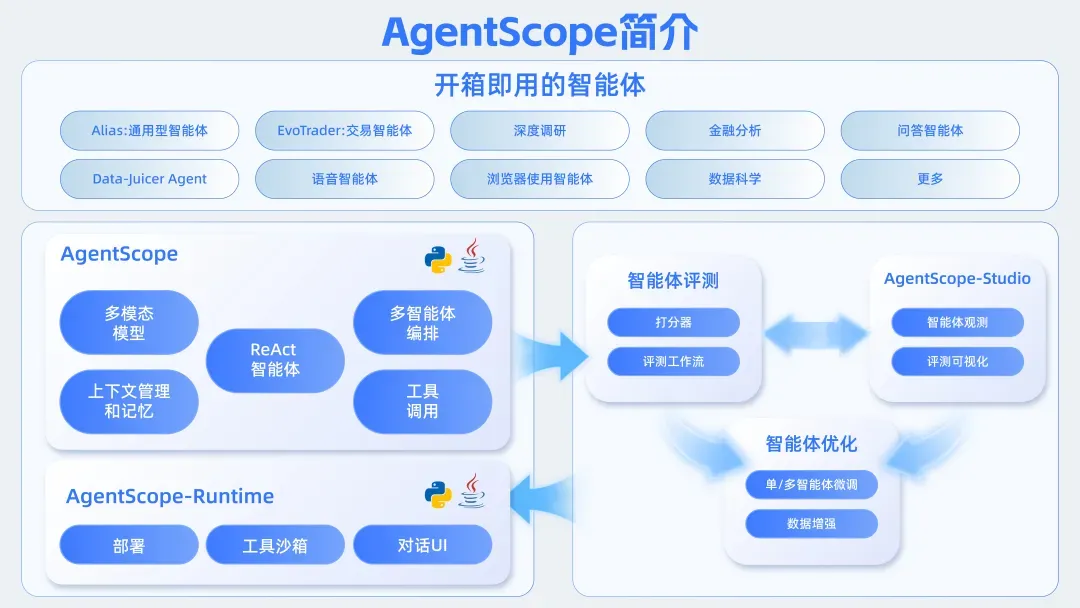
- 过程透明、可观测:对话状态、消息传递、工具调用和模型交互全程可记录、可追踪,便于排查问题和审计行为。
- 可控执行:支持 ReAct 等模式,任务执行过程中可随时中断和人工干预,满足高可控场景需求。
- 工具与知识增强:统一工具管理与调用接口,原生支持 RAG,便于智能体利用企业知识和外部数据。
- 模型无关与多模态:通过适配层对接多家语言模型及多模态模型,降低模型切换与演进成本。
- 模块化与多智能体编排:将感知、推理、记忆、执行等环节模块化,支持“总控 + 执行 + 审核”等多智能体流水线编排。
- 工程化与生产可用:可对接日志、监控、告警、权限等基础设施,支撑从 PoC 到生产级部署的全生命周期。
阿里云百炼在提供应用开发框架 AgentScope 之外,还推出了配套的运行时组件AgentScope Runtime,解决智能体在生产环境中的部署、运行与治理问题,使基于 AgentScope 构建的应用能够以服务化方式稳定落地。同时,AgentScope Runtime 也可以与主流开源 Agent 框架或自研智能体实现无缝配合,其目标是为“服务化”的智能体应用提供可观测、可治理、易部署且安全可控的运行底座。
在企业内部,智能体应用一旦走向生产,就离不开稳定的运行环境和统一的运维体系。基于这一共识,AgentScope 与 AgentScope Runtime 在设计之初就面向 Kubernetes 进行了优化,原生适配阿里云容器服务 Kubernetes 版(ACK)及阿里云容器计算服务(ACS)。目前,将 AgentScope 部署在阿里云容器服务已经成为了主流的部署模式,可以保障 Agent 应用的稳定安全运行、大规模并发弹性以及高性价比的成本述求。
容器服务相关能力介绍
今年云栖大会,阿里云容器服务面向 AI Agent 场景进行了全面升级发布,容器集群向下高效调度资源、实现自动弹性与故障恢复。向上连接了 AI 算力基础设施与上层智能应用,从推理应用、数据处理,拓展到了 Agent 应用,让复杂工作负载变得可管理、可扩展。
基于 ACK Pro 集群,可以轻松构建 AI Agent 应用。在 Agent Runtime 中,在 Agent Runtime 中,更推荐直接使用 ACS,每个 Pod 对应一个安全沙箱容器,简单易用。每个 Pod 对应一个安全沙箱容器,简单易用。ACS 以 Serverless 方式交付容器算力,无需关注底层节点的运维管理,只需按需申请使用,用完即释放。若使用的是 ECS,也可以选择我们的安全沙箱容器运行时方案,在一台 ECS 上可以创建多个安全运行环境。
集群高可用
ACK Pro 集群在高可用能力上进行了全面增强:控制面采用多可用区冗余部署,实现可用区级容灾;数据面在节点异常时可自动迁移并重建业务 Pod,确保业务快速恢复与连续可用。配合托管式 Master 管理、完善的健康检查机制以及滚动升级、自动回滚等运维特性,ACK Pro 能为大模型服务与 Agent 应用提供稳定、可恢复的生产级集群基础。
大规模弹性
ACS 容器算力结合用户负载特征的沙箱资源预调度优化,通过预测预调度、资源复用等手段,节省了 ACS 的调度、创建时间。同时,基于云盘快照技术提供镜像缓存功能。通过预先将需要使用的镜像制作成镜像缓存,然后基于该镜像缓存来大规模创建 Pod,避免或者减少镜像层的下载,从而进一步提升 Pod 的启动速度。
强安全隔离
使用 ACS 容器算力可以快速创建代码沙箱、浏览器沙箱、桌面沙箱环境。默认,ACS 基于轻量级虚拟机(MicroVM)技术,为每个 Agent 任务提供独立的、硬件级别的计算安全隔离环境。基于 Network Policy 可以有效限制 Agent 之间的网络通信,防止恶意 Agent 访问敏感数据或服务。再结合云盘、NAS、OSS 等存储挂载隔离能力,ACS 实现了 Pod 级别计算、网络、存储的端到端安全运行环境。
普惠易用
ACS 支持 0.5 vCPU 1 GiB 精细化步长递进,同时支持秒级按需热变配,可根据 AI Agent 真实资源需求按需使用 ACS CPU/GPU Pod,降低综合资源成本。ACS 也邀测发布状态保持的能力,支持一键休眠和快速唤醒。在休眠期间,Pod 的CPU和内存资源释放,降低休眠期间的资源成本;同时,也可以基于用户请求快速唤醒 Pod,将内存状态保持,完整恢复到休眠前的环境,实现在成本与体验之间找到最佳平衡。
目前,从基模客户到垂直行业客户,他们新一代的智能体应用,无论是科研助手、RPA 流程自动化、动态决策还是个性化服务,都在基于容器服务构建,并大规模使用 ACS 容器算力。而越来越多的 Agent 开发者也在基于 AgentScope on 容器服务的部署方案,快速落地企业级 Agent 应用。
AgentScope on 容器服务部署实践
基于 AgentScope 构建一个智能体 并部署至 ACK Pro 集群中
步骤一:准备 ACK Pro 集群环境
- 创建集群或者使用已有的 ACK Pro 集群,将 KubeConfig 保存在本地
- 集群中创建 Image Secret
kubectl create secret docker-registry demo-credential \
        -n default \
        --docker-server=your-registry \
        --docker-username=your-registry-username \
        --docker-password=your-registry-password
步骤二:准备本地环境
- 下载 agentscope-runtime
python3 -m venv demo
source demo/bin/activate

pip install agentscope-runtime==1.0.1
- 设置环境变量
export REGISTRY_URL="your-acr-registry"
export REGISTRY_NAMESPACE=="your-registry-namespace"
export REGISTRY_USERNAME="your-registry-username"
export REGISTRY_PASSWORD="your-registry-password"
export RUNTIME_SANDBOX_REGISTRY="your-acr-registry"

export KUBECONFIG_PATH="/path-to-your-kubeconfig"
export DASHSCOPE_API_KEY="your-api-key"
步骤三:构建 Agent 应用并部署
- 通过 agentscope 框架构造 Agent 应用
agent_app = AgentApp(
    app_name="Friday",
    app_description="A helpful assistant",
)
@agent_app.init
async def init_func(self):
    self.state_service = InMemoryStateService()
    self.session_service = InMemorySessionHistoryService()
    await self.state_service.start()
    await self.session_service.start()
@agent_app.shutdown
async def shutdown_func(self):
    await self.state_service.stop()
    await self.session_service.stop()
@agent_app.query(framework="agentscope")
async def query_func(
    self,
    msgs,
    request: AgentRequest = None,
    **kwargs,
):
    assert kwargs is not None, "kwargs is Required for query_func"
    session_id = request.session_id
    user_id = request.user_id
    state = await self.state_service.export_state(
        session_id=session_id,
        user_id=user_id,
    )
    toolkit = Toolkit()
    toolkit.register_tool_function(execute_python_code)
    agent = ReActAgent(
        name="Friday",
        model=DashScopeChatModel(
            "qwen-turbo",
            api_key=os.getenv("DASHSCOPE_API_KEY"),
            enable_thinking=True,
            stream=True,
        ),
        sys_prompt="You're a helpful assistant named Friday.",
        toolkit=toolkit,
        memory=AgentScopeSessionHistoryMemory(
            service=self.session_service,
            session_id=session_id,
            user_id=user_id,
        ),
        formatter=DashScopeChatFormatter(),
    )
    if state:
        agent.load_state_dict(state)
    async for msg, last in stream_printing_messages(
        agents=[agent],
        coroutine_task=agent(msgs),
    ):
        yield msg, last
    state = agent.state_dict()
    await self.state_service.save_state(
        user_id=user_id,
        session_id=session_id,
        state=state,
    )
- 通过 agentscope-runtime 进行镜像构建,并部署至 ACK Pro 集群中
- agentscope-runtime 提供以下对象用于配置构建和部署配置:
- RegistryConfig 和 BuildConfig 用于定义镜像构建的参数和镜像仓库配置
- deployment_config 用于配置工作负载的配置如资源规格、副本数等
"""Deploy AgentApp to Kubernetes"""
# 1. Configure Registry
registry_config = RegistryConfig(
    registry_url=(
        os.getenv("REGISTRY_URL")
    ),
    namespace=os.getenv("REGISTRY_NAMESPACE"),
    username=os.getenv("REGISTRY_USERNAME"),
    password=os.getenv("REGISTRY_PASSWORD"),
)
# 2. Configure K8s connection
k8s_config = K8sConfig(
    k8s_namespace="default",
    kubeconfig_path=os.getenv("KUBECONFIG_PATH"),
)
port = 8080
# 3. Create KubernetesDeployManager
deployer = KubernetesDeployManager(
    kube_config=k8s_config,
    registry_config=registry_config,
    use_deployment=True,  # Use Deployment mode, supports scaling
)
# 4. Runtime configuration
runtime_config = {
    # Resource limits
    "resources": {
        "requests": {"cpu": "200m", "memory": "512Mi"},
        "limits": {"cpu": "1000m", "memory": "2Gi"},
    },
    # Image pull policy
    "image_pull_policy": "IfNotPresent",
    # Image Pull Secrets
    "image_pull_secrets": ["demo-credential"],
}
# 5. Deployment configuration
deployment_config = {
    # Basic configuration
    "port": str(port),
    "replicas": 1,  # Deploy 1 replica
    "image_tag": "linux-amd64",
    "image_name": "agent_app",
    # Dependencies configuration
    "requirements": [
        "agentscope",
        "fastapi",
        "uvicorn",
    ],
    "extra_packages": [
        os.path.join(
            os.path.dirname(__file__),
            "others",
            "other_project.py",
        ),
    ],
    "base_image": "python:3.10-slim-bookworm",
    # Environment variables
    "environment": {
        "PYTHONPATH": "/app",
        "LOG_LEVEL": "INFO",
        "DASHSCOPE_API_KEY": os.environ.get("DASHSCOPE_API_KEY"),
        "RUNTIME_SANDBOX_REGISTRY": os.environ.get("RUNTIME_SANDBOX_REGISTRY")
    },
    # K8s runtime configuration
    "runtime_config": runtime_config,
    # Deployment timeout
    "deploy_timeout": 300,
    "health_check": True,
    "platform": "linux/amd64",
    "push_to_registry": True,
}
# 6. Execute deployment
result = await agent_app.deploy(
    deployer,
    **deployment_config,
)
- 参考完整的代码
# -*- coding: utf-8 -*-
import asyncio
import time
import os
from agentscope.agent import ReActAgent
from agentscope.model import DashScopeChatModel
from agentscope.formatter import DashScopeChatFormatter
from agentscope.tool import Toolkit, execute_python_code
from agentscope.pipeline import stream_printing_messages
from agentscope_runtime.adapters.agentscope.memory import (
    AgentScopeSessionHistoryMemory,
)
from agentscope_runtime.engine.app import AgentApp
from agentscope_runtime.engine.deployers.kubernetes_deployer import (
    KubernetesDeployManager,
    RegistryConfig,
    K8sConfig,
)
from agentscope_runtime.engine.schemas.agent_schemas import AgentRequest
from agentscope_runtime.engine.services.agent_state import (
    InMemoryStateService,
)
from agentscope_runtime.engine.services.session_history import (
    InMemorySessionHistoryService,
)
agent_app = AgentApp(
    app_name="Friday",
    app_description="A helpful assistant",
)
@agent_app.init
async def init_func(self):
    self.state_service = InMemoryStateService()
    self.session_service = InMemorySessionHistoryService()
    await self.state_service.start()
    await self.session_service.start()
@agent_app.shutdown
async def shutdown_func(self):
    await self.state_service.stop()
    await self.session_service.stop()
@agent_app.query(framework="agentscope")
async def query_func(
    self,
    msgs,
    request: AgentRequest = None,
    **kwargs,
):
    assert kwargs is not None, "kwargs is Required for query_func"
    session_id = request.session_id
    user_id = request.user_id
    state = await self.state_service.export_state(
        session_id=session_id,
        user_id=user_id,
    )
    toolkit = Toolkit()
    toolkit.register_tool_function(execute_python_code)
    agent = ReActAgent(
        name="Friday",
        model=DashScopeChatModel(
            "qwen-turbo",
            api_key=os.getenv("DASHSCOPE_API_KEY"),
            enable_thinking=True,
            stream=True,
        ),
        sys_prompt="You're a helpful assistant named Friday.",
        toolkit=toolkit,
        memory=AgentScopeSessionHistoryMemory(
            service=self.session_service,
            session_id=session_id,
            user_id=user_id,
        ),
        formatter=DashScopeChatFormatter(),
    )
    if state:
        agent.load_state_dict(state)
    async for msg, last in stream_printing_messages(
        agents=[agent],
        coroutine_task=agent(msgs),
    ):
        yield msg, last
    state = agent.state_dict()
    await self.state_service.save_state(
        user_id=user_id,
        session_id=session_id,
        state=state,
    )
@agent_app.endpoint("/sync")
def sync_handler(request: AgentRequest):
    yield {"status": "ok", "payload": request}
@agent_app.endpoint("/async")
async def async_handler(request: AgentRequest):
    yield {"status": "ok", "payload": request}
@agent_app.endpoint("/stream_async")
async def stream_async_handler(request: AgentRequest):
    for i in range(5):
        yield f"async chunk {i}, with request payload {request}\n"
@agent_app.endpoint("/stream_sync")
def stream_sync_handler(request: AgentRequest):
    for i in range(5):
        yield f"sync chunk {i}, with request payload {request}\n"
@agent_app.task("/task", queue="celery1")
def task_handler(request: AgentRequest):
    time.sleep(30)
    yield {"status": "ok", "payload": request}
@agent_app.task("/atask")
async def atask_handler(request: AgentRequest):
    await asyncio.sleep(15)
    yield {"status": "ok", "payload": request}
# agent_app.run()
async def deploy_app_to_k8s():
    """Deploy AgentApp to Kubernetes"""
    # 1. Configure Registry
    registry_config = RegistryConfig(
        registry_url=(
            "crpi-p44cuw4wgxu8xn0b.cn-hangzhou.personal.cr.aliyuncs.com"
        ),
        namespace="agentscope-runtime",
    )
    # 2. Configure K8s connection
    k8s_config = K8sConfig(
        k8s_namespace="agentscope-runtime",
        kubeconfig_path=None,
    )
    port = 8080
    # 3. Create KubernetesDeployManager
    deployer = KubernetesDeployManager(
        kube_config=k8s_config,
        registry_config=registry_config,
        use_deployment=True,  # Use Deployment mode, supports scaling
    )
    # 4. Runtime configuration
    runtime_config = {
        # Resource limits
        "resources": {
            "requests": {"cpu": "200m", "memory": "512Mi"},
            "limits": {"cpu": "1000m", "memory": "2Gi"},
        },
        # Image pull policy
        "image_pull_policy": "IfNotPresent",
    }
    # 5. Deployment configuration
    deployment_config = {
        # Basic configuration
        "port": str(port),
        "replicas": 1,  # Deploy 1 replica
        "image_tag": "linux-amd64-1",
        "image_name": "agent_app",
        # Dependencies configuration
        "requirements": [
            "agentscope",
            "fastapi",
            "uvicorn",
        ],
        "extra_packages": [
            os.path.join(
                os.path.dirname(__file__),
                "others",
                "other_project.py",
            ),
        ],
        "base_image": "python:3.10-slim-bookworm",
        # Environment variables
        "environment": {
            "PYTHONPATH": "/app",
            "LOG_LEVEL": "INFO",
            "DASHSCOPE_API_KEY": os.environ.get("DASHSCOPE_API_KEY"),
        },
        # K8s runtime configuration
        "runtime_config": runtime_config,
        # Deployment timeout
        "deploy_timeout": 300,
        "health_check": True,
        "platform": "linux/amd64",
        "push_to_registry": True,
    }
    try:
        print("🚀 Starting AgentApp deployment to Kubernetes...")
        # 6. Execute deployment
        result = await agent_app.deploy(
            deployer,
            **deployment_config,
        )
        print("✅ Deployment successful!")
        print(f"📍 Deployment ID: {result['deploy_id']}")
        print(f"🌐 Service URL: {result['url']}")
        print(f"📦 Resource name: {result['resource_name']}")
        print(f"🔢 Replicas: {result['replicas']}")
        # 7. Check deployment status
        print("\n📊 Checking deployment status...")
        status = deployer.get_status()
        print(f"Status: {status}")
        return result, deployer
    except Exception as e:
        print(f"❌ Deployment failed: {e}")
        raise
async def deployed_service_run(service_url: str):
    """Test the deployed service"""
    import aiohttp
    test_request = {
        "input": [
            {
                "role": "user",
                "content": [{"type": "text", "text": "Hello, how are you?"}],
            },
        ],
        "session_id": "123",
    }
    try:
        async with aiohttp.ClientSession() as session:
            # Test sync endpoint
            async with session.post(
                f"{service_url}/sync",
                json=test_request,
                headers={"Content-Type": "application/json"},
            ) as response:
                if response.status == 200:
                    result = await response.text()
                    print(f"✅ Sync endpoint test successful: {result}")
                else:
                    print(f"❌ Sync endpoint test failed: {response.status}")
            # Test async endpoint
            async with session.post(
                f"{service_url}/async",
                json=test_request,
                headers={"Content-Type": "application/json"},
            ) as response:
                if response.status == 200:
                    result = await response.text()
                    print(f"✅ Async endpoint test successful: {result}")
                else:
                    print(f"❌ Async endpoint test failed: {response.status}")
    except Exception as e:
        print(f"❌ Service test exception: {e}")
async def main():
    """Main function"""
    try:
        # Deploy
        result, deployer = await deploy_app_to_k8s()
        service_url = result["url"]
        # Test service
        print("\n🧪 Testing the deployed service...")
        await deployed_service_run(service_url)
        # Keep running, you can test manually
        print(
            f"""
        Service deployment completed, you can test with the following commands:
        # Health check
        curl {service_url}/health
        # Test sync endpoint
        curl -X POST {service_url}/sync \\
          -H "Content-Type: application/json" \\
          -d '{{
                "input": [
                {{
                  "role": "user",
                  "content": [
                    {{
                      "type": "text",
                      "text": "Hello, how are you?"
                    }}
                  ]
                }}
              ],
              "session_id": "123"
            }}'
        # Test async endpoint
        curl -X POST {service_url}/async \\
          -H "Content-Type: application/json" \\
          -d '{{
                "input": [
                {{
                  "role": "user",
                  "content": [
                    {{
                      "type": "text",
                      "text": "Hello, how are you?"
                    }}
                  ]
                }}
              ],
              "session_id": "123"
            }}'
        # Test streaming endpoint
        curl -X POST {service_url}/stream_async \\
          -H "Content-Type: application/json" \\
          -H "Accept: text/event-stream" \\
          --no-buffer \\
          -d '{{
                "input": [
                {{
                  "role": "user",
                  "content": [
                    {{
                      "type": "text",
                      "text": "Hello, how are you?"
                    }}
                  ]
                }}
              ],
              "session_id": "123"
            }}'
        """,
        )
        print("\n📝 Or use kubectl to check:")
        print("kubectl get pods -n agentscope-runtime")
        print("kubectl get svc -n agentscope-runtime")
        print(
            f"kubectl logs -l app={result['resource_name']} "
            "-n agentscope-runtime",
        )
        # Wait for user confirmation before cleanup
        input("\nPress Enter to cleanup deployment...")
        # Cleanup deployment
        print("🧹 Cleaning up deployment...")
        cleanup_result = await deployer.stop()
        if cleanup_result:
            print("✅ Cleanup completed")
        else:
            print("❌ Cleanup failed, please check manually")
    except Exception as e:
        print(f"❌ Error occurred during execution: {e}")
        import traceback
        traceback.print_exc()
if __name__ == "__main__":
    # Run deployment
    asyncio.run(main())
- 执行上述代码
python main.py
- 预期输出

- 在容器服务控制台可以在default命名空间下看到创建的 Deployment

- 通过 API 请求我们的 Agent 应用
curl -N \
  -X POST "http://your-service-url:8080/async" \
  -H "Content-Type: application/json" \
  -d '{
    "input": [
      {
        "role": "user",
        "content": [
          { "type": "text", "text": "请帮我使用python生成一段冒泡排序算法,并执行" }
        ]
      }
    ]
  }'
使用容器作为 Sandbox 的资源载体
AgentScope-Runtime 内置提供了几类Sandbox:Base、Brower 和 FileSystem,我们可以将 Sandbox 部署至 ACK Pro 集群中,使用 ACS 容器算力。
步骤一:准备 ACK Pro 集群环境
- 创建集群或者使用已有的 ACK Pro 集群,将 KubeConfig 保存在本地
步骤二:准备本地环境
python3 -m venv demo
source demo/bin/activate

pip install agentscope-runtime[ext]==1.0.1
步骤三:将社区提供的 Base Sandbox 部署至 ACK Pro 集群中
- 通过 custom.env 配置相关参数
# .env
# 服务设置
HOST="0.0.0.0"
PORT=8000
WORKERS=4
DEBUG=False
BEARER_TOKEN=demo

# 沙盒管理器设置
DEFAULT_SANDBOX_TYPE=base
POOL_SIZE=10
AUTO_CLEANUP=True
CONTAINER_PREFIX_KEY=agent-runtime-container-
CONTAINER_DEPLOYMENT=k8s
DEFAULT_MOUNT_DIR=sessions_mount_dir
PORT_RANGE=[49152,59152]

# Redis设置
REDIS_ENABLED=False

# K8S 设置
K8S_NAMESPACE=demo
KUBECONFIG_PATH=/path-to-your-kubeconfig # 替换为真实路径
- 使用 runtime-sandbox-server 将 BaseSandbox 部署至 ACK Pro 集群中
runtime-sandbox-server --config custom.env
- 预期输出

- 在容器服务控制台可以看到预热创建了 Sandbox Pod

- 将 Sandbox 作为一个插件注册到百炼中,进行业务编排。另外也可以使用高代码的方式基于agentscope-runtime 进行 Agent 应用研发,通过 SandboxService 结合会话来使用 Sandbox,如:
...
sandbox_service = SandboxService()

sandboxes = sandbox_service.connect(
            session_id=SESSION_ID,
            user_id=USER_ID,
            tools=tools,
)
...
总结
Gartner 指出 AI 基础设施正在向云原生迁移:到 2028 年,95% 的新 AI 部署将使用 Kubernetes,而目前这一比例不足 30%。K8s 正在成为企业级别 AI 工作负载调度、服务编排与弹性伸缩的统一平台,推动 AI 工程化与规模化落地。
AgentScope 与容器服务的深度集成,将加速更多企业客户 AI Agent 应用部署落地。通过一键部署 AgentScope 至 ACK Pro 集群,可以统一业务负载的运维体系,同时大幅降低对集群运维管理的复杂度。通过使用 ACS Serverless 容器算力,可以享受默认安全隔离、大规模弹性、普惠易用的特性,加速 AI Agent 应用的创新迭代。
相关产品:
AgentScope:https://agentscope.io/
容器服务 Kubernetes 版(ACK):https://www.aliyun.com/product/ack
容器计算服务(ACS):https://www.aliyun.com/product/acs
来源 | 阿里云开发者公众号
