
项目介绍
各位同学,大家好,今天开始,我们就正式开始项目阶段的学习之旅了哦,咱们要一起完成一个基于若依框架+AI的养老项目。
在项目开始前,咱们先来聊一聊为什么选择做养老项目。
行业背景
中国老龄化程度加深,我国老龄事业和养老服务体系的发展得到了国家的高度重视,在国家政策的支持下,我国智慧养老产业主体持续增多,产业链不断整合,发展前景较好。我国正在形成一个多元化“互联网+养老”的智慧老年护理服务系统,智慧养老是我国的必然趋势
市场规模及预测
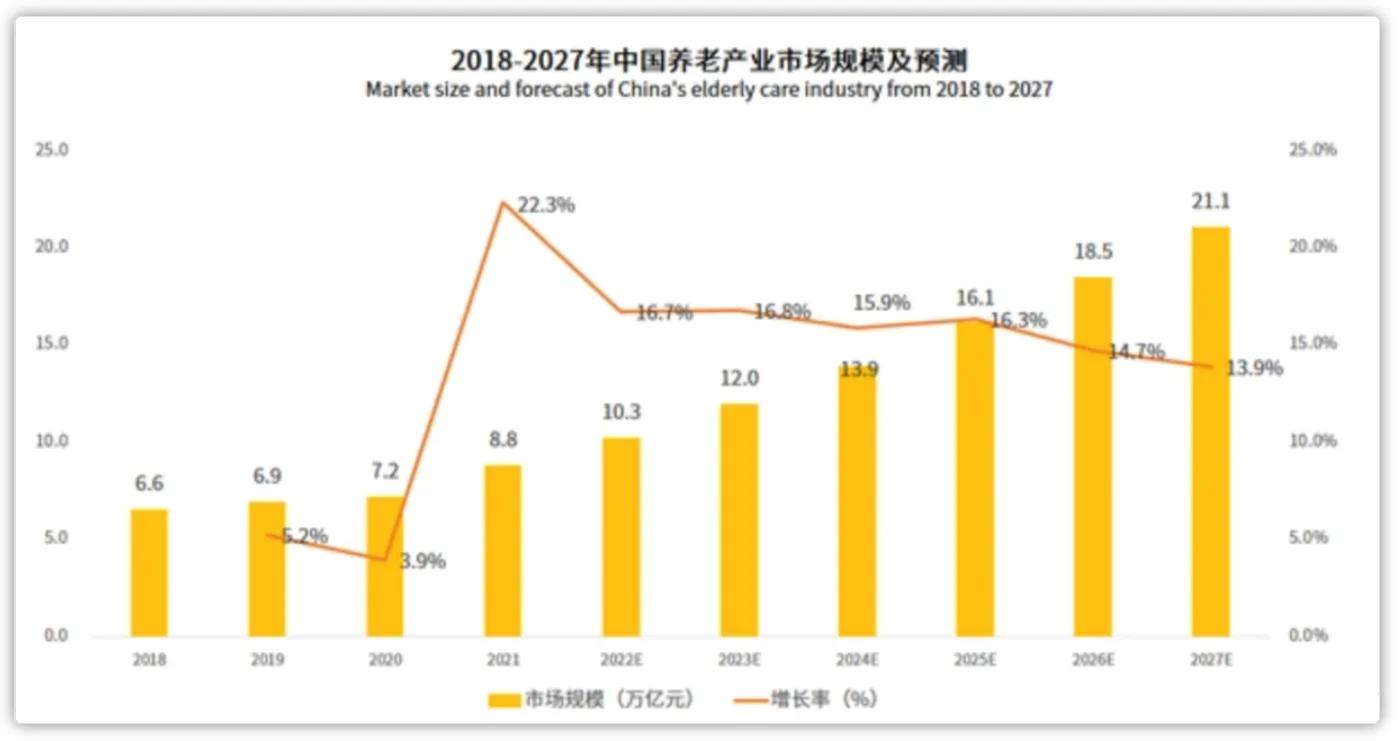
- 2023年中国养老产业市场规模达到12万亿元,同比增长16.8%。
- 预计2023-2027年中国养老产业迎来较快速增长。预计2027年中国养老产业市场规模达21.1万亿元
整体业务流程
中州养老系统是为养老院量身定制开发的专业的养老管理软件产品;涵盖来访管理、入退管理、在住管理、服务管理、财务管理等功能模块,涉及从来访参观到退住办理的完整流程。
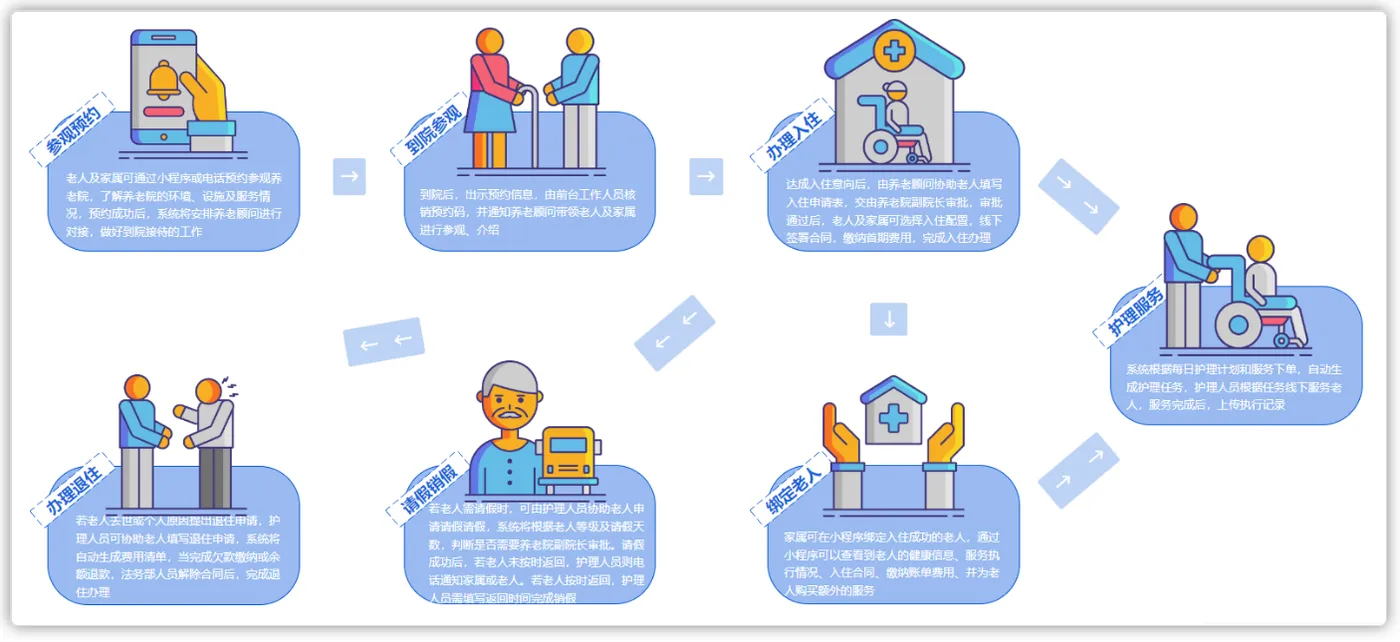
项目原型访问地址:https://codesign.qq.com/s/459277624064324 密码: FSTI
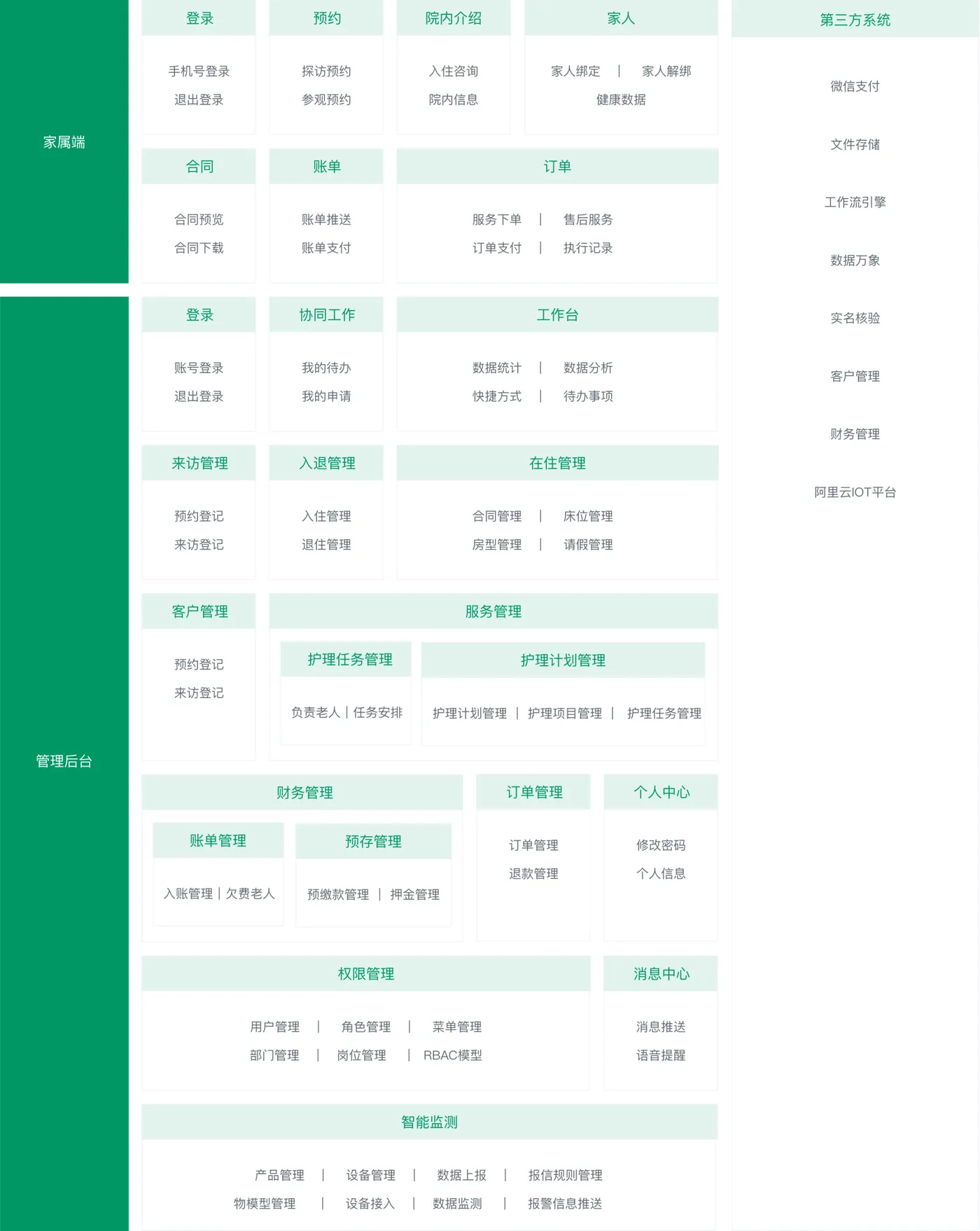
中州养老项目分为两端,一个是管理后台,另外一个是家属端
- 管理后台:养老院员工使用,入住、退住,给老人服务记录等等
- 家属端:养老院的老人家属使用,查看老人信息,缴费,下订单等等
业务主页效果:

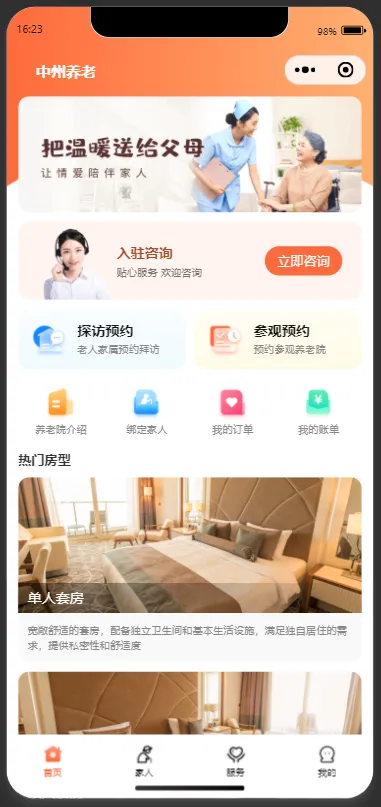
教育公司无养老相关资质,小程序无法正式上架,无法体验。在课程的对应阶段,我们会进行调试开发
技术架构
下图展现了中州养老项目主要使用的技术:
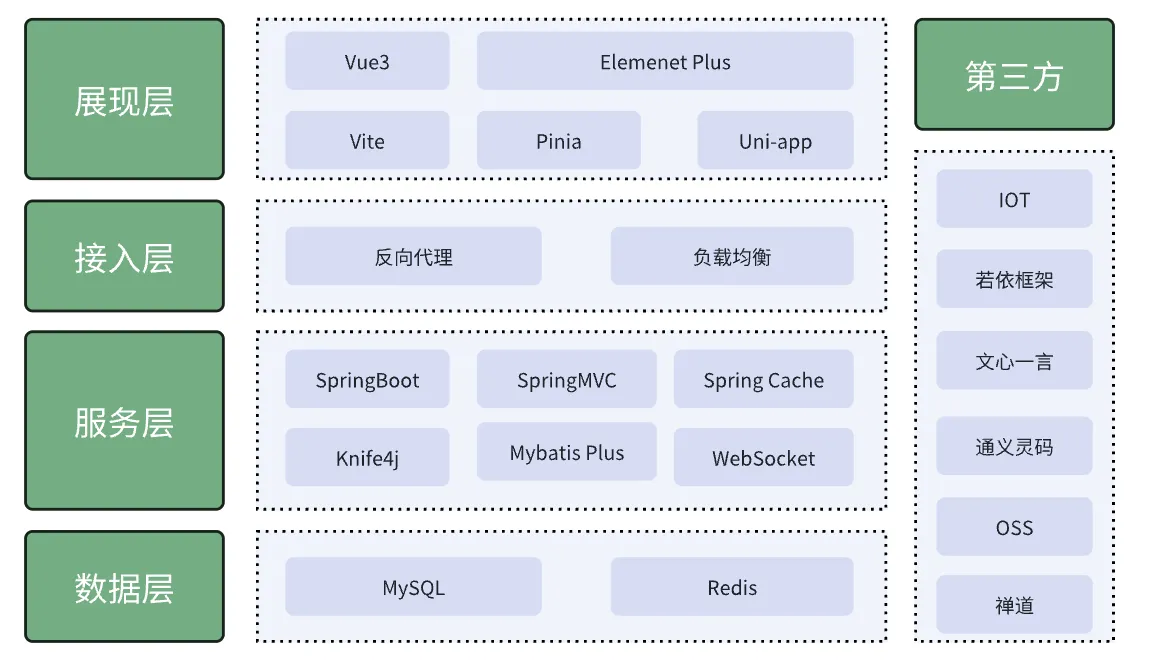
- 前端主要使用的Vue3+Element Plus
- 后端主要使用的是若依框架作为基础架构,当然后端也集成了很多其他的技术,比如有Springboot、Mybatis、Swagger、Spring cache、Spring Security、Mybatis-plus等
- 数据存储主要使用到了MySQL和Redis
- 使用了nginx来作为反向代理和前端的静态服务器
- 其他技术:阿里云物联网平台IOT、对象存储OSS、微信登录、千帆大模型、AI工具辅助开发等
课程安排
中州养老课程共17天,具体安排如下:
day01 |
项目简介,Mybatis-Plus框架 |
day02 |
版本控制工具Git、Git常用命令、版本冲突、IDE中集成Git |
day03 |
认识若依框架,环境搭建、AI协助快速熟悉项目、通义灵码代码生成、模块开发-代码生成 |
day04 |
使用AI改造若依框架前后端代码和代码生成模板 |
day05 |
数据字典、集成OSS,入住办理-模块后端设计,通义灵码协助接口代码开发 |
day06 |
入住办理-基于动态表单快速构建表单项,通义灵码协助完成养老项目中的入住办理功能 |
day07 |
性能优化、Redis基础、常见的数据类型和命令,Java中操作Redis |
day08 |
健康评估-大模型技术调研、对接千帆大模型,设计Prompt、大模型智能评估体检报告 |
day09 |
AI协助项目阶段性部署,代码质量检查、开发模式、jenkins、docker、日志管理(ELK)、禅道 |
day10 |
后台登录和鉴权、spring security入门、核心配置、小程序家属端,微信登录、定时任务 |
day11-day12 |
IOT产品设备管理,账号开通、设备管理、模拟上报、设备数据消费 |
day13 |
智能床位模块开发、家属端报表展示,AI协助编写sql以及优化、MySQL索引 |
day14 |
报警规则开发、报警数据过滤 |
day15 |
报警提醒(websocket)、项目总结 |
day15-17分组实战 |
后台:客户管理、来访管理、合同管理;家属端:绑定老人、老人列表;项目部署 |
聊完了课程安排后,接下来一起来看一下今天的课程安排:
在前面的Web开发课程中,咱们学习了持久层框架MyBatis,而目前很多企业也会采用能大大提高开发效率的持久层框架:MyBatisPlus。因此,咱们的项目会在若依的基础上集成更快捷的持久层框架MybatisPlus(简称:MP)。
今天的目标:
- 能够掌握MybatisPlus实现基本的增删改查
- 能够掌握MybatisPlus条件构建器来查询或更新的操作
- 能够掌握MybatisPlus分页插件逻辑的处理方式
掌握了MyBatisPlus的基本使用后,咱们会把它集成到项目中。
Mybatis-Plus
概述
Mybatis-Plus(简称MP)是一个基于Mybatis框架的增强工具,它在Mybatis的基础上只做增强而不做改变,旨在简化开发、提高效率。Mybatis-Plus提供了一系列的功能和特性,使得开发人员能够更加高效地使用Mybatis进行数据库操作。
愿景
我们的愿景是成为 MyBatis 最好的搭档,就像魂斗罗 中的 1P、2P,基友搭配,效率翻倍。
快速入门
环境准备
数据库的准备,基于我们熟悉的Tlias智能学习辅助系统中的部门管理和员工管理页面来完成开发
导入资料中提供的tlias初始项目,使用idea打开即可,项目的结构如下:

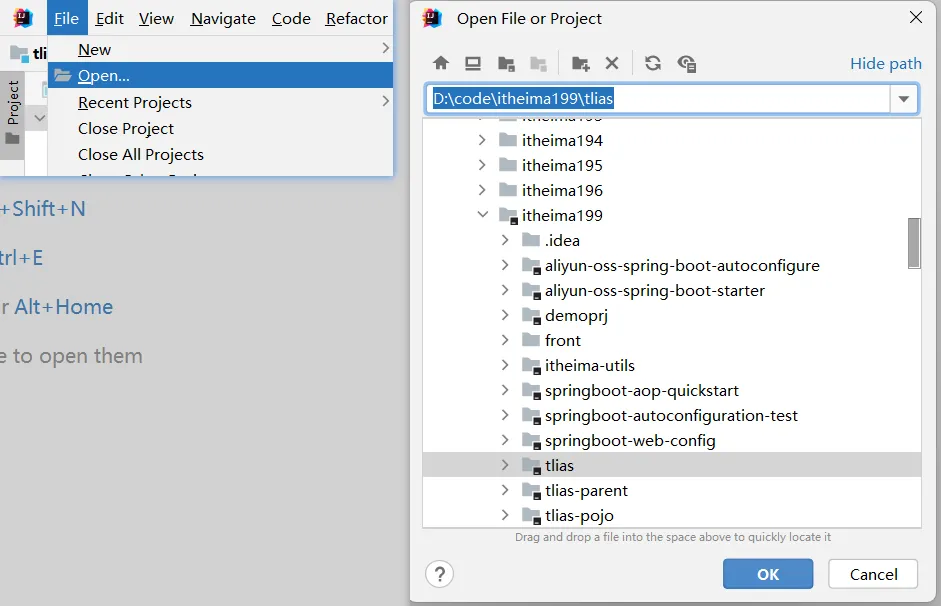
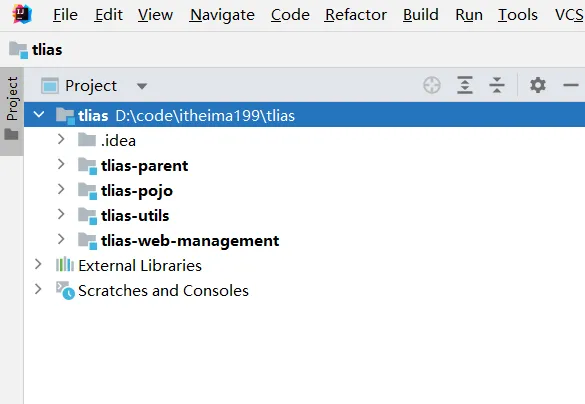
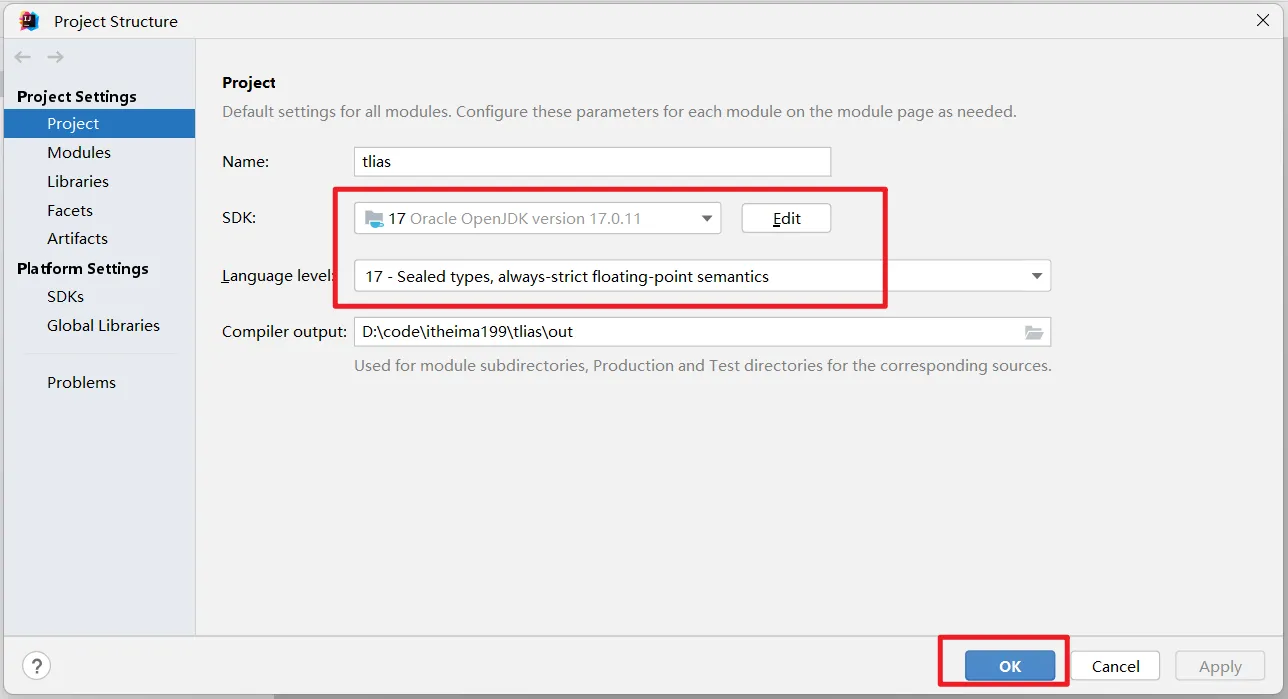
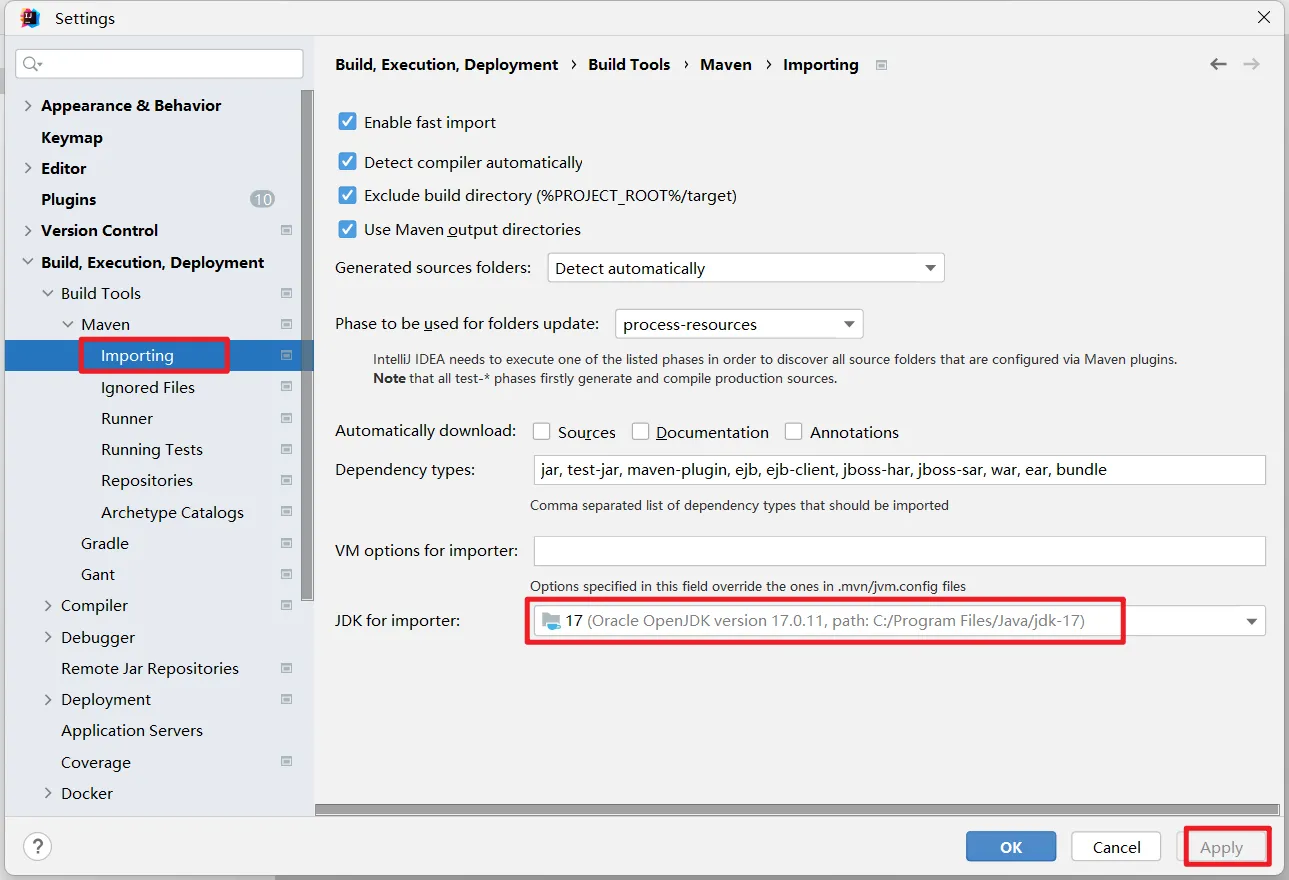
注意:检查项目结构jdk为17,检查maven配置和设置jdk17

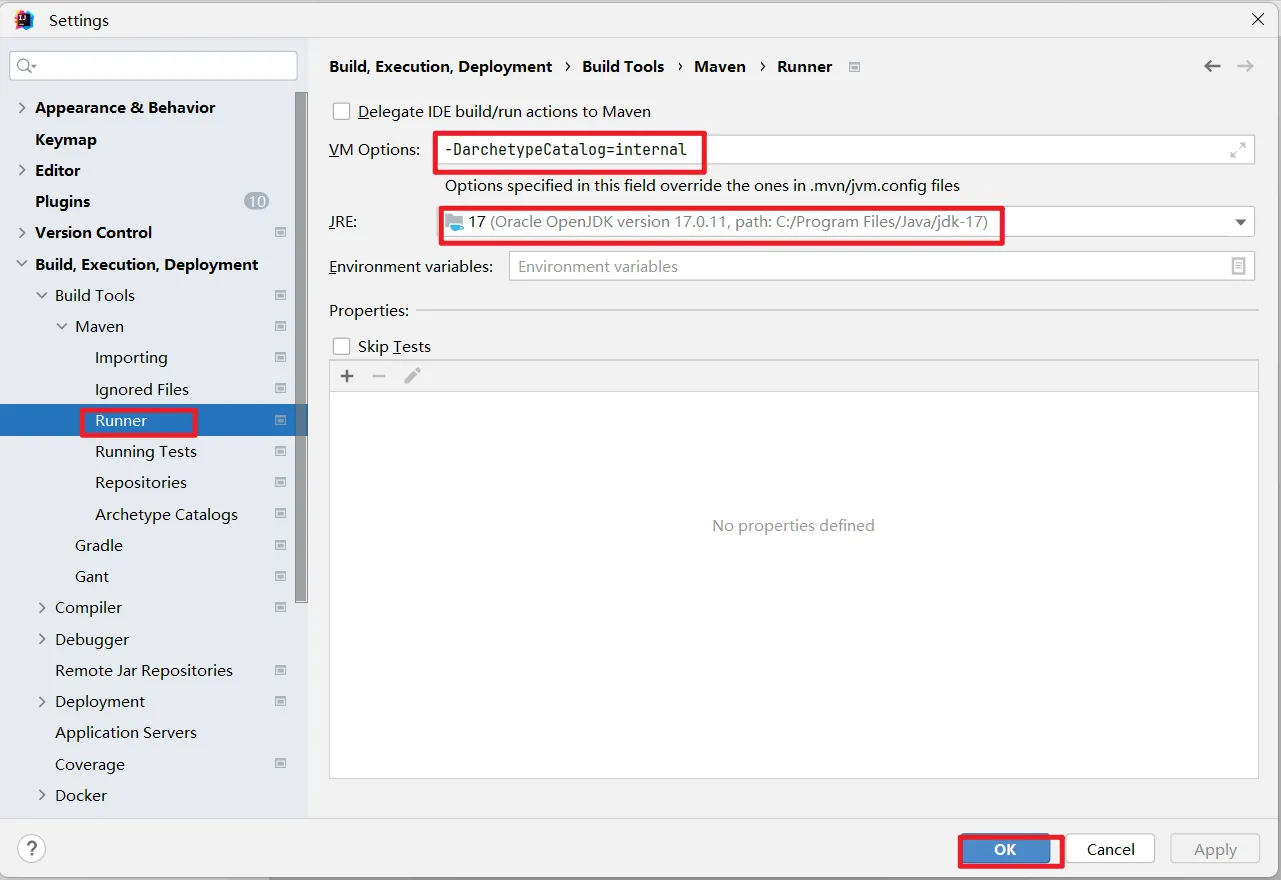
-DarchetypeCatalog=internal
在application.yml中修改jdbc参数为你自己的数据库参数
spring:
  datasource:
    # 数据库连接四要素
    url: jdbc:mysql://localhost:3306/tlias
    driver-class-name: com.mysql.cj.jdbc.Driver
    username: root
    password: root
# 配置Spring事务管理的debug级别日志
logging:
  level:
    org.springframework.jdbc.support.JdbcTransactionManager: debug
# 配置MyBatis的日志输出
mybatis:
  configuration:
    log-impl: org.apache.ibatis.logging.stdout.StdOutImpl
    map-underscore-to-camel-case: true    # 开启驼峰命名

#阿里云oss配置
aliyun:
  oss:
    endpoint: https://oss-cn-beijing.aliyuncs.com # 修改为自己的
    bucketName: itheimaweb  # 修改为自己的
环境准备好之后,可以运行启动类,然后打开资料中提供的前端项目来验证部门管理页面是否能正常操作数据库,其他页面只提供了基础的Controller类,没有Service层业务逻辑,所以都是没有数据的
需求描述
基于MyBatisPlus,实现Tlias智能学习辅助系统部门管理页面的所有功能:
①新增部门功能
②根据id查询部门
③根据id更新部门
④根据id删除部门
导入依赖
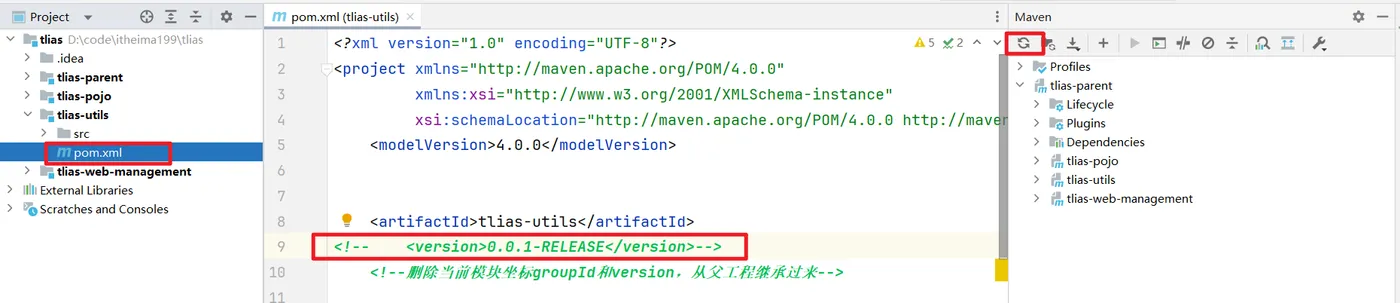
tlias-pojo中pom.xml导入Mybatis-Plus的起步依赖,替换掉MyBatis的起步依赖, 注意刷新maven
<!--MyBatisPlus-->
<dependency>
    <groupId>com.baomidou</groupId>
    <artifactId>mybatis-plus-spring-boot3-starter</artifactId>
    <version>3.5.7</version>
</dependency>
tlias-web-management 注释依赖
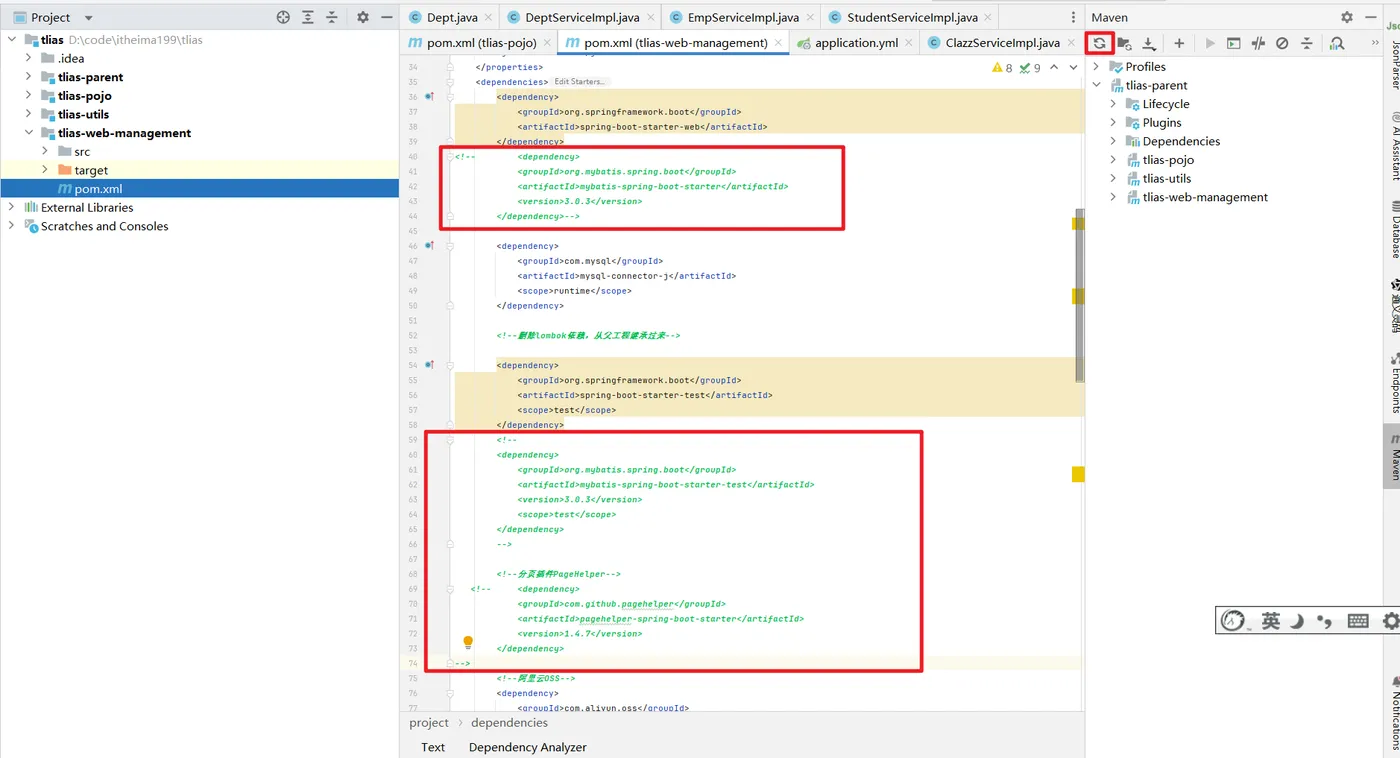
将如下分页代码注释
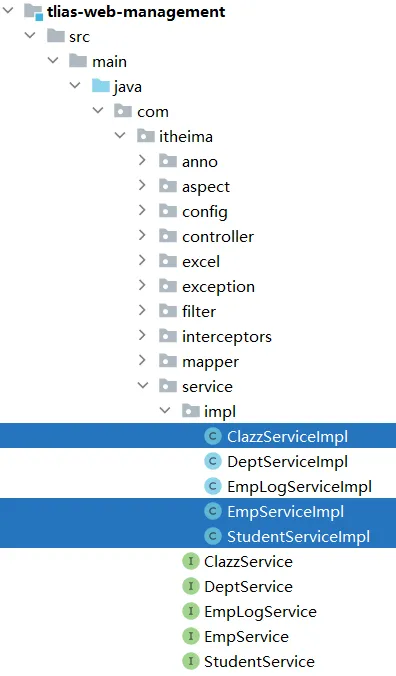
ClazzServiceImpl 代码
@Override
public PageResult page(String name, LocalDate begin, LocalDate end, Integer page, Integer pageSize) {
    // PageHelper.startPage(page, pageSize);
    //
    // List<Clazz> dataList = clazzMapper.list(name,begin,end);
    // Page<Clazz> p = (Page<Clazz>) dataList;
    //
    // return new PageResult(p.getTotal(), p.getResult());
    return null;
}
EmpServiceImpl 代码
@Override
public PageResult<Emp> page(EmpQueryParam empQueryParam) {
    // //1. 设置分页参数
    // PageHelper.startPage(empQueryParam.getPage(), empQueryParam.getPageSize());
    //
    // //2. 执行查询
    // List<Emp> empList = empMapper.list(empQueryParam);
    // Page<Emp> p = (Page<Emp>) empList;
    //
    // //3. 封装分页结果
    // return new PageResult<>(p.getTotal(), p.getResult());
    return null;
}
StudentServiceImpl 代码
@Override
public PageResult page(String name, Integer degree, Integer clazzId, Integer page, Integer pageSize) {
    // PageHelper.startPage(page, pageSize);
    //
    // List<Student> studentList = studentMapper.list(name,degree,clazzId);
    // Page<Student> p = (Page<Student>) studentList;
    //
    // return new PageResult(p.getTotal(), p.getResult());
    return null;
}
接着,在引导类上添加注解,配置自动扫描Mapper:
@MapperScan("com.itheima.mapper")
@ServletComponentScan
@SpringBootApplication
public class TliasMangementSystemApplication {
    public static void main(String[] args) {
        SpringApplication.run(TliasMangementSystemApplication.class, args);
    }
}
定义mapper
为了简化单表CRUD,MybatisPlus提供了一个基础的BaseMapper接口,其中已经实现了单表的CRUD:
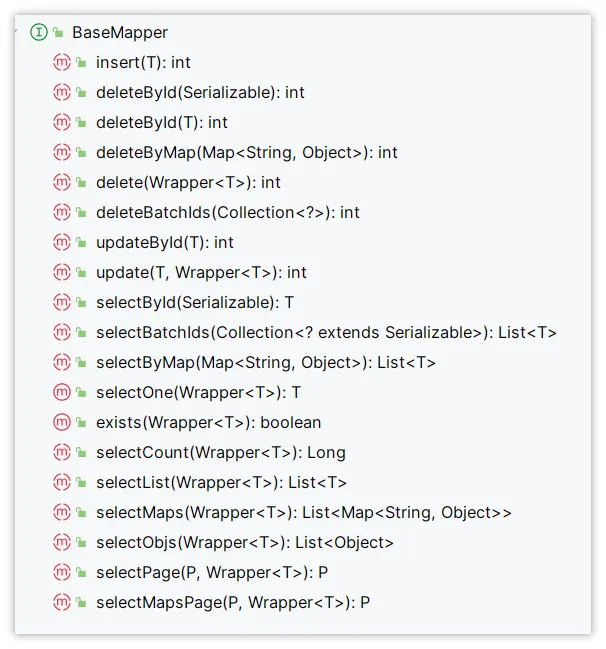
因此我们自定义的Mapper只要实现了这个BaseMapper,就无需自己实现单表CRUD了。
修改DeptMapper接口,让其继承BaseMapper,接口中的代码可以全部注释掉或者删除:
package com.itheima.mapper;
import com.baomidou.mybatisplus.core.mapper.BaseMapper;
import com.itheima.pojo.Dept;
import org.apache.ibatis.annotations.Mapper;
/**
 * Alt+7 查看当前类结构
 * BaseMapper<Dept>
 *     BaseMapper MP实现了很多CRUD方法
 *     Dept实体类,MP会以Dept类的小写作为表名,Dept实体类里面的属性作为查询数据库的字段
 */
@Mapper
public interface DeptMapper extends BaseMapper<Dept> {
   //里面的代码全部删除或注释
}
同时可以把原有的基础代码给注释掉或者删除掉,把对应的xml映射文件改个名字或删除(彻底失效)
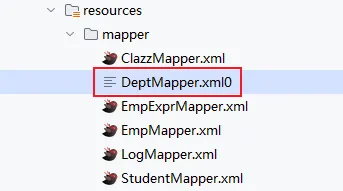
修改Service层实现类:DeptServiceImpl,内容如下:
package com.itheima.service.impl;
import com.itheima.exception.BusinessException;
import com.itheima.mapper.DeptMapper;
import com.itheima.mapper.EmpMapper;
import com.itheima.pojo.Dept;
import com.itheima.service.DeptService;
import org.springframework.beans.factory.annotation.Autowired;
import org.springframework.stereotype.Service;
import java.time.LocalDateTime;
import java.util.List;
@Service
public class DeptServiceImpl implements DeptService {
    @Autowired
    private DeptMapper deptMapper;
    @Autowired
    private EmpMapper empMapper;
    @Override
    public List<Dept> list() {
        //打印当前线程id
        System.out.println("DeptServiceImpl: 当前线程id="+Thread.currentThread().getId());
        return deptMapper.selectList(null);//mp的BaseMapper没有list方法,更换为 selectList
    }
    @Override
    public void delete(Integer id) {
        //1. 判断部门下是否有员工, 如果有, 需要提示错误信息
        Integer count = empMapper.countByDeptId(id);
        if(count > 0){
            throw new BusinessException("部门下有员工, 不能删除");
        }
        //2. 删除部门
        deptMapper.deleteById(id);;//mp的BaseMapper也有deleteById
    }
    @Override
    public void add(Dept dept) {
        //1. 补全基础属性
        dept.setCreateTime(LocalDateTime.now());
        dept.setUpdateTime(LocalDateTime.now());
        //2. 调用Mapper接口
        deptMapper.insert(dept);
    }
    @Override
    public Dept getInfo(Integer id) {
        return deptMapper.selectById(id);//mp的BaseMapper没有getById,更换为selectById
    }
    @Override
    public void update(Dept dept) {
        //1. 补全属性
        dept.setUpdateTime(LocalDateTime.now());
        //2. 调用Mapper
        deptMapper.updateById(dept);//mp的BaseMapper没有update,更换为updateById
    }
}
tlias-pojo中Dept代码修改如下
package com.itheima.pojo;
import com.baomidou.mybatisplus.annotation.IdType;
import com.baomidou.mybatisplus.annotation.TableId;
import lombok.AllArgsConstructor;
import lombok.Data;
import lombok.NoArgsConstructor;
import java.time.LocalDateTime;
@Data
@NoArgsConstructor
@AllArgsConstructor
public class Dept {
    @TableId(value = "id",type= IdType.AUTO) //设置主键采用数据库自增长设置值
    private Integer id;
    private String name;
    private LocalDateTime createTime;
    private LocalDateTime updateTime;
}
以上的所有操作数据库的方法,都是继承了BaseMapper之后提供好的方法,可以正常操作数据库
修改完成后,启动后端程序和nginx程序,打开前端页面,在部门管理页面执行增删改查,是不是都是可以正常使用呀,如果是的话,那就恭喜你啦,成功入门MyBatisPlus啦!
常见注解
在刚刚的入门案例中,我们仅仅引入了依赖,继承了BaseMapper就能使用MybatisPlus,非常简单。但是问题来了: MybatisPlus如何知道我们要查询的是哪张表?表中有哪些字段呢?
大家回忆一下,DeptMapper在继承BaseMapper的时候是不是指定了一个泛型呀:
public interface DeptMapper extends BaseMapper<Dept> {
}
泛型中的Dept就是与数据库对应的pojo
MybatisPlus就是根据pojo实体的信息通过反射来推断出表的信息,从而生成SQL的。默认情况下:
- MybatisPlus会把pojo实体的类名驼峰转下划线作为表名
- MybatisPlus会把名为id的字段作为主键
- MybatisPlus会把pojo实体的所有变量名驼峰转下划线作为表的字段名,并根据变量类型推断字段类型
但很多情况下,默认的实现与实际场景不符,因此MybatisPlus提供了一些注解便于我们声明表信息。
@TableName
- 描述:表名注解,标识实体类对应的表
- 使用位置:实体类
- 示例:
@Data
@NoArgsConstructor
@AllArgsConstructor
@TableName("tb_user")
public class User {
    private Long id;
    private String name;
    private Boolean isMarried;
    private Integer order;
    private String address;
}
@TableId
- 描述:主键注解,标识实体类中的主键字段
- 使用位置:实体类的主键字段
- 示例
@Data
@NoArgsConstructor
@AllArgsConstructor
@TableName("tb_user")
public class User {
    @TableId(value = "id", type = IdType.AUTO)
    private Long id;
    private String name;
    private Boolean isMarried;
    private Integer order;
    private String address;
}
- 注解支持两个属性:

IdType支持的类型有:
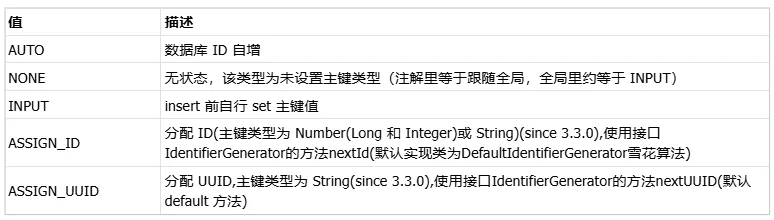
这里比较常见的有三种:
AUTO:利用数据库的id自增长INPUT:手动生成idASSIGN_ID:雪花算法生成Long类型的全局唯一id(数据库对应的数据类型bigint,生成的位数至少19位数字),这是默认的ID策略
@TableField
- 普通字段注解
- 示例
@Data
@NoArgsConstructor
@AllArgsConstructor
@TableName("tb_user")
public class User {
    @TableId(value = "id", type = IdType.AUTO)
    private Long id;
    @TableField("username")
    private String name;
    @TableField("is_married")
    private Boolean isMarried;
    @TableField("`order`")
    private Integer order;
    @TableField(exist = false)
    private String address;
}
一般情况下我们并不需要给字段添加@TableField注解,一些特殊情况除外:
- 成员变量名与数据库字段名不一致
- 成员变量是以
isXXX命名,按照JavaBean的规范,MybatisPlus识别字段时会把is去除,这就导致与数据库不符。 - 成员变量名与数据库一致,但是与数据库的关键字冲突。使用
@TableField注解给字段名添加转义字符:`` - 成员变量不是数据库中的字段,则需要使用
exist表明为false
案例 Dept类操作
数据库表(注意修改了表名和字段名)
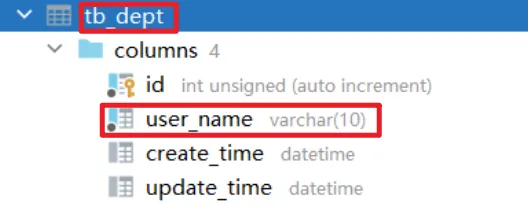
Dept类 代码
@TableName("tb_dept") //当表名与实体类名不一致的时候设置表名的
@Data
@NoArgsConstructor
@AllArgsConstructor
public class Dept {
    @TableId(value = "id",type= IdType.AUTO) //设置主键采用数据库自增长设置值,也用于标识主键字段,但是MP自动识别id为主键,type默认是雪花算法
    private Integer id;
    @TableField("user_name") //当数据库字段名与实体类属性名不一致设置数据库字段名
    private String name;
    private LocalDateTime createTime;
    private LocalDateTime updateTime;
    @TableField(exist = false) //设置数据库不存在这个字段,这样操作数据库就会忽略这个字段
    private String address;
}
测试类
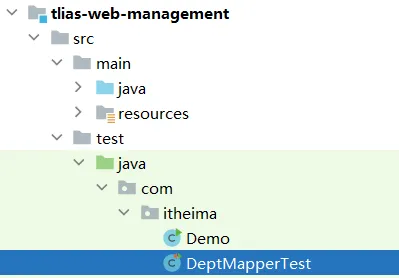
@SpringBootTest
public class DeptMapperTest {
    @Autowired
    private DeptMapper deptMapper;
    @Test
    public void test1(){
        List<Dept> deptList = deptMapper.selectList(null);
        deptList.forEach(System.out::println);//打印每个部门元素对象
    }
}
常见配置
MybatisPlus也支持基于yml文件的自定义配置,详见官方文档:https://www.baomidou.com/reference/
大多数的配置都有默认值,因此我们都无需配置。但还有一些是没有默认值的,例如:
- 全局id类型
mybatis-plus:
  global-config:
    db-config:
      id-type: auto             # 全局id类型为自增长
      update-strategy: not_null # 更新策略:只更新非空字段
需要注意的是,MyBatisPlus也支持手写SQL的,而mapper文件的读取地址可以自己配置:
- type-aliases-package:实体类的别名扫描包
- mapper-locations:xml映射文件目录
mybatis-plus:
  type-aliases-package: com.itheima.pojo
  mapper-locations: classpath:mapper/**/*Mapper.xml
  configuration:
    map-underscore-to-camel-case: true
    log-impl: org.apache.ibatis.logging.stdout.StdOutImpl
  global-config:
    db-config:
      id-type: auto             # 全局id类型为自增长
      update-strategy: not_null # 更新策略:只更新非空字段
所以所有XXXMapper.xml文件移动到resources/mapper目录下

也可以配置成classpath*:mapper/**.xml,也就是说我们只要把mapper.xml文件放置这个目录下就一定会被加载。
例如,我们开发DeptMapper.xml文件中的sql片段:
<?xml version="1.0" encoding="UTF-8" ?>
<!DOCTYPE mapper
PUBLIC "-//mybatis.org//DTD Mapper 3.0//EN"
"http://mybatis.org/dtd/mybatis-3-mapper.dtd">
<mapper namespace="com.itheima.mapper.DeptMapper">
  <update id="update">
    update dept set name = #{name}, update_time = #{updateTime} where id = #{id}
  </update>
</mapper>
同时,放开DeptMapper.java中的update方法:
public interface DeptMapper extends BaseMapper<Dept> {
    /*
    @Select("select id, name, create_time, update_time from dept order by update_time desc ")
    List<Dept> findAll();
    @Delete("delete from dept where id = #{id}")
    void deleteById(Integer id);
    @Insert("insert into dept(name, create_time, update_time) values (#{name}, #{createTime}, #{updateTime})")
    void save(Dept dept);
    @Select("select id, name, create_time, update_time from dept where id = #{id}")
    Dept getById(Integer id);
    */
    void update(Dept dept);
}
最后,修改DeptServiceImpl中的update方法:
@Override
    public void update(Dept dept) {
        // 补全基础属性
        dept.setUpdateTime(LocalDateTime.now());
//        deptMapper.updateById(dept);
        deptMapper.update(dept);
    }
重启后端程序,测试更新,依然正常可用,说明此时咱们放在mapper目录下的xml映射文件生效了。
核心功能
刚才的案例中都是以id为条件的简单CRUD,一些复杂条件的SQL语句就要用到一些更高级的功能了,所以,接下来咱们开始学习MyBatisPlus中的核心功能,包括3个小节:
- 条件构造器
- 自定义SQL
- Service接口
条件构建器
除了新增以外,查询、修改、删除的SQL语句都需要指定where条件。因此BaseMapper中提供的相关方法除了以id作为where条件以外,还支持更加复杂的where条件。
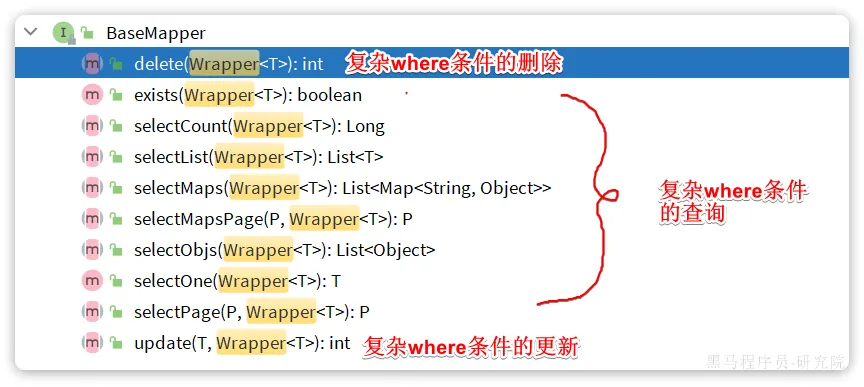
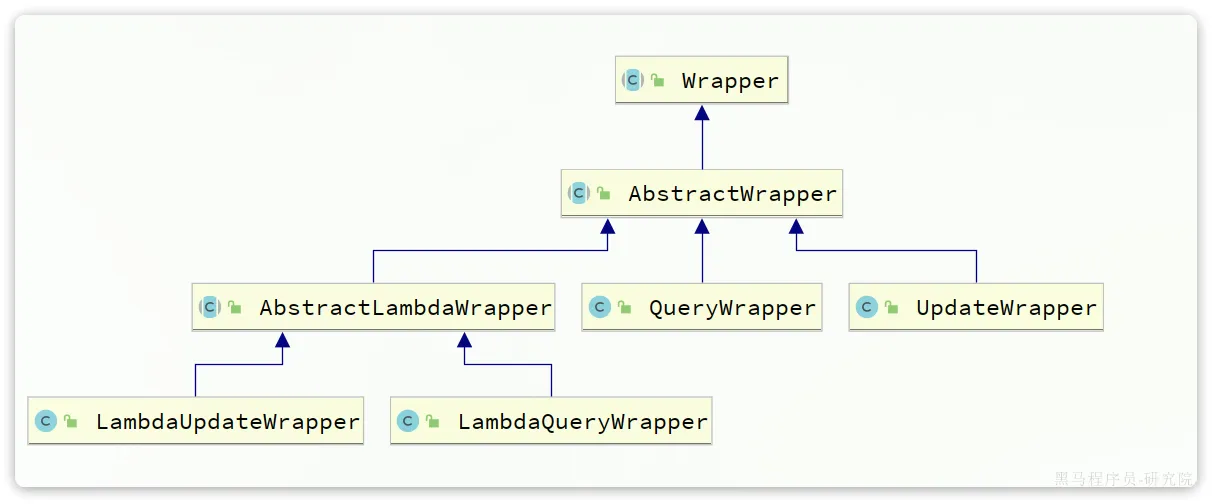
参数中的Wrapper就是条件构造的抽象类,其下有很多默认实现,继承关系如图:
Wrapper的子类AbstractWrapper提供了where中包含的所有条件构造方法:
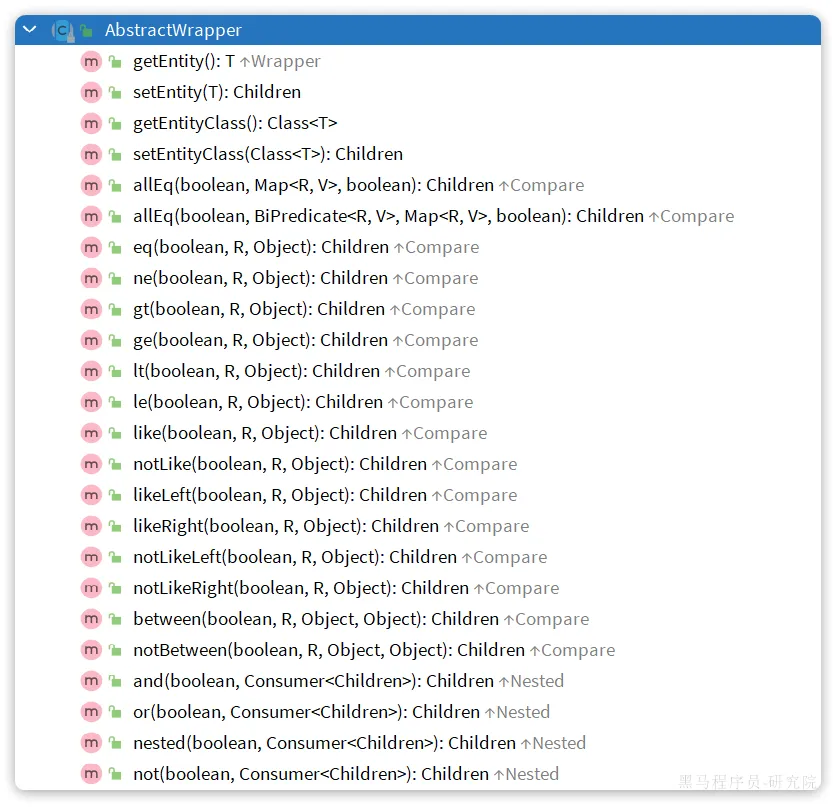
而QueryWrapper在AbstractWrapper的基础上拓展了一个select方法,允许指定查询字段:

而UpdateWrapper在AbstractWrapper的基础上拓展了一个set方法,允许指定SQL中的SET部分:

接下来,我们就来看看如何利用Wrapper实现复杂查询。
QueryWrapper
无论是修改、删除、查询,都可以使用QueryWrapper来构建查询条件。接下来看一些例子: 查询:查询姓名中包含“李”且薪资大于等于5000的员工的 id, name, phone, salary字段。代码如下:
首先让EmpMapper继承自BaseMapper:
注释如下代码
/**
 * 操作员工信息的Mapper
 */
@Mapper
public interface EmpMapper extends BaseMapper<Emp> {
    /**
     * 查询员工信息
     */
    //@Select("select emp.*, dept.name as dept_name from emp left join dept on emp.dept_id = dept.id")
    //public List<Emp> list(String name, Integer gender, LocalDate begin, LocalDate end);
    //@LogOperator
    public List<Emp> list(EmpQueryParam empQueryParam);
    /**
     * 保存员工信息 - insert
     * 主键返回 --> 获取到插入这条数据的主键.
     */
    // @Options(useGeneratedKeys = true, keyProperty = "id")
    // @Insert("insert into emp(username, name, gender, image, job, entry_date, phone, salary, dept_id, create_time, update_time) " +
    //         "values (#{username}, #{name}, #{gender}, #{image}, #{job}, #{entryDate}, #{phone}, #{salary}, #{deptId}, #{createTime}, #{updateTime})")
    // void insert(Emp emp);
    /**
     * 批量删除员工信息
     */
    void deleteByIds(List<Integer> ids);
    /**
     * 根据id查询员工信息(基本信息, 工作经历信息)
     */
    Emp getById(Integer id);
    /**
     * 根据ID更新员工的基本信息
     */
    // void update(Emp emp);
    /**
     * 统计员工职位人数
     */
    @MapKey("pos")
    List<Map> getEmpJobData();
    /**
     * 统计员工性别
     */
    @MapKey("name")
    List<Map<String, Object>> getEmpGenderData();
    /**
     * 根据部门id查询员工人数
     */
    @Select("select count(*) from emp where dept_id = #{deptId}")
    Integer countByDeptId(Integer deptId);
    /**
     * 查询所有的图像访问路径
     */
    @Select("select distinct image from emp where image != '' and image is not null")
    List<String> listFiles();
    @Select("select * from emp where username=#{username} and password=#{password}")
    Emp findByUserNameAndPwd(Emp emp);
}
EmpMapper.xml代码
<!DOCTYPE mapper
        PUBLIC "-//mybatis.org//DTD Mapper 3.0//EN"
        "http://mybatis.org/dtd/mybatis-3-mapper.dtd">
<mapper namespace="com.itheima.mapper.EmpMapper">
    <!--更新员工信息
        <set> : 替换set关键字; 会自动去除掉更新字段后多余的 逗号(,)
    -->
    <!--<update id="update">-->
    <!--    update emp-->
    <!--    <set>-->
    <!--        <if test="username != null and username != ''">username = #{username},</if>-->
    <!--        <if test="password != null and password != ''">password = #{password},</if>-->
    <!--        <if test="name != null and name != ''">name = #{name},</if>-->
    <!--        <if test="gender != null">gender = #{gender},</if>-->
    <!--        <if test="image != null and image != ''">image = #{image},</if>-->
    <!--        <if test="job != null">job = #{job},</if>-->
    <!--        <if test="entryDate != null">entry_date = #{entryDate},</if>-->
    <!--        <if test="phone != null and phone != ''">phone = #{phone},</if>-->
    <!--        <if test="salary != null">salary = #{salary},</if>-->
    <!--        <if test="deptId != null">dept_id = #{deptId},</if>-->
    <!--        <if test="updateTime != null">update_time = #{updateTime}</if>-->
    <!--    </set>-->
    <!--    where id=#{id}-->
    <!--</update>-->
    <!--批量删除员工-->
    <delete id="deleteByIds">
        delete from emp where id in
        <foreach collection="ids" separator="," item="id" open="(" close=")">
            #{id}
        </foreach>
    </delete>
    <!--
    注意事项:
        #{...} 占位符, 不能出现在引号之内 - concat('%',#{name},'%')
    动态SQL:
        <if test=""> : 条件判断; test属性指定条件表达式, 如果条件表达式的值为true, 则拼接里面的SQL片段; 如果为false,则不拼接;
        <where>:
            - 如果where关键字后面有成立的条件, 则会生成where关键字; 如果where关键字后面没有成立的条件, 则会删除where关键字;
            - 会自动去除第一个条件前多余的and/or
    -->
    <select id="list" resultType="com.itheima.pojo.Emp">
        select emp.*, dept.name as dept_name
        from emp
        left join dept on emp.dept_id = dept.id
        <where>
            <if test="name != null and name != ''">
                emp.name like concat('%',#{name},'%')
            </if>
            <if test="gender != null">
               and emp.gender = #{gender}
            </if>
            <if test="begin != null and end != null">
                and emp.entry_date between #{begin} and #{end}
            </if>
        </where>
        order by emp.update_time desc
    </select>
    <!--自定义ResultMap-->
    <resultMap id="empMap" type="com.itheima.pojo.Emp">
        <id column="id" property="id"/>
        <result column="username" property="username"/>
        <result column="name" property="name"/>
        <result column="gender" property="gender"/>
        <result column="image" property="image"/>
        <result column="job" property="job"/>
        <result column="entry_date" property="entryDate"/>
        <result column="phone" property="phone"/>
        <result column="salary" property="salary"/>
        <result column="dept_id" property="deptId"/>
        <result column="create_time" property="createTime"/>
        <result column="update_time" property="updateTime"/>
        <collection property="exprList" ofType="com.itheima.pojo.EmpExpr">
            <id column="ee_id" property="id"/>
            <result column="ee_emp_id" property="empId"/>
            <result column="ee_begin" property="begin"/>
            <result column="ee_end" property="end"/>
            <result column="ee_company" property="company"/>
            <result column="ee_job" property="job"/>
        </collection>
    </resultMap>
    <!--根据ID查询员工的详细信息
       resultType: 返回的结果集类型, 主要用来封装一些简单的类型的数据;
       resultMap: 返回的结果集类型, 主要用来封装一些复杂的类型数据, 例如: 嵌套结果集, 嵌套查询,
    -->
    <select id="getById" resultMap="empMap">
        select e.*,
               ee.id ee_id,
               ee.emp_id ee_emp_id,
               ee.begin ee_begin,
               ee.end ee_end,
               ee.company ee_company,
               ee.job ee_job
        from emp e left join emp_expr ee on e.id = ee.emp_id where e.id = #{id}
    </select>
    <!--统计员工的职位人数-->
    <select id="getEmpJobData" resultType="java.util.Map">
        select (case
                    when job = 1 then '班主任'
                    when job = 2 then '讲师'
                    when job = 3 then '学工主管'
                    when job = 4 then '教研主管'
                    when job = 5 then '咨询师'
                    else '其他'
            end) as pos,
               count(*) num from emp
        group by job
        order by num
    </select>
    <!--统计性别人数-->
    <select id="getEmpGenderData" resultType="java.util.Map">
        select
            if(gender = 1, '男性员工', '女性员工') as name,
            count(*) as value
        from emp group by gender
    </select>
</mapper>
EmpServiceImpl代码修改
@Transactional(rollbackFor = Exception.class)
@Override
public void update(Emp emp) {
    //1. 根据ID更新员工基本信息
    emp.setUpdateTime(LocalDateTime.now());
    empMapper.updateById(emp); //将update修改为updateById
    //2. 更新员工的工作经历信息(先删除, 再添加)
    //2.1 根据员工的id删除员工的工作经历
    empExprMapper.deleteByEmpIds(Arrays.asList(emp.getId()));
    //2.2 再添加员工的工作经历 (批量)
    List<EmpExpr> exprList = emp.getExprList();
    if(exprList != null && !exprList.isEmpty()){ //有工作经历
        //遍历集合,设置员工id
        exprList.forEach(expr -> {
            expr.setEmpId(emp.getId());
        });
        empExprMapper.insertBatch(exprList);
    }
}
Emp实体类代码修改
@Data
public class Emp {
    private Integer id; //ID,主键
    private String username; // 用户名
    private String password; //密码
    private String name; //姓名
    private Integer gender; //性别, 1:男, 2:女
    private String phone; //手机号
    private Integer job; //职位, 1:班主任,2:讲师,3:学工主管,4:教研主管,5:咨询师
    private Integer salary; //薪资
    private String image; //头像
    private LocalDate entryDate; //入职日期
    private Integer deptId; //关联的部门ID
    private LocalDateTime createTime; //创建时间
    private LocalDateTime updateTime; //修改时间
    //封装部门名称数
    @TableField(exist = false)
    private String deptName; //部门名称
    //封装员工的工作经历集合
    @TableField(exist = false)
    private List<EmpExpr> exprList;
}
为了方便测试,咱们使用单元测试学习QueryWrapper的使用:
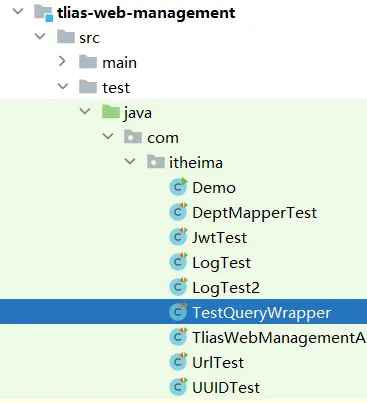
package com.itheima;
import com.baomidou.mybatisplus.core.conditions.query.QueryWrapper;
import com.itheima.mapper.EmpMapper;
import com.itheima.pojo.Emp;
import org.junit.jupiter.api.Test;
import org.springframework.beans.factory.annotation.Autowired;
import org.springframework.boot.test.context.SpringBootTest;
import java.util.List;
@SpringBootTest
public class TestQueryWrapper {
    @Autowired
    private EmpMapper empMapper;
    @Test
    public void testQueryWrapper() {
        // 查询姓名中包含“李”且薪资大于等于5000的员工的 id, name, phone, salary字段
        QueryWrapper<Emp> queryWrapper = new QueryWrapper<>();
        queryWrapper.like("name", "李")
                .ge("salary", 5000)
                .select("id", "name", "phone", "salary");
        List<Emp> emps = empMapper.selectList(queryWrapper);
        emps.forEach(System.out::println);
    }
}
更新:更新名为"李忠"的员工的薪水为18000,代码如下:
@Test
public void testUpdateByQueryWrapper() {
    // 更新名为"李忠"的员工的薪水为18000
    Emp emp = new Emp();
    emp.setSalary(18000);
    QueryWrapper<Emp> queryWrapper = new QueryWrapper<>();
    queryWrapper.eq("name", "李忠");
    empMapper.update(emp, queryWrapper);
}
UpdateWrapper
更新:更新id为5, 6, 7的员工的薪水,加2000,代码如下:
update emp set salary = salary + 2000 where id in (5, 6, 7);
@Test
public void testUpdateWrapper() {
    // 更新id为5, 6, 7的员工的薪水,加2000
    UpdateWrapper<Emp> updateWrapper = new UpdateWrapper<>();
    updateWrapper.in("id", 5, 6, 7)
            .setSql("salary = salary + 2000");
    empMapper.update(updateWrapper);
}
LambdaQueryWrapper
无论是QueryWrapper还是UpdateWrapper在构造条件的时候都需要写死字段名称,这在编程规范中显然是不推荐的。 那怎么样才能不写字段名,又能知道字段名呢?
其中一种办法是基于变量的gettter方法结合反射技术来实现,因此我们只要将条件对应的字段的getter方法传递给MybatisPlus,它就能计算出对应的变量名了。而传递方法可以使用JDK8中的方法引用和Lambda表达式。 因此MybatisPlus又提供了一套基于Lambda的Wrapper,包含两个:
- LambdaQueryWrapper
- LambdaUpdateWrapper
分别对应QueryWrapper和UpdateWrapper
其使用方式如下:
@Test
public void testLambdaUpdateWrapper() {
    // 更新id为5, 6, 7的员工的薪水,加2000
    LambdaUpdateWrapper<Emp> updateWrapper = new LambdaUpdateWrapper<>();
    updateWrapper.in(Emp::getId, 5, 6, 7)
            .setSql("salary = salary + 2000");
    empMapper.update(updateWrapper);
}
@Test
public void test4(){
    //目标:查询姓名中包含“李”且薪资大于等于5000的员工的 id, name, phone, salary字段
    //1.定义QueryWrapper
    LambdaQueryWrapper<Emp> queryWrapper = new LambdaQueryWrapper<>();
    queryWrapper.like(Emp::getName,"李")
            .gt(Emp::getSalary,5000)
            .select(Emp::getId,Emp::getName,Emp::getPhone,Emp::getSalary);
    //2.执行mp的方法操作数据库查询
    List<Emp> empList = empMapper.selectList(queryWrapper);
    //3.打印数据
    empList.forEach(System.out::println);
}
自定义SQL
在上面的例子中,咱们利用Wrapper对象构建了复杂的查询SQL,其实,MyBatisPlus的Wrapper还有一种用法:利用MyBatisPlus的Wrapper来构建复杂的Where条件,然后自己定义SQL语句中剩下的部分。
什么意思呢?来看一个需求:
将id在指定范围的员工(例如5、6、7 )的薪水增加指定值
如果用MyBatis来实现,咱们可以在Mapper.xml文件中编写下面的SQL:
<update id="updateSalaryByIds">
  UPDATE emp
  SET salary = salary + #{amount}
  WHERE id IN
  <foreach collection="ids" separator="," item="id" open="(" close=")">
    #{id}
  </foreach>
</update>
这段SQL片段的Where条件很容易通过Wrapper对象构建出来,而上方的Set条件是不太容易通过Wrapper对象构建的,不过咱们可以这样写:
@Test
void testUpdateWrapper() {
    List<Long> ids = List.of(5, 6, 7);
    UpdateWrapper<Emp> wrapper = new UpdateWrapper<User>()
    .setSql("salary = salary + 2000")
    .in("id", ids);
    empMapper.update(null, wrapper);
}
在UpdateWrapper的setSql方法中可以编写set子句的代码片段,看似没问题,大家再想一下,将来调用Mapper层方法的代码是不是要写在Service层呀,那这样的话咱们就将SQL写在Service中了,这不符合开发规范,也不太好维护,那怎么办呢?答案就是使用自定义SQL:
使用自定义SQL,咱们就可以利用MyBatisPlus的Wrapper来构建复杂的Where条件,然后自己定义SQL语句中剩下的部分,一共分三步:
- 基于Wrapper构建where条件
List<Long> ids = List.of(3L, 5L, 6L);
int amount = 200;
// 1.构建条件
LambdaQueryWrapper<Emp> wrapper = new LambdaQueryWrapper<Emp>().in(Emp::getId, ids);
// 2.自定义SQL方法调用
empMapper.updateBalanceByIds(wrapper, amount);
- 在mapper方法参数中用Param注解声明wrapper变量名称,必须是ew
void updateSalaryByIds(@Param("ew") LambdaQueryWrapper<Emp> wrapper, @Param("amount") int amount);
- 自定义SQL,并使用Wrapper条件
<update id="updateBalanceByIds">
    UPDATE emp SET balance = balance - #{amount} ${ew.customSqlSegment}
</update>
注意:自定义SQL是在Mapper.xml文件中定义的哦
IService接口
MybatisPlus不仅提供了BaseMapper,还提供了通用的Service接口及默认实现,封装了一些常用的service模板方法。 通用接口为IService,默认实现为ServiceImpl,其中封装的方法可以分为以下几类:
save:新增remove:删除update:更新get:查询单个结果list:查询集合结果count:计数page:分页查询
基本的增删改查
我们先来看下基本的CRUD接口,新增
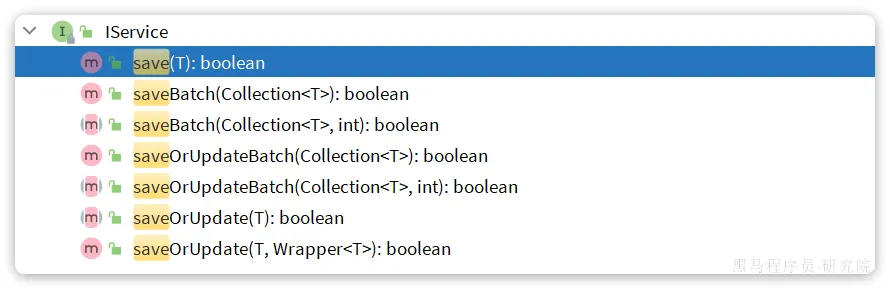
save是新增单个元素saveBatch是批量新增saveOrUpdate是根据id判断,如果数据存在就更新,不存在则新增saveOrUpdateBatch是批量的新增或修改
删除:
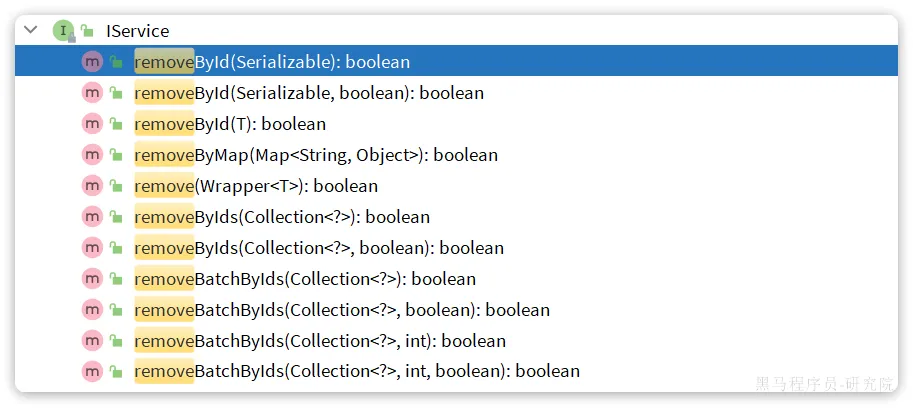
removeById:根据id删除removeByIds:根据id批量删除removeByMap:根据Map中的键值对为条件删除remove(Wrapper<T>):根据Wrapper条件删除~~removeBatchByIds~~:暂不支持
修改:

updateById:根据id修改update(Wrapper<T>):根据UpdateWrapper修改,Wrapper中包含set和where部分update(T,Wrapper<T>):按照T内的数据修改与Wrapper匹配到的数据updateBatchById:根据id批量修改
Get:
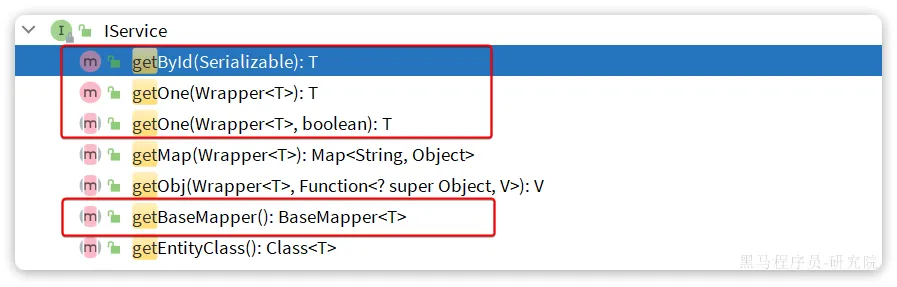
getById:根据id查询1条数据getOne(Wrapper<T>):根据Wrapper查询1条数据getBaseMapper:获取Service内的BaseMapper实现,某些时候需要直接调用Mapper内的自定义SQL时可以用这个方法获取到Mapper
List:
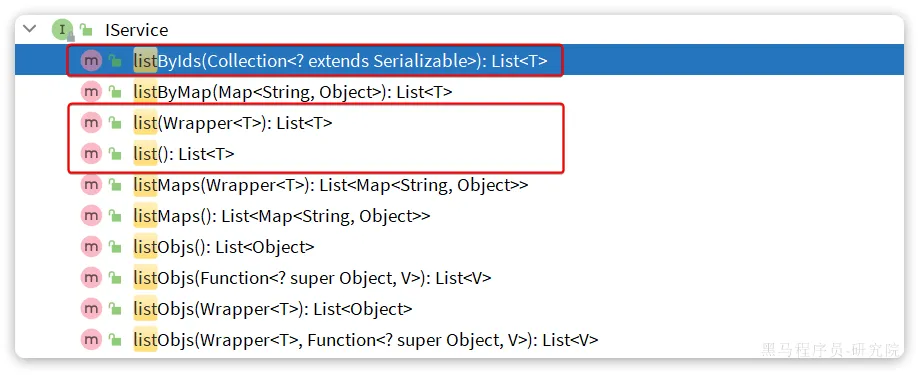
listByIds:根据id批量查询list(Wrapper<T>):根据Wrapper条件查询多条数据list():查询所有
Count:

count():统计所有数量count(Wrapper<T>):统计符合Wrapper条件的数据数量
基本用法与快速入门
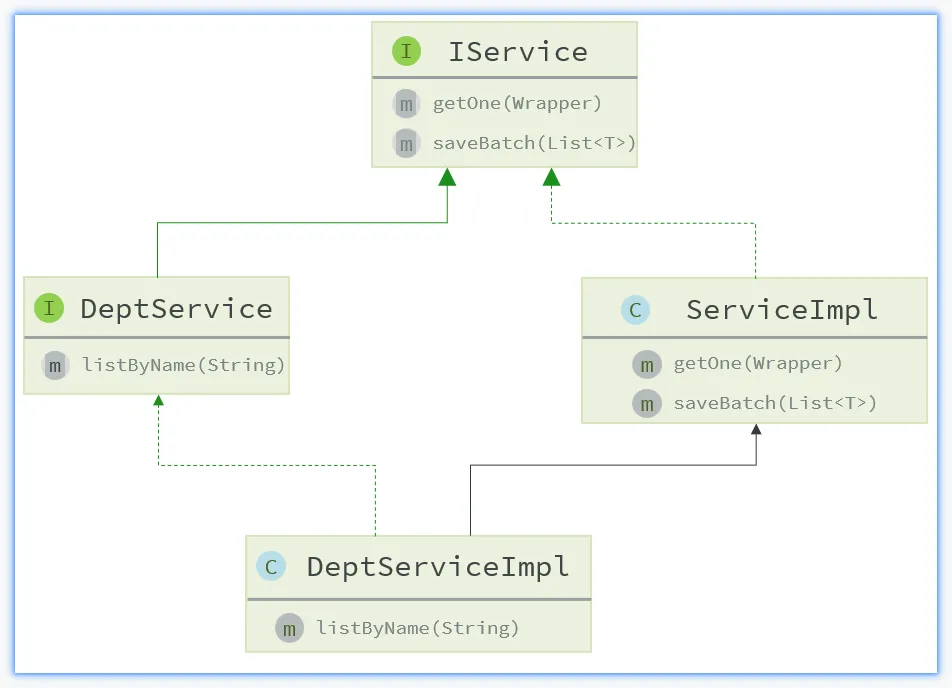
由于Service中经常需要定义与业务有关的自定义方法,因此我们不能直接使用IService,而是自定义Service接口,然后继承IService以拓展方法。同时,让自定义的Service实现类继承ServiceImpl,这样就不用自己实现IService中的接口了。
怎么样?听上去是不是很厉害?那接下来咱们就通过一个入门程序来感受一下是不是如此吧。
需求:基于MyBatisPlus的 Iservice 接口,实现Tlias智能学习辅助系统部门管理页面的所有功能:
- 新增部门功能
- 根据id查询部门
- 根据id更新部门
- 根据id删除部门
首先,找到DeptService接口,让它继承IService接口,并在泛型上指定实体类的类型:
public interface DeptService extends IService<Dept> {
    /**
     * 删除部门数据
     */
    void delete(Integer id);
    /**
     * 新增部门数据
     */
    void add(Dept dept);
    /**
     * 修改部门数据
     */
    void update(Dept dept);
}
里面原来书写的方法都可以全部删除啦。
接着,在找到DeptService接口的实现类:DeptServiceImpl,让它继承自ServiceImpl类,在泛型的位置指定Mapper层接口和实体类:
@Service
public class DeptServiceImpl extends ServiceImpl<DeptMapper,Dept> implements DeptService {
    @Autowired
    private EmpMapper empMapper;
    @Override
    public void delete(Integer id) {
        //1. 判断部门下是否有员工, 如果有, 需要提示错误信息
        Integer count = empMapper.countByDeptId(id);
        if(count > 0){
            throw new BusinessException("部门下有员工, 不能删除");
        }
        //2. 删除部门
        removeById(id);
    }
    @Override
    public void add(Dept dept) {
        //1. 补全基础属性
        dept.setCreateTime(LocalDateTime.now());
        dept.setUpdateTime(LocalDateTime.now());
        //2. 调用Mapper接口
        save(dept);
    }
    @Override
    public void update(Dept dept) {
        //1. 补全属性
        dept.setUpdateTime(LocalDateTime.now());
        //2. 调用Mapper
        updateById(dept);
    }
}
最后,修改DeptController中报错的代码,改一下方法调用就可以啦。
@Slf4j
@RequestMapping("/depts")
@RestController
public class DeptController {
    //定义一个日志记录器
    //private static final Logger log = LoggerFactory.getLogger(DeptController.class);
    @Autowired
    private DeptService deptService;
    /**
     * 查询全部部门
     */
    //@RequestMapping(value = "/depts", method = RequestMethod.GET)
    @GetMapping
    public Result list(){
        log.info("查询全部部门 ~ ");
        //打印当前线程id
        System.out.println("DeptController: 当前线程id="+Thread.currentThread().getId());
        List<Dept> deptList = deptService.list();
        return Result.success(deptList);
    }
    /**
     * 根据ID删除部门 --> /depts?id=10
     * 方式三: 直接定义形参接收 ---> 保证前端请求参数名 与 方法形参名一致 --> (推荐)
     */
    @DeleteMapping
    public Result delete(Integer id){
        log.info("根据ID删除部门 ~ , {}", id);
        deptService.delete(id);
        return Result.success();
    }
    /**
     * 添加部门
     *  {“name”:“教研部”} -----------> @RequestBody 实体对象 Dept dept
     */
    @PostMapping
    public Result add(@RequestBody Dept dept){
        log.info("添加部门 : {}", dept);
        deptService.add(dept);
        return Result.success();
    }
    /**
     * 根据ID查询部门  ---> /depts/1
     *                    /depts/2
     *                    /depts/5
     */
    @GetMapping("/{id}")
    public Result getInfo(@PathVariable Integer id){
        log.info("根据ID查询部门 ~ : {}", id);
        Dept dept =  deptService.getById(id);
        return Result.success(dept);
    }
    /**
     * 修改部门  {"id":1, "name":"xxxxx"}
     */
    @PutMapping
    public Result update(@RequestBody Dept dept){
        log.info("修改部门 ~ : {}", dept);
        deptService.update(dept);
        return Result.success();
    }
}
这样,就搞定了哦,接下来,重启程序,打开页面测试一下部门管理的增删改查是不是都还完全正确吧~
到这里,咱们就搞定了MyBatisPlus的基本使用啦,接下来,咱们一起通过员工管理页面来实战一下,在实战中也会引入一些新的技巧哦。
Tlias员工管理页面MyBatisPlus实战
分页查询
员工管理列表页是条件分页查询,先来完成基础的分页查询功能,MyBatisPlus提供了一个分页插件,只有引入这个分页插件,才能支持分页查询。
第一步:引入依赖
在项目中新建一个配置类:com.itheima.config.MybatisConfig

package com.itheima.config;
import com.baomidou.mybatisplus.annotation.DbType;
import com.baomidou.mybatisplus.extension.plugins.MybatisPlusInterceptor;
import com.baomidou.mybatisplus.extension.plugins.inner.PaginationInnerInterceptor;
import org.springframework.context.annotation.Bean;
import org.springframework.context.annotation.Configuration;
@Configuration
public class MybatisConfig {
    @Bean
    public MybatisPlusInterceptor mybatisPlusInterceptor() {
        // 初始化MyBatisPlus核心插件
        MybatisPlusInterceptor mybatisPlusInterceptor = new MybatisPlusInterceptor();
        // 添加分页插件
        PaginationInnerInterceptor paginationInnerInterceptor = new PaginationInnerInterceptor(DbType.MYSQL);
        paginationInnerInterceptor.setMaxLimit(1000L);
        mybatisPlusInterceptor.addInnerInterceptor(paginationInnerInterceptor);
        return mybatisPlusInterceptor;
    }
}
环境准备
EmpService 代码
package com.itheima.service;
import com.baomidou.mybatisplus.extension.service.IService;
import com.itheima.pojo.*;
import java.util.List;
import java.util.Map;
public interface EmpService extends IService<Emp> {
    /**
     * 分页查询
     */
    PageResult<Emp> page(EmpQueryParam empQueryParam);
    /**
     * 保存员工信息
     */
    boolean save(Emp emp);
    /**
     * 查询所有的员工数据
     */
    List<Emp> list();
    /**
     * 批量删除员工
     */
    void delete(List<Integer> ids);
    /**
     * 根据id查询员工信息
     */
    Emp getById(Integer id);
    /**
     * 更新员工信息
     */
    void update(Emp emp);
    /**
     * 统计员工职位人数
     */
    JobOption getEmpJobData();
    /**
     * 统计员工性别
     */
    List<Map<String, Object>> getEmpGenderData();
    /**
     * 根据用户名与密码查询员工登录信息
     * @param emp
     * @return
     */
    LoginInfo getLoginInfo(Emp emp);
}
EmpServiceImpl 原始代码
package com.itheima.service.impl;
import cn.hutool.core.collection.CollectionUtil;
import com.baomidou.mybatisplus.extension.plugins.pagination.Page;
import com.baomidou.mybatisplus.extension.service.impl.ServiceImpl;
import com.itheima.mapper.EmpExprMapper;
import com.itheima.mapper.EmpMapper;
import com.itheima.pojo.*;
import com.itheima.service.DeptService;
import com.itheima.service.EmpLogService;
import com.itheima.service.EmpService;
import com.itheima.utils.JwtUtils;
import lombok.extern.slf4j.Slf4j;
import org.springframework.beans.factory.annotation.Autowired;
import org.springframework.stereotype.Service;
import org.springframework.transaction.annotation.Transactional;
import java.time.LocalDateTime;
import java.util.Arrays;
import java.util.HashMap;
import java.util.List;
import java.util.Map;
import java.util.stream.Collectors;
@Slf4j
@Service
public class EmpServiceImpl extends ServiceImpl<EmpMapper,Emp> implements EmpService {
    @Autowired
    private EmpMapper empMapper;
    @Autowired
    private EmpExprMapper empExprMapper;
    @Autowired
    private DeptService deptService;
    @Override
    public PageResult<Emp> page(EmpQueryParam empQueryParam) {
        // //1. 设置分页参数
        // PageHelper.startPage(empQueryParam.getPage(), empQueryParam.getPageSize());
        //
        // //2. 执行查询
        // List<Emp> empList = empMapper.list(empQueryParam);
        // Page<Emp> p = (Page<Emp>) empList;
        //
        // //3. 封装分页结果
        // return new PageResult<>(p.getTotal(), p.getResult());
        return null;
    }
    @Autowired
    private EmpLogService empLogService;
    @Transactional(rollbackFor = Exception.class) //开启事务管理 - rollbackFor: 抛出什么异常回滚事务
    @Override
    public boolean save(Emp emp) {
        //1. 保存员工的基本信息
        emp.setCreateTime(LocalDateTime.now());
        emp.setUpdateTime(LocalDateTime.now());
        empMapper.insert(emp);
        log.info("保存员工信息, {}", emp);
        //2. 保存员工的工作经历信息 --> 属于上面刚添加的员工的
        List<EmpExpr> exprList = emp.getExprList();
        if(exprList != null && !exprList.isEmpty()){ //有工作经历
            //遍历集合,设置员工id
            exprList.forEach(expr -> {
                expr.setEmpId(emp.getId());
            });
            empExprMapper.insertBatch(exprList);
        }
        return true;
    }
    @Override
    public List<Emp> list() {
        return empMapper.list(null);
    }
    @Transactional(rollbackFor = Exception.class)
    @Override
    public void delete(List<Integer> ids) {
        //1. 删除员工的基本信息
        empMapper.deleteByIds(ids);
        //2. 删除员工的工作经历信息
        empExprMapper.deleteByEmpIds(ids);
    }
    @Override
    public Emp getById(Integer id) {
        return empMapper.getById(id);
    }
    @Transactional(rollbackFor = Exception.class)
    @Override
    public void update(Emp emp) {
        //1. 根据ID更新员工基本信息
        emp.setUpdateTime(LocalDateTime.now());
        empMapper.updateById(emp);
        //2. 更新员工的工作经历信息(先删除, 再添加)
        //2.1 根据员工的id删除员工的工作经历
        empExprMapper.deleteByEmpIds(Arrays.asList(emp.getId()));
        //2.2 再添加员工的工作经历 (批量)
        List<EmpExpr> exprList = emp.getExprList();
        if(exprList != null && !exprList.isEmpty()){ //有工作经历
            //遍历集合,设置员工id
            exprList.forEach(expr -> {
                expr.setEmpId(emp.getId());
            });
            empExprMapper.insertBatch(exprList);
        }
    }
    @Override
    public JobOption getEmpJobData() {
        // [{pos=教研主管, num=1} {pos=讲师, num=14}  {pos=学工主管, num=1} ...]
        List<Map> jobDataList = empMapper.getEmpJobData();
        // 组装数据 JobOption
        List jobList = jobDataList.stream().map(map -> {
            return map.get("pos");
        }).toList();
        List dataList = jobDataList.stream().map(map -> {
            return map.get("num");
        }).toList();
        return new JobOption(jobList, dataList);
    }
    @Override
    public List<Map<String, Object>> getEmpGenderData() {
        List<Map<String, Object>> mapList = empMapper.getEmpGenderData();
        return mapList;
    }
    /**
     * 根据用户名与密码查询员工登录信息
     * ctrl+Alt+鼠标点击,直接进入实现类重写方法中
     * @param emp
     * @return
     */
    @Override
    public LoginInfo getLoginInfo(Emp emp) {
        //1.根据用户名与密码查询员工信息Emp对象
        Emp e = empMapper.findByUserNameAndPwd(emp);
        if(e!=null) {
            //2.实例LoginInfo对象,封装数据返回
            LoginInfo loginInfo = new LoginInfo();
            loginInfo.setId(e.getId());
            loginInfo.setUsername(e.getUsername());
            loginInfo.setName(e.getName());
            //定义载荷
            Map<String,Object> claims = new HashMap<>();
            claims.put("id", e.getId());
            //调用工具类生成令牌
            String token = JwtUtils.generateJwt(claims);
            //封装令牌
            loginInfo.setToken(token);
            return loginInfo;
        }
        return null; //没有找到登录的员工
    }
}
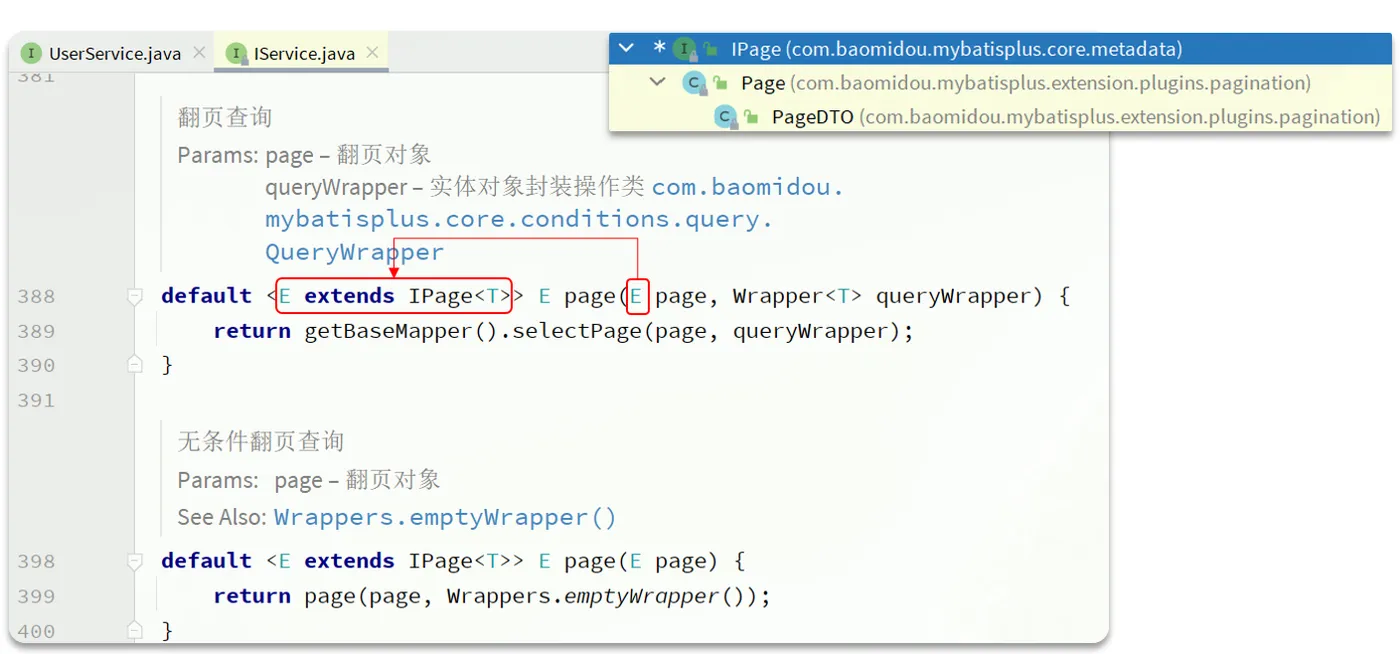
接着,就可以使用分页的API了:
编写代码,完成分页,这一步先不考虑条件查询哦:
对啦,友情提醒,千万不要忘记EmpService和EmpServiceImpl上要做的操作呢!
还有,要记得,分页查询要根据最后修改时间字段倒序排序哦;
EmpServiceImpl代码如下:
@Override
public PageResult<Emp> page(EmpQueryParam empQueryParam) {
    // //1. 设置分页参数
    // PageHelper.startPage(empQueryParam.getPage(), empQueryParam.getPageSize());
    //
    // //2. 执行查询
    // List<Emp> empList = empMapper.list(empQueryParam);
    // Page<Emp> p = (Page<Emp>) empList;
    //
    // //3. 封装分页结果
    // return new PageResult<>(p.getTotal(), p.getResult());
    //使用MP分页实现
    Page<Emp> page = Page.of(empQueryParam.getPage(), empQueryParam.getPageSize());
    // 根据最后修改时间倒序排序
    page.addOrder(OrderItem.desc("update_time"));

    //执行分页查询
    page = page(page);
    return new PageResult<>(page.getTotal(),  page.getRecords());
}
接下来,解决所属部门没有数据的问题

部门名称需要关联部门表查询,而MyBatisPlus是基于单表操作的,怎么办呢?
将多表操作转换成多次单表操作,查询出当前页面所有员工的部门数据,在内存中将部门名称关联到员工对象中。
EmpServiceImpl中修改后的代码如下:
package com.itheima.service.impl;
import com.baomidou.mybatisplus.core.metadata.OrderItem;
import com.baomidou.mybatisplus.extension.plugins.pagination.Page;
import com.baomidou.mybatisplus.extension.service.impl.ServiceImpl;
import com.itheima.mapper.EmpMapper;
import com.itheima.pojo.*;
import com.itheima.service.DeptService;
import com.itheima.service.EmpService;
import org.springframework.beans.factory.annotation.Autowired;
import org.springframework.stereotype.Service;
import java.util.List;
import java.util.stream.Collectors;
@Service
public class EmpServiceImpl extends ServiceImpl<EmpMapper, Emp> implements EmpService {
    @Autowired
    private DeptService deptService;
    @Override
    public PageResult<Emp> page(EmpQueryParam empQueryParam) {
        //使用MP分页实现
        Page<Emp> page = Page.of(empQueryParam.getPage(), empQueryParam.getPageSize());
        // 根据最后修改时间倒序排序
        page.addOrder(OrderItem.desc("update_time"));
        //执行分页查询
        page = page(page);
        //对当前页页数据列表List<Emp>封装部门名称
        List<Emp> empList = page.getRecords();
        //CollectionUtil 是hutool工具类
        if(CollectionUtil.isNotEmpty(empList)) {
            //实现思路:不要一个一个员工去封装查询部门,因为很多部门是重复的
            //         将员工里面部门id抽取出来封装成List<Integer> deptIds
            List<Integer> deptIds = empList.stream().map(Emp::getDeptId)
            .collect(Collectors.toList());
            //         根据部门deptIds查询部门列表
            List<Dept> deptList = deptService.listByIds(deptIds);
            if(CollectionUtil.isNotEmpty(deptList)) {
                //遍历员工empList,封装每个员工的部门名称
                empList.forEach(emp->{
                    deptList.stream().filter(dept->dept.getId().equals(emp.getDeptId()))
                    .findFirst().ifPresent(dept->emp.setDeptName(dept.getName()));
                });
            }
        }
        return new PageResult<>(page.getTotal(), empList);
    }
}
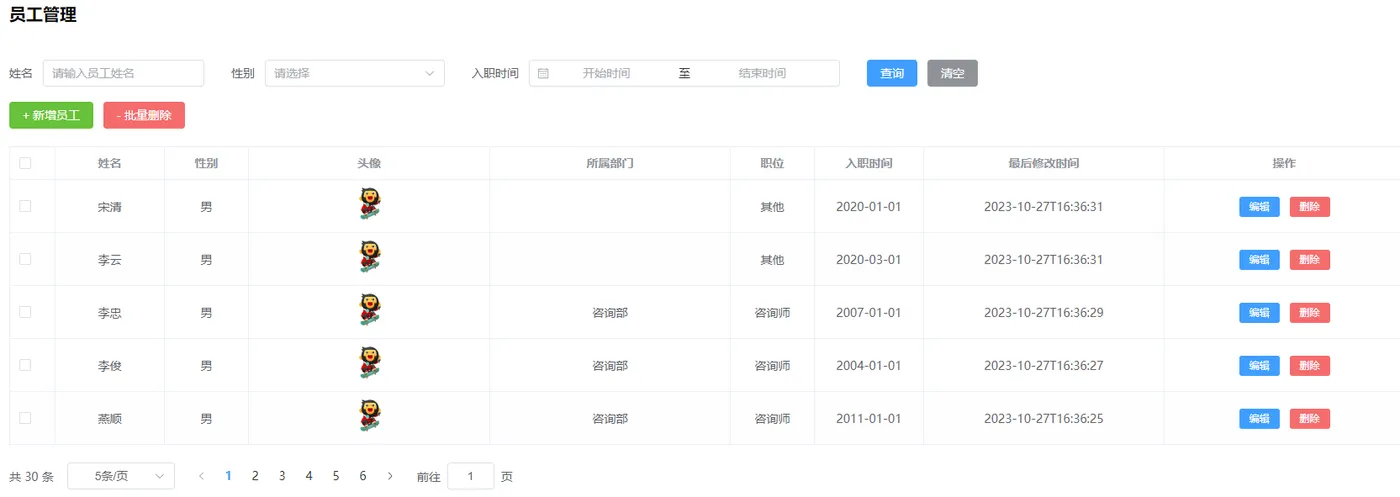
最终页面上的效果如下:
条件分页查询
怎么样,在MyBatisPlus中分页查询是不是很简单?那接下来,再来感受一下条件查询的强大之处吧。
IService接口中的page方法除了能接收一个Page对象作为参数外,还支持传入一个Wrapper对象,同时封装查询条件:
default <E extends IPage<T>> E page(E page, Wrapper<T> queryWrapper) {
    return this.getBaseMapper().selectPage(page, queryWrapper);
}
接下来,就一起来改造分页查询的方法,添加查询条件吧
@Override
public PageResult<Emp> page(EmpQueryParam empQueryParam) {
    //使用MP分页实现
    Page<Emp> page = Page.of(empQueryParam.getPage(), empQueryParam.getPageSize());
    // 根据最后修改时间倒序排序
    page.addOrder(OrderItem.desc("update_time"));
    // 构建查询条件
    LambdaQueryWrapper<Emp> queryWrapper = new LambdaQueryWrapper<>();
    queryWrapper.like(empQueryParam.getName() != null && !empQueryParam.getName().isEmpty(), Emp::getName, empQueryParam.getName())
            .eq(empQueryParam.getGender() != null, Emp::getGender, empQueryParam.getGender())
            .between(empQueryParam.getBegin() != null && empQueryParam.getEnd() != null, Emp::getEntryDate, empQueryParam.getBegin(), empQueryParam.getEnd());
    //执行分页查询
    page = page(page,queryWrapper);
    //对当前页页数据列表List<Emp>封装部门名称
    List<Emp> empList = page.getRecords();
    //CollectionUtil 是hutool工具类
    if(CollectionUtil.isNotEmpty(empList)) {
        //实现思路:不要一个一个员工去封装查询部门,因为很多部门是重复的
        //         将员工里面部门id抽取出来封装成List<Integer> deptIds
        List<Integer> deptIds = empList.stream().map(Emp::getDeptId).collect(Collectors.toList());
        //         根据部门deptIds查询部门列表
        List<Dept> deptList = deptService.listByIds(deptIds);
        if(CollectionUtil.isNotEmpty(deptList)) {
            //遍历员工empList,封装每个员工的部门名称
            empList.forEach(emp->{
                deptList.stream().filter(dept->dept.getId().equals(emp.getDeptId())).findFirst().
                        ifPresent(dept->emp.setDeptName(dept.getName()));
            });
        }
    }
    return new PageResult<>(page.getTotal(), empList);
}
注意这里加上了条件查询,所以要加一个判断,排除掉查询到的员工列表为空的情况,否则程序运行到这里的第30行会报错呢。
到这里,就实现了员工管理的分页查询,不过咱们还可以继续改造它,上面代码片段中绿色背景的代码还要自己new一个Wrapper对象,并将其作为参数传入到page方法内部,还是有点麻烦,这里可以借助于IService中的另外一个方法:lambdaQuery()进一步简化,最终的代码如下:
@Override
public PageResult<Emp> page(EmpQueryParam empQueryParam) {
    //使用MP分页实现
    Page<Emp> page = Page.of(empQueryParam.getPage(), empQueryParam.getPageSize());
    // 根据最后修改时间倒序排序
    page.addOrder(OrderItem.desc("update_time"));
    // 构建查询条件并执行分页
    page = lambdaQuery().like(empQueryParam.getName() != null && !empQueryParam.getName().isEmpty(), Emp::getName, empQueryParam.getName())
            .eq(empQueryParam.getGender() != null, Emp::getGender, empQueryParam.getGender())
            .between(empQueryParam.getBegin() != null && empQueryParam.getEnd() != null, Emp::getEntryDate, empQueryParam.getBegin(), empQueryParam.getEnd())
            .page(page);
    //对当前页页数据列表List<Emp>封装部门名称
    List<Emp> empList = page.getRecords();
    //CollectionUtil 是hutool工具类
    if(CollectionUtil.isNotEmpty(empList)) {
        //实现思路:不要一个一个员工去封装查询部门,因为很多部门是重复的
        //         将员工里面部门id抽取出来封装成List<Integer> deptIds
        List<Integer> deptIds = empList.stream().map(Emp::getDeptId).collect(Collectors.toList());
        //         根据部门deptIds查询部门列表
        List<Dept> deptList = deptService.listByIds(deptIds);
        if(CollectionUtil.isNotEmpty(deptList)) {
            //遍历员工empList,封装每个员工的部门名称
            empList.forEach(emp->{
                deptList.stream().filter(dept->dept.getId().equals(emp.getDeptId())).findFirst().
                        ifPresent(dept->emp.setDeptName(dept.getName()));
            });
        }
    }
    return new PageResult<>(page.getTotal(), empList);
}
新增员工
由于初始项目中去除了阿里云OSS相关的内容,因此,本次新增员工不考虑头像上传,只处理员工基本信息和工作经历信息。
先将Emp中的工作经历列表字段的注释取消,并标记字段不在数据库中。
@Data
public class Emp {
    private Integer id; //ID,主键
    private String username; //用户名
    private String password; //密码
    private String name; //姓名
    private Integer gender; //性别, 1:男, 2:女
    private String phone; //手机号
    private Integer job; //职位, 1:班主任,2:讲师,3:学工主管,4:教研主管,5:咨询师
    private Integer salary; //薪资
    private String image; //头像
    private LocalDate entryDate; //入职日期
    private Integer deptId; //关联的部门ID
    private LocalDateTime createTime; //创建时间
    private LocalDateTime updateTime; //修改时间
    //封装部门名称数
    @TableField(exist = false)
    private String deptName; //部门名称
    // 封装工作经历列表
    @TableField(exist = false)
    private List<EmpExpr> exprList;
}
在EmpController中调用Service层方法,将数据传给Service层处理,代码如下:
@PostMapping
public Result save(@RequestBody Emp emp) {
    log.info("新增员工,员工信息:{}", emp);
    // 调用service层方法保存员工信息和员工的工作经历信息
    empService.saveEmp(emp);
    return Result.success();
}
在EmpService中添加Controller层调用的方法:
public interface EmpService extends IService<Emp> {
    /**
     * 分页查询员工信息
     * @param param 分页参数和查询条件
     * @return  分页结果
     */
    PageResult<Emp> getPageResult(EmpQueryParam param);
    /**
     * 新增员工
     * @param emp   员工信息
     */
    void saveEmp(Emp emp);
}
在EmpServiceImpl中实现该方法:
/**
 * 新增员工
 *
 * @param emp 员工信息
 */
@Override
@Transactional(rollbackFor = Exception.class)
public void saveEmp(Emp emp) {
    // 调用service层方法保存员工信息
    // 补全基础属性
    emp.setCreateTime(LocalDateTime.now());
    emp.setUpdateTime(LocalDateTime.now());
    save(emp);
    // 调用service层方法保存员工工作经历信息
    List<EmpExpr> exprList = emp.getExprList();
    // 添加工作经历所属员工
    exprList.forEach(expr -> expr.setEmpId(emp.getId()));
    empExprService.saveBatch(exprList);
}
由于这里涉及到了批量保存员工的工作经历,所以,需要在程序中添加EmpExprService和其实现类ServiceImpl:
EmpExprService:
package com.itheima.service;
import com.baomidou.mybatisplus.extension.service.IService;
import com.itheima.pojo.EmpExpr;
public interface EmpExprService extends IService<EmpExpr> {
}
EmpExprServiceImpl:
package com.itheima.service.impl;
import com.baomidou.mybatisplus.extension.service.impl.ServiceImpl;
import com.itheima.mapper.EmpExprMapper;
import com.itheima.pojo.EmpExpr;
import com.itheima.service.EmpExprService;
import org.springframework.stereotype.Service;
@Service
public class EmpExprServiceImpl extends ServiceImpl<EmpExprMapper, EmpExpr> implements EmpExprService {
}
修改员工
修改员工涉及到2个操作:根据id查询员工用于页面回显和根据id修改员工信息。
先来完成第1步:根据id查询员工。
这里要注意的是,查询回显时不仅仅要查询到员工的基本信息,还要查询到员工的工作经历信息,在查询员工基本信息的时候还需要针对部门名称做单独的处理。
在Controller层调用Service层方法获取员工数据:
@GetMapping("/{id}")
public Result getById(@PathVariable Integer id) {
    log.info("根据ID查询员工信息,id:{}", id);
    // 调用Service层方法获取员工信息
    Emp emp = empService.getEmpById(id);
    return Result.success(emp);
}
在EmpService中添加以下方法:
/**
 * 根据id查询员工信息
 * @param id    员工id
 * @return      查询到的员工信息
 */
Emp getEmpById(Integer id);
在EmpServiceImpl中实现该方法:
/**
 * 根据id查询员工信息
 *
 * @param id 员工id
 * @return 查询到的员工信息
 */
@Override
public Emp getEmpById(Integer id) {
    Emp emp = getById(id);
    // 部门名称
    emp.setDeptName(deptService.getById(emp.getDeptId()).getName());
    // 工作经历列表
    emp.setExprList(empExprService.list(new LambdaQueryWrapper<EmpExpr>().eq(EmpExpr::getEmpId, id)));
    return emp;
}
接下来,完成点击保存按钮将修改更新到数据库。
这里,又可以拆分为3个小的操作:
- 根据id更新员工的基本信息
- 根据id批量删除员工的工作经历信息
- 批量保存员工的工作经历信息
代码如下:
在Controller层调用Service层方法将数据传给Service层处理:
@PutMapping
public Result update(@RequestBody Emp emp) {
    log.info("修改员工信息,员工信息:{}", emp);
    // 调用service层方法修改员工信息
    empService.updateEmp(emp);
    return Result.success();
}
在EmpService中添加以下方法:
/**
 * 修改员工
 * @param emp 员工信息
 */
void updateEmp(Emp emp);
在EmpServiceImpl中实现该方法:
/**
 * 修改员工
 *
 * @param emp 员工信息
 */
@Override
public void updateEmp(Emp emp) {
    // 调用service层方法修改员工信息
    // 根据id更新员工的基本信息
    emp.setUpdateTime(LocalDateTime.now());
    updateById(emp);
    // 根据id批量删除员工的工作经历信息
    empExprService.remove(new LambdaQueryWrapper<EmpExpr>().eq(EmpExpr::getEmpId, emp.getId()));
    // 批量保存员工的工作经历信息
    List<EmpExpr> exprList = emp.getExprList();
    if (exprList != null && !exprList.isEmpty()) {
        exprList.forEach(expr -> expr.setEmpId(emp.getId()));
    }
    empExprService.saveBatch(exprList);
}
小伙伴还记得Web阶段根据id更新员工的Mapper层xml文件是怎么写的吗?是不是下面这样呀?
<update id="update">
    update emp
    <set>
        <if test="username != null and username != ''">
            username=#{username},
        </if>
        <if test="password != null and password != ''">
            password=#{password},
        </if>
        <if test="name != null and name != ''">
            name=#{name},
        </if>
        <if test="gender != null">
            gender=#{gender},
        </if>
        <if test="phone != null and phone != ''">
            phone=#{phone},
        </if>
        <if test="job != null">
            job=#{job},
        </if>
        <if test="salary != null">
            salary=#{salary},
        </if>
        <if test="image != null and image != ''">
            image=#{image},
        </if>
        <if test="entryDate != null">
            entry_date=#{entryDate},
        </if>
        <if test="deptId != null">
            dept_id=#{deptId},
        </if>
        <if test="updateTime != null">
            update_time=#{updateTime}
        </if>
    </set>
    where id = #{id}
</update>
这里面做了很多的条件判断,那刚刚咱们在EmpServiceImpl的updateEmp方法中调用的updateById()方法能不能实现条件更新呢?来做一个测试:
在APIFox中发起一个请求,修改id等于1的员工数据,json中只保留id、username、phone三个字段:
{
    "id": 1,
    "username": "shinaian1",
    "phone": "13309090301"
}
发起请求后,重点查看控制台打印的SQL:
==>  Preparing: UPDATE emp SET username=?, phone=?, update_time=? WHERE id=?
==> Parameters: shinaian1(String), 13309090301(String), 2024-09-22T23:57:23.060488600(LocalDateTime), 1(Integer)
<==    Updates: 1
从执行的SQL中能看出来,MyBatisPlus自动执行了条件更新,值为null的字段并没有出现在set关键字的后方。
批量删除员工
员工管理页面上每条记录后面的删除按钮和批量删除按钮共用一个方法即可,方法代码如下:
@DeleteMapping
public Result deleteByIds(@RequestParam List<Integer> ids){
    Result rs =  empService.deleteByIds(ids);
    return rs;
}
在EmpService中添加一个方法:
/**
 * 批量删除员工
 * @param ids   要删除的员工id
 */
Result deleteByIds(List<Integer> ids);
在EmpServiceImpl中重写Service层新添加的方法来执行批量删除操作:
/**
 * 批量删除员工
 *
 * @param ids 要删除的员工id
 */
@Override
@Transactional(rollbackFor = Exception.class)
public Result deleteByIds(List<Integer> ids) {
    //1.删除员工表
    removeBatchByIds(ids);
    //3.根据empId集合去查询emp_expr表数据是否有数据
    boolean flag = empExprService.count(Wrappers.<EmpExpr>lambdaQuery().in(EmpExpr::getEmpId, ids))>0;
    if(flag==false){
        return Result.success("删除成功");
    }
    //2.删除员工工作经历表数据
    boolean flag2 = empExprService.remove(Wrappers.<EmpExpr>lambdaQuery().in(EmpExpr::getEmpId, ids));
    return flag2?Result.success("删除成功"):Result.error("删除失败");
}
今日作业
1.把上课完成的部门管理页面的增删改查全部实现(必做)
2.参考02-代码版本控制Git安装Git,同时注册一个Gitee账号: https://gitee.com/ (必做)
3.基于MyBatisPlus完成班级管理页面和学员管理页面的增删改查(选做)
附录:雪花算法
雪花算法(Snowflake)是由 Twitter 公司开发的一种分布式 ID 生成算法,以下是关于它的详细介绍:
基本原理
雪花算法生成的 ID 是一个 64 位的二进制数字,用长整型(long)来表示,其结构如下:
- 符号位:最高位是符号位,始终为 0,用于标识正数。
- 时间戳部分:接下来的 41 位是时间戳,记录了 ID 生成的时间。这部分可以精确到毫秒级,能表示的时间范围约为 69 年,从某个固定的起始时间开始计算。
- 工作机器 ID 部分:再往后的 10 位用于表示工作机器 ID,其中 5 位用于表示数据中心 ID,5 位用于表示机器 ID。通过这 10 位,可以在分布式系统中区分不同的机器,最多可以支持 1024 台机器。
- 序列号部分:最后 12 位是序列号,用于在同一毫秒内对来自同一台机器的不同 ID 进行编号。同一毫秒内最多可以生成 4096 个不同的 ID。
优点
- 全局唯一性:在分布式系统中,无论有多少台机器同时生成 ID,雪花算法都能保证生成的 ID 是全局唯一的。
- 高性能:雪花算法的计算过程相对简单,不需要进行复杂的数据库查询或分布式协调操作,因此可以在短时间内生成大量的 ID,具有很高的性能。
- 趋势递增性:生成的 ID 是按照时间顺序递增的,在一定程度上可以满足对数据进行排序和分桶等操作的需求。
- 可移植性:雪花算法的实现相对简单,不依赖于特定的数据库或中间件,因此可以很容易地在不同的编程语言和系统中进行移植和使用。
缺点
- 时间回拨问题:如果机器的时间出现回拨,比如由于时钟同步问题或系统故障导致时间倒退,可能会生成重复的 ID。
- 对时钟的依赖:ID 的生成依赖于系统时钟的准确性,如果系统时钟不准确或不稳定,可能会影响 ID 的生成质量和唯一性。
- 分布式环境下的时钟同步:在分布式环境中,需要确保各个节点的时钟保持相对一致,否则可能会导致 ID 生成出现问题。
应用场景
- 数据库主键:在分布式数据库中,作为表的主键可以保证数据的唯一性和有序性,便于数据的存储和查询。
- 分布式系统中的消息 ID:在消息队列、分布式日志等系统中,为每条消息生成唯一的 ID,方便对消息进行追踪、排序和处理。
- 订单系统:为每个订单生成唯一的 ID,方便订单的管理、查询和跟踪,同时可以根据 ID 的时间顺序对订单进行排序和统计。
