今天,智谱 AI 推出并开源端到端语音模型 GLM-4-Voice!GLM-4-Voice 能够直接理解和生成中英文语音,进行实时语音对话,并且能够遵循用户的指令要求改变语音的情感、语调、语速、方言等属性。
模型结构

GLM-4-Voice 由三个部分组成:
- GLM-4-Voice-Tokenizer: 通过在 Whisper 的 Encoder 部分增加 Vector Quantization 并在 ASR 数据上有监督训练,将连续的语音输入转化为离散的 token。每秒音频平均只需要用 12.5 个离散 token 表示。
- GLM-4-Voice-Decoder: 基于 CosyVoice 的 Flow Matching 模型结构训练的支持流式推理的语音解码器,将离散化的语音 token 转化为连续的语音输出。最少只需要 10 个语音 token 即可开始生成,降低端到端对话延迟。
- GLM-4-Voice-9B: 在 GLM-4-9B 的基础上进行语音模态的预训练和对齐,从而能够理解和生成离散化的语音 token。
预训练方面,为了攻克模型在语音模态下的智商和合成表现力两个难关,研究团队将 Speech2Speech 任务解耦合为“根据用户音频做出文本回复”和“根据文本回复和用户语音合成回复语音”两个任务,并设计两种预训练目标,分别基于文本预训练数据和无监督音频数据合成语音-文本交错数据以适配这两种任务形式。GLM-4-Voice-9B 在 GLM-4-9B 的基座模型基础之上,经过了数百万小时音频和数千亿 token 的音频文本交错数据预训练,拥有很强的音频理解和建模能力。
对齐方面,为了支持高质量的语音对话,研究团队设计了一套流式思考架构:根据用户语音,GLM-4-Voice 可以流式交替输出文本和语音两个模态的内容,其中语音模态以文本作为参照保证回复内容的高质量,并根据用户的语音指令要求做出相应的声音变化,在最大程度保留语言模型智商的情况下仍然具有端到端建模的能力,同时具备低延迟性,最低只需要输出 20 个 token 便可以合成语音。
模型体验
模型链接
GLM-4-Voice-Tokenizer:
https://modelscope.cn/models/ZhipuAI/glm-4-voice-tokenizer
GLM-4-Voice-9B:
https://modelscope.cn/models/ZhipuAI/glm-4-voice-9b
GLM-4-Voice-Decoder:
https://modelscope.cn/models/ZhipuAI/glm-4-voice-decoder
模型效果体验
体验链接:
https://modelscope.cn/studios/ZhipuAI/GLM-4-Voice-Demo/summary
小程序体验:

模型实战实践
模型推理
环境准备:
git clone https://github.com/THUDM/GLM-4-Voice.git

pip install matcha-tts torchaudio hyperpyyaml
cd GLM-4-Voice
# 如果出现环境问题,可以运行以下命令
pip install -r requirements.txt
然后进去`GLM-4-Voice`的目录下运行以下代码:
import os
import uuid
from typing import List, Optional, Tuple
import torch
import torchaudio
from flow_inference import AudioDecoder
from modelscope import snapshot_download
from speech_tokenizer.modeling_whisper import WhisperVQEncoder
from speech_tokenizer.utils import extract_speech_token
from transformers import AutoModel, AutoTokenizer, GenerationConfig, WhisperFeatureExtractor
class GLM4Voice:
    def _prepare_model(self):
        model_path = snapshot_download('ZhipuAI/glm-4-voice-9b')
        decoder_path = snapshot_download('ZhipuAI/glm-4-voice-decoder')
        tokenizer_path = snapshot_download('ZhipuAI/glm-4-voice-tokenizer')
        flow_config = os.path.join(decoder_path, 'config.yaml')
        flow_checkpoint = os.path.join(decoder_path, 'flow.pt')
        hift_checkpoint = os.path.join(decoder_path, 'hift.pt')
        # GLM
        self.model = AutoModel.from_pretrained(model_path, trust_remote_code=True, device_map=self.device).eval()
        self.tokenizer = AutoTokenizer.from_pretrained(model_path, trust_remote_code=True, use_fast=False)
        # Flow & Hift
        self.audio_decoder = AudioDecoder(
            config_path=flow_config, flow_ckpt_path=flow_checkpoint, hift_ckpt_path=hift_checkpoint, device=self.device)
        # Speech tokenizer
        self.whisper_model = WhisperVQEncoder.from_pretrained(tokenizer_path).eval().to(self.device)
        self.feature_extractor = WhisperFeatureExtractor.from_pretrained(tokenizer_path)
    def clear(self):
        self.previous_tokens = ''
    def __init__(self, generation_config=None):
        if generation_config is None:
            generation_config = GenerationConfig(top_p=0.8, temperature=0.2, max_new_tokens=2000, do_sample=True)
        self.generation_config = generation_config
        self.device = 'cuda:0'
        self._prepare_model()
        self.audio_offset = self.tokenizer.convert_tokens_to_ids('<|audio_0|>')
        self.end_token_id = self.tokenizer.convert_tokens_to_ids('<|user|>')
        self.clear()
    def infer(self, audio_path: Optional[str] = None, text: Optional[str] = None) -> Tuple[str, str]:
        if audio_path is not None:
            audio_tokens = extract_speech_token(self.whisper_model, self.feature_extractor, [audio_path])[0]
            audio_tokens = ''.join([f'<|audio_{x}|>' for x in audio_tokens])
            audio_tokens = '<|begin_of_audio|>' + audio_tokens + '<|end_of_audio|>'
            user_input = audio_tokens
            system_prompt = 'User will provide you with a speech instruction. Do it step by step. First, think about the instruction and respond in a interleaved manner, with 13 text token followed by 26 audio tokens. '
        else:
            user_input = text
            system_prompt = 'User will provide you with a text instruction. Do it step by step. First, think about the instruction and respond in a interleaved manner, with 13 text token followed by 26 audio tokens.'
        text = self.previous_tokens
        text = text.strip()
        if '<|system|>' not in text:
            text += f'<|system|>\n{system_prompt}'
        text += f'<|user|>\n{user_input}<|assistant|>streaming_transcription\n'
        inputs = self.tokenizer([text], return_tensors='pt').to(self.device)
        generate_ids = self.model.generate(**inputs, generation_config=self.generation_config)[0]
        generate_ids = generate_ids[inputs['input_ids'].shape[1]:]
        self.previous_tokens += text + self.tokenizer.decode(generate_ids, spaces_between_special_tokens=False)
        return self._parse_generate_ids(generate_ids)
    def _parse_generate_ids(self, generate_ids: List[int]) -> Tuple[str, str]:
        text_tokens, audio_tokens = [], []
        this_uuid = str(uuid.uuid4())
        for token_id in generate_ids.tolist():
            if token_id >= self.audio_offset:
                audio_tokens.append(token_id - self.audio_offset)
            elif token_id != self.end_token_id:
                text_tokens.append(token_id)
        audio_tokens_pt = torch.tensor(audio_tokens, device=self.device)[None]
        tts_speech, _ = self.audio_decoder.token2wav(audio_tokens_pt, uuid=this_uuid, finalize=True)
        audio_path = f'{this_uuid}.wav'
        with open(audio_path, 'wb') as f:
            torchaudio.save(f, tts_speech.cpu(), 22050, format='wav')
        response = self.tokenizer.decode(text_tokens)
        return response, audio_path
if __name__ == '__main__':
    generation_config = GenerationConfig(top_p=0.8, temperature=0.2, max_new_tokens=2000, do_sample=True)
    glm_voice = GLM4Voice(generation_config=generation_config)
    audio_path = 'http://modelscope-open.oss-cn-hangzhou.aliyuncs.com/images/weather.wav'
    response, output_path = glm_voice.infer(audio_path=audio_path)
    print(f'response: {response}\noutput_path: {output_path}')
    text = '请用英文回答'
    response, output_path = glm_voice.infer(text=text)
    print(f'response: {response}\noutput_path: {output_path}')
    glm_voice.clear()  # 清空历史
    text = '请用英文回答'
    response, output_path = glm_voice.infer(text=text)
    print(f'response: {response}\noutput_path: {output_path}')
"""
response: 是啊,阳光明媚的,真是个出门走走的好日子!你今天有什么计划吗?
output_path: 7f146cb5-4c1f-4c2c-85d0-0a8c985c90c0.wav
response: Sure! Today's weather is really nice, isn't it? It's a great day to go out and enjoy some fresh air. Do you have any plans for today?
output_path: 9326df35-aeec-4292-856b-5c0b1688e3f8.wav
response: Sure, I'll answer in English. What would you like to know?
output_path: e6e7c94b-7532-475f-bea7-e41566a954b6.wav
"""
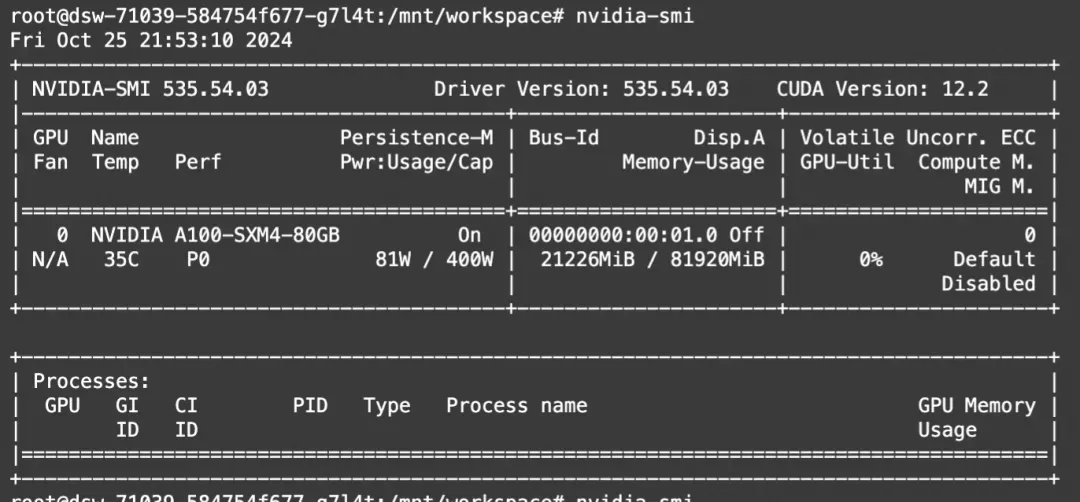
显存占用:
模型Web Demo体验
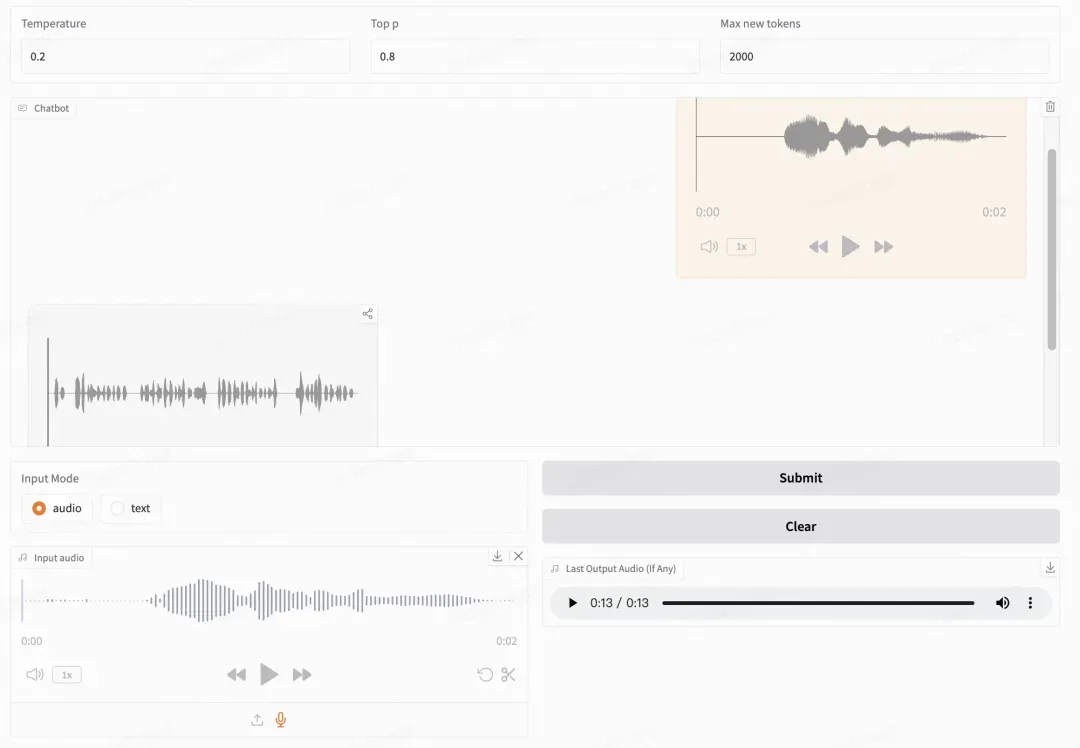
智谱提供了可以直接启动的 Web Demo。用户可以输入语音或文本,模型会同时给出语音和文字回复。
首先下载仓库
git clone --recurse-submodules https://github.com/THUDM/GLM-4-Voice
cd GLM-4-Voice
然后安装依赖。
pip install -r requirements.txt
由于 Decoder 模型不支持通过 transformers 初始化,因此 checkpoint 需要单独下载,建议单独下载三个模型。
# 使用ModelScope CLI下载
modelscope download --model=ZhipuAI/glm-4-voice-9b --local_dir ./glm-4-voice-9b
# 建议其他模型也单独下载
modelscope download --model=ZhipuAI/glm-4-voice-decoder --local_dir ./glm-4-voice-decoder
modelscope download --model=ZhipuAI/glm-4-voice-tokenizer --local_dir ./glm-4-voice-tokenizer
发布WebDemo
首先启动模型服务,指定文件路径
python model_server.py --model-path glm-4-voice-9b
然后启动 web 服务
python web_demo.py --tokenizer-path glm-4-voice-tokenizer --model-path glm-4-voice-9b
即可在 http://127.0.0.1:8888 访问 web demo。可以手动下载之后通过 --tokenizer-path 和 --model-path 指定本地的路径。
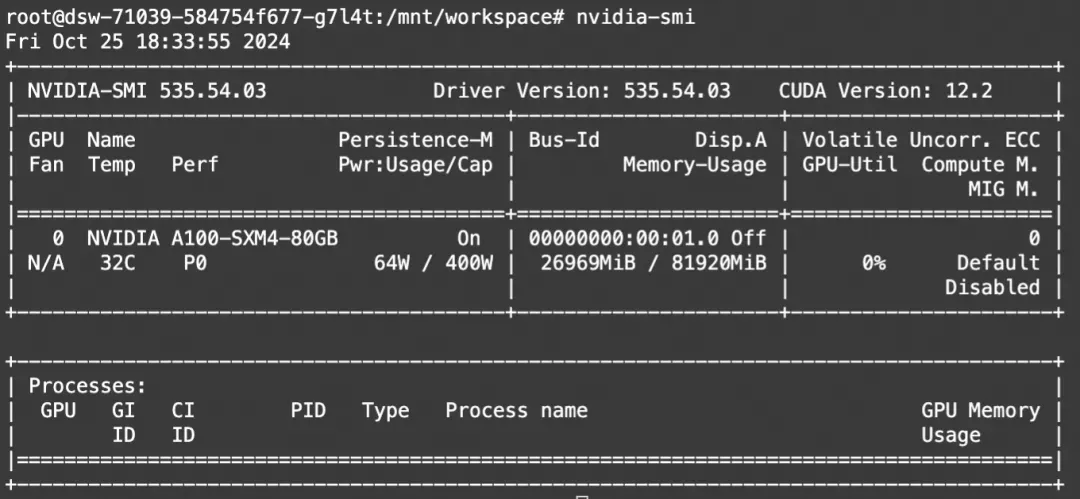
显存占用:
点击链接👇,直达模型体验
https://modelscope.cn/studios/ZhipuAI/GLM-4-Voice-Demo/summary