问题描述
在使用Python SDK时候,登录到China Azure (Mooncake)并访问AlertsManagement资源时候,时常遇见 EnvironmentCredential: Authentication failed 的错误消息。
Python 代码:
from azure.identity import DefaultAzureCredential
from azure.mgmt.alertsmanagement import AlertsManagementClient
# Acquire a credential object using CLI-based authentication.
credential = DefaultAzureCredential()
subscription_id = "xxxx-xxxx-xxxx-xxxx-xxxx"
alertClient = AlertsManagementClient(credential,subscription_id,base_url="https://management.chinacloudapi.cn/")
rules = alertClient.smart_detector_alert_rules.list()
for rule in rules:
    print("Rule Name: " + rule.name)
错误消息:
PS C:\LBWorkSpace\MyCode\46-alertrule-python> python getrule.py
DefaultAzureCredential failed to retrieve a token from the included credentials.
Attempted credentials:
        EnvironmentCredential: Authentication failed: AADSTS500011: The resource principal named https://management.azure.com was not found in the tenant named xxx Mooncake. This can happen if the application has not been installed by the administrator of the tenant or consented to by any user in the tenant. You might have sent your authentication request to the wrong tenant.
Trace ID: xxxxxxxx-xxxx-xxxx-xxxx-9e130dbf7900
Correlation ID: xxxxxxxx-xxxx-xxxx-xxxx-46769c9e1e10
Timestamp: 2022-01-27 12:09:35Z
To mitigate this issue, please refer to the troubleshooting guidelines here at https://aka.ms/azsdk/python/identity/defaultazurecredential/troubleshoot.
Traceback (most recent call last):
  File "C:\LBWorkSpace\MyCode\46-alertrule-python\getrule.py", line 15, in <module>
    for rule in rules:
  File "C:\Users\bulu\AppData\Local\Programs\Python\Python310\lib\site-packages\azure\core\paging.py", line 129, in __next__
    return next(self._page_iterator)
  File "C:\Users\bulu\AppData\Local\Programs\Python\Python310\lib\site-packages\azure\core\paging.py", line 76, in __next__
    self._response = self._get_next(self.continuation_token)
  File "C:\Users\bulu\AppData\Local\Programs\Python\Python310\lib\site-packages\azure\core\pipeline\policies\_redirect.py", line 158, in send
    response = self.next.send(request)
  File "C:\Users\bulu\AppData\Local\Programs\Python\Python310\lib\site-packages\azure\core\pipeline\policies\_retry.py", line 445, in send
    response = self.next.send(request)
  File "C:\Users\bulu\AppData\Local\Programs\Python\Python310\lib\site-packages\azure\core\pipeline\policies\_authentication.py", line 117, in send
    self.on_request(request)
  File "C:\Users\bulu\AppData\Local\Programs\Python\Python310\lib\site-packages\azure\core\pipeline\policies\_authentication.py", line 94, in on_request
    self._token = self._credential.get_token(*self._scopes)
  File "C:\Users\bulu\AppData\Local\Programs\Python\Python310\lib\site-packages\azure\identity\_credentials\default.py", line 172, in get_token
    return super(DefaultAzureCredential, self).get_token(*scopes, **kwargs)
  File "C:\Users\bulu\AppData\Local\Programs\Python\Python310\lib\site-packages\azure\identity\_credentials\chained.py", line 108, in get_token
    raise ClientAuthenticationError(message=message)
azure.core.exceptions.ClientAuthenticationError: DefaultAzureCredential failed to retrieve a token from the included credentials.
Attempted credentials:
        EnvironmentCredential: Authentication failed: AADSTS500011: The resource principal named https://management.azure.com was not found in the tenant named xxxx Mooncake. This can happen if the application has not been installed by the administrator of the tenant or consented to by any user in the tenant. You might have sent your authentication request to the wrong tenant.
Trace ID: xxxxxxxx-xxxx-xxxx-xxxx-9e130dbf7900
Correlation ID: xxxxxxxx-xxxx-xxxx-xxxx-46769c9e1e10
Timestamp: 2022-01-27 12:09:35Z
To mitigate this issue, please refer to the troubleshooting guidelines here at https://aka.ms/azsdk/python/identity/defaultazurecredential/troubleshoot.
问题解决
从错误消息 https://management.azure.com 得知问题是由于 AlertsManagementClient 中使用的 Resource Principal 为默认值,并没有随着指定 base_url 而修改为
https://management.chinacloudapi.cn/ 。 可以通过在构造 AlertsManagementClient 对象时候,指定 credential_scopes 为 ["https://management.chinacloudapi.cn/.default"] 来缓解问题。
修改后的代码为:
# 修改前:
alertClient = AlertsManagementClient(credential,subscription_id,base_url="https://management.chinacloudapi.cn/")
# 修改后:
alertClient = AlertsManagementClient(credential,subscription_id,base_url="https://management.chinacloudapi.cn/",credential_scopes=["https://management.chinacloudapi.cn/.default"])
PS: 当创建其他资源的Client对象,如果遇见相同的 Principal 问题,可以设定 credential_scopes 来解决问题。
完整可远行的代码为:
# Import the needed credential and management objects from the libraries.
from azure.identity import DefaultAzureCredential
from azure.mgmt.alertsmanagement import AlertsManagementClient
# Acquire a credential object using CLI-based authentication.
credential = DefaultAzureCredential()
subscription_id = "a9dc7515-7692-4316-9ad4-762f383eec10"
# # 修改前:
# alertClient = AlertsManagementClient(credential,subscription_id,base_url="https://management.chinacloudapi.cn/")
# 修改后:
alertClient = AlertsManagementClient(credential,subscription_id,base_url="https://management.chinacloudapi.cn/",credential_scopes=["https://management.chinacloudapi.cn/.default"])
rules = alertClient.smart_detector_alert_rules.list()
for rule in rules:
    print("Rule Name: " + rule.name)
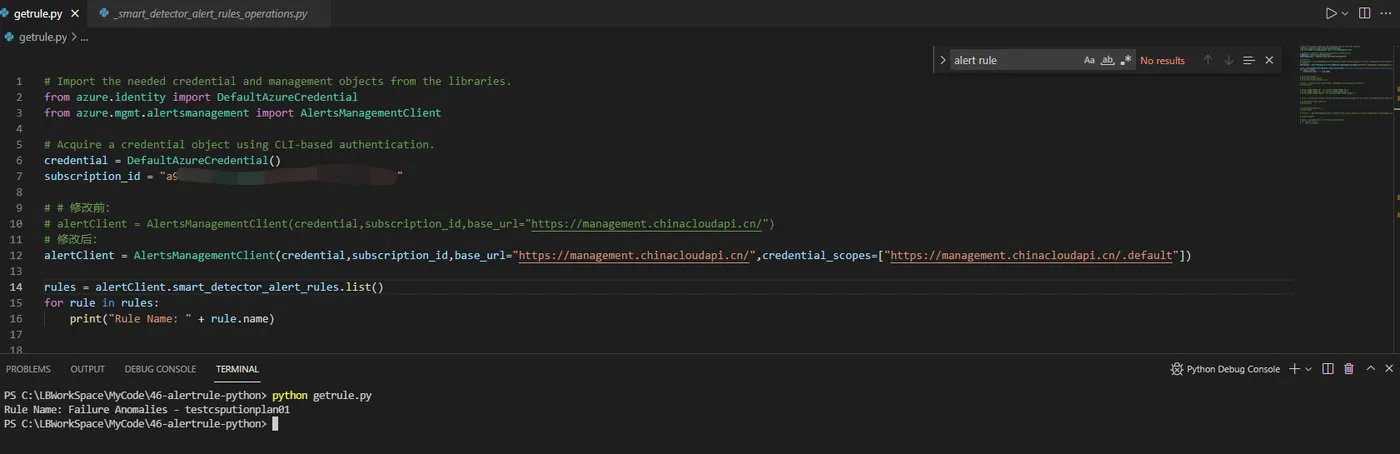
运行结果:
附录一:正确的 MonitorManagementClient 对象,来获取 metric_alerts 和 activity_log_alerts 获取Alert Rule代码
from azure.mgmt.monitor import MonitorManagementClient
from azure.identity import DefaultAzureCredential
from msrestazure.azure_cloud import AZURE_CHINA_CLOUD as CLOUD
import os
os.environ["SUBSCRIPTION_ID"] = "xxxxxxyour-subidxxxxxx"
os.environ["AZURE_TENANT_ID"] = "your tenant idxxxxx"
os.environ["AZURE_CLIENT_ID"]  = "client_id_sp"
os.environ["AZURE_CLIENT_SECRET"]  = "pw_sp"
subscription_id = os.environ["SUBSCRIPTION_ID"]
credential = DefaultAzureCredential(authority=CLOUD.endpoints.active_directory)
# create client
client1 = MonitorManagementClient(
    credential,
    subscription_id,
    base_url=CLOUD.endpoints.resource_manager,
    credential_scopes=[CLOUD.endpoints.resource_manager + "/.default"]
)
#classic
my_alerts1 = client1.alert_rules.list_by_subscription()
for j in my_alerts1:
    print(j)
#log search alerts
client2 = MonitorManagementClient(
    credential,
    subscription_id,
    base_url=CLOUD.endpoints.resource_manager,
    credential_scopes=[CLOUD.endpoints.resource_manager + "/.default"]
)
my_alerts2 = client2.scheduled_query_rules.list_by_subscription()
for j in my_alerts2:
    print(j)
#activity alerts
client3 = MonitorManagementClient(
    credential,
    subscription_id,
    base_url=CLOUD.endpoints.resource_manager,
    credential_scopes=[CLOUD.endpoints.resource_manager + "/.default"],
    api_version="2017-04-01"
)
my_alerts3 = client3.activity_log_alerts.list_by_subscription_id()
for j in my_alerts3:
    print(j)
#metric alerts
client4 = MonitorManagementClient(
    credential,
    subscription_id,
    base_url=CLOUD.endpoints.resource_manager,
    credential_scopes=[CLOUD.endpoints.resource_manager + "/.default"]
)
my_alerts4 = client4.metric_alerts.list_by_subscription()
for j in my_alerts4:
    print(j)
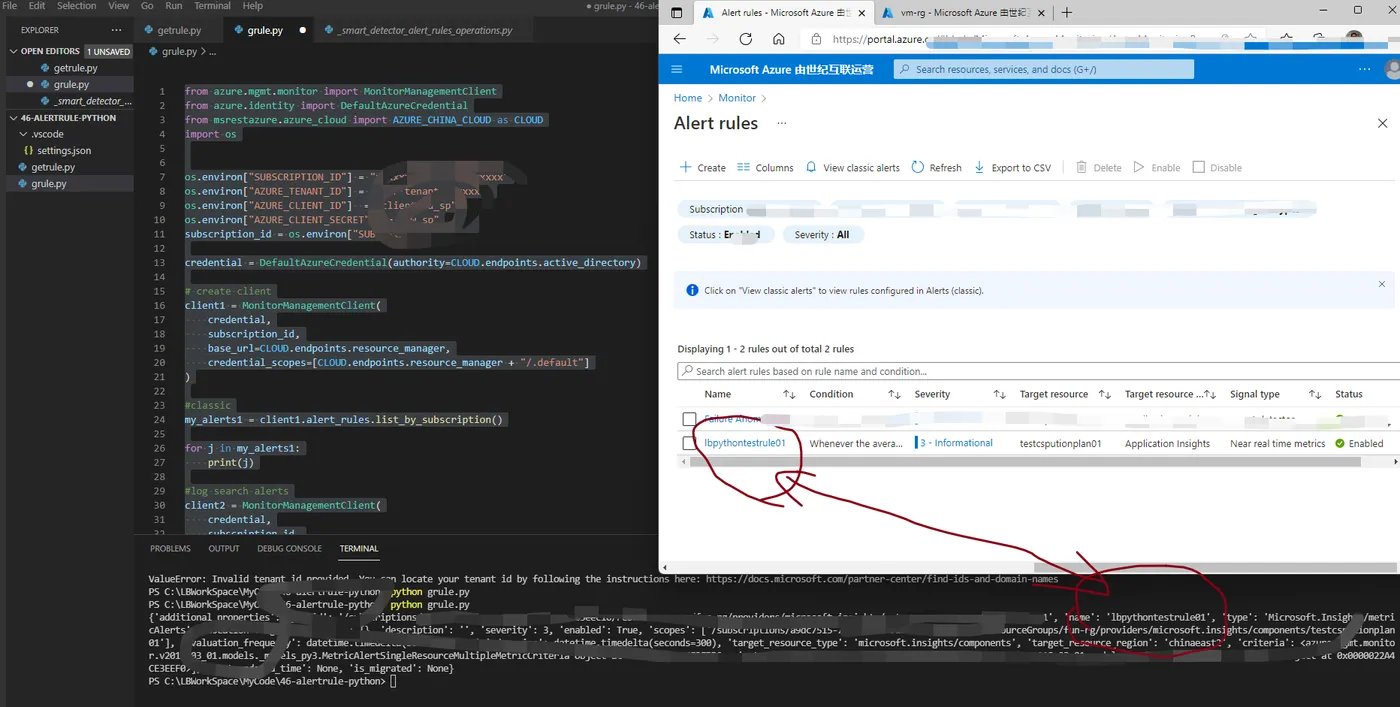
运行结果对比图:
参考资料
alertsmanagement Package :https://docs.microsoft.com/en-us/python/api/azure-mgmt-alertsmanagement/azure.mgmt.alertsmanagement?view=azure-python