问题描述
在Azure App Service上部署了站点,想要在网站的响应头中加一个字段(Cache-Control),并设置为固定值(Cache-Control:no-store)
效果类似于本地IIS中设置IIS响应标头
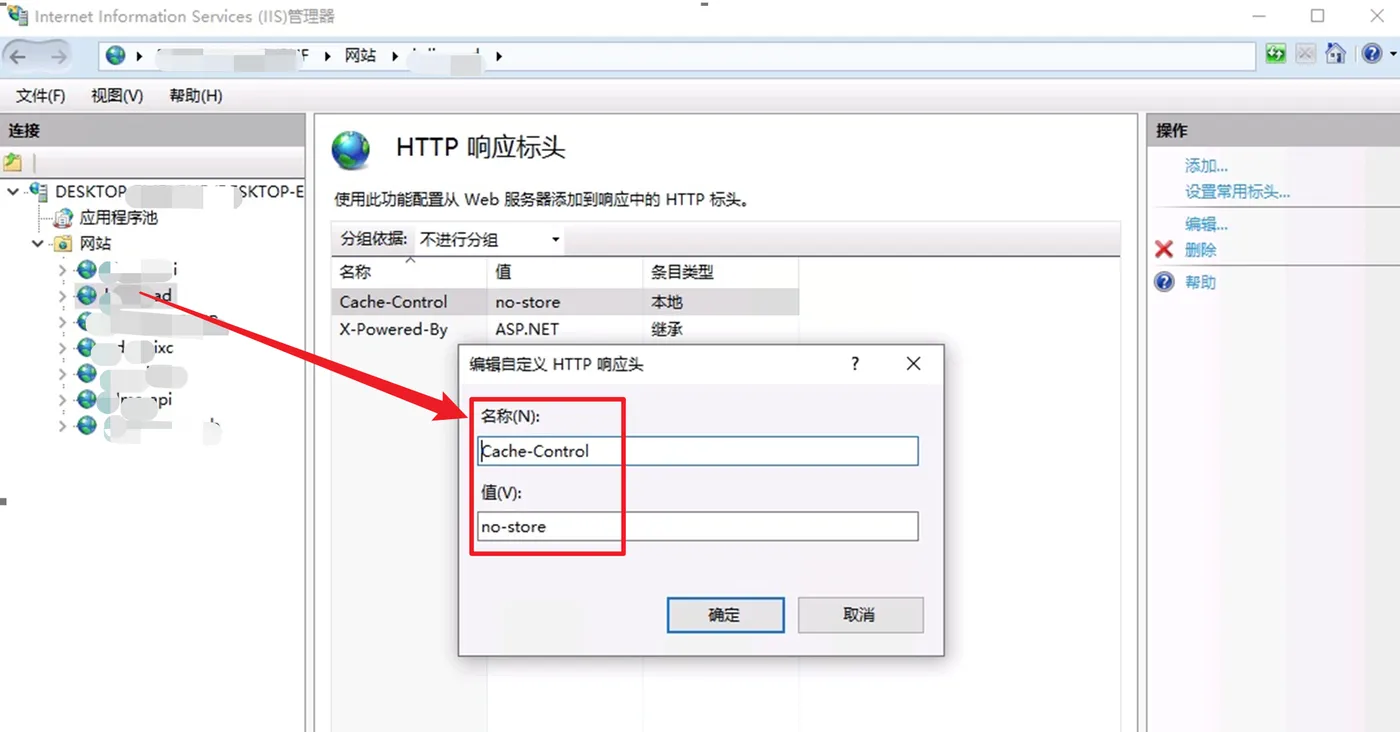
有时,也会根据不同的安全要求,需要添加Response Header,如下:
#Adding security headers
X-Frame-Options "SAMEORIGIN"
X-Xss-Protection "1; mode=block"
X-Permitted-Cross-Domain-Policies "none"
X-Content-Type-Options "nosniff"
Expect-CT "max-age=86400, enforce"
Referrer-Policy "strict-origin-when-cross-origin"
Strict-Transport-Security "max-age=31536000; includeSubDomains; preload"
Content-Security-Policy "block-all-mixed-content; frame-ancestors 'self'; form-action 'self'; object-src 'none'; base-uri 'self';"
Permissions-Policy "accelerometer=(self), camera=(self), geolocation=(self), gyroscope=(self), magnetometer=(self), microphone=(self), payment=(self), usb=(self)"
问题解决
在App Service的web.config文件中添加配置Cache-Control为no-store,可以登录到 kudu( https://<your site name>.scm.chinacloudsites.cn/DebugConsole ) 站点查看 wwwroot 下是否存在 web.config 文件,如果没有可以新建一个,web.config配置参考如下:
<?xml version="1.0" encoding="utf-8"?>
<configuration>
    <system.webServer>
          <httpProtocol>
      <customHeaders>
        <clear />
        <add name="Cache-Control" value="no-store" />
      </customHeaders>
    </httpProtocol>
    </system.webServer>
</configuration>
同理,如果是需要加上安全相关的Header,追加即可。
<?xml version="1.0" encoding="utf-8"?>
<configuration>
    <system.webServer>
          <httpProtocol>
      <customHeaders>
        <clear />
        <add name="Cache-Control" value="no-store" />

        <!-- #Adding security headers -->
        <add name="X-Frame-Options" value="SAMEORIGIN" />
        <add name="X-Xss-Protection" value="1; mode=block" />
        <add name="X-Permitted-Cross-Domain-Policies" value="none" />
        <add name="X-Content-Type-Options" value="nosniff" />
        <add name="Expect-CT" value="max-age=86400, enforce" />
        <add name="Referrer-Policy" value="strict-origin-when-cross-origin" />
        <add name="Strict-Transport-Security" value="max-age=31536000; includeSubDomains; preload" />
        <add name="Content-Security-Policy" value="block-all-mixed-content; frame-ancestors 'self'; form-action 'self'; object-src 'none'; base-uri 'self';" />
        <add name="Permissions-Policy" value="accelerometer=(self), camera=(self), geolocation=(self), gyroscope=(self), magnetometer=(self), microphone=(self), payment=(self), usb=(self)" />
      </customHeaders>
    </httpProtocol>
    </system.webServer>
</configuration>
HTTP 消息头允许客户端和服务器通过 request和 response传递附加信息。一个请求头由名称(不区分大小写)后跟一个冒号“:”,冒号后跟具体的值(不带换行符)组成。该值前面的引导空白会被忽略。
- X-Frame-Options : 用来给浏览器 指示允许一个页面 可否在
<frame>,<iframe>,<embed>或者<object>中展现的标记。站点可以通过确保网站没有被嵌入到别人的站点里面,从而避免 clickjacking 攻击。 SAMEORIGIN 表示该页面可以在相同域名页面的 frame 中展示。 - X-XSS-Protection : 是 Internet Explorer,Chrome 和 Safari 的一个特性,当检测到跨站脚本攻击 (XSS (en-US))时,浏览器将停止加载页面。1;mode=block 启用XSS过滤。 如果检测到攻击,浏览器将不会清除页面,而是阻止页面加载。
- X-Permitted-Cross-Domain-Policies : 用于允许来自 Flash 和 PDF 文档的跨域请求。none 表示完全阻止通过不同域集成 Flash 和 PDF 文档。
- X-Content-Type-Options : 相当于一个提示标志,被服务器用来提示客户端一定要遵循在
Content-Type首部中对 MIME 类型 的设定,而不能对其进行修改。nosniff只应用于 "script" 和 "style" 两种类型 - Expect-CT : 允许站点选择性报告和/或执行证书透明度 (Certificate Transparency) 要求,来防止错误签发的网站证书的使用不被察觉。max-age=86400, enforce 指定24小时的证书透明度执行
- Referrer-Policy : 用来监管哪些访问来源信息——会在
Referer中发送——应该被包含在生成的请求当中。strict-origin-when-cross-origin 对于同源的请求,会发送完整的URL作为引用地址 - Strict-Transport-Security : 是一个安全功能,它告诉浏览器只能通过HTTPS访问当前资源,而不是HTTP。
- Content-Security-Policy : 允许站点管理者控制用户代理能够为指定的页面加载哪些资源。
- Permissions-Policy : 允许web开发者在浏览器中选择启用、禁用和修改确切特征和 API 的行为
问:在App Service for Linux(Node JS 应用) 中是否可以修改Header呢?
答:不可以,App Service for Linux是无法修改服务端配置的,所以无法通过服务端配置添加header的,但是可通过代码方式自行添加Security Header。使用response.setHeader(name, value)方法即可
示例代码如:
const http = require('http');
const server = http.createServer((request, response) => {
    //使用SetHeader添加响应头
    response.setHeader('Content-Type', 'text/html');
    response.setHeader('X-Foo', 'bar');
    response.setHeader("Access-Control-Allow-Origin", "*");

    response.writeHead(200, {"Content-Type": "text/plain"});
    response.end("Hello World!");
});
const port = process.env.PORT || 1337;
server.listen(port);
console.log("Server running at http://localhost:%d", port);
参考资料
response.setHeader(name, value):http://nodejs.cn/api/http/response_setheader_name_value.html
Node.js Hello World (App Service): https://github.com/Azure-Samples/nodejs-docs-hello-world
在 Azure 中创建 Node.js Web 应用:https://docs.azure.cn/zh-cn/app-service/quickstart-nodejs?pivots=platform-linux
HTTP headers:https://developer.mozilla.org/en-US/docs/Web/HTTP/Headers#security OR https://developer.mozilla.org/zh-CN/docs/Web/HTTP/Headers
X-PERMITTED-CROSS-DOMAIN-POLICIES:https://www.scip.ch/en/?labs.20180308
【完】