一、依赖
fastjson依赖
<dependency>
    <groupId>com.alibaba</groupId>
    <artifactId>fastjson</artifactId>
    <version>1.2.56</version>
</dependency>
jackson依赖
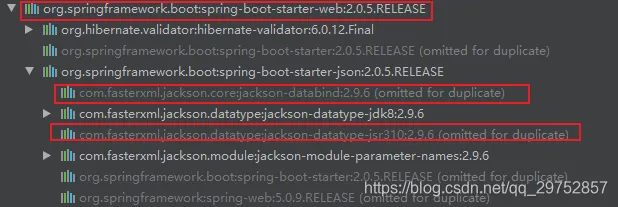
springMVC默认json解析器就是jackson,如果是springweb项目不用导入
<dependency>
  <groupId>com.fasterxml.jackson.core</groupId>
  <artifactId>jackson-databind</artifactId>
  <version>2.7.3</version>
</dependency>
二、代码
package xxxx.entity;


public class DeliveryMan implements Serializable {

    private String name;

    private String phone;
    private String area;
    private String officeholding;
    private String jobnum;
    private int state;

    public DeliveryMan() {
    }

    public DeliveryMan(String name, String phone, String area, String officeholding, String jobnum, int state) {
        this.name = name;
        this.phone = phone;
        this.area = area;
        this.officeholding = officeholding;
        this.jobnum = jobnum;
        this.state = state;
    }

    public String getName() {
        return name;
    }

    public void setName(String name) {
        this.name = name;
    }

    public String getPhone() {
        return phone;
    }

    public void setPhone(String phone) {
        this.phone = phone;
    }

    public String getArea() {
        return area;
    }

    public void setArea(String area) {
        this.area = area;
    }

    public String getOfficeholding() {
        return officeholding;
    }

    public void setOfficeholding(String officeholding) {
        this.officeholding = officeholding;
    }

    public String getJobnum() {
        return jobnum;
    }

    public void setJobnum(String jobnum) {
        this.jobnum = jobnum;
    }

    public int getState() {
        return state;
    }

    public void setState(int state) {
        this.state = state;
    }

    @Override
    public String toString() {
        return "DeliveryMan{" +
                "name='" + name + '\'' +
                ", phone='" + phone + '\'' +
                ", area='" + area + '\'' +
                ", officeholding='" + officeholding + '\'' +
                ", jobnum='" + jobnum + '\'' +
                ", state=" + state +
                '}';
    }

}
package xxxx.xxx;

import com.alibaba.fastjson.JSON;
import com.alibaba.fastjson.JSONArray;
import com.fasterxml.jackson.databind.ObjectMapper;
import com.uublue.food.Application;
import com.uublue.food.delivery.entity.DeliveryMan;
import org.junit.Test;
import org.junit.runner.RunWith;
import org.springframework.boot.test.context.SpringBootTest;
import org.springframework.test.context.junit4.SpringRunner;

import java.io.IOException;
import java.util.ArrayList;

@RunWith(SpringRunner.class)
@SpringBootTest(classes = Application.class)
public class UtilPay {
    @Test
    public void jsontostring() throws IOException {
        ObjectMapper mapper = new ObjectMapper();

        DeliveryMan man=new DeliveryMan();
        man.setState(1);
        man.setPhone("1111");

        DeliveryMan man2=new DeliveryMan();
        man2.setState(2);
        man2.setPhone("2222");

        ArrayList<DeliveryMan> list=new ArrayList<>();
        list.add(man);
        list.add(man2);
//list转string
        String s1 = JSONArray.toJSONString(list);
        String s2 = mapper.writeValueAsString(list);
        System.out.println("com.alibaba.fastjson.JSONArray;");
        System.out.println(s1);
        System.out.println("om.fasterxml.jackson.databind.ObjectMapper;");
        System.out.println(s2);
//string转list
        java.util.List<DeliveryMan>  deliveryManList1= JSON.parseArray(s1, DeliveryMan.class);
        java.util.List<DeliveryMan>  deliveryManList2= mapper.readValue(s2, mapper.getTypeFactory().constructParametricType(ArrayList.class, DeliveryMan.class));

        System.out.println("com.alibaba.fastjson.JSONArray");
        System.out.println(deliveryManList1.toString());
        System.out.println("om.fasterxml.jackson.databind.ObjectMapper");
        System.out.println(deliveryManList2.toString());

    }
}
com.alibaba.fastjson.JSONArray;
[{"phone":"1111","state":1,"user_id":0},{"phone":"2222","state":2,"user_id":0}]
om.fasterxml.jackson.databind.ObjectMapper;
[{"id":null,"name":null,"phone":"1111","area":null,"officeholding":null,"jobnum":null,"state":1,"createtime":null,"updatetime":null,"user_id":0},{"id":null,"name":null,"phone":"2222","area":null,"officeholding":null,"jobnum":null,"state":2,"createtime":null,"updatetime":null,"user_id":0}]
com.alibaba.fastjson.JSONArray
[DeliveryMan{name='null', phone='1111', area='null', officeholding='null', jobnum='null', state=1, createtime=null, updateTime=null, user_id=0}, DeliveryMan{name='null', phone='2222', area='null', officeholding='null', jobnum='null', state=2, createtime=null, updateTime=null, user_id=0}]
om.fasterxml.jackson.databind.ObjectMapper
[DeliveryMan{name='null', phone='1111', area='null', officeholding='null', jobnum='null', state=1, createtime=null, updateTime=null, user_id=0}, DeliveryMan{name='null', phone='2222', area='null', officeholding='null', jobnum='null', state=2, createtime=null, updateTime=null, user_id=0}]
三、参考文章
jackson完成json和对象/map/list互转:https://blog.csdn.net/qq_37936542/article/details/79268402
fastjson List<> 转Json , Json 转List<>:https://www.cnblogs.com/xiaohouzai/p/8972286.html