1.yum源下载
1.1 国内镜像源列表
# 网易开源镜像站
http://mirrors.163.com
# 阿里云开源镜像站
https://mirrors.aliyun.com
# 华为开源镜像站
http://mirrors.huaweicloud.com
# 中国科学技术大学开源软件镜像站
http://mirrors.ustc.edu.cn
# 上海交通大学镜像站
http://ftp.sjtu.edu.cn
# 北京外国语大学开源软件镜像站
http://mirrors.bfsu.edu.cn
# 清华大学开源软件镜像站
http://mirrors.tuna.tsinghua.edu.cn
# 南京大学开源镜像站
http://mirrors.nju.edu.cn
# 重庆大学开源软件镜像站
http://mirrors.cqu.edu.cn
# 南京邮电大学开源软件镜像站
http://mirrors.njupt.edu.cn
# 山东大学镜像站(似乎没有CentOS)
https://mirrors.sdu.edu.cn
1.2 下载对应版本的镜像文件
# 1.版本信息查询
cat /etc/centos-release
# 版本信息
CentOS Linux release 7.9.2009 (Core)
# 2.版本信息查询
rpm -qi centos-release
# 版本信息
Name        : centos-release
Version     : 7
Release     : 9.2009.1.el7.centos
Architecture: x86_64
Install Date: Tue 08 Feb 2022 02:59:59 PM CST
Group       : System Environment/Base
Size        : 44787
License     : GPLv2
Signature   : RSA/SHA256, Thu 03 Dec 2020 12:35:28 AM CST, Key ID 24c6a8a7f4a80eb5
Source RPM  : centos-release-7-9.2009.1.el7.centos.src.rpm
Build Date  : Mon 23 Nov 2020 11:08:41 PM CST
Build Host  : x86-01.bsys.centos.org
Relocations : (not relocatable)
Packager    : CentOS BuildSystem <http://bugs.centos.org>
Vendor      : CentOS
Summary     : CentOS Linux release file
Description :
CentOS Linux release files
国内镜像源只有一个最新版本,比如 CentOS 7,只有 7.9.2009 版本,没有 7.8.2003 或 7.7.1908 等旧版本,非最新版本需要到 CentOS 官网下载。本次下载使用 网易开源镜像站 根据版本及分支信息找到要下载的文件。
isos目录是镜像文件。
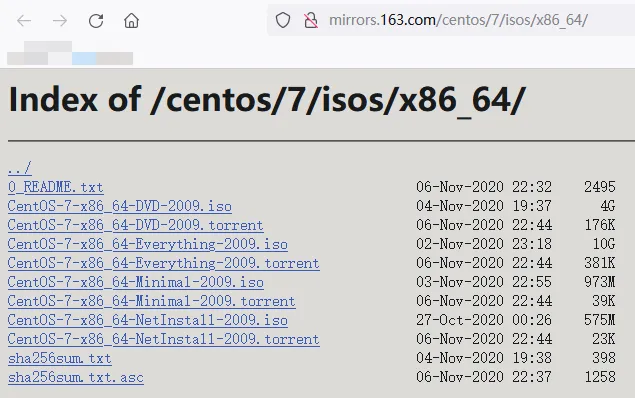
镜像版本说明:
- DVD:标准安装盘,里面包含大量的常用软件,大部分情况下安装时无需再在线下载;
- Everything:对标准安装盘的软件进行补充,包含所有软件组件,体积最大;
- Minimal:精简版本,包含核心组件;
- NetInstall:网络安装镜像。
os目录是镜像解压文件。

本次以 Minimal 版本进行说明,镜像文件为CentOS-7-x86_64-Minimal-2009.iso。
2.挂载镜像
# 1.新建目录 /mnt/iso 放置原始镜像文件 /mnt/cdrom 用于挂载镜像
mkdir -p /mnt/iso
mkdir -p /mnt/cdrom
# 2.上传 CentOS-7-x86_64-Minimal-2009.iso 文件到 /mnt/iso 文件夹下
# 3.挂载镜像 -o loop 用来把一个文件当成硬盘分区挂接上系统
mount -o loop /mnt/iso/CentOS-7-x86_64-Minimal-2009.iso  /mnt/cdrom
# 取消挂载
umount /mnt/cdrom
/mnt/cdrom 和 os 路径下的文件是一致的。
[root@aliyun cdrom]# ll
total 110
-rw-r--r--  2 root root    14 Oct 30  2020 CentOS_BuildTag
drwxr-xr-x  3 root root  2048 Oct 27  2020 EFI
-rw-rw-r-- 15 root root   227 Aug 30  2017 EULA
-rw-rw-r-- 15 root root 18009 Dec 10  2015 GPL
drwxr-xr-x  3 root root  2048 Oct 27  2020 images
drwxr-xr-x  2 root root  2048 Nov  3  2020 isolinux
drwxr-xr-x  2 root root  2048 Oct 27  2020 LiveOS
drwxr-xr-x  2 root root 73728 Nov  3  2020 Packages
drwxr-xr-x  2 root root  4096 Nov  3  2020 repodata
-rw-rw-r-- 15 root root  1690 Dec 10  2015 RPM-GPG-KEY-CentOS-7
-rw-rw-r-- 15 root root  1690 Dec 10  2015 RPM-GPG-KEY-CentOS-Testing-7
-r--r--r--  1 root root  2883 Nov  3  2020 TRANS.TBL
3.修改yum源配置
# 1.备份原yum源配置
cp -r /etc/yum.repos.d /etc/yum.repos.d.bak
# 2.查看是否备份成功
ll  /etc/yum.repos.d.bak
# 3.删除原yum源配置
rm -rf /etc/yum.repos.d/*
# 4.新建本地yum离线源配置
vim /etc/yum.repos.d/local.repo
/etc/yum.repos.d/local.repo 内容如下:
[local]
name=local
baseurl=file:///mnt/cdrom
enabled=1
gpgcheck=0
gpgkey=file:///mnt/cdrom/RPM-GPG-KEY-CentOS-7
# 5.清除缓存启用本地yum源
yum clean all
  # 返回信息 已启用 local
  Loaded plugins: fastestmirror
  Cleaning repos: local
  Cleaning up list of fastest mirrors
  Other repos take up 168 M of disk space (use --verbose for details)
4. 局域网yum源
4.1 局域网yum源服务搭建
# 安装并启动 apache http 服务
yum -y install httpd
systemctl start httpd
apache http 服务测试 http://aliyun 默认是80端口。

apache http 服务的文件目录为 /var/www/html,所以需要建立快捷方式指向本地yum源:
# 创建软链接
ln -s /mnt/cdrom/ /var/www/html/centos7
访问测试 http://aliyun/centos7/
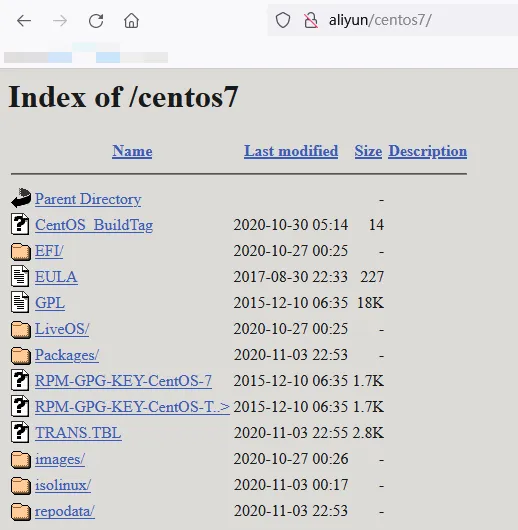
至此局域网yum源服务搭建完成。
4.2 局域网yum源应用
# 备份删除原 yum 源配置并添加远程源配置
cp -r /etc/yum.repos.d /etc/yum.repos.d.bak
rm -rf /etc/yum.repos.d/*
vim /etc/yum.repos.d/remote.repo
# remote.repo 内容如下
[remote]
name=remote
baseurl=http://aliyun/centos7/
enabled=1
gpgcheck=0
gpgkey=http://192.168.0.174/centos7/RPM-GPG-KEY-CentOS-7
# 清除缓存启用远程yum源
yum clean all
  # 返回信息
  Loaded plugins: fastestmirror, langpacks
  Cleaning repos: remote
  Cleaning up list of fastest mirrors
  Other repos take up 30 M of disk space (use --verbose for details)