前言:
本文将主要就在centos7操作系统下已有的一个利用kubeadm部署的集群内在线安装kubesphere做一个介绍,该kubernetes集群是使用的etcd外部集群。
kubernetes集群的搭建本文不做过多介绍,具体的搭建流程见我的博客:
云原生|kubernetes|kubeadm部署高可用集群(一)使用外部etcd集群_kubeadm etcd集群_晚风_END的博客-
下面开始就在现有集群内部署kubesphere做一个详细的介绍。
一,
kubernetes集群的状态介绍
可以看到,该集群使用的是外部etcd,pod里没有etcd嘛,计划网络插件安装flannel,kubernetes的版本是1.22.16

二,
kubesphere部署的前提条件
1,需要开启集群监控服务,也就是metric server
详细部署方法见我的博客:kubesphere安装部署附带Metrics server的安装_晚风_END的博客-

2,需要一个默认的storage class, 也就是存储插件
安装文档见我的博客:
kubernetes学习之持久化存储StorageClass(4---nfs存储服务)_fuseim.pri/ifs_晚风_END的博客
3,
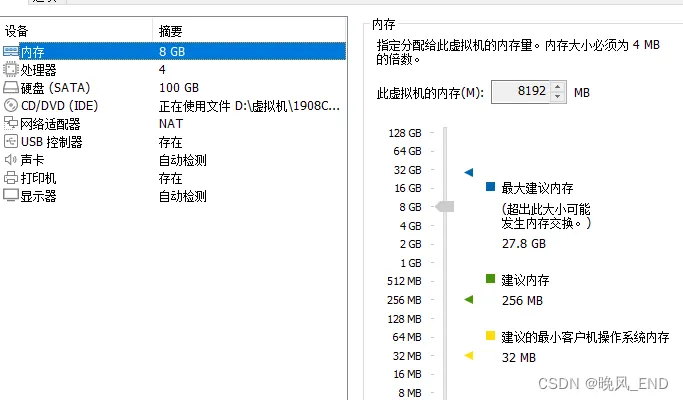
如果是在虚拟机里练习部署安装,那么,虚拟机的内存建议至少8G,否则会安装失败或者不能正常运行
4,
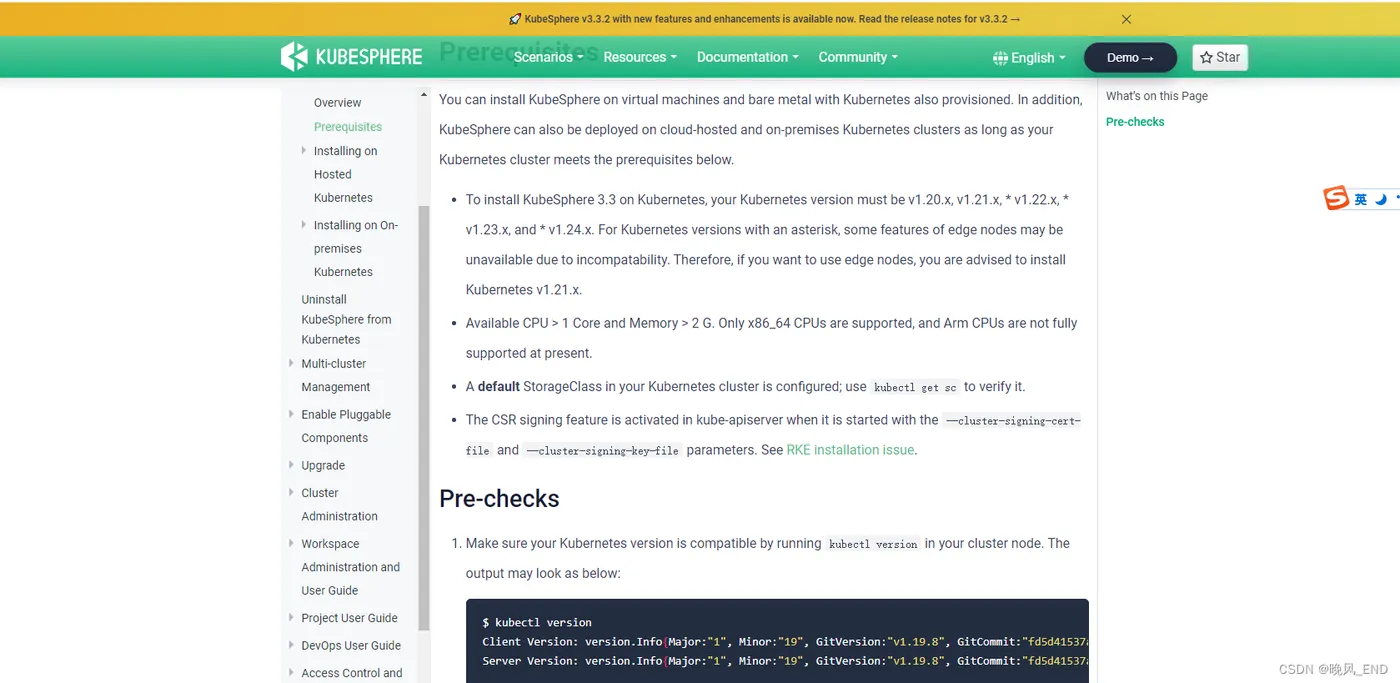
由于kubernetes集群的版本是1.22.16是比较高的,因此,kubesphere的版本也需要比较高,本例测试用的kubesphere的版本是3.3.2
查询kubernetes和kubesphere的版本依赖,见下面网址:
三,
etcd证书的处理
healthcheck开始的这些证书在使用内部堆叠etcd集群时是自动生成的,而我们是使用的外部etcd,这些证书是没有的
这些证书的作用是kubesphere启动的时候Prometheus的存活探针使用,而在安装kubesphere的时候,我们是无法修改源码的,因此,将外部etcd的证书改名后,放入定义的目录就可以使得kubesphere正常安装了(那个secret必须要有得哦,否则会安装失败,检验安装状态那一步会过不去,Prometheus会无法启动)。
[root@centos1 ~]# cp /opt/etcd/ssl/server.pem  /etc/kubernetes/pki/etcd/healthcheck-client.crt
[root@centos1 ~]# cp /opt/etcd/ssl/server-key.pem  /etc/kubernetes/pki/etcd/healthcheck-client.key
[root@centos1 ~]# cp /opt/etcd/ssl/ca.pem  /etc/kubernetes/pki/etcd/ca.crt
[root@centos1 data]# scp -r /etc/kubernetes/pki/etcd/* slave1:/etc/kubernetes/pki/etcd/
apiserver-etcd-client-key.pem                                                                                                                                                   100% 1675     1.1MB/s   00:00
apiserver-etcd-client.pem                                                                                                                                                       100% 1338     1.3MB/s   00:00
ca.crt                                                                                                                                                                          100% 1265     2.0MB/s   00:00
ca.pem                                                                                                                                                                          100% 1265     1.6MB/s   00:00
healthcheck-client.crt                                                                                                                                                          100% 1338     2.6MB/s   00:00
healthcheck-client.key                                                                                                                                                          100% 1675     2.6MB/s   00:00
[root@centos1 data]# scp -r /etc/kubernetes/pki/etcd/* slave2:/etc/kubernetes/pki/etcd/
apiserver-etcd-client-key.pem                                                                                                                                                   100% 1675     1.0MB/s   00:00
apiserver-etcd-client.pem                                                                                                                                                       100% 1338     2.0MB/s   00:00
ca.crt                                                                                                                                                                          100% 1265     2.3MB/s   00:00
ca.pem                                                                                                                                                                          100% 1265     2.0MB/s   00:00
healthcheck-client.crt                                                                                                                                                          100% 1338     2.6MB/s   00:00
healthcheck-client.key
 kubectl -n kubesphere-monitoring-system create secret generic kube-etcd-client-certs  --from-file=etcd-client-ca.crt=/etc/kubernetes/pki/etcd/ca.crt  --from-file=etcd-client.crt=/etc/kubernetes/pki/etcd/healthcheck-client.crt  --from-file=etcd-client.key=/etc/kubernetes/pki/etcd/healthcheck-client.key
四,
kubesphere的正式安装
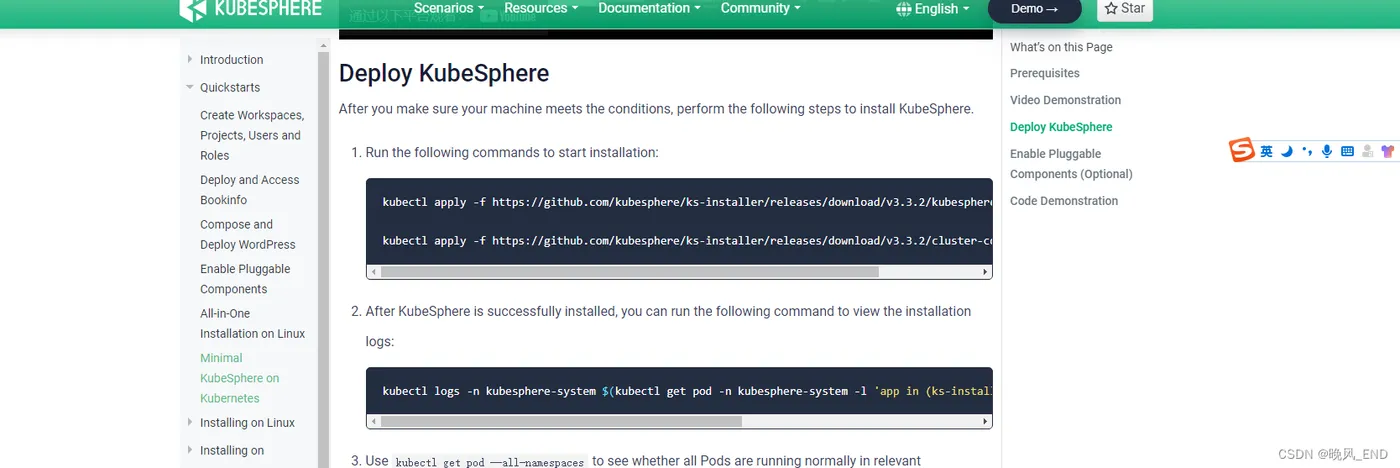
kubesphere主要是两个资源清单文件,文件内容如下:
下载地址:
https://www.kubesphere.io/docs/v3.3/quick-start/minimal-kubesphere-on-k8s/#prerequisites
[root@centos1 ~]# cat kubesphere-installer.yaml
---
apiVersion: apiextensions.k8s.io/v1
kind: CustomResourceDefinition
metadata:
  name: clusterconfigurations.installer.kubesphere.io
spec:
  group: installer.kubesphere.io
  versions:
    - name: v1alpha1
      served: true
      storage: true
      schema:
        openAPIV3Schema:
          type: object
          properties:
            spec:
              type: object
              x-kubernetes-preserve-unknown-fields: true
            status:
              type: object
              x-kubernetes-preserve-unknown-fields: true
  scope: Namespaced
  names:
    plural: clusterconfigurations
    singular: clusterconfiguration
    kind: ClusterConfiguration
    shortNames:
      - cc
---
apiVersion: v1
kind: Namespace
metadata:
  name: kubesphere-system
---
apiVersion: v1
kind: ServiceAccount
metadata:
  name: ks-installer
  namespace: kubesphere-system
---
apiVersion: rbac.authorization.k8s.io/v1
kind: ClusterRole
metadata:
  name: ks-installer
rules:
- apiGroups:
  - ""
  resources:
  - '*'
  verbs:
  - '*'
- apiGroups:
  - apps
  resources:
  - '*'
  verbs:
  - '*'
- apiGroups:
  - extensions
  resources:
  - '*'
  verbs:
  - '*'
- apiGroups:
  - batch
  resources:
  - '*'
  verbs:
  - '*'
- apiGroups:
  - rbac.authorization.k8s.io
  resources:
  - '*'
  verbs:
  - '*'
- apiGroups:
  - apiregistration.k8s.io
  resources:
  - '*'
  verbs:
  - '*'
- apiGroups:
  - apiextensions.k8s.io
  resources:
  - '*'
  verbs:
  - '*'
- apiGroups:
  - tenant.kubesphere.io
  resources:
  - '*'
  verbs:
  - '*'
- apiGroups:
  - certificates.k8s.io
  resources:
  - '*'
  verbs:
  - '*'
- apiGroups:
  - devops.kubesphere.io
  resources:
  - '*'
  verbs:
  - '*'
- apiGroups:
  - monitoring.coreos.com
  resources:
  - '*'
  verbs:
  - '*'
- apiGroups:
  - logging.kubesphere.io
  resources:
  - '*'
  verbs:
  - '*'
- apiGroups:
  - jaegertracing.io
  resources:
  - '*'
  verbs:
  - '*'
- apiGroups:
  - storage.k8s.io
  resources:
  - '*'
  verbs:
  - '*'
- apiGroups:
  - admissionregistration.k8s.io
  resources:
  - '*'
  verbs:
  - '*'
- apiGroups:
  - policy
  resources:
  - '*'
  verbs:
  - '*'
- apiGroups:
  - autoscaling
  resources:
  - '*'
  verbs:
  - '*'
- apiGroups:
  - networking.istio.io
  resources:
  - '*'
  verbs:
  - '*'
- apiGroups:
  - config.istio.io
  resources:
  - '*'
  verbs:
  - '*'
- apiGroups:
  - iam.kubesphere.io
  resources:
  - '*'
  verbs:
  - '*'
- apiGroups:
  - notification.kubesphere.io
  resources:
  - '*'
  verbs:
  - '*'
- apiGroups:
  - auditing.kubesphere.io
  resources:
  - '*'
  verbs:
  - '*'
- apiGroups:
  - events.kubesphere.io
  resources:
  - '*'
  verbs:
  - '*'
- apiGroups:
  - core.kubefed.io
  resources:
  - '*'
  verbs:
  - '*'
- apiGroups:
  - installer.kubesphere.io
  resources:
  - '*'
  verbs:
  - '*'
- apiGroups:
  - storage.kubesphere.io
  resources:
  - '*'
  verbs:
  - '*'
- apiGroups:
  - security.istio.io
  resources:
  - '*'
  verbs:
  - '*'
- apiGroups:
  - monitoring.kiali.io
  resources:
  - '*'
  verbs:
  - '*'
- apiGroups:
  - kiali.io
  resources:
  - '*'
  verbs:
  - '*'
- apiGroups:
  - networking.k8s.io
  resources:
  - '*'
  verbs:
  - '*'
- apiGroups:
  - edgeruntime.kubesphere.io
  resources:
  - '*'
  verbs:
  - '*'
- apiGroups:
  - types.kubefed.io
  resources:
  - '*'
  verbs:
  - '*'
- apiGroups:
  - monitoring.kubesphere.io
  resources:
  - '*'
  verbs:
  - '*'
- apiGroups:
  - application.kubesphere.io
  resources:
  - '*'
  verbs:
  - '*'
---
kind: ClusterRoleBinding
apiVersion: rbac.authorization.k8s.io/v1
metadata:
  name: ks-installer
subjects:
- kind: ServiceAccount
  name: ks-installer
  namespace: kubesphere-system
roleRef:
  kind: ClusterRole
  name: ks-installer
  apiGroup: rbac.authorization.k8s.io
---
apiVersion: apps/v1
kind: Deployment
metadata:
  name: ks-installer
  namespace: kubesphere-system
  labels:
    app: ks-installer
spec:
  replicas: 1
  selector:
    matchLabels:
      app: ks-installer
  template:
    metadata:
      labels:
        app: ks-installer
    spec:
      serviceAccountName: ks-installer
      containers:
      - name: installer
        image: kubesphere/ks-installer:v3.3.2
        imagePullPolicy: "Always"
        resources:
          limits:
            cpu: "1"
            memory: 1Gi
          requests:
            cpu: 20m
            memory: 100Mi
        volumeMounts:
        - mountPath: /etc/localtime
          name: host-time
          readOnly: true
      volumes:
      - hostPath:
          path: /etc/localtime
          type: ""
        name: host-time
[root@centos1 ~]# cat cluster-configuration.yaml
---
apiVersion: installer.kubesphere.io/v1alpha1
kind: ClusterConfiguration
metadata:
  name: ks-installer
  namespace: kubesphere-system
  labels:
    version: v3.3.2
spec:
  persistence:
    storageClass: ""        # If there is no default StorageClass in your cluster, you need to specify an existing StorageClass here.
  authentication:
    # adminPassword: ""     # Custom password of the admin user. If the parameter exists but the value is empty, a random password is generated. If the parameter does not exist, P@88w0rd is used.
    jwtSecret: ""           # Keep the jwtSecret consistent with the Host Cluster. Retrieve the jwtSecret by executing "kubectl -n kubesphere-system get cm kubesphere-config -o yaml | grep -v "apiVersion" | grep jwtSecret" on the Host Cluster.
  local_registry: ""        # Add your private registry address if it is needed.
  # dev_tag: ""               # Add your kubesphere image tag you want to install, by default it's same as ks-installer release version.
  etcd:
    monitoring: true       # Enable or disable etcd monitoring dashboard installation. You have to create a Secret for etcd before you enable it.
    endpointIps: 192.168.123.11  # etcd cluster EndpointIps. It can be a bunch of IPs here.
    port: 2379              # etcd port.
    tlsEnable: true
  common:
    core:
      console:
        enableMultiLogin: true  # Enable or disable simultaneous logins. It allows different users to log in with the same account at the same time.
        port: 30880
        type: NodePort
    # apiserver:            # Enlarge the apiserver and controller manager's resource requests and limits for the large cluster
    #  resources: {}
    # controllerManager:
    #  resources: {}
    redis:
      enabled: true
      enableHA: false
      volumeSize: 2Gi # Redis PVC size.
    openldap:
      enabled: true
      volumeSize: 2Gi   # openldap PVC size.
    minio:
      volumeSize: 20Gi # Minio PVC size.
    monitoring:
      # type: external   # Whether to specify the external prometheus stack, and need to modify the endpoint at the next line.
      endpoint: http://prometheus-operated.kubesphere-monitoring-system.svc:9090 # Prometheus endpoint to get metrics data.
      GPUMonitoring:     # Enable or disable the GPU-related metrics. If you enable this switch but have no GPU resources, Kubesphere will set it to zero.
        enabled: false
    gpu:                 # Install GPUKinds. The default GPU kind is nvidia.com/gpu. Other GPU kinds can be added here according to your needs.
      kinds:
      - resourceName: "nvidia.com/gpu"
        resourceType: "GPU"
        default: true
    es:   # Storage backend for logging, events and auditing.
      # master:
      #   volumeSize: 4Gi  # The volume size of Elasticsearch master nodes.
      #   replicas: 1      # The total number of master nodes. Even numbers are not allowed.
      #   resources: {}
      # data:
      #   volumeSize: 20Gi  # The volume size of Elasticsearch data nodes.
      #   replicas: 1       # The total number of data nodes.
      #   resources: {}
      logMaxAge: 7             # Log retention time in built-in Elasticsearch. It is 7 days by default.
      elkPrefix: logstash      # The string making up index names. The index name will be formatted as ks-<elk_prefix>-log.
      basicAuth:
        enabled: false
        username: ""
        password: ""
      externalElasticsearchHost: ""
      externalElasticsearchPort: ""
  alerting:                # (CPU: 0.1 Core, Memory: 100 MiB) It enables users to customize alerting policies to send messages to receivers in time with different time intervals and alerting levels to choose from.
    enabled: true         # Enable or disable the KubeSphere Alerting System.
    # thanosruler:
    #   replicas: 1
    #   resources: {}
  auditing:                # Provide a security-relevant chronological set of records,recording the sequence of activities happening on the platform, initiated by different tenants.
    enabled: true         # Enable or disable the KubeSphere Auditing Log System.
    # operator:
    #   resources: {}
    # webhook:
    #   resources: {}
  devops:                  # (CPU: 0.47 Core, Memory: 8.6 G) Provide an out-of-the-box CI/CD system based on Jenkins, and automated workflow tools including Source-to-Image & Binary-to-Image.
    enabled: true             # Enable or disable the KubeSphere DevOps System.
    # resources: {}
    jenkinsMemoryLim: 4Gi      # Jenkins memory limit.
    jenkinsMemoryReq: 2Gi   # Jenkins memory request.
    jenkinsVolumeSize: 8Gi     # Jenkins volume size.
  events:                  # Provide a graphical web console for Kubernetes Events exporting, filtering and alerting in multi-tenant Kubernetes clusters.
    enabled: true         # Enable or disable the KubeSphere Events System.
    # operator:
    #   resources: {}
    # exporter:
    #   resources: {}
    # ruler:
    #   enabled: true
    #   replicas: 2
    #   resources: {}
  logging:                 # (CPU: 57 m, Memory: 2.76 G) Flexible logging functions are provided for log query, collection and management in a unified console. Additional log collectors can be added, such as Elasticsearch, Kafka and Fluentd.
    enabled: true         # Enable or disable the KubeSphere Logging System.
    logsidecar:
      enabled: true
      replicas: 2
      # resources: {}
  metrics_server:                    # (CPU: 56 m, Memory: 44.35 MiB) It enables HPA (Horizontal Pod Autoscaler).
    enabled: false                   # Enable or disable metrics-server.
  monitoring:
    storageClass: ""                 # If there is an independent StorageClass you need for Prometheus, you can specify it here. The default StorageClass is used by default.
    node_exporter:
      port: 9100
      # resources: {}
    # kube_rbac_proxy:
    #   resources: {}
    # kube_state_metrics:
    #   resources: {}
    # prometheus:
    #   replicas: 1  # Prometheus replicas are responsible for monitoring different segments of data source and providing high availability.
    #   volumeSize: 20Gi  # Prometheus PVC size.
    #   resources: {}
    #   operator:
    #     resources: {}
    # alertmanager:
    #   replicas: 1          # AlertManager Replicas.
    #   resources: {}
    # notification_manager:
    #   resources: {}
    #   operator:
    #     resources: {}
    #   proxy:
    #     resources: {}
    gpu:                           # GPU monitoring-related plug-in installation.
      nvidia_dcgm_exporter:        # Ensure that gpu resources on your hosts can be used normally, otherwise this plug-in will not work properly.
        enabled: false             # Check whether the labels on the GPU hosts contain "nvidia.com/gpu.present=true" to ensure that the DCGM pod is scheduled to these nodes.
        # resources: {}
  multicluster:
    clusterRole: none  # host | member | none  # You can install a solo cluster, or specify it as the Host or Member Cluster.
  network:
    networkpolicy: # Network policies allow network isolation within the same cluster, which means firewalls can be set up between certain instances (Pods).
      # Make sure that the CNI network plugin used by the cluster supports NetworkPolicy. There are a number of CNI network plugins that support NetworkPolicy, including Calico, Cilium, Kube-router, Romana and Weave Net.
      enabled: false # Enable or disable network policies.
    ippool: # Use Pod IP Pools to manage the Pod network address space. Pods to be created can be assigned IP addresses from a Pod IP Pool.
      type: none # Specify "calico" for this field if Calico is used as your CNI plugin. "none" means that Pod IP Pools are disabled.
    topology: # Use Service Topology to view Service-to-Service communication based on Weave Scope.
      type: none # Specify "weave-scope" for this field to enable Service Topology. "none" means that Service Topology is disabled.
  openpitrix: # An App Store that is accessible to all platform tenants. You can use it to manage apps across their entire lifecycle.
    store:
      enabled: true # Enable or disable the KubeSphere App Store.
  servicemesh:         # (0.3 Core, 300 MiB) Provide fine-grained traffic management, observability and tracing, and visualized traffic topology.
    enabled: true     # Base component (pilot). Enable or disable KubeSphere Service Mesh (Istio-based).
    istio:  # Customizing the istio installation configuration, refer to https://istio.io/latest/docs/setup/additional-setup/customize-installation/
      components:
        ingressGateways:
        - name: istio-ingressgateway
          enabled: true
        cni:
          enabled: true
  edgeruntime:          # Add edge nodes to your cluster and deploy workloads on edge nodes.
    enabled: false
    kubeedge:        # kubeedge configurations
      enabled: false
      cloudCore:
        cloudHub:
          advertiseAddress: # At least a public IP address or an IP address which can be accessed by edge nodes must be provided.
            - ""            # Note that once KubeEdge is enabled, CloudCore will malfunction if the address is not provided.
        service:
          cloudhubNodePort: "30000"
          cloudhubQuicNodePort: "30001"
          cloudhubHttpsNodePort: "30002"
          cloudstreamNodePort: "30003"
          tunnelNodePort: "30004"
        # resources: {}
        # hostNetWork: false
      iptables-manager:
        enabled: true
        mode: "external"
        # resources: {}
      # edgeService:
      #   resources: {}
  gatekeeper:        # Provide admission policy and rule management, A validating (mutating TBA) webhook that enforces CRD-based policies executed by Open Policy Agent.
    enabled: false   # Enable or disable Gatekeeper.
    # controller_manager:
    #   resources: {}
    # audit:
    #   resources: {}
  terminal:
    # image: 'alpine:3.15' # There must be an nsenter program in the image
五,
查看日志
[root@centos1 ~]# kubectl get po -A
NAMESPACE           NAME                                      READY   STATUS    RESTARTS        AGE
kube-flannel        kube-flannel-ds-679sl                     1/1     Running   0               81m
kube-flannel        kube-flannel-ds-g6xx5                     1/1     Running   0               81m
kube-flannel        kube-flannel-ds-mtq4v                     1/1     Running   0               81m
kube-system         coredns-7f6cbbb7b8-cndqt                  1/1     Running   0               4d14h
kube-system         coredns-7f6cbbb7b8-pk4mv                  1/1     Running   0               4d14h
kube-system         kube-apiserver-master                     1/1     Running   0               82m
kube-system         kube-controller-manager-master            1/1     Running   6 (27m ago)     4d14h
kube-system         kube-proxy-7bqs7                          1/1     Running   3 (4d13h ago)   4d14h
kube-system         kube-proxy-8hkdn                          1/1     Running   3 (4d13h ago)   4d14h
kube-system         kube-proxy-jkghf                          1/1     Running   3 (4d13h ago)   4d14h
kube-system         kube-scheduler-master                     1/1     Running   6 (27m ago)     4d14h
kube-system         metrics-server-55b9b69769-85nf6           1/1     Running   0               6m37s
kube-system         nfs-client-provisioner-686ddd45b9-nx85p   1/1     Running   0               15m
kubesphere-system   ks-installer-846c78ddbf-fvg7p             1/1     Running   0               22s
[root@centos1 ~]# kubectl logs -n kubesphere-system -f  ks-installer-846c78ddbf-fvg7p
2023-06-28T12:44:02+08:00 INFO     : shell-operator latest
2023-06-28T12:44:02+08:00 INFO     : Use temporary dir: /tmp/shell-operator
2023-06-28T12:44:02+08:00 INFO     : Initialize hooks manager ...
2023-06-28T12:44:02+08:00 INFO     : Search and load hooks ...
2023-06-28T12:44:02+08:00 INFO     : HTTP SERVER Listening on 0.0.0.0:9115
2023-06-28T12:44:02+08:00 INFO     : Load hook config from '/hooks/kubesphere/installRunner.py'
2023-06-28T12:44:02+08:00 INFO     : Load hook config from '/hooks/kubesphere/schedule.sh'
2023-06-28T12:44:02+08:00 INFO     : Initializing schedule manager ...
2023-06-28T12:44:02+08:00 INFO     : KUBE Init Kubernetes client
2023-06-28T12:44:02+08:00 INFO     : KUBE-INIT Kubernetes client is configured successfully
最终正确的日志:
**************************************************
Collecting installation results ...
#####################################################
###              Welcome to KubeSphere!           ###
#####################################################
Console: http://192.168.123.12:30880
Account: admin
Password: P@88w0rd
NOTES:
  1. After you log into the console, please check the
     monitoring status of service components in
     "Cluster Management". If any service is not
     ready, please wait patiently until all components
     are up and running.
  2. Please change the default password after login.
#####################################################
https://kubesphere.io             2023-06-28 13:42:14
#####################################################
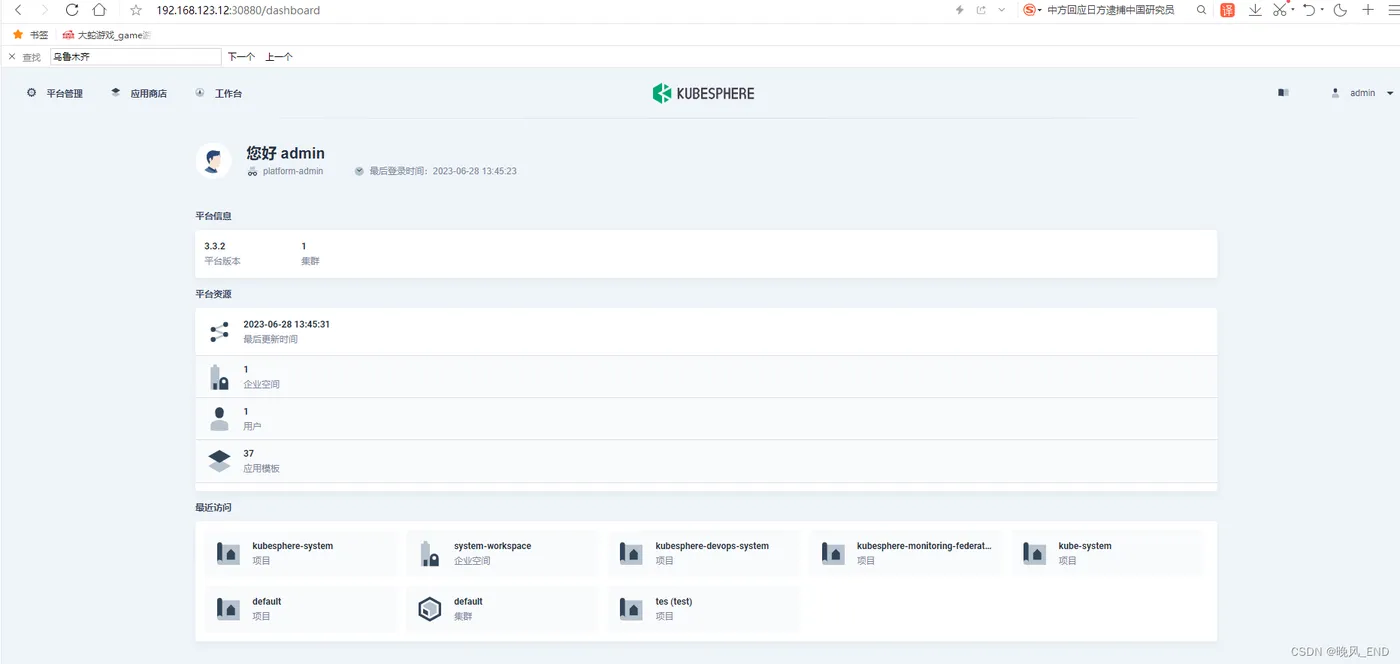
[root@centos1 ~]# kubectl get po -A
NAMESPACE                      NAME                                                      READY   STATUS      RESTARTS         AGE
argocd                         devops-argocd-application-controller-0                    1/1     Running     0                49m
argocd                         devops-argocd-applicationset-controller-b88d4b875-6tjjl   1/1     Running     0                49m
argocd                         devops-argocd-dex-server-5f4c69cdb8-9stkk                 1/1     Running     0                49m
argocd                         devops-argocd-notifications-controller-6d86f8974f-dtb9n   1/1     Running     0                49m
argocd                         devops-argocd-redis-655969589d-8f9gt                      1/1     Running     0                49m
argocd                         devops-argocd-repo-server-f77687668-2xvbc                 1/1     Running     0                49m
argocd                         devops-argocd-server-6c55bbb84f-hqt7s                     1/1     Running     0                49m
istio-system                   istio-cni-node-9bfbn                                      1/1     Running     0                45m
istio-system                   istio-cni-node-cpcxg                                      1/1     Running     0                45m
istio-system                   istio-cni-node-fp4g4                                      1/1     Running     0                45m
istio-system                   istio-ingressgateway-68cb85486d-hnlxj                     1/1     Running     0                45m
istio-system                   istiod-1-11-2-6784498b47-bz4fb                            1/1     Running     0                50m
istio-system                   jaeger-collector-7cd595d96d-wcxcn                         1/1     Running     0                11m
istio-system                   jaeger-operator-6f94b6594f-z9wft                          1/1     Running     0                24m
istio-system                   jaeger-query-c9568b97c-7wj4g                              2/2     Running     0                6m32s
istio-system                   kiali-6558c65c47-k9tkw                                    1/1     Running     0                10m
istio-system                   kiali-operator-6648dcb67d-vxvtg                           1/1     Running     0                24m
kube-flannel                   kube-flannel-ds-679sl                                     1/1     Running     0                144m
kube-flannel                   kube-flannel-ds-g6xx5                                     1/1     Running     0                144m
kube-flannel                   kube-flannel-ds-mtq4v                                     1/1     Running     0                144m
kube-system                    coredns-7f6cbbb7b8-cndqt                                  1/1     Running     0                4d15h
kube-system                    coredns-7f6cbbb7b8-pk4mv                                  1/1     Running     0                4d15h
kube-system                    kube-apiserver-master                                     1/1     Running     0                145m
kube-system                    kube-controller-manager-master                            1/1     Running     11 (8m33s ago)   4d15h
kube-system                    kube-proxy-7bqs7                                          1/1     Running     3 (4d14h ago)    4d15h
kube-system                    kube-proxy-8hkdn                                          1/1     Running     3 (4d14h ago)    4d15h
kube-system                    kube-proxy-jkghf                                          1/1     Running     3 (4d14h ago)    4d15h
kube-system                    kube-scheduler-master                                     0/1     Error       10 (8m45s ago)   4d15h
kube-system                    metrics-server-55b9b69769-85nf6                           1/1     Running     0                69m
kube-system                    nfs-client-provisioner-686ddd45b9-nx85p                   0/1     Error       6 (5m56s ago)    78m
kube-system                    snapshot-controller-0                                     1/1     Running     0                52m
kubesphere-controls-system     default-http-backend-5bf68ff9b8-hdqh7                     1/1     Running     0                51m
kubesphere-controls-system     kubectl-admin-6dbcb94855-lgf9q                            1/1     Running     0                20m
kubesphere-devops-system       devops-28132140-r9p22                                     0/1     Completed   0                46m
kubesphere-devops-system       devops-28132170-vqz2p                                     0/1     Completed   0                16m
kubesphere-devops-system       devops-apiserver-54f87654c6-bqf67                         1/1     Running     2 (16m ago)      49m
kubesphere-devops-system       devops-controller-7f765f68d4-8x4kb                        1/1     Running     0                49m
kubesphere-devops-system       devops-jenkins-c8b495c5-8xhzq                             1/1     Running     4 (5m53s ago)    49m
kubesphere-devops-system       s2ioperator-0                                             1/1     Running     0                49m
kubesphere-logging-system      elasticsearch-logging-data-0                              1/1     Running     0                51m
kubesphere-logging-system      elasticsearch-logging-data-1                              1/1     Running     2 (5m55s ago)    48m
kubesphere-logging-system      elasticsearch-logging-discovery-0                         1/1     Running     0                51m
kubesphere-logging-system      fluent-bit-6r2f2                                          1/1     Running     0                46m
kubesphere-logging-system      fluent-bit-lwknk                                          1/1     Running     0                46m
kubesphere-logging-system      fluent-bit-wft6n                                          1/1     Running     0                46m
kubesphere-logging-system      fluentbit-operator-6fdb65899c-cp6xr                       1/1     Running     0                51m
kubesphere-logging-system      ks-events-exporter-f7f75f84d-6cx2t                        2/2     Running     0                45m
kubesphere-logging-system      ks-events-operator-684486db88-62kgt                       1/1     Running     0                50m
kubesphere-logging-system      ks-events-ruler-8596865dcf-9m4tl                          2/2     Running     0                45m
kubesphere-logging-system      ks-events-ruler-8596865dcf-ds5qn                          2/2     Running     0                45m
kubesphere-logging-system      kube-auditing-operator-84857bf967-6lpv7                   1/1     Running     0                50m
kubesphere-logging-system      kube-auditing-webhook-deploy-64cfb8c9f8-s4swb             1/1     Running     0                46m
kubesphere-logging-system      kube-auditing-webhook-deploy-64cfb8c9f8-xgm4k             1/1     Running     0                46m
kubesphere-logging-system      logsidecar-injector-deploy-586fb644fc-h4jsx               2/2     Running     0                5m31s
kubesphere-logging-system      logsidecar-injector-deploy-586fb644fc-qtt52               2/2     Running     0                5m31s
kubesphere-monitoring-system   alertmanager-main-0                                       2/2     Running     0                42m
kubesphere-monitoring-system   alertmanager-main-1                                       2/2     Running     0                42m
kubesphere-monitoring-system   alertmanager-main-2                                       2/2     Running     0                42m
kubesphere-monitoring-system   kube-state-metrics-687d66b747-9c2tg                       3/3     Running     0                49m
kubesphere-monitoring-system   node-exporter-4jkpr                                       2/2     Running     0                49m
kubesphere-monitoring-system   node-exporter-8fzzd                                       2/2     Running     0                49m
kubesphere-monitoring-system   node-exporter-wm27p                                       2/2     Running     0                49m
kubesphere-monitoring-system   notification-manager-deployment-78664576cb-fdgft          2/2     Running     0                11m
kubesphere-monitoring-system   notification-manager-deployment-78664576cb-ztqw4          2/2     Running     0                11m
kubesphere-monitoring-system   notification-manager-operator-7d44854f54-fkzrv            1/2     Error       2 (5m54s ago)    49m
kubesphere-monitoring-system   prometheus-k8s-0                                          2/2     Running     0                42m
kubesphere-monitoring-system   prometheus-k8s-1                                          2/2     Running     0                42m
kubesphere-monitoring-system   prometheus-operator-8955bbd98-7jv9m                       2/2     Running     0                49m
kubesphere-monitoring-system   thanos-ruler-kubesphere-0                                 2/2     Running     1 (8m16s ago)    42m
kubesphere-monitoring-system   thanos-ruler-kubesphere-1                                 2/2     Running     0                42m
kubesphere-system              ks-apiserver-7f4d67c7bc-wjwtg                             1/1     Running     0                51m
kubesphere-system              ks-console-5c9fcbc67b-rfnxp                               1/1     Running     0                51m
kubesphere-system              ks-controller-manager-75ccc66ccf-sl29v                    0/1     Error       3 (8m43s ago)    51m
kubesphere-system              ks-installer-846c78ddbf-fvg7p                             1/1     Running     0                62m
kubesphere-system              minio-859cb4d777-7pzsv                                    1/1     Running     0                52m
kubesphere-system              openldap-0                                                1/1     Running     1 (51m ago)      52m
kubesphere-system              openpitrix-import-job-2t2lp                               0/1     Completed   0                6m12s
kubesphere-system              redis-68d7fd7b96-nhcfx                                    1/1     Running     0                52m