需要源码或有问题请点赞关注收藏后评论区留言~~~
电商App经常会和用户互动,虚心听取用户的意见,同样的,我们在买东西的时候也会着重看一看货物的评价然后货比三家,评价内容可以是纯文字,也可以是图片甚至是带视频的评价。
一、需求描述
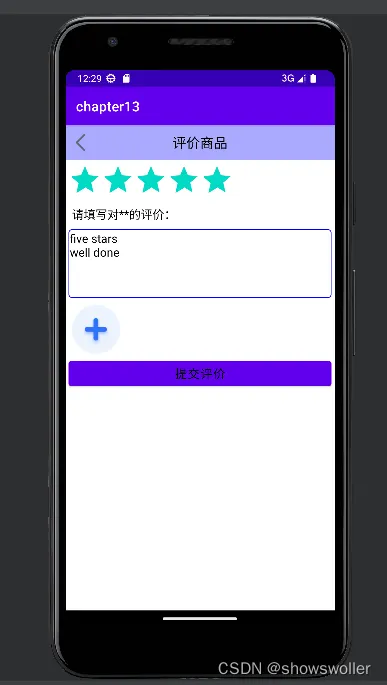
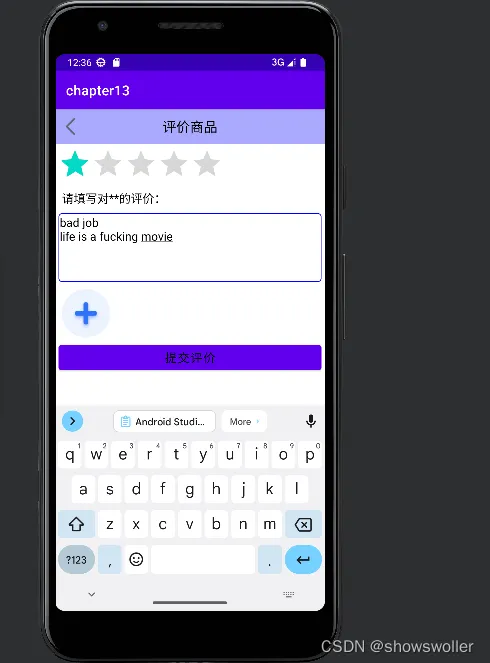
用户在评价页面可以选择评分等级,输入文字评价,还能点击加号按钮上传图片或者视频 效果如下,并且可以提交评价,然后我们运行展示类即可看到提交的评价
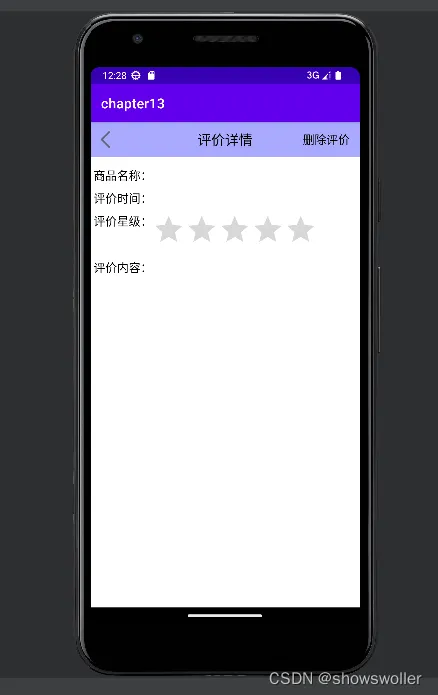
填写评价和等级 五星好评
一星差评
选择文件或者视频
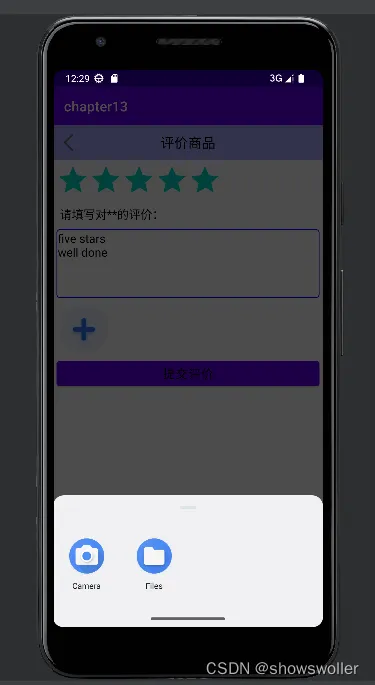
二、界面设计
商品评价不单单是文字内容,还包括图片晒单与视频晒单,所以用到了以下技术
拍照
查找相册
查看图片
录制视频
查找视频库
播放视频
同样 用户提交的图片可能很大,为了导致系统崩溃和浪费资源,App需要采取图片压缩技术,适当缩小用户的大图 以便提升App的运行性能
三、关键部分
1:如何使用评分条控件RatingBar
评价商品时的星级选择用到了评分条RatingBar,它由若干个五角星组成,总数表示评价总分,高亮的五角星数量表示当前评分
RatingBar有两种用法 一种是评价的时候允许改变星级,另一种是展示星级的时候不允许改变星级
2:在活动页面之间传递图形数据
3:评价晒单项目的源码之间关系
1:GoodsOrderActivity 这是订单列表的活动代码 列出了相关信息
2:EvaluateGoodsActivity 这是填写评价的活动代码
3:EvaluateDetailActivity 这是评价详情的活动代码
4:EvaluatePhotoActivity 这是浏览晒图的活动代码
四、代码
Java类
填写评价类
package com.example.chapter13;
import android.content.ContentValues;
import android.content.Intent;
import android.graphics.Bitmap;
import android.net.Uri;
import android.os.Bundle;
import android.os.Environment;
import android.provider.MediaStore;
import android.text.TextUtils;
import android.util.Log;
import android.view.View;
import android.widget.EditText;
import android.widget.ImageView;
import android.widget.RatingBar;
import android.widget.TextView;
import android.widget.Toast;
import androidx.appcompat.app.AppCompatActivity;
import com.example.chapter13.bean.EvaluateInfo;
import com.example.chapter13.bean.EvaluatePhoto;
import com.example.chapter13.bean.GoodsOrder;
import com.example.chapter13.database.EvaluateInfoHelper;
import com.example.chapter13.database.EvaluatePhotoHelper;
import com.example.chapter13.database.GoodsOrderHelper;
import com.example.chapter13.util.BitmapUtil;
import com.example.chapter13.util.DateUtil;
import com.example.chapter13.util.FileUtil;
import java.util.ArrayList;
import java.util.List;
public class EvaluateGoodsActivity extends AppCompatActivity implements View.OnClickListener {
    private final static String TAG = "EvaluateGoodsActivity";
    private int COMBINE_CODE = 4; // 既可拍照获得现场图片、也可在相册挑选已有图片的请求码
    private TextView tv_hint;
    private RatingBar rb_score;
    private EditText et_comment;
    private ImageView iv_first;
    private ImageView iv_second;
    private ImageView iv_third;
    private ImageView iv_current;
    private GoodsOrder mOrder;
    private Uri mImageUri; // 图片的路径对象
    private List<String> mImageList = new ArrayList<String>(); // 图片文件的路径列表
    @Override
    protected void onCreate(Bundle savedInstanceState) {
        super.onCreate(savedInstanceState);
        setContentView(R.layout.activity_evaluate_goods);
        TextView tv_title = findViewById(R.id.tv_title);
        tv_title.setText("评价商品");
        findViewById(R.id.iv_back).setOnClickListener(this);
        tv_hint = findViewById(R.id.tv_hint);
        rb_score = findViewById(R.id.rb_score);
        et_comment = findViewById(R.id.et_comment);
        iv_first = findViewById(R.id.iv_first);
        iv_second = findViewById(R.id.iv_second);
        iv_third = findViewById(R.id.iv_third);
        iv_first.setOnClickListener(this);
        iv_second.setOnClickListener(this);
        iv_third.setOnClickListener(this);
        findViewById(R.id.btn_commit).setOnClickListener(this);
        getGoodsOrder(); // 获取商品订单
    }
    @Override
    public void onClick(View v) {
        if (v.getId() == R.id.iv_back) {
            finish(); // 关闭当前页面
        } else if (v.getId() == R.id.iv_first) {
            openSelectDialog(v); // 打开选择对话框(要拍照还是去相册)
        } else if (v.getId() == R.id.iv_second) {
            openSelectDialog(v); // 打开选择对话框(要拍照还是去相册)
        } else if (v.getId() == R.id.iv_third) {
            openSelectDialog(v); // 打开选择对话框(要拍照还是去相册)
        } else if (v.getId() == R.id.btn_commit) {
            if (TextUtils.isEmpty(et_comment.getText())) {
                Toast.makeText(this, "请填写评价内容", Toast.LENGTH_SHORT).show();
                return;
            }
            commitEvaluate(); // 提交评价
        }
    }
    // 获取商品订单
    private void getGoodsOrder() {
        long order_id = getIntent().getLongExtra("order_id", -1);
        GoodsOrderHelper mOrderHelper = GoodsOrderHelper.getInstance(this);
        // 获取指定订单编号的商品订单
        List<GoodsOrder> mOrderList = (List<GoodsOrder>) mOrderHelper.queryByRowid(order_id);
        if (mOrderList.size() > 0) {
            mOrder = mOrderList.get(0);
            tv_hint.setText(String.format("请填写对%s的评价:", mOrder.goods_name));
        }
    }
    // 打开选择对话框(要拍照还是去相册)
    private void openSelectDialog(View v) {
        iv_current = (ImageView) v;
        // Android10开始必须由系统自动分配路径,同时该方式也能自动刷新相册
        ContentValues values = new ContentValues();
        values.put(MediaStore.Video.Media.DISPLAY_NAME, "photo_"+ DateUtil.getNowDateTime());
        values.put(MediaStore.Video.Media.MIME_TYPE, "image/jpeg"); // 类型为图像
        mImageUri = getContentResolver().insert(MediaStore.Images.Media.EXTERNAL_CONTENT_URI, values);
        // 声明相机的拍照行为
        Intent photoIntent = new Intent(MediaStore.ACTION_IMAGE_CAPTURE);
        // 往意图存入待拍摄的图片路径
        photoIntent.putExtra(MediaStore.EXTRA_OUTPUT, mImageUri);
        Intent[] intentArray = new Intent[] { photoIntent };
        // 声明相册的打开行为
        Intent albumIntent = new Intent(Intent.ACTION_GET_CONTENT);
        albumIntent.putExtra(Intent.EXTRA_ALLOW_MULTIPLE, false); // 是否允许多选
        albumIntent.setType("image/*"); // 类型为图像
        // 容纳相机和相册在内的选择意图
        Intent chooserIntent = new Intent(Intent.ACTION_CHOOSER);
        chooserIntent.putExtra(Intent.EXTRA_TITLE, "请拍照或选择图片");
        chooserIntent.putExtra(Intent.EXTRA_INITIAL_INTENTS, intentArray);
        chooserIntent.putExtra(Intent.EXTRA_INTENT, albumIntent);
        // 创建封装好标题的选择器意图
        Intent chooser = Intent.createChooser(chooserIntent, "选择图片");
        // 在页面底部弹出多种选择方式的列表对话框
        startActivityForResult(chooser, COMBINE_CODE);
    }
    @Override
    protected void onActivityResult(int requestCode, int resultCode, Intent intent) {
        super.onActivityResult(requestCode, resultCode, intent);
        if (resultCode == RESULT_OK && requestCode == COMBINE_CODE) {
            Bitmap bitmap = getPhoto(intent); // 从照片获得位图对象
            iv_current.setImageBitmap(bitmap); // 设置图像视图的位图对象
            Log.d(TAG, "bitmap.getByteCount="+bitmap.getByteCount()+", bitmap.getWidth="+bitmap.getWidth()+", bitmap.getHeight="+bitmap.getHeight());
            addBitmapList(bitmap, R.id.iv_first, 0, iv_second);
            addBitmapList(bitmap, R.id.iv_second, 1, iv_third);
            addBitmapList(bitmap, R.id.iv_third, 2, null);
        }
    }
    // 添加到位图列表
    private void addBitmapList(Bitmap bitmap, int iv_id, int pos, ImageView iv_next) {
        if (iv_current.getId() == iv_id) {
            // 获得图片的临时保存路径
            String filePath = String.format("%s/%s.jpg",
                    getExternalFilesDir(Environment.DIRECTORY_PICTURES), "photo_"+ DateUtil.getNowDateTime());
            FileUtil.saveImage(filePath, bitmap); // 把位图保存为图片
            if (mImageList.size() <= pos) {
                mImageList.add(filePath);
            } else {
                mImageList.set(pos, filePath);
            }
            if (iv_next != null) {
                iv_next.setVisibility(View.VISIBLE);
            }
        }
    }
    // 从照片获得位图对象
    private Bitmap getPhoto(Intent intent) {
        Bitmap bitmap;
        if (intent!=null && intent.getData()!=null) { // 从相册选择一张照片
            Uri uri = intent.getData(); // 获得已选择照片的路径对象
            // 根据指定图片的uri,获得自动缩小后的位图对象
            bitmap = BitmapUtil.getAutoZoomImage(this, uri);
        } else { // 拍照的原始图片
            // 根据指定图片的uri,获得自动缩小后的位图对象
            bitmap = BitmapUtil.getAutoZoomImage(this, mImageUri);
        }
        return bitmap;
    }
    // 提交评价
    private void commitEvaluate() {
        mOrder.evaluate_status = 1;
        GoodsOrderHelper mOrderHelper = GoodsOrderHelper.getInstance(this);
        mOrderHelper.updateStatus(mOrder); // 更新该商品订单的评价状态
        saveEvaluateRecord(); // 保存评价记录
        finish(); // 关闭当前页面
    }
    // 保存评价记录
    private void saveEvaluateRecord() {
        EvaluateInfo info = new EvaluateInfo();
        info.order_id = mOrder.rowid;
        info.goods_name = mOrder.goods_name;
        info.evaluate_star = (int) rb_score.getRating();
        info.evaluate_content = et_comment.getText().toString();
        info.create_time = DateUtil.getNowDateTime();
        EvaluateInfoHelper infoHelper = EvaluateInfoHelper.getInstance(this);
        long evaluate_id = infoHelper.insert(info); // 插入评价记录
        EvaluatePhotoHelper photoHelper = EvaluatePhotoHelper.getInstance(this);
        for (String image_path : mImageList) {
            EvaluatePhoto photo = new EvaluatePhoto();
            photo.evaluate_id = evaluate_id;
            photo.image_path = image_path;
            photoHelper.insert(photo); // 插入评价图片
        }
    }
}
详情活动类
package com.example.chapter13;
import android.content.Intent;
import android.net.Uri;
import android.os.Bundle;
import android.view.View;
import android.widget.ImageView;
import android.widget.LinearLayout;
import android.widget.RatingBar;
import android.widget.TextView;
import android.widget.Toast;
import androidx.appcompat.app.AppCompatActivity;
import com.example.chapter13.bean.EvaluateInfo;
import com.example.chapter13.bean.EvaluatePhoto;
import com.example.chapter13.bean.GoodsOrder;
import com.example.chapter13.database.EvaluateInfoHelper;
import com.example.chapter13.database.EvaluatePhotoHelper;
import com.example.chapter13.database.GoodsOrderHelper;
import com.example.chapter13.util.DateUtil;
import java.io.File;
import java.util.ArrayList;
import java.util.List;
public class EvaluateDetailActivity extends AppCompatActivity implements View.OnClickListener {
    private TextView tv_name;
    private TextView tv_time;
    private RatingBar rb_score;
    private TextView tv_comment;
    private LinearLayout ll_photo;
    private ImageView iv_first;
    private ImageView iv_second;
    private ImageView iv_third;
    private long evaluate_id; // 评价编号
    private EvaluateInfo mEvaluate; // 评价信息
    private List<EvaluatePhoto> mPhotoList = new ArrayList<EvaluatePhoto>(); // 图片列表
    @Override
    protected void onCreate(Bundle savedInstanceState) {
        super.onCreate(savedInstanceState);
        setContentView(R.layout.activity_evaluate_detail);
        TextView tv_title = findViewById(R.id.tv_title);
        tv_title.setText("评价详情");
        findViewById(R.id.iv_back).setOnClickListener(this);
        TextView tv_option = findViewById(R.id.tv_option);
        tv_option.setVisibility(View.VISIBLE);
        tv_option.setText("删除评价");
        tv_option.setOnClickListener(this);
        tv_name = findViewById(R.id.tv_name);
        tv_time = findViewById(R.id.tv_time);
        rb_score = findViewById(R.id.rb_score);
        tv_comment = findViewById(R.id.tv_comment);
        ll_photo = findViewById(R.id.ll_photo);
        iv_first = findViewById(R.id.iv_first);
        iv_second = findViewById(R.id.iv_second);
        iv_third = findViewById(R.id.iv_third);
        iv_first.setOnClickListener(this);
        iv_second.setOnClickListener(this);
        iv_third.setOnClickListener(this);
    }
    @Override
    protected void onResume() {
        super.onResume();
        evaluate_id = getIntent().getLongExtra("evaluate_id", -1);
        EvaluateInfoHelper infoHelper = EvaluateInfoHelper.getInstance(this);
        // 查询指定评价编号的评价记录
        List<EvaluateInfo> infoList = (List<EvaluateInfo>) infoHelper.queryByRowid(evaluate_id);
        if (infoList.size() > 0) {
            mEvaluate = infoList.get(0);
            tv_name.setText(mEvaluate.goods_name);
            tv_time.setText(DateUtil.convertDateString(mEvaluate.create_time));
            rb_score.setRating(mEvaluate.evaluate_star);
            tv_comment.setText(mEvaluate.evaluate_content);
        }
        EvaluatePhotoHelper photoHelper = EvaluatePhotoHelper.getInstance(this);
        // 查询指定评价编号的评价图片
        mPhotoList = photoHelper.queryByEvaluateId(evaluate_id);
        for (int i=0; i<mPhotoList.size(); i++) {
            ll_photo.setVisibility(View.VISIBLE);
            EvaluatePhoto photo = mPhotoList.get(i);
            showImage(photo.image_path, i); // 显示评价图片
        }
    }
    // 显示评价图片
    private void showImage(String image_path, int pos) {
        ImageView iv = null;
        if (pos == 0) {
            iv = iv_first;
        } else if (pos == 1) {
            iv = iv_second;
        } else if (pos == 2) {
            iv = iv_third;
        }
        if (iv != null) {
            iv.setVisibility(View.VISIBLE);
            iv.setImageURI(Uri.parse(image_path)); // 设置图像视图的图片路径
        }
    }
    @Override
    public void onClick(View v) {
        if (v.getId() == R.id.iv_back) {
            finish(); // 关闭当前页面
        } else if (v.getId() == R.id.tv_option) {
            deleteEvaluate(); // 删除当前评价
        } else if (v.getId() == R.id.iv_first) {
            openWholePhoto(0); // 打开整张图片
        } else if (v.getId() == R.id.iv_second) {
            openWholePhoto(1); // 打开整张图片
        } else if (v.getId() == R.id.iv_third) {
            openWholePhoto(1); // 打开整张图片
        }
    }
    // 删除当前评价
    private void deleteEvaluate() {
        updateEvaluateStatus(); // 更新评价状态(商品订单表的评价状态改为未评价)
        deleteEvaluateRecord(); // 删除评价记录
        finish(); // 关闭当前页面
    }
    // 更新评价状态(商品记录表的评价状态改为未评价)
    private void updateEvaluateStatus() {
        GoodsOrderHelper orderHelper = GoodsOrderHelper.getInstance(this);
        List<GoodsOrder> orderList = (List<GoodsOrder>) orderHelper.queryByRowid(mEvaluate.order_id);
        if (orderList.size() > 0) {
            GoodsOrder order = orderList.get(0);
            order.evaluate_status = 0;
            orderHelper.updateStatus(order);
        }
    }
    // 删除评价记录
    private void deleteEvaluateRecord() {
        EvaluateInfoHelper infoHelper = EvaluateInfoHelper.getInstance(this);
        infoHelper.deleteByRowid(evaluate_id);
        EvaluatePhotoHelper photoHelper = EvaluatePhotoHelper.getInstance(this);
        photoHelper.deleteByEvaluateId(evaluate_id);
        for (EvaluatePhoto photo : mPhotoList) {
            File file = new File(photo.image_path);
            file.delete(); // 删除存储卡上的图片文件
        }
        Toast.makeText(this, "已删除当前评价", Toast.LENGTH_SHORT).show();
    }
    // 打开整张图片
    private void openWholePhoto(int pos) {
        String image_path = mPhotoList.get(pos).image_path;
        // 下面跳到指定图片的浏览页面
        Intent intent = new Intent(this, EvaluatePhotoActivity.class);
        intent.putExtra("image_path", image_path); // 往意图中保存图片路径
        startActivity(intent); // 打开评价大图的页面
    }
}
浏览图片类
package com.example.chapter13;
import android.net.Uri;
import android.os.Bundle;
import android.view.View;
import android.widget.ImageView;
import androidx.appcompat.app.AppCompatActivity;
public class EvaluatePhotoActivity extends AppCompatActivity implements View.OnClickListener {
    private final static String TAG = "EvaluatePhotoActivity";
    @Override
    protected void onCreate(Bundle savedInstanceState) {
        super.onCreate(savedInstanceState);
        setContentView(R.layout.activity_evaluate_photo);
        String image_path = getIntent().getStringExtra("image_path"); // 获取意图中的图片路径
        ImageView iv_photo = findViewById(R.id.iv_photo);
        iv_photo.setOnClickListener(this);
        iv_photo.setImageURI(Uri.parse(image_path)); // 设置图像视图的图片路径
    }
    @Override
    public void onClick(View v) {
        if (v.getId() == R.id.iv_photo) {
            finish(); // 关闭当前页面
        }
    }
}
XML文件
对应顺序同上Java类
<LinearLayout xmlns:android="http://schemas.android.com/apk/res/android"
    android:layout_width="match_parent"
    android:layout_height="match_parent"
    android:orientation="vertical">
    <include layout="@layout/title_evaluate" />
    <LinearLayout
        android:layout_width="match_parent"
        android:layout_height="match_parent"
        android:padding="5dp"
        android:orientation="vertical">
        <RatingBar
            android:id="@+id/rb_score"
            android:layout_width="wrap_content"
            android:layout_height="wrap_content"
            android:numStars="5"
            android:rating="3"
            android:stepSize="1" />
        <TextView
            android:id="@+id/tv_hint"
            android:layout_width="match_parent"
            android:layout_height="wrap_content"
            android:padding="5dp"
            android:gravity="left"
            android:text="请填写对**的评价:"
            android:textColor="@color/black"
            android:textSize="17sp" />
        <EditText
            android:id="@+id/et_comment"
            android:layout_width="match_parent"
            android:layout_height="100dp"
            android:layout_marginTop="5dp"
            android:background="@drawable/editext_selector"
            android:gravity="left|top"
            android:hint="请填写评价文字"
            android:textColor="@color/black"
            android:textSize="17sp" />
        <LinearLayout
            android:layout_width="match_parent"
            android:layout_height="wrap_content"
            android:layout_marginTop="10dp"
            android:layout_marginBottom="5dp"
            android:orientation="horizontal">
            <ImageView
                android:id="@+id/iv_first"
                android:layout_width="70dp"
                android:layout_height="70dp"
                android:layout_marginLeft="5dp"
                android:scaleType="fitXY"
                android:src="@drawable/add_pic"
                android:visibility="visible" />
            <ImageView
                android:id="@+id/iv_second"
                android:layout_width="70dp"
                android:layout_height="70dp"
                android:layout_marginLeft="5dp"
                android:scaleType="fitXY"
                android:src="@drawable/add_pic"
                android:visibility="gone" />
            <ImageView
                android:id="@+id/iv_third"
                android:layout_width="70dp"
                android:layout_height="70dp"
                android:layout_marginLeft="5dp"
                android:scaleType="fitXY"
                android:src="@drawable/add_pic"
                android:visibility="gone" />
        </LinearLayout>
        <Button
            android:id="@+id/btn_commit"
            android:layout_width="match_parent"
            android:layout_height="wrap_content"
            android:text="提交评价"
            android:textColor="@color/black"
            android:textSize="17sp" />
    </LinearLayout>
</LinearLayout>
2
<LinearLayout xmlns:android="http://schemas.android.com/apk/res/android"
    android:layout_width="match_parent"
    android:layout_height="match_parent"
            <TextView
                android:layout_width="wrap_content"
                android:layout_height="wrap_content"
                android:text="商品名称:"
                android:textColor="@color/black"
                android:textSize="17sp" />
            <TextView
                android:id="@+id/tv_name"
                android:layout_width="0dp"
                android:layout_height="wrap_content"
                android:layout_weight="2"
                android:gravity="left"
                android:textColor="@color/black"
                android:textSize="17sp" />
        </LinearLayout>
        <LinearLayout
            android:layout_width="match_parent"
            android:layout_height="wrap_content"
            android:layout_marginTop="10dp"
            android:orientation="horizontal">
            <TextView
                android:layout_width="wrap_content"
                android:layout_height="wrap_content"
                android:text="评价时间:"
                android:textColor="@color/black"
                android:textSize="17sp" />
            <TextView
                android:id="@+id/tv_time"
                android:layout_width="0dp"
                android:layout_height="wrap_content"
                android:layout_weight="2"
                android:gravity="left"
                android:textColor="@color/black"
                android:textSize="17sp" />
        </LinearLayout>
        <LinearLayout
            android:layout_width="match_parent"
            android:layout_height="wrap_content"
            android:layout_marginTop="10dp"
            android:orientation="horizontal">
            <TextView
                android:layout_width="wrap_content"
                android:layout_height="wrap_content"
                android:text="评价星级:"
                android:textColor="@color/black"
                android:textSize="17sp" />
            <RatingBar
                android:id="@+id/rb_score"
                android:layout_width="wrap_content"
                android:layout_height="wrap_content"
                android:numStars="5"
                android:stepSize="1"
                android:isIndicator="true"/>
        </LinearLayout>
        <LinearLayout
            android:layout_width="match_parent"
            android:layout_height="wrap_content"
            android:layout_marginTop="10dp"
            android:orientation="horizontal">
            <TextView
                android:layout_width="wrap_content"
                android:layout_height="wrap_content"
                android:text="评价内容:"
                android:textColor="@color/black"
                android:textSize="17sp" />
            <TextView
                android:id="@+id/tv_comment"
                android:layout_width="0dp"
                android:layout_height="wrap_content"
                android:layout_weight="2"
                android:gravity="left"
                android:textColor="@color/black"
                android:textSize="17sp" />
        </LinearLayout>
        <LinearLayout
            android:id="@+id/ll_photo"
            android:layout_width="match_parent"
            android:layout_height="wrap_content"
            android:layout_marginTop="10dp"
            android:orientation="horizontal"
            android:visibility="gone">
            <TextView
                android:layout_width="wrap_content"
                android:layout_height="wrap_content"
                android:text="评价图片:"
                android:textColor="@color/black"
                android:textSize="17sp" />
            <LinearLayout
                android:layout_width="0dp"
                android:layout_height="wrap_content"
                android:layout_weight="2"
                android:orientation="horizontal">
                <ImageView
                    android:id="@+id/iv_first"
                    android:layout_width="70dp"
                    android:layout_height="70dp"
                    android:layout_marginLeft="5dp"
                    android:scaleType="fitXY"
                    android:visibility="gone" />
                <ImageView
                    android:id="@+id/iv_second"
                    android:layout_width="70dp"
                    android:layout_height="70dp"
                    android:layout_marginLeft="5dp"
                    android:scaleType="fitXY"
                    android:visibility="gone" />
                <ImageView
                    android:id="@+id/iv_third"
                    android:layout_width="70dp"
                    android:layout_height="70dp"
                    android:layout_marginLeft="5dp"
                    android:scaleType="fitXY"
                    android:visibility="gone" />
            </LinearLayout>
        </LinearLayout>
    </LinearLayout>
</LinearLayout>
3
<LinearLayout xmlns:android="http://schemas.android.com/apk/res/android"
    android:layout_width="match_parent"
    android:layout_height="match_parent"
    android:orientation="vertical">
    <include layout="@layout/title_evaluate" />
    <LinearLayout
        android:layout_width="match_parent"
        android:layout_height="match_parent"
        android:padding="5dp"
        android:orientation="vertical">
        <RatingBar
            android:id="@+id/rb_score"
            android:layout_width="wrap_content"
            android:layout_height="wrap_content"
            android:numStars="5"
            android:rating="3"
            android:stepSize="1" />
        <TextView
            android:id="@+id/tv_hint"
            android:layout_width="match_parent"
            android:layout_height="wrap_content"
            android:padding="5dp"
            android:gravity="left"
            android:text="请填写对**的评价:"
            android:textColor="@color/black"
            android:textSize="17sp" />
        <EditText
            android:id="@+id/et_comment"
            android:layout_width="match_parent"
            android:layout_height="100dp"
            android:layout_marginTop="5dp"
            android:background="@drawable/editext_selector"
            android:gravity="left|top"
            android:hint="请填写评价文字"
            android:textColor="@color/black"
            android:textSize="17sp" />
        <LinearLayout
            android:layout_width="match_parent"
            android:layout_height="wrap_content"
            android:layout_marginTop="10dp"
            android:layout_marginBottom="5dp"
            android:orientation="horizontal">
            <ImageView
                android:id="@+id/iv_first"
                android:layout_width="70dp"
                android:layout_height="70dp"
                android:layout_marginLeft="5dp"
                android:scaleType="fitXY"
                android:src="@drawable/add_pic"
                android:visibility="visible" />
            <ImageView
                android:id="@+id/iv_second"
                android:layout_width="70dp"
                android:layout_height="70dp"
                android:layout_marginLeft="5dp"
                android:scaleType="fitXY"
                android:src="@drawable/add_pic"
                android:visibility="gone" />
         it"
            android:layout_width="match_parent"
            android:layout_height="wrap_content"
            android:text="提交评价"
            android:textColor="@color/black"
            android:textSize="17sp" />
    </LinearLayout>
</LinearLayout>
创作不易 觉得有帮助请点赞关注收藏~~~