
一.SSM整合Redis
1.1 配置文件pom.xml文件
添加redis依赖:
<redis.version>2.9.0</redis.version>
<redis.spring.version>1.7.1.RELEASE</redis.spring.version>
<dependency>
  <groupId>redis.clients</groupId>
  <artifactId>jedis</artifactId>
  <version>${redis.version}</version>
</dependency>
<dependency>
  <groupId>org.springframework.data</groupId>
  <artifactId>spring-data-redis</artifactId>
  <version>${redis.spring.version}</version>
</dependency>
并且为了解决mybatis-generator-maven-plugin运行时没有将jdbc.properites文件放入target文件夹的问题
<resource>
  <directory>src/main/resources</directory>
  <includes>
    <include>*.properties</include>
    <include>*.xml</include>
  </includes>
</resource>
<?xml version="1.0" encoding="UTF-8"?>
<project xmlns="http://maven.apache.org/POM/4.0.0" xmlns:xsi="http://www.w3.org/2001/XMLSchema-instance"
  xsi:schemaLocation="http://maven.apache.org/POM/4.0.0 http://maven.apache.org/xsd/maven-4.0.0.xsd">
  <modelVersion>4.0.0</modelVersion>
  <groupId>org.example</groupId>
  <artifactId>ssm2</artifactId>
  <version>1.0-SNAPSHOT</version>
  <packaging>war</packaging>
  <name>ssm2 Maven Webapp</name>
  <!-- FIXME change it to the project's website -->
  <url>http://www.example.com</url>
  <properties>
    <project.build.sourceEncoding>UTF-8</project.build.sourceEncoding>
    <maven.compiler.source>1.8</maven.compiler.source>
    <maven.compiler.target>1.8</maven.compiler.target>
    <maven.compiler.plugin.version>3.7.0</maven.compiler.plugin.version>
    <!--添加jar包依赖-->
    <!--1.spring 5.0.2.RELEASE相关-->
    <spring.version>5.0.2.RELEASE</spring.version>
    <!--2.mybatis相关-->
    <mybatis.version>3.4.5</mybatis.version>
    <!--mysql-->
    <mysql.version>5.1.44</mysql.version>
    <!--pagehelper分页jar依赖-->
    <pagehelper.version>5.1.2</pagehelper.version>
    <!--mybatis与spring集成jar依赖-->
    <mybatis.spring.version>1.3.1</mybatis.spring.version>
    <!--3.dbcp2连接池相关 druid-->
    <commons.dbcp2.version>2.1.1</commons.dbcp2.version>
    <commons.pool2.version>2.4.3</commons.pool2.version>
    <!--4.log日志相关-->
    <log4j2.version>2.9.1</log4j2.version>
    <!--5.其他-->
    <junit.version>4.12</junit.version>
    <servlet.version>4.0.0</servlet.version>
    <lombok.version>1.18.2</lombok.version>
    <ehcache.version>2.10.0</ehcache.version>
    <slf4j-api.version>1.7.7</slf4j-api.version>
    <redis.version>2.9.0</redis.version>
    <redis.spring.version>1.7.1.RELEASE</redis.spring.version>
  </properties>
  <dependencies>
    <!--1.spring相关-->
    <dependency>
      <groupId>org.springframework</groupId>
      <artifactId>spring-context</artifactId>
      <version>${spring.version}</version>
    </dependency>
    <dependency>
      <groupId>org.springframework</groupId>
      <artifactId>spring-orm</artifactId>
      <version>${spring.version}</version>
    </dependency>
    <dependency>
      <groupId>org.springframework</groupId>
      <artifactId>spring-tx</artifactId>
      <version>${spring.version}</version>
    </dependency>
    <dependency>
      <groupId>org.springframework</groupId>
      <artifactId>spring-aspects</artifactId>
      <version>${spring.version}</version>
    </dependency>
    <dependency>
      <groupId>org.springframework</groupId>
      <artifactId>spring-web</artifactId>
      <version>${spring.version}</version>
    </dependency>
    <dependency>
      <groupId>org.springframework</groupId>
      <artifactId>spring-test</artifactId>
      <version>${spring.version}</version>
    </dependency>
    <!--2.mybatis相关-->
    <dependency>
      <groupId>org.mybatis</groupId>
      <artifactId>mybatis</artifactId>
      <version>${mybatis.version}</version>
    </dependency>
    <!--mysql-->
    <dependency>
      <groupId>mysql</groupId>
      <artifactId>mysql-connector-java</artifactId>
      <version>${mysql.version}</version>
    </dependency>
    <!--pagehelper分页插件jar包依赖-->
    <dependency>
      <groupId>com.github.pagehelper</groupId>
      <artifactId>pagehelper</artifactId>
      <version>${pagehelper.version}</version>
    </dependency>
    <!--mybatis与spring集成jar包依赖-->
    <dependency>
      <groupId>org.mybatis</groupId>
      <artifactId>mybatis-spring</artifactId>
      <version>${mybatis.spring.version}</version>
    </dependency>
    <!--3.dbcp2连接池相关-->
    <dependency>
      <groupId>org.apache.commons</groupId>
      <artifactId>commons-dbcp2</artifactId>
      <version>${commons.dbcp2.version}</version>
    </dependency>
    <dependency>
      <groupId>org.apache.commons</groupId>
      <artifactId>commons-pool2</artifactId>
      <version>${commons.pool2.version}</version>
    </dependency>
    <!--4.log日志相关依赖-->
    <!--核心log4j2jar包-->
    <dependency>
      <groupId>org.apache.logging.log4j</groupId>
      <artifactId>log4j-core</artifactId>
      <version>${log4j2.version}</version>
    </dependency>
    <dependency>
      <groupId>org.apache.logging.log4j</groupId>
      <artifactId>log4j-api</artifactId>
      <version>${log4j2.version}</version>
    </dependency>
    <!--web工程需要包含log4j-web,非web工程不需要-->
    <dependency>
      <groupId>org.apache.logging.log4j</groupId>
      <artifactId>log4j-web</artifactId>
      <version>${log4j2.version}</version>
    </dependency>
    <!--5.其他-->
    <dependency>
      <groupId>junit</groupId>
      <artifactId>junit</artifactId>
      <version>${junit.version}</version>
      <scope>test</scope>
    </dependency>
    <dependency>
      <groupId>javax.servlet</groupId>
      <artifactId>javax.servlet-api</artifactId>
      <version>${servlet.version}</version>
      <scope>provided</scope>
    </dependency>
    <dependency>
      <groupId>org.projectlombok</groupId>
      <artifactId>lombok</artifactId>
      <version>${lombok.version}</version>
      <scope>provided</scope>
    </dependency>
    <dependency>
      <groupId>org.springframework</groupId>
      <artifactId>spring-webmvc</artifactId>
      <version>${spring.version}</version>
    </dependency>
    <!-- jsp依赖-->
    <dependency>
      <groupId>javax.servlet.jsp</groupId>
      <artifactId>javax.servlet.jsp-api</artifactId>
      <version>2.3.3</version>
    </dependency>
    <dependency>
      <groupId>jstl</groupId>
      <artifactId>jstl</artifactId>
      <version>1.2</version>
    </dependency>
    <dependency>
      <groupId>taglibs</groupId>
      <artifactId>standard</artifactId>
      <version>1.1.2</version>
    </dependency>
    <dependency>
      <groupId>commons-fileupload</groupId>
      <artifactId>commons-fileupload</artifactId>
      <version>1.3.3</version>
    </dependency>
<!--    做服务端参数校验 JSR303 的jar包依赖 -->
    <dependency>
      <groupId>org.hibernate</groupId>
      <artifactId>hibernate-validator</artifactId>
      <version>6.0.7.Final</version>
    </dependency>
<!--    用来SpringMVC支持json数据转换-->
    <dependency>
      <groupId>com.fasterxml.jackson.core</groupId>
      <artifactId>jackson-databind</artifactId>
      <version>2.9.3</version>
    </dependency>
    <dependency>
      <groupId>com.fasterxml.jackson.core</groupId>
      <artifactId>jackson-core</artifactId>
      <version>2.9.3</version>
    </dependency>
    <dependency>
      <groupId>com.fasterxml.jackson.core</groupId>
      <artifactId>jackson-annotations</artifactId>
      <version>2.9.3</version>
    </dependency>
<!--    shiro相关依赖 -->
    <dependency>
      <groupId>org.apache.shiro</groupId>
      <artifactId>shiro-core</artifactId>
      <version>1.3.2</version>
    </dependency>
    <dependency>
      <groupId>org.apache.shiro</groupId>
      <artifactId>shiro-web</artifactId>
      <version>1.3.2</version>
    </dependency>
    <dependency>
      <groupId>org.apache.shiro</groupId>
      <artifactId>shiro-spring</artifactId>
      <version>1.3.2</version>
    </dependency>
    <dependency>
      <groupId>net.sf.ehcache</groupId>
      <artifactId>ehcache</artifactId>
      <version>${ehcache.version}</version>
    </dependency>
    <!-- slf4j核心包 -->
    <dependency>
      <groupId>org.slf4j</groupId>
      <artifactId>slf4j-api</artifactId>
      <version>${slf4j-api.version}</version>
    </dependency>
    <dependency>
      <groupId>org.slf4j</groupId>
      <artifactId>jcl-over-slf4j</artifactId>
      <version>${slf4j-api.version}</version>
      <scope>runtime</scope>
    </dependency>
    <!--用于与slf4j保持桥接 -->
    <dependency>
      <groupId>org.apache.logging.log4j</groupId>
      <artifactId>log4j-slf4j-impl</artifactId>
      <version>${log4j2.version}</version>
    </dependency>
    <dependency>
      <groupId>redis.clients</groupId>
      <artifactId>jedis</artifactId>
      <version>${redis.version}</version>
    </dependency>
    <dependency>
      <groupId>org.springframework.data</groupId>
      <artifactId>spring-data-redis</artifactId>
      <version>${redis.spring.version}</version>
    </dependency>
  </dependencies>
  <build>
    <finalName>ssm2</finalName>
    <resources>
      <!--解决mybatis-generator-maven-plugin运行时没有将XxxMapper.xml文件放入target文件夹的问题-->
      <resource>
        <directory>src/main/java</directory>
        <includes>
          <include>**/*.xml</include>
        </includes>
      </resource>
      <!--解决mybatis-generator-maven-plugin运行时没有将jdbc.properites文件放入target文件夹的问题-->
      <resource>
        <directory>src/main/resources</directory>
        <includes>
          <include>*.properties</include>
          <include>*.xml</include>
        </includes>
      </resource>
    </resources>
    <pluginManagement><!-- lock down plugins versions to avoid using Maven defaults (may be moved to parent pom) -->
      <plugins>
        <plugin>
          <groupId>org.apache.maven.plugins</groupId>
          <artifactId>maven-compiler-plugin</artifactId>
          <version>${maven.compiler.plugin.version}</version>
          <configuration>
            <source>${maven.compiler.source}</source>
            <target>${maven.compiler.target}</target>
            <encoding>${project.build.sourceEncoding}</encoding>
          </configuration>
        </plugin>
        <plugin>
          <groupId>org.mybatis.generator</groupId>
          <artifactId>mybatis-generator-maven-plugin</artifactId>
          <version>1.3.2</version>
          <dependencies>
            <!--使用Mybatis-generator插件不能使用太高版本的mysql驱动 -->
            <dependency>
              <groupId>mysql</groupId>
              <artifactId>mysql-connector-java</artifactId>
              <version>${mysql.version}</version>
            </dependency>
          </dependencies>
          <configuration>
            <overwrite>true</overwrite>
          </configuration>
        </plugin>
        <plugin>
          <artifactId>maven-clean-plugin</artifactId>
          <version>3.1.0</version>
        </plugin>
        <!-- see http://maven.apache.org/ref/current/maven-core/default-bindings.html#Plugin_bindings_for_war_packaging -->
        <plugin>
          <artifactId>maven-resources-plugin</artifactId>
          <version>3.0.2</version>
        </plugin>
        <plugin>
          <artifactId>maven-compiler-plugin</artifactId>
          <version>3.8.0</version>
        </plugin>
        <plugin>
          <artifactId>maven-surefire-plugin</artifactId>
          <version>2.22.1</version>
        </plugin>
        <plugin>
          <artifactId>maven-war-plugin</artifactId>
          <version>3.2.2</version>
        </plugin>
        <plugin>
          <artifactId>maven-install-plugin</artifactId>
          <version>2.5.2</version>
        </plugin>
        <plugin>
          <artifactId>maven-deploy-plugin</artifactId>
          <version>2.8.2</version>
        </plugin>
      </plugins>
    </pluginManagement>
  </build>
</project>
1.2配制Spring-redis.xml文件
在这个里面就是redis连接池以及工厂的配置
redis.properties.xml
redis.hostName=47.100.191.44
redis.port=6379
redis.password=xiaoli_redis
redis.timeout=10000
redis.maxIdle=300
redis.maxTotal=1000
redis.maxWaitMillis=1000
redis.minEvictableIdleTimeMillis=300000
redis.numTestsPerEvictionRun=1024
redis.timeBetweenEvictionRunsMillis=30000
redis.testOnBorrow=true
redis.testWhileIdle=true
redis.expiration=3600
Spring-redis.xml
<?xml version="1.0" encoding="UTF-8"?>
<beans xmlns="http://www.springframework.org/schema/beans"
       xmlns:xsi="http://www.w3.org/2001/XMLSchema-instance"
       xmlns:context="http://www.springframework.org/schema/context"
       xmlns:cache="http://www.springframework.org/schema/cache"
       xsi:schemaLocation="http://www.springframework.org/schema/beans
       http://www.springframework.org/schema/beans/spring-beans.xsd
       http://www.springframework.org/schema/context
       http://www.springframework.org/schema/context/spring-context.xsd
       http://www.springframework.org/schema/cache
       http://www.springframework.org/schema/cache/spring-cache.xsd">
    <!-- 1. 引入properties配置文件 -->
    <!--<context:property-placeholder location="classpath:redis.properties" />-->
    <!-- 2. redis连接池配置-->
    <bean id="poolConfig" class="redis.clients.jedis.JedisPoolConfig">
        <!--最大空闲数-->
        <property name="maxIdle" value="${redis.maxIdle}"/>
        <!--连接池的最大数据库连接数  -->
        <property name="maxTotal" value="${redis.maxTotal}"/>
        <!--最大建立连接等待时间-->
        <property name="maxWaitMillis" value="${redis.maxWaitMillis}"/>
        <!--逐出连接的最小空闲时间 默认1800000毫秒(30分钟)-->
        <property name="minEvictableIdleTimeMillis" value="${redis.minEvictableIdleTimeMillis}"/>
        <!--每次逐出检查时 逐出的最大数目 如果为负数就是 : 1/abs(n), 默认3-->
        <property name="numTestsPerEvictionRun" value="${redis.numTestsPerEvictionRun}"/>
        <!--逐出扫描的时间间隔(毫秒) 如果为负数,则不运行逐出线程, 默认-1-->
        <property name="timeBetweenEvictionRunsMillis" value="${redis.timeBetweenEvictionRunsMillis}"/>
        <!--是否在从池中取出连接前进行检验,如果检验失败,则从池中去除连接并尝试取出另一个-->
        <property name="testOnBorrow" value="${redis.testOnBorrow}"/>
        <!--在空闲时检查有效性, 默认false  -->
        <property name="testWhileIdle" value="${redis.testWhileIdle}"/>
    </bean>
    <!-- 3. redis连接工厂 -->
    <bean id="connectionFactory" class="org.springframework.data.redis.connection.jedis.JedisConnectionFactory"
          destroy-method="destroy">
        <property name="poolConfig" ref="poolConfig"/>
        <!--IP地址 -->
        <property name="hostName" value="${redis.hostName}"/>
        <!--端口号  -->
        <property name="port" value="${redis.port}"/>
        <!--如果Redis设置有密码  -->
        <property name="password" value="${redis.password}"/>
        <!--客户端超时时间单位是毫秒  -->
        <property name="timeout" value="${redis.timeout}"/>
    </bean>
    <!-- 4. redis操作模板,使用该对象可以操作redis
        hibernate课程中hibernatetemplete,相当于session,专门操作数据库。
    -->
    <bean id="redisTemplate" class="org.springframework.data.redis.core.RedisTemplate">
        <property name="connectionFactory" ref="connectionFactory"/>
        <!--如果不配置Serializer,那么存储的时候缺省使用String,如果用User类型存储,那么会提示错误User can't cast to String!!  -->
        <property name="keySerializer">
            <bean class="org.springframework.data.redis.serializer.StringRedisSerializer"/>
        </property>
        <property name="valueSerializer">
            <bean class="org.springframework.data.redis.serializer.GenericJackson2JsonRedisSerializer"/>
        </property>
        <property name="hashKeySerializer">
            <bean class="org.springframework.data.redis.serializer.StringRedisSerializer"/>
        </property>
        <property name="hashValueSerializer">
            <bean class="org.springframework.data.redis.serializer.GenericJackson2JsonRedisSerializer"/>
        </property>
        <!--开启事务  -->
        <property name="enableTransactionSupport" value="true"/>
    </bean>
    <!--  5.配置缓存管理器  -->
    <bean id="redisCacheManager" class="org.springframework.data.redis.cache.RedisCacheManager">
        <constructor-arg name="redisOperations" ref="redisTemplate"/>
        <!--redis缓存数据过期时间单位秒-->
        <property name="defaultExpiration" value="${redis.expiration}"/>
        <!--是否使用缓存前缀,与cachePrefix相关-->
        <property name="usePrefix" value="true"/>
        <!--配置缓存前缀名称-->
        <property name="cachePrefix">
            <bean class="org.springframework.data.redis.cache.DefaultRedisCachePrefix">
                <constructor-arg index="0" value="-cache-"/>
            </bean>
        </property>
    </bean>
    <!--6.配置缓存生成键名的生成规则-->
    <bean id="cacheKeyGenerator" class="com.zking.ssm.redis.CacheKeyGenerator"></bean>
    <!--7.启用缓存注解功能-->
    <cache:annotation-driven cache-manager="redisCacheManager" key-generator="cacheKeyGenerator"/>
</beans>
1.3 applicationContext.xml
resouces的配置必须要涵盖读取.properties结尾的文件
<?xml version="1.0" encoding="UTF-8"?>
<beans xmlns="http://www.springframework.org/schema/beans"
       xmlns:xsi="http://www.w3.org/2001/XMLSchema-instance"
       xmlns:context="http://www.springframework.org/schema/context"
       xmlns:cache="http://www.springframework.org/schema/cache"
       xsi:schemaLocation="http://www.springframework.org/schema/beans
       http://www.springframework.org/schema/beans/spring-beans.xsd
       http://www.springframework.org/schema/context
       http://www.springframework.org/schema/context/spring-context.xsd
       http://www.springframework.org/schema/cache
       http://www.springframework.org/schema/cache/spring-cache.xsd">
    <!-- 1. 引入properties配置文件 -->
    <!--<context:property-placeholder location="classpath:redis.properties" />-->
    <!-- 2. redis连接池配置-->
    <bean id="poolConfig" class="redis.clients.jedis.JedisPoolConfig">
        <!--最大空闲数-->
        <property name="maxIdle" value="${redis.maxIdle}"/>
        <!--连接池的最大数据库连接数  -->
        <property name="maxTotal" value="${redis.maxTotal}"/>
        <!--最大建立连接等待时间-->
        <property name="maxWaitMillis" value="${redis.maxWaitMillis}"/>
        <!--逐出连接的最小空闲时间 默认1800000毫秒(30分钟)-->
        <property name="minEvictableIdleTimeMillis" value="${redis.minEvictableIdleTimeMillis}"/>
        <!--每次逐出检查时 逐出的最大数目 如果为负数就是 : 1/abs(n), 默认3-->
        <property name="numTestsPerEvictionRun" value="${redis.numTestsPerEvictionRun}"/>
        <!--逐出扫描的时间间隔(毫秒) 如果为负数,则不运行逐出线程, 默认-1-->
        <property name="timeBetweenEvictionRunsMillis" value="${redis.timeBetweenEvictionRunsMillis}"/>
        <!--是否在从池中取出连接前进行检验,如果检验失败,则从池中去除连接并尝试取出另一个-->
        <property name="testOnBorrow" value="${redis.testOnBorrow}"/>
        <!--在空闲时检查有效性, 默认false  -->
        <property name="testWhileIdle" value="${redis.testWhileIdle}"/>
    </bean>
    <!-- 3. redis连接工厂 -->
    <bean id="connectionFactory" class="org.springframework.data.redis.connection.jedis.JedisConnectionFactory"
          destroy-method="destroy">
        <property name="poolConfig" ref="poolConfig"/>
        <!--IP地址 -->
        <property name="hostName" value="${redis.hostName}"/>
        <!--端口号  -->
        <property name="port" value="${redis.port}"/>
        <!--如果Redis设置有密码  -->
        <property name="password" value="${redis.password}"/>
        <!--客户端超时时间单位是毫秒  -->
        <property name="timeout" value="${redis.timeout}"/>
    </bean>
    <!-- 4. redis操作模板,使用该对象可以操作redis
        hibernate课程中hibernatetemplete,相当于session,专门操作数据库。
    -->
    <bean id="redisTemplate" class="org.springframework.data.redis.core.RedisTemplate">
        <property name="connectionFactory" ref="connectionFactory"/>
        <!--如果不配置Serializer,那么存储的时候缺省使用String,如果用User类型存储,那么会提示错误User can't cast to String!!  -->
        <property name="keySerializer">
            <bean class="org.springframework.data.redis.serializer.StringRedisSerializer"/>
        </property>
        <property name="valueSerializer">
            <bean class="org.springframework.data.redis.serializer.GenericJackson2JsonRedisSerializer"/>
        </property>
        <property name="hashKeySerializer">
            <bean class="org.springframework.data.redis.serializer.StringRedisSerializer"/>
        </property>
        <property name="hashValueSerializer">
            <bean class="org.springframework.data.redis.serializer.GenericJackson2JsonRedisSerializer"/>
        </property>
        <!--开启事务  -->
        <property name="enableTransactionSupport" value="true"/>
    </bean>
    <!--  5.配置缓存管理器  -->
    <bean id="redisCacheManager" class="org.springframework.data.redis.cache.RedisCacheManager">
        <constructor-arg name="redisOperations" ref="redisTemplate"/>
        <!--redis缓存数据过期时间单位秒-->
        <property name="defaultExpiration" value="${redis.expiration}"/>
        <!--是否使用缓存前缀,与cachePrefix相关-->
        <property name="usePrefix" value="true"/>
        <!--配置缓存前缀名称-->
        <property name="cachePrefix">
            <bean class="org.springframework.data.redis.cache.DefaultRedisCachePrefix">
                <constructor-arg index="0" value="-cache-"/>
            </bean>
        </property>
    </bean>
    <!--6.配置缓存生成键名的生成规则-->
    <bean id="cacheKeyGenerator" class="com.zking.ssm.redis.CacheKeyGenerator"></bean>
    <!--7.启用缓存注解功能-->
    <cache:annotation-driven cache-manager="redisCacheManager" key-generator="cacheKeyGenerator"/>
</beans>
1.4 配置redis的key生成策略
CacheKeyGenerator.java
package com.zking.ssm.redis;
import lombok.extern.slf4j.Slf4j;
import org.springframework.cache.interceptor.KeyGenerator;
import org.springframework.util.ClassUtils;
import java.lang.reflect.Array;
import java.lang.reflect.Method;
@Slf4j
public class CacheKeyGenerator implements KeyGenerator {
    // custom cache key
    public static final int NO_PARAM_KEY = 0;
    public static final int NULL_PARAM_KEY = 53;
    @Override
    public Object generate(Object target, Method method, Object... params) {
        StringBuilder key = new StringBuilder();
        //键的定义规则
        key.append(target.getClass().getSimpleName()).append(".").append(method.getName()).append(":");
        if (params.length == 0) {
            key.append(NO_PARAM_KEY);
        } else {
            int count = 0;
            for (Object param : params) {
                if (0 != count) {//参数之间用,进行分隔
                    key.append(',');
                }
                if (param == null) {
                    key.append(NULL_PARAM_KEY);
                } else if (ClassUtils.isPrimitiveArray(param.getClass())) {
                    int length = Array.getLength(param);
                    for (int i = 0; i < length; i++) {
                        key.append(Array.get(param, i));
                        key.append(',');
                    }
                } else if (ClassUtils.isPrimitiveOrWrapper(param.getClass()) || param instanceof String) {
                    key.append(param);
                } else {//Java一定要重写hashCode和eqauls
                    key.append(param.hashCode());
                }
                count++;
            }
        }
        String finalKey = key.toString();
//        IEDA要安装lombok插件
        log.debug("using cache key={}", finalKey);
        return finalKey;
    }
}
二.redis的注解式开发
2.1 redis的注解式是什么及其好处
Redis的注解式是指通过注解的方式来简化对Redis的操作。在使用注解式的方法中,程序员可以通过在方法上添加特定的注解来实现对Redis的读写操作,而不需要显式地编写Redis相关的代码。使用注解式操作Redis可以简化代码编写,提高开发效率。同时,注解式操作还可以利用Spring的AOP特性,实现缓存、事务管理等功能,进一步提升应用的性能和可维护性。通过注解式,可以方便地对Redis的缓存策略进行配置。可以使用注解来控制缓存的过期时间、缓存刷新策略等,实现更加灵活和高效的缓存管理。
通过在方法上添加@RedisHash、@RedisId、@RedisIndexed等注解,可以将Java对象映射到Redis中的Hash数据结构,并实现对Redis的CRUD操作。
同时,Spring Data Redis还提供了一些常用的注解,如@RedisHashIndexed、@RedisHashKey、@RedisHashReference等,用于实现索引、关联等功能。
2.2 redis注解式的场景应用
建立一个测试类:
package com.zking.shiro;
import com.zking.ssm.biz.ClazzBiz;
import org.junit.Test;
import org.junit.runner.RunWith;
import org.springframework.beans.factory.annotation.Autowired;
import org.springframework.test.context.ContextConfiguration;
import org.springframework.test.context.junit4.SpringJUnit4ClassRunner;
/**
 * @author姿势不太差
 * @site www.javayz.com
 * @company xxx公司
 * @create  2022-10-26 15:29
 */
@RunWith(SpringJUnit4ClassRunner.class)
@ContextConfiguration(locations={"classpath:applicationContext.xml"})
public class ClazzBizTest {
    @Autowired
    private ClazzBiz clazzBiz;
    @Test
    public void test1(){
        System.out.println(clazzBiz.selectByPrimaryKey(10));
        System.out.println(clazzBiz.selectByPrimaryKey(10));
    }
    @Test
    public void test2(){
        clazzBiz.deleteByPrimaryKey(10);
    }
}
①Cacheable
在class.Biz里面:
  @Cacheable("clz")
    Clazz selectByPrimaryKey(Integer cid);
在测试类里面:
  @Test
    public void test1(){
        System.out.println(clazzBiz.selectByPrimaryKey(1));
        System.out.println(clazzBiz.selectByPrimaryKey(1));
    }
运行结果,只会走一次数据库,之后都是走redis缓存,减少了数据库压力


②@CachePut
 @CachePut(value = "xx",key = "'cid:'+#cid")
 Clazz selectByPrimaryKey(Integer cid);
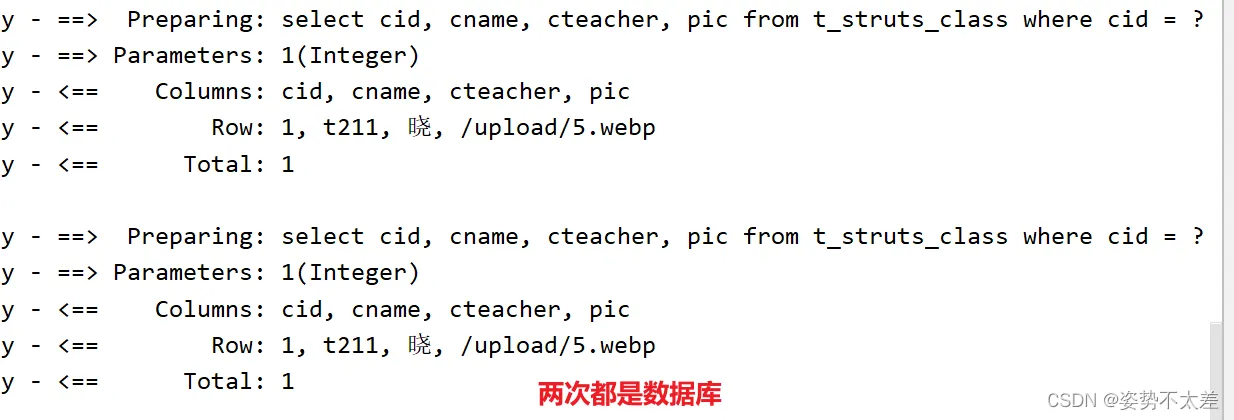
@Test
    public void test1(){
        System.out.println(clazzBiz.selectByPrimaryKey(1));
        System.out.println(clazzBiz.selectByPrimaryKey(1));
    }
两次都会走数据库:
③@CacheEvict
用于清除缓存的数据。它通常用于方法上,表示在方法执行后清除指定的缓存。
 @CacheEvict(value = "xx",key = "'cid:'+#cid",allEntries = true)
    int deleteByPrimaryKey(Integer cid);
2.3 Cacheable 与CachePut的区别
cacheable会在redis中存储数据,同时也会读取数据;cacheput只会在redis中数据,不会读数据
1. @Cacheable注解用于读取缓存,如果缓存中存在对应的结果则直接返回,不执行方法体内的代码;@CachePut注解则用于更新缓存,无论缓存中是否存在对应的结果都会执行方法体内的代码。
2. @Cacheable注解可以指定缓存名称和缓存键,用于唯一标识缓存的存储位置;@CachePut注解不需要指定缓存键,它会根据方法的参数自动生成缓存键。
3. @Cacheable注解适合用于查询操作,可以减少数据库的访问压力;@CachePut注解适合用于更新操作,可以保证缓存的数据与数据库的数据保持一致。
三、Redis中的击穿、穿透、雪崩的三种场景

3.1 击穿
含义:击穿指的是当一个缓存键在缓存中不存在,且同时有大量请求同时访问这个缓存键时,这些请求会直接访问后端数据库,导致数据库压力骤增。这种情况通常发生在热点数据失效导致的缓存穿透问题。
场景:某个热点数据在缓存中过期或被手动删除,然后有大量的请求同时访问这个数据。
解决方案:一种解决方案是在缓存失效时使用互斥锁,只允许一个请求去更新缓存,其他请求等待并读取更新后的缓存。另一种方案是使用“空值缓存”,即将缓存中不存在的数据(如数据库中不存在的数据)也缓存起来,这样下次请求同样的数据时,可以直接从缓存中获取到空值。
3.2. 穿透
含义:穿透指的是当一个请求查询一个不存在的缓存键时,由于缓存中没有这个键的值,请求会直接访问后端数据库,同样导致数据库压力增加。这种情况通常发生在恶意攻击或异常查询导致的缓存穿透问题。
场景:某个恶意用户或者异常请求不断查询缓存中不存在的数据。
解决方案:一种解决方案是使用布隆过滤器(Bloom Filter),在查询缓存之前先进行布隆过滤器的判断,如果键不在布隆过滤器中,则直接返回缓存缺失的结果,而不去查询数据库。另一种方案是在缓存中设置一个过期时间,即使不存在的数据也缓存一段时间,避免频繁查询数据库。
3.3. 雪崩
含义:雪崩指的是当缓存中的大量数据同时失效或者由于某种原因都不可用时,所有的请求都直接访问后端数据库,导致数据库压力骤增。这种情况通常发生在缓存服务器故障、断电、网络异常等情况下。
场景:缓存服务器故障、网络异常等导致缓存中的大量数据同时失效。
解决方案:一种解决方案是在缓存的失效时间上引入随机性,避免大量缓存同时失效。另一种方案是使用多级缓存架构,将缓存分为多个层级,当某一层缓存失效时,可以从其他层级的缓存中获取数据,避免全部请求直接访问数据库。
