分页查询文章列表
需求
在首页查询文章页面都有文章列表 ,首页 :查询所有文章
分类页面: 查询对应分类的文章列表
要求 ::1. 只能查询正式发布的文章 2. 置顶文章要显示在最前面
接口设计
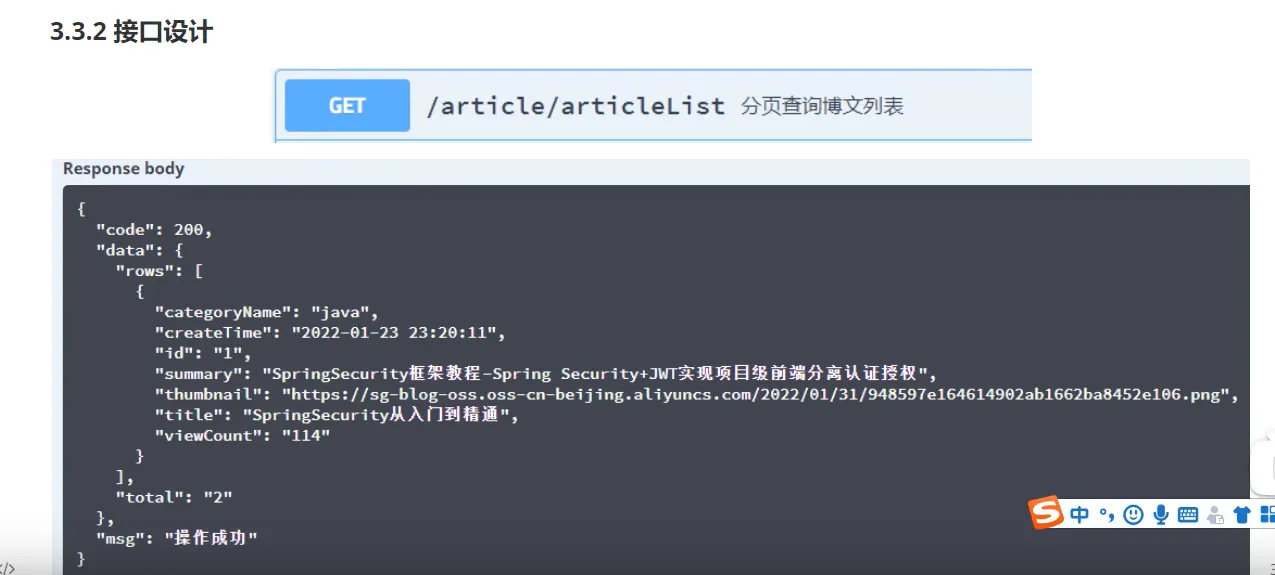
实现
//todo 文章分页
@GetMapping("/articleList")
//如果在请求路径后面直接 /+值的 需要使用 @PathVariable
//如果是从请求体中获取出来的就需要加上 @RequestBody
public ResponseResult articleList(Integer pageNum, Integer pageSize, Long categoryId){
    return articleService.articleList(pageNum,pageSize,categoryId);
}
按照要求 ,我们需要将查询到的信息传入前端, 但是 不能将全部信息传入 ,所以就需要将查询到的信息进行封装
List<ArticleListVo> articleListVo = BeanCopyUtils.copyBeanList(page.getRecords(), ArticleListVo.class);
//todo 文章分页
/*
在首页查询文章页面都有文章列表  ,首页 :查询所有文章
分类页面: 查询对应分类的文章列表
要求 ::1. 只能查询正式发布的文章 2. 置顶文章要显示在最前面
 */
@Override
public ResponseResult articleList(Integer pageNum, Integer pageSize, Long categoryId) {
    LambdaQueryWrapper<Article> queryWrapper = new LambdaQueryWrapper();
    //如果有categoryId ,那么查询和传入的就需要相同
    queryWrapper.eq(Objects.nonNull(categoryId) && categoryId > 0,Article::getCategoryId,categoryId);
    //状态 : 正式发布
    queryWrapper.eq(Article::getStatus, SystemConstants.ARTICLE_STATUS_PUT);
    //置顶的文章(对isTop进行排序)
    queryWrapper.orderByDesc(Article::getIsTop);
    //分页查询
    Page<Article> pageN = new Page<>(pageNum,pageSize);
    Page<Article> page = page(pageN, queryWrapper);
    //封装查询结果
    List<ArticleListVo> articleListVo = BeanCopyUtils.copyBeanList(page.getRecords(), ArticleListVo.class);
    PageVo pageVo = new PageVo(articleListVo, page.getTotal());
    return ResponseResult.okResult(pageVo);
}
因为我们封装的是categoryName,但是查询出来的确实categoryId,所以需要在查询后进行给categoryName赋值
for (Article article  : records){
    Category category = categoryService.getById(article.getCategoryId());
    article.setCategoryName(category.getName());
}
分页配置
/**
 * myBatisPlus分页配置
 */
@Configuration
public class MyBatisPlusConfig {
    @Bean
    public MybatisPlusInterceptor mybatisPlusInterceptor(){
        MybatisPlusInterceptor mb = new MybatisPlusInterceptor();
        mb.addInnerInterceptor(new PaginationInnerInterceptor());
        return mb;
    }
}
修改时间格式配置
在WebConfig中
//todo 修改时间格式 【yyyy-MM-dd HH:mm:ss】
// 其实也可以直接在相关字段上加注解
// @JsonFormat(timezone="GMT+8",pattern = "yyyy-MM-dd HH:mm:ss")
// 只是这样做可以使所有的时间格式都转换
@Bean//使用@Bean注入fastJsonHttpMessageConvert
public HttpMessageConverter fastJsonHttpMessageConverters() {
    //1.需要定义一个Convert转换消息的对象
    FastJsonHttpMessageConverter fastConverter = new FastJsonHttpMessageConverter();
    FastJsonConfig fastJsonConfig = new FastJsonConfig();
    fastJsonConfig.setSerializerFeatures(SerializerFeature.PrettyFormat);
    fastJsonConfig.setDateFormat("yyyy-MM-dd HH:mm:ss");
   // SerializeConfig.globalInstance.put(Long.class, ToStringSerializer.instance);
    fastJsonConfig.setSerializeConfig(SerializeConfig.globalInstance);
    fastConverter.setFastJsonConfig(fastJsonConfig);
    HttpMessageConverter<?> converter = fastConverter;
    return converter;
}
@Override
public void configureMessageConverters(List<HttpMessageConverter<?>> converters) {
    converters.add(fastJsonHttpMessageConverters());
}
文章详情接口
需求
要在文章列表页面点击阅读全文时能够跳转到文章详情页面 ,可以让用户阅读文章正文
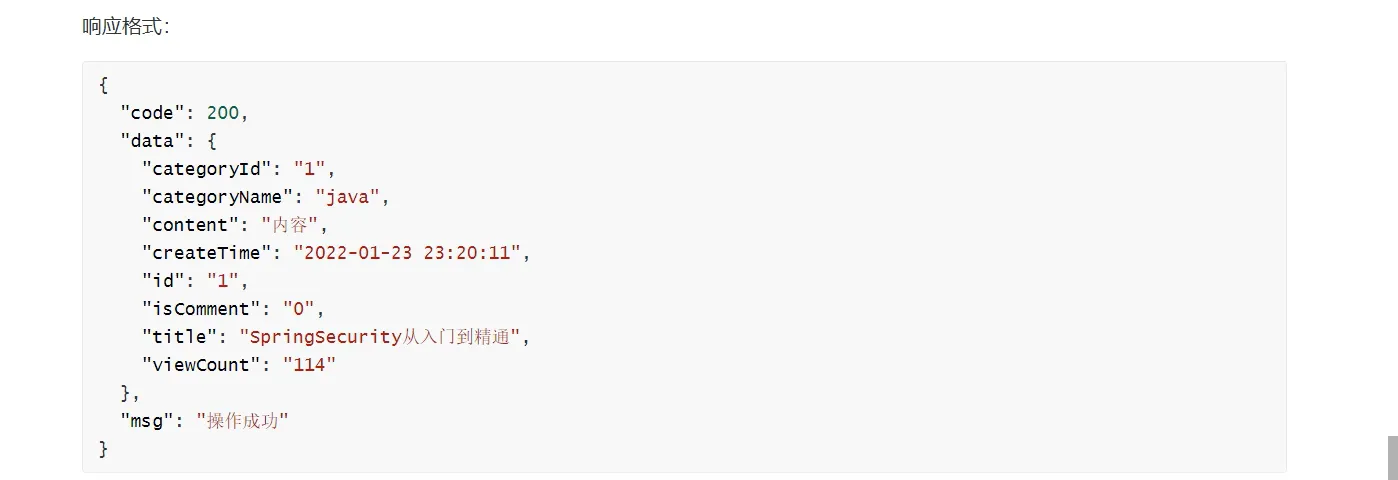
要求: 1. 要在文章详情中展示其分类名
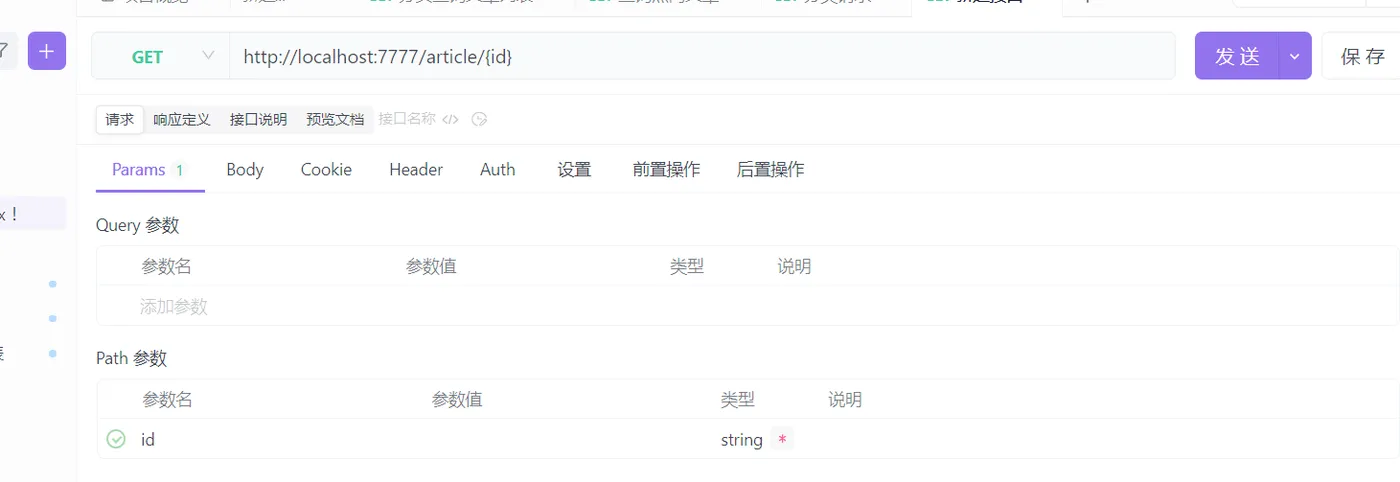
接口信息
响应格式
实现
//todo 查询文章详情
  @GetMapping("/{id}")
  public ResponseResult getArticleDetails(@PathVariable("id") Long id){
      return articleService.getArticleDetails(id);
  }
//todo 查询文章详情
/*
要在文章列表页面点击阅读全文时能够跳转到文章详情页面 ,可以让用户阅读文章正文
要求: 1. 要在文章详情中展示其分类名
 */
@Override
public ResponseResult getArticleDetails(Long id) {
    //根据文章id查询文章
    Article article = getById(id);
    //转换成vo格式
    ArticleDetailVo articleDetailVo = BeanCopyUtils.copyBean(article, ArticleDetailVo.class);
    //根据分类id查询分类名
    Long categoryId = articleDetailVo.getCategoryId();
    Category category = categoryService.getById(categoryId);
    if(category == null){
        return ResponseResult.okResult(articleDetailVo);
    }
    articleDetailVo.setCategoryName(category.getName());
    //封装响应,返回
    return ResponseResult.okResult(articleDetailVo);
}
友链查询
需求
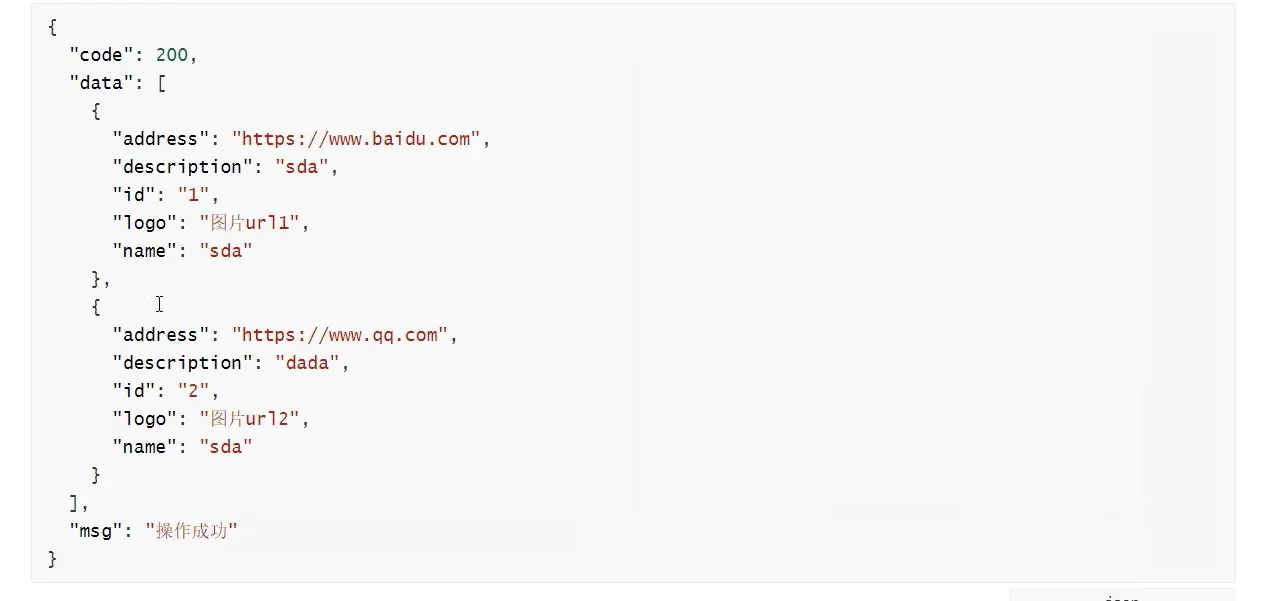
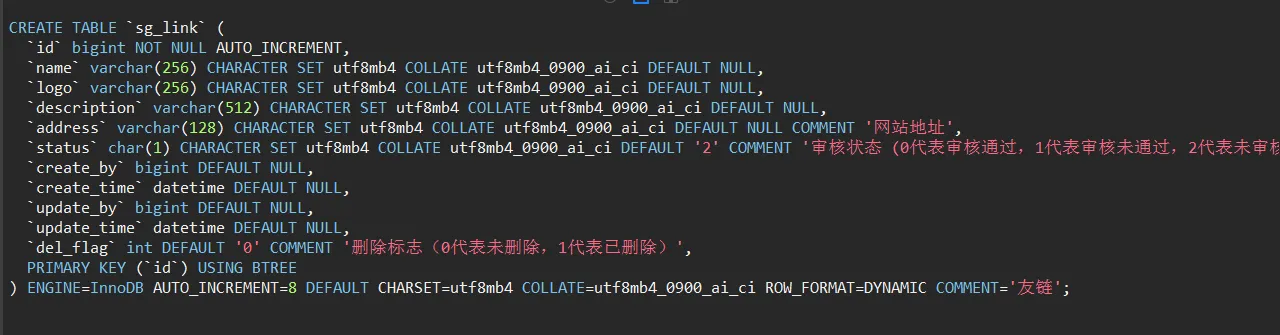
如果进行评论 ,那么就可以将用户的网站名、地址、描述、logo放上去
接口设计

响应格式
表信息
实现
@RestController
@RequestMapping("/link")
public class LinkController {
    @Resource
    private LinkService linkService;
    //todo 获取所有友链
    @GetMapping("/getAllLink")
    public ResponseResult getAllLink(){
        return linkService.getAllLink();
    }
}
@Service("linkService")
public class LinkServiceImpl extends ServiceImpl<LinkMapper, Link> implements LinkService {
    // todo 获取所有友链
    /*
     如果进行评论 ,那么就可以将用户的网站名、地址、描述、logo放上去
     */
    @Override
    public ResponseResult getAllLink() {
        //查询所有审核通过的
        LambdaQueryWrapper<Link> queryWrapper = new LambdaQueryWrapper();
        queryWrapper.eq(Link::getStatus, SystemConstants.LINK_STATUS_NORMAL);
        List<Link> links = list(queryWrapper);
        List<LinkVo> linkVos = BeanCopyUtils.copyBeanList(links, LinkVo.class);
        return ResponseResult.okResult(linkVos);
    }
}
评论列表
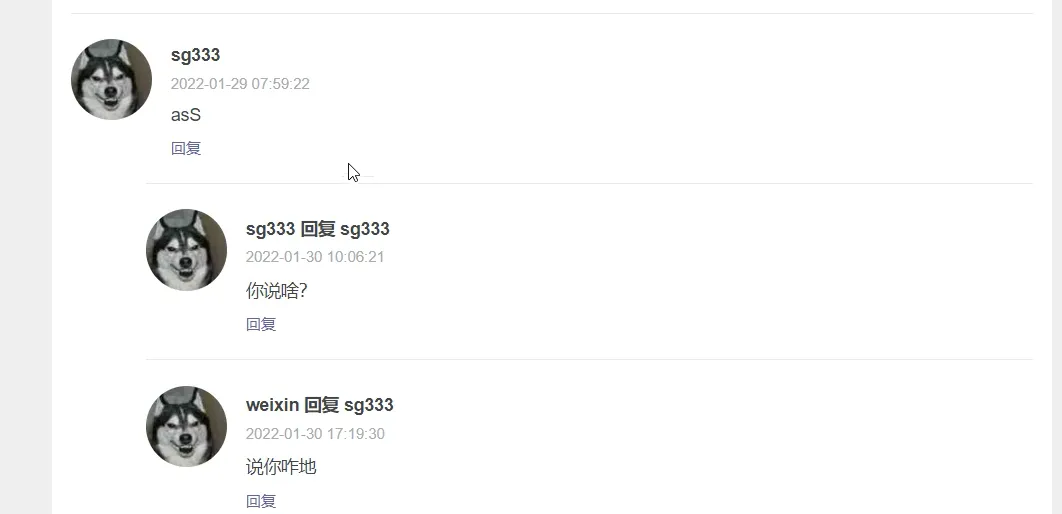
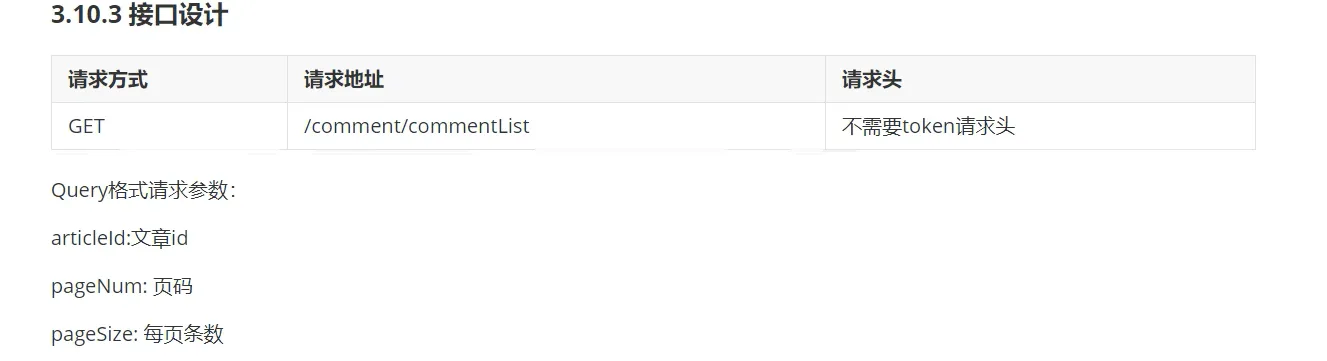
接口
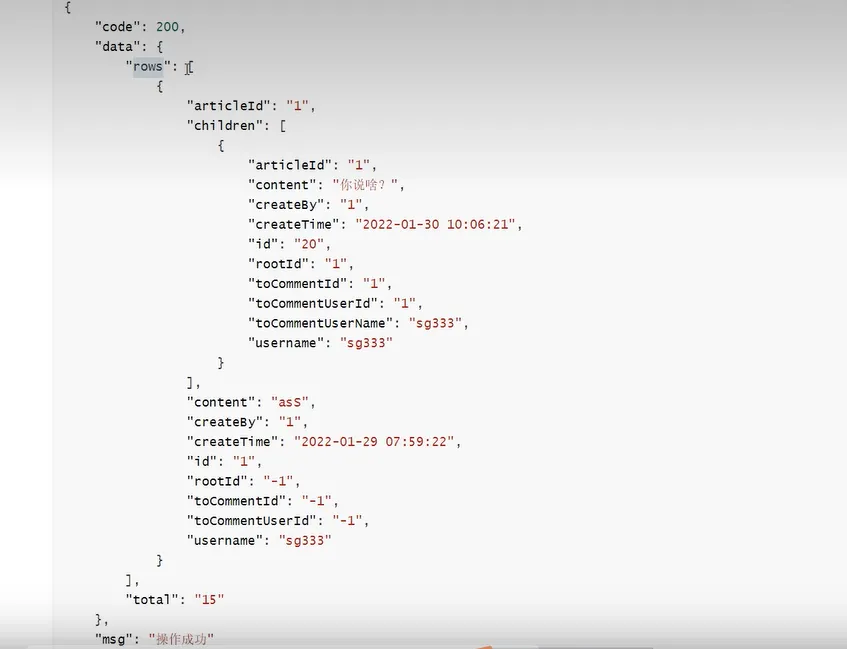
响应
需求
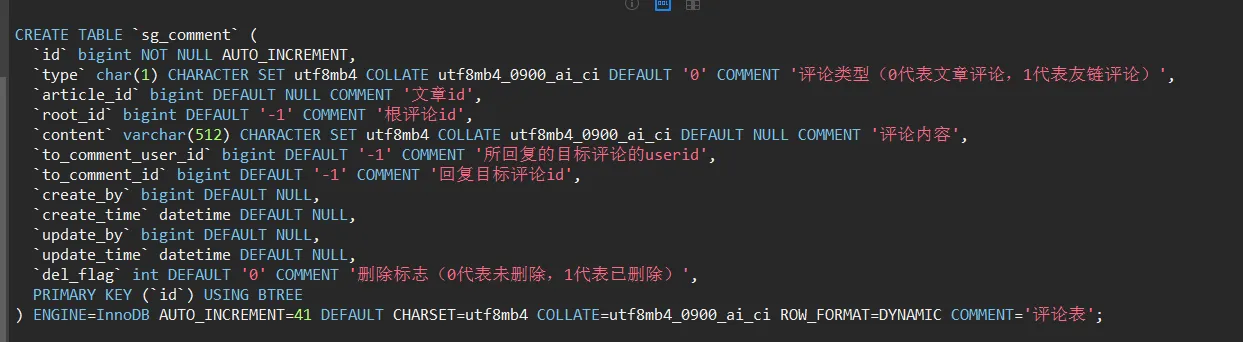
不仅需要实现评论 ,还要实现”父子评论“
表分析
实现
@RestController
@RequestMapping("/comment")
public class CommentController {
    @Autowired
    private CommentService commentService;
    //todo 评论列表
    @GetMapping("/commentList")
    public ResponseResult commentList(Long articleId ,Integer pageNum , Integer pageSize){
        return commentService.commentList(articleId,pageNum,pageSize);
    }
}
service层
@Service
public class CommentServiceImpl extends ServiceImpl<CommentMapper, Comment> implements CommentService {
    @Resource
    private UserService userService;
    //todo 评论列表
    @Override
    public ResponseResult commentList(Long articleId, Integer pageNum, Integer pageSize) {
        //根据文章id 所对应的 根评论(root_id = -1)
        LambdaQueryWrapper<Comment> queryWrapper = new LambdaQueryWrapper<>();
        //对articleId进行判断
        queryWrapper.eq(Comment::getArticleId,articleId);
        queryWrapper.eq(Comment::getRootId, SystemConstants.ARTICLE_ROOT_COMMENT);
        //分页查询
        Page<Comment> pageN = new Page<>(pageNum,pageSize);
        Page<Comment> page = page(pageN, queryWrapper);
        //封装返回
        List<CommentVo> list = toCommentVoList(page.getRecords());
        return ResponseResult.okResult(new PageVo(list,page.getTotal()));
    }
    //comment 集合 和commentVo 集合的拷贝
    private List<CommentVo> toCommentVoList(List<Comment> list){
        List<CommentVo> commentVos = BeanCopyUtils.copyBeanList(list, CommentVo.class);
        //遍历vo
        for (CommentVo commentVo : commentVos){
            //通过createBy查询用户的昵称并且赋值
            String nickName = userService.getById(commentVo.getCreateBy()).getNickName();
            commentVo.setUsername(nickName);
            //通过 toCommentUserId查询用户ude昵称并赋值
            //如果 toCommentUserId != -1才进行查询
            if (commentVo.getToCommentId() != -1){
                String toCommentName = userService.getById(commentVo.getToCommentId()).getNickName();
                commentVo.setToCommentUserName(toCommentName);
            }
        }
        return commentVos;
    }
}
查询根评论对应的子评论
也就是多条评论

//查询所有根评论对应的子评论的集合 ,并且赋值给对应的属性children
 for (CommentVo commentVo : list){
     //查询对应子评论
     List<CommentVo> children = getChildren(commentVo.getId());
     commentVo.setChildren(children);
 }
service层
/todo 评论列表
@Override
public ResponseResult commentList(Long articleId, Integer pageNum, Integer pageSize) {
    //根据文章id 所对应的 根评论(root_id = -1)
    LambdaQueryWrapper<Comment> queryWrapper = new LambdaQueryWrapper<>();
    //对articleId进行判断
    queryWrapper.eq(Comment::getArticleId,articleId);
    queryWrapper.eq(Comment::getRootId, SystemConstants.ARTICLE_ROOT_COMMENT);
    //分页查询
    Page<Comment> pageN = new Page<>(pageNum,pageSize);
    Page<Comment> page = page(pageN, queryWrapper);
    //封装返回
    List<CommentVo> list = toCommentVoList(page.getRecords());
    //查询所有根评论对应的子评论的集合 ,并且赋值给对应的属性children
    for (CommentVo commentVo : list){
        //查询对应子评论
        List<CommentVo> children = getChildren(commentVo.getId());
        commentVo.setChildren(children);
    }
    return ResponseResult.okResult(new PageVo(list,page.getTotal()));
}
//todo 根据根评论的id查询对应的子评论的集合
private List<CommentVo> getChildren(Long commentId){
    LambdaQueryWrapper<Comment> queryWrapper = new LambdaQueryWrapper<>();
    queryWrapper.eq(Comment::getRootId,commentId);
    List<Comment> list = list(queryWrapper);
    //封装成为CommentVo,然后返回
    return toCommentVoList(list);
}
//comment 集合 和commentVo 集合的拷贝
private List<CommentVo> toCommentVoList(List<Comment> list){
    List<CommentVo> commentVos = BeanCopyUtils.copyBeanList(list, CommentVo.class);
    //遍历vo
    for (CommentVo commentVo : commentVos){
        //通过createBy查询用户的昵称并且赋值
        String nickName = userService.getById(commentVo.getCreateBy()).getNickName();
        commentVo.setUsername(nickName);
        //通过 toCommentUserId查询用户ude昵称并赋值
        //如果 toCommentUserId != -1才进行查询
        if (commentVo.getToCommentId() != -1){
            String toCommentName = userService.getById(commentVo.getToCommentId()).getNickName();
            commentVo.setToCommentUserName(toCommentName);
        }
    }
    return commentVos;
}
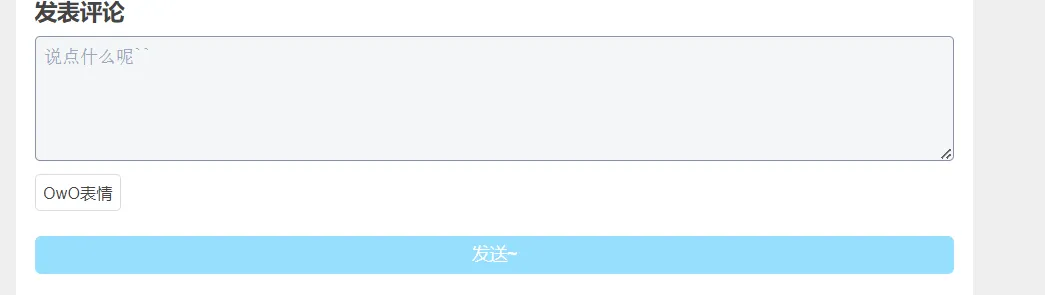
发表评论
请求
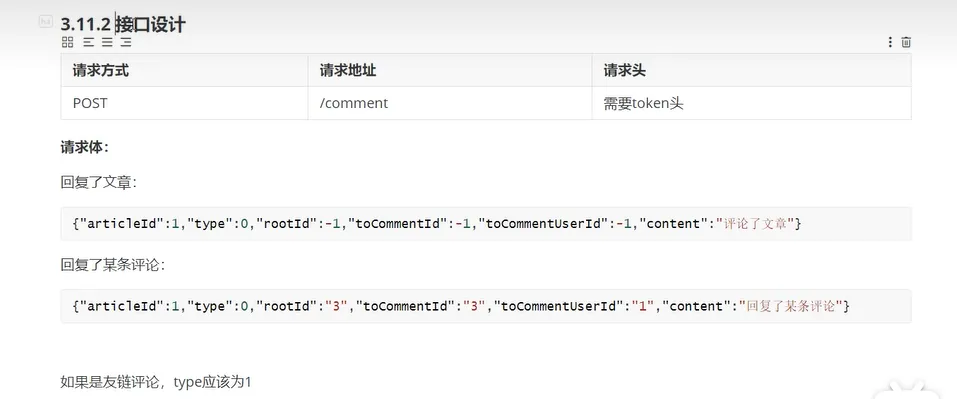
如果是友链 type为 1
还需要有请求体
实现
package com.blog.service.impl;
import com.baomidou.mybatisplus.core.conditions.query.LambdaQueryWrapper;
import com.baomidou.mybatisplus.core.mapper.BaseMapper;
import com.baomidou.mybatisplus.extension.plugins.pagination.Page;
import com.baomidou.mybatisplus.extension.service.impl.ServiceImpl;
import com.blog.domain.ResponseResult;
import com.blog.domain.entity.Comment;
import com.blog.domain.entity.LoginUser;
import com.blog.domain.entity.User;
import com.blog.domain.vo.CommentVo;
import com.blog.domain.vo.PageVo;
import com.blog.enums.AppHttpCodeEnum;
import com.blog.exception.SystemException;
import com.blog.mapper.CommentMapper;
import com.blog.service.CommentService;
import com.blog.service.UserService;
import com.blog.utils.BeanCopyUtils;
import com.blog.utils.SecurityUtils;
import com.blog.utils.SystemConstants;
import org.springframework.security.core.Authentication;
import org.springframework.security.core.context.SecurityContextHolder;
import org.springframework.stereotype.Service;
import org.springframework.util.StringUtils;
import org.springframework.web.bind.annotation.RestController;
import javax.annotation.Resource;
import javax.sql.rowset.BaseRowSet;
import java.util.List;
import java.util.Objects;
@Service
public class CommentServiceImpl extends ServiceImpl<CommentMapper, Comment> implements CommentService {
    @Resource
    private UserService userService;
    //todo 评论列表
    @Override
    public ResponseResult commentList(Long articleId, Integer pageNum, Integer pageSize) {
        //根据文章id 所对应的 根评论(root_id = -1)
        LambdaQueryWrapper<Comment> queryWrapper = new LambdaQueryWrapper<>();
        //对articleId进行判断
        queryWrapper.eq(Comment::getArticleId,articleId);
        queryWrapper.eq(Comment::getRootId, SystemConstants.ARTICLE_ROOT_COMMENT);
        //分页查询
        Page<Comment> pageN = new Page<>(pageNum,pageSize);
        Page<Comment> page = page(pageN, queryWrapper);
        //封装返回
        List<CommentVo> list = toCommentVoList(page.getRecords());
        //查询所有根评论对应的子评论的集合 ,并且赋值给对应的属性children
        for (CommentVo commentVo : list){
            //查询对应子评论
            List<CommentVo> children = getChildren(commentVo.getRootId());
            commentVo.setChildren(children);
        }
        return ResponseResult.okResult(new PageVo(list,page.getTotal()));
    }
    //todo 添加评论
    @Override
    public ResponseResult addComment(Comment comment) {
        //评论内容不能为空
        if(!StringUtils.hasText(comment.getContent())){
            throw new SystemException(AppHttpCodeEnum.CONTENT_NOT_NULL);
        }
        save(comment);
        return ResponseResult.okResult();
    }
    //todo 根据根评论的id查询对应的子评论的集合
    private List<CommentVo> getChildren(Long commentId){
        LambdaQueryWrapper<Comment> queryWrapper = new LambdaQueryWrapper<>();
        queryWrapper.eq(Comment::getRootId,commentId);
        queryWrapper.orderByAsc(Comment::getCreateTime);
        List<Comment> list = list(queryWrapper);
        //封装成为CommentVo,然后返回
        return toCommentVoList(list);
    }
    //todo comment 集合 和commentVo 集合的拷贝
    private List<CommentVo> toCommentVoList(List<Comment> list){
        List<CommentVo> commentVos = BeanCopyUtils.copyBeanList(list, CommentVo.class);
        //遍历vo
        for (CommentVo commentVo : commentVos){
            //通过createBy查询用户的昵称并且赋值
            String nickName = userService.getById(commentVo.getCreateBy()).getNickName();
            commentVo.setUsername(nickName);
            //通过 toCommentUserId查询用户ude昵称并赋值
            //如果 toCommentUserId != -1才进行查询
            if (commentVo.getToCommentUserId() != -1){
                String toCommentUserName = userService.getById(commentVo.getToCommentUserId()).getNickName();
                commentVo.setToCommentUserName(toCommentUserName);
            }
        }
        return commentVos;
    }
}
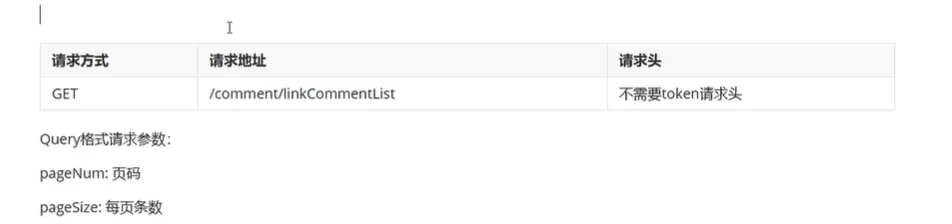
友链评论
接口
实现
@GetMapping("/linkCommentList")
public ResponseResult listCommentList(Integer pageNum , Integer pageSize){
    return commentService.commentList(SystemConstants.COMMENT_TYPE_FRIEND,null,pageNum,pageSize);
}
@Service
public class CommentServiceImpl extends ServiceImpl<CommentMapper, Comment> implements CommentService {
    @Resource
    private UserService userService;
    //todo 评论列表
    @Override
    public ResponseResult commentList(String commentType, Long articleId, Integer pageNum, Integer pageSize) {
        //根据文章id 所对应的 根评论(root_id = -1)
        LambdaQueryWrapper<Comment> queryWrapper = new LambdaQueryWrapper<>();
        //对articleId进行判断  ,必须是文章评论再显示这个条件
        queryWrapper.eq(SystemConstants.COMMENT_TYPE_ARTICLE.equals(commentType),Comment::getArticleId,articleId);
        queryWrapper.eq(Comment::getRootId, SystemConstants.ARTICLE_ROOT_COMMENT);
        //评论类型
        queryWrapper.eq(Comment::getType,commentType);
        //分页查询
        Page<Comment> pageN = new Page<>(pageNum,pageSize);
        Page<Comment> page = page(pageN, queryWrapper);
        //封装返回
        List<CommentVo> list = toCommentVoList(page.getRecords());
        //查询所有根评论对应的子评论的集合 ,并且赋值给对应的属性children
        for (CommentVo commentVo : list){
            //查询对应子评论
            List<CommentVo> children = getChildren(commentVo.getRootId());
            commentVo.setChildren(children);
        }
        return ResponseResult.okResult(new PageVo(list,page.getTotal()));
    }
}
个人中心
接口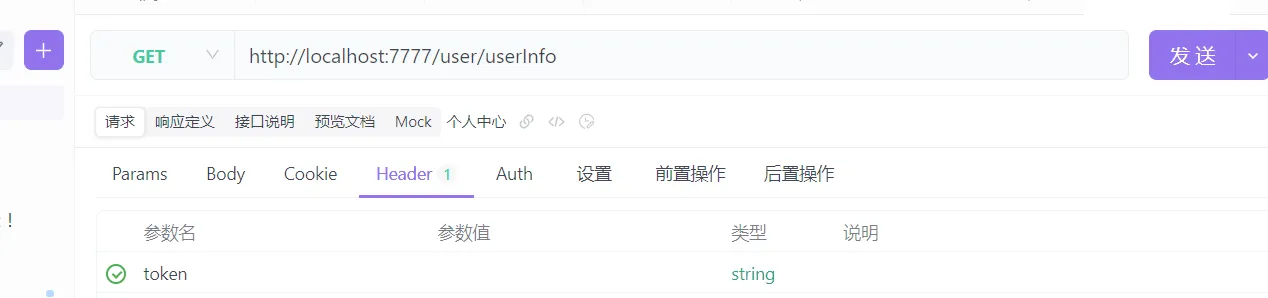
表分析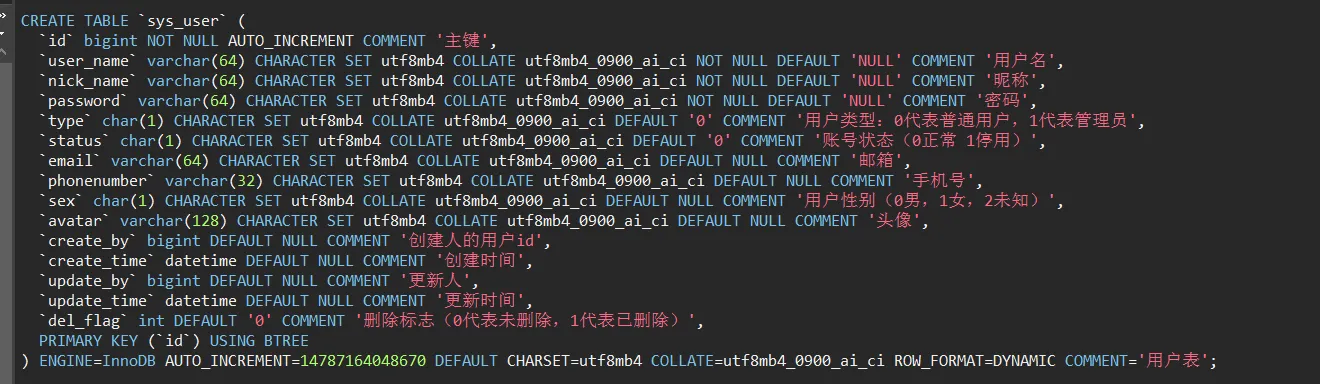
实现
@RestController
@RequestMapping("/user")
public class UserController {
    @Autowired
    private UserService userService;
    @GetMapping("/userInfo")
    public ResponseResult userInfo(){
        return userService.userInfo();
    }
}
@Service
public class UserServiceImpl extends ServiceImpl<UserMapper, User> implements UserService {
    //todo 用户中心
    @Override
    public ResponseResult userInfo() {
        //获取当前用户
        Long userId = SecurityUtils.getUserId();
        //根据当前用户id查询当前用户
        User user = getById(userId);
        //封装成userInfoVo返回
        UserInfoVo userInfoVo = BeanCopyUtils.copyBean(user, UserInfoVo.class);
        return ResponseResult.okResult(userInfoVo);
    }
}
个人信息curd
头像上传—-使用七牛云

首先上传至web应用服务器 ,然后再从web服务器上传至 oss
接口
上传文件需求 :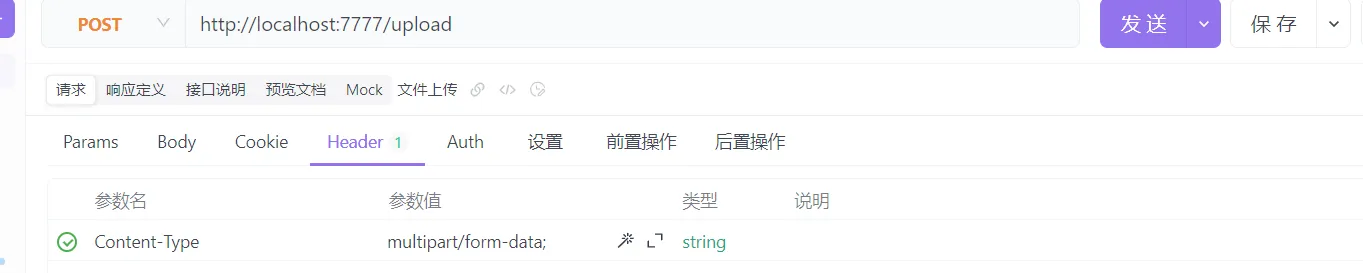
更新个人信息需求 :
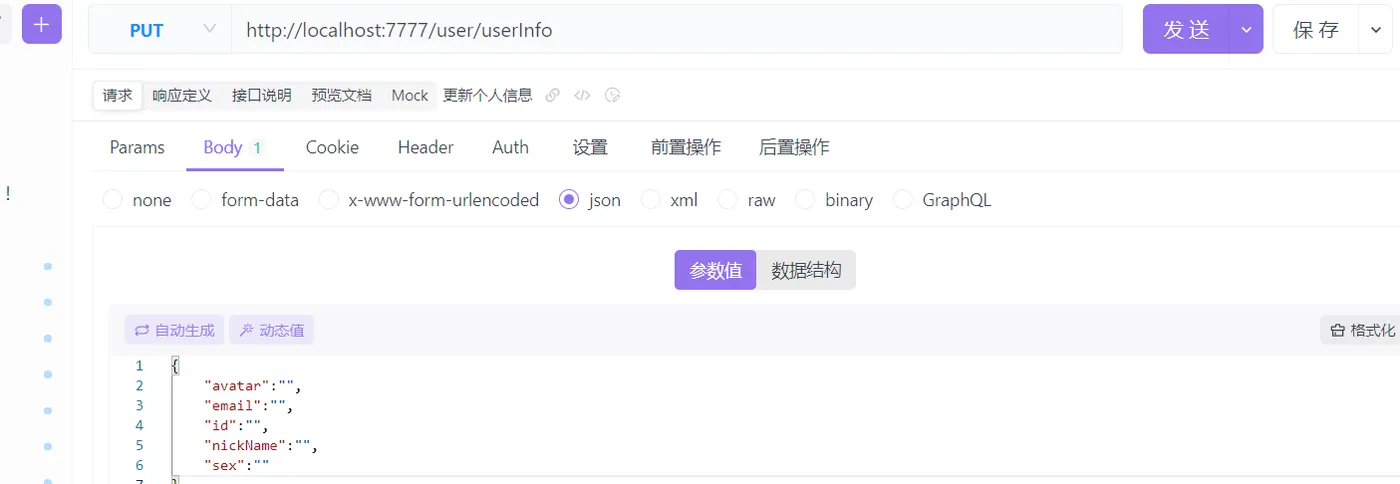
实现
上传文件
@RestController
public class UploadController {
    @Autowired
    private UploadService uploadService;
    @PostMapping("/upload")
    public ResponseResult uploadImg(MultipartFile img){
        return uploadService.uploadImg(img);
    }
}
/**
 * 上传文件到七牛云
 */
@ConfigurationProperties(prefix = "oss")
@Service
@Data
public class UploadServiceImpl implements UploadService {
    //todo 实现文件的上传
    @Override
    public ResponseResult uploadImg(MultipartFile img) {
        //判断文件的大小
        //获取原始文件名进行判断
        String originalFilename = img.getOriginalFilename();
        if(!originalFilename.endsWith(".png") && !originalFilename.endsWith(".jpg")){
            return ResponseResult.errorResult(AppHttpCodeEnum.FILE_TYPE_ERROR);
        }
        //如果通过,上传文件到oss
        String url = uploadOSS(img);
        return ResponseResult.okResult(url);
    }
    private String accessKey;
    private String secretKey;
    private String bucket;
    private String uploadOSS(MultipartFile imgFile){
        //构造一个带指定 Region 对象的配置类
        Configuration cfg = new Configuration(Region.autoRegion());
        //...其他参数参考类注释
        UploadManager uploadManager = new UploadManager(cfg);
        //默认不指定key的情况下,以文件内容的hash值作为文件名
        //images目录下的文件
        String originalFilename = imgFile.getOriginalFilename();
        String key = "images/"+originalFilename;
        try {
            //将前端传过来的imgFile文件转换成一个inputStream,然后
            InputStream inputStream = imgFile.getInputStream();
            Auth auth = Auth.create(accessKey, secretKey);
            String upToken = auth.uploadToken(bucket);
            try {
                Response response = uploadManager.put(inputStream,key,upToken,null, null);
                //解析上传成功的结果
                DefaultPutRet putRet = new Gson().fromJson(response.bodyString(), DefaultPutRet.class);
                System.out.println(putRet.key);
                System.out.println(putRet.hash);
            } catch (QiniuException ex) {
                Response r = ex.response;
                System.err.println(r.toString());
                try {
                    System.err.println(r.bodyString());
                } catch (QiniuException ex2) {
                    //ignore
                }
            }
        } catch (Exception ex) {
            //ignore
        }
        //文件地址
        return "http://rrpanx30j.hd-bkt.clouddn.com/images/"+ originalFilename;
    }
}
更新个人信息实现 :
@RestController
@RequestMapping("/user")
public class UserController {
    @Autowired
    private UserService userService;
    @GetMapping("/userInfo")
    public ResponseResult userInfo(){
        return userService.userInfo();
    }
    @PutMapping("/userInfo")
    public ResponseResult updateUserInfo(@RequestBody User user){
        return userService.updateUserInfo(user);
    }
}
@Service
public class UserServiceImpl extends ServiceImpl<UserMapper, User> implements UserService {
    //todo 用户中心
    @Override
    public ResponseResult userInfo() {
        //获取当前用户
        Long userId = SecurityUtils.getUserId();
        //根据当前用户id查询当前用户
        User user = getById(userId);
        //封装成userInfoVo返回
        UserInfoVo userInfoVo = BeanCopyUtils.copyBean(user, UserInfoVo.class);
        return ResponseResult.okResult(userInfoVo);
    }
    //todo 更新个人信息
    @Override
    public ResponseResult updateUserInfo(User user) {
        updateById(user);
        return ResponseResult.okResult();
    }
}
@Service
public class UserServiceImpl extends ServiceImpl<UserMapper, User> implements UserService {
    @Autowired
    private PasswordEncoder passwordEncoder;
    //todo 注册用户
    @Override
    public ResponseResult register(User user) {
        //对数据进行非空判断 要求用户名 密码 等都不为空
        if(!StringUtils.hasText(user.getUserName())){
            ResponseResult.errorResult(AppHttpCodeEnum.USERNAME_NOT_NULL);
        }
        if( StringUtils.hasText(user.getPassword())){
            ResponseResult.errorResult(AppHttpCodeEnum.PASSWORD_NOT_NULL);
        }
        if( StringUtils.hasText(user.getEmail())){
            ResponseResult.errorResult(AppHttpCodeEnum.EMAIL_NOT_NULL);
        }
        if( StringUtils.hasText(user.getNickName())){
            ResponseResult.errorResult(AppHttpCodeEnum.NICKNAME_EXIST);
        }
        //判断数据库中是否存在用户
        if(usernameExist(user.getUserName())){
            //用户已经存在
            ResponseResult.errorResult(USERNAME_EXIST);
        }
        if(nickNameExist(user.getNickName())){
            //昵称存在
            ResponseResult.errorResult(NICKNAME_EXIST);
        }
        ///密码加密处理
        String encodePass = passwordEncoder.encode(user.getPassword());
        user.setPassword(encodePass); //设置加密之后的密码
        save(user);
        //返回结果
        return ResponseResult.okResult();
    }
    //todo 判断用户名是否存在
    private boolean usernameExist(String username){
        LambdaQueryWrapper<User> queryWrapper = new LambdaQueryWrapper<>();
        queryWrapper.eq(User::getUserName,username);
        int count = count(queryWrapper);
        if(count >= 1){
            return true;
        }
        return false;
    }
    //todo 判断昵称是否存在
    private boolean nickNameExist(String nickName){
        LambdaQueryWrapper<User> queryWrapper = new LambdaQueryWrapper<>();
        queryWrapper.eq(User::getNickName,nickName);
        int count = count(queryWrapper);
        if(count >= 1){
            return true;
        }
        return false;
    }
}