
一、PropertySource 简介二、@PropertySource与Environment读取配置文件三、@PropertySource与@Value读取配置文件@Value 基本使用@Value 高级用法四、@PropertySource 与 @Import
一、PropertySource 简介
org.springframework.context.annotation.PropertySource 是一个注解,可以标记在类上、接口上、枚举上,在运行时起作用。而@Repeatable(value = PropertySources.class) 表示在PropertySources 中此注解时可以重复使用的。如下:
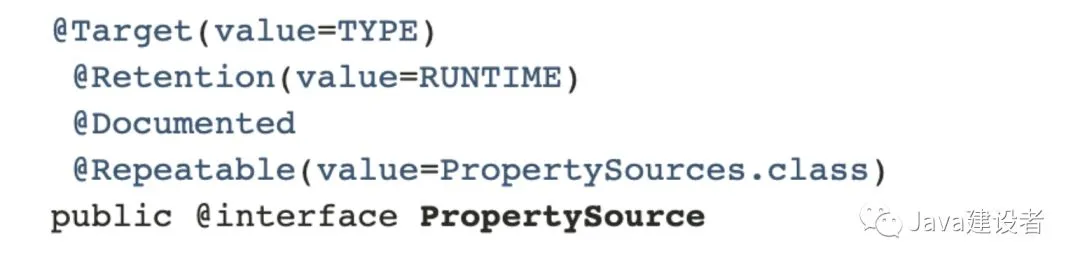
二、@PropertySource与Environment读取配置文件
此注解@PropertySource 为Spring 中的 Environment提供方便和声明机制,通常与Configuration一起搭配使用。
- 新建一个maven 项目,添加pom.xml 依赖:
<?xml version="1.0" encoding="UTF-8"?>
<project xmlns="http://maven.apache.org/POM/4.0.0" xmlns:xsi="http://www.w3.org/2001/XMLSchema-instance"
    xsi:schemaLocation="http://maven.apache.org/POM/4.0.0 http://maven.apache.org/xsd/maven-4.0.0.xsd">
    <modelVersion>4.0.0</modelVersion>
    <groupId>com.spring.propertysource</groupId>
    <artifactId>spring-propertysource</artifactId>
    <version>0.0.1-SNAPSHOT</version>
    <name>spring-propertysource</name>
    <description>Demo project for Spring Boot</description>
    <properties>
        <java.version>1.8</java.version>
        <spring.version>4.3.13.RELEASE</spring.version>
    </properties>
    <dependencies>
        <dependency>
            <groupId>org.springframework</groupId>
            <artifactId>spring-core</artifactId>
            <version>${spring.version}</version>
        </dependency>
        <dependency>
            <groupId>org.springframework</groupId>
            <artifactId>spring-context</artifactId>
            <version>${spring.version}</version>
        </dependency>
    </dependencies>
    <build>
        <pluginManagement>
            <plugins>
                <plugin>
                    <groupId>org.apache.maven.plugins</groupId>
                    <artifactId>maven-compiler-plugin</artifactId>
                    <version>3.2</version>
                    <configuration>
                        <source>1.6</source>
                        <target>1.6</target>
                    </configuration>
                </plugin>
            </plugins>
        </pluginManagement>
    </build>
</project>
一般把版本名称统一定义在 标签中,便于统一管理,如上可以通过
${…}来获取指定版本。
- 定义一个application.properties 来写入如下配置
com.spring.name=liuXuan
com.spring.age=18
- 新建一个TestBean,定义如下属性
public class TestBean {
    private String name;
    private Integer age;
    public String getName() {
        return name;
    }
    public void setName(String name) {
        this.name = name;
    }
    public Integer getAge() {
        return age;
    }
    public void setAge(Integer age) {
        this.age = age;
    }
    @Override
    public String toString() {
        return "TestBean{" +
                "name='" + name + '\'' +
                ", age=" + age +
                '}';
    }
}
- 新建一个main class ,用来演示@PropertySource 的使用
@Configuration
  @PropertySource(value = "classpath:application.properties",ignoreResourceNotFound = false)
  public class SpringPropertysourceApplication {
    @Resource
    Environment environment;
    @Bean
    public TestBean testBean(){
      TestBean testBean = new TestBean();
      // 读取application.properties中的name
      testBean.setName(environment.getProperty("com.spring.name"));
      // 读取application.properties中的age
      testBean.setAge(Integer.valueOf(environment.getProperty("com.spring.age")));
      System.out.println("testBean = " + testBean);
      return testBean;
    }
    public static void main(String[] args) {
      ApplicationContext applicationContext = new AnnotationConfigApplicationContext(SpringPropertysourceApplication.class);
      TestBean testBean = (TestBean)applicationContext.getBean("testBean");
    }
  }
输出:
testBean = TestBean{name='liuXuan', age=18}
Refreshing the spring context
@Configuration : 相当于 标签,注意不是,一个配置类可以有多个bean,但是只能有一个
@PropertySource: 用于引入外部属性配置,和Environment 配合一起使用。其中ignoreResourceNotFound 表示没有找到文件是否会报错,默认为false,就是会报错,一般开发情况应该使用默认值,设置为true相当于生吞异常,增加排查问题的复杂性。
引入PropertySource,注入Environment,然后就能用environment 获取配置文件中的value值。
三、@PropertySource与@Value读取配置文件
@Value 基本使用
我们以DB的配置文件为例,来看一下如何使用@Value读取配置文件
- 首先新建一个DBConnection,具体代码如下:
// 组件bean
    @Component
  @PropertySource("classpath:db.properties")
  public class DBConnection {
    @Value("${DB_DRIVER_CLASS}")
    private String driverClass;
    @Value("${DB_URL}")
    private String dbUrl;
    @Value("${DB_USERNAME}")
    private String userName;
    @Value("${DB_PASSWORD}")
    private String password;
    public DBConnection(){}
    public void printDBConfigs(){
      System.out.println("Db Driver Class = " + driverClass);
      System.out.println("Db url = " + dbUrl);
      System.out.println("Db username = " + userName);
      System.out.println("Db password = " + password);
    }
  }
类上加入@Component 表示这是一个组件bean,需要被spring进行管理,@PropertySource 用于获取类路径下的db.properties 配置文件,@Value用于获取properties中的key 对应的value值,printDBConfigs方法打印出来对应的值。
- 新建一个db.properties,具体文件如下
#MYSQL Database Configurations
DB_DRIVER_CLASS=com.mysql.jdbc.Driver
DB_URL=jdbc:mysql://localhost:3306/test
DB_USERNAME=cxuan
DB_PASSWORD=111111
APP_NAME=PropertySourceExample
这是一个MYSQL连接数据库驱动的配置文件。
- 新建一个SpringMainClass,用于测试DBConection中是否能够获取到@Value的值
public class SpringMainClass {
        public static void main(String[] args) {
            AnnotationConfigApplicationContext context = new AnnotationConfigApplicationContext();
            // 注解扫描,和@ComponentScan 和 基于XML的配置<context:component-scan base-package>相同
            context.scan("com.spring.propertysource.app");
            // 刷新上下文环境
            context.refresh();
            System.out.println("Refreshing the spring context");
            // 获取DBConnection这个Bean,调用其中的方法
            DBConnection dbConnection = context.getBean(DBConnection.class);
            dbConnection.printDBConfigs();
            // 关闭容器(可以省略,容器可以自动关闭)
            context.close();
        }
    }
输出:
Refreshing the spring context
Db Driver Class = com.mysql.jdbc.Driver
Db url = jdbc:mysql://localhost:3306/test
Db username = cxuan
Db password = 111111
@Value 高级用法
在实现了上述的例子之后,我们再来看一下@Value 的高级用法:
- @Value 可以直接为字段赋值,例如:
@Value("cxuan")
String name;
@Value(10)
Integer age;
@Value("${APP_NAME_NOT_FOUND:Default}")
private String defaultAppName;
- @Value 可以直接获取系统属性,例如:
@Value("${java.home}")
// @Value("#{systemProperties['java.home']}") SPEL 表达式
String javaHome;
@Value("${HOME}")
String dir;
- @Value 可以注解在方法和参数上
@Value("Test") // 可以直接使用Test 进行单元测试
public void printValues(String s, @Value("another variable") String v) {
     ...
}
修改DBConnection后的代码如下:
public class DBConnection {
    @Value("${DB_DRIVER_CLASS}")
    private String driverClass;
    @Value("${DB_URL}")
    private String dbUrl;
    @Value("${DB_USERNAME}")
    private String userName;
    @Value("${DB_PASSWORD}")
    private String password;
    public DBConnection(){}
    public void printDBConfigs(){
        System.out.println("Db Driver Class = " + driverClass);
        System.out.println("Db url = " + dbUrl);
        System.out.println("Db username = " + userName);
        System.out.println("Db password = " + password);
    }
}
在com.spring.propertysource.app 下 新增DBConfiguration,作用是配置管理类,管理DBConnection,并读取配置文件,代码如下:
@Configuration
@PropertySources({
        @PropertySource("classpath:db.properties"),
        @PropertySource(value = "classpath:root.properties", ignoreResourceNotFound = true)
})
public class DBConfiguration {
    @Value("Default DBConfiguration")
    private String defaultName;
    @Value("true")
    private boolean defaultBoolean;
    @Value("10")
    private int defaultInt;
    @Value("${APP_NAME_NOT_FOUND:Default}")
    private String defaultAppName;
     @Value("#{systemProperties['java.home']}")
//    @Value("${java.home}")
    private String javaHome;
    @Value("${HOME}")
    private String homeDir;
    @Bean
    public DBConnection getDBConnection() {
        DBConnection dbConnection = new DBConnection();
        return dbConnection;
    }
    @Value("Test") // 开启测试
    public void printValues(String s, @Value("another variable") String v) {
        System.out.println("Input Argument 1 = " + s);
        System.out.println("Input Argument 2 = " + v);
        System.out.println("Home Directory = " + homeDir);
        System.out.println("Default Configuration Name = " + defaultName);
        System.out.println("Default App Name = " + defaultAppName);
        System.out.println("Java Home = " + javaHome);
        System.out.println("Home dir = " + homeDir);
        System.out.println("Boolean = " + defaultBoolean);
        System.out.println("Int = " + defaultInt);
    }
}
使用SpringMainClass 进行测试,测试结果如下:
Input Argument 1 = Test
Input Argument 2 = another variable
Home Directory = /Users/mr.l
Default Configuration Name = Default DBConfiguration
Default App Name = Default
Java Home = /Library/Java/JavaVirtualMachines/jdk1.8.0_191.jdk/Contents/Home/jre
Home dir = /Users/mr.l
Boolean = true
Int = 10
Refreshing the spring context
Db Driver Class = com.mysql.jdbc.Driver
Db url = jdbc:mysql://localhost:3306/test
Db username = cxuan
Db password = 111111
可以看到上述代码并没有显示调用printValues 方法,默认是以单元测试的方式进行的。
四、@PropertySource 与 @Import
@Import 可以用来导入 @PropertySource 标注的类,具体代码如下:
- 新建一个PropertySourceReadApplication 类,用于读取配置文件并测试,具体代码如下:
// 导入BasicPropertyWithJavaConfig类
@Import(BasicPropertyWithJavaConfig.class)
public class PropertySourceReadApplication {
    @Resource
    private Environment env;
    @Value("${com.spring.name}")
    private String name;
    @Bean("context")
    public PropertySourceReadApplication contextLoadInitialized(){
          // 用environment 读取配置文件
        System.out.println(env.getProperty("com.spring.age"));
          // 用@Value 读取配置文件
        System.out.println("name = " + name);
        return null;
    }
    public static void main(String[] args) {
          // AnnotationConnfigApplicationContext 内部会注册Bean
        new AnnotationConfigApplicationContext(PropertySourceReadApplication.class);
    }
}
- 新建一个BasicPropertyWithJavaConfig 类,用于配置类并加载配置文件
@Configuration
@PropertySource(value = "classpath:application.properties")
public class BasicPropertyWithJavaConfig {
    public BasicPropertyWithJavaConfig(){
        super();
    }
}
启动PropertySourceReadApplication ,console能够发现读取到配置文件中的value值
18
name = cxuan
欢迎关注 Java建设者
</div>