**Spring boot是用来简化Spring的,是对Spring框架的一个再封装
(所以需要有spring和maven等基础)**
**解决:**
“spring全家桶”时代
Spring boot->J2EE一站式解决方案
Spring Cloud->分布式整体解决方案
**微服务
2014,Martin flowler**
微服务:架构风格(服务微化)
一个应用应该是一组小型服务,可以通过HTTP互联互通。
每一个单元元素最终都是可独立替换和独立升级的软件功能单元
**特点**
不需要web.xml
不需要springmvc.xml
不需要tomcat(内嵌了)
不需要配置JSON解析,支持rest架构
个性化配置非常简单
**demo最终目录结构(代码下面给出了)**
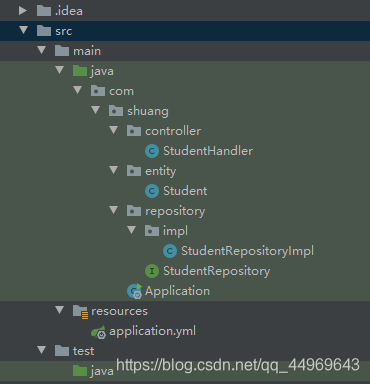
**由于Spring boot使用了大量注解,所以很简单。最后,只需要浏览器:localhost:8080/student/方法 就OK了!**
**使用步骤**
**1,创建maven工程(先不整合其他组件),导入相关依赖**
```java
<!--pom.xml中-->
<!-- 继承父包-->
<parent>
<groupId>org.springframework.boot</groupId>
<artifactId>spring-boot-starter-parent</artifactId>
<version>2.0.7.RELEASE</version>
</parent>
<dependencies>
<!-- web启动jar-->
<dependency>
<groupId>org.springframework.boot</groupId>
<artifactId>spring-boot-starter-web</artifactId>
</dependency>
<dependency>
<groupId>org.projectlombok</groupId>
<artifactId>lombok</artifactId>
<version>1.18.6</version>
<scope>provided</scope>
</dependency>
</dependencies>
```
**2,创建Student实体类**
**package com.shuang.entity;
import lombok.Data;
@Data
public class Student {
private long id;
private String name;
private int age;
}**
**3,StudentRepository**
```java
package com.shuang.repository;
import com.shuang.entity.Student;
import java.util.Collection;
public interface StudentRepository {
public Collection<Student> findAll();
public Student findByid(long id);
public void saveOrUpdate(Student student) ;
public void deleteById(long id);
}
```
**4,StudentRespository**
```java
package com.shuang.repository.impl;
import com.shuang.entity.Student;
import com.shuang.repository.StudentRepository;
import org.springframework.stereotype.Repository;
import java.util.Collection;
import java.util.HashMap;
import java.util.Map;
@Repository
public class StudentRepositoryImpl implements StudentRepository {
private static Map<Long,Student> studentMap;
static{
studentMap=new HashMap<>();
studentMap.put(1L,new Student(1L,"张三",22));
studentMap.put(2L,new Student(2L,"李四",23));
studentMap.put(3L,new Student(3L,"王五",24));
studentMap.put(4L,new Student(4L,"赵六",25));
}
@Override
public Collection<Student> findAll() {
return studentMap.values();
}
@Override
public Student findByid(long id) {
return studentMap.get(id);
}
@Override
public void saveOrUpdate(Student student) {
studentMap.put(student.getId(),student);
}
@Override
public void deleteById(long id) {
studentMap.remove(id);
}
}
```
**5,studentHandler**
```java
package com.shuang.controller;
import com.shuang.entity.Student;
import com.shuang.repository.StudentRepository;
import org.springframework.beans.factory.annotation.Autowired;
import org.springframework.web.bind.annotation.*;
import java.util.Collection;
@RestController
@RequestMapping("/student")
public class StudentHandler {
@Autowired
private StudentRepository studentRepository;
@GetMapping("findAll")
public Collection<Student>findAll(){
return studentRepository.findAll();
}
@GetMapping("/findById/{id}")
public Student findById(@PathVariable("id") long id){
return studentRepository.findByid(id);
}
@PostMapping("/save")
public void save(@RequestBody Student student){
studentRepository.saveOrUpdate(student);
}
@PutMapping ("/update")
public void update(@RequestBody Student student){
studentRepository.saveOrUpdate(student);
}
@DeleteMapping("/deleteById/{id}")
public void deleteById(@PathVariable("id") long id){
studentRepository.deleteById(id);
}
}
```
**6,application.yml**
```java
server:
port: 9090
```
**7,启动类(此为纯java项目,但由于springboot本身内嵌了tomcat服务器,故本身就可以做web项目)**
```java
package com.shuang;
import org.springframework.boot.SpringApplication;
import org.springframework.boot.autoconfigure.SpringBootApplication;
@SpringBootApplication
public class Application {
public static void main(String[] args) {
SpringApplication.run(Application.class,args);
}
}
```
**@SpringBootApplication 表示当前类是Spring Boot的入口,Application类存放位置必须是其他相关业务类的存放位置的父级(向下扫描)。**
**ok,基础掌握了**
推荐1(带源码):[Springboot 整合Thymeleaf](https://blog.csdn.net/qq_44969643/article/details/106441931)
推荐2(带源码):[springboot整合jsp快速搭建增删改查的学生管理系统](https://blog.csdn.net/qq_44969643/article/details/106423406)