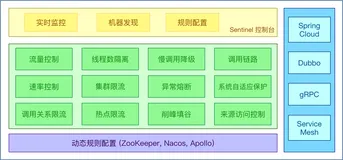
本文主要讲述常见的几种限流算法:计数器算法、漏桶算法、令牌桶算法。然后结合我对 Sentinel 1.8.0 的理解,给大家分享 Sentinel 在源码中如何使用这些算法进行流控判断。由于本人理解有限,如果有不正确的地方,希望大家能够留言讨论😊😊😊。
计数器限流算法
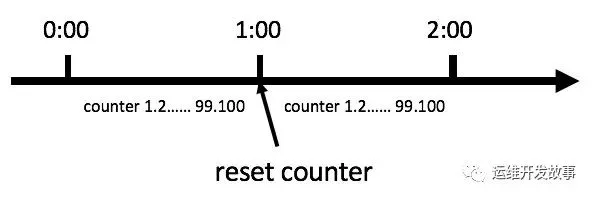
我们可以直接通过一个计数器,限制每一秒钟能够接收的请求数。比如说 qps定为 1000,那么实现思路就是从第一个请求进来开始计时,在接下去的 1s 内,每来一个请求,就把计数加 1,如果累加的数字达到了 1000,那么后续的请求就会被全部拒绝。等到 1s 结束后,把计数恢复成 0 ,重新开始计数。
优点:实现简单
缺点:如果1s 内的前半秒,已经通过了 1000 个请求,那后面的半秒只能请求拒绝,我们把这种现象称为“突刺现象”。
实现代码案例:
public class Counter {    public long timeStamp = getNowTime();    public int reqCount = 0;    public final int limit = 100; // 时间窗口内最大请求数    public final long interval = 1000; // 时间窗口ms
    public boolean limit() {        long now = getNowTime();        if (now < timeStamp + interval) {            // 在时间窗口内            reqCount++;            // 判断当前时间窗口内是否超过最大请求控制数            return reqCount <= limit;        } else {            timeStamp = now;            // 超时后重置            reqCount = 1;            return true;        }    }
    public long getNowTime() {        return System.currentTimeMillis();    }}
滑动时间窗算法
滑动窗口,又称 Rolling Window。为了解决计数器算法的缺陷,我们引入了滑动窗口算法。下面这张图,很好地解释了滑动窗口算法:
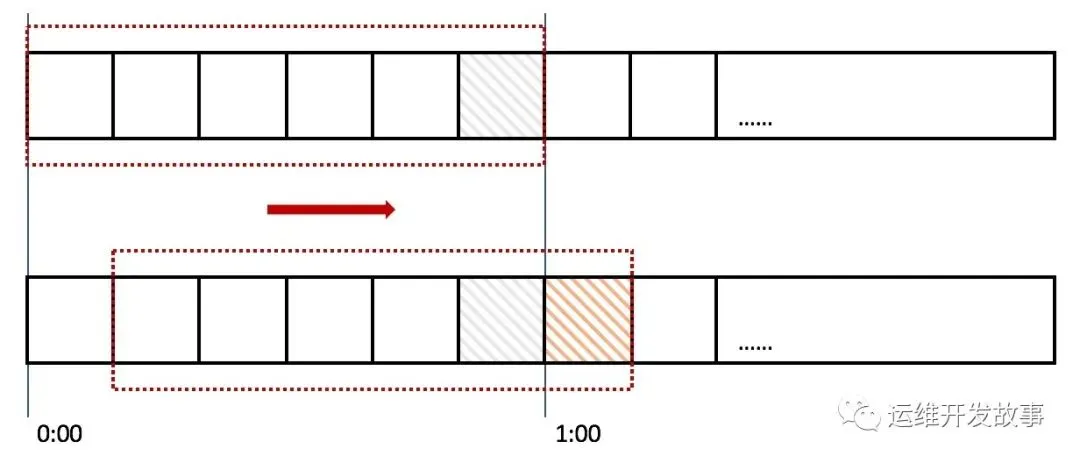
在上图中,整个红色的矩形框表示一个时间窗口,在我们的例子中,一个时间窗口就是一分钟。然后我们将时间窗口进行划分,比如图中,我们就将滑动窗口 划成了6格,所以每格代表的是10秒钟。每过10秒钟,我们的时间窗口就会往右滑动一格。每一个格子都有自己独立的计数器counter,比如当一个请求 在0:35秒的时候到达,那么0:30~0:39对应的counter就会加1。
那么滑动窗口怎么解决刚才的临界问题的呢?我们可以看上图,0:59到达的100个请求会落在灰色的格子中,而1:00到达的请求会落在橘黄色的格子中。当时间到达1:00时,我们的窗口会往右移动一格,那么此时时间窗口内的总请求数量一共是200个,超过了限定的100个,所以此时能够检测出来触发了限流。
我再来回顾一下刚才的计数器算法,我们可以发现,计数器算法其实就是滑动窗口算法。只是它没有对时间窗口做进一步地划分,所以只有1格。
由此可见,当滑动窗口的格子划分的越多,那么滑动窗口的滚动就越平滑,限流的统计就会越精确。
实现代码案例:
public class SlideWindow {
    /** 队列id和队列的映射关系,队列里面存储的是每一次通过时候的时间戳,这样可以使得程序里有多个限流队列 */    private volatile static Map<String, List<Long>> MAP = new ConcurrentHashMap<>();
    private SlideWindow() {}
    public static void main(String[] args) throws InterruptedException {        while (true) {            // 任意10秒内,只允许2次通过            System.out.println(LocalTime.now().toString() + SlideWindow.isGo("ListId", 2, 10000L));            // 睡眠0-10秒            Thread.sleep(1000 * new Random().nextInt(10));        }    }
    /**     * 滑动时间窗口限流算法     * 在指定时间窗口,指定限制次数内,是否允许通过     *     * @param listId     队列id     * @param count      限制次数     * @param timeWindow 时间窗口大小     * @return 是否允许通过     */    public static synchronized boolean isGo(String listId, int count, long timeWindow) {        // 获取当前时间        long nowTime = System.currentTimeMillis();        // 根据队列id,取出对应的限流队列,若没有则创建        List<Long> list = MAP.computeIfAbsent(listId, k -> new LinkedList<>());        // 如果队列还没满,则允许通过,并添加当前时间戳到队列开始位置        if (list.size() < count) {            list.add(0, nowTime);            return true;        }
        // 队列已满(达到限制次数),则获取队列中最早添加的时间戳        Long farTime = list.get(count - 1);        // 用当前时间戳 减去 最早添加的时间戳        if (nowTime - farTime <= timeWindow) {            // 若结果小于等于timeWindow,则说明在timeWindow内,通过的次数大于count            // 不允许通过            return false;        } else {            // 若结果大于timeWindow,则说明在timeWindow内,通过的次数小于等于count            // 允许通过,并删除最早添加的时间戳,将当前时间添加到队列开始位置            list.remove(count - 1);            list.add(0, nowTime);            return true;        }    }
}
在 Sentinel 中 通过 LeapArray 结构来实现时间窗算法, 它的核心代码如下(只列举获取时间窗方法):
/**     * 获取当前的时间窗     *     * Get bucket item at provided timestamp.     *     * @param timeMillis a valid timestamp in milliseconds     * @return current bucket item at provided timestamp if the time is valid; null if time is invalid     */public WindowWrap<T> currentWindow(long timeMillis) {  if (timeMillis < 0) {    return null;  }
  int idx = calculateTimeIdx(timeMillis);  // Calculate current bucket start time.  // 计算窗口的开始时间,计算每个格子的开始时间  long windowStart = calculateWindowStart(timeMillis);
  /*         * Get bucket item at given time from the array.         *         * (1) Bucket is absent, then just create a new bucket and CAS update to circular array.         * (2) Bucket is up-to-date, then just return the bucket.         * (3) Bucket is deprecated, then reset current bucket and clean all deprecated buckets.         */  while (true) {    WindowWrap<T> old = array.get(idx);    // 如果没有窗格,创建窗格    if (old == null) {      /*                 *     B0       B1      B2    NULL      B4                 * ||_______|_______|_______|_______|_______||___                 * 200     400     600     800     1000    1200  timestamp                 *                             ^                 *                          time=888                 *            bucket is empty, so create new and update                 *                 * If the old bucket is absent, then we create a new bucket at {@code windowStart},                 * then try to update circular array via a CAS operation. Only one thread can                 * succeed to update, while other threads yield its time slice.                 */      WindowWrap<T> window = new WindowWrap<T>(windowLengthInMs, windowStart, newEmptyBucket(timeMillis));      if (array.compareAndSet(idx, null, window)) {        // Successfully updated, return the created bucket.        return window;      } else {        // Contention failed, the thread will yield its time slice to wait for bucket available.        Thread.yield();      }      // 当前窗格存在,返回历史窗格    } else if (windowStart == old.windowStart()) {      /*                 *     B0       B1      B2     B3      B4                 * ||_______|_______|_______|_______|_______||___                 * 200     400     600     800     1000    1200  timestamp                 *                             ^                 *                          time=888                 *            startTime of Bucket 3: 800, so it's up-to-date                 *                 * If current {@code windowStart} is equal to the start timestamp of old bucket,                 * that means the time is within the bucket, so directly return the bucket.                 */      return old;      //    } else if (windowStart > old.windowStart()) {      /*                 *   (old)                 *             B0       B1      B2    NULL      B4                 * |_______||_______|_______|_______|_______|_______||___                 * ...    1200     1400    1600    1800    2000    2200  timestamp                 *                              ^                 *                           time=1676                 *          startTime of Bucket 2: 400, deprecated, should be reset                 *                 * If the start timestamp of old bucket is behind provided time, that means                 * the bucket is deprecated. We have to reset the bucket to current {@code windowStart}.                 * Note that the reset and clean-up operations are hard to be atomic,                 * so we need a update lock to guarantee the correctness of bucket update.                 *                 * The update lock is conditional (tiny scope) and will take effect only when                 * bucket is deprecated, so in most cases it won't lead to performance loss.                 */      if (updateLock.tryLock()) {        try {          // Successfully get the update lock, now we reset the bucket.          // 清空所有的窗格数据          return resetWindowTo(old, windowStart);        } finally {          updateLock.unlock();        }      } else {        // Contention failed, the thread will yield its time slice to wait for bucket available.        Thread.yield();      }      // 如果时钟回拨,重新创建时间格    } else if (windowStart < old.windowStart()) {      // Should not go through here, as the provided time is already behind.      return new WindowWrap<T>(windowLengthInMs, windowStart, newEmptyBucket(timeMillis));    }  }}
漏桶算法
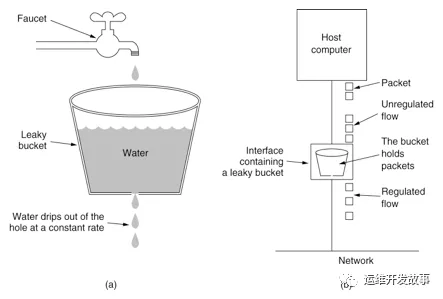
漏桶算法(Leaky Bucket)是网络世界中流量整形(Traffic Shaping)或速率限制(Rate Limiting)时经常使用的一种算法,它的主要目的是控制数据注入到网络的速率,平滑网络上的突发流量。漏桶算法提供了一种机制,通过它,突发流量可以被整形以便为网络提供一个稳定的流量, 执行过程如下图所示。
实现代码案例:
public class LeakyBucket {  public long timeStamp = System.currentTimeMillis();  // 当前时间  public long capacity; // 桶的容量  public long rate; // 水漏出的速度  public long water; // 当前水量(当前累积请求数)
  public boolean grant() {    long now = System.currentTimeMillis();    // 先执行漏水,计算剩余水量    water = Math.max(0, water - (now - timeStamp) * rate);
    timeStamp = now;    if ((water + 1) < capacity) {      // 尝试加水,并且水还未满      water += 1;      return true;    } else {      // 水满,拒绝加水      return false;    }  }}
说明:
(1)未满加水:通过代码 water +=1进行不停加水的动作。
(2)漏水:通过时间差来计算漏水量。
(3)剩余水量:总水量-漏水量。
在 Sentine 中RateLimiterController 实现了了漏桶算法 , 核心代码如下
@Overridepublic boolean canPass(Node node, int acquireCount, boolean prioritized) {  // Pass when acquire count is less or equal than 0.  if (acquireCount <= 0) {    return true;  }  // Reject when count is less or equal than 0.  // Otherwise,the costTime will be max of long and waitTime will overflow in some cases.  if (count <= 0) {    return false;  }
  long currentTime = TimeUtil.currentTimeMillis();  // Calculate the interval between every two requests.  // 计算时间间隔  long costTime = Math.round(1.0 * (acquireCount) / count * 1000);
  // Expected pass time of this request.  // 期望的执行时间  long expectedTime = costTime + latestPassedTime.get();
  // 当前时间 > 期望时间  if (expectedTime <= currentTime) {    // Contention may exist here, but it's okay.    // 可以通过,并且设置最后通过时间    latestPassedTime.set(currentTime);    return true;  } else {    // Calculate the time to wait.    // 等待时间 = 期望时间 - 最后时间 - 当前时间    long waitTime = costTime + latestPassedTime.get() - TimeUtil.currentTimeMillis();    // 等待时间 > 最大排队时间    if (waitTime > maxQueueingTimeMs) {      return false;    } else {      // 上次时间 + 间隔时间      long oldTime = latestPassedTime.addAndGet(costTime);      try {        // 等待时间        waitTime = oldTime - TimeUtil.currentTimeMillis();        // 等待时间 > 最大排队时间        if (waitTime > maxQueueingTimeMs) {          latestPassedTime.addAndGet(-costTime);          return false;        }        // in race condition waitTime may <= 0        // 休眠等待        if (waitTime > 0) {          Thread.sleep(waitTime);        }        // 等待完了,就放行        return true;      } catch (InterruptedException e) {      }    }  }  return false;}
令牌桶算法
令牌桶算法是网络流量整形(Traffic Shaping)和速率限制(Rate Limiting)中最常使用的一种算法。典型情况下,令牌桶算法用来控制发送到网络上的数据的数目,并允许突发数据的发送。如下图所示:
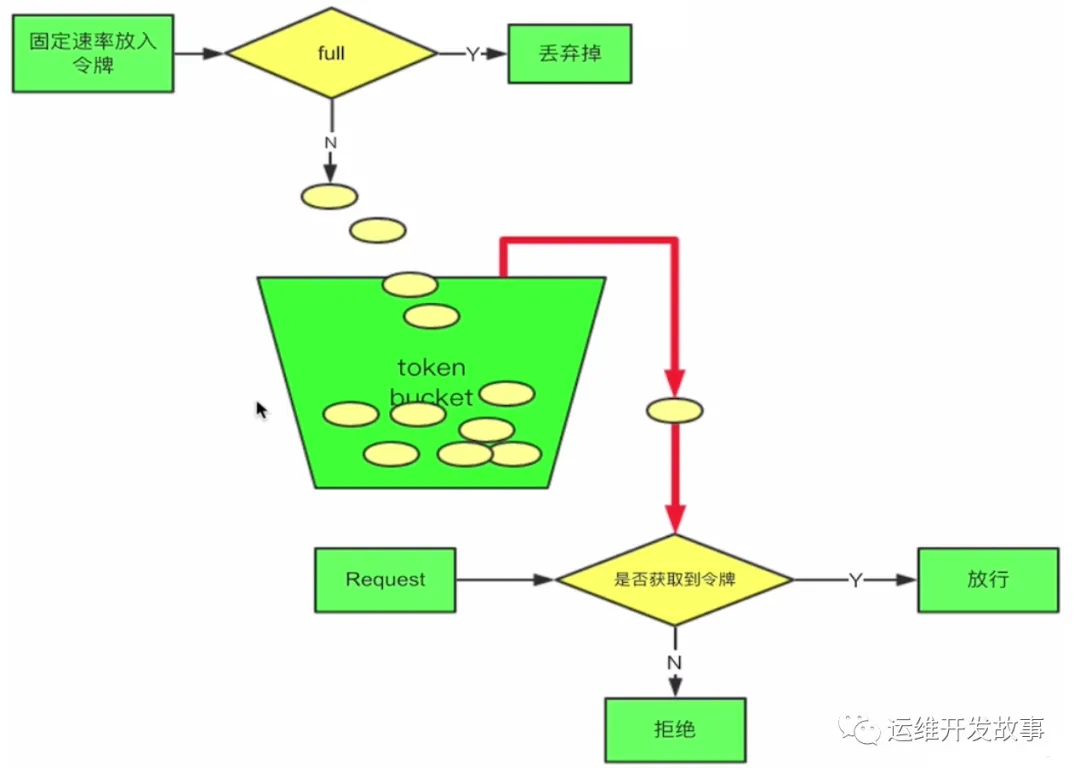
简单的说就是,一边请求时会消耗桶内的令牌,另一边会以固定速率往桶内放令牌。当消耗的请求大于放入的速率时,进行相应的措施,比如等待,或者拒绝等。
实现代码案例:
public class TokenBucket {  public long timeStamp = System.currentTimeMillis();  // 当前时间  public long capacity; // 桶的容量  public long rate; // 令牌放入速度  public long tokens; // 当前令牌数量
  public boolean grant() {    long now = System.currentTimeMillis();    // 先添加令牌    tokens = Math.min(capacity, tokens + (now - timeStamp) * rate);    timeStamp = now;    if (tokens < 1) {      // 若不到1个令牌,则拒绝      return false;    } else {      // 还有令牌,领取令牌      tokens -= 1;      return true;    }  }}
Sentinel 在 WarmUpController 中运用到了令牌桶算法,在这里可以实现对系统的预热,设定预热时间和水位线,对于预热期间多余的请求直接拒绝掉。
public boolean canPass(Node node, int acquireCount, boolean prioritized) {  long passQps = (long) node.passQps();
  long previousQps = (long) node.previousPassQps();  syncToken(previousQps);
  // 开始计算它的斜率  // 如果进入了警戒线,开始调整他的qps  long restToken = storedTokens.get();  if (restToken >= warningToken) {    long aboveToken = restToken - warningToken;    // 消耗的速度要比warning快,但是要比慢    // current interval = restToken*slope+1/count    double warningQps = Math.nextUp(1.0 / (aboveToken * slope + 1.0 / count));    if (passQps + acquireCount <= warningQps) {      return true;    }  } else {    if (passQps + acquireCount <= count) {      return true;    }  }
  return false;}
限流算法总结
计数器 VS 时间窗
- 时间窗算法的本质也是通过计数器算法实现的。
- 时间窗算法格子划分的越多,那么滑动窗口的滚动就越平滑,限流的统计就会越精确,但是也会占用更多的内存存储。
漏桶 VS 令牌桶
- 漏桶算法和令牌桶算法本质上是为了做流量整形或速率限制,避免系统因为大流量而被打崩,但是两者的核心差异在于限流的方向是相反的
- 漏桶:限制的是流量的流出速率,是相对固定的。
- 令牌桶 :限制的是流量的平均流入速率,并且允许一定程度的突然性流量,最大速率为桶的容量和生成token的速率。
- 在某些场景中,漏桶算法并不能有效的使用网络资源,因为漏桶的漏出速率是相对固定的,所以在网络情况比较好并且没有拥塞的状态下,漏桶依然是会有限制的,并不能放开量,因此并不能有效的利用网络资源。而令牌桶算法则不同,其在限制平均速率的同时,支持一定程度的突发流量。