WSGI是什么?
WSGI即Web Server Gateway Interface
是基于现存的CGI标准而设计的,是Python对CGI进行的一种包装
也是一个规范,定义了Web服务器如何与Python应用程序进行交互,使得使用Python写的Web应用程序可以和Web服务器对接起来
目前Django、Flask等主流Python Web框架都实现了WSGI
WSGI Web架构
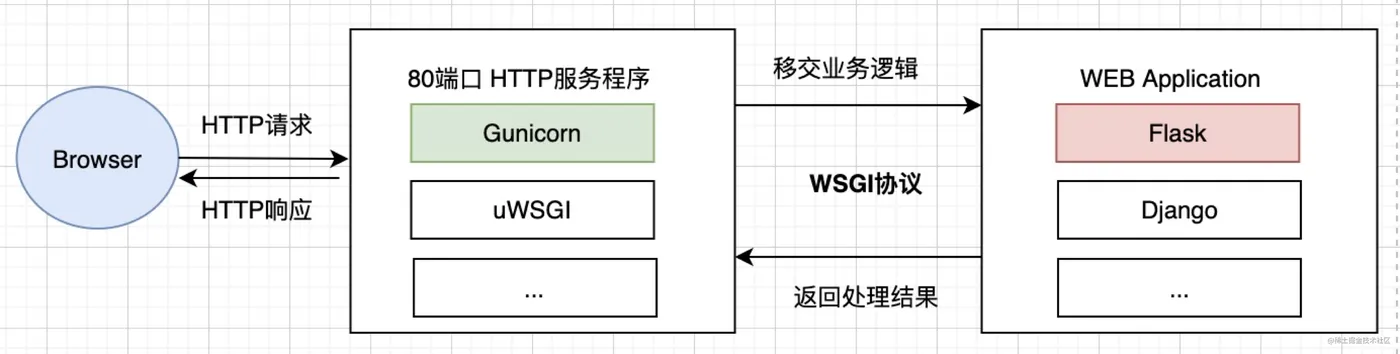
对于一个遵守WSGI协议的服务器和Web应用来说, 它并不在意到底是谁传过来的数据, 只需要知道传过来的数据符合某种格式, 两边都能处理对方传入的数据,具体交互流程如下:
- 浏览器作为用户代理为我们发送了
HTTP请求 - 请求网络转发找到对应的处理服务器
HTTP服务器程序会将请求移交给Web应用处理该请求Web应用处理完成,再将数据交给HTTP服务器软件HTTP服务程序返回最终结果给浏览器- 浏览器接受到响应并展示给用户
Flask简介
Flask是一个轻量级的WSGI Web应用程序框架。它旨在使入门快速而简单,并能够扩展到复杂的应用程序。它最初是围绕Werkzeug和Jinja的一个简单包装器,现已成为最受欢迎的Python Web应用程序框架之一。
基于Flask我们可以很容易创建一个Web Applications,具体如下:
from flask import Flask, escape, request
app = Flask(__name__)

@app.route('/')
def hello():
    name = request.args.get("name", "World")
    return f'Hello, {escape(name)}!'
$ flask run
* Running on http://127.0.0.1:5000/ (Press CTRL+C to quit)Flask源码解读
源码下载:git clone https://github.com/pallets/flask.git
为了剖析作者的最初架构设计,我们直接切换到初始分支:git checkout 0.1
下面我们看一个启动的具体Demo,并分析源码
from flask import Flask

app = Flask(__name__)

@app.route("/")
def hello():
    return "Hello, World!"
app.run()

# * Running on http://localhost:5000/ (Press CTRL+C to quit)
初始化
def __init__(self, package_name):
    self.debug = False      # 是否打开Debug模式
    self.package_name = package_name    # 包名或模块名
    self.root_path = _get_package_path(self.package_name)   # app所在目录
    self.view_functions = {}    # 存储视图函数的词典,@route 装饰器进行注册
    self.error_handlers = {}    # 存储错误异常处理的字典,使用@errorhandler装饰器进行注册
    self.before_request_funcs = []  # 前置处理执行函数列表,使用@before_request装饰器进行注册
    self.after_request_funcs = []   # 后置处理执行函数列表,使用@after_request装饰器进行注册
    # 模版上下文
    self.template_context_processors = [_default_template_ctx_processor]
    self.url_map = Map()    # URL映射
    if self.static_path is not None:    # 静态文件
        self.url_map.add(Rule(self.static_path + '/<filename>', build_only=True, endpoint='static'))
        if pkg_resources is not None:
            target = (self.package_name, 'static')
        else:
            target = os.path.join(self.root_path, 'static')
        self.wsgi_app = SharedDataMiddleware(self.wsgi_app, {
            self.static_path: target
        })
    # 初始化 JinJa2 模版环境
    self.jinja_env = Environment(loader=self.create_jinja_loader(), **self.jinja_options)
    self.jinja_env.globals.update(url_for=url_for, get_flashed_messages=get_flashed_messages)
启动流程
Flask项目都是从app.run()入口启动,具体代码如下:
def run(self, host='localhost', port=5000, **options):
        """
        启动本地开发服务器,debug=True,代码热更部署标志
        :param host: 监听IP地址
        :param port: 监听端口,默认5000
        :param options: 运行相关的其他重要参数
        """
        from werkzeug import run_simple
        if 'debug' in options:
            self.debug = options.pop('debug')
        options.setdefault('use_reloader', self.debug)
        options.setdefault('use_debugger', self.debug)
return run_simple(host, port, self, **options)app.run()方法主要调用了werkzeug.run_simple进行服务启动,接下来我们具体看看run_simple的实现逻辑,具体代码如下:
def run_simple(hostname, port, application, use_reloader=False,
               use_debugger=False, use_evalex=True,
               extra_files=None, reloader_interval=1, threaded=False,
               processes=1, request_handler=None, static_files=None,
               passthrough_errors=False, ssl_context=None):
    if use_debugger:    # 是否使用werkzeug调试模式启动
        from werkzeug.debug import DebuggedApplication
        application = DebuggedApplication(application, use_evalex)
    if static_files:    # 静态文件封装为服务
        from werkzeug.wsgi import SharedDataMiddleware
        application = SharedDataMiddleware(application, static_files)

    def inner():    # 启动核心方法
        make_server(hostname, port, application, threaded, processes, request_handler, passthrough_errors, ssl_context).serve_forever()

    if os.environ.get('WERKZEUG_RUN_MAIN') != 'true':
        display_hostname = hostname != '*' and hostname or 'localhost'
        if ':' in display_hostname:
            display_hostname = '[%s]' % display_hostname
        _log('info', ' * Running on %s://%s:%d/', ssl_context is None and 'http' or 'https', display_hostname, port)
    if use_reloader:    # 服务是否热更新
        test_socket = socket.socket(socket.AF_INET, socket.SOCK_STREAM)
        test_socket.setsockopt(socket.SOL_SOCKET, socket.SO_REUSEADDR, 1)
        test_socket.bind((hostname, port))
        test_socket.close()
        run_with_reloader(inner, extra_files, reloader_interval)
    else:
inner()werkzeug.run_simple中inner()方法封装了make_server()启动的核心逻辑,接下来我们具体看看make_server()的实现逻辑,具体代码如下:
def make_server(host, port, app=None, threaded=False, processes=1,
                request_handler=None, passthrough_errors=False,
                ssl_context=None):
    if threaded and processes > 1:
        raise ValueError("cannot have a multithreaded and multi process server.")
    elif threaded:
        return ThreadedWSGIServer(host, port, app, request_handler, passthrough_errors, ssl_context)
    elif processes > 1:
        return ForkingWSGIServer(host, port, app, processes, request_handler, passthrough_errors, ssl_context)
    else:
return BaseWSGIServer(host, port, app, request_handler, passthrough_errors, ssl_context)make_server()函数内会根据线程或进程的数创建对应的WSGI服务器。默认情况下是创建BaseWSGIServer服务。接下来我们看看BaseWSGIServer、ThreadedWSGIServer、ForkingWSGIServer实现逻辑,具体代码如下:
class BaseWSGIServer(HTTPServer, object):
    """Simple single-threaded, single-process WSGI server."""
    multithread = False
    multiprocess = False
    ...

class ThreadedWSGIServer(ThreadingMixIn, BaseWSGIServer):
    """A WSGI server that does threading."""
    multithread = True

class ForkingWSGIServer(ForkingMixIn, BaseWSGIServer):
    """A WSGI server that does forking."""
    multiprocess = True
    ...
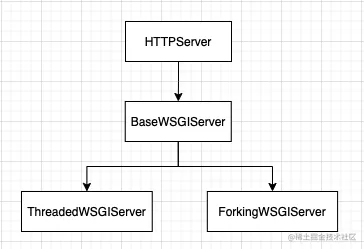
三个服务类继承关系如下:
打开BaseWSGIServer的start_server()方法
def serve_forever(self):
    try:
        HTTPServer.serve_forever(self)
       except KeyboardInterrupt:
pass可以看到,整个启动流程最终是使用Python标准类库中的HTTPServer类接口,HTTPServer是socketserver.TCPServer的子类,如果想要直接使用Python中类库启动一个http server,则可实现如下类似代码:
# -*- coding: utf-8 -
try:
    # Python2 逻辑
    import BaseHTTPServer
    import CGIHTTPServer
    server = BaseHTTPServer.HTTPServer(('127.0.0.1', 8000), CGIHTTPServer.CGIHTTPRequestHandler)
except:
    # Python3 逻辑
    from http import server
    server = server.HTTPServer(('127.0.0.1', 8000), server.CGIHTTPRequestHandler)
server.serve_forever()
至此,服务就启动起来了,整个流程如下: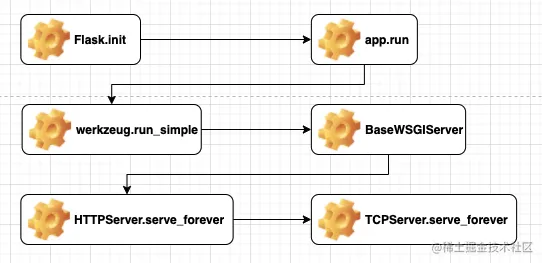
路由注册
@app.route('/')
def index():
pass以上是一个Flask注册的Demo,路由都是通过@app.route装饰器实现URL和视图函数的注册,具体代码如下:
def route(self, rule, **options):
    def decorator(f):
        self.add_url_rule(rule, f.__name__, **options)
        self.view_functions[f.__name__] = f
        return f
    return decorator
def add_url_rule(self, rule, endpoint, **options):
options['endpoint'] = endpoint
options.setdefault('methods', ('GET',))
self.url_map.add(Rule(rule, **options))模版渲染
from flask import render_template

@app.route('/hello/')
def hello(name=None):
    return render_template('hello.html', name=name)
def render_template(template_name, **context):
current_app.update_template_context(context)
return current_app.jinja_env.get_template(template_name).render(context)这块逻辑比较简单,从templates文件夹中找到名称为template_name的文件进行渲染。其中current_app和jinja_env都是在Flask.init()中被初始化
Werkzeug是什么?
werkzeug German noun: “tool”. Etymology: werk (“work”), zeug (“stuff”)
Werkzeug是一个综合的WSGI Web应用程序库。它最初是WSGI应用程序的各种实用程序的简单集合,现已成为最先进的 WSGI 实用程序库之一。
基于Werkzeug我们可以很容易创建一个WSGI Applications,具体如下:
from werkzeug.wrappers import Request, Response

@Request.application
def application(request):
    return Response("Hello, World!")

if __name__ == "__main__":
    from werkzeug.serving import run_simple
    run_simple("localhost", 5000, application)
Jinja是什么?
Jinja是一个快速、富有表现力、可扩展的模板引擎。模板中的特殊占位符允许编写类似于Python语法的代码,然后向模板传递数据以呈现最终文档。
接下来我们看一个使用模版渲染的例子
from flask import render_template

@app.route('/hello/')
def hello(name=None):
return render_template('hello.html', name=name)项目根目录下创建一个templates目录,并创建一个hello.html文件
/templates
/hello.htmlhello.html具体内容如下:
<!doctype html>
<title>Hello Web Flask</title>
{% if name %}
  <h1>Hello {{ name }}!</h1>
{% else %}
  <h1>Hello, Hello!</h1>
{% endif %}其中name是参数,通过render_template方法就实现hello.html模版文件的渲染。
总结
Flask早期版本封装了werkzeug和Jinja函数库,以装饰器的方式对外提供WEB框架服务,相对更简单简洁。整个服务流程围绕Flask.run()方法启动服务开始。
参考文献
- https://palletsprojects.com/p/flask/
- https://flask.palletsprojects.com/en/2.0.x/
- https://werkzeug.palletsprojects.com/en/2.0.x/
- https://jinja.palletsprojects.com/en/3.0.x/
❤️❤️❤️读者每一份热爱都是笔者前进的动力!
我是李三十一,感谢各位朋友:点赞、收藏和评论,我们下期再见!