Linux - Ubuntu下执行apt-get update报错:Some index files failed to download. They have been ignored, or old ones used instead.

简介: Linux - Ubuntu下执行apt-get update报错:Some index files failed to download. They have been ignored, or old ones used instead.

报错命令


root@ubuntu:/etc/apt# apt-get update
Err:1 http://mirrors.aliyun.com/ubuntu trusty InRelease
  Could not resolve 'mirrors.aliyun.com'
Err:2 http://mirrors.aliyun.com/ubuntu trusty-backports InRelease
  Could not resolve 'mirrors.aliyun.com'
Err:3 http://mirrors.aliyun.com/ubuntu trusty-proposed InRelease
  Could not resolve 'mirrors.aliyun.com'
Err:4 http://mirrors.aliyun.com/ubuntu trusty-security InRelease
  Could not resolve 'mirrors.aliyun.com'
Err:5 http://mirrors.aliyun.com/ubuntu trusty-updates InRelease
  Could not resolve 'mirrors.aliyun.com'
Reading package lists... Done
W: Failed to fetch http://mirrors.aliyun.com/ubuntu/dists/trusty/InRelease  Could not resolve 'mirrors.aliyun.com'
W: Failed to fetch http://mirrors.aliyun.com/ubuntu/dists/trusty-backports/InRelease  Could not resolve 'mirrors.aliyun.com'
W: Failed to fetch http://mirrors.aliyun.com/ubuntu/dists/trusty-proposed/InRelease  Could not resolve 'mirrors.aliyun.com'
W: Failed to fetch http://mirrors.aliyun.com/ubuntu/dists/trusty-security/InRelease  Could not resolve 'mirrors.aliyun.com'
W: Failed to fetch http://mirrors.aliyun.com/ubuntu/dists/trusty-updates/InRelease  Could not resolve 'mirrors.aliyun.com'
W: Some index files failed to download. They have been ignored, or old ones used instead.


报错原因


解析域名不对


解决方案


vim /etc/systemd/resolved.conf

dns改成8.8.8.8
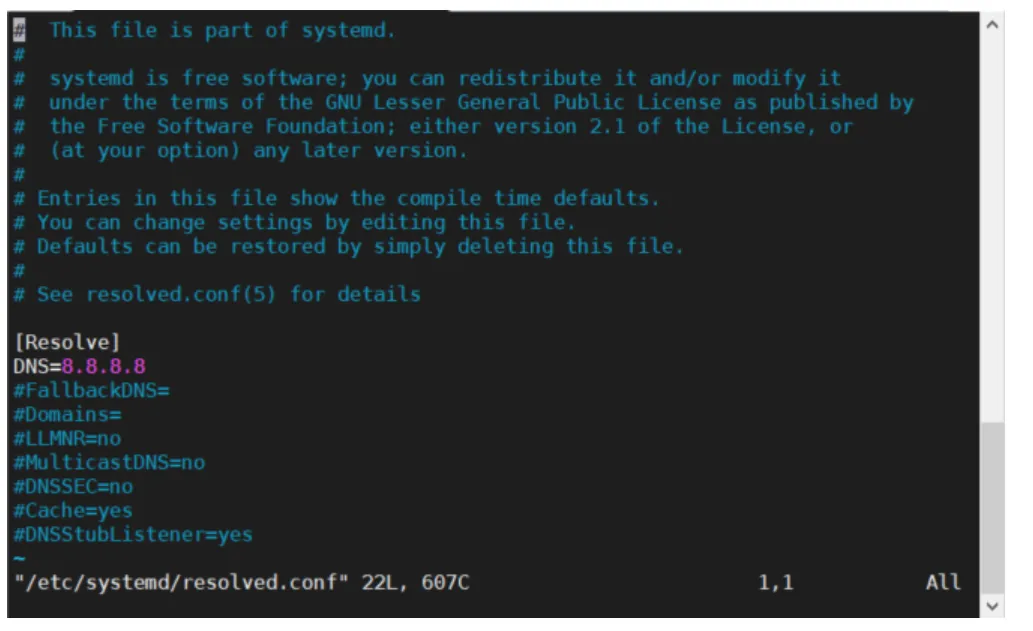
image.png


保存,重启机器即可

相关文章
|
11月前
|
Ubuntu 安全
Ubuntu中遇到"无法创建临时文件"/tmp/..."在普通或root用户运行apt-get update时的错误解决办法
这些步骤当然不能涵盖所有可能出现问题的场合,但是能覆盖大多数常见的情景。希望这些信息能帮到你解决"无法创建临时文件"/tmp/..."这样的问题。不过,请记住,因为修改系统文件和目录的权限,清理临时文件,或者运行磁盘检查,都可能对系统造成影响,所以执行这些操作前要先确认这是安全的,必要时最好先做好数据备份。
728 10
|
Ubuntu 安全 Linux
Linux错误排查:解决Ubuntu 20.4执行sudo apt-get update时出现的libnettle.so.6错误。
很有可能在你得到解决方案时,你也学到了不少Linux修复技巧。祝你处理计算机问题时顺利如麻!永远记得,各种问题总是像老鼠一样从意想不到的地方冒出来。但记住,不管它们跑到哪里,最终都逃不过你的捕鼠器。盖起你的计算机,拾起你的代码,大步向前!
403 28
|
Ubuntu 安全 Linux
Linux错误排查:解决Ubuntu 20.4执行sudo apt-get update时出现的libnettle.so.6错误。
很有可能在你得到解决方案时,你也学到了不少Linux修复技巧。祝你处理计算机问题时顺利如麻!永远记得,各种问题总是像老鼠一样从意想不到的地方冒出来。但记住,不管它们跑到哪里,最终都逃不过你的捕鼠器。盖起你的计算机,拾起你的代码,大步向前!
385 18
|
Linux 数据库
Linux中第一次使用locate命令报错?????
在Linux CentOS7系统中,使用`locate`命令时出现“command not found”错误,原因是缺少`mlocate`包。解决方法是通过`yum install mlocate -y`或`apt-get install mlocate`安装该包,并执行`updatedb`更新数据库以解决后续的“can not stat”错误。
386 9
|
Ubuntu Linux Windows
wsl重装Ubuntu遇到的一些问题( WslRegisterDistribution failed with error: 0x80041002 Error: 0x80041002 (null)、重置网络后WLAN图标消失)
|
Ubuntu Linux Windows
linux 挂载硬盘报错 "mount: unknown filesystem type 'ntfs'"
【10月更文挑战第7天】在Linux系统中挂载硬盘时遇到“mount: unknown filesystem type 'ntfs'”错误,是因为Linux默认可能不支持NTFS文件系统。本文提供了解决方案:安装NTFS-3G软件包以支持NTFS,并检查内核是否已加载NTFS模块。对于Ubuntu/Debian系统,可使用`sudo apt-get install ntfs-3g`命令;对于CentOS/RHEL系统,则需先安装EPEL仓库再安装NTFS-3G。此外,还需确认硬盘设备名正确无误,并创建合适的挂载点目录。
3801 2
|
消息中间件 分布式计算 Java
Linux环境下 java程序提交spark任务到Yarn报错
390 5
|
并行计算 Ubuntu 算法
Ubuntu18 服务器 更新升级CUDA版本 pyenv nvidia ubuntu1804 原11.2升级到PyTorch要求12.1 全过程详细记录 apt update
500 0
