一、Jedis,Redisson,Lettuce三者的区别
共同点:都提供了基于Redis操作的Java API,只是封装程度,具体实现稍有不同。
不同点:
1.1、Jedis
是Redis的Java实现的客户端。支持基本的数据类型如:String、Hash、List、Set、Sorted Set。
特点:使用阻塞的I/O,方法调用同步,程序流需要等到socket处理完I/O才能执行,不支持异步操作。Jedis客户端实例不是线程安全的,需要通过连接池来使用Jedis。
1.2、Redisson
优点点:分布式锁,分布式集合,可通过Redis支持延迟队列。
1.3、 Lettuce
用于线程安全同步,异步和响应使用,支持集群,Sentinel,管道和编码器。
基于Netty框架的事件驱动的通信层,其方法调用是异步的。Lettuce的API是线程安全的,所以可以操作单个Lettuce连接来完成各种操作。
二、RedisTemplate
2.1、使用配置
maven配置引入,(要加上版本号,我这里是因为Parent已声明)
<dependency>
    <groupId>org.springframework.boot</groupId>
    <artifactId>spring-boot-starter-data-redis</artifactId>
</dependency>
application-dev.yml
spring:
  redis:
    host: 192.168.1.140
    port: 6379
    password:
    database: 15 # 指定redis的分库(共16个0到15)
Spring Boot 基础就不介绍了,推荐下这个实战教程: https://github.com/javastacks/spring-boot-best-practice
2.2、使用示例
 @Resource
 private StringRedisTemplate stringRedisTemplate;
    @Override
    public CustomersEntity findById(Integer id) {
        // 需要缓存
        // 所有涉及的缓存都需要删除,或者更新
        try {
            String toString = stringRedisTemplate.opsForHash().get(REDIS_CUSTOMERS_ONE, id + "").toString();
            if (toString != null) {
                return JSONUtil.toBean(toString, CustomersEntity.class);
            }
        } catch (Exception e) {
            e.printStackTrace();
        }
        // 缓存为空的时候,先查,然后缓存redis
        Optional<CustomersEntity> byId = customerRepo.findById(id);
        if (byId.isPresent()) {
            CustomersEntity customersEntity = byId.get();
            try {
                stringRedisTemplate.opsForHash().put(REDIS_CUSTOMERS_ONE, id + "", JSONUtil.toJsonStr(customersEntity));
            } catch (Exception e) {
                e.printStackTrace();
            }
            return customersEntity;
        }
        return null;
    }
2.3、扩展
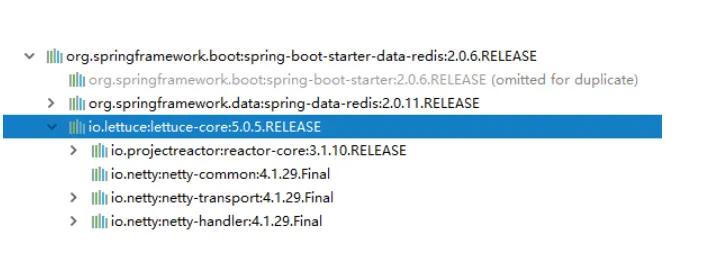
2.3.1、spring-boot-starter-data-redis的依赖包
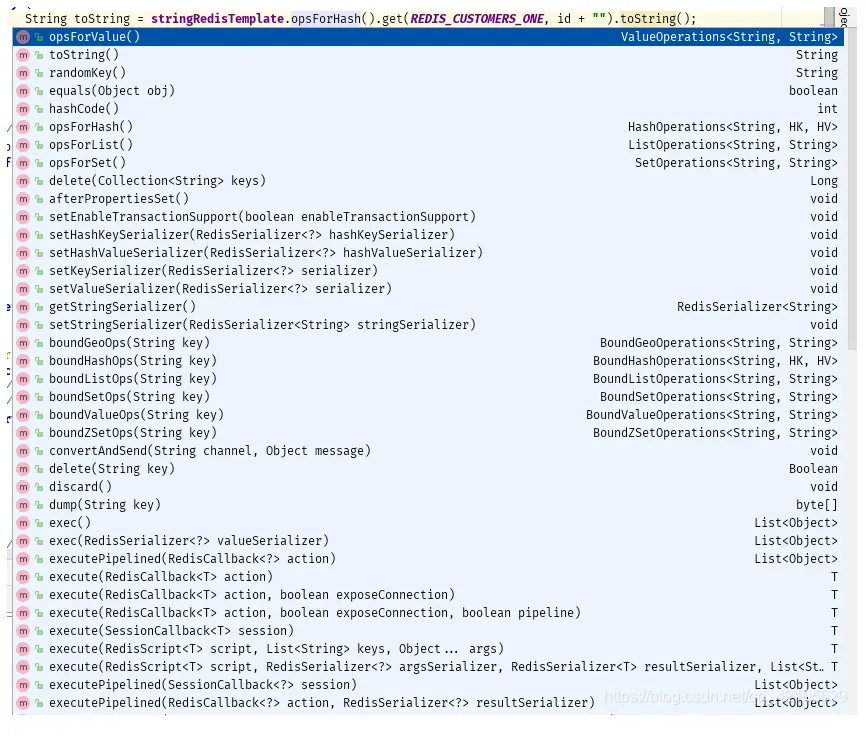
3.3.2、stringRedisTemplate API(部分展示)
opsForHash --> hash操作
opsForList --> list操作
opsForSet --> set操作
opsForValue --> string操作
opsForZSet --> Zset操作
3.3.3 StringRedisTemplate默认序列化机制
public class StringRedisTemplate extends RedisTemplate<String, String> {
     /**
      * Constructs a new <code>StringRedisTemplate</code> instance. {@link #setConnectionFactory(RedisConnectionFactory)}
      * and {@link #afterPropertiesSet()} still need to be called.
      */
     public StringRedisTemplate() {
      RedisSerializer<String> stringSerializer = new StringRedisSerializer();
      setKeySerializer(stringSerializer);
      setValueSerializer(stringSerializer);
      setHashKeySerializer(stringSerializer);
      setHashValueSerializer(stringSerializer);
     }
 }
三、RedissonClient 操作示例
3.1 基本配置
3.1.1、Maven pom 引入
<dependency>
    <groupId>org.springframework.boot</groupId>
    <artifactId>spring-boot-starter-data-redis</artifactId>
</dependency>
<dependency>
    <groupId>org.redisson</groupId>
    <artifactId>redisson</artifactId>
    <version>3.8.2</version>
    <optional>true</optional>
</dependency>
<dependency>
    <groupId>org.redisson</groupId>
    <artifactId>redisson-spring-boot-starter</artifactId>
    <version>LATEST</version>
</dependency>
3.1.2、添加配置文件Yaml或者json格式
redisson-config.yml
# Redisson 配置
singleServerConfig:
  address: "redis://192.168.1.140:6379"
  password: null
  clientName: null
  database: 15 #选择使用哪个数据库0~15
  idleConnectionTimeout: 10000
  pingTimeout: 1000
  connectTimeout: 10000
  timeout: 3000
  retryAttempts: 3
  retryInterval: 1500
  reconnectionTimeout: 3000
  failedAttempts: 3
  subscriptionsPerConnection: 5
  subscriptionConnectionMinimumIdleSize: 1
  subscriptionConnectionPoolSize: 50
  connectionMinimumIdleSize: 32
  connectionPoolSize: 64
  dnsMonitoringInterval: 5000
  #dnsMonitoring: false
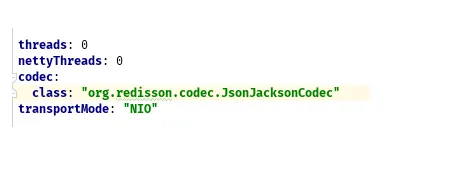
threads: 0
nettyThreads: 0
codec:
  class: "org.redisson.codec.JsonJacksonCodec"
transportMode: "NIO"
或者,配置 redisson-config.json
{
  "singleServerConfig": {
    "idleConnectionTimeout": 10000,
    "pingTimeout": 1000,
    "connectTimeout": 10000,
    "timeout": 3000,
    "retryAttempts": 3,
    "retryInterval": 1500,
    "reconnectionTimeout": 3000,
    "failedAttempts": 3,
    "password": null,
    "subscriptionsPerConnection": 5,
    "clientName": null,
    "address": "redis://192.168.1.140:6379",
    "subscriptionConnectionMinimumIdleSize": 1,
    "subscriptionConnectionPoolSize": 50,
    "connectionMinimumIdleSize": 10,
    "connectionPoolSize": 64,
    "database": 0,
    "dnsMonitoring": false,
    "dnsMonitoringInterval": 5000
  },
  "threads": 0,
  "nettyThreads": 0,
  "codec": null,
  "useLinuxNativeEpoll": false
}
3.1.3、读取配置
新建读取配置类
@Configuration
public class RedissonConfig {
    @Bean
    public RedissonClient redisson() throws IOException {
        // 两种读取方式,Config.fromYAML 和 Config.fromJSON
//        Config config = Config.fromJSON(RedissonConfig.class.getClassLoader().getResource("redisson-config.json"));
        Config config = Config.fromYAML(RedissonConfig.class.getClassLoader().getResource("redisson-config.yml"));
        return Redisson.create(config);
    }
}
或者,在 application.yml中配置如下
spring:
  redis:
    redisson:
      config: classpath:redisson-config.yaml
3.2 使用示例
@RestController
@RequestMapping("/")
public class TeController {
    @Autowired
    private RedissonClient redissonClient;
    static long i = 20;
    static long sum = 300;
//    ========================== String =======================
    @GetMapping("/set/{key}")
    public String s1(@PathVariable String key) {
        // 设置字符串
        RBucket<String> keyObj = redissonClient.getBucket(key);
        keyObj.set(key + "1-v1");
        return key;
    }
    @GetMapping("/get/{key}")
    public String g1(@PathVariable String key) {
        // 设置字符串
        RBucket<String> keyObj = redissonClient.getBucket(key);
        String s = keyObj.get();
        return s;
    }
    //    ========================== hash =======================-=
    @GetMapping("/hset/{key}")
    public String h1(@PathVariable String key) {
        Ur ur = new Ur();
        ur.setId(MathUtil.randomLong(1,20));
        ur.setName(key);
      // 存放 Hash
        RMap<String, Ur> ss = redissonClient.getMap("UR");
        ss.put(ur.getId().toString(), ur);
        return ur.toString();
    }
    @GetMapping("/hget/{id}")
    public String h2(@PathVariable String id) {
        // hash 查询
        RMap<String, Ur> ss = redissonClient.getMap("UR");
        Ur ur = ss.get(id);
        return ur.toString();
    }
    // 查询所有的 keys
    @GetMapping("/all")
    public String all(){
        RKeys keys = redissonClient.getKeys();
        Iterable<String> keys1 = keys.getKeys();
        keys1.forEach(System.out::println);
        return keys.toString();
    }
    // ================== ==============读写锁测试 =============================
    @GetMapping("/rw/set/{key}")
    public void rw_set(){
//        RedissonLock.
        RBucket<String> ls_count = redissonClient.getBucket("LS_COUNT");
        ls_count.set("300",360000000l, TimeUnit.SECONDS);
    }
    // 减法运算
    @GetMapping("/jf")
    public void jf(){
        String key = "S_COUNT";
//        RAtomicLong atomicLong = redissonClient.getAtomicLong(key);
//        atomicLong.set(sum);
//        long l = atomicLong.decrementAndGet();
//        System.out.println(l);
        RAtomicLong atomicLong = redissonClient.getAtomicLong(key);
        if (!atomicLong.isExists()) {
            atomicLong.set(300l);
        }
        while (i == 0) {
            if (atomicLong.get() > 0) {
                long l = atomicLong.getAndDecrement();
                        try {
                            Thread.sleep(1000l);
                        } catch (InterruptedException e) {
                            e.printStackTrace();
                        }
                i --;
                System.out.println(Thread.currentThread().getName() + "->" + i + "->" + l);
            }
        }
    }
    @GetMapping("/rw/get")
    public String rw_get(){
        String key = "S_COUNT";
        Runnable r = new Runnable() {
            @Override
            public void run() {
                RAtomicLong atomicLong = redissonClient.getAtomicLong(key);
                if (!atomicLong.isExists()) {
                    atomicLong.set(300l);
                }
                if (atomicLong.get() > 0) {
                    long l = atomicLong.getAndDecrement();
                    i --;
                    System.out.println(Thread.currentThread().getName() + "->" + i + "->" + l);
                }
            }
        };
        while (i != 0) {
            new Thread(r).start();
//            new Thread(r).run();
//            new Thread(r).run();
//            new Thread(r).run();
//            new Thread(r).run();
        }
        RBucket<String> bucket = redissonClient.getBucket(key);
        String s = bucket.get();
        System.out.println("================线程已结束================================" + s);
        return s;
    }
}
4.3 扩展
4.3.1 丰富的jar支持,尤其是对 Netty NIO框架
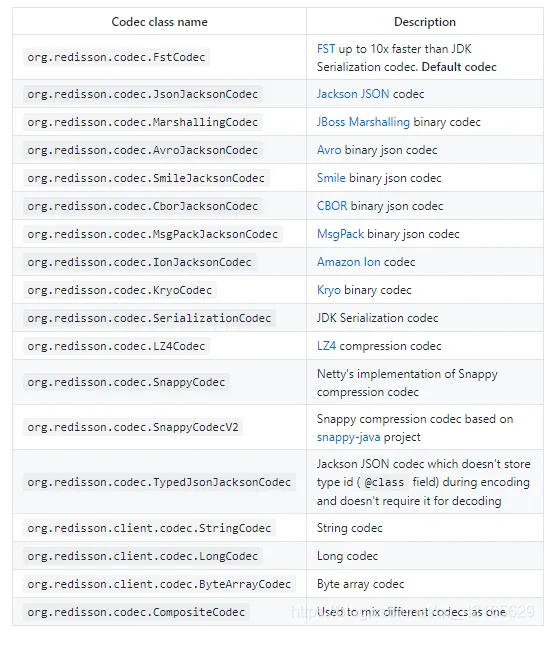
4.3.2 丰富的配置机制选择,这里是详细的配置说明
https://github.com/redisson/redisson/wiki/2.-Configuration
关于序列化机制中,就有很多
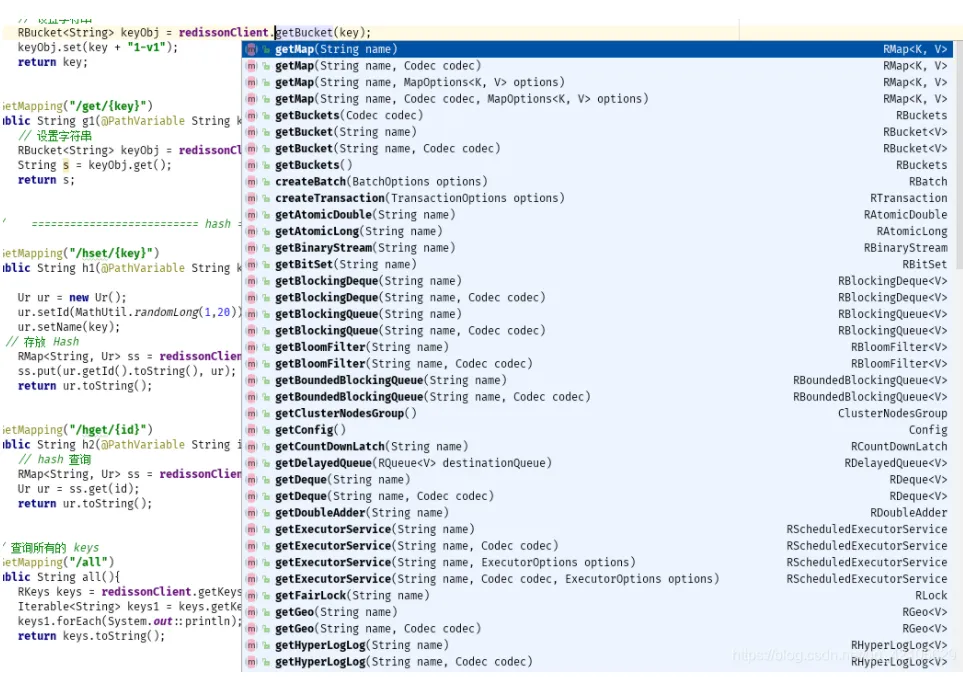
4.3.3 API支持(部分展示),具体的 Redis --> RedissonClient ,可查看这里
https://github.com/redisson/redisson/wiki/11.-Redis-commands-mapping
4.3.4 轻便的丰富的锁机制的实现
Lock
Fair Lock
MultiLock
RedLock
ReadWriteLock
Semaphore
PermitExpirableSemaphore
CountDownLatch
四、基于注解实现的Redis缓存
4.1 Maven 和 YML配置
参考 RedisTemplate 配置。另外,还需要额外的配置类
// todo 定义序列化,解决乱码问题
@EnableCaching
@Configuration
@ConfigurationProperties(prefix = "spring.cache.redis")
public class RedisCacheConfig {
    private Duration timeToLive = Duration.ZERO;
    public void setTimeToLive(Duration timeToLive) {
        this.timeToLive = timeToLive;
    }
    @Bean
    public CacheManager cacheManager(RedisConnectionFactory factory) {
        RedisSerializer<String> redisSerializer = new StringRedisSerializer();
        Jackson2JsonRedisSerializer jackson2JsonRedisSerializer = new Jackson2JsonRedisSerializer(Object.class);
        // 解决查询缓存转换异常的问题
        ObjectMapper om = new ObjectMapper();
        om.setVisibility(PropertyAccessor.ALL, JsonAutoDetect.Visibility.ANY);
        om.enableDefaultTyping(ObjectMapper.DefaultTyping.NON_FINAL);
        jackson2JsonRedisSerializer.setObjectMapper(om);
        // 配置序列化(解决乱码的问题)
        RedisCacheConfiguration config = RedisCacheConfiguration.defaultCacheConfig()
                .entryTtl(timeToLive)
                .serializeKeysWith(RedisSerializationContext.SerializationPair.fromSerializer(redisSerializer))
                .serializeValuesWith(RedisSerializationContext.SerializationPair.fromSerializer(jackson2JsonRedisSerializer))
                .disableCachingNullValues();
        RedisCacheManager cacheManager = RedisCacheManager.builder(factory)
                .cacheDefaults(config)
                .build();
        return cacheManager;
    }
}
4.2 使用示例
@Transactional
@Service
public class ReImpl implements RedisService {
    @Resource
    private CustomerRepo customerRepo;
    @Resource
    private StringRedisTemplate stringRedisTemplate;
    public static final String REDIS_CUSTOMERS_ONE = "Customers";
    public static final String REDIS_CUSTOMERS_ALL = "allList";
    // =====================================================================使用Spring cahce 注解方式实现缓存
    // ==================================单个操作
    @Override
    @Cacheable(value = "cache:customer", unless = "null == #result",key = "#id")
    public CustomersEntity cacheOne(Integer id) {
        final Optional<CustomersEntity> byId = customerRepo.findById(id);
        return byId.isPresent() ? byId.get() : null;
    }
    @Override
    @Cacheable(value = "cache:customer", unless = "null == #result", key = "#id")
    public CustomersEntity cacheOne2(Integer id) {
        final Optional<CustomersEntity> byId = customerRepo.findById(id);
        return byId.isPresent() ? byId.get() : null;
    }
     // todo 自定义redis缓存的key,
    @Override
    @Cacheable(value = "cache:customer", unless = "null == #result", key = "#root.methodName + '.' + #id")
    public CustomersEntity cacheOne3(Integer id) {
        final Optional<CustomersEntity> byId = customerRepo.findById(id);
        return byId.isPresent() ? byId.get() : null;
    }
    // todo 这里缓存到redis,还有响应页面是String(加了很多转义符\,),不是Json格式
    @Override
    @Cacheable(value = "cache:customer", unless = "null == #result", key = "#root.methodName + '.' + #id")
    public String cacheOne4(Integer id) {
        final Optional<CustomersEntity> byId = customerRepo.findById(id);
        return byId.map(JSONUtil::toJsonStr).orElse(null);
    }
     // todo 缓存json,不乱码已处理好,调整序列化和反序列化
    @Override
    @Cacheable(value = "cache:customer", unless = "null == #result", key = "#root.methodName + '.' + #id")
    public CustomersEntity cacheOne5(Integer id) {
        Optional<CustomersEntity> byId = customerRepo.findById(id);
        return byId.filter(obj -> !StrUtil.isBlankIfStr(obj)).orElse(null);
    }
    // ==================================删除缓存
    @Override
    @CacheEvict(value = "cache:customer", key = "'cacheOne5' + '.' + #id")
    public Object del(Integer id) {
        // 删除缓存后的逻辑
        return null;
    }
    @Override
    @CacheEvict(value = "cache:customer",allEntries = true)
    public void del() {
    }
    @CacheEvict(value = "cache:all",allEntries = true)
    public void delall() {
    }
    // ==================List操作
    @Override
    @Cacheable(value = "cache:all")
    public List<CustomersEntity> cacheList() {
        List<CustomersEntity> all = customerRepo.findAll();
        return all;
    }
    // todo 先查询缓存,再校验是否一致,然后更新操作,比较实用,要清楚缓存的数据格式(明确业务和缓存模型数据)
    @Override
    @CachePut(value = "cache:all",unless = "null == #result",key = "#root.methodName")
    public List<CustomersEntity> cacheList2() {
        List<CustomersEntity> all = customerRepo.findAll();
        return all;
    }
}
4.3 扩展
基于spring缓存实现