
开发者学堂课程【数据采集系统 Flume :单数据源多出口案例( Sink 组)实现】学习笔记,与课程紧密联系,让用户快速学习知识。
课程地址:https://developer.aliyun.com/learning/course/99/detail/1638
单数据源多出口案例( Sink 组)实现
需求分析 :
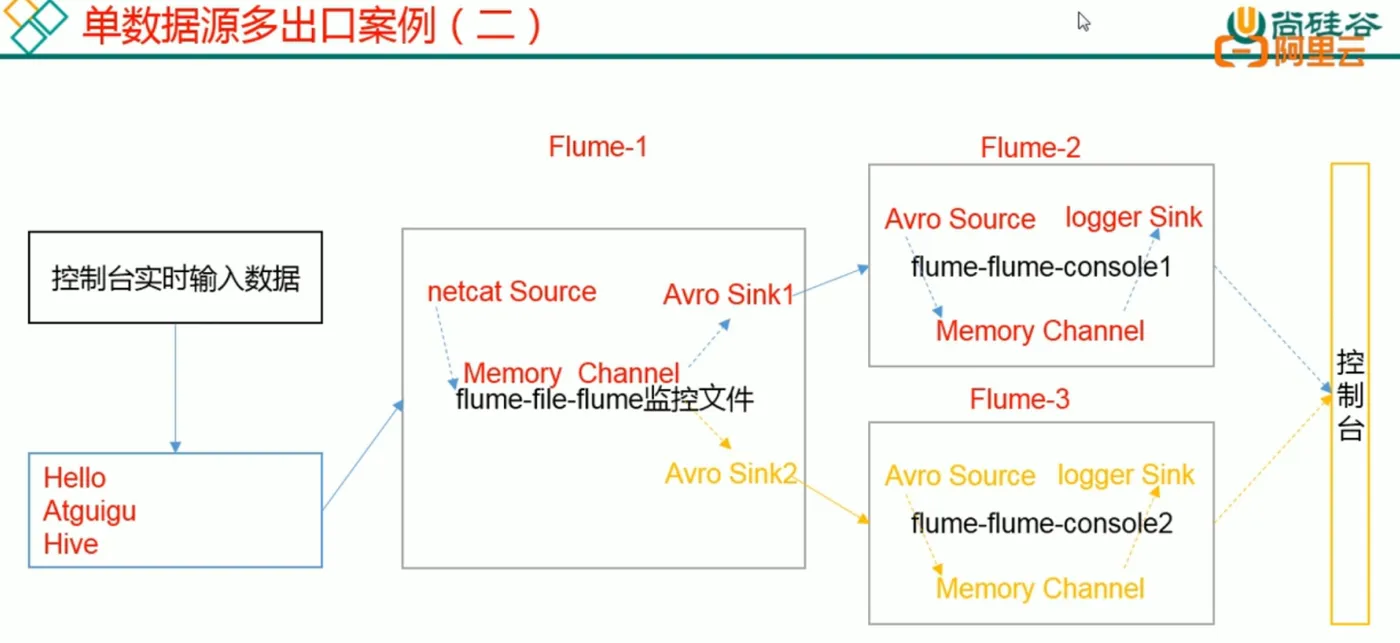
实现步骤 :
准备工作
在 /opt/module/flume/job 目录下创建 group2 文件夹
1.创建 flume-netcat-flume.conf
配置一个接受日志文件的 Source 和一个 channel ,两个 sink,分别输送给 flume-flume-console 和 flume-flume-console2
创建配置文件并打开
[atguigu@hadoop102group2]stouch flume-netcat-flume.conf
[atquigu@hadoop102group2]svim flume-netcat-flume.conf
添加如下内容
# Name the components on this agent.
al.sources = r1
al.channels = c1
al.sinkgroups = gl
al.sinks = k1 k2
# Describe/configure the source
al.sources.rl.type =netcat
al.sources.r1.bind =localhost
al.sources.r1.port =44444
al.sinkgroups.gl.processor.type = load ballange
al.sinkgroups.gl.processor.backoff = true
al.sinkgroups.gl.processor.selector = round robin
al.sinkgroups.gl.processor.selector.maxTimeout=10000
# Describe the sink
al.sinks.kl.type = avner
al.sinks.k1.hostname = hadoop102
al.sinks.k1.port = 4141
al.sinks.k2.type = avrey
al.sinks.k2.hostname = hadoop1024
al.sinks.k2.port = 4142
# Describe the channel
al.channels.cl.type = memory
al.channels.cl.capacity = 1000
al.channels.cl.transactionCapacity = 100
# Bind the source and sink to the channel
al.sources.rl.channels = c1
al.sinkgroups.gq.sinks = k1 K2!
al.sinks.k1.chafnel = c1
al.sinks.k2.channel = c1
注: Avro 是由 Hadoop 创始人 Doug Curting 创建的一种语蓄无关的数据序列化和 RPC 框架。
2.创建 flume-flume-console1.conf。
配置上级 Flume 输出的 Source,输出是到本地控制台。
创建配置文件并打开。
[atguigu@hadoop102 group2]s touch flume-flume-console1.conf
[atguigu@hadoop102 group2]s yim flume-flume-consolel.conf
添加如下内容
# Name the components on this agent
a2.sources = r1
a2.sinks = k1
a2.channels = c1
#Describe/configure the source
a2.sources.r1.type = avro
a2.sources.r1.bind = hadoop102
a2.sources.r1.port = 4141
# Describe the sink
la2.sinks.kl.type = logger
# Describe the channel
la2.channels.c1.type = memory
a2.channels.c1.capacity = 1000
a2.channels.cl.transagtioncapacity = 100
# Bind the source and sink to the channel
a2.sources.rl.channels = cl
a2.sinks.kl.channel = cl
3.创建 flume-flume-console2.conf
配置上级 Flume 输出的 Source,输出是到本地控制台。
创建配置文件并打开。
Tatguigu@hadoop102 group2]s touch flume-flume-console2.conf
[atguigu@hadoop102 group2]$ xim flume-flume-console2.conf
添加如下内容。
# Name the components on this agent
a3.sources = r1
a3.sinks = kl
a3.channels = c2
# Describe/configure the source.
a3.sources.rl.type =avro
a3.sources.rl.bind =hadoop102
a3.sources.rl.port =4142
# Describe the sink
a3.sinks.kl.type = logger
# Describe the channel
a3.channels.c2.type = memory
a3.channels.c2.capacity = 1000
a3.channels.c2.transactionCapacity = 100
# Bind the source and sink to the channel
a3.sources.r1.channels = c2
a3.sinks.k1.channel = c2
4.执行配置文件
分别开启对应配置文件 :
flune-flume-console2, flume-flume-console1,flume-netcat-flume
[atguigu@hadoop102 flume]$ bin/flume-nq agent --conf conf/
iname a3 --conf-file job/group2/flume-flume-console2.conf
pflume.root.logger-INFQ,console
[atguigu@hadoop102 flume]$ bin/flume-ng agent --conf _conf/
name a2
--conf-file job/group2/Flume-flume-consolel.conf
Dflume.root.logger-INFO,console
[atguiguehadoop102 flume]s bin/flume-nq agent --gonf gonf/
jname al --gonf-file job/group2/flume-netcat-flume.conf
5.使用 telnet 工具向本机的 44444 端口发送内容
$ telnet localhost 44444
