基本语法
字符串 都要加双引号, 可以加\n换行符
注释 双斜杠// 或/* */
有向图 digraph, 节点关系: 指向->
无向图 graph, 节点关系: 连通 --
属性 node[attribute1=value1, attribute2=value2]
大小: size=”2,2”; 单位为英寸
标签: label=”显示在图上的内容”
边:edge [color=red,style=dotted]; 这句话之后生效
节点:node [color=navy]; 这句话之后生效
边方向:rankdir=参数值;LR(从左到右),RL,BT,TB
节点形状: a[shape=box]; 默认是椭圆
边框大小:a[width=.1,height=2.5]; 单位为英寸
边框颜色:a[color=red];
构造边
关系 |
有向图 |
无向图 |
一对一 |
a->b; |
a–b; |
一对多 |
a->{b;c;d}; |
a–{b;c;d}; |
多对一 |
{b;c;d}->a; |
{b;c;d}–a; |
多对多 |
{m,n,p,q}->{b;c;d}; |
{m,n,p,q}->{b;c;d}; |
详细资料:
官方文档:http://www.graphviz.org/documentation/
属性设置:https://graphviz.gitlab.io/_pages/doc/info/attrs.html
节点形状:https://graphviz.gitlab.io/_pages/doc/info/shapes.html
箭头形状:https://graphviz.gitlab.io/_pages/doc/info/arrows.html
颜色配置:https://graphviz.gitlab.io/_pages/doc/info/colors.html
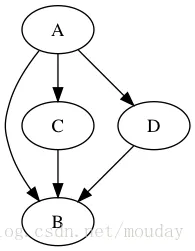
基本图形绘制
digraph G {
    A -> B;
    A -> C -> B;
    A -> D -> B;
}
图片
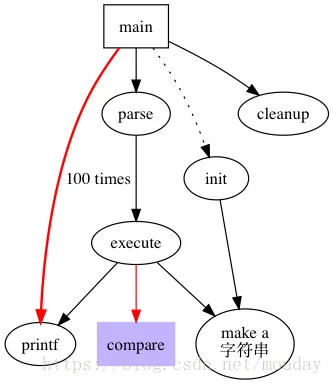
节点形状
digraph G {
    size = "4, 4";
    main [shape=box]; /* 这是注释 */
    main -> parse [weight=8];
    parse -> execute;
    main -> init [style=dotted];
    main -> cleanup;
    execute -> { make_string; printf}
    init -> make_string;
    edge [color=red]; // 设置生效
    main -> printf [style=bold,label="100 times"];
    make_string [label="make a\n字符串"];
    node [shape=box,style=filled,color=".7 .3 1.0"];
    execute -> compare;
}
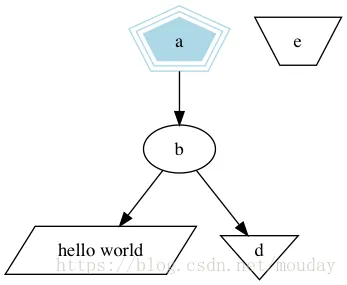
标签
digraph G {
    a -> b -> c;
    b -> d;
    a [shape=polygon,sides=5,peripheries=3,color=lightblue,style=filled];
    c [shape=polygon,sides=4,skew=.4,label="hello world"]
    d [shape=invtriangle];
    e [shape=polygon,sides=4,distortion=.7];
}
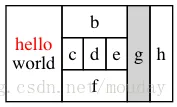
类似HTML的样式
 digraph html {
    abc [shape=none, margin=0, label=<
    <TABLE BORDER="0" CELLBORDER="1" CELLSPACING="0" CELLPADDING="4">
        <TR>
            <TD ROWSPAN="3"><FONT COLOR="red">hello</FONT><BR/>world</TD>
            <TD COLSPAN="3">b</TD>
            <TD ROWSPAN="3" BGCOLOR="lightgrey">g</TD>
            <TD ROWSPAN="3">h</TD>
        </TR>
        <TR>
            <TD>c</TD>
            <TD PORT="here">d</TD>
            <TD>e</TD>
        </TR>
        <TR>
            <TD COLSPAN="3">f</TD>
        </TR>
    </TABLE>>];
}
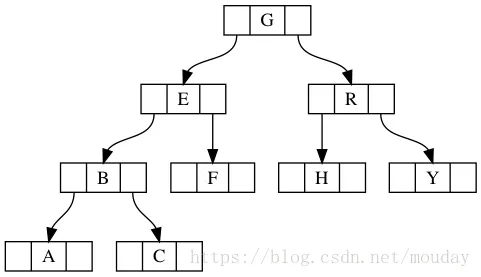
二分查找树
digraph g {
    node [shape = record,height=.1];
    node0[label = "<f0> |<f1> G|<f2> "];
    node1[label = "<f0> |<f1> E|<f2> "];
    node2[label = "<f0> |<f1> B|<f2> "];
    node3[label = "<f0> |<f1> F|<f2> "];
    node4[label = "<f0> |<f1> R|<f2> "];
    node5[label = "<f0> |<f1> H|<f2> "];
    node6[label = "<f0> |<f1> Y|<f2> "];
    node7[label = "<f0> |<f1> A|<f2> "];
    node8[label = "<f0> |<f1> C|<f2> "];
    "node0":f2 -> "node4":f1;
    "node0":f0 -> "node1":f1;
    "node1":f0 -> "node2":f1;
    "node1":f2 -> "node3":f1;
    "node2":f2 -> "node8":f1;
    "node2":f0 -> "node7":f1;
    "node4":f2 -> "node6":f1;
    "node4":f0 -> "node5":f1;
}
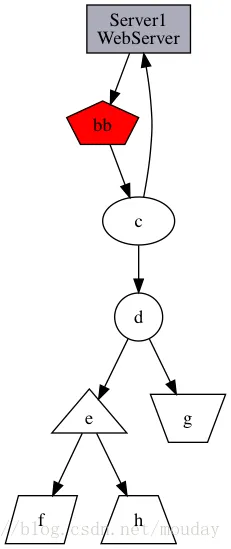
示例
//定义节点属性
digraph g {
    //==========定义节点关系============
    a->b;
    b->c;
    c->a;
    c->d->e->f;
    d->g;
    e->h;
    //==========定义节点属性============
    //定义a节点为长方形, 样式为填充, 填充颜色为#ABACBA
    a[shape=box,label="Server1\nWebServer",fillcolor="#ABACBA",style=filled];
    //定义b为5边形, 标签为"bb", 样式为填充, 填充色为red
    b[shape=polygon,sides=5,label="bb",style=filled,fillcolor=red];
    //c, 默认为椭圆
    d[shape=circle]; //园
    e[shape=triangle]; //三角形
    f[shape=polygon, sides=4, skew=0.5]; //平行四边形
    g[shape=polygon, distortion=0.5]; //梯形, 上边长
    h[shape=polygon, distortion=-.5]; //梯形, 下边长
}
有向图
digraph g {
  //edge[style=dashed]; //定义边的样式, 虚线
  node[peripheries=2, style=filled, color="#eecc80"];
  a->b [color=red, style=dashed]; //定义边的颜色, 红色 (b和方括号之间必须有空格)
  b->c; //箭头, 三角形; 箭尾, 菱形
  b->d [arrowhead=box]; //箭头, 长方形
  b->e [dir=none]; //没有箭头
  d->f [dir=both]; //双向箭头
  f->h [label=go]; //定义edge的标签
  f->k [arrowhead=diamond]; //更改箭头形状
  k->y [headlabel="哈哈", taillabel="洗洗"];
}
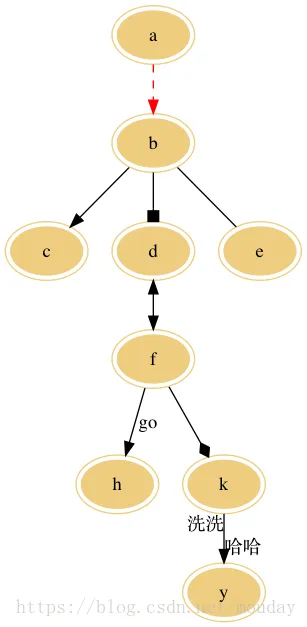
// (更多箭头形状请参考官方文档: http://www.graphviz.org/content/arrow-shapes)
无向图
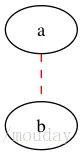
graph g {
  edge[style=dashed]; //定义边的样式, 虚线
  a -- b [color=red]; //定义边的颜色, 红色 (b和方括号之间必须有空格)
}
参考: