using System;
using System.Collections.Generic;
using System.ComponentModel;
using System.Data;
using System.Drawing;
using System.Linq;
using System.Text;
using System.Windows.Forms;
namespace PrintDialogTest
{
    public partial class Form1 : Form
    {
        public Form1()
        {
            InitializeComponent();
        }
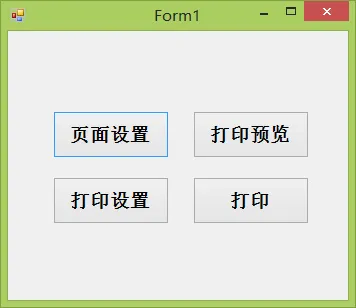
        private void button1_Click(object sender, EventArgs e)
        {
            try
            {
                pageSetupDialog1.Document = printDocument1;
                pageSetupDialog1.ShowDialog();
            }
            catch (Exception ex)
            {
                MessageBox.Show(ex.Message,"打印设置出错",MessageBoxButtons.OK,MessageBoxIcon.Error);
            }
        }
        private void button2_Click(object sender, EventArgs e)
        {
            if (printDialog1.ShowDialog() == DialogResult.OK)
            {
                MessageBox.Show("打印");
            }
        }
        private void button4_Click(object sender, EventArgs e)
        {
            try
            {
                printPreviewDialog1.Document = printDocument1;
                printPreviewDialog1.ShowDialog();
            }
            catch (Exception ex)
            {
                MessageBox.Show(ex.Message,"打印预览出错",MessageBoxButtons.OK,MessageBoxIcon.Error);
            }
        }
        private void button3_Click(object sender, EventArgs e)
        {
            try
            {
                printDocument1.Print();
            }
            catch (Exception ex)
            {
                MessageBox.Show(ex.Message,"打印出错",MessageBoxButtons.OK,MessageBoxIcon.Error);
            }
        }
        private void printDocument1_PrintPage(object sender, System.Drawing.Printing.PrintPageEventArgs e)
        {
            //左边距
            int x = e.PageBounds.Left;
            //上边距
            int y = e.PageBounds.Top;
            //获得绘图对象
            Graphics g = e.Graphics;
            Font printFont = new Font("宋体",14);
            SolidBrush brush = new SolidBrush(Color.Black);
            string text="第一次学习打印机设置,输出的文字内容";
            g.DrawString(text,printFont,brush,x,y);
        }
    }
}