iOS开发UI篇—无限轮播(功能完善)
一、自动滚动
添加并设置一个定时器,每个2.0秒,就跳转到下一条。
获取当前正在展示的位置。
 1     [self addNSTimer];
 2 }
 3
 4 -(void)addNSTimer
 5 {
 6 //    NSTimer timerWithTimeInterval:<#(NSTimeInterval)#> target:<#(id)#> selector:<#(SEL)#> userInfo:<#(id)#> repeats:<#(BOOL)#>
 7     [NSTimer scheduledTimerWithTimeInterval:1.5 target:self selector:@selector(nextPage) userInfo:nil repeats:YES];
 8 }
 9 -(void)nextPage
10 {
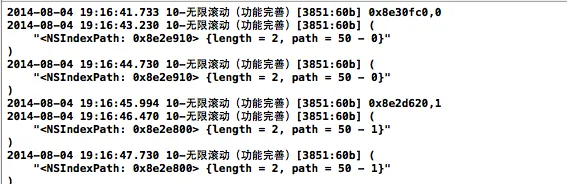
11     NSLog(@"%@",[self.collectinView indexPathsForVisibleItems]);
12 //    NSIndexPath *currentIndexPath=[[self.collectinView indexPathsForVisibleItems]lastObject];
13 }
打印查看:
实现步骤:
(1)添加并设置定时器
(2)设置定时器的调用方法
1)获取当前正在展示的位置
2)计算出下一个需要展示的位置
3)通过动画滚动到下一个位置
注意点:需要进行判断。
实现代码:
 1 - (void)viewDidLoad
 2 {
 3     [super viewDidLoad];
 4     //注册cell
 5 //    [self.collectinView registerClass:[YYimageCell class] forCellWithReuseIdentifier:YYCell];
 6     [self.collectinView registerNib:[UINib nibWithNibName:@"YYcell" bundle:nil] forCellWithReuseIdentifier:YYIDCell];
 7
 8
 9      [self.collectinView scrollToItemAtIndexPath:[NSIndexPath indexPathForItem:0 inSection:50] atScrollPosition:UICollectionViewScrollPositionLeft animated:YES];
10      [self addNSTimer];
11 }
12
13 -(void)addNSTimer
14 {
15 //    NSTimer timerWithTimeInterval:<#(NSTimeInterval)#> target:<#(id)#> selector:<#(SEL)#> userInfo:<#(id)#> repeats:<#(BOOL)#>
16
17    NSTimer *timer = [NSTimer scheduledTimerWithTimeInterval:1.5 target:self selector:@selector(nextPage) userInfo:nil repeats:YES];
18     //添加到runloop中
19     [[NSRunLoop mainRunLoop]addTimer:timer forMode:NSRunLoopCommonModes];
20 }
21 -(void)nextPage
22 {
23 //    NSLog(@"%@",[self.collectinView indexPathsForVisibleItems]);
24         //1)获取当前正在展示的位置
25     NSIndexPath *currentIndexPath=[[self.collectinView indexPathsForVisibleItems]lastObject];
26
27        //2)计算出下一个需要展示的位置
28     NSInteger nextItem=currentIndexPath.item+1;
29     NSInteger nextSection=currentIndexPath.section;
30     if (nextItem==self.news.count) {
31         nextItem=0;
32         nextSection++;
33     }
34     NSIndexPath *nextIndexPath=[NSIndexPath indexPathForItem:nextItem inSection:nextSection];
35
36       //3)通过动画滚动到下一个位置
37      [self.collectinView scrollToItemAtIndexPath:nextIndexPath atScrollPosition:UICollectionViewScrollPositionLeft animated:YES];
38 }
定时器的说明:
当用户在处理其他事情的时候,定时器会停止工作。应该把定时器添加到runloop中,告诉系统在处理其他事情的时候分一部分空间给它。
二、设置页码
在storyboard中添加一个页码控件。
实现代码:
 1 #pragma mark-懒加载
 2 -(NSArray *)news
 3 {
 4     if (_news==nil) {
 5         _news=[YYnews objectArrayWithFilename:@"newses.plist"];
 6         self.pageControl.numberOfPages=self.news.count;
 7     }
 8     return _news;
 9 }
10
11 - (void)viewDidLoad
12 {
13     [super viewDidLoad];
14     //注册cell
15 //    [self.collectinView registerClass:[YYimageCell class] forCellWithReuseIdentifier:YYCell];
16     [self.collectinView registerNib:[UINib nibWithNibName:@"YYcell" bundle:nil] forCellWithReuseIdentifier:YYIDCell];
17
18
19      [self.collectinView scrollToItemAtIndexPath:[NSIndexPath indexPathForItem:0 inSection:50] atScrollPosition:UICollectionViewScrollPositionLeft animated:YES];
20     [self addNSTimer];
21 }
22
23 -(void)addNSTimer
24 {
25 //    NSTimer timerWithTimeInterval:<#(NSTimeInterval)#> target:<#(id)#> selector:<#(SEL)#> userInfo:<#(id)#> repeats:<#(BOOL)#>
26
27    NSTimer *timer = [NSTimer scheduledTimerWithTimeInterval:1.5 target:self selector:@selector(nextPage) userInfo:nil repeats:YES];
28     //添加到runloop中
29     [[NSRunLoop mainRunLoop]addTimer:timer forMode:NSRunLoopCommonModes];
30 }
31 -(void)nextPage
32 {
33 //    NSLog(@"%@",[self.collectinView indexPathsForVisibleItems]);
34         //1)获取当前正在展示的位置
35     NSIndexPath *currentIndexPath=[[self.collectinView indexPathsForVisibleItems]lastObject];
36
37        //2)计算出下一个需要展示的位置
38     NSInteger nextItem=currentIndexPath.item+1;
39     NSInteger nextSection=currentIndexPath.section;
40     if (nextItem==self.news.count) {
41         nextItem=0;
42         nextSection++;
43     }
44     NSIndexPath *nextIndexPath=[NSIndexPath indexPathForItem:nextItem inSection:nextSection];
45
46       //3)通过动画滚动到下一个位置
47      [self.collectinView scrollToItemAtIndexPath:nextIndexPath atScrollPosition:UICollectionViewScrollPositionLeft animated:YES];
48
49     //4)设置页码
50     self.pageControl.currentPage=nextItem;
51 }
自动滚动,页码的实现效果:

三、完善
说明:监听collectionView的滚动,当手动触摸collectionView,尝试拖拽的时候,把定时器停掉,当手指移开的时候,重启定时器。
完整的实现代码:
  1 //
  2 //  YYViewController.m
  3 //  07-无限滚动(循环利用)
  4 //
  5 //  Created by apple on 14-8-3.
  6 //  Copyright (c) 2014年 yangyong. All rights reserved.
  7 //
  8
  9 #import "YYViewController.h"
 10 #import "MJExtension.h"
 11 #import "YYnews.h"
 12 #import "YYcell.h"
 13
 14 #define YYIDCell @"cell"
 15 //注意:这里需要考虑用户的手动拖拽
 16 #define YYMaxSections 100
 17 @interface YYViewController ()<UICollectionViewDataSource,UICollectionViewDelegate>
 18 @property (weak, nonatomic) IBOutlet UICollectionView *collectinView;
 19 @property(nonatomic,strong)NSArray *news;
 20 @property (weak, nonatomic) IBOutlet UIPageControl *pageControl;
 21 @property(nonatomic,strong)NSTimer *timer;
 22
 23 @end
 24
 25 @implementation YYViewController
 26
 27 #pragma mark-懒加载
 28 -(NSArray *)news
 29 {
 30     if (_news==nil) {
 31         _news=[YYnews objectArrayWithFilename:@"newses.plist"];
 32         self.pageControl.numberOfPages=self.news.count;
 33     }
 34     return _news;
 35 }
 36
 37 - (void)viewDidLoad
 38 {
 39     [super viewDidLoad];
 40     //注册cell
 41 //    [self.collectinView registerClass:[YYimageCell class] forCellWithReuseIdentifier:YYCell];
 42     [self.collectinView registerNib:[UINib nibWithNibName:@"YYcell" bundle:nil] forCellWithReuseIdentifier:YYIDCell];
 43
 44
 45      [self.collectinView scrollToItemAtIndexPath:[NSIndexPath indexPathForItem:0 inSection:50] atScrollPosition:UICollectionViewScrollPositionLeft animated:YES];
 46     [self addNSTimer];
 47 }
 48
 49 //添加定时器
 50 -(void)addNSTimer
 51 {
 52    NSTimer *timer = [NSTimer scheduledTimerWithTimeInterval:0.5 target:self selector:@selector(nextPage) userInfo:nil repeats:YES];
 53     //添加到runloop中
 54     [[NSRunLoop mainRunLoop]addTimer:timer forMode:NSRunLoopCommonModes];
 55     self.timer=timer;
 56 }
 57
 58 //删除定时器
 59 -(void)removeNSTimer
 60 {
 61     [self.timer invalidate];
 62     self.timer=nil;
 63 }
 64
 65 //自动滚动
 66 -(void)nextPage
 67 {
 68         //1获取当前正在展示的位置
 69     NSIndexPath *currentIndexPath=[[self.collectinView indexPathsForVisibleItems]lastObject];
 70
 71     //马上显示回最中间那组的数据
 72     NSIndexPath *currentIndexPathRest=[NSIndexPath indexPathForItem:currentIndexPath.item inSection:YYMaxSections/2];
 73     [self.collectinView scrollToItemAtIndexPath:currentIndexPathRest atScrollPosition:UICollectionViewScrollPositionLeft animated:NO];
 74
 75        //2计算出下一个需要展示的位置
 76     NSInteger nextItem=currentIndexPathRest.item+1;
 77     NSInteger nextSection=currentIndexPathRest.section;
 78     if (nextItem==self.news.count) {
 79         nextItem=0;
 80         nextSection++;
 81     }
 82     NSIndexPath *nextIndexPath=[NSIndexPath indexPathForItem:nextItem inSection:nextSection];
 83
 84       //3通过动画滚动到下一个位置
 85      [self.collectinView scrollToItemAtIndexPath:nextIndexPath atScrollPosition:UICollectionViewScrollPositionLeft animated:YES];
 86
 87 //    //4)设置页码
 88 //    self.pageControl.currentPage=nextItem;
 89 }
 90
 91 #pragma mark- UICollectionViewDataSource
 92 //一共多少组,默认为1组
 93 -(NSInteger)numberOfSectionsInCollectionView:(UICollectionView *)collectionView
 94 {
 95     return YYMaxSections;
 96 }
 97 -(NSInteger)collectionView:(UICollectionView *)collectionView numberOfItemsInSection:(NSInteger)section
 98 {
 99     return self.news.count;
100 }
101
102 -(UICollectionViewCell *)collectionView:(UICollectionView *)collectionView cellForItemAtIndexPath:(NSIndexPath *)indexPath
103 {
104     YYcell *cell=[collectionView dequeueReusableCellWithReuseIdentifier:YYIDCell forIndexPath:indexPath];
105     cell.news=self.news[indexPath.item];
106     NSLog(@"%p,%d",cell,indexPath.item);
107     return cell;
108 }
109
110 #pragma mark-UICollectionViewDelegate
111 //当用户开始拖拽的时候就调用
112 -(void)scrollViewWillBeginDragging:(UIScrollView *)scrollView
113 {
114     [self removeNSTimer];
115 }
116 //当用户停止拖拽的时候调用
117 -(void)scrollViewDidEndDragging:(UIScrollView *)scrollView willDecelerate:(BOOL)decelerate
118 {
119     [self addNSTimer];
120 }
121 //设置页码
122 -(void)scrollViewDidScroll:(UIScrollView *)scrollView
123 {
124     int page=(int)(scrollView.contentOffset.x/scrollView.frame.size.width+0.5)%self.news.count;
125     self.pageControl.currentPage=page;
126 }
127 @end
补充说明:
实现瀑布流最理想的做法是继承UIScrollView,不建议使用多个UITableView的方式实现(这种方式无法实现cell的循环利用,且禁止了cell的滚动时间后,整体的tableView需要随着滚动会出现空白)。
也可以使用collectionView来实现,但使用这种方法需要自定义collectionView的布局(流水布局)