iOS ATS(App Transport Security has blocked a cleartext HTTP (http://) resource load since it is i...

简介: 异常日志:2018-01-04 15:33:42.270 01NSURLConnection[532:15138] App Transport Security has blocked a cleartext HTTP (http://) resource load since it is insecure.

异常日志:

2018-01-04 15:33:42.270 01NSURLConnection[532:15138] App Transport Security has blocked a cleartext HTTP (http://) resource load since it is insecure. Temporary exceptions can be configured via your app's Info.plist file.
2018-01-04 15:33:42.276 01NSURLConnection[532:14992] 连接错误 Error Domain=NSURLErrorDomain Code=-1022 "The resource could not be loaded because the App Transport Security policy requires the use of a secure connection." UserInfo={NSErrorFailingURLStringKey=http://www.baidu.com, NSErrorFailingURLKey=http://www.baidu.com, NSLocalizedDescription=The resource could not be loaded because the App Transport Security policy requires the use of a secure connection., NSUnderlyingError=0x78e21290 {Error Domain=kCFErrorDomainCFNetwork Code=-1022 "The resource could not be loaded because the App Transport Security policy requires the use of a secure connection." UserInfo={NSErrorFailingURLKey=http://www.baidu.com/, NSErrorFailingURLStringKey=http://www.baidu.com/, NSLocalizedDescription=The resource could not be loaded because the App Transport Security policy requires the use of a secure connection.}}}

解决方法:

  1. 在项目的根目录下找到Info.plist, 右键->Open As->Source code
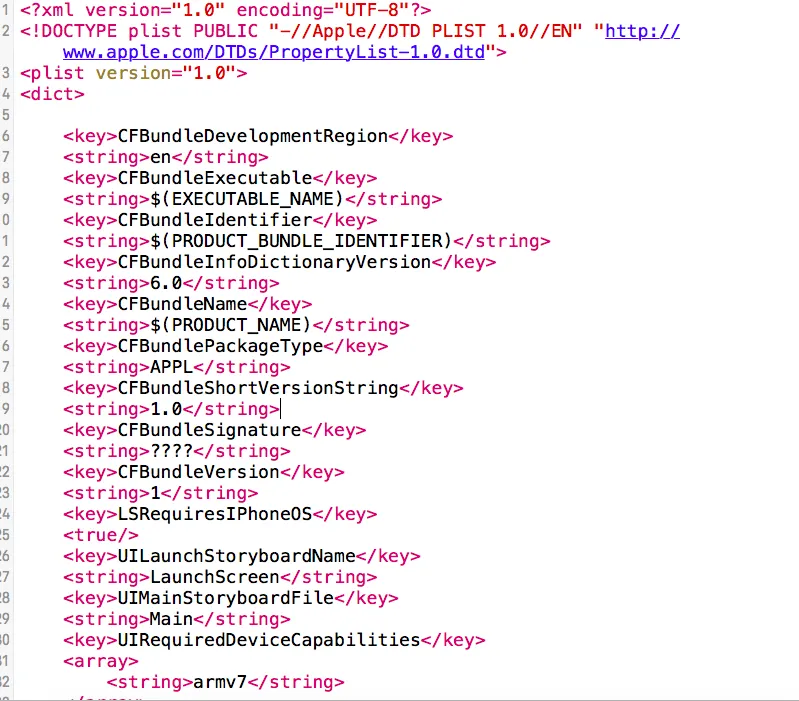

    img_1c2533d56533d87b2653eb72be370b5c.png
    图1.png
  2. 在dict节点下加入如下代码:

    <key>NSAppTransportSecurity</key>
    <dict>
        <key>NSAllowsArbitraryLoads</key>
        <true/>
    </dict>
  1. 保存后即可正常访问Http请求

注意: iOS在访问Http请求时会出现这种问题,所以在创建项目时先加入此段代码。由于这段代码经常使用,故可加入代码段中,加入代码段时,去掉第一个尖括号,这样可以省去每次删除一个尖括号的操作。

目录
相关文章
|
XML JSON Java
Android App网络通信中通过okhttp调用HTTP接口讲解及实战(包括GET、表单格式POST、JSON格式POST 附源码)
2515 0
|
Java Android开发 UED
安卓scheme_url调端:如果手机上多个app都注册了 http或者https 的 intent。 调端的时候,调起哪个app呢?
当多个Android应用注册了相同的URL Scheme(如http或https)时,系统会在尝试打开这类链接时展示一个选择对话框,让用户挑选偏好应用。若用户选择“始终”使用某个应用,则后续相同链接将直接由该应用处理,无需再次选择。本文以App A与App B为例,展示了如何在`AndroidManifest.xml`中配置对http与https的支持,并提供了从其他应用发起调用的示例代码。此外,还讨论了如何在系统设置中管理这些默认应用选择,以及建议开发者为避免冲突应注册更独特的Scheme。
|
安全 应用服务中间件 网络安全
修复HTTPS升级后出现 Mixed Content: The page at 'https://xxx' was loaded over HTTPS, but requested an insecure frame 'http://xxx'. This request has been blocked; the content must be served over HTTPS. 的问题
|
API C#
【Azure App Service】验证App Service接受HTTP 2.0请求
192 0
|
Kubernetes Linux Docker
【Azure 应用服务】使用Docker Compose创建App Service遇见"Linux Version is too long. It cannot be more than 4000 characters"错误
332 0
|
Linux Python
【Azure 应用服务】Azure App Service For Linux 上实现 Python Flask Web Socket 项目 Http/Https
376 0
|
NoSQL 网络协议 Shell
【Azure 应用服务】App Service 项目部署成功后,应用连接 Azure Redis时报错 Could not get a resource from the pool
398 0
|
iOS开发
iOS之使用模拟器报错:resource fork, Finder information, or similar detritus not allowed完美解决方案
7148 0
Another app is currently holding the yum lock; waiting for it to exit
96 0
|
应用服务中间件 Linux 网络安全
【WEB】当HTTPS资源引入HTTP导致报错blocked:mixed-content (混合加载/Mixed Content)如何解决

热门文章

最新文章