Control cannot be created because Visual Studio cannot find the control's type in the control assembly 问题的解决

简介: 在使用DotNetNuke C# Compiled Module Starter Kit for DNN 4.x时,拖拽DNN自带的Web Control时报错:   Control cannot be created because Visual Studio cannot find the control's type in the control assembly   无效的FORMATETC 结构(Exception from HRESULT: 0x80040064(DV_E_FORMATETC))   原因是模块目录下多了一个web.config文件,删除即可。

在使用DotNetNuke C# Compiled Module Starter Kit for DNN 4.x时,拖拽DNN自带的Web Control时报错:


Control cannot be created because Visual Studio cannot find the control's type in the control assembly

image


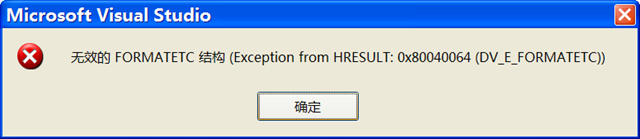
无效的FORMATETC 结构(Exception from HRESULT: 0x80040064(DV_E_FORMATETC))
image


原因是模块目录下多了一个web.config文件,删除即可。同时做一下如下的操作:


C# Compiled Module 默认的User IIS Web server 是http://localhost/dnn_4_3_6 ,点击Project 的属性,修改为你使用的地址即可。


image

目录
相关文章
|
IDE Shell 网络安全
Visual Studio 2022 git error Unable to negotiate with xx.xxx.xxxx port 22: no matching host key type found. Their offer: ssh-rsa
1013 0
Visual Studio 2022 git error Unable to negotiate with xx.xxx.xxxx port 22: no matching host key type found. Their offer: ssh-rsa
|
Rust NoSQL 编译器
Rust在Visual Studio Code中调试提示debug type is not supported
433 0
Rust在Visual Studio Code中调试提示debug type is not supported
|
IDE 开发工具 C语言
Visual Studio 2017 安装及使用(新手)
2245 0
|
弹性计算 自然语言处理 Windows
通义灵码 Visual Studio 下载安装指南(附安装包)
本安装步骤适用于 Windows 10 及以上操作系统中安装和使用通义灵码。
137790 21
|
前端开发 JavaScript 开发工具
|
Java 开发工具 C++
(2023版本)GraalVM+native-image+Visual Studio 在Win10上全流程安装,避坑+实操
1282 1
(2023版本)GraalVM+native-image+Visual Studio 在Win10上全流程安装,避坑+实操
|
JSON 开发工具 C语言
编程入门(五)【Visual Studio Code安装与C/C++语言运行】
1225 0
|
C++ Windows
Visual Studio 2022安装详解教程
1646 0

热门文章

最新文章